HAVPR22 - Radio KONIG - Free user manual and instructions
Find the device manual for free HAVPR22 KONIG in PDF.


| Brand | Konig |
| Model | HAVPR22 |
| Product Type | Portable AM/FM/SW Radio |
| Power Supply | 3 AA batteries (1.5 V) or 4.5 V DC power adapter (center positive) |
| Frequency Bands | FM: 87.5-108 MHz, MW: 530-1600 kHz, SW1: 2.3-7.3 MHz, SW2: 9.5-26.1 MHz |
| Speaker | 8 Ω, 0.5 W |
| Output Power | 150 mW (RMS max.) |
| Headphone Output | 3.5 mm jack, 32 Ω |
| Preset Memory | 40 stations (10 per band) |
| Alarm Function | Buzz or radio, with 9-minute snooze |
| Sleep Timer | Adjustable auto-off |
| Display | LCD with backlight |
| Antennas | Telescopic for FM/SW, built-in ferrite for MW |
| Power Consumption | 2 W |
| Maintenance | Clean with a dry cloth only |
| Safety | Do not expose to water or moisture; do not open (risk of electric shock) |
| General Information | Manual available in multiple languages; design and specifications subject to change |
Frequently Asked Questions - HAVPR22 KONIG
User questions about HAVPR22 KONIG
0 question about this device. Answer the ones you know or ask your own.
Ask a new question about this device
Download the instructions for your Radio in PDF format for free! Find your manual HAVPR22 - KONIG and take your electronic device back in hand. On this page are published all the documents necessary for the use of your device. HAVPR22 by KONIG.
USER MANUAL HAVPR22 KONIG
text_image
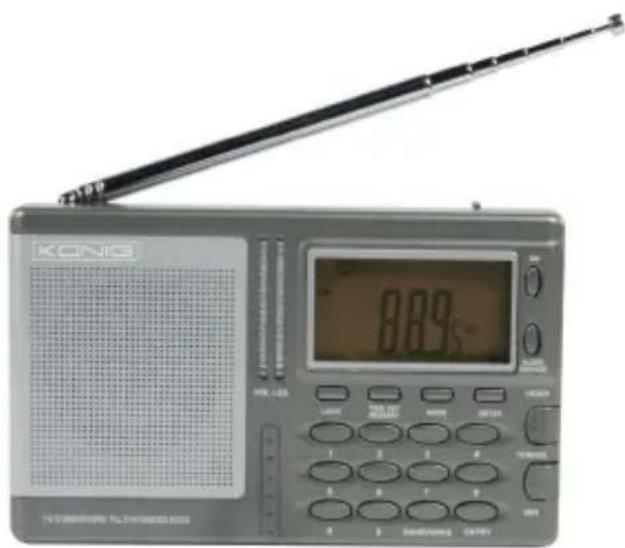
KÖNIG ELECTRONICHAV-PR22
text_image
KONG 8.89V STANDARD TELTAWOOD 600MANUAL (p. 2)
World Receiver
MODE D'EMPLOI (p. 9)
World Receiver
MANUALE (p. 17)
World Receiver
HASZNÁLATI ÚTMUTATÓ (o. 25.)
Világvevő
MANUAL DE USO (p. 21)
Receptor mundial
KÄYTTÖOHJE (s. 29)
Maailmanradio
AM/FM/SW Digital Tuning Radio with Built-in Mono Speaker
text_image
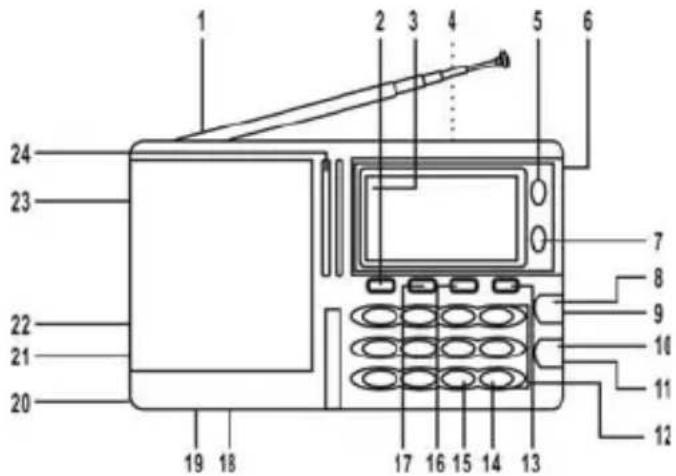
1 2 3 4 5 6 24 23 22 21 20 19 18 7 8 9 10 11 12 17 16 15 14 13- Telescopic antenna
- Light button
- LCD
- Stand (the rear of the radio)
- Power on button
- Carrying strap
- Sleep/snooze button
- Tuning up/hour set
- Volume +/- control
- Tuning down/min set
- Lock switch
-
Preset 0.....9
-
Meter button
- Enter button
- Band/wake button
- Mode button
- Time/set/memory
- Reset (in battery compartment)
- 9k/10k selector (in battery compartment)
- Battery compartment
- DC IN jack
- Earphone jack
- Ext. Ant. jack
- Volume indicator
text_image
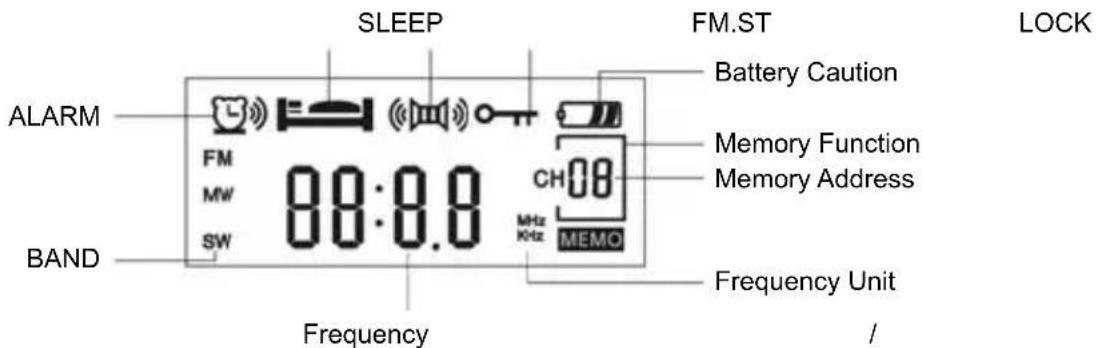
SLEEP FM.ST ALARM BAND 88:0.0 Frequency Fremecy Battery Caution Memory Function Memory Address MHz KHz MEMO Frequency Unit /POWER SOURCE
BATTERY OPERATION
- Open the battery compartment.
- Correctly Insert 3 "AA" size batteries.
To prevent possible damage make sure you
- Insert batteries according to the indicated polarity
- Do not apply heat to the batteries


- Remove the batteries if you are not going to use the radio for a long time
- Remove empty batteries immediately
- Do not use old and new batteries together
TO USE AC ADAPTER
Connect the plug to the radio and the schuko plug to an AC wall outlet. The DC input is 4.5 V ____ outer + inner -.
CLOCK FUNCTION
- To set the time press the "POWER" button to go into standby mode.
- Press "TIME/SET/MEMORY" and use the "HOUR/+" and "MIN/-" to set the correct time.
- After you are finished press the "TIME/SET/MEMORY BUTTON" again to save the settings.
- Press "MODE" to view the time on the display.
RADIO OPERATION
- Move the lock switch to the UP position.
- Turn on the radio with the "POWER BUTTON".
- Adjust the volume with the "VOLUME +/-" button.
- Select the desired band using the "BAND/WAKE" button.
- Tune to the desired station using the "HOUR/+" or "MIN/-" buttons. The frequency is displayed on the display.
- To improve reception, move the antenna.
- To switch off the radio use the "POWER BUTTON".
HEADPHONE
If you want to listen via a headphone, lower the volume, connect the headphone and set the volume to the desired level again.
NOTE: When the received signal is weak, or the batteries are low, the FM ST indicator may not show up on the display, even though the sound can still be heard via the headphones.
AUTOMATIC TUNING
To automatically tune to the desired station press and hold "HOUR/+" or "MIN/-" for more than 2 seconds. The radio will then search for the next available station. For SW press the "METER" button repeatedly to select a station.
DIRECT TUNING
To directly input the desired frequency, press the "ENTER" button and type in the frequency of the desired station. Press "ENTER" to confirm.
PRESETS
This radio is able to store 40 preset stations, with a maximum of 10 on each band. When you are listening to the station you want to store, follow these steps:
- Press "TIME/SET/MEMORY", MEMO will blink in the display.
- Press a preset number (0-9).
- Press the "TIME /SET/MEMORY" button again and the station will be stored.
NOTE: Storing a station needs to be completed in succession without any pauses.
To select a stored preset station, first select the desired band and then press the numerical key which corresponds with the stored station.
ALARM SETTINGS
TO SET THE ALARM
- Switch to standby mode.
- Press the "BAND/WAKE" button repeatedly to select the desired alarm (OFF, BUZZ, RADIO).
- Hold the "BAND/WAKE" button until the time starts flashing.
- Set the desired alarm time using "HOUR/+" or "MIN/-" and press "BAND/WAKE" to confirm.


SLEEP SETTING
When you want to fall asleep with the radio on, press the "SLEEP/SNOOZE" button to activate the timer. Change the duration of the timer by repeatedly pressing the "SLEEP/SNOOZE" button. After the desired length is displayed do not touch the radio and it will automatically turn off after the set period of time. To cancel the function press the "SLEEP/SNOOZE" function.
TURNING OFF THE ALARM
When the alarm goes off, press the "SLEEP/SNOOZE" button to go into snooze mode. After 9 minutes the alarm will go off again. To turn off the alarm press the "POWER ON" button. To prevent the alarm from going off the next day press the "BAND/WAKE" button repeatedly until the display shows OFF.
RESET
Press the RESET button with a pen or small object to reset all functions.
ANTENNAS
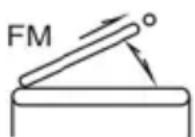
FM: Pull out the Telescopic Antenna and adjust its length and angle for optimum reception.
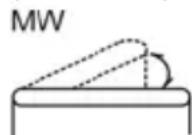
MW: The sensitive ferrite care antenna inside the set will provide excellent MW reception in most areas. For optimum reception, turn the set in the direction which gives the best results as the ferrite care antenna is directional.
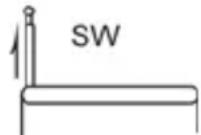
SW: Extend the telescopic antenna fully and keep it vertical.
NOTE: The EXT.ANT jack is mainly used for short wave.
SPECIFICATIONS
Power Source: 3 AA size/UM-3 batteries (DC 4.5V)
Frequency Range: FM: 87.5-108 MHz
MW: 530-1600 KHz
SW1: 2.3-7.3 KHz
SW2: 9.5-26.1 MHz
Speaker: 8 Ω 0.5W
Power Output: 150mW (RMS. Max.)
Output Jack: Earphone 32 Ω
Power Consumption: 2W
* Design and specifications are subject to change without notice.
Safety precautions:
Read, heed and follow all instructions.
- Do not use the apparatus in places that are extremely hot, cold, dusty or humid, do not leave the apparatus where the temperature may increase such as under the direct sunlight or near a heater.
- The apparatus shall not be exposed to dripping or splashing and no objects filled with liquids, such as vases, shall be placed on the apparatus.
- The main plug is used as the disconnect device. The disconnect device should remain readily accessible.
- Unplug the unit or remove all batteries if the unit is not in use for a long period.
- Do not take batteries apart, or put batteries under the direct sunlight, or heat them with fire or heater.
- The marking information is located at the bottom of the apparatus.
• Always ensure adequate space for ventilation. - Attentions should be drawn to the environmental aspects of batteries disposal.
- Use the apparatus in moderate climates.
Safety precautions:

text_image
CAUTION RISK OF ELECTRIC SHOCK DO NOT OPENTo reduce risk of electric shock, this product should ONLY be opened by an authorized technician when service is required. Disconnect the product from mains and other equipment if a problem should occur. Do not expose the product to water or moisture.
Maintenance:
Clean only with a dry cloth. Do not use cleaning solvents or abrasives.
Warranty:
No guarantee or liability can be accepted for any changes and modifications of the product or damage caused due to incorrect use of this product.
General:
Designs and specifications are subject to change without notice.
All logos brands and product names are trademarks or registered trademarks of their respective holders and are hereby recognized as such.
Keep this manual and packaging for future reference.
Attention:

This product is marked with this symbol. It means that used electrical and electronic products should not be mixed with general household waste. There is a separate collections system for these products.
DEUTSCH
FÖR ATT STÄLLA IN ALARM
Description: World Receiver
Description : World Receiver