08044 - Wifi repeater MARMITEK - Free user manual and instructions
Find the device manual for free 08044 MARMITEK in PDF.


User questions about 08044 MARMITEK
0 question about this device. Answer the ones you know or ask your own.
Ask a new question about this device
Download the instructions for your Wifi repeater in PDF format for free! Find your manual 08044 - MARMITEK and take your electronic device back in hand. On this page are published all the documents necessary for the use of your device. 08044 by MARMITEK.
USER MANUAL 08044 MARMITEK
5.8 GHz DIGITAL Wireless Audio Transmitter / Receiver

natural_image
Two metallic electronic devices, one with a conical tip and the other a cylindrical device (no visible text or symbols on the devices themselves)USER MANUAL 1
- To prevent short circuits, this product should only be used inside and only in dry spaces. Do not expose the components to rain or moisture. Do not use the product close to a bath, swimming pool etc.
- Do not expose the components of your systems to extremely high temperatures or bright light sources.
- In case of improper usage or if you have altered and repaired the product yourself, all guarantees expire. Marmitek does not accept responsibility in the case of improper usage of the product or when the product is used for purposes other than specified. Marmitek does not accept responsibility for additional damage other than covered by the legal product responsibility.
- This product is not a toy. Keep out of reach of children.
- Do not open the product: the device may contain live parts. The product should only be repaired or serviced by a qualified expert.
- Only connect the adapter to the mains after checking whether the mains voltage is the same as the values on the identification tags. Never connect an adapter when it is damaged. In that case, contact your supplier.
CONTENT
- Surround Anywhere 220....2
- Connecting the transmitter ....2
- Connecting the receiver....4
- Placing the transmitter and receiver....5
- Operating the transmitter ....7
- Operating the receiver....8
- Frequently asked questions ......9
- Technical Specifications ....11
- Optional accessories....12
Unpacking
Check that this package contains:
•One 5.8 GHz Digital Audio transmitter
•One Digital Audio receiver
•One small and one large AC adapter
- Two short speaker cables
- This userguide
1. Surround Anywhere 220
Congratulations with the purchase of the Marmitek Surround Anywhere 220!
With this you can easily connect your rear surround speakers wirelessly to your Home Cinema set. Because of the built-in amplifier in the receiver you can use your present (passive) surround speakers.
The uncompressed digital transfer ensures a sound which goes beyond CD-quality, without interference or delay. Because the sound is controlled through your Home Cinema set and the automatic on/off function of the transmitter and the receiver, it needs no looking after.
Marmitek-products are manufactured with utmost precision and are of high quality.
Please read this operating instructions and follow the directions so you can enjoy the possibilities of this product optimally.
2. Connecting the transmitter
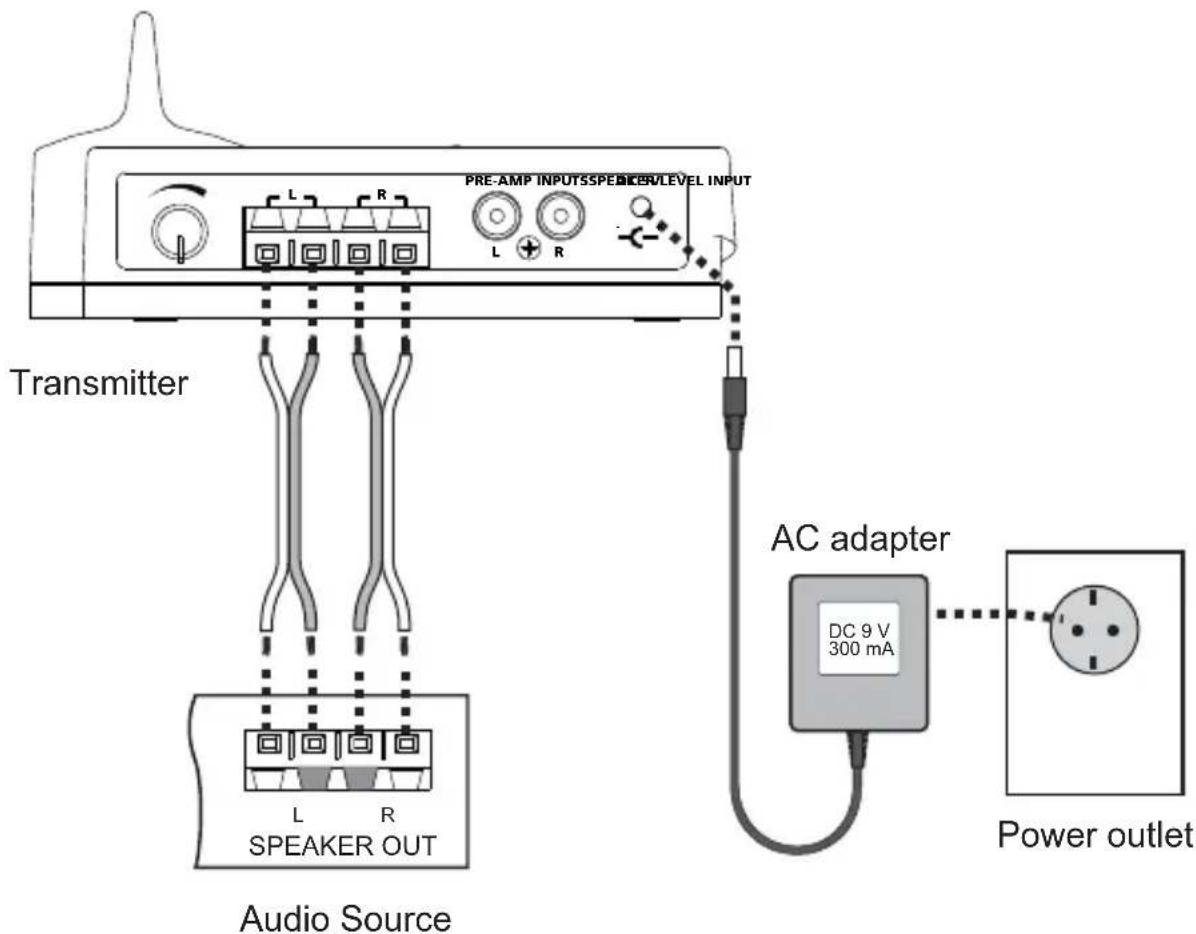
The transmitter connects to an amplified speaker output via the supplied short speaker cables. Alternatively it can be connected to a standard line-out audio interface.
If the transmitter is connected via speaker cables, observe the polarity of the cable connection to ensure that the transmitter will be fed with a correct polarity signal. If one of the cables is switched (reversed), one speaker will receive an opposite polarity signal which will degrade sound performance.
Connect the supplied small power adapter plug into the DC 9V jack, and then plug the power adapter into a standard AC outlet. We recommend the use of a surge protector to protect the transmitter from power surges.

ATTENTION!
Do not use both the speaker cables and RCA cable. Do not connect speakers to the transmitter. Do not connect the large AC adapter to the transmitter.
Using the transmitter speaker level input:
text_image
PRE-AMP INPUTSPEAKLEVEL INPUT L R L R Transmitter L R SPEAKER OUT Audio Source AC adapter DC 9 V 300 mA Power outlet3. Connecting the receiver
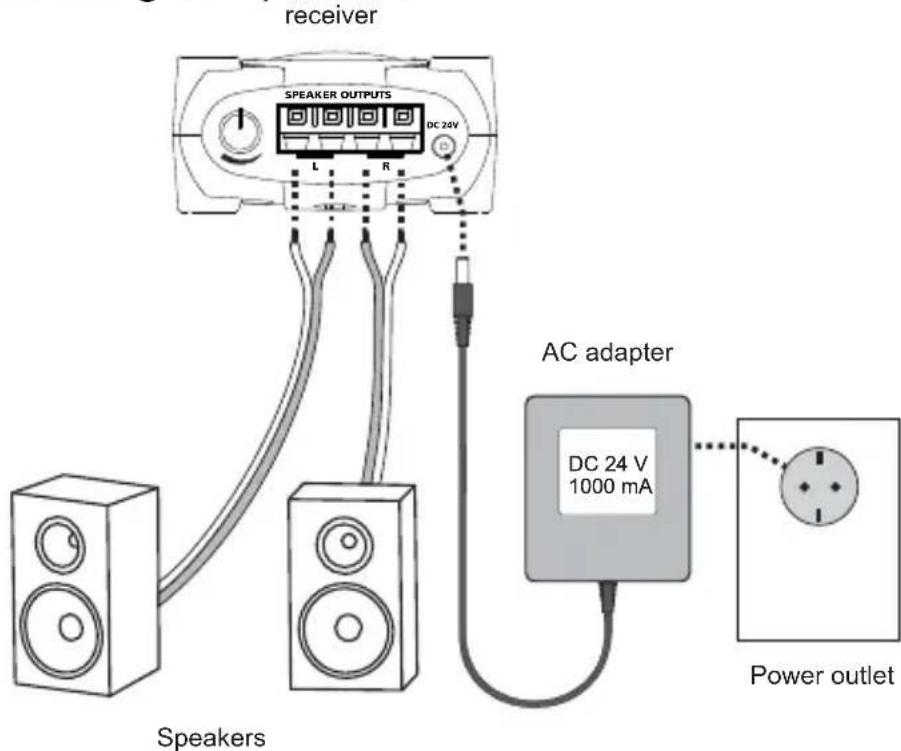
Connect the DC power input of the receiver with the supplied large AC adapter. The use of a surge protector is recommended to protect the receiver from power surges which may damage the receiver and connected speakers or may cause audio dropouts.
The receiver connects to regular passive loudspeakers via regular speaker cables (not included). Observe the correct polarity when connecting the speakers.
It is also possible to connect both speakers to separate receivers by using an additional receiver. In this case connect one speaker to the left audio output of the first receiver and the second speaker to the right audio output of the second receiver. One audio output of each receiver will not be used in this case.

ATTENTION!
Never short circuit any receiver audio output since this may damage the receiver. A clicking noise may be generated during receiver power up. Therefore, it is recommended to connect power to the receiver prior to connecting the speakers.
text_image
receiver SPEAKER OUTPUTS DC 24V L R AC adapter DC 24 V 1000 mA Speakers Power outlet4. Placing the transmitter and receiver
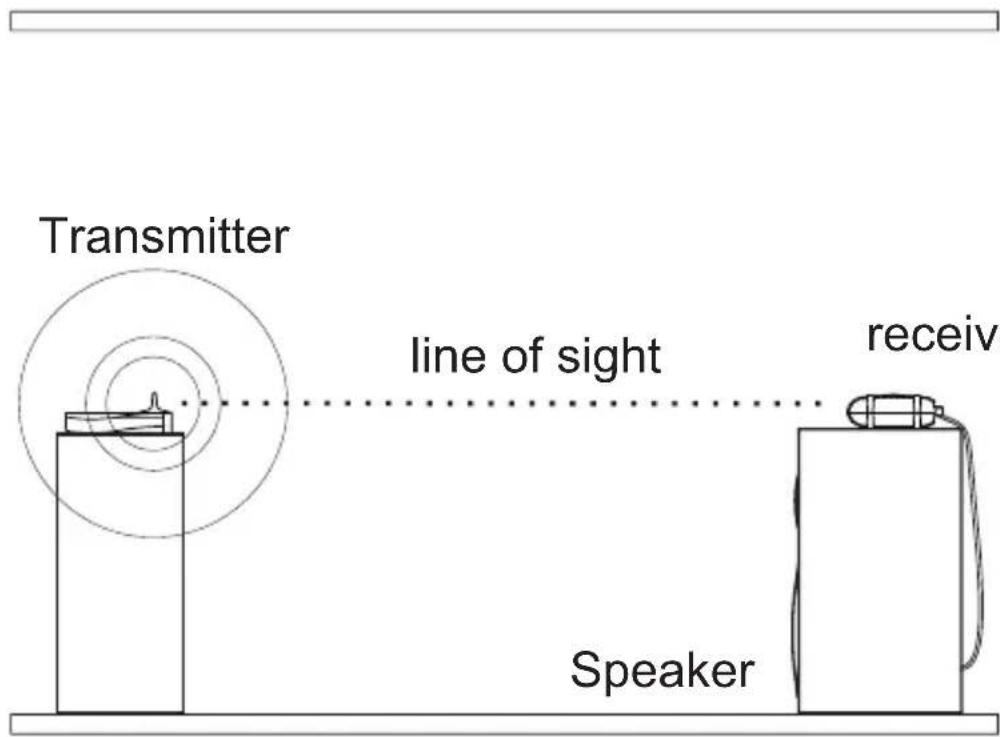
For optimum reception, the receiver should be placed within the line of sight from the transmitter. If possible, the receiver should be placed right side up with its front toward the transmitter.
The transmitter should be placed at an elevation such that there are no obstacles between the transmitter and receiver (line of sight) in an area where there will be the least amount of traffic. We suggest that you place the transmitter on top of your audio source. Example 1 shows the optimum placement of the transmitter and receiver.
The receiver can also be placed as shown in example 2. In this case, no line of sight exists and the operating range is reduced.
You can mount the receiver vertically by using the 2 screw openings at the bottom of the receiver. If the receiver is mounted vertically, the operating range is reduced compared to mounting the receiver right side up.
The receiver incorporates a directional antenna which prefers signals transmitted toward the front of the receiver. Therefore, the front of the receiver should always be facing toward the direction of the strongest transmitter signal. By properly orienting the receiver, interference from other signal sources can be minimized.
We suggest that you experiment with placement in order to find the best location for the transmitter and receivers.
Note: This product will not work properly from within an enclosed metal cabinet.
text_image
Transmitter line of sight receiv SpeakerExample 1: Receiver placed on top of a speaker Line of sight
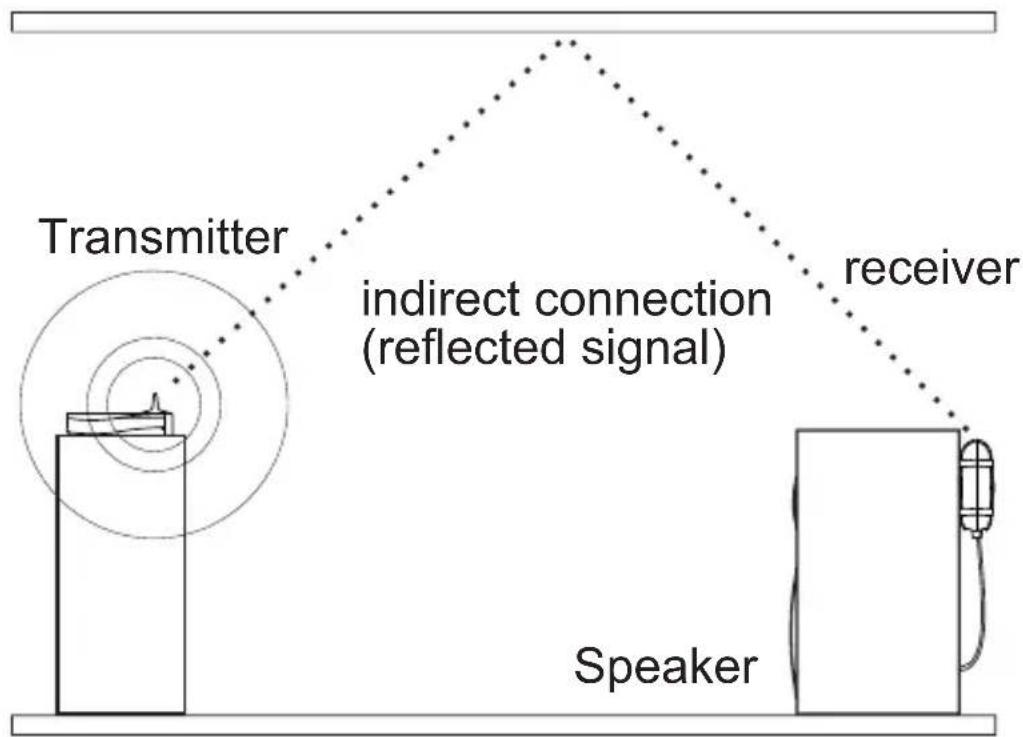
flowchart
graph TD
    A["Transmitter"] --> B["indirect connection (reflected signal)"]
    B --> C["Receiver"]
    C --> D["Speaker"]
Example 2: Receiver mounted vertically behind a speaker Indirect connection (reflected signal)
5. Operating the transmitter
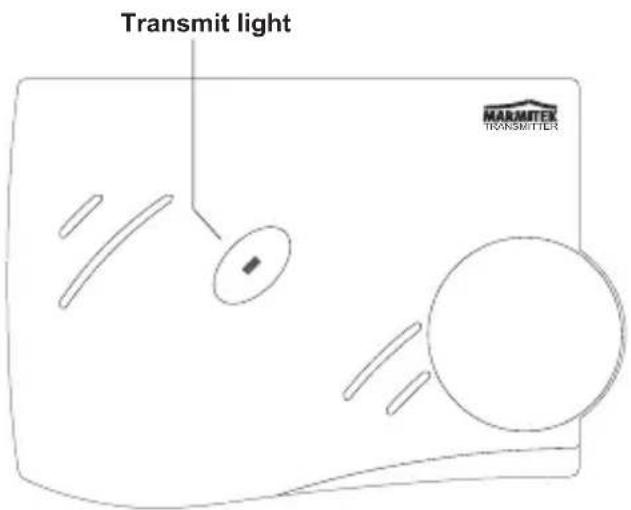
After powering up the transmitter, the transmit light will go on for approximately five seconds while the transmitter initializes.
After initialization, the transmit light will go out.
Initially, set the transmitter volume control to a middle setting.
Once audio is detected at the audio input, the transmit light will go on and the transmitter will transmit the audio signal.
When audio is no longer detected, the transmitter will go into standby mode after approximately 30 minutes. The Signal indication LED will go out. During standby mode, no signal is transmitted.
text_image
Transmit light MARMITEX TRANSMITTER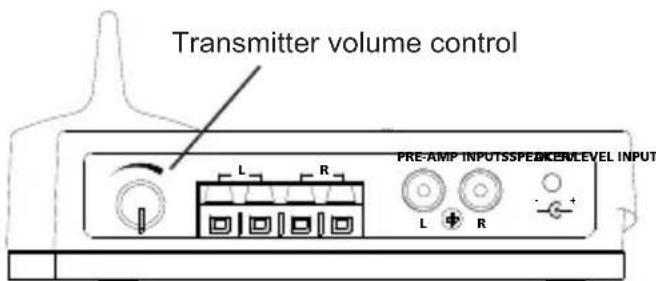
text_image
Transmitter volume control PRE-AMP INPUTSSPEEKLEVEL INPUT6. Operating the receiver
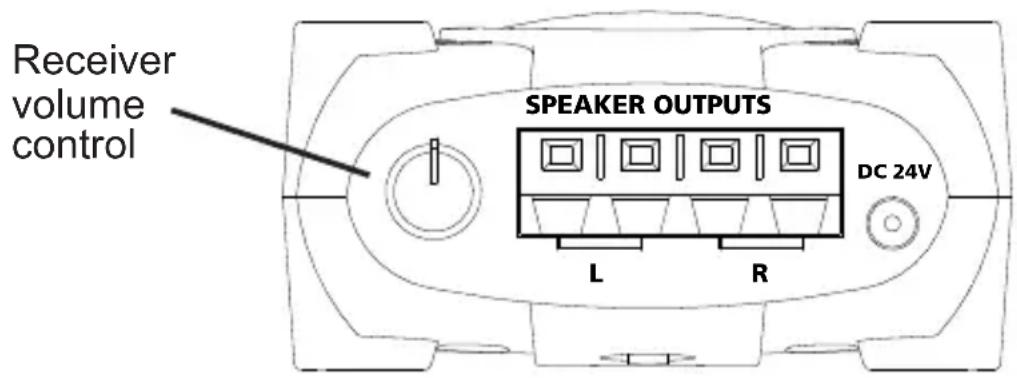
As soon as a valid transmitter signal is received by the receiver, the receiver will output the amplified audio signal to the speaker outputs. You can change the audio level by adjusting the receiver volume control.
In order to achieve maximum transmission quality, the transmitter volume control should be set to match the audio level of your audio source as follows:
1) Set the receiver volume control to a low level to prevent clipping inside the receiver.
2) Set your Home Cinema Set to output the maximum audio level that you will encounter during normal operation.
3) Turn the transmitter level control knob to the position that yields maximum audio loudness to the speakers without any clipping (distortion). If the transmitter level is set too low, the dynamics of the transmission are not fully used. If the level is set too high, audio clipping (distortion) will occur inside the transmitter.
4) Turn the receiver volume control to a setting that yields the desired volume from the speakers.
If no audio signal is received for more than 30 minutes, the receiver will go into standby mode (power-down mode).
text_image
Receiver volume control SPEAKER OUTPUTS DC 24V L R7. Frequently asked questions
The transmit light does not go on after DC power is applied to the transmitter
Check the power outlet and the AC adapter; if possible, check for correct voltage of the AC adapter.
The transmit light goes out after a few seconds and does not light again
- Check the audio connection to the transmitter and ensure that there is audio present.
- Disconnect and then reconnect DC power.
No audio at receiver
- Check the power outlet and the AC adapter; if possible, check for correct voltage of the AC adapter.
- Adjust the transmitter volume control.
- Adjust the receiver volume control.
- In some cases, there may be strong interference preventing proper reception of the audio signal which can be caused by 5.8 GHz cordless telephones or 5.8 GHz wireless networks. Either eliminate the interference, locate the base unit of the cordless phone in another room, set the wireless network to use the 5.1 GHz frequency band rather than 5.8 GHz, relocate the transmitter, relocate or reorient the receiver.
Audio is distorted
- Adjust the transmitter volume control until clipping stops.
- Adjust the receiver volume control until clipping stops.
• See part four of the question No audio at the receiver
Speaker audio level is too low
- Adjust the transmitter volume control to achieve the desired audio level.
- Adjust the receiver volume control to achieve the desired audio level.
- Increase the output level of the audio source (connect transmitter to an adjustable output by using an adapter if necessary).
Audio is noisy
• See part four of the question No audio at the receiver
- Adjust the transmitter volume control.
Do you still have questions?
Please check out www.marmitek.com for more information.
8. Technical Specifications
Transmitter:
Supply voltage: 230VAC +10% -15% 50 Hz, 9V/250mA
Audio transmission method: Digital
Transmitter frequency: 5.8 GHz
Error correction: 1/2 rate FEC
Audio sampling method: 128 times oversampling
Transmitted data rate: 4 Mbps
Transmitter operating range: Up to 30m free field, up to 10m
through walls and ceilings
Automatic transmitter
power down feature: 30 minutes
Receiver:
Supply voltage: 230VAC +10% -15% 50 Hz, 24V/1000mA
Output power: 2 x 30 W (2 x 15 W RMS)
Frequency response: 20Hz - 20kHz
Signal-to-noise ratio: 99 dB (Transmitter / Receiver, A-weighted)
Total harmonic distortion: typ. 0.02 % @ 10 W
Overall audio latency: 1.2 ms
Power efficiency: 78 %
Channel separation: typ. 102 dB
Automatic receiver
power down feature: 30 minutes
Specifications may be modified without prior notice.
9. Optional accessories

natural_image
Product photo showing a black pyramid-shaped device with a hand holding a digital scanner (no visible text or symbols)Operate Anywhere
To operate your AV devices anywhere, even when these are placed in a closed cupboard or in a different room, you can choose for Marmitek's wired or wireless IR solutions. More information about these so called infrared extenders can be found at www.marmitek.com.

natural_image
Two remote control devices, one with a remote and the other with a digital display (no visible text or symbols)Universal Remote Control
To operate all your AV devices with only one remote control, you can choose for Marmitek's IR and RF remotes. More information about these so called Universal remote control can be found at www.marmitek.com
natural_image
Exterior view of a cylindrical mechanical component (no visible text or symbols)Extra Receiver
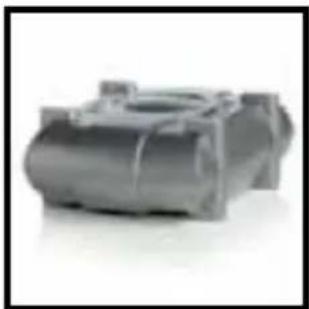
An unlimited number of receivers can be used that operate from the same transmitter. For example, you can operate two separate receivers to connect two speakers which are located apart from each other. Each speaker connects to one of the two audio outputs of the receiver. The other audio output of each receiver is not used in this case.

Environmental Information for Customers in the European Union
European Directive 2002/96/EC requires that the equipment bearing this symbol on the product and/or its packaging must not be disposed of with unsorted municipal waste. The symbol indicates that this product should be disposed of separately from regular household waste streams. It is your responsibility to dispose of this and other electric and electronic equipment via designated collection facilities appointed by the government or local authorities. Correct disposal and recycling will help prevent potential negative consequences to the environment and human health. For more detailed information about the disposal of your old equipment, please contact your local authorities, waste disposal service, or the shop where you purchased the product.
SICHERHEITSHINWEISE
natural_image
Product photo showing a black pyramid-shaped device with a hand holding a digital scanner (no visible text or symbols)Überall bedienen
natural_image
Two remote control devices, one with a silver case and the other with a black case (no visible text or symbols)natural_image
3D rendered mechanical component with cylindrical body and flanged ends (no visible text or symbols)natural_image
Product display featuring a black pyramid, a hand holding a digital scanner, and two earphones (no visible text or symbols)Commander partout
natural_image
Two remote control devices, one with a silver case and the other with a black case (no visible text or symbols)natural_image
3D rendered mechanical component with cylindrical body and flanged ends (no visible text or symbols)natural_image
Product display of a black pyramid and a handheld device with earphones (no visible text or symbols)natural_image
Two remote control devices, one with a silver case and the other with a black case (no visible text or symbols)natural_image
3D rendered mechanical component with cylindrical body and flanged ends (no visible text or symbols)natural_image
Product photo showing a black pyramid, a hand holding a digital scanner, and two earphones (no visible text or symbols)Comandare ovunque
natural_image
Three remote control devices shown side by side, no visible text or labelsTelecomando universale
natural_image
3D rendered image of a gray mechanical component with no visible text or symbolsVEILIGHEIDSWAARSCHUWINGEN
text_image
PRE-AMP INPUTSPEEK/LEVEL INPUT zender L R L R L R voeding DC 9 V 300 mA wandcontactdoos L R speaker-uit audiobronAudio sampling methode: 128x oversampling
Stroomefficiency: 78%
natural_image
Product display featuring a black pyramid, a hand holding a digital scanner, and earphones (no visible text or symbols)Overal bedienen
natural_image
Two remote control devices, one with a black-and-white display and the other with a black-and-white interface (no visible text or symbols)Universele afstandsbediening
natural_image
Close-up of a gray plastic mechanical component with cylindrical and rectangular features (no visible text or symbols)5,8 GHz extra ontvanger
DECLARATION OF CONFORMITY
Hereby, Marmitek BV, declares that this SURROUND ANYWHERE 220 is in compliance with the essential requirements and other relevant provisions of the following Directives:
Directive 1999/5/EC of the European Parliament and of the Council of 9 March 1999 on radio equipment and telecommunications terminal equipment and the mutual recognition of their conformity
Directive 2004/108/ec of the european parliament and of the council of 15 December 2004 on the approximation of the laws of the Member States relating to electromagnetic compatibility
Directive 2006/95/EC of the European Parliament and of the Council of 12 December 2006 on the harmonisation of the laws of Member States relating to electrical equipment designed for use within certain voltage limits
Directive 2002/95/EC of the European Parliament and of the Council of 27 January 2003 on the restriction of the use of certain hazardous substances in electrical and electronic equipment
Commission Regulation (EC) No 278/2009 of 6 April 2009 implementing Directive 2005/32/EC of the European Parliament and of the Council with regard to ecodesign requirements for no-load condition electric power consumption and average active efficiency of external power supplies
Marmitek is a trademark of Pattitude B.V.
SURROUND ANYWHERE 220 is a trademark of Marmitek B.V. Copyright and all other proprietary rights in the content (including but not limited to model numbers, software, audio, video, text and photographs) rests with Marmitek B.V. Any use of the Content, but without limitation, distribution, reproduction, modification, display or transmission without the prior written consent of Marmitek is strictly prohibited. All copyright and other proprietary notices shall be retained on all reproductions.
MARMITEK
www.mamitek.com