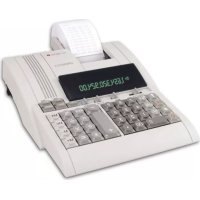
USER MANUAL CPD 3212 S OLYMPIA
-Addition/Subtraction (a + b + c + )
Ergebnis mittels
- Multiplication/Division (axb÷c=)
Ergebnis mittels
Triadenmarkierung
X Multiplicationstaste
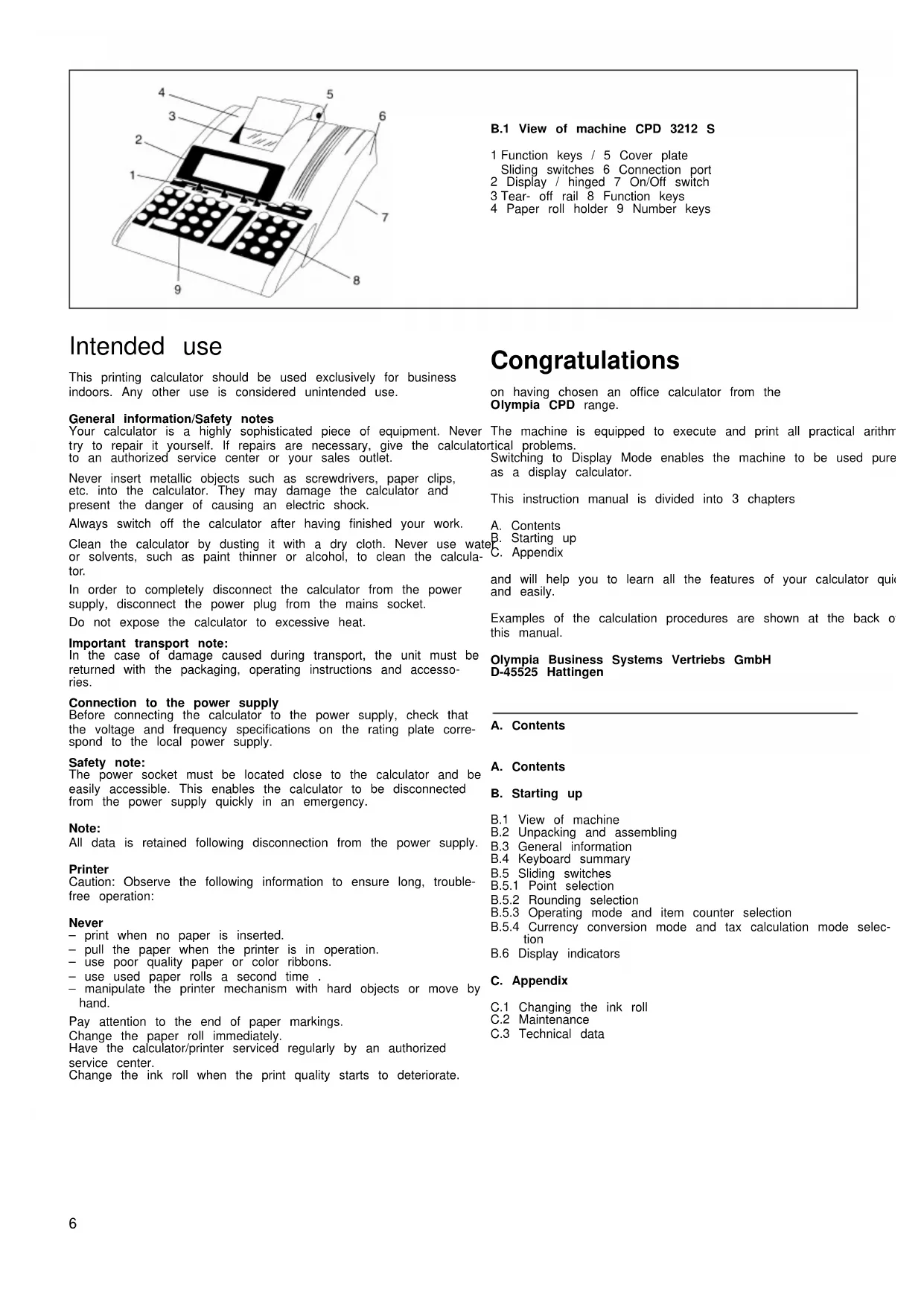
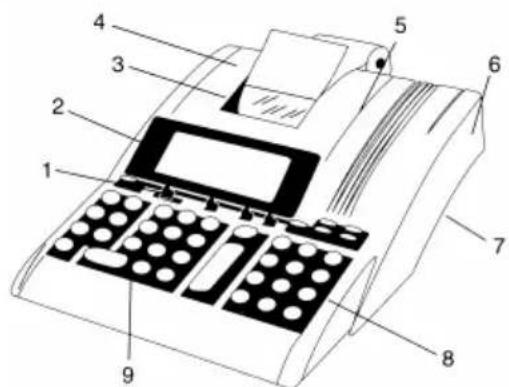
B.1 View of machine CPD 3212 S
1 Function keys / 5 Cover plate
Sliding switches 6 Connection port
2 Display / hinged 7 On/Off switch
3 Tear-off rail 8 Function keys
4 Paper roll holder 9 Number keys
Intended use
This printing calculator should be used exclusively for business indoors. Any other use is considered unintended use.
Your calculator is a highly sophisticated piece of equipment. Never try to repair it yourself. If repairs are necessary, give the calculator to an authorized service center or your sales outlet.
Never insert metallic objects such as screwdrivers, paper clips, etc. into the calculator. They may damage the calculator and present the danger of causing an electric shock.
Always switch off the calculator after having finished your work.
Clean the calculator by dusting it with a dry cloth. Never use water or solvents, such as paint thinner or alcohol, to clean the calculator.
In order to completely disconnect the calculator from the power supply, disconnect the power plug from the mains socket.
Do not expose the calculator to excessive heat.
Important transport note:
In the case of damage caused during transport, the unit must be returned with the packaging, operating instructions and accessories.
Connection to the power supply
Before connecting the calculator to the power supply, check that the voltage and frequency specifications on the rating plate correspond to the local power supply.
Safety note:
The power socket must be located close to the calculator and be easily accessible. This enables the calculator to be disconnected from the power supply quickly in an emergency.
Note:
All data is retained following disconnection from the power supply.
Printer
Caution: Observe the following information to ensure long, trouble-free operation:
Never
- print when no paper is inserted.
- pull the paper when the printer is in operation.
- use poor quality paper or color ribbons.
- use used paper rolls a second time
- manipulate the printer mechanism with hard objects or move by hand.
Pay attention to the end of paper markings.
Change the paper roll immediately.
Have the calculator/printer serviced regularly by an authorized service center.
Change the ink roll when the print quality starts to deteriorate.
Congratulations
on having chosen an office calculator from the Olympia CPD range.
The machine is equipped to execute and print all practical arithmetical problems.
Switching to Display Mode enables the machine to be used pure as a display calculator.
This instruction manual is divided into 3 chapters
A. Contents
B. Starting up
C. Appendix
and will help you to learn all the features of your calculator quick and easily.
Examples of the calculation procedures are shown at the back of this manual.
B.1 View of machine
B.2 Unpacking and assembling
B.3 General information
B.4 Keyboard summary
B.5 Sliding switches
B.5.1 Point selection
B.5.2 Rounding selection
B.5.3 Operating mode and item counter selection
B.5.4 Currency conversion mode and tax calculation mode selection
B.6 Display indicators
C. Appendix
C.1 Changing the ink roll
C.2 Maintenance
C.3 Technical data
B.2 Unpacking and assembling
Connection to power supply:
- Check that the data on the data plate coincides with the local voltage before connection calculator to power supply.
- Connect calculator to power supply.
Inserting the paper roll (Art. No. 06.840.0200):
- Fit the paper roll holder
- Roll out paper, leading edge to the bottom, into the guides
- Turn calculator on
- Paper is drawn into paper slot
- Feed paper as far as possible until it stops at the rear opening
- UseTip insert the paper further
Turning ON / OFF:
When turned on, the calculator is ready to operate.
At least 3 seconds should elapse between turning on and off again.
Accumulator:
Products, quotients and individual value can be totaled and stored in the accumulator. Multiplication and division are ignored.
Entries:
Value and sub-totals are transmitted directly to the accumulator via the addition and subtraction keys.
Constants:
The multiplicand, divisor, basic value or percentage, including the subsequent function, are automatically retained as constants.
Repeat value:
Using the basic calculation modes, a value can be repeatedly used as often as required.
Paper roll printout:
The decimal place is printed as a point. Examples:
1:234567890·12+
Entering values and calculation methods:
-Addition/Subtraction (a + b + c + )
Result via
- Multiplication / Division (axb÷c=)
Result via
Triad group symbols (commas) shown in display:
Values to the left of the decimal point are divided by triad symbols
Example:
1,234,567,890.12
Capacity overflow:
When results exceed 12 full digits " is printed out, an "E" appears in the display and the keyboard is
blocked for entry. To release the keyboard;
press: 1
Memory block:
The memory will not accept a value which would exceed the memory capacity. The memory contents remain unaltered.
Item counter (Switch position):
When activated a 3 digit item counter is provided for the accumulator and for the memory.
By pressing+andMmand the number of additions
and subtractions are counted.
The number of item is printed on requesting sub-totals or final total.
posExample: 008.7.8. items.
600.00*
Pressing the final total key clears the counter.
Stored rates retained:
The stored rates of conversion, tax and % will be retained even if the calculator is turned off.
The 11 pre-programmed fixed Euro rates are available for different countries (refer "Currency code table" page 29.) and are originally installed in the calculator.
Currency conversion:
- The conversion rate consists of 6 significant figures with the decimal points.
- Additionally, 5-currency conversion rates can be programmable and stored.
- To convert between '1 st currency' and '2 nd currency' through 1st conversion rate, the 1st currency and the 2nd currency will be selected among 'Euro', 'o riginally installed 11-currency' and 'sto-1 currency'.
- Conversion rate is printed out with the symbol of C€.
- Euro currency can be printed out with the symbol €.
- Refer to "Currency code table" page 29.
Tax Rate:
- Tax rate consists of 6 significant figures with decimal point.
- Tax rate is printed out with the symbol of %.
Automatic %+ calculation (percent add-on):
- Automatic %+ calculation can proceed with user stored % rate entry % rate.
- The user stored % rate consists of 6 significant figures with decimal point.
- Stored % rate is printed out with the symbol of %.
B.4 Keyboard summary
The keyboard has an input buffer which enables all entries, regardless of speed of input, to be proceeded in order of input.
Total clearance
- The complete calculation process is cleared. Memory contents are retained.
- The stored rates are retained even after depressing this key.
Recall item counter
Press once:
Recall number of added items
- Press twice, after recall of final sum or sub-total:
Recall arithmetic mode average of item addition and subtraction.
Non-add key
CE Correction key
+1- Algebraic sign change key
- To specify a positive or negative value.
[0] Digit keys
- The values entered appear in the display.
Decimal point key
Subtraction key
+Addition key
Sub-total key
- Recall accumulator / item counter contents
Final total key
- Recall and clear accumulator / item counter contents
% Percent key
Together with
Together with and of
- Recall the value plus or minus the percent value.
Division key
Multiplication key
Result key for multiplications and divisions - Conclude calculation.
Result is requested.
The result can be further used with the (+, -, x, ÷) comm or transferred to the memory with Mand.
Memory total key
- Recall / Clear memory contents.
Memory sub-total key
Memory subtraction key
The result is subtracted from the memory contents.
Memory addition key
The result is added to the memory contents.
Paper transport key
%+ Percent mark-up key
- The percentage value is added.
To be proceeded by stored percentage or entered percentage.
8% Delta %
- For the calculation of percentage differences of two values.
COST SELL MARGIN Calculation
-Used for calculating the cost, selling price and profit margin amount.
Enter the value of any 2 items to obtain automatically the unknown value item. (e.g. enter the value of the cost and the selling price to obtain automatically the profit margin %
RATE Rate set key
To perform with function key and numeral key.
-
Recall and set the 1st currency and 2nd currency.
-
Recall and store the currency rates.
-
Recall the stored rate and store the rate for TAX and %+ calculations.
-
Negative value can not be entered as any rate.
€1 Currency conversion-1 / Tax plus key
TAX+ Selection slide switch at the CONV mode position:
- Convert from 2nd currency to 1st currency.
To be proceeded by conversion rates of originally installed 11-currency and user stored currencies.
Selection slide switch at the TAX mode position:
To be proceeded by stored tax rate.
€2 Currency conversion-2 / Tax minus key
TAX-Selection slide switch at the CONV mode position:
- Convert from 1st currency to 2nd currency.
To be proceeded by conversion rates of originally installed 11-currency and user stored currencies.
Selection slide switch at the TAX mode position:
- The Tax value is subtracted.
To be proceeded by stored tax rate.
B.5 Sliding switches
B.5.1 Point selection
A F 0 2 3 4 6 Floating decimal point ON
Result to maximum number of decimal places.
AF02346AF02346Fixed point ON
The result is given, depending on the switch setting, to 0,2,3,4 decimal places.
Sums which extend beyond the number of places to the left of decimal point, limited by a fix point, results in the decimal place being truncated.
6 Rapid adding ON (add mode)
After entering the digits (without point) and pressing the Addition Subtraction keys, the decimal point is automatically set in front of the last two digits.
At Conversion-Mode:
If conversion result is 'Euro', the decimal point will be automat- set at 2 & 5/4, excluding the case of decimal setting at F' p
B.5.2 Rounding selection
5/4 ▲ Truncation ON
The decimal places extending beyond the set number are truncated.
5/4 ▲Rounding ON
The decimal number extending beyond the set number of places rounded up or down.
5/4 ▲ General rounding to 1 digit
B.5.3 Calculation mode and item counter selection
D P IC Display mode
D P IC Print and Display mode
D P IC Item counter (+),ON
- Counts all + and - entries, upwards
When switching from D to P or IC, a control paper feeding of is executed.
B.5.4 Currency conversion mode and Tax calculation mode selection
CONV TAX Currency conversion mode
Tax calculation model
m = 311 ;
B.6 Display indication
M - The memory contains data
E - Capacity overflow
Currency symbols on display are shown in "Currency code table" (page 29)
When depressing RATE SET will be appeared on display.
When Tax rate is stored or recalled, twill be appeared with num ber on display.
When %+ rate is stored or recalled, Pwill be appeared with num ber on display.
C. Appendix
C.1 The exchange of the ink roll
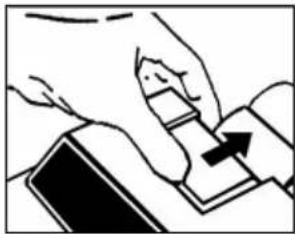
- Remove printer cover
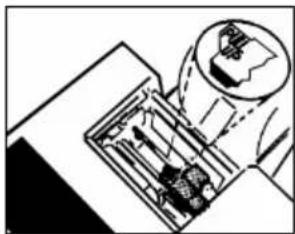
- Remove ink cartridge
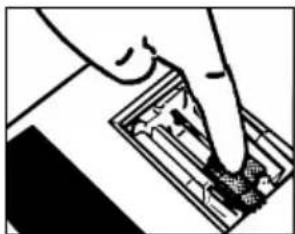
- Insert new cartridge
Do not re-impregnate
Attention!
Please only use the original
Olympia Ink Roll (Art.-No. 06.840.0134).
In the event the supply of ink being used up, it is essential that a new Olympia ink-roller is fitted, otherwise the validity of the guarantee will not apply.
C.2 Maintenance
Do not expose the machine to extreme temperatures, direct sunlight, high humidity or dusty conditions.
Ensure that no liquids enter the machines.
Do not use solvents.
C.3 Technical data
Dimensions:Width 210 mm
Depth 252 / 310 mm Height 68 mm
Paper roll: Art.-No. 06.840.0200
Width 57 mm
Max.diameter max.80 mm
Printer: Serial printer
Print = 3 lines/sec.
2-colcured print = red/black
Voltage: 220...240 V / 50/60 Hz
Power requirement: 0.06 A...220...240 V
Weight: 1.10kg
Capacity: 12 figure display
This instruction manual is purely informative. The contents are not part of any offer for sale or contract. The specifications, extensions and options described may differ from country to country. Olympia Business Systems Vertriebs GmbH reserves the right to revise specifications, make modifications and technical changes to the product described here in without notification.
COST [SELL] [MARGIN] CALCULATION
(COSTOS-VENTA-MARGEN DE GANANCIA)
stamp a = 3 linee/sec
Mark up-toets (Mark down-toets)
The Manufacturer hereby declares that the equipment complies with the applications defined in the following guidelines and standards: