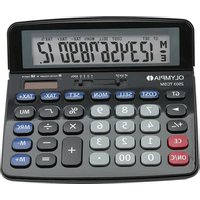
2503 TCSM - Calculator OLYMPIA - Free user manual and instructions
Find the device manual for free 2503 TCSM OLYMPIA in PDF.


| Product Type | 12-digit desktop calculator |
| Brand | Olympia |
| Model | 2503 TCSM |
| Color | Black |
| Dimensions (L × H × D) | 153 × 147 × 17.5 mm |
| Weight | 110 g |
| Power supply | Solar cell and LR1130 button cell (1.5 V) |
| Screen type | 12-digit LCD, tiltable |
| Basic functions | +, -, ×, ÷, %, sign change, square root, double zero |
| Memory functions | M+, M-, MRC (memory recall/clear) |
| Advanced functions | Grand total (GT), margin calculation (COST/SELL/MGN), exchange rate (SET), tax calculation (TAX+/TAX-), markup (MU) |
| Selectors | Rounding method (UP 5/4 CUT) and decimals (F 3 2 0 ADD2) |
| Power on/off | Power on via ON/C key, auto power off |
| Reset | RESET key on the back of the device |
| Care and cleaning | Clean with a soft, dry, lint-free cloth |
| Safety instructions | Do not leave children unattended, handle batteries with care, avoid moisture |
| Warranty | Return the device in its original packaging with proof of purchase to the store |
| Compliance | CE marking (declaration at www.go-europe.com) |
| Manufacturer | GO Europe GmbH, Zum Kraftwerk 1, D-45527 Hattingen, Germany |
| Spare parts and repairability | Standard LR1130 battery, user-replaceable |
| Intended use | Private use, calculation exercises in enclosed spaces |
Frequently Asked Questions - 2503 TCSM OLYMPIA
User questions about 2503 TCSM OLYMPIA
0 question about this device. Answer the ones you know or ask your own.
Ask a new question about this device
Download the instructions for your Calculator in PDF format for free! Find your manual 2503 TCSM - OLYMPIA and take your electronic device back in hand. On this page are published all the documents necessary for the use of your device. 2503 TCSM by OLYMPIA.
USER MANUAL 2503 TCSM OLYMPIA
Operating Manual -Desktop calculator

Please read the operating manual thoroughly and observe all the information contained when using the desktop calculator. Keep the operating manual in a safe place for future reference. Hand over all the documents if the calculator is transferred to a third party.
Intended Use
The desktop calculator has been conceived to solve arithmetic problems. The calculator is only intended for private use indoors.
Any other use is considered unintended use. Unauthorised modifications or reconstructions are not permitted and annul any rights related to the terms of guarantee.
Safety Instructions
Observe the following safety instructions to protect yourself and others from personal injury.

Warning! Risk of fatal injuries and accidents for children! The packaging material represents a risk of suffocation.
▶ Never leave children unattended in the vicinity of the packaging material. Children often underestimate the risks.
▶ The device is not a toy.

Warning! Risks to health and the environment from batteries! Improper handling of batteries can put your health and the environment at risk. Batteries may contain toxic, ecologically hazardous heavy metals.
▶ Never open or damage batteries or allow them to pollute the environment.
- Dispose of the batteries according to the applicable environmental laws.

Caution! Risk of battery leakage!
▶ Take the utmost care when handling damaged or leaking batteries and wear protective gloves.
- Avoid contact with the skin, eyes and mucous membranes.
If a battery should leak, remove it immediately from the equipment to prevent damage.
Rinse any areas which do come into contact with battery acid immediately with plenty of cold water and seek medical assistance straight away!

Caution! This device can be used by children from the age of 8 and persons with restricted physical, sensory or mental capabilities or a lack of experience and knowledge when they are supervised or have been instructed with regard to safe use of the device and understand the related risks
involved.
▶ Children must not clean the device without supervision.

Important! Risk of property damage through environmental influences! Unfavourable environmental influences could damage the device or impair its functionality.
▶ Prevent exposing the device to environmental influences such as smoke, dust, vibration, chemicals, moisture, heat or direct sunlight.
This product is not waterproof so keep it dry.
Package Contents
Check the package contents of your desktop calculator before starting to put the calculator into operation. If anything is missing or damaged, please contact our Service department.
■ Desktop calculator, 2503 TCSM
■ Operating manual
Function Description
The desktop calculator is equipped with a 12-digit display and is powered by a solar cell or battery. Battery operation is activated in the case of poor light conditions. The unit cannot be switched off manually. The desktop calculator switches off automatically after a certain time. The height of the calculator display can be adjusted.
Operation
The desktop calculator is operated by means of buttons and switches. You can reset the desktop calculator using the RESET button on the rear side of the device.
Key Assignment
ON/C
Switch on / Delete
GB
| M- | Memory minus (subtract the value displayed from that in the memory) |
| M+ | Memory plus (add the value displayed to that in the memory) |
| MRC | Recall memory / Clear memory |
| % | Percent key |
| +/- | Sign change key |
| 00 | Double zero key |
| ▶ | Correction key |
| CE | Delete current display |
| ∫ | Root sign |
| GT | Grand Total |
| COST | Purchase price |
| SELL | Retail price |
| MGN | Margin in % |
| SET | Set exchange rate |
| TAX+ | Programme tax rate |
| TAX- | Check tax rate |
| MU | Calculate markup |
Switch Assignment
UP 5/4 CUT

Rounding selection switch
UP Rounds the decimal value after the point upwards at the specified place.
5/4 Rounds the decimal value after the point downwards at the specified place.
CUT Displays the decimal places as far as the specified position.
F 3 2 0 ADD _2

Decimal places selection switch
F Displays the result without any rounding up or down.
0, 2, 3 Number of decimal places to be rounded.
GB
ADD2
Automatically adds a decimal point and two decimal places after the point to your entries. The decimal places are only added in the case of additions and subtractions.
Disposal


The adjacent symbol indicates that electrical and electronic apparatus and batteries no longer required must be disposed of separate from domestic waste in accordance with legal directives. Disposal is free of charge.
■ Remove the batteries from the device.
■ Dispose of the device and the batteries at the relevant collection points provided by your local waste authorities.
■ Packaging materials must be disposed of according to local regulations.
Care Instructions
Clean the housing surfaces with a soft, dry, fluff-free cloth. Do not use any cleaning agents or solvents.
Guarantee
Dear customer,
we are delighted that you have chosen this equipment. In the case of a defect, please return the device together with the receipt and original packing material to the point of sale.
Declaration of Conformity


The CE Mark on the desktop calculator confirms conformity The Declaration of Conformity for this product is available on our website: www.go-europe.com
Technical Data
Display 12-digit
| Dimensions(W × H × D) | 153 × 147 × 17.5 mm |
| Weight 110 g | |
| Colour Black |
Power source Solar cell,
Round cell battery, LR 1130, 1.5 V
Manufacturer
GO Europe GmbH
Zum Kraftwerk 1
45527 Hattingen
Germany

Brand : OLYMPIA
Model : 2503 TCSM
Category : Calculator