
CPD 5212 - Calculator OLYMPIA - Free user manual and instructions
Find the device manual for free CPD 5212 OLYMPIA in PDF.


| Product type | Desktop calculator |
| Brand | Olympia |
| Model | CPD 5212 |
| Dimensions | 15 x 8 x 1.5 cm |
| Weight | 100 g |
| Power supply | LR44 button cell battery + solar panel |
| Display | 8-digit LCD |
| Main functions | Addition, subtraction, multiplication, division, percentage, square root, memory, sign change |
| Maintenance and cleaning | Wipe with a soft dry cloth. Do not use chemical products. |
| Safety | Do not expose to moisture, excessive heat or shocks. |
| Spare parts and repairability | User-replaceable battery. No other spare parts available. |
| General information | Made in China. 2-year warranty. |
Frequently Asked Questions - CPD 5212 OLYMPIA
User questions about CPD 5212 OLYMPIA
0 question about this device. Answer the ones you know or ask your own.
Ask a new question about this device
Download the instructions for your Calculator in PDF format for free! Find your manual CPD 5212 - OLYMPIA and take your electronic device back in hand. On this page are published all the documents necessary for the use of your device. CPD 5212 by OLYMPIA.
USER MANUAL CPD 5212 OLYMPIA
Intended use
This printing calculator should be used exclusively for business indoors. Any other use is considered unintended use.
General information/Safety notes
Your calculator is a highly sophisticated piece of equipment. Never try to repair it yourself. If repairs are necessary, give the calculator to an authorized service center or your sales outlet.
Never insert metallic objects such as screwdrivers, paper clips, etc. into the calculator. They may damage the cash calculator and present the danger of causing an electric shock.
Always switch off the calculator after having finished your work.
Clean the calculator by dusting it with a dry cloth. Never use water or solvents, such as paint thinner or alcohol, to clean the calculator.
In order to completely disconnect the calculator from the power supply, disconnect the power plug from the mains socket.
Do not expose the calculator to excessive heat.
Transport protection locks
Before starting to operate the calculator, remove any transport protection locks and keep them for future use. If the calculator is subsequently moved, the transport locks must be reinstalled.
Important transport note:
In the case of damage caused during transport, the unit must be returned with the packaging, operating instructions and accessories.
Connection to the power supply
Before connecting the calculator to the power supply, check that the voltage and frequency specifications on the rating plate correspond to the local power supply.
Safety note:
The power socket must be located close to the calculator and be easily accessible. This enables the calculator to be disconnected from the power supply quickly in an emergency.
Note:
All data is retained following disconnection from the power supply.
Printer
Caution: Observe the following information to ensure long, trouble-free operation:
Never
- print when no paper is inserted.
– pull the paper when the printer is in operation. - use poor quality paper or color ribbons.
- use used paper rolls a second time
- manipulate the printer mechanism with hard objects or move by hand.
Pay attention to the end of paper markings.
Change the paper roll immediately.
Have the cash register/printer serviced regularly by an authorized service center.
Change the ribbon when the print quality starts to deteriorate.
B.1 View of machine CPD 3212 / CPD 5212 (*)
1 Function keys / 6 Cover plate
Sliding switches 7 Connection port
2 Display / hinged 8 On/Off switch
3 Tear-off rail 9 Function keys
4 Paper support / (* 5212) 10 Number keys
5 Paper roll holder
Congratulations
on having chosen an office calculator from the Olympia CPD range.
The machine is equipped to execute and print all practical arithmetical problems.
Switching to Display Mode enables the machine to be used purely as a display calculator.
This instruction manual is divided into 3 chapters
A. Contents
B. Starting up
C. Appendix
and will help you to learn all the features of your calculator quickly and easily.
The performance variations in the range of models is identified as follows:
Model Display Printer
CPD 3212 12-digit Rubber platen printer
CPD 5212 12-digit Parallel character wheel
This instruction manual is refer to CPD 3212 and CPD 5212, and if you see the (*) mark, then it refer to (*) CPD 5212 only.
Examples of the calculation procedures are shown at the back of this manual.
B.2 Unpacking and assembling
B.3 General information
B.4 K e yboard summary
B.5 Sliding switches
B.5.1 Point selection
B.5.2 Rounding selection
B.5.3 Operating mode and item counter selection
B.5.4 Currency conversion mode and tax calculation mode selection
B.6 Display indicators
C. Appendix
C.1 Changing the ink roll
C.2 Changing the ribbon
C.3 Maintenance
C.4 T echnical data
B. Starting up
B.2 Unpacking and assembling
Remove transport and security devices: (*)
- Slide cover plate to rear and remove
- Remove transport safety device (from ribbon spools)
- Tighten ribbon by turning spool
- Replace cover plate, slide forward and secure
Connection to power supply:
- Check that the data on the data plate coincides with the local voltage before connection calculator to power supply.
- Connect calculator to power supply.
Inserting the paper roll (Art. No. 9367):
- Fit the paper roll holder
- Roll out paper, leading edge to the top, into the guides
- Turn calculator on
- Paper is drawn into paper slot
- Feed paper as far as possible until it stops at the rear opening
- Use to insert the paper further
Turning ON / OFF:
When turned on, the calculator is ready to operate.
At least 3 seconds should elapse between turning on and off again.
B.3 General information
Accumulator:
Products, quotients and individual value can be totaled and stored in the accumulator. Multiplication and division are ignored.
Entries:
Value and sub-totals are transmitted directly to the accumulator via the addition and subtraction keys.
Constants:
The multiplicand, divisor, basic value or percentage, including the subsequent function, are automatically retained as constants.
Repeat value:
Using the basic calculation modes, a value can be repeatedly used as often as required.
Paper roll printout:
The decimal place is printed as a point. Examples:
CPD 3212, CPD 5212
1 234 567 890.12 +
Entering values and calculation methods:
- Addition / Subtraction (a+b+c+)
Result via *
- Multiplikation / Division (axb÷c=)
Result via =
Triad group symbols (commas) shown in display:
Values to the left of the decimal point are divided by triad symbols.
Example:
1,234,567,890.12
Capacity overflow:
When results exceed 12 full digits “......” (CPD 3212) or
"ERROR" (*) is printed out, a "E" appears in the display and the
keyboard is blocked for entry. To release the keyboard;
press: CE or E or → for (* 5212).
Memory block:
The memory will not accept a value which would exceed the memory capacity. The memory contents remain unaltered.
Item counter (Switch position):
When activated a 3 digit item counter is provided for the accumulator and for the memory.
By pressing and or and the number of additions and subtractions are counted.
The number of item is printed on requesting sub-totals or final total. Example:008 = 8 items.
008 600.00
Pressing the final total key clears the counter.
Stored rates & memory contents retained:
The memory contents and stored rates of conversion, tax and % will be retained even if the calculator is turned off.
The 11 pre-programmed fixed Euro rates are available for different countries (refer "Currency code table" page 31.) and are originally installed in the calculator. It is not possible to change such preprogrammed rate at any time.
Currency conversion:
- The conversion rate consists of 6 significant figures with the decimal points.
- Additionally, 5-currency conversion rates can be programmable and stored.
- To convert between ‘1st currency’ and ‘2nd currency’ through conversion rate, the 1st currency and the 2nd currency will be select among ‘Euro’, ‘originally installed 11-currency’ and ‘stored 5-currency’.
- Conversion rate is printed out with the symbol of R#.
- Euro currency can be printed out with the following symbol mark:
E ---- CPD 3212
€ ---- CPD 5212 (*)
- Refer to "Currency code table" page 31.
Tax Rate:
- Tax rate consists of 6 significant figures with decimal point.
- Tax rate is printed out with the symbol of RT.
Automatic %+ calculation (percent add-on):
- Automatic %+ calculation can proceed with user stored % rate or entry % rate.
- The user stored % rate consists of 6 significant figures with decimal point.
- Stored % rate is printed out with the symbol of R%.
B.4 Keyboard summary
The keyboard has an input buffer which enables all entries, regardless of speed of input, to be proceeded in order of input.
C Total clearance
- The complete calculation process is cleared. Memory contents are retained.
- The stored rates are retained even after depressing this key.
n Recall item counter
- Press once:
Recall number of added items - Press twice, after recall of final sum or sub-total:
Recall arithmetic mode average of item addition and subtraction.
# Non-add key
- Date or number printout.
CE Correction key
- Clear entered value.
+/- Algebraic sign change key
- To specify a positive or negative value.
0-9 Digit keys
- The values entered appear in the display.
- Decimal point key
Subtraction key
+ Addition key
Sub-total key
- Recall accumulator / item counter contents
Final total key
- Recall and clear accumulator / item counter contents
Percent key
Together with x
Recall percent value.
Together with and or :
- Recall the value plus or minus the percent value.
Division key
x Multiplication key
= Result key for multiplications and divisions
- Conclude calculation.
Result is requested.
The result can be further used with the (+,-,x,÷) command or transferred to the memory with M-
M* Memory total key
- Recall / Clear memory contents.
M ◇ Memory sub-total key
- Recall memory contents.
M- Memory subtraction key
- The entered value is subtracted from the memory contents.
- Conclude calculation.
The result is subtracted from the memory contents.
M+ Memory addition key
- The entered value is added to the memory contents.
- Conclude calculation.
The result is added to the memory contents.
Paper transport key
%+ Percent mark-up key
- The percentage value is added.
To be proceeded by stored percentage or entered percentage.
Δ% Delta %
- For the calculation of percentage differences of two values.
Clear last digit key (*)
- The last digit of the entered value in the display is cleared.
- To choose currency code for 1st currency and 2nd currency etc. at Currency conversion mode.
√ Square root key (*)
- Calculate the square root of the entry number.
COST SELL MARGIN Calculation
- Used for calculating the cost, selling price and profit margin amount.
Enter the value of any 2 items to obtain automatically the unknown value item. (e.g. enter the value of the cost and the selling price to obtain automatically the profit margin %.)
RATE Rate set key
To perform with function key and numeral key.
- Recall and set the 1st currency and 2nd currency.
- Recall and store the currency rates.
- Recall the stored rate and store the rate for TAX and %+ calculations.
- Negative value can not be entered as any rate.
▶€1 Currency conversion-1 / Tax plus key
TAX+ Selection slide switch at the CONV mode position:
- Convert from 2nd currency to 1st currency.
To be proceeded by conversion rates of originally installed 11-currency and user stored currencies.
Selection slide switch at the TAX mode position:
- The Tax value is added.
To be proceeded by stored tax rate.
€ 2 Currency conversion-2 / Tax minus key
TAX- Selection slide switch at the CONV mode position:
- Convert from 1st currency to 2nd currency.
To be proceeded by conversion rates of originally installed 11-currency and user stored currencies.
Selection slide switch at the TAX mode position:
- The Tax value is subtracted.
To be proceeded by stored tax rate.
B.5 Sliding switches
B.5.1 Point selection

A F 0 2 3 4 6 Floating decimal point ON
Result to maximum number of decimal places.

AF02346
Fixed point ON
The result is given, depending on the switch setting, to 0,2,3,4 or 6 decimal places.
Sums which extend beyond the number of places to the left of the decimal point, limited by a fix point, results in the decimal places being truncated.

Rapid adding ON (add mode)
After entering the digits (without point) and pressing the Addition or Subtraction keys, the decimal point is automatically set in front of the last two digits.
At Conversion-Mode:
If conversion result is 'Euro', the decimal point will be automatically set at 2 & 5/4, excluding the case of decimal setting at 'F' position.
B.5.2 Rounding selection
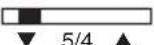
Truncation ON
The decimal places extending beyond the set number are truncated.
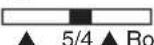
Rounding ON
The decimal number extending beyond the set number of places is rounded up or down.

5/4 ▲ General rounding to 1 digit
B.5.3 Calculation mode and item counter selection

Display mode

Print and Display mode

Item counter (+), ON
- Counts all + and - entries, upwards
When switching from D to P or IC, a control paper feeding of 1 line is executed.
B.5.4 Currency conversion mode and Tax calculation mode selection

Currency conversion mode

Tax calculation mode
CONV TAX
B.6 Display indication
M - The memory contains data
- - Negative value
E - Capacity overflow
Currency symbols on display are shown in "Currency code table" (page 31) SEt
When depressing RATE, SEt will be appeared on display.
When Tax rate is stored or recalled, t will be appeared with number on display.
When %+ rate is stored or recalled, P will be appeared with number on display.
C. Appendix
C.1 The exchange of the ink roll (CPD 3212)
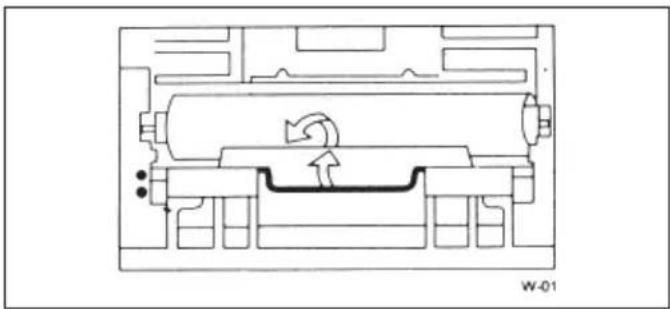
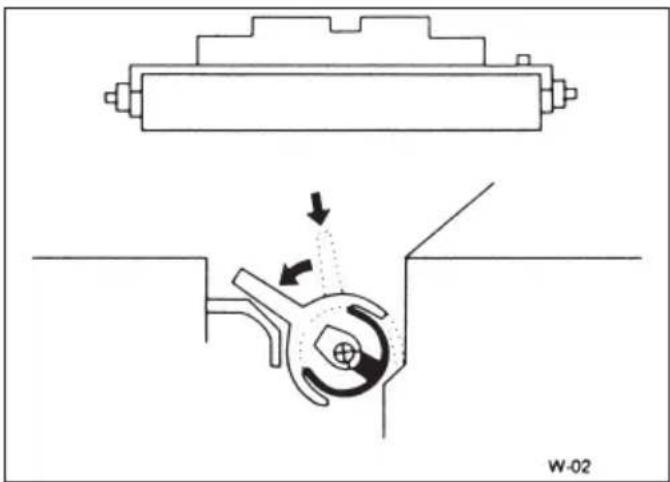
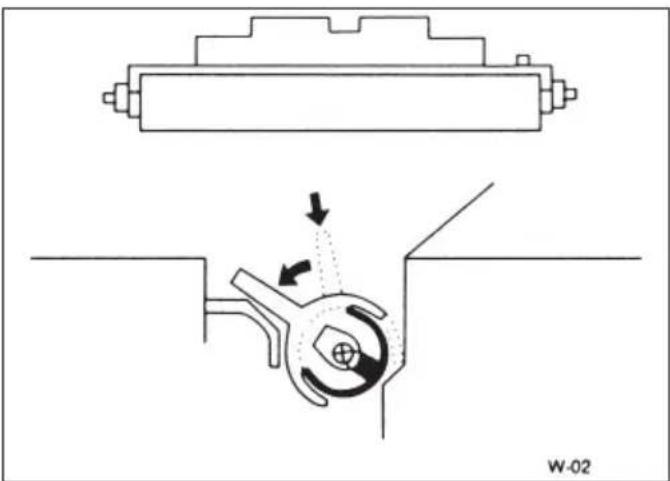
1) Once the cover has been removed, grip the ink roller behind the plastic handle with the thumbs.
2) Unlatch the handle by rotating, and remove the old roller.
Do not re-impregnate
3) Insert a new roller horizontally and release the handle.
Attention!
Please only use the original
In the event the supply of ink being used up, it is essential that a new Olympia ink-roller is fitted, otherwise the validity of the guarantee will not apply.
C.2 Changing the ribbon (CPD 5212)
Removing the ribbon:
- Turn calculator off
- Slide cover plate to the rear and remove
- Remove 1st ribbon spool
- Adjust ribbon reverse lever
- Remove 2nd ribbon spool
Note:
Use only original consumables Art. No. 9360 (*)

Inserting the spool ribbon:
- Fits the spools and ribbon (red to the bottom) in reverse sequence. The ribbon can easily be fitted into the guide with the tip of a pencil.
- Turn spool to tighten the ribbon.
- Replace cover plate, slide forward and secure.
C.3 Maintenance
Do not expose the machine to extreme temperatures, direct sunlight, high humidity or dusty conditions.
Ensure that no liquids enter the machines.
Do not use solvents.
C.4 Technical data
Dimensions: Width 210 mm / (*) 218 mm
Depth 252 / 310 mm / (*) 289 / 355 mm
Height 68 mm / (*) 90 mm
Paper roll: Width 57 mm
(Art.-No. 9367) Max. diameter max. 80 mm
Printer: Rubber platen printer
CPD 3212 Black print = 3.0 lines / sec.
Parallel character wheel printer (*)
CPD 5212 2-colcured print = 4.1 lines / sec.
Voltage: 220....240 V / 50/60 Hz
Power requirement: CPD 3212 / 5212 0.1 A...220...240 V
Weight: CPD 3212 1.20 kg
CPD 5212 1.60 kg
Capacity: CPD 3212 / 5212 12 figure display
This instruction manual is purely informative. The contents are not part of any offer for sale or contract. The specifications, extensions and options described may differ from country to country. Olympia Business Systems Vertriebs GmbH reserves the right to revise specifications, make modifications and technical changes to the product described here in without notification.

Utilisation prévue
MARGINSE (boc, vente, marge)


Uso regolare
%+ Mark up (Mark down)

%+ Mark up-toets (Mark down-toets)
MARGINS KOSPTEN-VERKOOP-WINSTMARGE
berekening

Lint plaatsen:
Währung 1 = BEF (01) / 1st currency = BEF (01)
| F5/4PCONV | CRATE | 0.SET 0.6EF =40.33991,6EF =40.3399 | 0.C#1..01 40.3399R# | |
| 01 | ||||
| €1 | ||||
| CRATE | 0.SET 0.;EP =0.7875642,;EP =0.7875640.6,300.1961745 | 0.C#2..05 0.787564 R#0.C123.##2..05 0.787564 R#156.177783646 €#1..01 40.3399 R#6 300.1961745 # | ||
| 05 | ||||
| €2 | ||||
| CRATE | 0.SET 0.1,6EF =40.33990.0.2,;EP =0.78756411.069655304 | 0.C#1..01 40.3399 R#0.C#2..05 0.787564 R#567.##1..01 40.3399 R#14.0555628546 €#2..05 0.787564 R#11.069655304 # | ||
| 123 | ||||
| €1 | ||||
| CRATE | 0.SET 0.1,6EF =40.33990.0.2,;EP =0.78756411.069655304 | 0.C#1..01 40.3399 R#0.C#2..05 0.787564 R#567.##1..o1 40.3399 R#14.0555628546 €#2..05 0.787564 R#11.069655304 # | ||
| 567 | ||||
| €2 | ||||
| €2 | ||||
| €1 |
Währung 2 = DEM (02) / 2nd currency = DEM (02)
2 ème devise = DEM (02) 2° cambio de moneda = DEM (02)
Seconda valuta (= DEM (02)) / 2e valuta DEM (02)
5 Euro = ? DEM
Währung 2 = DEM (02) / 2nd currency = DEM (02)
2 ère devise = DEM (02) / 2 °cambio de moneda = DEM (02)
Seconda valuta = DEM (02) / 2e valuta = DEM (02)
15 DEM = ? Euro
| F5/4PCONV | C€1 | 0.7.66937821794 | 0.C15.##2..02 1.95583 R#7.66937821794 € |
1 Euro = 119.3 Japanese Yen
1 Euro = 119.3 Yen Japonais / 1 Euro = 119.3 Yen Japonenses
1 Euro = 119.3 Yen giapponesi / 1 Euro = 119.3 Japanse Yen
CC1 (12) = Japanische Yen / CC1 (12) = Japanese Yen
CC1 (02) = Yen Japonais / CC1 (12) = Yen Japonés
By depressing [ ](*) instead of currency code input, the currency can also be recalled one by one from CC1 to CC5 in this case.
The Manufacturer hereby declares that the equipment complies with the stipulations defined in the following guidelines and standarts:
73/23/EEC; EN 60950:2000
89/336/EEC; EN61000-3:1995+A1:2001;EN61000-3-2:2000
EN55024:09.1998+A1:10.2001+A2:O1.2003;
EN55022:1998+A1:2000+A2:2003

89/336/CEE; EN61000-3:1995+A1:2001;
EN61000-3-2:2000
EN55024:09.1998+A1:10.2001+A2:O1.2003;
EN55022:1998+A1:2000+A2:2003

89/336/CEE; EN61000-3:1995+A1:2001;
EN61000-3-2:2000
EN55024:09.1998+A1:10.2001+A2:O1.2003;
EN55022:1998+A1:2000+A2:2003
CE
Olympia CPD3212 / CPD5212




- INTENDED USE
- GENERAL INFORMATION/SAFETY NOTES
- TRANSPORT PROTECTION LOCKS
- IMPORTANT TRANSPORT NOTE
- CONNECTION TO THE POWER SUPPLY
- SAFETY NOTE
- NOTE
- PRINTER
- NEVER
- B.1 VIEW OF MACHINE CPD 3212 / CPD 5212 (*)
- CONGRATULATIONS
- MODEL DISPLAY PRINTER
- APPENDIX
- STARTING UP
- B.2 UNPACKING AND ASSEMBLING
- REMOVE TRANSPORT AND SECURITY DEVICES: (*)
- CONNECTION TO POWER SUPPLY
- INSERTING THE PAPER ROLL (ART. NO. 9367)
- TURNING ON / OFF
- B.3 GENERAL INFORMATION
- ACCUMULATOR
- ENTRIES
- CONSTANTS
- REPEAT VALUE
- PAPER ROLL PRINTOUT
- ENTERING VALUES AND CALCULATION METHODS
- TRIAD GROUP SYMBOLS (COMMAS) SHOWN IN DISPLAY
- CAPACITY OVERFLOW
- MEMORY BLOCK
- ITEM COUNTER (SWITCH POSITION)
- STORED RATES & MEMORY CONTENTS RETAINED
- CURRENCY CONVERSION
- TAX RATE
- AUTOMATIC %+ CALCULATION (PERCENT ADD-ON)
- B.4 KEYBOARD SUMMARY
- B.5 SLIDING SWITCHES
- B.5.1 POINT SELECTION
- B.5.2 ROUNDING SELECTION
- B.5.3 CALCULATION MODE AND ITEM COUNTER SELECTION
- B.5.4 CURRENCY CONVERSION MODE AND TAX CALCULATION MODE SELECTION
- B.6 DISPLAY INDICATION
- C.1 THE EXCHANGE OF THE INK ROLL (CPD 3212)
- DO NOT RE-IMPREGNATE
- C.2 CHANGING THE RIBBON (CPD 5212)
- REMOVING THE RIBBON
- INSERTING THE SPOOL RIBBON
- C.3 MAINTENANCE
- C.4 TECHNICAL DATA
- UTILISATION PRÉVUE
- USO REGOLARE
- LINT PLAATSEN
- CE
- OLYMPIA CPD3212 / CPD5212
Brand : OLYMPIA
Model : CPD 5212
Category : Calculator