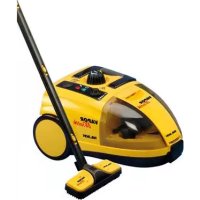
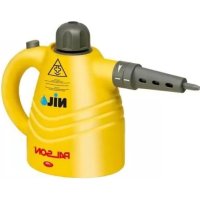
30484 - Steam cleaner PALSON - Free user manual and instructions
Find the device manual for free 30484 PALSON in PDF.



| Brand | Palson |
| Model | 30484 |
| Product type | Steam cleaner |
| Input voltage | 220-240 V ~ 50 Hz |
| Power consumption | 1400-1600 W |
| Max steam pressure | 4 bar |
| Water tank capacity | 1.4 L |
| Max autonomy with full tank | 50 minutes |
| Heating time | Approximately 11 minutes |
| Main functions | Steam cleaning for floors, surfaces, windows, joints, resistant textiles |
| Included accessories | Steam gun with hose, 3 extension tubes, floor brush, 2 round brushes (nylon and metal), adapter for tight spots, nozzle, 2-in-1 assembly (steam + windows), cotton cloth, mop with fringe, funnel, measuring container |
| Safety | Child lock on the gun, automatic shut-off in case of overheating (180°C), pressure safety cap |
| Maintenance and cleaning | Descaling every 6 months, rinse the tank every 5 uses if water is hard, clean the casing with a damp cloth |
| Spare parts and repairability | Use only original Palson accessories; repairs by approved technical service |
| General information | Indoor use only; do not use on worn clothing or sensitive surfaces without prior testing |
Frequently Asked Questions - 30484 PALSON
User questions about 30484 PALSON
0 question about this device. Answer the ones you know or ask your own.
Ask a new question about this device
Download the instructions for your Steam cleaner in PDF format for free! Find your manual 30484 - PALSON and take your electronic device back in hand. On this page are published all the documents necessary for the use of your device. 30484 by PALSON.
USER MANUAL 30484 PALSON
natural_image
Black and white photo of a VAPOR vacuum cleaner with attached brush, no visible text or symbols on the device itself.VAPOR
Matik
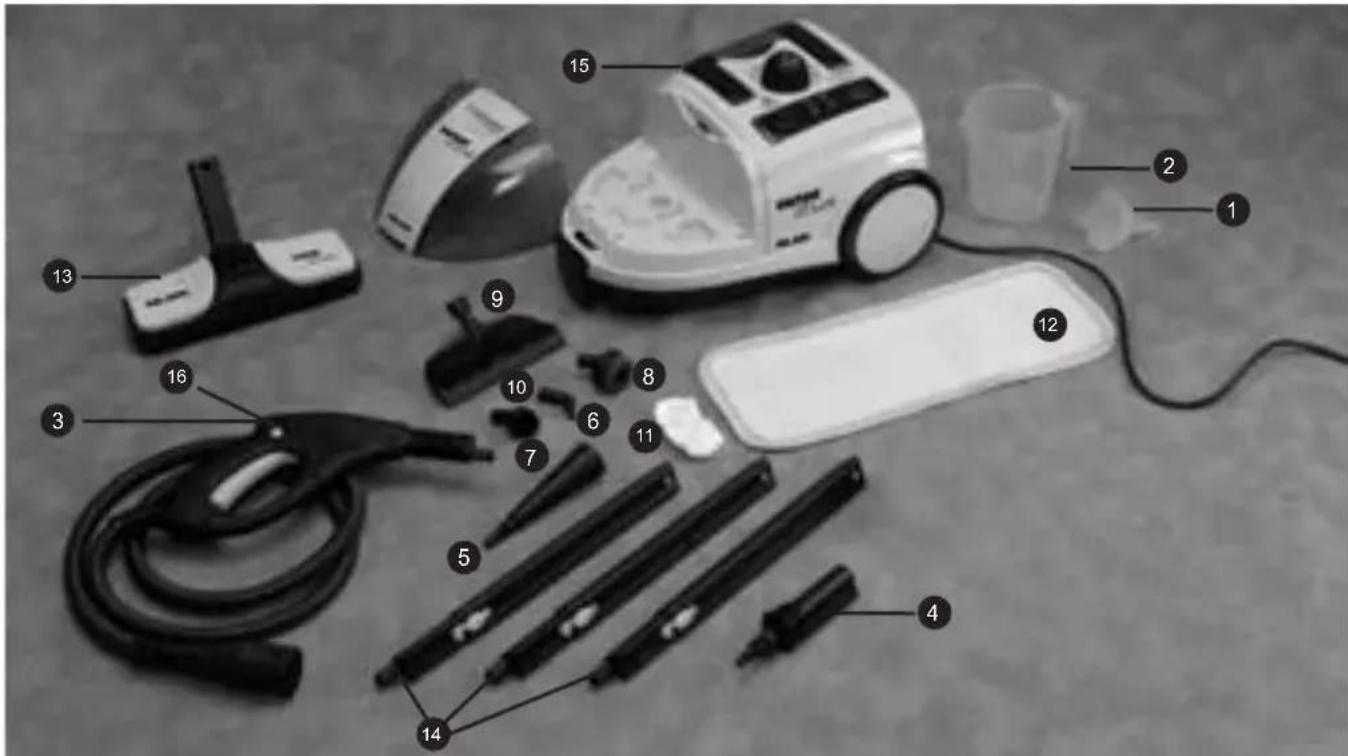
1 Funnel
2 Measuring jug
3 Steam gun with hose and steam connector
4 Accessory adaptor
5 Adaptor for hard to reach areas
6 Jet nozzle fitting
7 Nylon fixed round brush
8 Metal round brush
9 2 in 1 fitting (steam fitting)
10 2 in 1 fitting (window fitting)
11 Cotton cloth
12 Large cleaning mop
13 Floor brush
14 3 Extension tubes
15 Steam cleaner with plug and cable
16 Locking mechanism
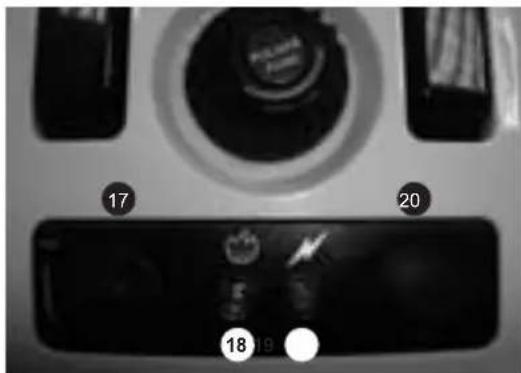
17 Steam controller
18 Luminous heating indicator
19 Luminous operating indicator
20 I/O button
natural_image
Line drawing of a kitchen appliance with a black arrow pointing to the lid area (no text or symbols)natural_image
Line drawing of a washing machine with a black arrow indicating rotation (no text or symbols)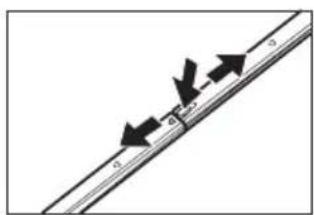
natural_image
Pure diagram of a diagonal line with arrows indicating direction, no text or symbols present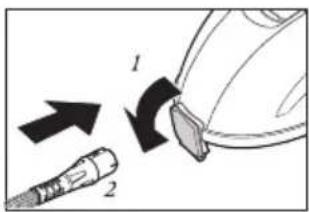
natural_image
Diagram showing a tool interacting with a device, no text or symbols present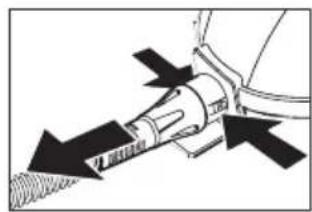
natural_image
Mechanical diagram showing a tool interacting with a mechanical component, no text or symbols present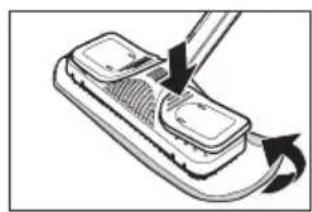
natural_image
Diagram of a handheld device with a tool inserted, showing a curved arrow indicating rotation (no text or symbols present)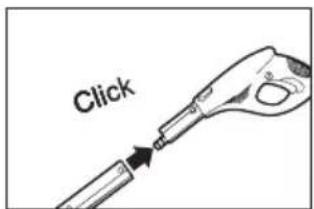
flowchart
graph TD
    A["Device with attached parts"] --> B["Tool with two lenses"]
    B --> C["Tool tip with arrow indicating direction"]
    C --> D["Arrow pointing to final tool"]
natural_image
Diagram showing a tool emitting black arrows from a small component (no text or symbols)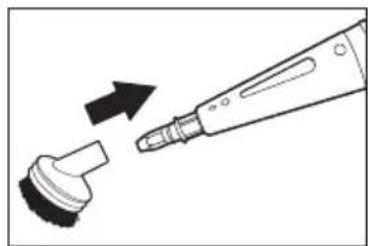
natural_image
Diagram showing a tool emitting black arrows from a small component (no text or symbols)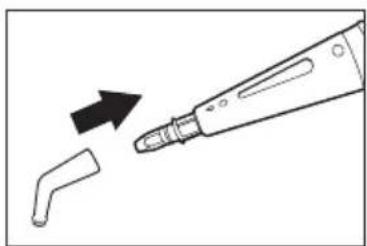
natural_image
Diagram showing a dental tool tip being inserted into a small tooth, with an arrow indicating the insertion direction (no text or symbols present)Fig. 12 Fig. 13 Fig. 14
natural_image
Illustration of a hairpin being inserted into a small mechanical component (no text or symbols)Fig. 15 Fig. 16
natural_image
Technical line drawing of a mechanical component with an arrow indicating assembly or transformation (no text or symbols present)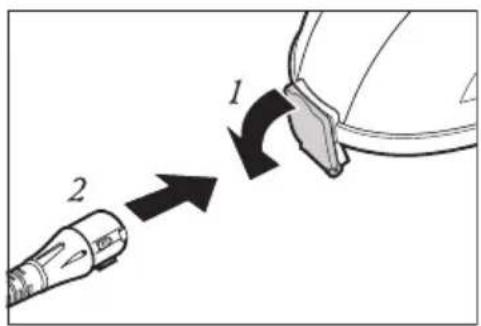
Fig. 17
natural_image
Top-down view of a car dashboard with air vent and control knobs (no text or symbols visible)Fig. 18 Fig. 19 Fig. 20 Fig. 21
natural_image
Line drawing of a cooking step with pouring liquid from a beaker into a pan (no text or symbols)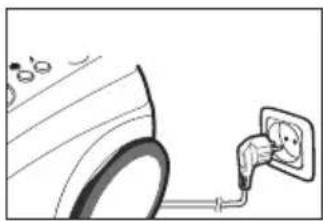
natural_image
Illustration of a car being charged with an electrical outlet plug (no text or symbols)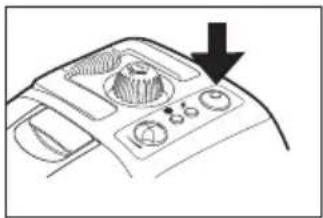
natural_image
Line drawing of a car dashboard with control buttons and a downward arrow indicating action (no text or symbols)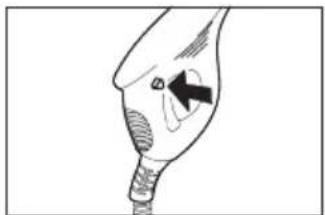
natural_image
Simple line drawing of a medical or anatomical device with no visible text, numbers, or symbols.Fig. 22 Fig. 23 Fig. 24 Fig. 25
natural_image
Line drawing of a handheld electric shaver with exhaust plume (no text or symbols)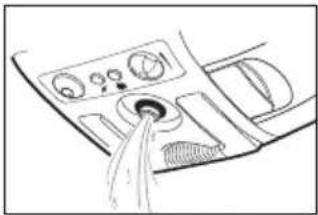
natural_image
Line drawing of a car interior showing dashboard controls and a showerhead (no text or symbols)
¡ATENCIÓN!
Before opening the cap, press the steam button to reduce pressure.
Danger of scalding.
Before refilling the cleaner with water, leave to cool for 5 minutes.
ATTENTION!
Our products are designed to attain the highest quality, functionality and design standards. We hope you enjoy your new VAPORMATIK professional steam cleaner from PALSON.
1 Safety instructions
1.1 For the mains supply
- Make sure that the voltage indicated on the rating plate coincides with socket voltage before connecting the steam cleaner to the mains.
- Only connect the appliance to a properly earthed socket.
- The appliance's plug should fit the socket. The plug should not be changed in any way whatsoever. Do not use adaptors with earth protection devices. Plugs that have not been modified and suitable sockets reduce the risk of electric shocks.
- We recommend only plugging the appliance into a socket protected by a residual current breaker. Get advice from an electrician when necessary.
- Never touch the plug with wet hands.
- Always disconnect the appliance from the mains, removing the plug from the socket. Do not pull the cable!
- If the electricity cable is damaged, it must be replaced by the manufacturer, its authorised technical service or qualified engineer to prevent dangerous situations.
- Make sure that the connection values coincide with the steam cleaner if you are using an extension lead. If necessary, ask a specialised distributor.
- Make sure that there is no danger of tripping over the cable. It should not be twisted, pressed or stepped on.
- This product should not be used by children or other people without the help or supervision if their physical, sensorial or mental conditions limits them from using it safely. Children must be supervised to ensure that they do not play with the appliance.
- Never leave the steam cleaner unattended, especially if there are children or disabled people in the same room.
- The appliance should be kept out of the reach of children.
- Do not allow the children to play with the packaging (plastic wrapping).
1.2 Using the appliance
- Regularly check if the appliance, cable and accessories are damaged. Do not use the appliance or accessories if they are damaged.
- Never point the steam cleaner towards people, animals or plants (due to the risk of burns), or at electric equipment or cables.
- Do not use the appliance without supervision. When you leave the cleaning area, always turn the appliance off and unplug it from the mains.
- The appliance has a thermostat and thermal disconnection that stop it from overheating.
- The accessories heat up during usage. Leave them to cool down before changing them.
- Never unscrew the tank lid when you are using the appliance. The tank is pressurised.
- The appliance cannot be tilted more than 45^ during use.
- Never submerge the appliance in water or other liquids.
- Keep the appliance away from the rain and humidity. The appliance is not suitable for outdoor use.
- Do not use the appliance without water in the tank. Always fill it with water.
- Empty the water tank when you are not using the appliance.
- Never fill the tank with anything other than water. Do not add additives (such as perfume, stain remover or products containing surgical spirits) to the water, as it could damage the appliance put you at risk.
- Always unplug the appliance from the mains socket and leave it to fully cool down before filling it with water.
- Do not fill the tank up to the brim. Never go past the maximum filling level. Use the measuring jug and funnel supplied with the appliance.
- Make sure that the lid is totally screwed on before turning the appliance on.
- Only use the handle to carry the appliance.
- Do not touch any of the appliance's hot areas. It is normal for the steam to heat up during use.
- Do not use the Vapormatik to clean the clothes you are wearing.
- The nozzle may drip from time to time. This is completely normal, as it is only condensation.
- The strength and the heat of the steam can damage some materials. Always check if a surface is suitable for cleaning with the appliance carrying out a test beforehand on an area that is out of sight.
- Always provide these usage instructions if you let somebody else use the steam cleaner.
1.3 Maintenance and cleaning
- Only use the original accessories supplied with the appliance.
- To prevent risks, do not carry out the repairs yourself. Consult the Authorised Technical Service and entrust the repairs to suitably qualified personnel using original Palson spares.
- Always unplug the appliance, remove the plug from the mains and leave the steam cleaner to cool down before cleaning it or servicing it.
2 Introduction
2.1 Unpacking the appliance
Unpack the steam cleaner and all the accessories. Check that it has no components missing. If possible, keep the box and packaging to protect the appliance during transport or returning it under guarantee. Suitably dispose of the packaging material not required. Immediately contact your distributor if you see any damage suffered during transport when you unpack the appliance. Under no circumstance should the appliance be used if it has been damaged in any way.
* Warning! Make sure that the packaging (plastic wrapping) does not get into the hands of children. They could be suffocated.
3 To start
3.1 Accessory assembly
Before using the Vapormatik, the steam hose with the steam gun and the accessory you require should be connected to the appliance. The Vapormatik has an accessory compartment. Open the accessory compartment pulling the yellow lock handle upwards and pulling the compartment's transparent lid forwards (Fig. 2 and 3).
Remove the steam accessory you require and put the lid back on the compartment. Slide the edge of the lid along the groove on top of the steam inlet and press it down firmly from behind until it snaps into place.
3.1.1 Steam hose
First connect the steam hose to the inlet located on the front of the Vapormatik. To do so, lower the black lid's panel and firmly push the steam hose's connector until it snaps into place (Fig. 4).
To extract the steam hose, press the two buttons to the left and right of the steam connector and remove the connector from the inlet by pulling it out (Fig. 5).
3.1.2 Extension tubes
Assemble the extension tubes if you are going to use the steam cleaner for cleaning floors or hard to reach areas. To do so, push the open end of a pipe into the steam gun. Push it into the steam gun until the gun button clicks into place (Fig. 6). Add one, two or three extension tubes as necessary. Press the right button and detach the pipes pulling them downwards to remove the extension tube. 7).
3.1.3. Floor brush
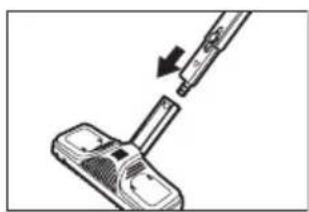
Attach the floor brush to the end of the extension tube. Make sure that the brush fits into place when you assemble it (Fig. 8). The floor brush is ideal for cleaning washable walls and floorings. It can be used with or without the cleaning cloth. Nevertheless, we recommend using the cloth to protect the floorings if these are sensitive surfaces such as wood or lino. Put the floor brush in the cleaning cloth and fix the material hanging underneath the cloth's clips on the right and left. Press the yellow support's insides, open the clips and fix the cloth into place (Fig. 9).
To remove the floor nozzle, press the button (see Fig. 7) and pull the brush down to remove it.
NOTE: The floor brush comes with a separate connector for packaging reasons.
3.1.4. Accessory adaptor
The steam cleaner has several attachable accessories for more efficient and deeper cleaning of different surfaces. First assemble the accessory adaptor so that the fittings can be connected to the steam hose. The accessory adaptor can be directly fitted to the steam gun and the end of one or more extension pipes.
GB
Make sure you push the adaptor firmly down until it snaps into place (Fig. 10).
Press the suitable button and remove the adaptor downwards to remove it again.
3.1.5. Adaptor for hard to reach areas
The adaptor for hard to reach areas can be used separately for cleaning or assembled with one of the accessories. Push it into the accessory adaptor and firmly turn it a quarter of the way round in the direction of the arrow on it (Fig. 11).
To remove the adaptor, carry out the procedure the other way round: turn it a quarter of the way round in the opposite direction to the arrow and remove it pulling it downwards.
3.1.6 Jet nozzle
Just push the jet nozzle firmly into the adaptor for hard to reach areas to connect it (Fig. 12). This nozzle allows for easily cleaning hard to reach areas such as corners, joints and washbasins. The jet nozzle can be removed by pulling it downwards.
3.1.7 Brushes
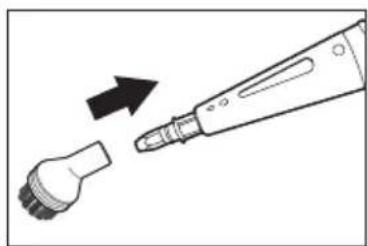
The two brush fittings are pushed firmly into the adaptor for hard to reach areas, like the jet nozzle.
Even the most encrusted dirt can be removed, e.g., in blinds, central heating radiators, valves, etc., with the nylon brush. The round brush is suitable for difficult stains in tougher materials such as stainless steel or stone. The brushes are removed just by pulling them downwards.
3.1.8 2 in 1 fitting
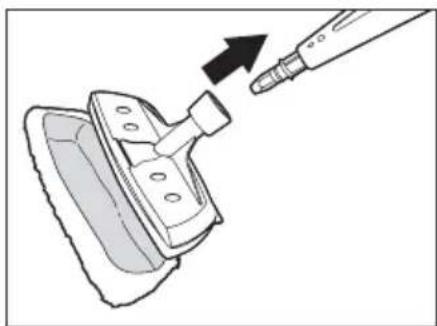
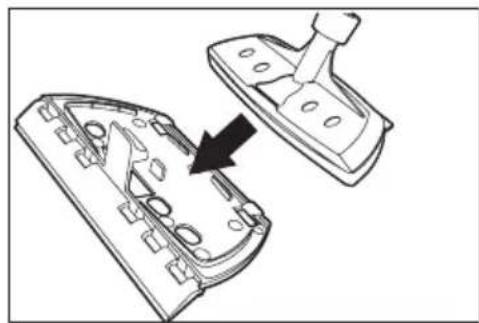
The 2 in 1 accessory consists of a steam fitting connected to the window cleaner. Firmly push it into the adaptor or hard to reach areas.
- Put the cotton cover onto the adaptor to get a more thorough cleaning and protect the work surface (Fig. 15).
- Fix the window cleaner with the rubber scraper in the steam fitting with right angles if you are going to clean windows, mirrors or tiles (Fig. 16).
* Precaution: Glass may crack when subjected to heat. Heat the glass areas up before carrying out the steam cleaning, spraying steam in a wide arch at a distance of 20 - 25 cm. Slowly reduce the distance to 10 - 15 cm to heat the glass up even more.
3.2 Filling the water tank
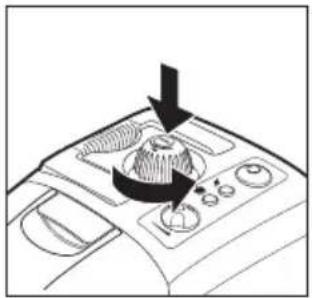
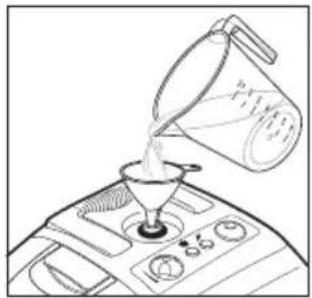
The Vapormatik has a 1.4 litre water tank. Turn the steam cleaner off and unplug it from the mains. You should always unplug the steam cleaner from the mains when filling or topping up the water tank. Unscrew the tank lid (Fig. 18) pressing it down and turning it to the left at the same time. Use the funnel and measuring jug supplied when filling the water tank (Fig. 19).
Only use pure water without any additives, e.g., perfume, detergents, surgical spirit, as these could damage the appliance and put you at risk. It is advisable to use distilled water to prevent scale from forming if the water is very hard (over 2.5 mmol/l or 21°dH). You can also boil the water first to extend the appliance's useful life.
* Precaution: Never exceed the maximum amount of 1.4 litres when filling the tank!
Screw the tank lid back on firmly turning it to the right and pressing it down.
Tip: If you use hot water, the heating time will be reduced.
4 Handling the appliance
4.1 Mains connection
Plug the steam cleaner into a adequately installed mains socket (Fig. 20) and turn the appliance on pressing the I/O switch (Fig. 21).
The red operating and green heating indicators will turn on. The operating indicators will light up when the Vapormatik is plugged in and turned on. The heating indicator indicates that the steam cleaner is heating up. Operating temperature is reached after 11 minutes, after which the green indicator will turn off. The appliance is now ready for use.
4.2 Use of the steam cleaner
* Warning: Never point the gun's steam outlet hole at people, animals, plants or electric equipment (e.g. oven or mains plug). There is a risk of burns or electric shocks.
Release the lock mechanism (childproof safety lock) pressing the yellow triangular pin to the right of the steam gun towards the left (Fig. 22). Now hot steam will come out when you press the steam button.
First hold the steam gun over an old cloth to absorb any remains of pulverised water. Press the steam button until the steam comes out evenly. You can now start to clean.
NOTE: the remaining steam will continue to come out for a few seconds after turning the appliance off.
* Precaution: Always test the steam cleaner first in areas of the surfaces or fabrics you are going to clean that are hidden or cannot be seen, to test their tolerance to hot steam.
- Steam may bleach painted/varnished wood.
- Steam may bleach shiny plastic.
- Acrylic material, velvet and linen may be sensitive to the steam temperature.
- Do not use the steam cleaner on Dralon fibres without previously having tested it on a hidden area.
For obvious reasons, the manufacturer cannot assume any responsibility for damage to objects, materials, people, animals or plants due to inadequate use of hot steam or improper use of the appliance.
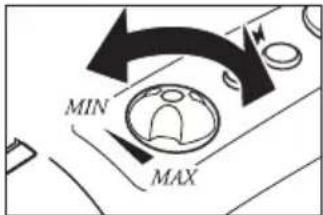
Do not point the steam outlet hole at a point for too long. Remove the dirt moving the steam jet backwards and forwards. The steam flow can be adjusted turning the steam controller and can be adjusted to the level or dirtiness. Turn the steam controller to the right to reduce the amount of steam and to the left to increase it (Fig. 23).
Do not swing or tilt the appliance more than 45^ during usage and make sure that it is always supported on a firm base. A full tank is sufficient for 50 minutes of usage. Keep an eye on the machine when it is on and if necessary use the childproof safety lock to protect the steam switch. To do so, push the yellow triangular pin to the left of the steam gun towards the right.
* Warning: The casing and accessories heat up during usage. Let the appliance cool down before changing the accessories. Never open the tank lid when the steam cleaner is turned on, as the tank is pressurised.
NOTE: The Vapormatik has a overheating disconnection mechanism. The appliance turns off automatically when it reaches 180 °C to prevent it from overheating. Unplug it from the mains immediately pulling out the plug. The appliance can be used again after a cooling period of 30 minutes.
4.4 Water filling
Turn the steam cleaner off pressing the I/O button. The red operating indicator will turn off. Press the steam gun steam button to release the residual pressure and then lock the gun. Unplug the appliance from the mains and let it cool down. Be careful, the tank water is still hot after 5 minutes. Open the tank lid pushing it downwards and turning it to the left.
* Warning: hot steam may come out when you open the tank. You can burn yourself on the screw top and the tank.
Fill the water tank with the measuring jug and funnel (see section 3.2 "Filling the water tank") and then carefully close it again with the lid.
The cleaner can now be plugged in and turned on again. The Vapormatik is ready to use as soon as the heating indicator turns off.
4.5 End of use and storage
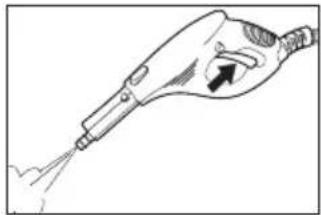
Turn the appliance off. The red operating indicator will turn off. Press the steam gun steam button (Fig. 24) to release the residual pressure. Fix the steam gun pushing the lock pin to the left of the handle towards the right. Remove the plug from the mains socket and let the appliance to cool down. Empty the water tank so that the remains do not settle (Fig. 25).
Do not close the water tank until it is completely dry. The steam cleaner should have completely cooled down before it is put away. The appliance should be kept out of the reach of children. The extension tube with the floor brush assembled can be put inside the storage support at the back of the appliance to put it away or for short rests during work.
5 General information
5.1 For cleaning and maintenance
* Warning: Always make sure that the steam cleaner is turned off and unplugged from the mains before putting it away or repairing it.
Only clean the appliance passing a damp cloth over the casing. Do not use detergents, abrasive cleaning agents or surgical spirit, as these could damage the casing.
We recommend rinsing the tank after 5 filling operations at the most, if the water hardness is in excess of 1.8 mmol/l (10°dH). You can get information on the hardness of your local water from the water board. We recommend filling the tank with water and shaking it well before cleaning. This will loosen any remains of limescale deposited at the bottom of the steam cleaner. Then, remove the water and leave the tank to dry completely before closing it.
The water tank should be treated with a de-scaler approx. once every 6 months to extend the useful working life of the steam cleaner.
Place one or at most two limescale removal sticks in 1 litre of hot water (50 °C) and fill the tank with this water. Leave the solution to work for approx. 30 minutes and then throw the water with the dissolved solids away. Repeat this process if necessary and rinse the tank with water.
Disposal after the end of its useful life:
If the appliance has come to the end of its useful life, particularly if it has not worked properly, the worn appliance should be rendered useless unplugging it from the mains and disconnecting the mains cable. Dispose of the appliance suitably through a public waste disposal centre. Contact the local waste disposal service or bulky waste collection centre.
5.2 Troubleshooting
First check if you can solve the problem with this list before sending the steam cleaner to the Authorised Technical Service.
| Fault Possible cause Solution | ||
| The operating indicator does not turn on. | The appliance is not plugged in or is not turned on. | Plug it in or turn the appliance on. |
| The plug is faulty. | Check the condition of the plug by plugging another appliance in. | |
| The mains cable is damaged. | Ask the Authorised Technical Service for a spare cable | |
| Steam does not come out when pressing the steam button. | The childproof safety lock prevents the steam button from being pressed. | Push the yellow pin to the right of the steam gun towards the left. |
| The water tank is empty Fill the water tank (see Section 4.4). | ||
| Only a small amount of steam comes out. | The steam controller is at its lowest point. | Turn the steam controller left until sufficient steam comes out. |
| The appliance takes a long time to heat up. | The water tank is covered in scaling. De-scale the water tank (see Section 5.1). | |
Technical data
Voltage: 220-240V \~ 50Hz
Power consumption: 1,400-1,600W.
Steam pressure: 4 bar Max.
Water tank volume: 1.4 litres
Operating time: Maximum 50 minutes / with the tank full.
Heating time: around 11 minutes.
* Warning: This refers to danger for the user.
* Precaution: This refers to danger for the unit or other objects.
Thank you for choosing one of our products.
F
لا ت Falk airport airport airport airport airport airport airport airport airport airport airport airport airport airport airport airport airport airport airport airport airport airport airport airport airport airport airport airport airport airport airport airport airport airport airport airport airport airport airport airport airport airport airport airport airport airport airport airport airport airport airport airport airport airport airport airport airport airport airport airport airport airport airport airport airport airport airport airport airport airport airport airport airport airport airport airport airport airport airport airport airport airport airport airport airport airport airport airport airport airport airport airport airport airport airport airport airport airport airport airport Airport Airport Airport Airport Airport Airport Airport Airport Airport Airport Airport Airport Airport Airport Airport Airport Airport Airport Airport Airport Airport Airport Airport Airport Airport Airport Airport Airport Airport Airport Airport Airport Airport Airport Airport Airport Airport Airport Airport Airport Airport Airport Airport Airport Airport Airport Airport Airport Airport Airport Airport Airport Airport Airport Airport Airport Airport Airport Airport Airport Airport Airport Airport Airport Airport Airport Airport Airport Airport Airport Airport Airport Airport Airport Airport Airport Airport Airport Airport Airport Airport Airport Airport Airport Airport Airport Airport Airport Airport Airport Airport Airport Airport Airport Airport Airport Airport Airport Airport Airport airports
Disposal of old Electrical & Electronic Equipment (Applicable throughout the European Union and other European countries with separate collection programs)
This symbol, found on your product or on its packaging, indicates that this product should not be treated as household waste when you wish to dispose of it. Instead, it should be handed over to an applicable collection point for the recycling of electrical and electronic equipment. By ensuring this product is disposed of correctly, you will help prevent negative consequences to the environment and human health, which could otherwise be caused by inappropriate disposal of this product. The recycling of materials will help to conserve natural resources. For more detailed information about the recycling of this product, please contact your local city office, household waste disposal service or the retail store where you purchased this product.


- VAPOR
- Matik
- ¡ATENCIÓN!
- ATTENTION!
- Safety instructions
- For the mains supply
- Using the appliance
- Maintenance and cleaning
- Introduction
- Unpacking the appliance
- To start
- Accessory assembly
- Steam hose
- Extension tubes
- Floor brush
- Accessory adaptor
- GB
- Adaptor for hard to reach areas
- Jet nozzle
- Brushes
- 2 in 1 fitting
- Filling the water tank
- Handling the appliance
- Mains connection
- Use of the steam cleaner
- Water filling
- End of use and storage
- General information
- For cleaning and maintenance
- Troubleshooting
- F
Brand : PALSON
Model : 30484
Category : Steam cleaner