Equinox - Binoculars BUSHNELL - Free user manual and instructions
Find the device manual for free Equinox BUSHNELL in PDF.


User questions about Equinox BUSHNELL
0 question about this device. Answer the ones you know or ask your own.
Ask a new question about this device
Download the instructions for your Binoculars in PDF format for free! Find your manual Equinox - BUSHNELL and take your electronic device back in hand. On this page are published all the documents necessary for the use of your device. Equinox by BUSHNELL.
USER MANUAL Equinox BUSHNELL
natural_image
Satellite view of Earth showing continents and oceans, with partial view of the Moon (no text or symbols)EQUINOX™
Instruction manual
Model #: 260330
03-13
ENGLISH 4-12
FraNçaIS 13-21
ESpaÑoL 22-30
DEutScH 31-39
ItaLIaNo 40-48
portuGuÊS 49-57
text_image
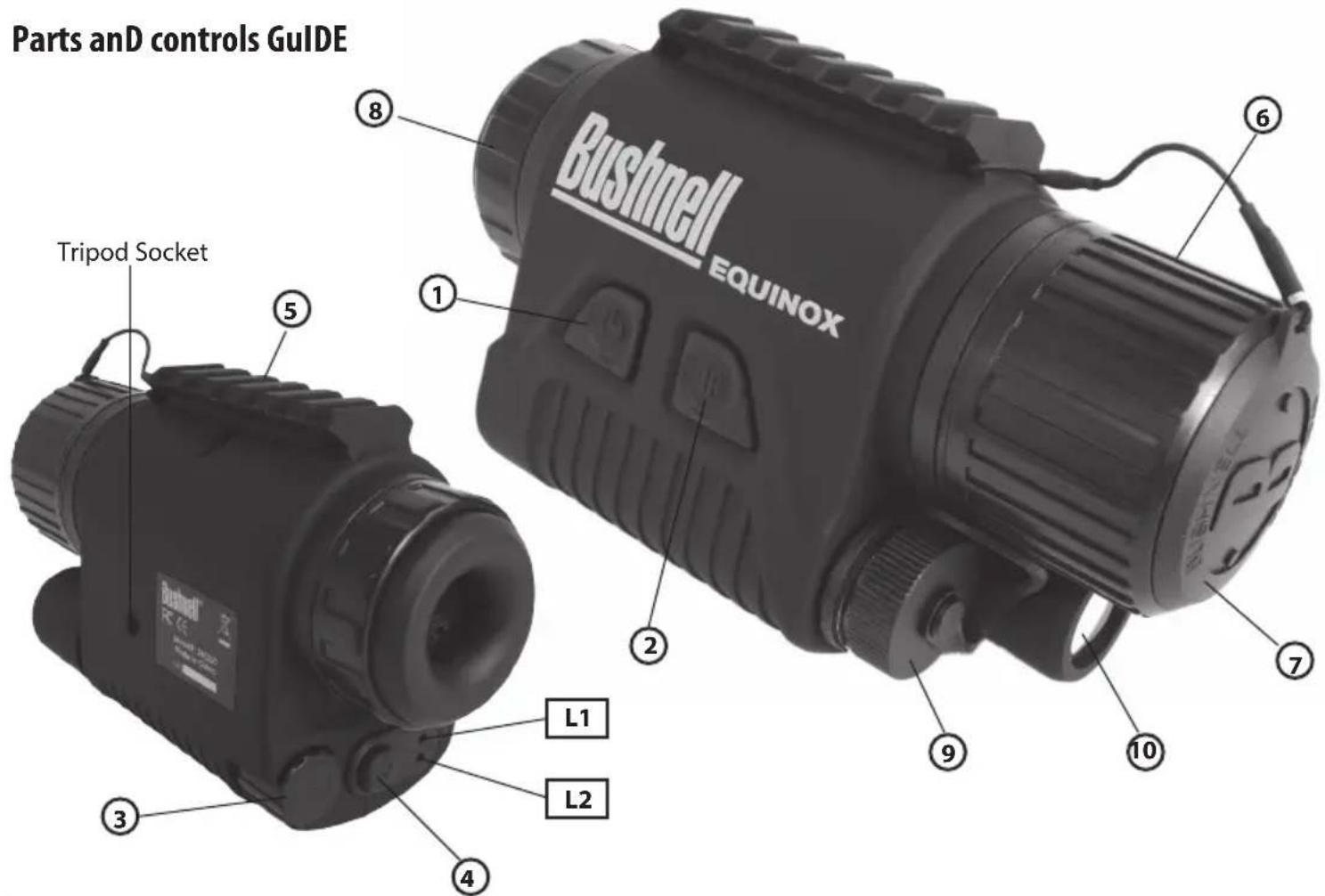
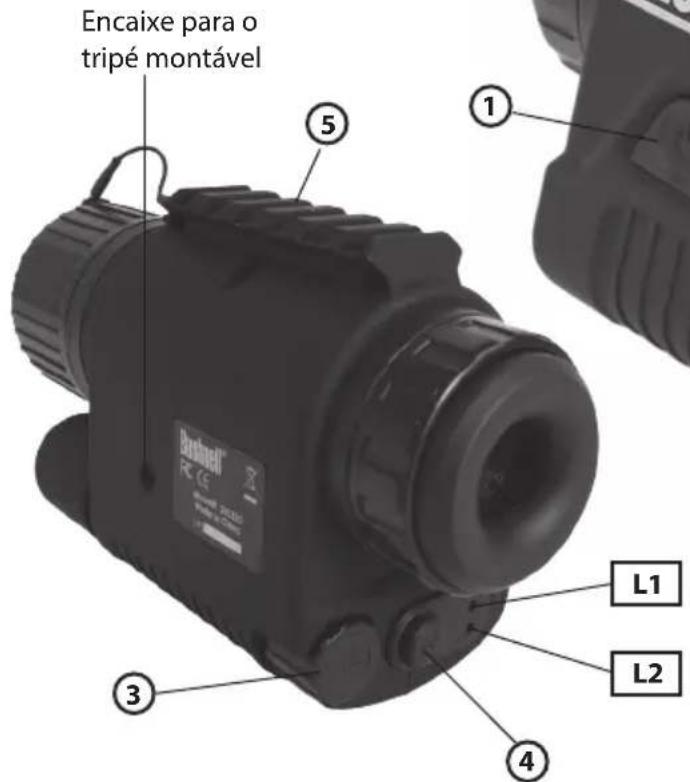
Parts and controls Guide Bushnell EQUINOX Tripod Socket L1 L2ENGLISH
ABOUT BUSHNELL® EQUINOX™ DIGITAL NIGHT VISION
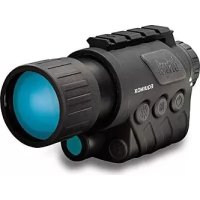
Congratulations on the purchase of your Bushnell® Equinox™ Digital Night Vision. Comprised of high quality electronics and optics, the Bushnell Equinox is a hand-held digital night vision viewing system that utilizes a low-light charge-coupled device (CCD) sensor, providing edge-to-edge resolution and image quality equal to or exceeding "Gen 2" analog units, at any range. Fully multi-coated optics increase light transmission and decrease glare. The LCD micro display screen features user-selectable monochrome or "traditional" green viewing modes. The Equinox models are 20% more energy efficient than other digital night vision units, resulting in a battery life of over 6 hours (without IR). The Equinox 3x30 Digital Night Vision monocular is versatile enough for many applications including hunting, camping, boating/fishing, caving, paintball, stargazing, rescue/recovery, security surveillance, and law enforcement- in continuously changing light conditions – from dawn to absolute darkness. The Equinox 3x30 model has a 46 foot field of view at an observation distance of 100 yards (14 meters at 100 meters), ideal for viewing moving objects. A built-in accessory mounting rail (5) enables the user to attach the Bushnell I-Beam IR Flashlight (#267100) or other compatible accessories.
Bushnell Digital Night Vision products collect existing light through the objective lens. The image is then processed through a 1/3" near infra-red sensitive CCD sensor module and transferred to the micro liquid crystal display (LCD). Images viewed on the LCD are magnified 3 times. Equinox Digital Night Vision models are equipped with a built-in powerful IR (infrared) illuminator (10) that enables clear viewing in low ambient light conditions or even total darkness.
BATTERY INSTALLATION
- Open the battery compartment (9) by unscrewing and removing the battery cap (counter-clockwise).
- Install two CR123 lithium batteries, inserted with the negative (flat) ends facing up towards the spring on the removable cap.
- Replace the battery compartment cap and secure it by turning it clockwise until tight. NOTE: Do not mix old and new batteries together. Replace both batteries at the same time. Do not mix battery types.
POWER ON
Remove the protective objective lens cover (7) from the objective lens (6). Press the ON button (1) until the green LED indicator (L1) turns on. The LCD screen inside the eyepiece (8) will power on.
FOCUSING
Point the Equinox night vision unit at the object you wish to observe, holding it horizontally with the ON button and Bushnell logo facing up. To focus, first rotate the diopter setting ring of the eyepiece (8) until the edges of the rectangular LCD screen appear as sharp as possible to your eye. Then rotate the objective lens focusing collar (6) until the observed image is sharp. To focus on another object at a different distance, you will only need to adjust the objective lens focusing collar (6), as the diopter setting is already optimized for your individual eyesight. You may need to readjust the diopter setting the next time you use the Equinox unit or if the eyepiece is moved accidentally.
POWER OFF
To turn the unit off, press the ON button (1) again. The green LED indicator (L1) will turn off. Replace the protective objective lens cap cover (7) before storing or transporting the unit.
USING THE IR ILLUmINATOR
When using the unit under conditions of total darkness, turn on the IR illuminator (10) by pressing the IR button (2). When the IR illuminator is on, the red LED indicator (L2) will turn on.
NOTE: The IR light source is invisible to the unaided eye, but can be seen by other people equipped with night vision devices (be aware of this if using the unit for surveillance or law enforcement applications).
To turn the IR illuminator off, press the IR button (2). The red LED indicator (L2) turns off. (Note that the IR illuminator does not cut off instantly, it will "fade out"). The IR illuminator will also turn off when the unit's power is turned off by pressing and holding the ON button (1).
ADJUSTING THE LCD DISPLAY BRIGHTNESS
To increase and decrease LCD screen brightness, rotate the LCD brightness knob (3) until the desired level of brightness is achieved to allow a comfortable viewing experience (clockwise rotation increases brightness).
NOTE: When the unit is turned on again, the LCD screen brightness setting will be at the same level as previously set.
SWITCHING THE LCD DISPLAY COLOR
To switch the LCD screen color from green to white or from white to green, quickly press the LCD backlight color mode button (4).
LOW BATTERY INDICATOR
The green LED (L1) starts flashing when the battery power is less than approximately 15% of full capacity. Replace both batteries as directed in "Battery Installation".
TROUBLESHOOTING
Unit does not turn on
- Reinstall the batteries, making sure of the correct polarity (+/- terminals) orientation.
- Replace both batteries.
- Clean the battery compartment, especially the contact points.
Observed image is too bright
The ambient light level is too high (e.g. observation during bright sun conditions).
- Turn off the unit or place the objective lens cover (7) over the lens. The unit will function normally in light conditions below 25,000 Lx (day light).
- Adjust the LCD screen brightness (see "Adjusting the LCD Display Brightness" in this instruction manual).
Image is missing or not focused
- Re-focus by adjusting the objective lens (6). Adjust the diopter setting if necessary by rotating the eyepiece (8) until the edges of the LCD display appear sharp (see "Focusing" in this instruction manual).
- Check the condition of the objective lens (6) surface and eyepiece (8) and clean if necessary.
- Replace the batteries.
- In extreme low light conditions, activate the built-in IR illuminator (10).
Image disappears or its quality is reduced
Bright light sources (e.g. street lights at night time) may cause decreased visibility or reduced contrast.
1. Turn the monocular away from the light source; visibility will return momentarily.
2. Readjust the LCD display brightness setting.
Small black dots are visible on the screen
Small dots are normal, minor cosmetic blemishes resulting from the LCD manufacturing process and are not a defect or quality control error. These dots do not interfere with the reliability and performance of the monocular.
CARE AND mAINTENANCE
Your Bushnell Equinox Digital Night Vision device was designed to provide many years of reliable service. To ensure that you get the most enjoyment out of your Digital Night Vision device, always obey the following warnings and precautions.
- Keep the device away from any heating and air conditioning vents or other heating devices, direct sunlight, and moisture.
- Always store the unit in its carrying case in a dry well ventilated space in temperature above +15°C (60°F). Do not store near heating devices. Do not store in direct sunlight or high humidity conditions (higher than 70%).
- Clean the optical lens with camera lens cleaning supplies.
- Clean the exterior of the device with a soft clean cloth.
- Remove the batteries if the device will not be used for longer than a few weeks.
WARNING AND PRECAUTIONS
- Avoid dropping or otherwise shocking the unit. Although designed for rugged outdoor use, this device incorporates sophisticated digital circuitry which could be damaged in extreme cases of misuse.
- Do not open the body of the device or otherwise attempt to service this device.
- Never pour alcohol or any other liquids directly onto the lens surfaces.
- Do not clean lenses and unit surfaces with paper based products, such as newspaper, textbook paper, etc. as it can damage the coating.
- Avoid removing the eyepiece as the LCD display could become damaged.
- Do not leave the device in direct sunlight or rain. The unit is water resistant, but is not designed for prolonged exposure to moisture and cannot be submerged in water.
- After the unit is operated in temperatures below zero, wait at least 3 hours at room temperature, to avoid condensation accumulating on the internal lens surfaces and the consequent fogging caused by extreme temperature differences.
| Specification 260330 | |
| Magnification 3x | |
| Objective Size 30mm | |
| Battery Type (2) CR-123 Lithium | |
| Viewing Range 656 ft / 200 m | |
| Field of View @ 100 yds/m 46 ft / 14m | |
| Operating Temperature Range +14 ~+113 F / -10 ~ +45 C | |
| Dimensions (H x W x L) 53 x 82 x 140 mm | |
| Weight (w/o batteries) 7.4 oz / 210 g | |
| Tripod Mountable Yes | |
| Water Resistance Standard IPX4 | |
Note: failure to follow the warnings and precautions as stated in this manual may damage the unit and void the manufacturer's warranty.
Fcc notE
This equipment has been tested and found to comply with the limits for a Class B digital device, pursuant to Part 15 of the FCC Rules. These limits are designed to provide reasonable protection against harmful interference in a residential installation. This equipment generates, uses and can radiate radio frequency energy and, if not installed and used in accordance with the instructions, may cause harmful interference to radio communications. However, there is no guarantee that interference will not occur in a particular installation. If this equipment does cause harmful interference to radio or television reception, which can be determined by turning the equipment off and on, the user is encouraged to try to correct the interference by one or more of the following measures:
- Reorient or relocate the receiving antenna.
- Increase the separation between the equipment and receiver.
- Connect the equipment into an outlet on a circuit different from that to which the receiver is connected.
- Consult the dealer or an experienced radio/TV technician for help.
Shielded interface cable must be used with the equipment in order to comply with the limits for a digital device pursuant to Subpart B of Part 15 of FCC Rules.
Specifications and designs are subject to change without any notice or obligation on the part of the manufacturer.
FC CE
Disposal of Electric and Electronic Equipment
(Applicable in the EU and other European countries with separate collection systems)
This equipment contains electric and/or electronic parts and must therefore not be disposed of as normal household waste. Instead, it should be disposed at the respective collection points for recycling provided by the communities. For you, this is free of charge.
If the equipment contains exchangeable (rechargeable) batteries, these too must be removed before and, if necessary, in turn be disposed of according to the relevant regulations (see also the respective comments in this unit's instructions).
Further information about the subject is available at your community administration, your local waste collection company, or in the store where you purchased this equipment.
ONE-Year LIMITED WARRANTY
Your Bushnell ^® product is warranted to be free of defects in materials and workmanship for one year after the date of purchase. In the event of a defect under this warranty, we will, at our option, repair or replace the product, provided that you return the product postage prepaid. This warranty does not cover damages caused by misuse, improper handling, installation, or maintenance provided by someone other than a Bushnell Authorized Service Department.
Any return made under this warranty must be accompanied by the items listed below:
1) A check/money order in the amount of \$10.00 to cover the cost of postage and handling
2) Name and address for product return
3) An explanation of the defect
4) Proof of Date Purchased
5) Product should be well packed in a sturdy outside shipping carton, to prevent damage in transit, with return postage prepaid to the address listed below:
IN U.S.A. Send To:
Bushnell Outdoor Products
Attn.: Repairs Attn.: Repairs
9200 Cody 25A East Pearce Street, Unit 1
Overland Park, Kansas 66214 Richmond Hill, Ontario L4B 2M9
IN CANADA Send To:
Bushnell Outdoor Products
For products purchased outside the United States or Canada please contact your local dealer for applicable warranty information. In Europe you may also contact Bushnell at: Bushnell Germany GmbH
European Service Centre
Mathias-Brüggen-Str. 80
D-50827 Köln
GERMANY
This warranty gives you specific legal rights.
You may have other rights which vary from country to country.
©2013 Bushnell Outdoor Products
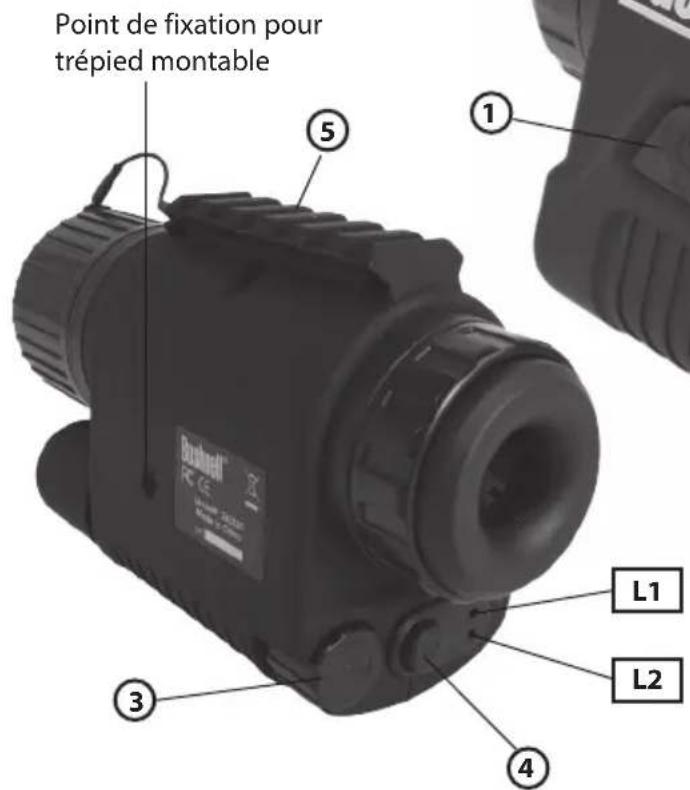
GuIDE DEs DIFFErEntEs
PIEcEs Et commanDEs
| Bushnell Outdoor Products | Bushnell Outdoor Products |
| Attn.: | Repairs | |
| 9200 Cody | 25A East Pearce Street, Unit 1 | |
| Overland Park, Kansas 66214 | ||
Attn.: Repairs
Richmond Hill, Ontario L4B 2M9
©2013 Bushnell Outdoor Products
Bushnell Outdoor Products
Attn.: Repairs Attn.: Repairs
9200 Cody 25A East Pearce Street, Unit 1
Overland Park, Kansas 66214 Richmond Hill, Ontario L4B 2M9
En CANADÁ enviar a:
Bushnell Outdoor Products
©2013 Bushnell Outdoor Products
Bushnell Outdoor Products
Bushnell Outdoor Products
Attn.: Repairs Attn.: Repairs
9200 Cody 25A East Pearce Street, Unit 1
Overland Park, Kansas 66214 Richmond Hill, Ontario L4B 2M9
©2013 Bushnell Outdoor Products
Bushnell Outdoor Products
Attn.: Repairs Attn.: Repairs
9200 Cody 25A East Pearce Street, Unit 1
Overland Park, Kansas 66214 Richmond Hill, Ontario L4B 2M9
IN CANADA Send To:
Bushnell Outdoor Products
European Service Centre
Mathias-Brüggen-Str. 80
D-50827 Köln
GERMANY
©2013 Bushnell Outdoor Products
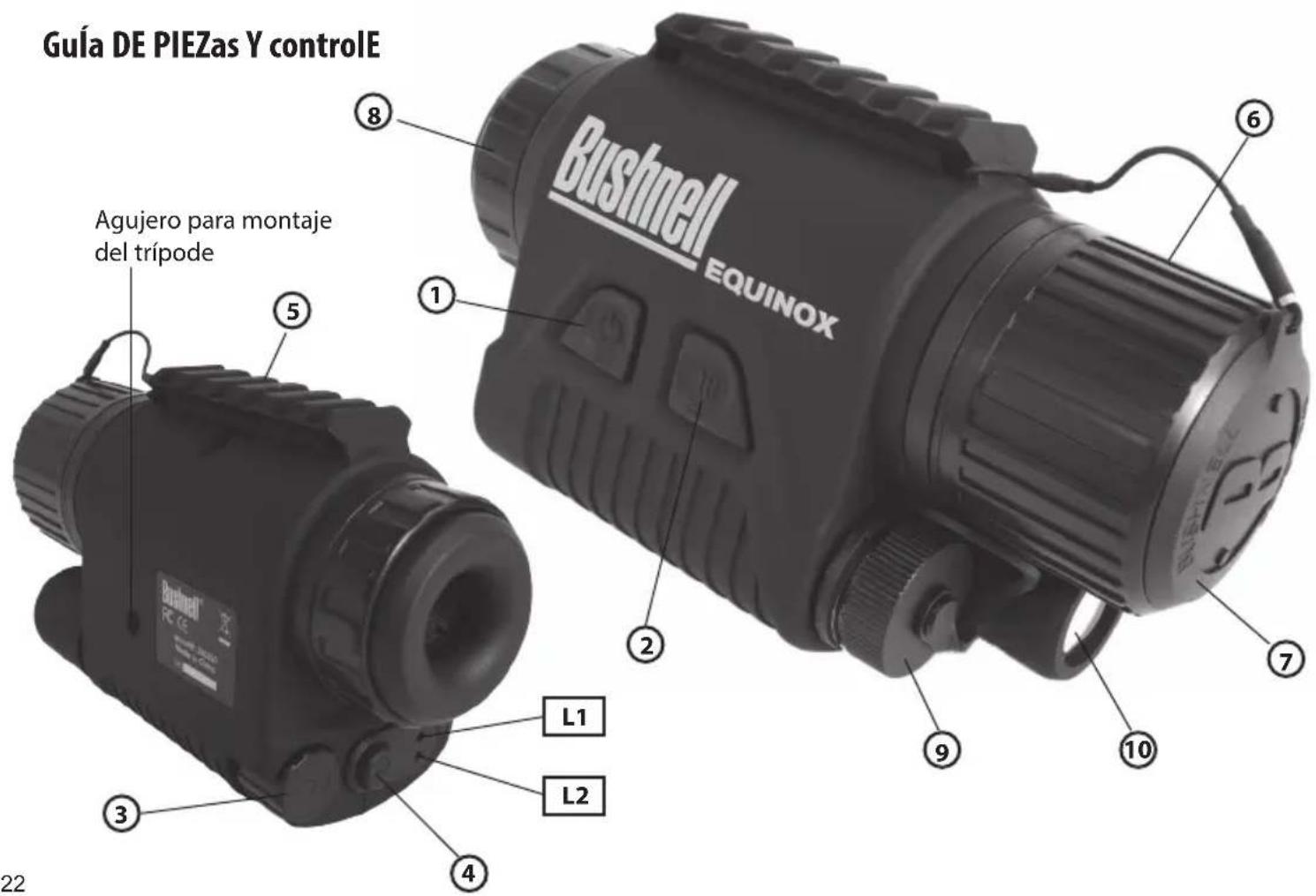
Gula DE controlos E PEÇas
mUDAR A COR DO ECRă LCD
Bushnell Outdoor Products
Bushnell Outdoor Products
Attn.: Repairs Attn.: Repairs
9200 Cody 25A East Pearce Street, Unit 1
Overland Park, Kansas 66214 Richmond Hill, Ontario L4B 2M9
©2013 Bushnell Outdoor Products
Bushnell
©2013 Bushnell Outdoor Products
(800) 423-3537 • www.bushnell.com