DKI 3184 - Cooker CLATRONIC - Free user manual and instructions
Find the device manual for free DKI 3184 CLATRONIC in PDF.



User questions about DKI 3184 CLATRONIC
0 question about this device. Answer the ones you know or ask your own.
Ask a new question about this device
Download the instructions for your Cooker in PDF format for free! Find your manual DKI 3184 - CLATRONIC and take your electronic device back in hand. On this page are published all the documents necessary for the use of your device. DKI 3184 by CLATRONIC.
USER MANUAL DKI 3184 CLATRONIC
text_image
Profi Cooknatural_image
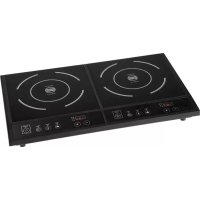
Exterior view of a two-whe� electric cooktop appliance with dual fans and control buttons (no text or symbols visible)Inhalt
Inhoud · Sommaire · Indice · Índice · Índice · Contents
Innhold · Spis treści · Obsah · Tartalom · Содержание
D-47906 Kempen/Germany
Let op, overbelasting!:
Attention, surcharge!
Consommation: 3300 W
Classe de protection: II
Poids net: 4,85 kg
General Safety Instructions
Read the operating instructions carefully before putting the appliance into operation and keep the instructions including the warranty, the receipt and, if possible, the box with the internal packing. If you give this device to other people, please also pass on the operating instructions.
- The appliance is designed exclusively for private use and for the envisaged purpose. This appliance is not fi t for commercial use. Do not use it outdoors (except if it is designed to be used outdoors). Keep it away from sources of heat, direct sunlight, humidity (never dip it into any liquid) and sharp edges. Do not use the appliance with wet hands. If the appliance is humid or wet, unplug it immediately. Do not put it in water.
- When cleaning or putting it away, switch off the appliance and always pull out the plug from the socket (pull on the plug, not the cable) if the appliance is not being used and remove the attached accessories.
- Do not operate the machine without supervision. If you should leave the workplace, always switch the machine off or remove the plug from the socket (pull the plug itself, not the lead).
- Check the appliance and the cable for damage on a regular basis. Do not use the appliance if it is damaged.
- Do not try to repair the appliance on your own. Always contact an authorized technician. To avoid the exposure to danger, always have a faulty cable be replaced only by the manufacturer, by our customer service or by a qualified person and with a cable of the same type.
- Use only original spare parts.
- Pay careful attention to the following "Special Safety Instructions".
Children and Frail Individuals
- In order to ensure your children's safety, please keep all packaging (plastic bags, boxes, polystyrene etc.) out of their reach.
Caution! Do not allow small children to play with the foil as there is a danger of suffocation! - In order to protect children or frail individuals from the hazards of electrical equipment, please ensure that this device is only used under supervision. This device is not a toy. Do not allow small children to play with it.
Symbols in these Instructions for Use
Important information for your safety is specially marked. It is essential to comply with these instructions in order to avoid accidents and prevent damage to the machine:

WARNING:
This warns you of dangers to your health and indicates possible injury risks.

CAUTION:
This refers to possible hazards to the machine or other objects.

NOTE: This highlights tips and information.
Special safety instructions
GB
- Place the appliance on an even, moisture and heat-resistant surface. Use a heatresistant plate when placing on sensitive surfaces.
- Do not move the device when it is in operation.
- Only touch the machine by using the handles and buttons provided.
- Due to the rising heat and vapours the device should not be operated under wall cupboards.
- Keep the unit at a safe distance from easily infl ammable objects such as furniture, curtains, etc. (30cm). Under no circumstances should the device be installed in cupboards.
- Do not heat empty pots on the cooking zone as this may lead to dangerous overheating.
- Ventilation: Always keep the ventilation slots free from any obstructions and dirt.
- Caution: During operation the temperature of the exposed surface may be very hot. Danger of burns!

Attention
- Ceramic surface! If the surface is damaged or has cracks the device must be switched off to avoid the hazard of electrical shocks.
- Induction heat! Metal objects as, e.g., knives, forks, spoons and pot lids should not be placed on the cooking zone as they may get hot.
- Hot surface! The induction cooker initially heats only the base of the cooking utensils used, not the cooking zone itself. However, because of the heat radiated during cooking, dangerously high temperatures may also occur at the cooking zone after the cooking cycle. Hazard of burns!
- Warning: potential damage to your health! People wearing pacemakers must not use this cooker.
Control panel
1 Operation indicator 6 + button (higher)
2 ON/OFF button 7 – button (lower)
3 TIMER button 8 Display
4 TEMP. button for cooking function 9 Lights on display "temperature controlled"
5 HEAT button for cooking function "power controlled"
General information
Cooking with induction technology
When cooking with induction technology, heat is only generated by means of magnetic power, if a pot or pan with a magnetisable base is placed on a switched-on cooking zone. The induction cooker heats only the base of the cooking utensils used, not the cooking zone itself. The induction coil is located below the ceramic. If the coil is supplied with electrical power a magnetic field develops generating whirls in the pot's base. This results in the heating of the base material. The induction process saves energy as heat is solely produced where it is needed.
GB
What cooking utensils may I use?
Induction cookers require pots, i.e., pot bases made of magnetisable material. Today, cooking utensils appropriate for induction cooking usually bear a note saying 'Suitable for induction hob' or similar.
But principally you may use any iron-based cooking utensils; to find out whether a pot or pan is suitable, i.e., magnetisable just try the following:
Put the respective pot on the hob. Should appear “---” in the display after having switched on the device and repeatedly ring out an acoustic signal the pot is not suitable for this use.
i
NOTE: For reasons of safety, the device automatically switches to the standby mode after a few seconds.
Cooking utensils made of the following materials are not suitable for induction hobs: Clay, glass or aluminium.
Do not use the following types of pots:
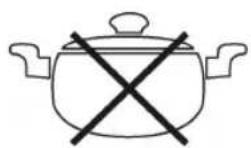
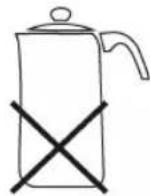
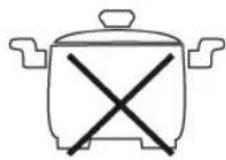
Pots with bended Pots with a base diameter Pots standing (convex/parabolic) bases. of less than 12 cm. on feet.
Operating time
Do operate the device only for a maximum of 4 hours continuously. Then interrupt the operation for at least 30 minutes, otherwise you risk some damages by overload.
Weight
Charge the cooker ring only with a maximum weight of 4 kg, otherwise you risk damages to the cooking surface.
Mains supply
Connected load/wattage
The hob can take up an overall load of 3300 W. Because of this high connected load it is recommended to use a separate connection protected over a 16 A safety switch.

Warning: Avoid overloading!
- If you use extension lines, these should dispose of a cable cross-section of at least 1.5 mm ^2 .
- Do not use multiple socket-outlets, as this device is too powerful.
Connection
GB
- Before inserting the mains plug into the socket check whether the voltage which you intend to use corresponds to that of the machine. Please see the label on the machine for details.
- Only connect the machine to a correctly installed safety socket, 230 V/50 Hz.
Operating instructions
Initial operation
- Standby mode: After you have connected the device's plug to the mains supply, the hub is in standby mode. The lights of the ON/OFF buttons switch on.
- Put a suitable pot on the cooking zone.
- Push the ON/OFF button (2) to start the cooking process. The lights of the HEAT function flash.
Cooking function
Press the HEAT button once or the TEMP. button twice in order to choose a cooking function. The lamp for the corresponding function lights up.
HEAT power control system for cooking
- The food to be cooked is continuously simmering on the power setting which has been selected by you.

NOTE:
- The display shows the power level 5.
- After the cooking zone has been switched on the selected power setting can be changed at any time with the keys (+/-).
TEMP. Temperature controlled cooking
- The food to be cooked will be heated up to the temperature selected by you and kept warm on this temperature by automatic regulation.

NOTE:
- The display shows the value "120".
- After the cooking zone has been switched on the pre-selected temperature can be changed at any time with the keys (+/-).
- In case of temperatures up to 200 °C this function is suitable also for frying. Please do use only highly heat-resistant fat!
GB TIMER enter disconnecting time
The cooking functions can be limited in time.
- Select a cooking function.
- Afterwards press the TIMER button. The TIMER light and the light for the cooking function flash.
- Now you can set the desired turn-off time with the buttons (- / + ) . The maximum time amounts to 180 minutes.
- After about 3 seconds the lights stop flashing and the light for the cooking function glows steadily.
i NOTE:
- After the timer has been switched on you can change the levels with the buttons (+/-) at any time.
- Interrupt: You can interrupt this process at any time by pressing the ON/OFF button (2).
- The end of the cooking time will be announced in the last minute by an acoustic signal.
Switching off
- Push the ON/OFF button (2).
- The hob changes back to the standby mode from whatever operating mode. The operating mode display (1) is illuminated.
NOTE: The ventilator for the cooling air still continues to run for about 30 seconds.
- Pull the plug.
- Let the device cool down, before you put it away.
Identification of the pot
The device has a pot recognition function. After the pot has been taken from the hob, it switches back to the standby mode.
In this context, please pay attention to the following:
WARNING:
After having used the hot plate, you need to turn off the switches; do not only use the pot detection.
Hazard of burns! Because of the heat radiated during cooking, dangerously high temperatures may occur at the cooking zone after the cooking cycle.
Cleaning
GB
Always pull out the plug from the mains socket before cleaning and wait until the unit has cooled down.
Do not use any wire brush or other abrasive objects.
Do not use any acidic or abrasive detergents.
Under no circumstances should the device be immersed in water for cleaning.
Ceramic Hob
- Clean the surface from food remains when it's still warm using a moist cloth or tissue.
- Wash the hob using a soft sponge and some water, then wipe dry with a soft cloth.
- Cleaning agent for ceramic surfaces: In case of stubborn, baked-in remains, use suitable cleaning products available at special departments of department stores.
Housing
- Clean the housing after use using a slightly moist cloth.
- Make sure that no fluid matter gets into any of the openings of the housing. This might damage the device or result in an electric shock.
Troubleshooting
- Device does not function, no indication on the display.
Remedy: Check the mains connection.
- There is a sound after I have selected a cooking function and switched the device on.
Possible cause: You put no or an unsuitable pot on the hob.
NOTE: For reasons of safety, the device automatically switches to the standby mode after a few seconds.
Remedy: Put a pot on the hob that is suitable for induction hobs.
- The hob suddenly switches off during operation.
Possible cause: The overheating protection (cutout switch) has been activated.
Remedy: Pull the plug and let the device cool down for about 20 min.
Then start operating the device again.
Further cause: The ventilation slots are obstructed.
Remedy: Free the ventilation slots from any obstructions.
- When keeping food warm the pot is not maintaining the temperature.
Possible cause: The pot's base is not level or bended (convex/concave).
Remedy: Put a suitable pot on the hob.
CR • Error messages
During the operation the following message appears on the display:
Security instruction
--- There has been put no or an unsuitable pot on the stove.
Technical data
Model: DKI 3184
Power supply: 230 V, 50 Hz
Power consumption: 3300 W
Protection class:
||
Net weight: 4,85 kg
This device has been tested according to all relevant current CE guidelines, such as electromagnetic compatibility and low voltage directives, and has been constructed in accordance with the latest safety regulations.
Subject to technical changes without prior notice!
Guarantee
The device supplied by our Company is covered by a 24 month guarantee starting on the date of purchase (receipt).
During the life of the guarantee any fault of the device or its accessories ascribable to material or manufacturing defects will be eliminated free of charge by repairing or, at our discretion, by replacing it. The guarantee services do not entail an extension of the life of the guarantee nor do they give rise to any right to a new guarantee!
Proof of the guarantee is provided by the proof of purchase. Without proof of purchase no free replacement or repair will be carried out.
If you wish to make a claim under the guarantee please return the entire machine in the original packaging to your dealer together with the receipt.
Defects to consumables or parts subject to wearing as well as cleaning, maintenance or the replacement of said parts are not covered by the guarantee and hence are to be paid!
The guarantee lapses in case of unauthorized tampering.
After the expiry of the guarantee
GB
After the expiry of the guarantee repairs can be carried by the competent dealer or repair service against the payment of the ensuing costs.
Meaning of the "Dustbin" Symbol
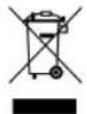
Protect our environment: do not dispose of electrical equipment in the domestic waste. Please return any electrical equipment that you will no longer use to the collection points provided for their disposal.
This helps avoid the potential effects of incorrect disposal on the environment and human health.
This will contribute to the recycling and other forms of reutilisation of electrical and electronic equipment.
Information concerning where the equipment can be disposed of can be obtained from your local authority.