KickBee - Toys BEEWI - Free user manual and instructions
Find the device manual for free KickBee BEEWI in PDF.



User questions about KickBee BEEWI
0 question about this device. Answer the ones you know or ask your own.
Ask a new question about this device
Download the instructions for your Toys in PDF format for free! Find your manual KickBee - BEEWI and take your electronic device back in hand. On this page are published all the documents necessary for the use of your device. KickBee by BEEWI.
USER MANUAL KickBee BEEWI
BLUETOOTH MINI ROBOT
KICK BEE BBZ150
KICK BEE
natural_image
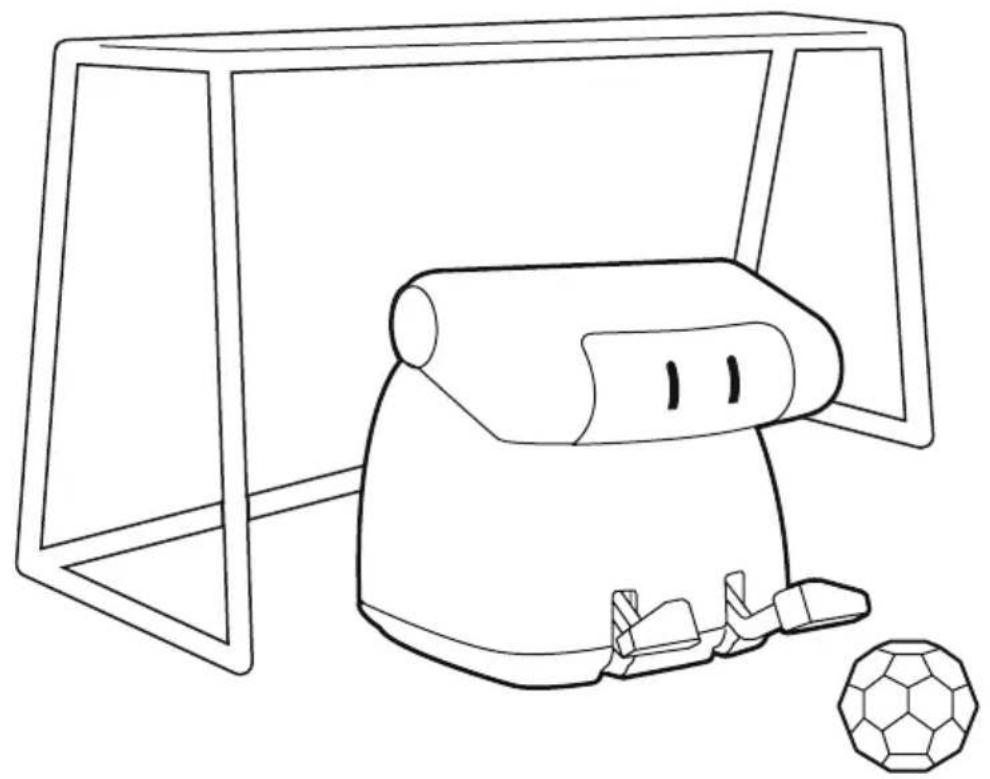
Line drawing of a robot arm positioned near a soccer ball (no text or symbols)

APPLICATION
natural_image
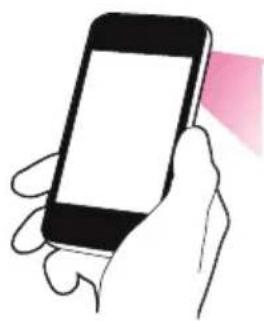
Illustration of a hand holding a smartphone with a blank screen (no text or symbols)
text_image
QR code image containing encoded data, no visible human-readable text
natural_image
Pink square icon with a white telephone handset and 'BeeWi' text overlay (no other symbols or text)User's guide
ENGLISH 4
FRANCAIS 10
DEUTSCH 16
ITALIANO 22
ESPAÑOL 28
PORTUGUES 34
NEDERLANDS 40
БЪЛгАРСКИ 46
ROmÂN 52
РУССКИЙ 58
日本語 64
中文 70
Thank you for purchasing the Bluetooth Mini Robot from BEEWI. Please read the following instructions to learn how to configure and use more effectively your product.
INTRODUCTION
The Bluetooth Mini Robot can be controlled directly from your Smartphone using the specific BeeWi BotPad application available on line on AppStore or Google Play. The Bluetooth Mini Robot works as a remote controlled robot and it can be moved in all directions including left/right and forward/backward directions. You can play various ball games as well as Sumo games using the battling arms to kick the ball or another Mini Robot. You can also combine multiple robots, each one being controlled by a single player, using either iOS or Android devices. The application provided allows for both touch screen and motion control, offering a funnier, richer and more user friendly experience.
The Mini Robot is Bluetooth 3.0 compliant and it is compatible with all Bluetooth compliant iOS devices using Wireless iAp protocol such as iPod touch (G3 and above), iPhone (3G and above) and iPad as well as Bluetooth compliant Android devices using Bluetooth SPP profile.
1. PRODUCT DESCRIPTION
1.1. Package Content
- Bluetooth Mini Robot
- Soccer Ball and Goal
- Personalization Sticker
- Quick Start Guide
1.2. Main Features
- Remote Controlled Mini Robot with 2 independent motors
- Fully controlled by a Smartphone using Bluetooth Radio
- Forward/backward, left/right movement, fixed position rotation
- Use 2 standard AAA batteries
- User friendly Smartphone app for iOS and Android mobile devices
- Motion & Touch Key Control modes
- Multi-Level Control with variable speed
- Typical range, 10 meter
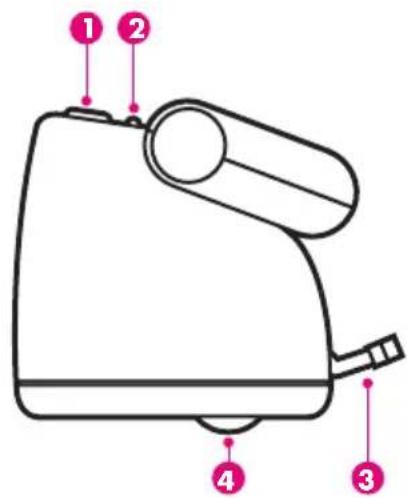
1.3. Product Outlook
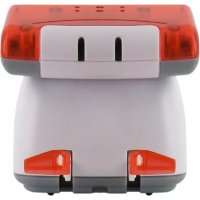
1 Power On/Off Button
② Status LED
3 Battling arms
4 Wheels
text_image
Diagram of a hand mixer with numbered parts labeled 1 to 41.4. Product Specification
| BLUETOOTH VERSION Bluetooth 3.0 | |
| BLUETOOTH RANGE Class 2, 10 m typical, up to 10 m | |
| PROTOCOL Wireless iAp, SPP | |
| BATTERY 2 x AAA (not included) | |
| TYPICAL USE TIME 8 h | |
| SERVO CONTROLS 2 independent motors | |
| DIMENSIONS W62 x H62 x D77 | |
| WEIGHT 68 g |
2. INITIAL SETTINGS
2.1. Battery Installation
Before using the product, you must insert 2 AAA batteries in the battery slot at the bottom of the product.
Unscrew the battery door and fit the 2 AAA batteries respecting the polarity.
2.2. App Installation
Go to iTunes or GooglePlay and look for "BeeWi BotPad" app. Follow the on-screen indications to download and install the app. Once the application has been successfully installed, you can launch it directly. Make sure the Mini Robot has been paired and connected prior to start the application.
2.3. Pairing
To pair the Mini Robot with your Smartphone, refer to the pairing procedures in your Smartphone user manual and follow the instructions below:
- Power on the Mini Robot and wait 30 seconds for it to be turned in pairing mode - In the Smartphone Bluetooth menu, search for devices, select the device name "BeeWi BBZ150" to pair it. When prompted, enter the passkey "0000".
Warning: the Mini Robot will not turn in pairing mode if it has been previously paired and is automatically connecting to another device.
3. USING THE MINI ROBOT
3.1. Connection with iPhone
If it has been previously paired, the Mini Robot will automatically connect to the iPhone when it is powered on. If this is not the case, you can also go to the iPhone Bluetooth menu and select the "BeeWi BBZ150" device in your device list.
If you are using 2 different Robots with the same device, always make sure there is only one connected at a time or the application will malfunction.
3.2. iPhone User Interface
Once the connection is made, the app will launch automatically. You can also launch it directly from the iPhone main screen.
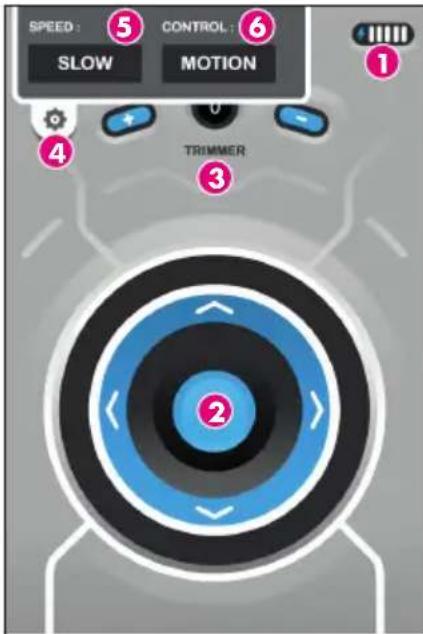
The Mini Robot will be connected automatically and the control screen below displayed. By default the control is MOTION and the trimmer is set to "0".
text_image
SPEED : ⑤ CONTROL : ⑥ SLOW MOTION ① ④ TRIMMER ③- Battery meter
2.Direction wheel (only in TOUCH mode)
- Trimmer
4.Settings bar
5.SPEED: SLOW or FAST speed
3.3. Connection with Android Smartphone
When the BeeWi BotPad application is launched, it will automatically connect the Mini Robot it has been previously connected.
To connect manually the Mini Robot, display the application menu using the mobile option key, then press the button CONNECTION to see the list of paired devices.
Make sure your Mini Robot is turned on and select it in the list. The Mini Robot will be connected automatically and the control screen below displayed.
3.4. Android User Interface
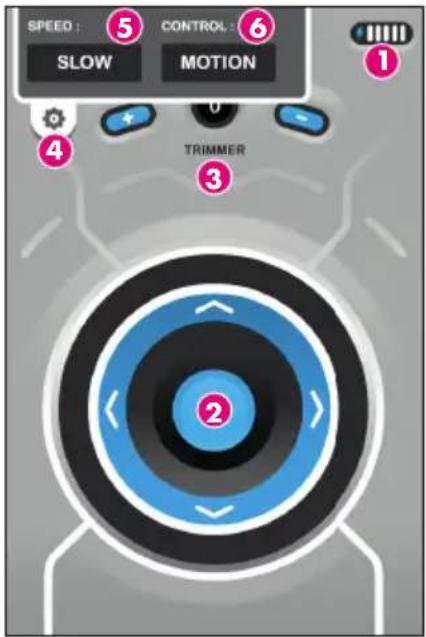
When the Mini Robot is connected, you can access the control screen below. By default the control is motion and the trimmer is set to "0".
text_image
SPEED : ⑤ CONTROL : ⑥ SLOW MOTION ① 4 TRIMMER ③- Battery meter
- Direction wheel (only in TOUCH mode)
- Trimmer
- Option Menu
- SPEED: to select SLOW or FAST speed
- CONTROL: to select MOTION or TOUCH
3.5. Operations
Adjust the direction using the TRIM buttons before using the Mini Robot. Select Touch control and gently push the joystick upward until the Robot moves in the forward direction. Then use the TRIM button to adjust the direction and make sure there is no drift on the left or the right. Once the direction is properly trimmed, you can start to use the product. It is recommended to use the SLOW mode with smoother and lower speed commands to start with.
In Motion control the commands are the following:
- To move forward, tilt the Smartphone forward
- To move backward, tilt the Smartphone towards yourself
- To turn left, turn the Smartphone leftwards
- To turn right, turn the Smartphone rightwards In Touch control, the commands are the following:
- To move forward, slide the engine bar up
- To move backward, slide the engine bar down
- To turn left, slide the direction bar left
- To turn right, slide the direction bar right
3.5. Configuration
The configuration menu can be accessed by sliding down the SETTINGS bar on the top or pressing the Option button. There are different options listed in the Settings:
- CONTROL: to select either MOTION or TOUCH control modes.
- MODE : to select either SLOW or FAST speeds
On Android device, another option button "CONNECTION" is provided to pair ou manually connect a Mini Robot.
The default settings are MOTION & SLOW, but your preferred settings will be saved.
5. CAUTIONS & MAINTENANCE
WARNING!
- Please read carefully the complete manual and strictly follow the instructions given before using the product.
- This product is not suitable for children under 14 years old.
- This product is not suitable for children under 3 years old – risks of small parts breaking off and potential choking hazard.
- Do not disassemble or rework the product as this may cause damage and void the warranty.
CAUTION
- Do not mix old and new batteries together. Do not mix battery type or brands.
- Only batteries of the same or equivalent type as recommended are to be used.
• Non-rechargeable batteries are not to be recharged. - Rechargeable batteries are to be removed from the toy before being charged.
- Rechargeable batteries are only to be charged under adult supervision.
- Batteries are to be inserted with the correct polarity.
- Exhausted batteries are to be removed from the toy.
- The supply terminals are not to be short-circuited.
- Please keep this information for future reference.
USE AND MAINTENANCE
- Do not operate the product outdoor, or on a wet or dirty surface.
- Use the product with care and avoid throwing, crashing or twisting it.
- Do not leave the product near sources of heat or in wet environment conditions for a long time.
DAMAGES NOT COVERED By THE STANDARD WARRANTY:
- Damages that are caused by a improper use of the toy (shocks, drops, heat, misuse, etc)
- Damages resulting from any non-compliance with manufacturer instructions
• Cosmetic damages (scratches, ...) - Components and parts which require regular renewal
- Damages to the toy after an intervention by any person not authorized by BeeWi
European Union Directives Conformance Statement
Hereby, VOXLAND declares that this product is in compliance with:

- The essential requirements and other relevant provisions of Directive 1999/5/EC
• All other relevant EU Directives
You can view your product's Declaration of Conformity (DoC) to Directive 1999/5/EC (to R&TTE Directive) at www.bee-wi.com.
Federal Communications Commission

This device complies with Part 15 of the FCC Rules. Operation is subject to the following two conditions: (1) this device may not cause harmful interference, and (2) this device must accept any interference received, including interference that may cause undesired operation.
Shielded cables must be used with this unit to ensure compliance with the Class B FCC limits.
Warning: Changes or modifications to this unit not expressly approved by the party responsible for compliance could void the user's authority to operate the equipment.
NOTE: This equipment has been tested and found to comply with the limits for a Class B digital device, pursuant to Part 15 of the FCC Rules. These limits are designed to provide reasonable protection against harmful interference in a residential installation. This equipment generates, uses and can radiate radio frequency energy and, if not installed and used in accordance with the instructions, may cause harmful interference to radio communications.
However, there is no guarantee that interference will not occur in a particular installation. If this equipment does cause harmful interference to radio or television reception, which can be determined by turning the equipment off and on, the user is encouraged to try to correct the interference by one or more of the following measures:
- Reoria or relocate the receiving antenna.
- Increase the separation between the equipment and receiver.
- Connect the equipment into an outlet on a circuit different from that to which the receiver is connected.
- Consult the dealer or an experienced radio/TV technician for help.
Canada Compliance Statement
This device complies with Industry Canada licence-exempt RSS standard(s). Operation is subject to the following two conditions: (1) this device may not cause interference, and (2) this device must accept any interference, including interference that may cause undesired operation of the device. Under Industry Canada regulations, this radio transmitter may only operate using an antenna of a type and maximum (or lesser) gain approved for the transmitter by Industry Canada. To reduce potential radio interference to other users, the antenna type and its gain should be so chosen that the equivalent isotropically radiated power (e.i.r.p.) is not more than that necessary for successful communication.
Caring for the environment by recycling

Do not dispose of electrical devices or accessories with your household waste.
In some countries or regions, collection systems are set up to handle electrical and electronic waste items. Contact your regional authorities for more details.
Copyright and other legal information
BEEWI is a registered trademark. Other trademarks mentioned herewith are owned by their proprietors. All other product or service names are the property of their respective owners.
The use of wireless devices and their accessories may be prohibited or restricted in certain areas. Always obey the laws and regulations on the use of these products.
This product is covered by a 2-year product warranty which is valid from the date of purchase. Users are not permitted to make changes or modify the device in any way. Changes or modifications not expressly approved by the party responsible for compliance will void the user's warranty. Please visit our website www.bee-wi.com for more information.
Technical support: support@bee-wi.com.
© VOXLAND CS90234 13311 Marseille Cedex 14 France.
text_image
Diagram of a hand mixer with numbered parts labeled 1 to 41.4. Spécifications
| BLUETOOTH Bluetooth 3.0 | |
| PORTEE Classe 2, environ 10 m | |
| PROTOCOLE Wireless iAp, SPP | |
| ALIMENTATION 2 piles AAA (non incluses) | |
| AUTONOMIE 8 h | |
| CONTROLES SERVO 2 moteurs indépendants | |
| DIMENSIONS W62 x H62 x D77 | |
| POIDS 68 g |
2. AvANT UTILISATION
2.1. Installation des piles
iPad®, iPhone®, and iPod touch® are trademarks of Apple Inc. registered in the U.S. and other countries.
Support technique: support@bee-wi.com.
text_image
Diagram of a hand mixer with numbered parts labeled 1 to 41.4. Spécifications
text_image
Diagram of a hand mixer with numbered parts labeled 1 to 4text_image
Diagram of a hand mixer with numbered parts labeled 1 to 4text_image
Diagram of a hand mixer with numbered parts labeled 1 to 41.4. Especificações
1. BESCHRIJVING vAN HET PRODUCT
text_image
Diagram of a hand mixer with numbered parts labeled 1 to 4text_image
Diagram of a hand mixer with numbered parts labeled 1 to 41.4. Спецификации
text_image
Diagram of a hand mixer with numbered parts labeled 1 to 41.4. Specificații
| BLUETOOTH Bluetooth 3.0 | |
| RAZĂ DE ACTIUNE Clasa a 2-a, aproximativ 10 m | |
| PROTOCOL Wireless iAp, SPP | |
| ALIMENTARE 2 accumulatori AAA (neinclusi) | |
| AUTONOMIE | 8 h |
| SERVOCONTROALE 2 motoare independente | |
| DIMENSIUNI l62 x h62 x a77 | |
| MASĂ 68 g | |