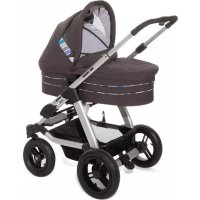
Viper 4S - Stroller ABC DESIGN - Free user manual and instructions
Find the device manual for free Viper 4S ABC DESIGN in PDF.



| Product type | Combined baby stroller with convertible bassinet |
| Brand | ABC Design |
| Model | Viper 4S |
| Maximum supported weight (child) | 15 kg |
| Recommended age | From 6 months to 3 years (bassinet from birth) |
| Safety standard | EN 1888:2012 |
| Backrest adjustment | 4 positions |
| Telescopic handle | Adjustable height |
| Front wheels | Swivel and lockable |
| Parking brake | Foot brake, lever to lower/raise |
| Hood | Removable and adjustable |
| Leg rest | Adjustable height |
| Protection bar | Adjustable height |
| Safety harness | Waist belt + crotch strap (5-point) |
| Car seat compatibility | ABC Design Risus, Doozy ; Maxi Cosi Cabrio, Citi, Pebble ; Römer Baby-Safe plus SHR ; Cybex Aton ; Kiddie Ride Ôn |
| Shopping basket capacity | 5 kg maximum |
| Folding | Foldable, handlebar folded down |
| Cover maintenance | Machine washable cold (delicate detergent) |
| Chassis maintenance | Oil moving parts with silicone oil |
| Materials | Compliant with AZO, EN71-2, EN71-3 |
| Included accessories | Sun canopy, leg cover, mattress (bassinet) |
Frequently Asked Questions - Viper 4S ABC DESIGN
User questions about Viper 4S ABC DESIGN
0 question about this device. Answer the ones you know or ask your own.
Ask a new question about this device
Download the instructions for your Stroller in PDF format for free! Find your manual Viper 4S - ABC DESIGN and take your electronic device back in hand. On this page are published all the documents necessary for the use of your device. Viper 4S by ABC DESIGN.
USER MANUAL Viper 4S ABC DESIGN
Viper 4S
Bedienungsanleitung - DE (01-04)
Instructions for use - EN (05-08)
NB: Keep these instructions for future reference!
natural_image
Line drawing of a mechanical component with a labeled section '1a' (no text or symbols on the diagram itself)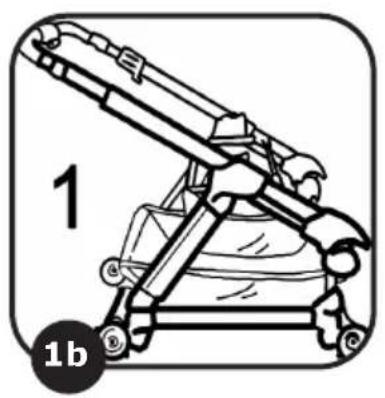
natural_image
Technical line drawing of a mechanical device with labeled parts (1 and 1b), no readable text or symbols beyond labels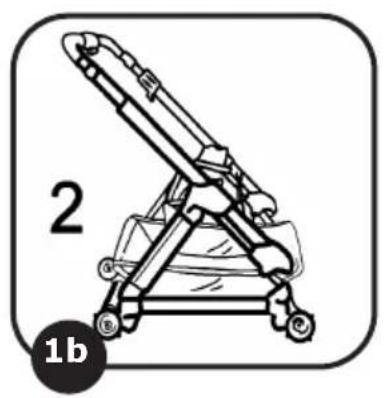
natural_image
Line drawing of a mechanical device with a stand and wheels, labeled '1b' (no text or symbols on the device itself)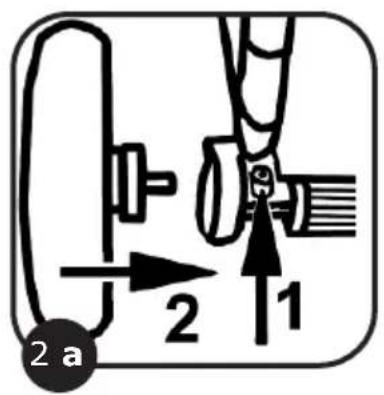
natural_image
Diagram of a car wheel assembly with an upward arrow indicating motion or force (no text or symbols)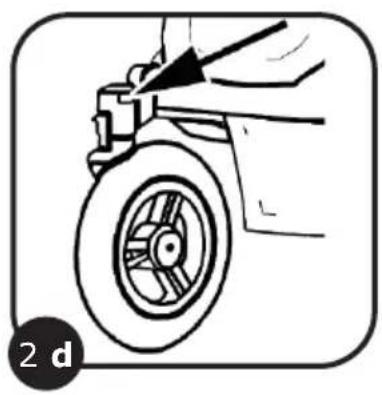
natural_image
Line drawing of a person using a bicycle tire to lift a wheel (no text or symbols)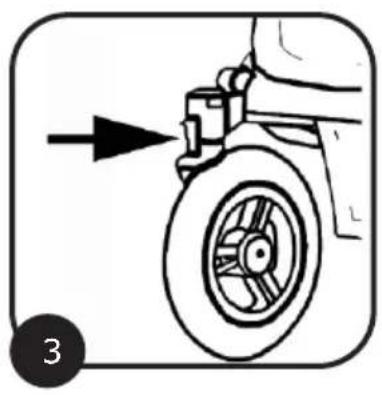
natural_image
Diagram of a vehicle's wheel assembly with an arrow indicating direction (no text or symbols)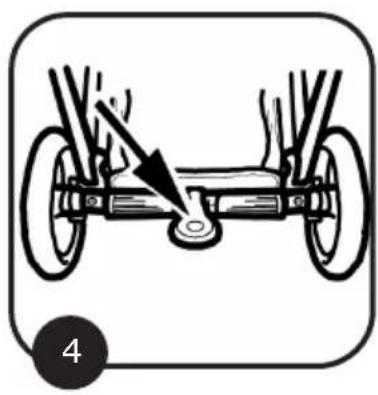
natural_image
Diagram of a bicycle's wheel assembly with a hand pointing to the wheel (no text or labels)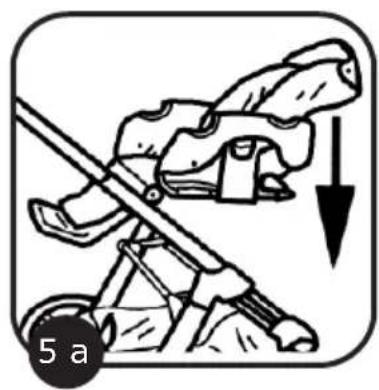
natural_image
Illustration of a person using a tool to lift a vehicle, with a downward arrow indicating motion (no text or symbols)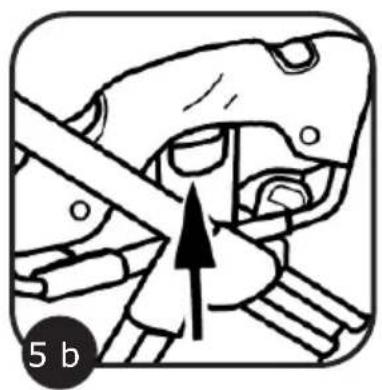
natural_image
Illustration of a mechanical assembly with an arrow indicating direction (no text or symbols)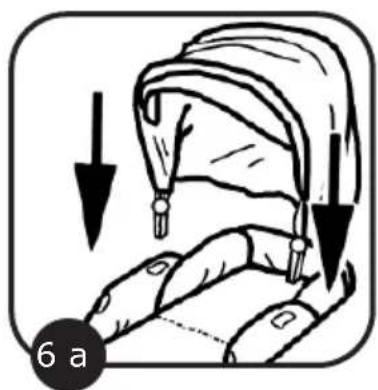
natural_image
Illustration of a hand holding a curved object with arrows indicating motion or force direction (no text or symbols)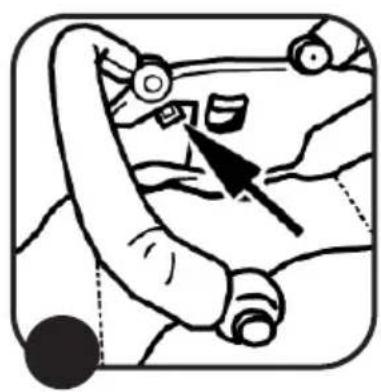
natural_image
Illustration of a person's hand holding a car with a pointing arrow (no text or symbols)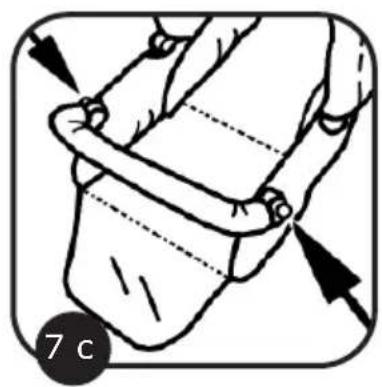
natural_image
Illustration of a person's seatbelt with arrows indicating fastening (no text or symbols)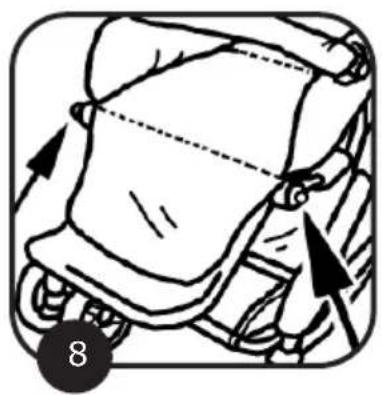
natural_image
Illustration of a car seatbelt with arrows indicating movement direction (no text or symbols)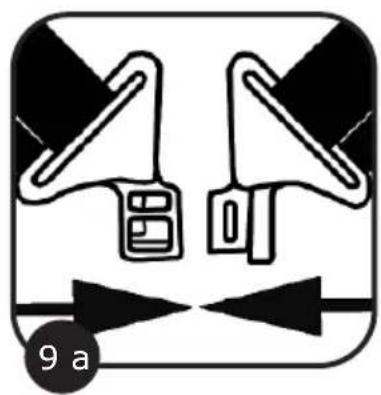
natural_image
Pure electrical circuit lines without any symbols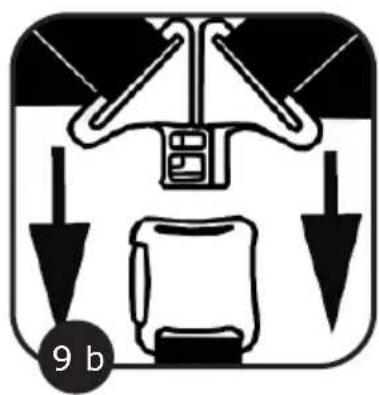
natural_image
Diagram of a vehicle seatbelt with directional arrows indicating movement (no text or symbols)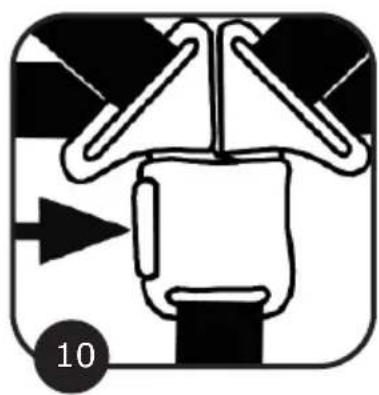
natural_image
Pure mechanical diagram showing a gear or cam mechanism without any text, numbers, or symbols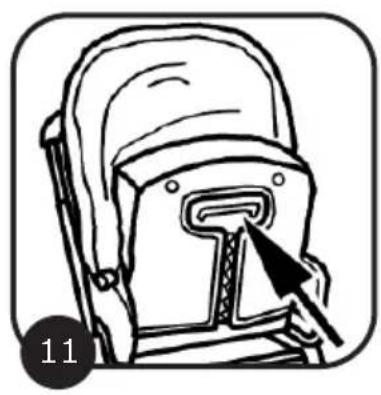
natural_image
Line drawing of a backpack with a hand pointing to the front seat (no text or symbols)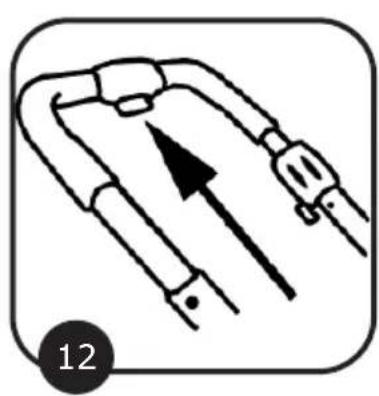
natural_image
Diagram of a mechanical or electrical component with directional arrows, no text or symbols present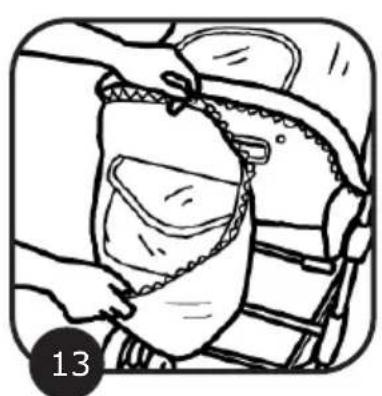
natural_image
Illustration of a person inserting a bag into a chair (no text or symbols)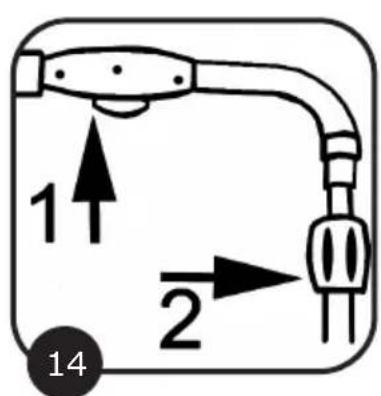
natural_image
Simple line drawing of a boat with directional arrows indicating flow or movement (no text or symbols)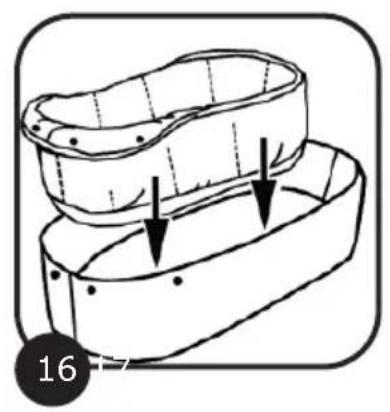
natural_image
Diagram of a mechanical component with two arrows indicating direction, no text or symbols present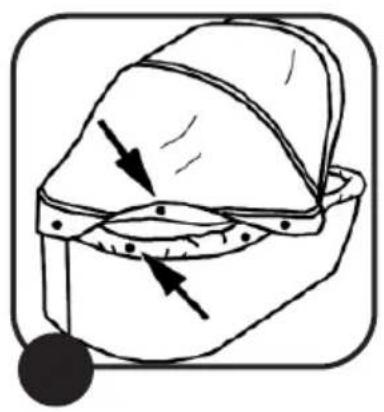
natural_image
Diagram of a helmet with arrows indicating direction, no text or symbols present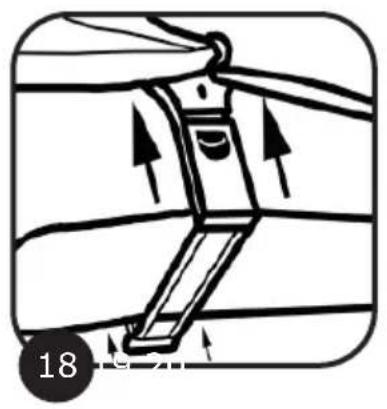
natural_image
Diagram of a mechanical device with directional arrows indicating motion or force (no text or symbols)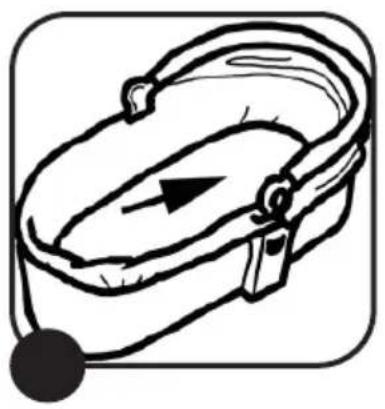
natural_image
Line drawing of a closed bag with a black arrow and a black button, no text or symbols present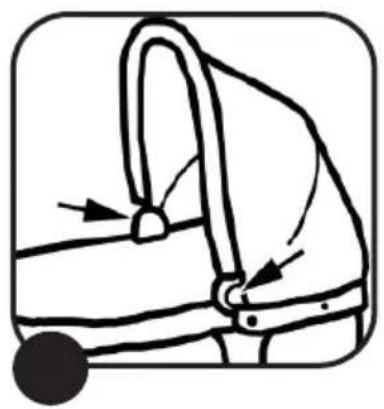
natural_image
Simple line drawing of a handbag with a handle and belt, no text or symbols present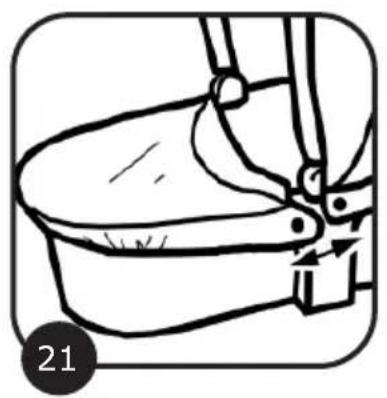
natural_image
Line drawing of a bucket with a handle and lever mechanism, no text or symbols present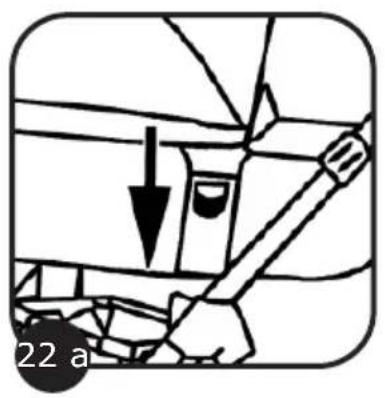
natural_image
Simple line drawing of a hand holding a tool, with a downward arrow and a circular label '22 b' (no text or symbols on the diagram itself)- Combination travel system with convertible attachment
• Height-adjustable telescopic handle - Four-position backrest
- Swivel mode and locked setting on front wheels
- Tested for conformity with EN 1888 : 2012
- Compatible with ABC Design "Risus" "Doozy" car seat
- Compatible with "Maxi Cosi Cabrio, Citi, Pebble" car seat
- Compatible with "Römer Baby-Safe plus SHR" car seat
- Compatible with "Cybex Aton" car seat
- Compatible with ABC Design "Kiddie Ride-On"
Care instructions
- The materials used to manufacture our products comply with the AZO requirement, EN71-2 and EN71-3, and light fastness standards for textiles. Nevertheless, we advise you not to leave the product exposed to bright sunlight for any length of time. No claims may be made for wear and tear or if the colours fade when exposed to strong sunlight. The fabric covers on this product can be washed by hand or on a cold cycle in the washing machine (mild detergent).
• An ABC Design rain canopy is available in retail stores offering complete protection against the rain. - All the frames on our products have been tested for conformity with EN1888 : 2012 and have met the required standards. In order to maintain the safety of the product it is necessary to oil the moving parts or tighten the rivets as and when required. NB: Please do not use any product for lubrication other than silicone oil or silicone spray lubricant.
- Regular care and upkeep have a major part to play in maintaining the safety and value of the product. Exposure to such things as salt in the air, road-gritting salt or acid rain will encourage the onset of corrosion, as will inappropriate storage of the product.
- We recommend regular maintenance of all coated parts. In serious cases of soiling please clean the surface coating immediately.
- Check for loose parts and fastenings from time to time and tighten if necessary.
Safety instructions
Read these instructions carefully before use and keep them for future reference. Failure to read these instructions may compromise the safety of your child.
NB:
- This model is suitable for infants from 6 months (from birth with carrycot) to 3 years and up to a maximum weight of 15kg .
- The net bag can carry up to 5 kg.
- This pushchair is designed to transport a child.
- Do not use any accessories other than those approved by the manufacturer.
- You are advised to take your child out of the pushchair as a matter of principle when negotiating steps or flights of stairs or if the pushchair needs to be lifted or carried.
- If you are using a carrier, ensure that it is correctly attached to the pushchair.
- The parking device shall be engaged when placing and removing the child.
- If a car seat is used in combination with the chassis, this vehicle does not replace a cot or a bed. Should your child need to sleep, then it should be placed in a suitable cot or bed.
- Carry Cot: This product is suitable for infants who cannot sit up or turn over independently and who cannot get up on their hands and knees. Maximum weight of child: 9kg
CAUTION:
- Do not leave your child unattended.
- The only mattresses suitable for use are those up to 50 mm thick.
- Use a safety harness as soon as your child can sit independently.
- This seat is not suitable for babies under 6 months old.
- Loads attached to the handle affect the stability of the pushchair.
- Before use, check that the pushchair attachment or seat is correctly engaged in position.
- This product is not suitable for jogging or skating.
- Do not make any modifications to the product which compromise its safety.
- Keep this product away from fire and other sources of heat.
- To avoid injury ensure that your child is kept away when unfolding and folding this product.
- Do not let your child play with this product.
• Always use the restraint system. - Check that the pram body or seat unit or car seat attachment devices are correctly engaged before use.
Customer complaints
- No claims may be made for natural wear and tear or for damage caused by undue demands on the product or by exceeding the permissible load.
- No claims may be made for damage caused by improper use.
- No claims may be made for damage caused by incorrect assembly or operation.
- No claims may be made for damage caused by improper modifications to the product.
- Areas of rust may appear through lack of maintenance or improper care and do not constitute a fault with the product.
- Scratch marks are normal signs of wear and do not constitute a fault with the product.
- Mildew is likely to appear on textiles which are not dried out after getting wet and cannot be attributed to shortcomings in production conditions.
- The product may fade if exposed to sunlight, perspiration and detergents, or if subject to abrasion or excessive washing, therefore fading cannot be attributed to a fault with the product.
- No claims may be made for wheels which become worn out as a natural result of wear and tear.
1. Opening the pushchair
a. Release the transportation lock.
b. Pull the handle on the stroller (1) upwards until the frame clicks into place (2).
WARNING: Ensure that all the catches are engaged before use.
2. Fitting the wheels
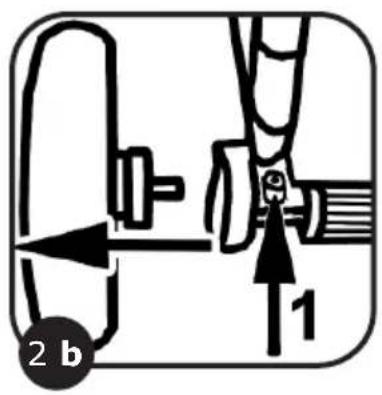
a. Press the button (1) and insert the rear wheel in the slot (2) until it engages.
b. To remove the wheels, press the button (1) to release the wheels. The wheels can then be removed from the axle.
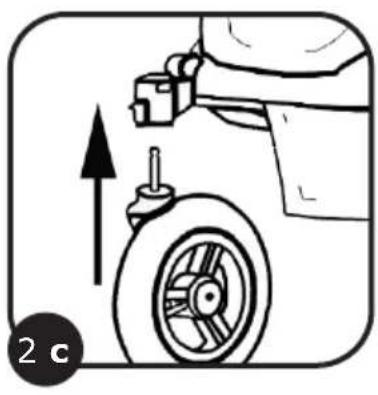
c. To mount the front wheels, push the wheels into the fittings until they click into place.
d. To remove the front wheels, press the buttons on the wheel fittings and pull the wheels out.
3. Wheel locking and swivel settings
Push the lever downwards to lock the wheels.
Push the lever upwards for swivel position.
4. Operating the brake
Press the lever down to engage the brake.
Press the lever up to disengage the brake.
5. Attaching and converting the seat
a. Attach the seat by placing it on the frame until it clicks into place.
b. To convert the seat, press the buttons on both adapters and lift up the seat.
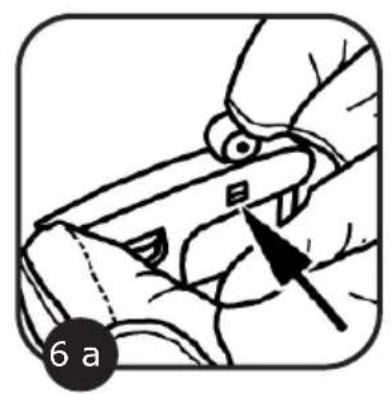
6. Attaching and removing the hood
a. Lower the hood down onto the attachment
b. To remove the hood, press the buttons in on both sides of the hood.
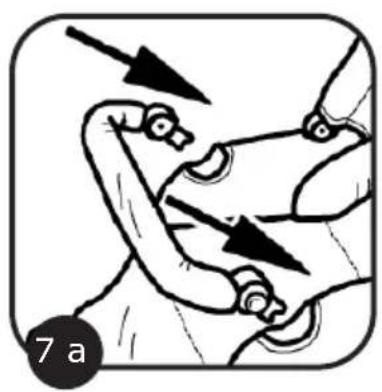
7. Fitting and removing the guard rail
a. Fit the guard rail by inserting it in the plastic mounts on both sides.
b. To remove the guard rail from the pushchair, press in the buttons on both sides and pull the guard rail off away from the pushchair.
c. To adjust the height of the guard rail, press and hold down the buttons on each side and push the bar up or down.
8. Adjusting the leg rest
To adjust the leg rest, press in the buttons on both sides and then adjust the height.
Let go of the buttons again so that the leg rest clicks into place.
9. Fastening the harness
a. To fasten the harness, bring the top two plastic catches together and interlock them.
b. Then insert the interlocked catches into the bottom part of the fastening.
Adjust the harness to a setting where the baby is held in the correct position.
10. Unfastening the harness
To open the harness, press the button on the side.
CAUTION: Always use the shoulder harness and lap belt together.
11. Adjusting the backrest
To adjust the backrest, pull the retainer on the rear of the backrest upwards and then adjust the height. When you have reached the required position, let go of the retainer to allow the backrest to remain in that position.
12. Adjusting the handle
Push the button upwards to adjust the height of the handle.
When the handle is at the required height, let go of the button again so that the handle will remain locked in this position.
13. Removing the sun canopy
Undo the zip fastener on the side of the canopy.
14. Folding the pushchair
To fold the pushchair, bring the handle to its lowest position as described in point 12, holding the button (1) down as you do so.
Now rotate the knob (2) to the left and push the handle down.
Now you can fold up the pushchair.
Note: To unfold the pushchair, follow the instructions in point 1 "Opening the pushchair".
CAUTION: Ensure that all the catches are engaged before use.
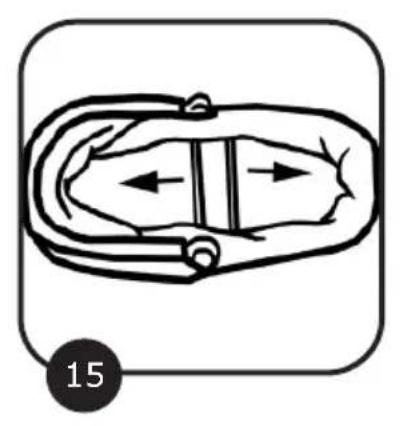
15. Opening the carrycot
Lift the side panels of the carrier.
Extend and secure the side panels by pushing the two retainers outwards into the mountings.
Make sure that the retainers are securely engaged.
16. Attaching the cot bumper
Lay the bumper in the cot, folding the top part over the edge of the carrycot.
Fasten the four press studs on the rear.
17. Attaching the hood to the cot bumper
Fasten the four press studs on the bottom of the hood onto the bumper.
18. Fitting the adapter to the carrycot
Fit the adapter onto the carrycot from below until it engages in the brackets provided.
Make sure that the adapter is securely engaged.
19. Inserting the mattress
Insert the mattress in the cover.
Lay the mattress on the base.
NB: The mattress is wedge-shaped. Make sure that the raised part is at the head end.
20. Adjusting the handle
To adjust the handle, press the buttons on both sides.
Now you can adjust the handle.
21. Fitting the apron
Fit the closed end of the apron over the lower end of the carrycot.
Extend the apron over the cot.
Secure the ends of the apron with the Velcro fastening provided on the outside of the hood.
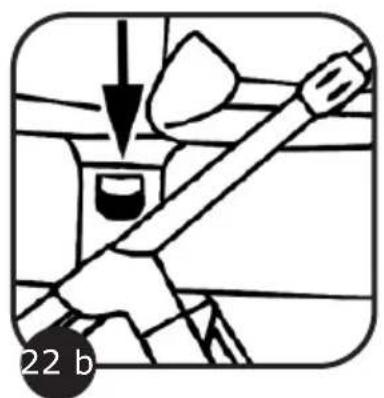
22. Mounting the carrycot on the pushchair
a. The adapter is fitted to the long side of the carrycot.
Place the carrycot onto the pushchair so that the catch mechanism engages.
b. To remove the carrycot, press the buttons on the adapter on both sides of the cot and lift the cot up to release it from the catches.
CAUTION: Always check before use that the carrycot is correctly secured to the pushchair.
Article for baby and child
Dr. Rudolf-Eberle Str. 29
D - 79774 Albbruck
Tel. +49 (0)77539393-0
Email. info@abc-design.de
www.abc-design.de