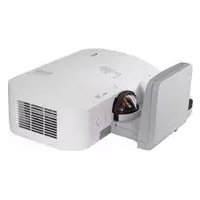
U300X - Projector NEC - Free user manual and instructions
Find the device manual for free U300X NEC in PDF.



| Brand | NEC |
| Model | U300X |
| Product Type | Projector |
| Projector Weight | Approx. 6.5 kg |
| Wall Mount Weight (NP01WK) | Approx. 6.2 kg |
| Wall Mount Dimensions | 280 x 541 x 219 mm |
| Vertical Adjustment Angle of Mount | ±3° |
| Horizontal Adjustment Angle of Mount | ±3° |
| Tilt Angle of Mount | ±10° |
| Front-Back Adjustment Range | ±100 mm |
| Left-Right Adjustment Range | ±50 mm |
| Up-Down Adjustment Range | ±50 mm |
| Recommended Projection Method | Front ceiling (setting in menu) |
| Power Supply | Mains (accessible power outlet) |
| Required Wall Mounting Screws | M6 bolts (1/4 inch) |
| Wall Mount Compatibility | U300X, U250X, U310W, U260W |
Frequently Asked Questions - U300X NEC
User questions about U300X NEC
0 question about this device. Answer the ones you know or ask your own.
Ask a new question about this device
Download the instructions for your Projector in PDF format for free! Find your manual U300X - NEC and take your electronic device back in hand. On this page are published all the documents necessary for the use of your device. U300X by NEC.
USER MANUAL U300X NEC
NP01WK/NP01WK1 Installation and Adjustment Manual
Thank you for your purchase of this NEC wall mount unit.
Please read this installation and adjustment manual carefully to ensure proper use.
The Wall Mount Unit NP01WK/NP01WK1 is exclusively for Projector U300X/U250X/U310W/U260W and cannot be used for other projectors.

Special skills are required to install the projector. This work should never be performed by the customer.

To the Dealer and Installer
To ensure customer safety, we ask that the installation work be started after careful attention is paid to the strength of the mounting location to ensure it will withstand the weight of the projector and mounting hardware.
CONTENTS
Please heed the following .ENG-2
Preparation .ENG-4
Packaged Parts .ENG-4
Names of Parts .ENG-5
Dimensions of Parts .ENG-6
Mounting the Projector . ENG-7
Adjusting the Projection Position . ENG-12
Specifications .ENG-16
Using the wall plate. .ENG-16
Symbol
In this "Installation and Adjustment Manual", to ensure the safe and proper use of the product, prevent harm to yourself and others and damage to property, various symbols are used. The symbols and meanings are as follows. Please read this manual after ensuring the contents are well understood.

Warning
Improper handling and ignoring this indication may result in bodily harm such as death, serious injury and so on.

Caution
Improper handling and ignoring this indication may result in bodily injury and damage to surrounding contents.
Examples of symbols:

Symbol alerts you to cautions (including warnings) Concrete cautions are specified in figures.

Symbol expresses prohibited actions Concrete prohibitions are specified in figures.

- Symbol expresses compulsory actions. Concrete instructions are specified in figures.

Warning

- When installing the projector and adjusting the projection position, be sure to do so as explained in this manual. The projector may fall and cause injury if installed and adjusted improperly.

- To prevent the projector from falling, install it in a location and fasten it so as to ensure sufficient strength to support the combined weight (about 12.7kg ) of the projector (about 6.5kg ), the wall mount unit (about 6.2kg ) and so on for an extended period as well as to withstand earthquakes. Insufficient strength or fastening may result in the projector falling and causing injury.
Be sure to observe the following precautions:
- Use M6 (1/4 inch) for the wall fixation bolts and screws for the wall adapter.
- Use an outlet for the power source of the projector. Do not directly connect to the lamp line because this is dangerous. Also, use an accessible outlet so that you can connect and disconnect the power plug.
- Mounting on a wooden wall
Ensure the load is mounted on a pillar or robust constructional material. If the strength of the constructional material and so on is insufficient, please reinforce it. Do not mount on wall finishing material, furring strip and so on.
- Mounting on a concrete wall
Use a commercial anchor bolt M6 (1/4 inch), anchor nuts and similar, which will bear the load of the projector.
| Warning | |
| ·Do not install in places subject to constant vibration. Extended vibration may cause loosening of the screws and result in the Wall Mount Unit and projector falling and causing injury. Also, it may cause breakdown of the projector. | |
| ·To ensure safety, be sure to tighten the bolts, screws and adjusting knobs securely. Failure to do so may result in the projector falling and causing injury. | |
| ·Do not modify any parts. Doing so may result in the projector and the Wall Mount Unit falling and causing injury. | |
| ·Do not use broken parts. Doing so may result in the projector and the Wall Mount Unit falling and causing injury. If a part should break, consult your dealer. | |
| ·Do not look into the mirror when the projector is turned on. Doing so could damage your eyesight. | |
| ·Do not hang from the projector and the Wall Mount Unit. Doing so may result in the projector and the Wall Mount Unit falling and causing injury. Be especially careful of children. | |
| ·Do not use adhesive for the locking screws, lubricant agent, oil and so on for the wall adapter. Doing so may cause the material of the wall adapter to deteriorate and result in the projector falling and causing injury. | |
| Caution | |
| • Do not obstruct the projector's ventilation holes. Doing so will prevent the dissipation of heat and may result in fire. In particular, do not use the projector in the following ways: installing the projector in a place such as wall and so on where ventilation is poor, covering it, etc. | |
| • Do not install the projector in front of the outlets of an air conditioner or heater or in a place exposed to significant vibrations. Doing so may result in fires and electric shock. | |
| • Do not install the projector in humid or dusty places or those exposed to smoke or steam (such as near cooking equipment or humidifiers). Doing so may result in fires. | |
| • When installing the projector, leave sufficient space between it and surround objects. Failure to do so will prevent the dissipation of heat and may result in fires. |
Please:
- Avoid rooms with significant dust, humidity, greasy smoke, or tobacco smoke.
Dirt will adhere to the optical parts such as mirrors, which will cause image quality to deteriorate.
- Avoid places in which the screen is exposed to direct sunlight or illuminated light.
When surrounding light directly hits the screen, the image appears washed out and is difficult to view.
- Avoid locations exposed to particularly high or low temperatures.
Doing so may result in breakdown. (For the ambient operating temperature, see the user's manual included with the projector.)
■ Packaged Parts
Please check the packaged items.
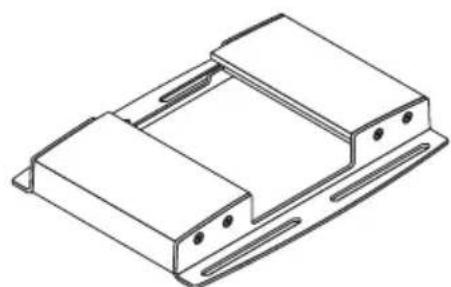
Wall adapter:1
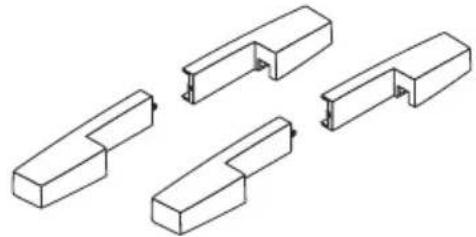
Cover (A, B):2 pairs
M4 screws:4 M3.5 screws:2
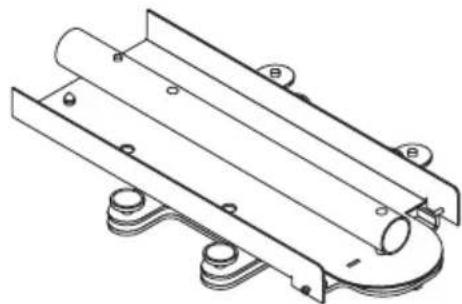
Projector adapter:1
Installation and Adjustment Manual:1
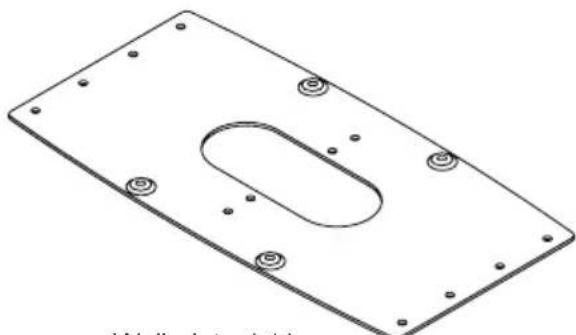
Wall plate:1*1


M5 screws:4 *2
1, 2: To be used when mounting the wall adapter in the North America region.
Names of Parts
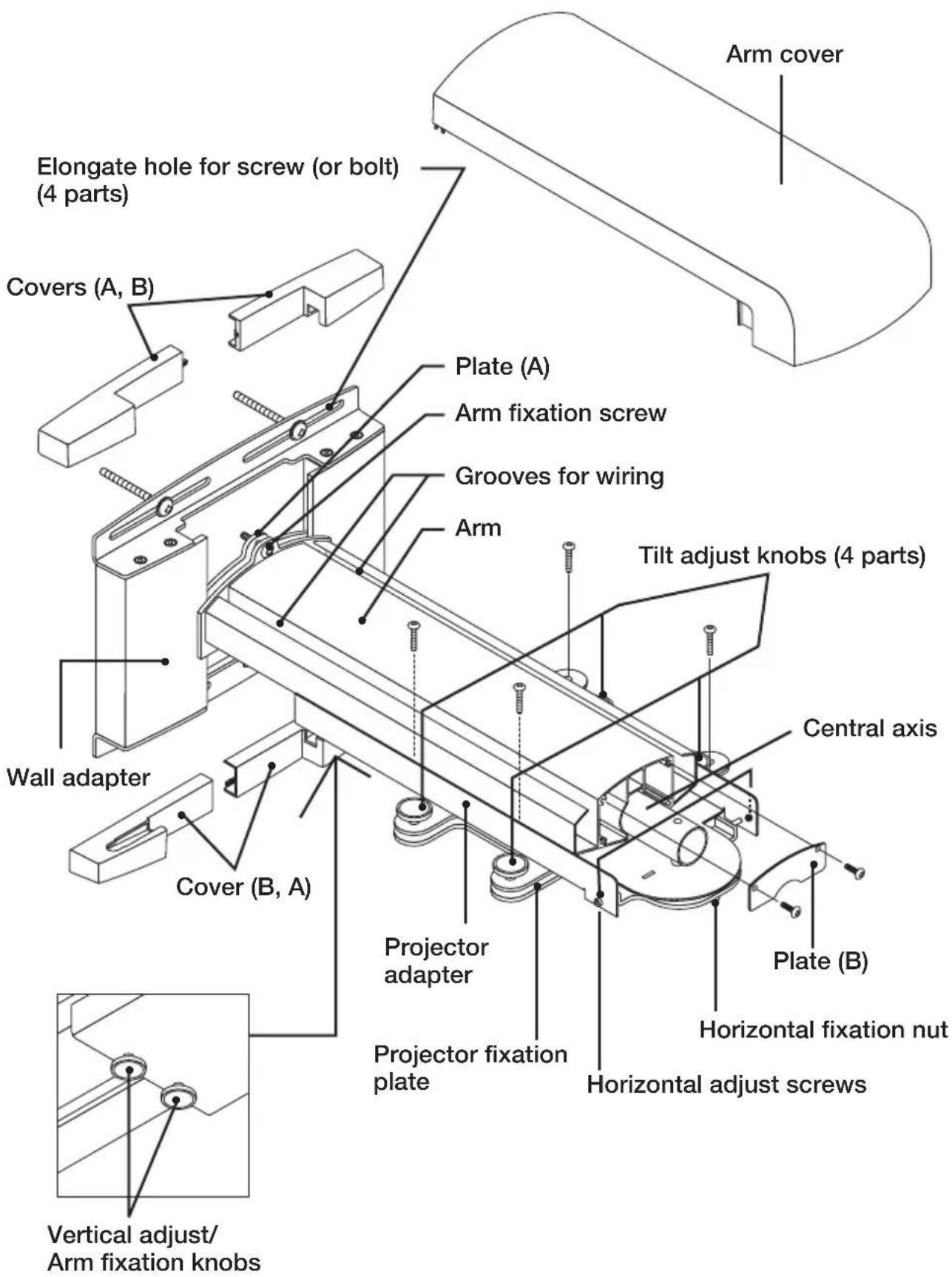
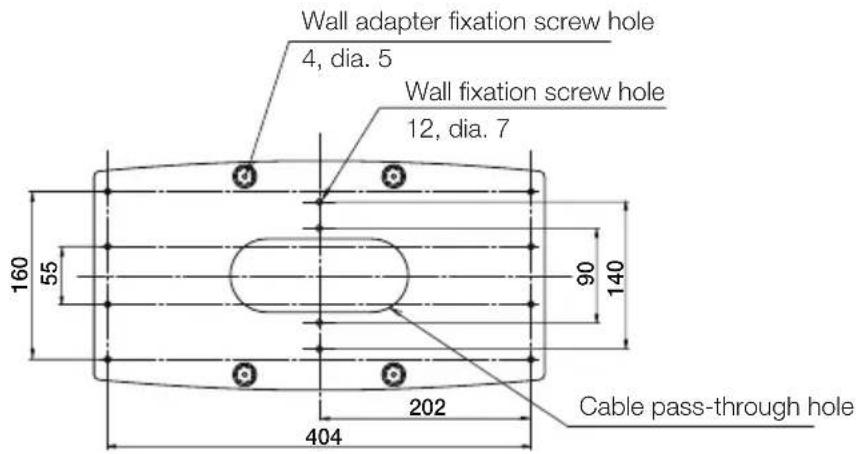
Dimensions of Parts: (unit: mm)
The dimensions of the positions of the wall fixation screws (bolts) of the wall adapter are described.
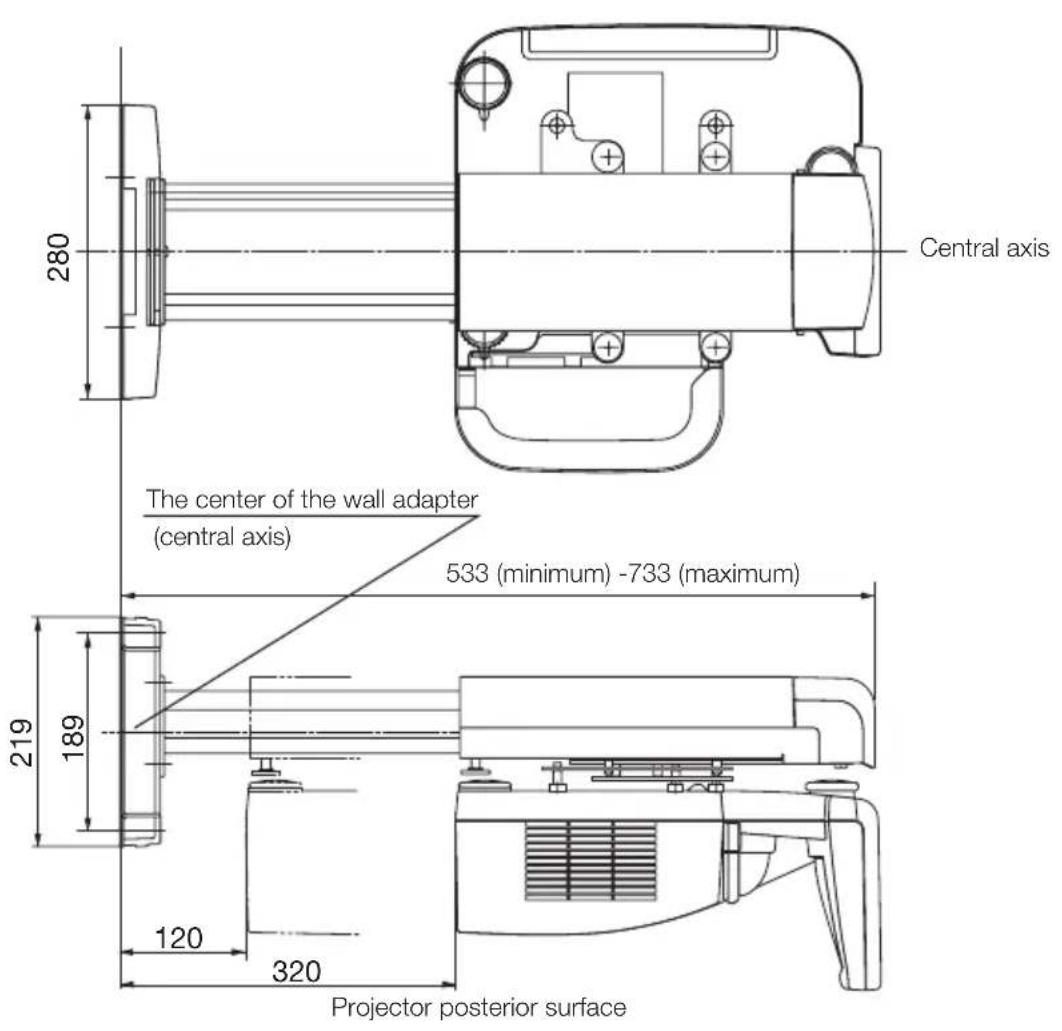
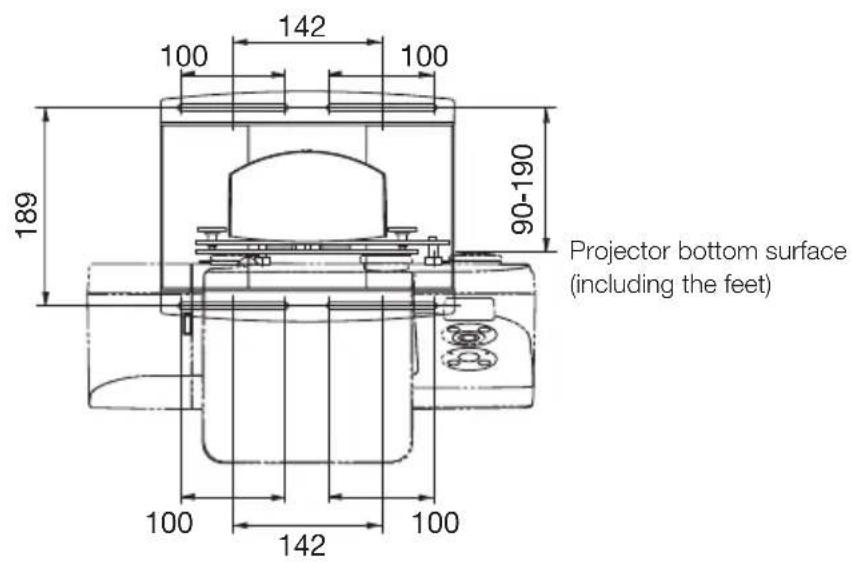
Preparations
- Determine the installation location of the screen, and accordingly decide the installation position of the wall mount unit.
Refer to the section "Installation" in the user's manual included with the projector information.
-
Installation for slanted projection is not possible. Determine the position for front projection.
-
Make sure that all conditions described in the section "Heed the Following" on page ENG-2 of this manual are met.
-
Because the U300X/U250X/U310W/U260W have a large optical axis elevation angle, a slight shift in projection distance will have a large effect on the screen size and position. If the projector angle is off, image distortion will increase.
1. Attach the projector adapter to the projector.
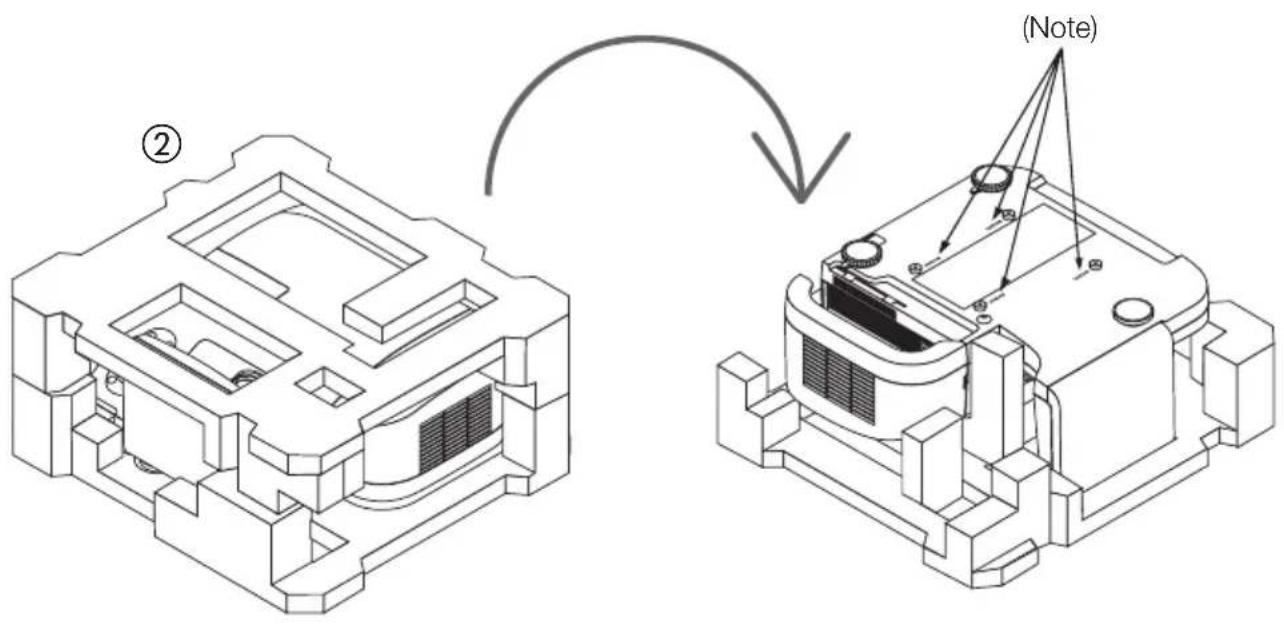
(1) Remove the projector from its box and take off the plastic wrap.
(2) Reattach the foam packing spacers to the projector and then turn the projector over.
Note: There are four screw holes on the bottom of the projector marked "MAX.M4x10". This indication does not apply to the project adapter of this product.
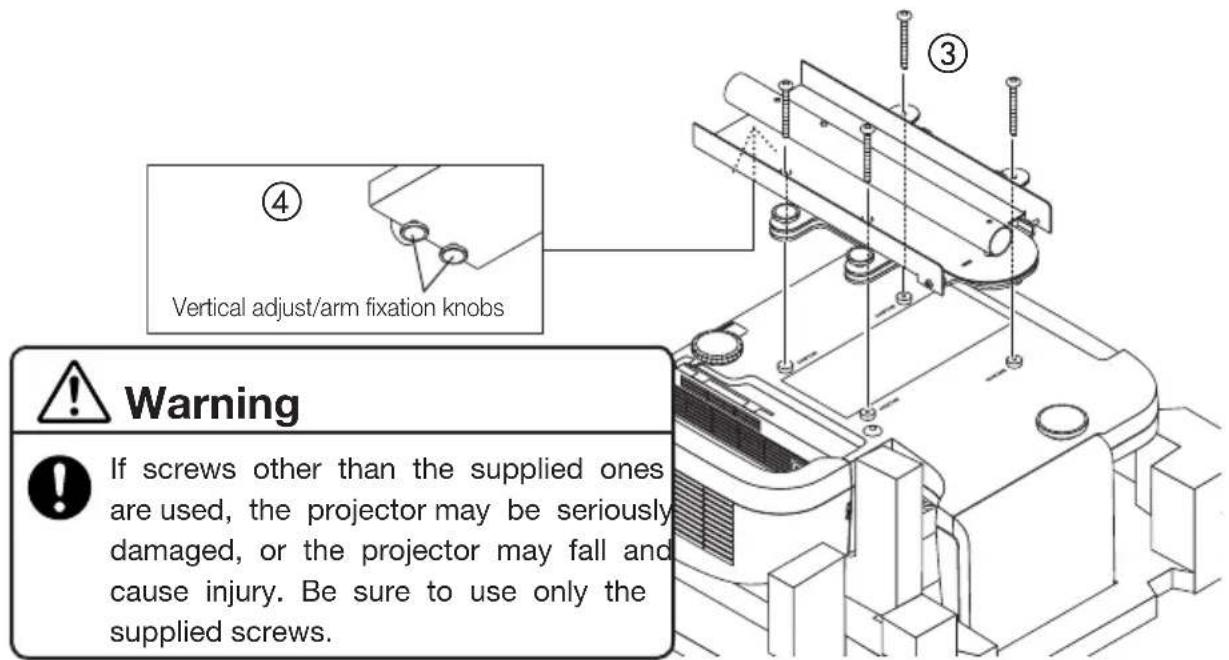
③ Align the projector adapter with the holes on the bottom of the projector and securely attach the adapter with the four supplied screws (M4x20).
④ Loosen the vertical adjust/arm fixation knobs of the projector adapter.
Caution
Do not try to attach the projector adapter without the foam packing spacers in place. Otherwise the mirror section may be subject to excessive force, which can lead to a shift in the projected image and cause serious damage.
2. Attach the wall adapter to the structural material of the wall.
To ensure a projected image without distortion, the center of the wall adapter and the center of the screen should be aligned on a straight axis.
- The wall adapter has a top/bottom orientation. Be sure to attach it with correct orientation.
Caution
If the wall adapter is mounted with reversed top/bottom orientation, correct installation is not possible.
- The wall adapter can be adjusted horizontally over a range of ± 50mm .
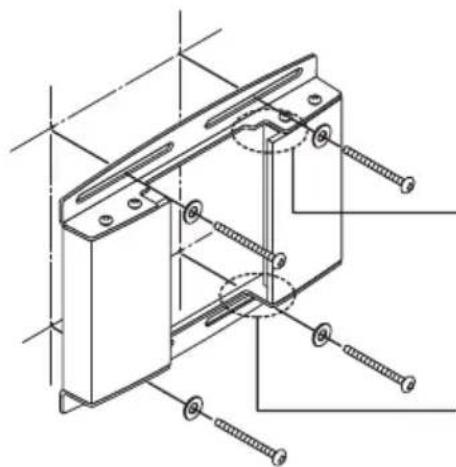
Side with cutouts facing up
Side without cutouts facing down

Warning

Use only M6 (1/4 inch) screws or bolts (4 locations) to fix the wall adapter. If screws or bolts other than M6 are used, the projector may fall and cause injury.
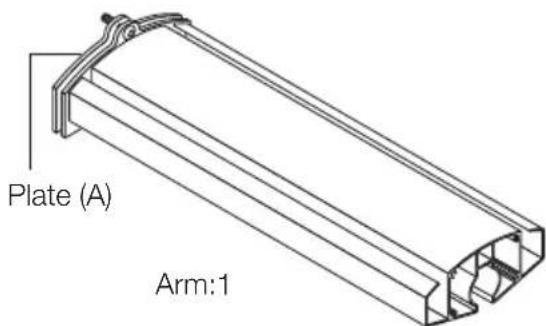
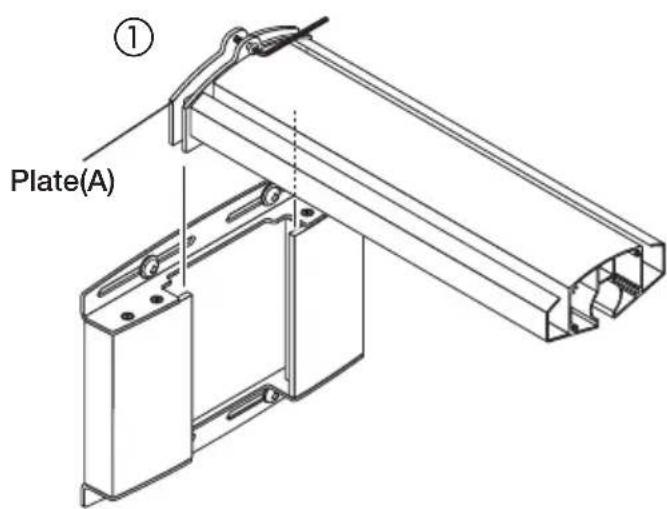
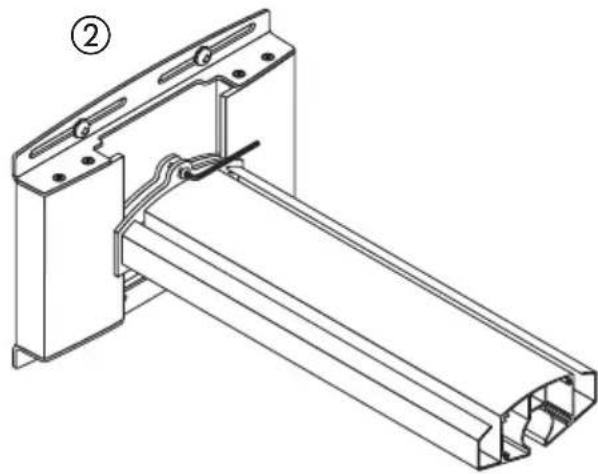
3. Attach the arm to the wall adapter.
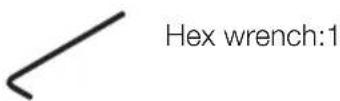
① Loosen the arm fixation screws (top and bottom) with the supplied hex wrench.
② Insert the arm plate (A) into the wall adapter from the top and tighten the screws (top and bottom) near the center of the elongated hole.
- The covers (A) and (B) are to be attached after installation and adjustment are completed.
4. Mount the projector assembled in step 1 on the arm.
Caution
To do this, first remove the packing spacers from the projector. Then hold the projector body with the help of a second person and insert it carefully into the arm. Do not hold the projector by the cable cover or the mirror section, and do not touch the mirror or lens.
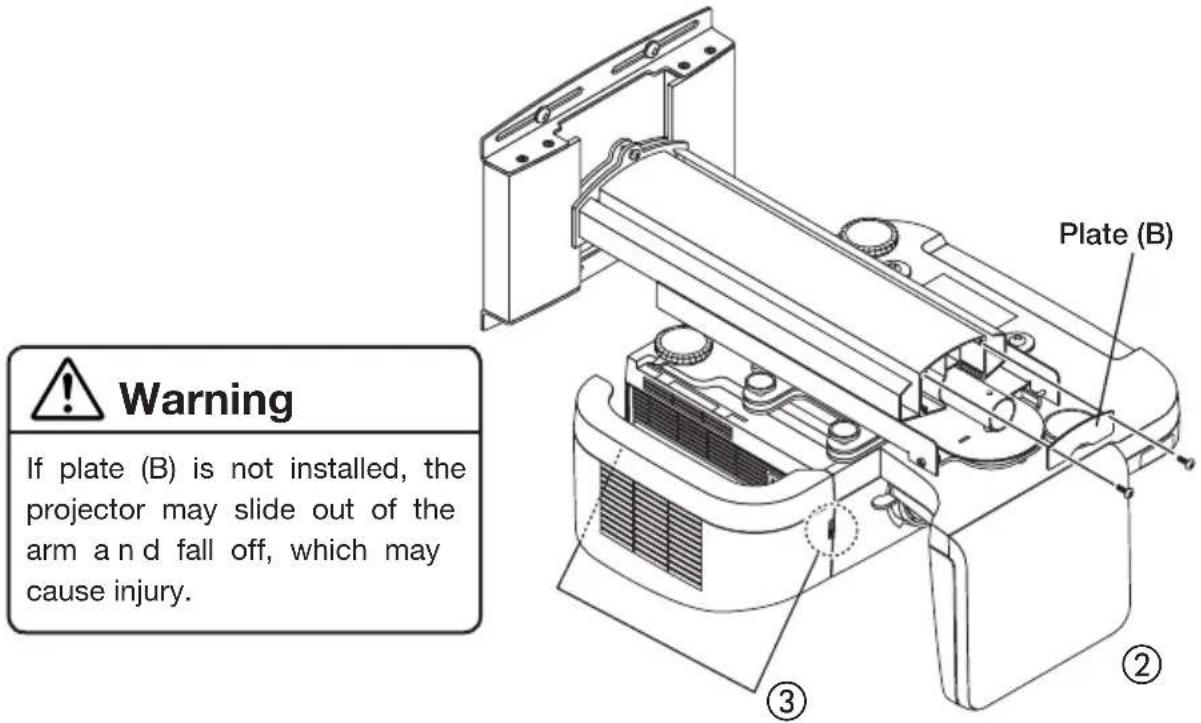
① Insert the central axis of the projector adapter into the arm.
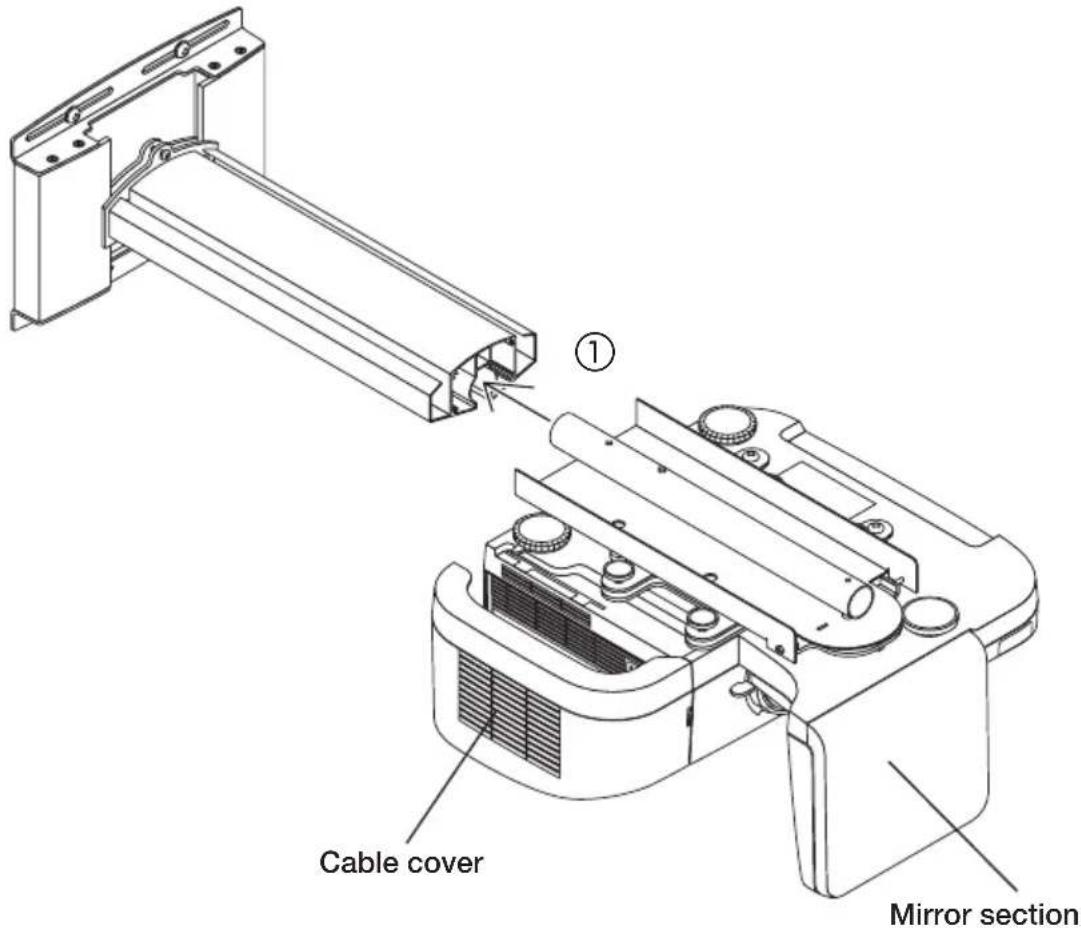
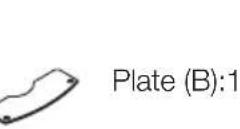
② Use the two supplied M5.5x9.5 screws to securely attach the supplied plate (B) to the arm.
③ Remove the cable cover of the projector.
5. Cabling
① The power cord and signal cables can be passed through the grooves for wiring on the left and right side of the arm. This should be done before attaching the arm cover. Take care not to squeeze the cables with the horizontal adjust screws.
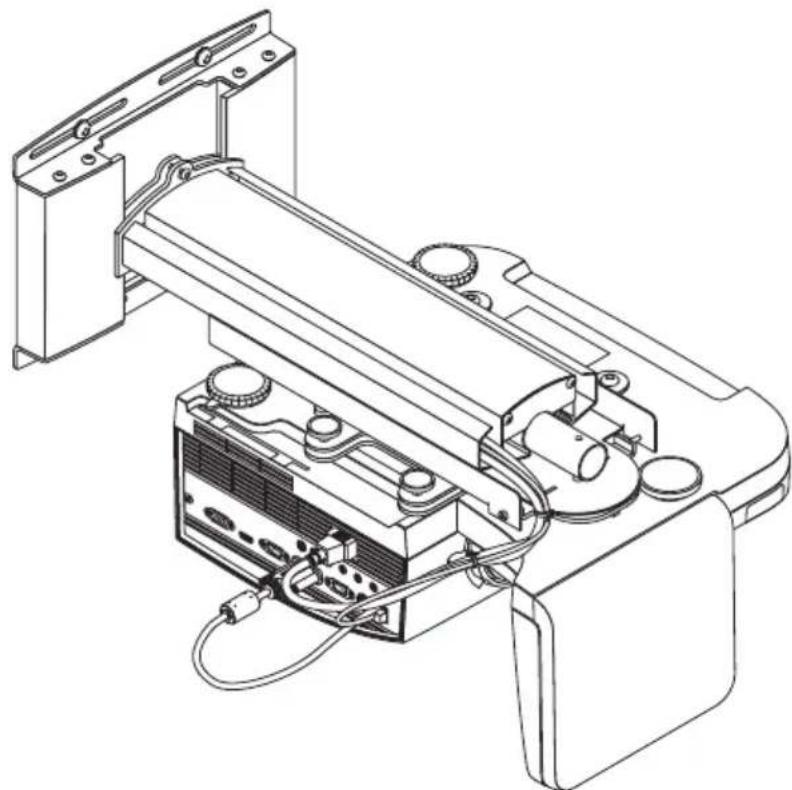
This concludes the projector installation.
Adjusting the Projection Position
Preparations
Before adjusting
- Project an image from the projector, then first use the focus lever of the projector to roughly adjust the focus of the projected image. For information on how to project an image, see "Installation" in the user's manual included with the projector.
- From the on-screen menu, select "Ceiling Front" for "Orientation" as the method of projection.
1. Check the tilt adjust knobs.
Verify that the four tilt adjust knobs are all set to the same adjustment height. If the projector fixation plate is slanted, correct vertical adjustment and horizontal adjustment cannot be performed.
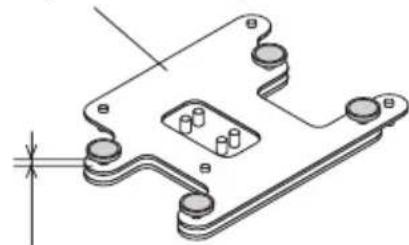
Projectile fixation plate
Knob adjustment height
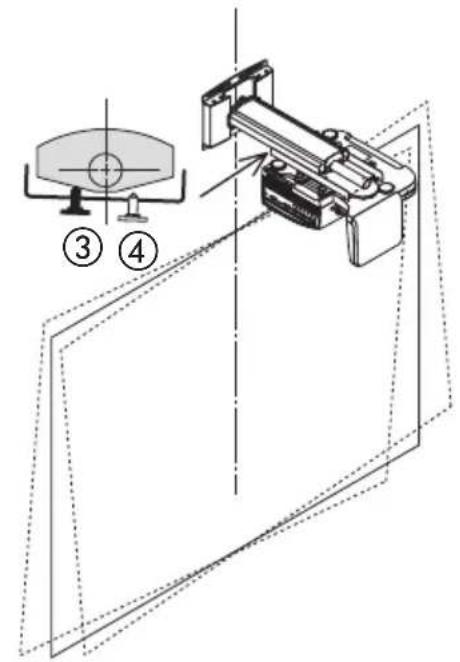
2. Adjust the size of the projected image and the left/right tilt.
- The illustrations in this manual show the adjustment for an image with a 4:3 aspect ratio. Connecting cables for screen and projector are omitted.
Adjust the size of the projected image and, if necessary, the tilt in clockwise or anticlockwise direction.
(1) Loosen the vertical adjust/arm fixation knobs.
- Loosen the two knobs shown in black in the illustration.
② Move the projector back and forth to match the size of the projected image to the screen.
To do this, grasp the projector firmly on both sides and move it carefully.
Caution
Do not grasp the mirror section. Otherwise the mirror may come off or become damaged.
-
To adjust tilt in the left/right direction, proceed to step ③.
-
If only size adjustment is to be performed, tighten the two knobs shown in black in the illustration.
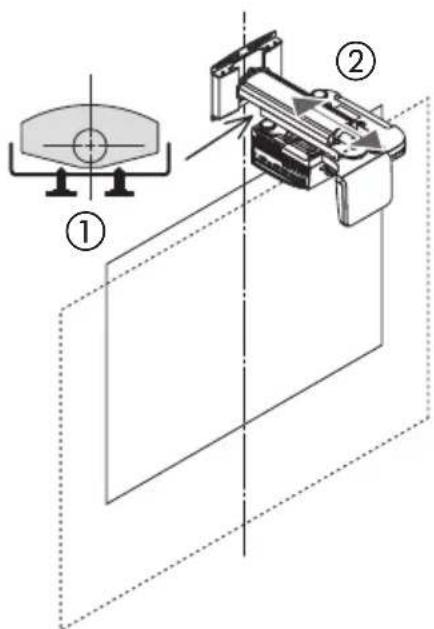
③ Turn the left or right knob to adjust projector tilt in the left or right direction.
- When the knob shown in black in the illustration is tightened, the projector is rotated in the counterclockwise direction.
④ When the adjustment is complete, tighten the opposite knob that is still loosened.
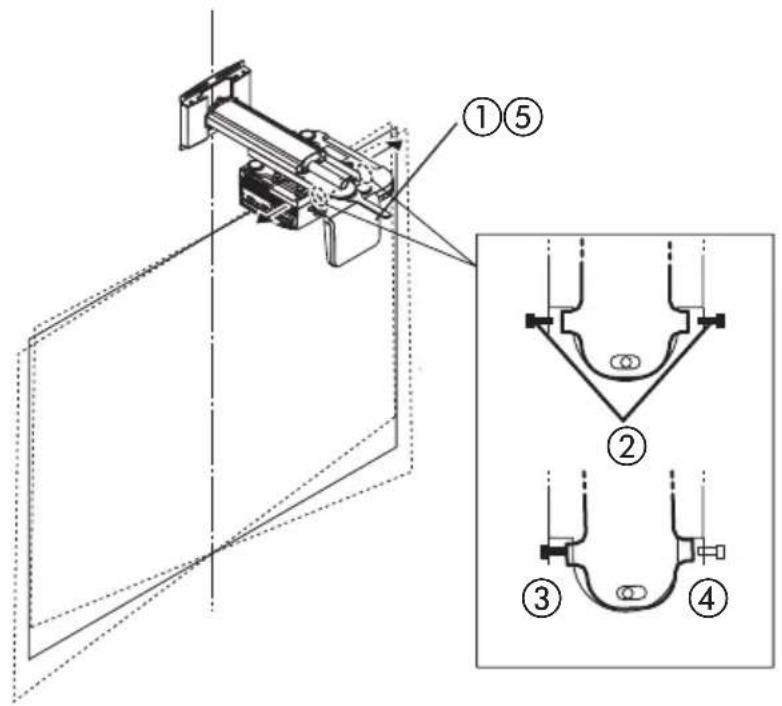
3. Adjust the horizontal tilt of the projector.
The projector adapter allows adjustment over a range of approximately ± 3 degrees.
(1) Loosen the horizontal fixation nut (double nut) with a wrench.
(2) Loosen the horizontal adjust screws (left and right) with the supplied hex wrench.
- Loosen the two screws shown in black in the illustration.
③ Make the adjustment by tightening the left or right screw until the top edge and bottom edge of the image are parallel.
(4) When the adjustment is complete, tighten the opposite screw that is still loosened.
(5) Tighten the horizontal fixation nut (double nut) with a wrench.
4. Adjust the tilt.
Tilt adjustment is performed with the four adjustment knobs.
- Front/rear tilt adjustment
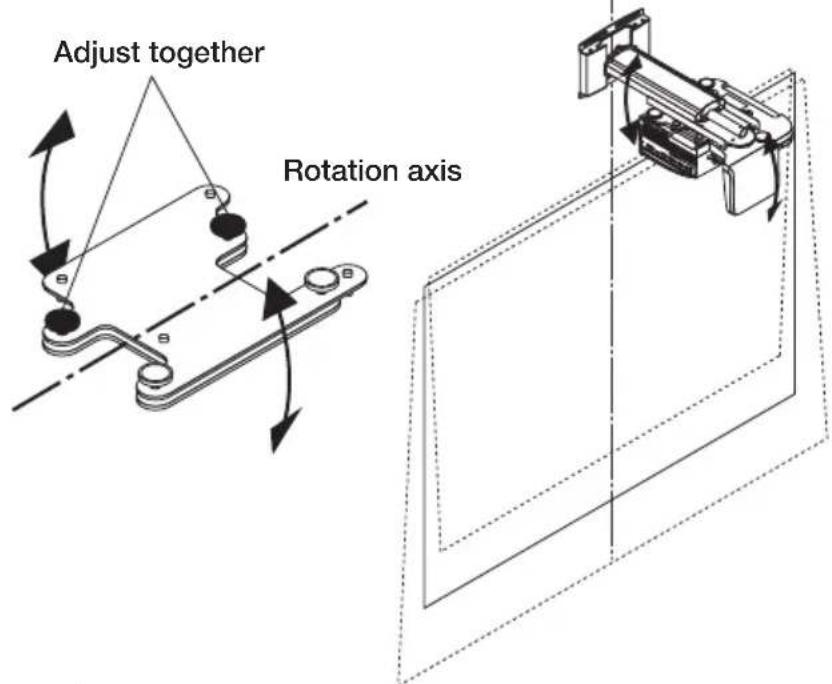
- Left/right tilt adjustment
Fine adjustment in same direction as for vertical adjustment
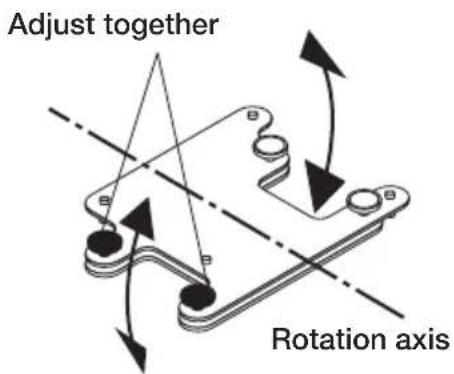
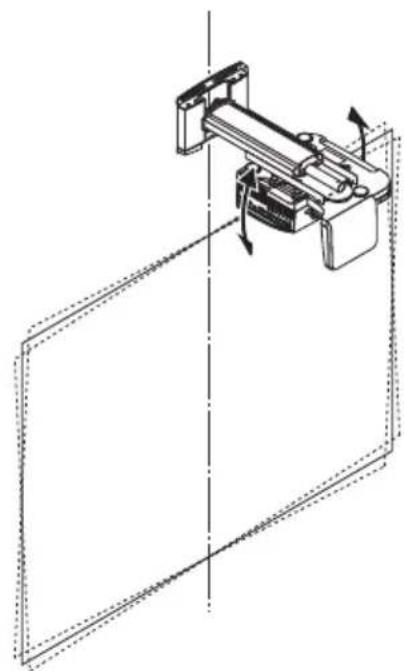
- If tilt adjustment achieved with these knobs is not sufficient, repeat the adjustment process from step 2 on page ENG-12.
- During adjustment, the position of the projected image may shift. In such a case, loosen the wall adapter and arm fixation screws and adjust the position.
This completes the adjustment.
Securely tighten all screws and adjustment knobs.
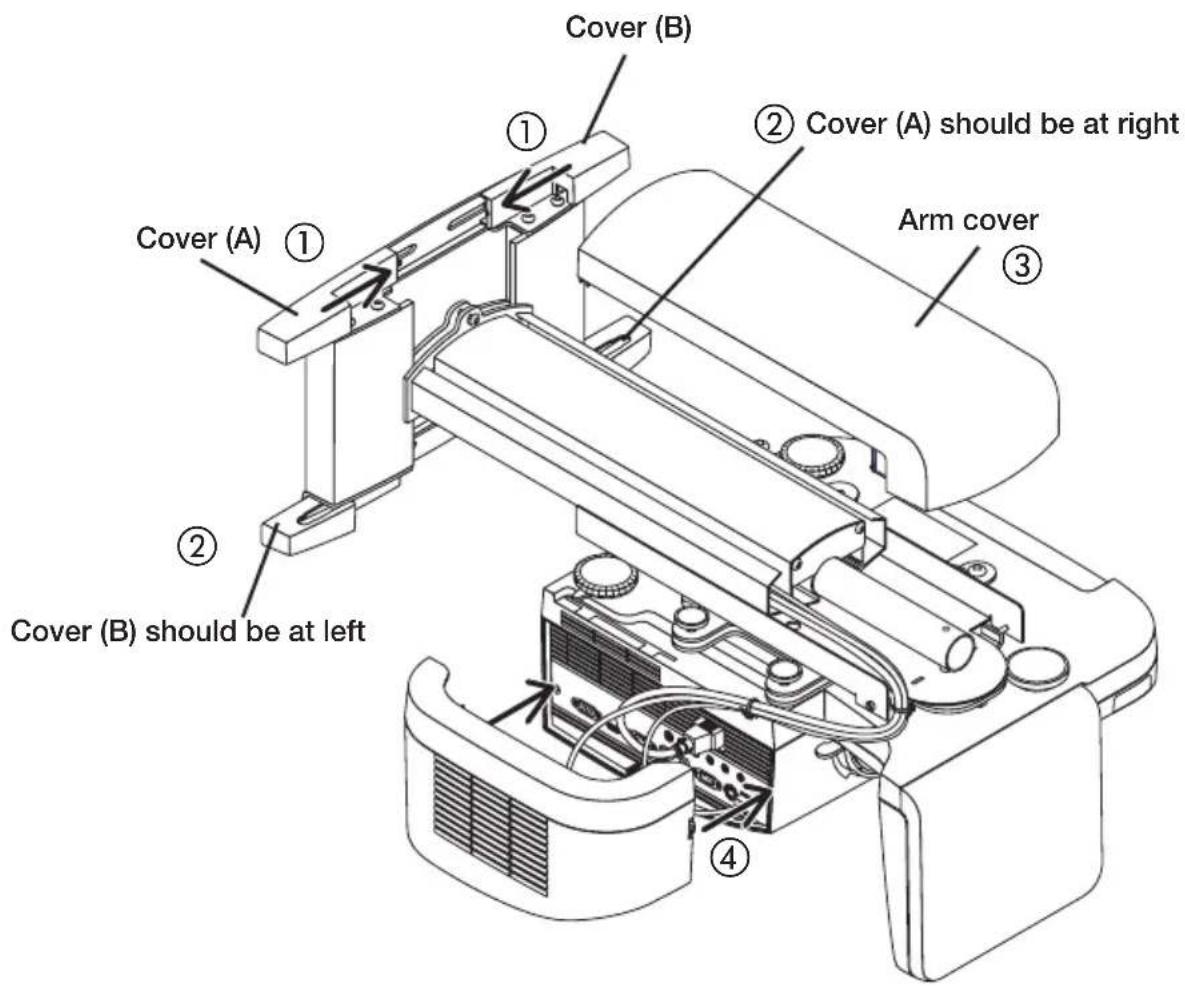
5. Attach the covers to the projector adapter and the wall adapter.
① Attach cover (A) (with hook) and cover (B) (with notch) to the upper side of the wall adapter. Slide the two covers towards the center while pushing them down, as shown in the illustration. The bottom of each cover will then engage with the screw heads of the wall adapter. At the same time, the hook of cover (A) will enter the notch of cover (B), thereby locking the covers.
② On the bottom side of the wall adapter, reverse the positions of covers (A) and (B) and attach them in the same way as described in ①.
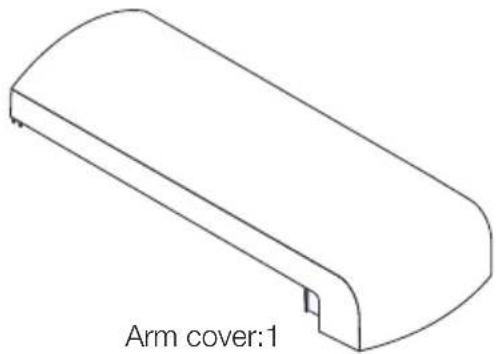
③ Attach the arm cover.
The cover is fixed when the left and right tabs engage with the notches on the projector adapter.
④ Attach the cable cover of the projector.
Turn the knobs on both sides to fasten the cover.
Product name: Wall mount unit
Model: NP01WK/NP01WK1
Adjustment angle: Up-down angle ± 3^ , left-right angle ± 3^ , inclination angle ± 10^
Adjustment width: Front-rear ± 100mm left-right ± 50mm up-down ± 50mm
External dimensions: 280 (W) x 541(D) x 219 (H) mm
Weight: Approx. 6.2kg
- Specifications and design are subject to change without notice.
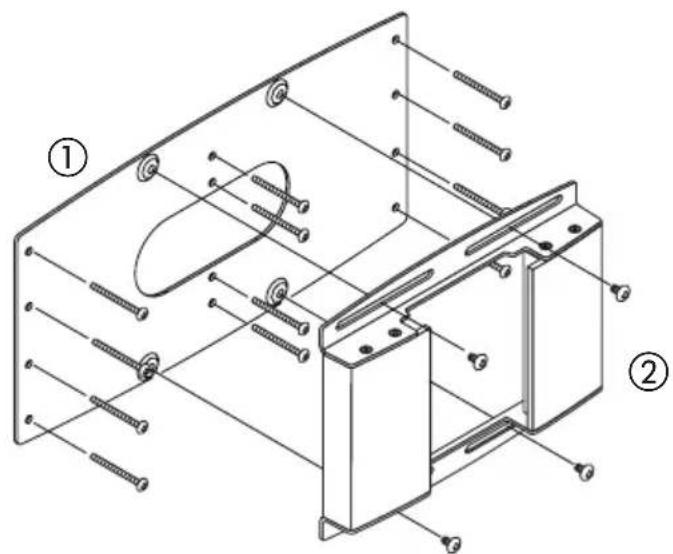
Using the wall plate (NP01WK1 only)
The NP01WK1 is distributed in North America only.
Screw position dimensional drawing (unit: mm)
① Mount the supplied wall plate to the vertical frame of the wall.
② Securely fasten the wall adapter to the wall plate using the four supplied screws. Be sure to observe all precautions listed on page ENG-8.
Wandhalterung
U300X/U250X/U310W/U260W IN He MoKeT 6bITb NcNoJIb3OBAHOДЯpyrNx npoeKTopoB.

Pokynatelb He doJxeh BblnoHryt b daHHyO pa60ty.

yCTaHOBky; yJeIInTe Oco6oe BHImaHne npOuHOct MeCTa yCTaHOBKn,
y6eINBwncb, yTO OHO BblpejKNT Bec npoeKTopa n 3JeMeHTOB
Kpenen.