
VCB10P - Pool cleaner GRE - Free user manual and instructions
Find the device manual for free VCB10P GRE in PDF.



| Product type | Robotic pool cleaner |
| Brand | GRE |
| Model | VCB10P |
| Dimensions (approx.) | 40 x 30 x 25 cm |
| Weight (approx.) | 3.5 kg |
| Power supply | Lithium battery 7.4 V / 2000 mAh |
| Charger | 8.4 V DC, 1.0 A |
| Charging time | Approximately 4 hours |
| Battery life | 70 min (standard speed) / 50 min (high speed) |
| Maximum depth | 3 meters |
| Water temperature | 4°C to 35°C |
| Protection rating | IPX8 (submersible) |
| Main functions | Cleaning of floor, walls, steps, and corners |
| Speed modes | Low speed (standard) and high speed (turbo) |
| Filtration system | Transparent front filter + metal rear filter + optional paper filter |
| Transport handle | Integrated and compatible with standard telescopic pole |
| Maintenance | Regular cleaning of filters; rinsing with clean water; dry storage between 10°C and 25°C |
| Safety | Automatic shut-off out of water; not for use by children without supervision; use only original charger |
| Spare parts | Battery, filter, suction head, handle, anti-spill blade, V-clip |
| Repairability | Contact the authorized distributor for part replacement; do not disassemble yourself |
| Warranty | 2 years (conformity defects) |
| General information | Use in pool or spa; do not use with aggressive chemicals |
Frequently Asked Questions - VCB10P GRE
User questions about VCB10P GRE
0 question about this device. Answer the ones you know or ask your own.
Ask a new question about this device
Download the instructions for your Pool cleaner in PDF format for free! Find your manual VCB10P - GRE and take your electronic device back in hand. On this page are published all the documents necessary for the use of your device. VCB10P by GRE.
USER MANUAL VCB10P GRE
When installing and using this electrical equipment, you should always follow the basic safety precautions. Please read the following carefully.
WARNING
The cleaner is not a toy, and is operated by people older than 8 years age.
Any people who operates the cleaner, has to read the manual carefully before work it.
-
Cleaning and user maintenance shall not be made by children without supervision.
-
The cleaner is designed to clean the swimming pool, SPA.
-
Please use the original batteries and charger when using.
-
Only charging it when the cleaner is power off.
-
Put the cleaner into a clean and dry place. Do not expose it under the sun, or close to explosive.
-
The filter bag is easy to be broken when there is sharp substances under water.
-
The cleaner automatically stops to work when it is out of water.
-
Do not close to the vacuum head when it is working, due to its suction power, especially for the human body, animals, hairs or clothes.
-
Do not disassemble the cleaner without professional guidance or notice from the authorized distributor or manufacturer.
-
Do not leak the lubricant oil, and it causes water polluted.
-
Stop to work the cleaner when there is anything wrong; Please contact with the authorized distributor or replace it to the original parts/accessories.
12.Cleaner working conditions:
12.1 Maximum applicable water depth: 3 m (10 ft)
12.2Water temperature: 4°C(39.2°F)-35°C(95°F)
1. Charger
When installing and using this electrical equipment, you should always follow the basic safety precautions. Please read the following carefully:
-
Use the original charger provided only.
-
For indoor use only. The charger should not be used outdoor and not be exposed to rain, humidity, any liquid or heat.
-
Keep the charger out of children.
-
Never use the charger if any damage is found.
-
Do not handle the cleaner and charger with wet hands and bare feet, when charging the cleaner.
-
Disconnect the charger from power when not in use.
-
If the wire is damaged, it must be replaced by a new charger to avoid danger.
-
Make sure the cleaner and charger are totally dry before charging.
-
Charge the cleaner 4 hours prior to the first use. After fully charged, it works 70mins by basic speed, and 50mins by high speed.
2. Battery disposal
-
The cleaner battery is a lithium battery, it must be disposed properly, please contact with your local authority for more information.
-
Never attempt to disassemble the lithium battery.
-
Remove all personal items such as rings, bracelets, necklaces and watches when unwiring a lithium battery from the vacuum unit.
-
The battery causes short curcuit current, as well as severe burning when it is high enough.
-
Wear complete eye protection, gloves and protective clothing when removing the battery pack.
-
No smoking or sparkling flame near the cleaner, or, it may causes unknown gases.
-
If acid comes in contact with skin and clothing, wash immediately with plenty of soap and water.
-
If acid comes in contact with eyes, immediately flood eye with running cool water for at least 15 minutes. Get medical attention immediately.
Above warning and cautions are not intended to incorporate all possible instances for risks and/or severe injury. Pool/spa owners should always exercise intensive caution and common sense when operating the cleaner.
How to use it
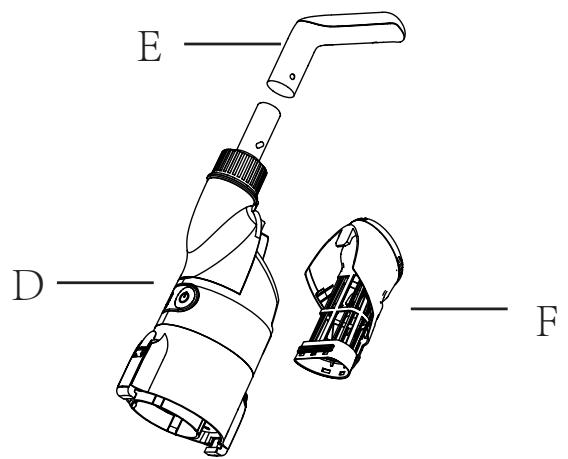
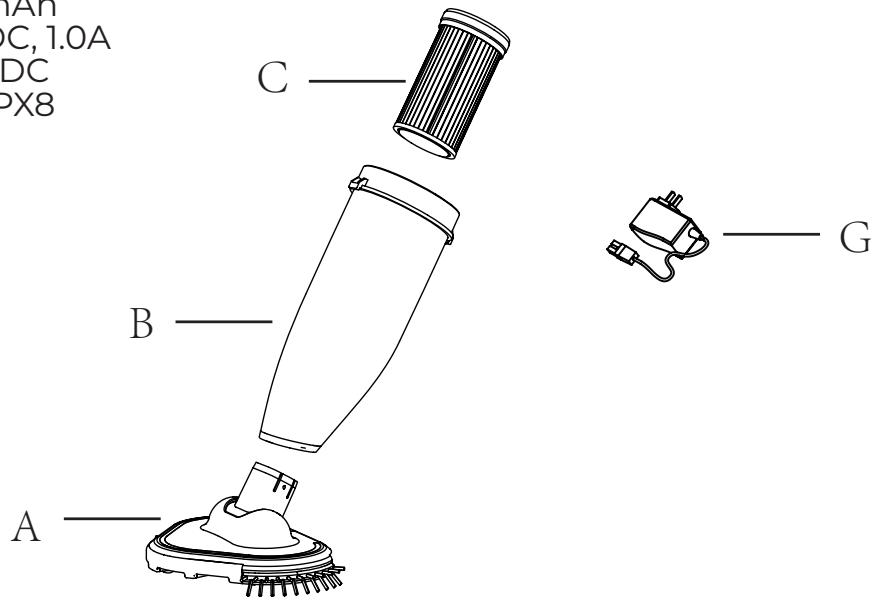
Assembly
A: Vacuum head
B: Front filter
C: Paper filter
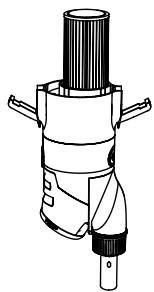
D: Motor body
E: Portable handle
F: Back filter
G: Charger
Battery: 7.4V /2000mAh Charging power: 8.4V DC, 1.0A Motor voltage: 7.4V DC Waterproof grade: IPX8
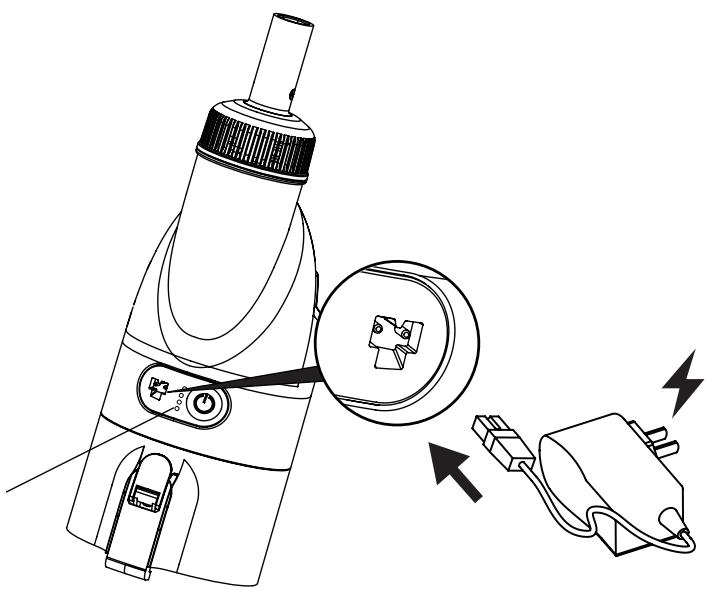
1. Charger connection
(1) Plug one end of the charger into the power socket, and then plug the other end of the charger into the charging port of the cleaner. At this time, the three green indicator lights on the cleaner flash circularly, indicating normal charging.
(2) After about 4 hours, three green indicator lights are on for a long time to indicate that the charging is completed.
natural_image
Technical line drawing of a handheld device with an inset close-up showing internal components (no text or symbols)Indicator light
2. Installation
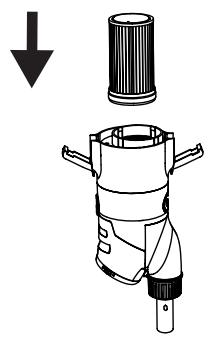
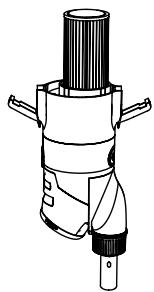
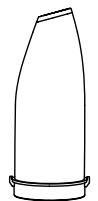
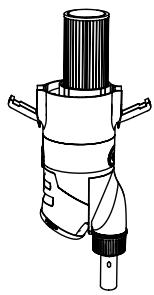
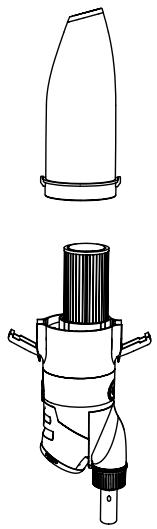
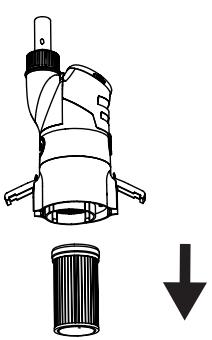
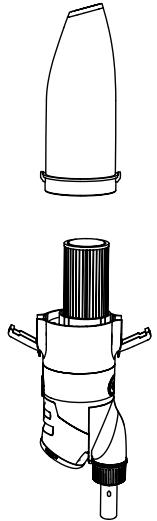
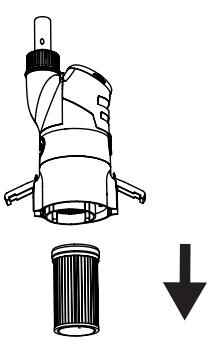
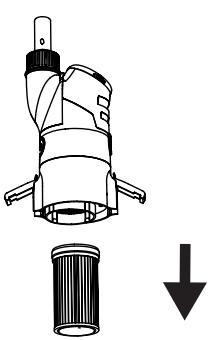
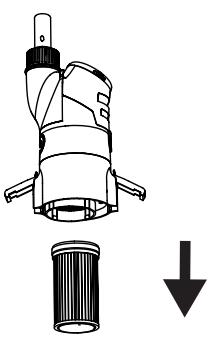
2.1 Filter element assembly and body parts assembly
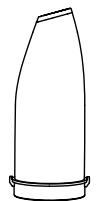
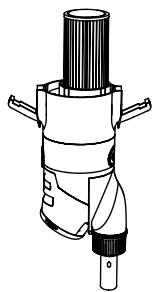
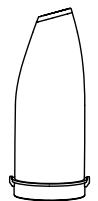
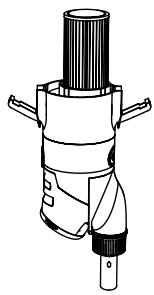
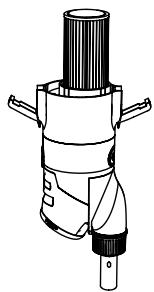
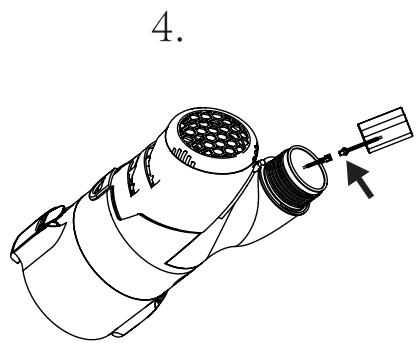
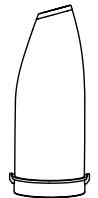
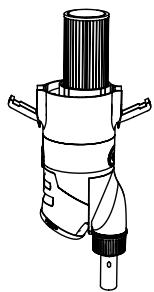
Assemble the body parts in the direction of the arrow.
natural_image
Diagram of a mechanical device with a downward arrow indicating force or direction (no text or symbols present)

natural_image
Technical line drawing of a mechanical device with cylindrical components and mounting brackets (no text or symbols)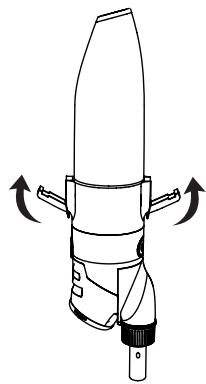
natural_image
Technical line drawing of a mechanical device with directional arrows indicating motion (no text or symbols)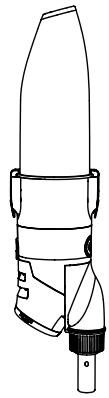
natural_image
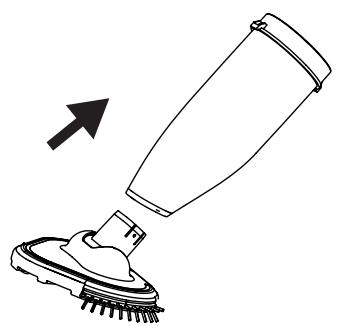
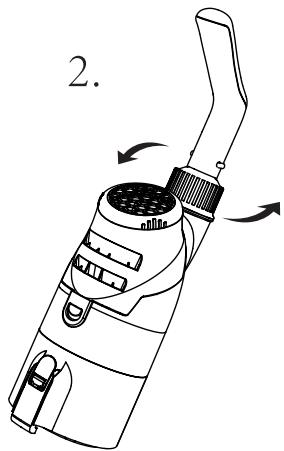
Line drawing of a mechanical device with no visible text or symbols2.2 Assembly of suction head
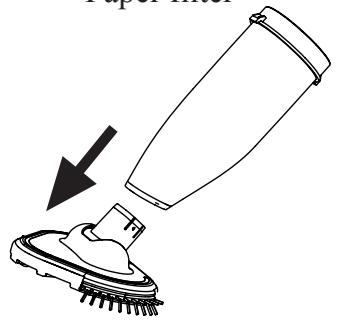
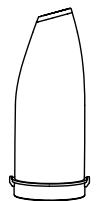
Insert the entire suction head directly into the Cover the garbage.
natural_image
Simple line drawing of a cleaning brush with an arrow indicating direction (no text or symbols)2.3 Handle assembly
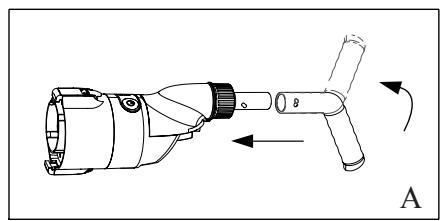
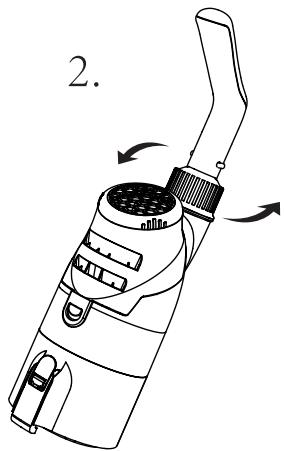
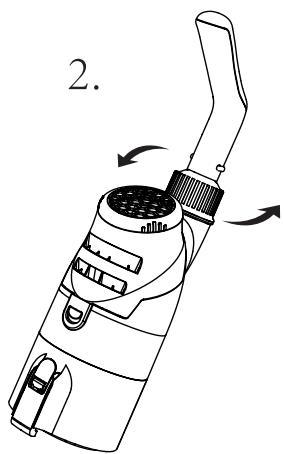
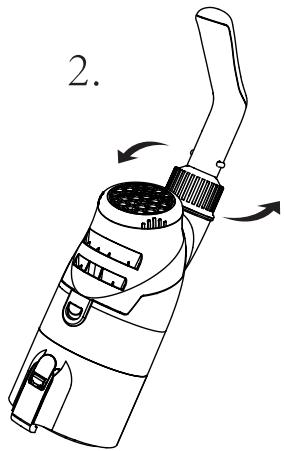
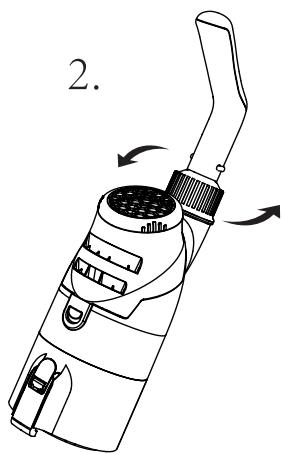
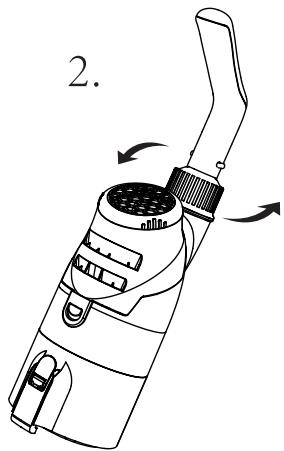
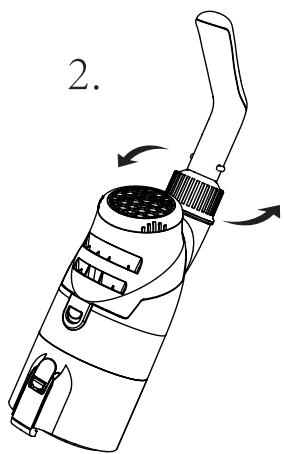
(1) Handle assembly. This handle is used to clean walls, steps, seats and corners, as shown in figure "A"
(2) Assembly of telescopic rod (included)
Cleaner can be connected to a standard telescopic rod, as shown in figure "B".
natural_image
Technical line drawing of a mechanical device with directional arrows indicating motion (no text or symbols)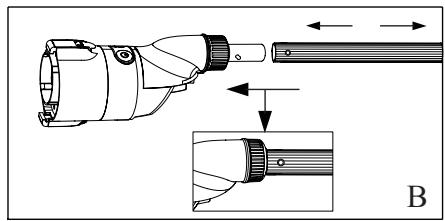
natural_image
Technical illustration of a handheld device with an inset showing a close-up view of its internal components (no text or symbols present)Note: the product can be connected with handle A or standard telescopic rod B.
3. Power on and Turbo speed mode
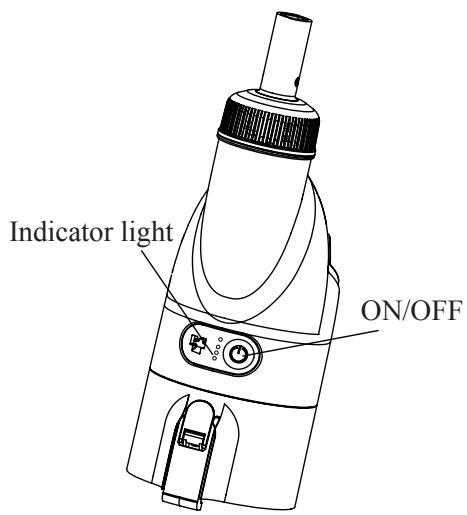
3.1 Press and hold the power switch button of the cleaner for 2-3 seconds. If the «green» indicator light is always on, it means the machine is started. Please put the product into the water for operation, so as to prevent the seal failure of the oil seal when the product is idling. At this time, the cleaner is in low speed mode.
3.2 Press and hold the power switch button of the cleaner for 2-3 seconds again, you will find that a “blue” indicator light is on, and the cleaner enters the “high speed mode”. At this time, the cleaner can clean up a large number of large particles of sediment at the bottom of the pool. Long press the switch button for 2-3 seconds to switch between “low speed mode” and “high speed mode”.
3.3 Turn off: When you lightly press the switch button, all the indicator lights are off and the cleaner is turned off.
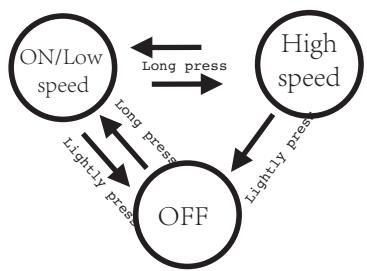
flowchart
graph TD
    A["ON/Low speed"] <-->|Long press| B["High speed"]
    B <-->|Lightly press| C["OFF"]
    C <-->|Long press| A
    C <-->|Lightly press| B
4. When to use paper filter?
There is a paper filter with shipment, it is used to collect fine dust and rubblishes; For daily cleaning, such as leaves, fruits, stone, there is no need to such a paper filter.
5. How to use vacuum head?
To use the cleaner without vac head for corners of the pool, it can be after or with the high speed as it can be used at same to cleans angles of pools and steps of the pool.
natural_image
Illustration of a showerhead being injected with a funnel, showing the spray effect (no text or symbols)6. Garbage cleaning
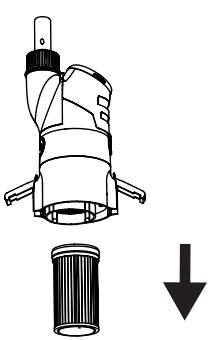
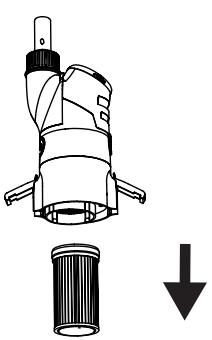
6.1 cleaning of front transparent garbage cover and filter element
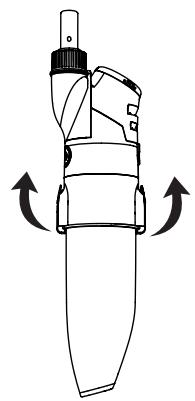
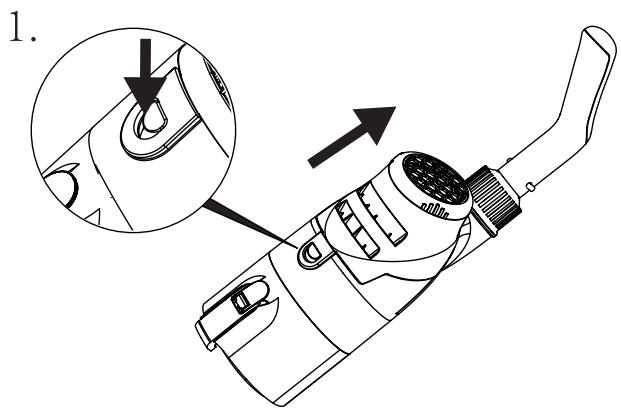
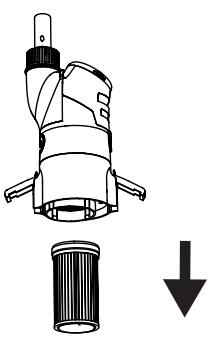
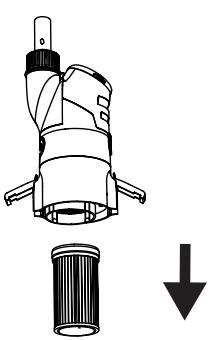
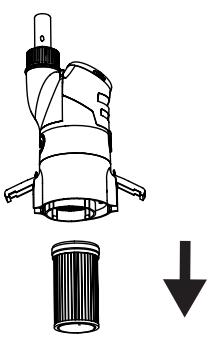
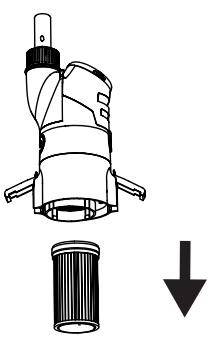
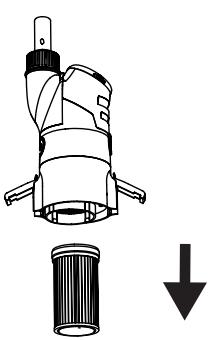
(1) For example, the buttons on the two sides of the transparent garbage cover under the drawing board remove the transparent garbage cover and the filter element from the body;
natural_image
Line drawing of a handheld device with directional arrows indicating rotation or movement (no text or symbols)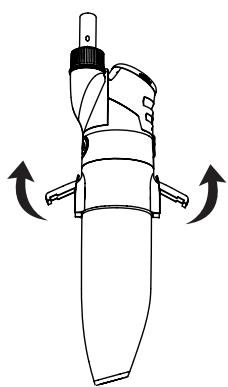
natural_image
Line drawing of a mechanical device with directional arrows indicating rotation or movement (no text or symbols)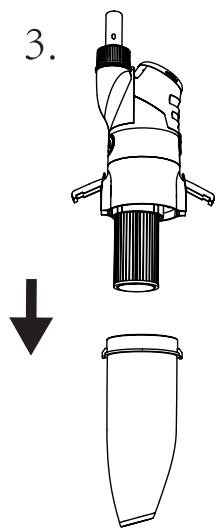
natural_image
Technical line drawing of a mechanical device with a downward arrow indicating a decrease or removal (no text or symbols present)(2) Clean out the garbage in the transparent cover,
(3) Use a paper filter cleaner / machine to clean the filter paper.
(The cleaner / machine needs to buy separately).
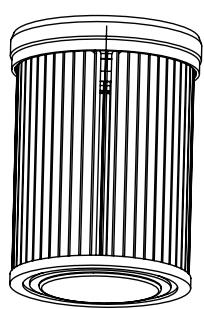
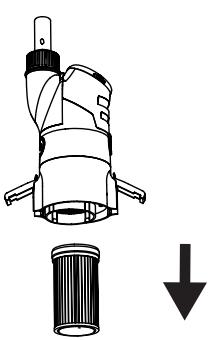
(4) First install the cleaned filter element to the body, then install the transparent garbage cover to the body, and finally buckle the lock button.
(Reference: 2.1 filter element assembly and body parts assembly)
natural_image
Technical line drawing of a cylindrical mechanical component with vertical grooves and a central shaft (no text or symbols)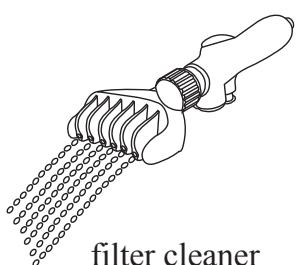
( not included into )
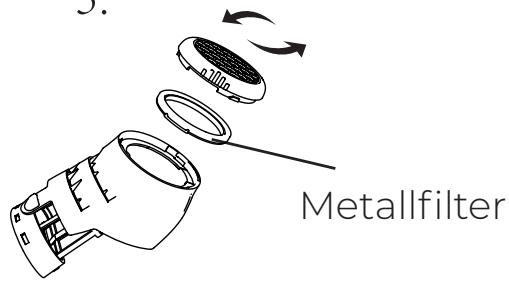
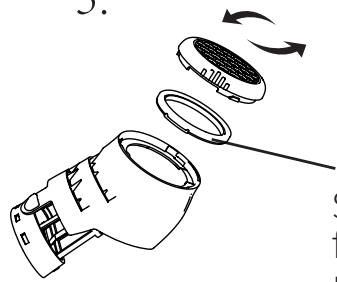
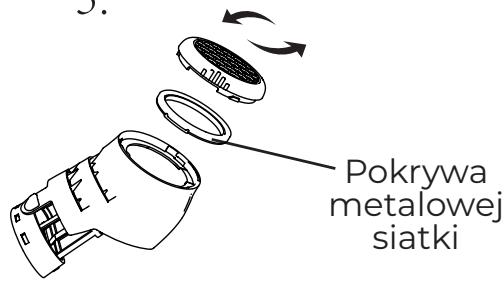
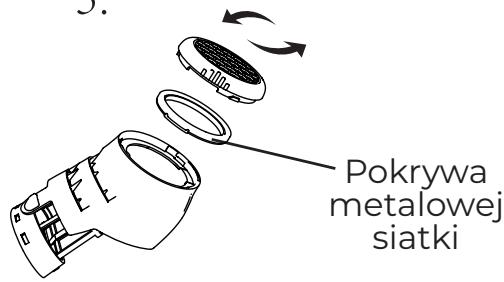
6.2 Back filters cleaning
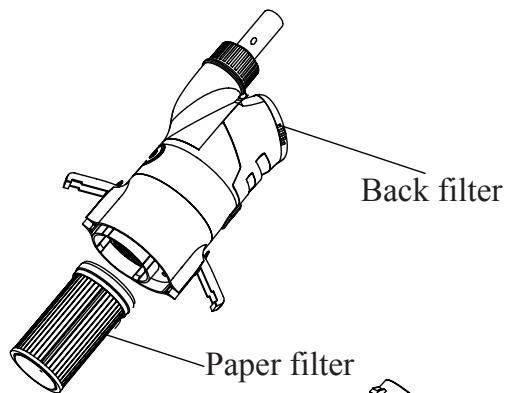
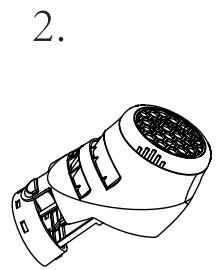
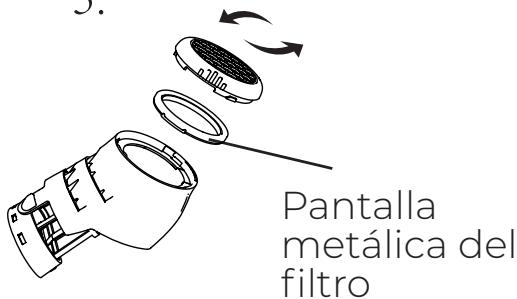
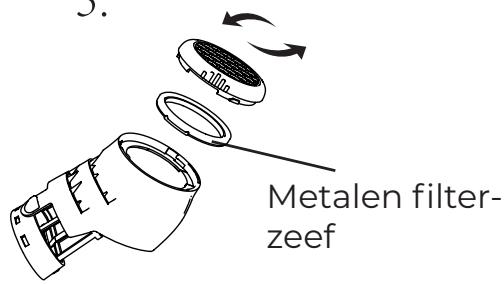
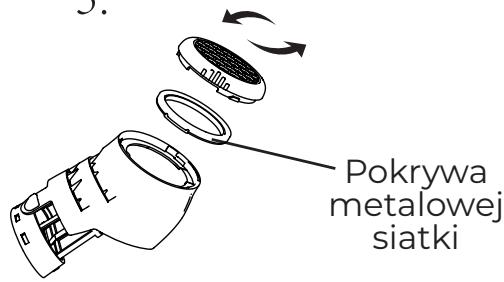
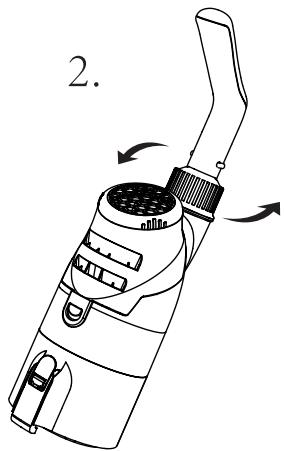
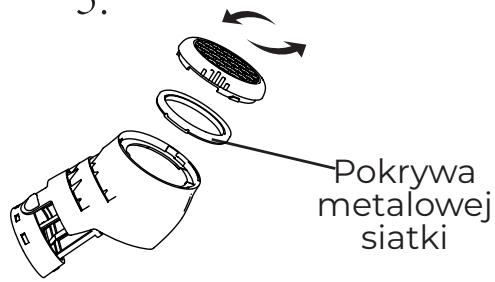
(1) Press and hold the button at the front end of the filter cover to remove the whole filter cover from the body;
(2) Screw out the rear cover of the filter cover,
(3) Clean the metal filter screen in the filter cover;
(4) Tighten the rear cover of the filter cover, and assemble the filter cover to the body.
natural_image
Line drawing of a handheld device with internal components (no text or symbols)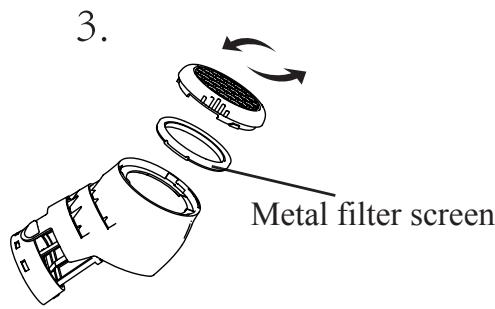
6.3 battery replacement
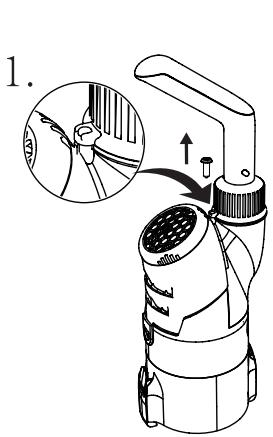
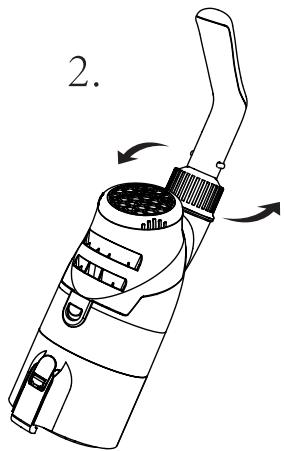
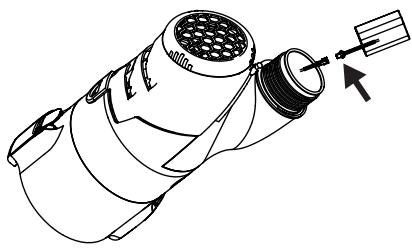
NOTE: User must consult dealer before any battery replacement.
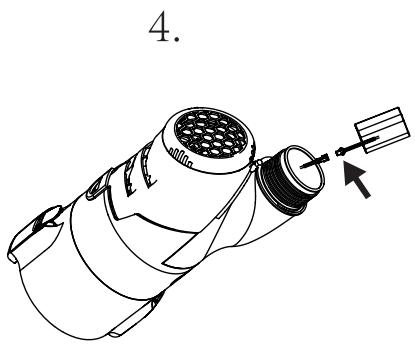
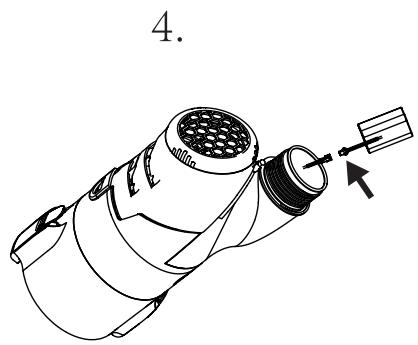
Open the screw, loosen the handle, take out the battery pack, gently press the battery power cord to separate and replace the battery.
natural_image
Line drawing of a handheld device with a handle and internal components, no text or symbols present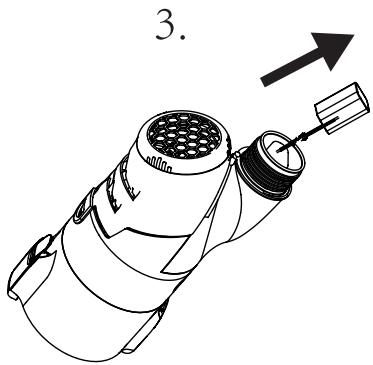
natural_image
Technical line drawing of a mechanical component with a tool and arrow indicating direction (no text or symbols)Maintenance and storage
- The battery discharges itself during storage. Make sure the robot is fully charged before storage.
- When not in use, you must recharge the battery at least every three months.
- Unplug the external adapter from the socket and then the charging cable from the external adapter and the robot.
- Remove the accessories from the robot. If necessary, rinse the robot and accessories with clean water. Do not use detergent.
• Make sure the robot is drained before storage. - Use a wet cloth to clean and dry the robot and its accessories.
- Store in a well ventilated place away from sunlight, heat, fire sources, pool chemicals and children.
- The storage environment temperature should be 10^-25^ (50°F–77°F). Note: higher temperature may shorten battery life.
Troubleshooting
If you have problems with your cleaner, follow the troubleshooting steps below to restore performance. Note: turn off the power before making any repairs.
| Problem | Possible causes | Solution |
| Unable to clean garbage | The battery is low | Please recharge. |
| Impeller clogging | Turn off the cleaner and check the impeller to remove the garbage. If necessary, contact your dealer for further instructions. Warning! Before servicing the equipment, make sure that the cleaner is turned off. | |
| Impeller damage | Please contact your dealer for replacement. | |
| The filter is full | Clean up the garbage from the filter screen. | |
| There is too much garbage in the filter element | Clean the garbage of filter element. | |
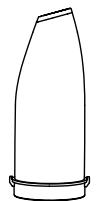
| Garbage flows out of the front transparency | Anti pour blade damage | Replace the anti reverse flow piece. Please contact your dealer for replacement parts. |
| The garbage is too full | Clean the waste of filter screen and filter element. | |
| Rubbish is leaking out of the filter bag | The filter bag is damaged | Replace the filter bag. Please contact your dealer for replacement parts. |
| The handle / telescopic link cannot be assembled correctly | V-clip damaged | Replace the v-clip. Please contact your dealer for replacement parts. |
| The cleaner cannot be charged. | Battery damage. | Please contact the dealer to replace the battery. Warning! Don't turn on the cleaner and replace the battery yourself. This can cause serious or fatal injury, so the warranty will not be valid. |
| The charging cable is not fully connected to the external adapter and the robot. | Make sure the charger cable is properly and completely connected to the external adapter and cleaner. Please refer to the user manual. | |
| The external adapter is broken. | Contact the dealer for replacement. Warning! Using the wrong external adapter will result in damage to the cleaner / battery and void the warranty. |
natural_image
Diagram of a mechanical device with a downward arrow indicating force or direction (no text or symbols present)
natural_image
Technical line drawing of a mechanical device with cylindrical components and a base (no text or symbols)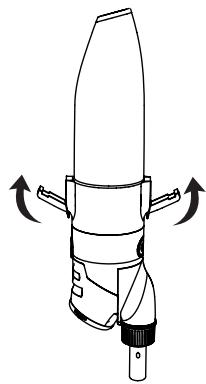
natural_image
Technical line drawing of a mechanical device with directional arrows indicating motion (no text or symbols)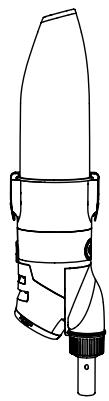
natural_image
Line drawing of a mechanical device with no visible text or symbolsnatural_image
Simple line drawing of a cleaning tool with a brush and base, no text or symbols present2.3 Montaje del asa
Monte el asa.
natural_image
Technical line drawing of a mechanical device with directional arrows indicating motion (no text or symbols)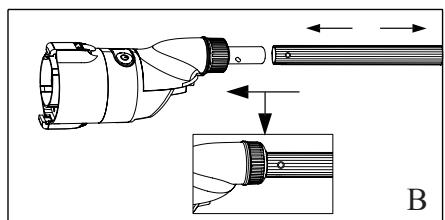
natural_image
Technical illustration of a mechanical component with an inset showing a detailed view of a shaft and end cap (no text or symbols present)flowchart
graph TD
    A["ON/Low speed"] <-->|Long press| B["High speed"]
    B <-->|Lightly press| C["OFF"]
    C <-->|Long press| A
    C <-->|Lightly press| B
natural_image
Line drawing of a handheld device with directional arrows indicating rotation or movement (no text or symbols)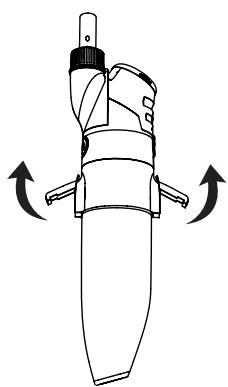
natural_image
Line drawing of a mechanical device with directional arrows indicating rotation or movement (no text or symbols)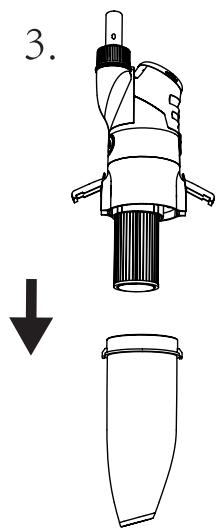
natural_image
Technical line drawing of a mechanical device with a downward arrow indicating a decrease or transformation (no text or symbols present)natural_image
Technical line drawing of a cylindrical mechanical component with internal vertical grooves and a central shaft (no text or symbols)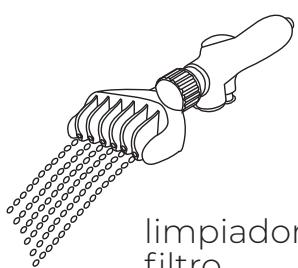
natural_image
Line drawing of a lathe tool with meshing and a handle, labeled 'limpiador filtro' (no other text or symbols)natural_image
Technical line drawing of a handheld device with an inset showing a close-up of a component (no text or symbols present)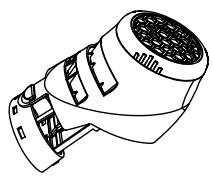
natural_image
Line drawing of a handheld device with a handle and internal components, no text or symbols present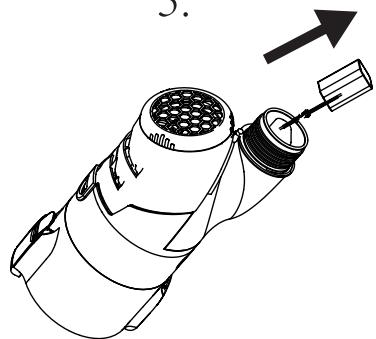
natural_image
Line drawing of a mechanical device with a pipe fitting and an arrow indicating direction (no text or symbols)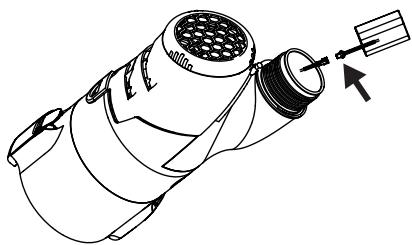
natural_image
Technical line drawing of a mechanical component with no visible text or symbolsnatural_image
Technical line drawing of a handheld device with an inset close-up showing internal components (no text or symbols)2. Installation
natural_image
Diagram of a mechanical device with a downward arrow indicating force or direction (no text or symbols present)
natural_image
Technical line drawing of a mechanical device with cylindrical components and mounting brackets (no text or symbols)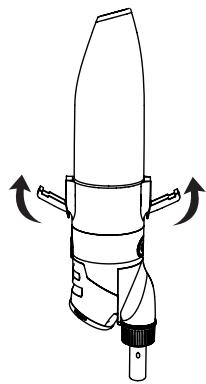
natural_image
Technical line drawing of a mechanical device with directional arrows indicating motion (no text or symbols)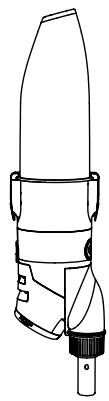
natural_image
Line drawing of a mechanical device with no visible text or symbolsnatural_image
Simple line drawing of a cleaning tool with an arrow indicating direction (no text or symbols)natural_image
Technical line drawing of a mechanical device with directional arrows indicating motion (no text or symbols)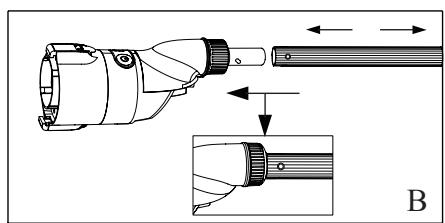
natural_image
Technical illustration of a handheld device with a close-up view showing internal components (no text or symbols)flowchart
graph TD
    A["Témoin"] --> B["On / Off"]
    B --> C["High speed"]
    C --> D["OFF"]
    D --> E["ON/Low speed"]
    E --> F["Long press"]
    F --> G["Lightly press"]
    G --> H["OFF"]
    H --> I["Long press"]
    I --> J["ON/Low speed"]
natural_image
Line drawing of a handheld device with directional arrows indicating rotation or movement (no text or symbols)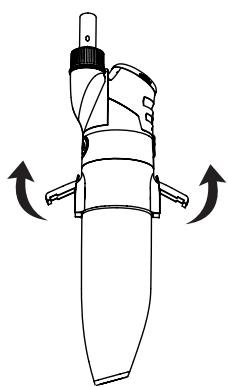
natural_image
Line drawing of a mechanical device with directional arrows indicating rotation or movement (no text or symbols)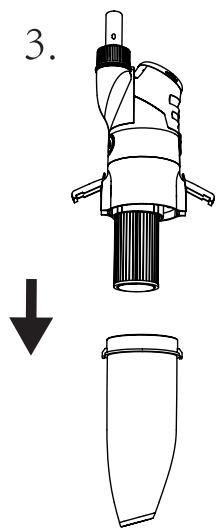
natural_image
Technical line drawing of a mechanical device with a downward arrow indicating a decrease or transformation (no text or symbols present)natural_image
Technical line drawing of a cylindrical mechanical component with internal vertical grooves and a central shaft (no text or symbols)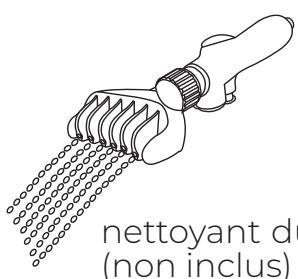
natural_image
Line drawing of a handheld device with internal components (no text or symbols)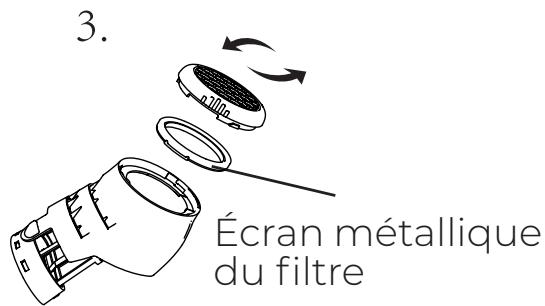
natural_image
Line drawing of a handheld device with a handle and internal components, no text or symbols present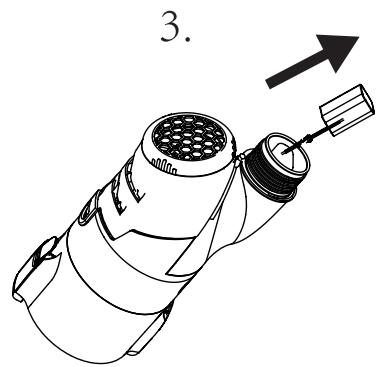
natural_image
Simple line drawing of a cylindrical object with a label 'B' on its side (no other text or symbols)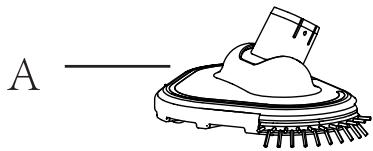
natural_image
Simple line drawing of a mechanical component with a base and textured surface (no text or symbols)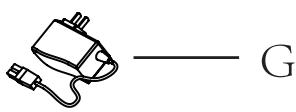
natural_image
Technical line drawing of a handheld device with an inset close-up showing internal components (no text or symbols)2. Installation
natural_image
Diagram of a mechanical device with a downward arrow indicating force or direction (no text or symbols present)
natural_image
Technical line drawing of a mechanical device with two views: top shows a tapered component, bottom shows a cylindrical assembly (no text or symbols)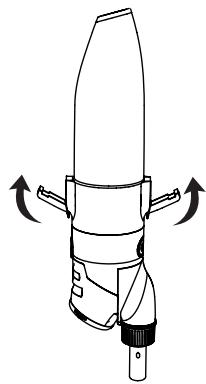
natural_image
Technical line drawing of a mechanical device with directional arrows indicating motion (no text or symbols)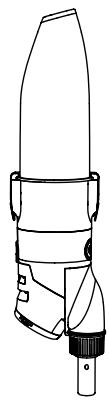
natural_image
Line drawing of a mechanical device with no visible text or symbolsnatural_image
Simple line drawing of a cleaning tool with a brush and arrow, no text or symbols presentnatural_image
Technical line drawing of a mechanical device with directional arrows indicating motion (no text or symbols)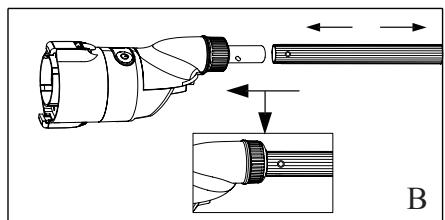
natural_image
Technical illustration of a mechanical component with an inset showing a detailed view of a shaft and end cap (no text or symbols present)flowchart
graph TD
    A["Lichtanzeige"] --> B["ON/Low speed"]
    A --> C["OFF"]
    D["EIN/AUS"] --> E["High speed"]
    F["Off"] --> G["Lightly press"]
    H["Long press"] --> I["Long press"]
    J["Lightly press"] --> K["Long press"]
natural_image
Line drawing of a cleaning brush applying paint to a surface, with an arrow indicating the process (no text or symbols present)6. Abfallreinigung
natural_image
Line drawing of a handheld device with directional arrows indicating rotation or movement (no text or symbols)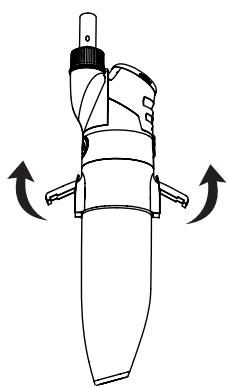
natural_image
Line drawing of a mechanical device with directional arrows indicating rotation or movement (no text or symbols)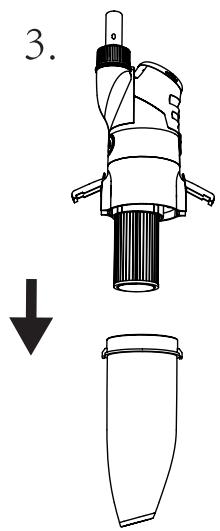
natural_image
Technical line drawing of a mechanical device with a downward arrow indicating a decrease or transformation (no text or symbols present)natural_image
Technical line drawing of a cylindrical mechanical component with internal vertical grooves and a central shaft (no text or symbols)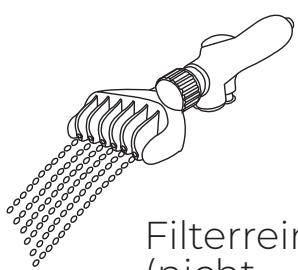
natural_image
Technical line drawing of a handheld device with an inset showing a close-up of a component (no text or symbols present)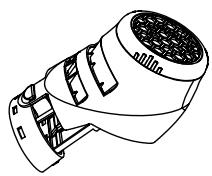
6.3 Batteriewechsel
natural_image
Line drawing of a handheld device with a handle and internal components, no text or symbols present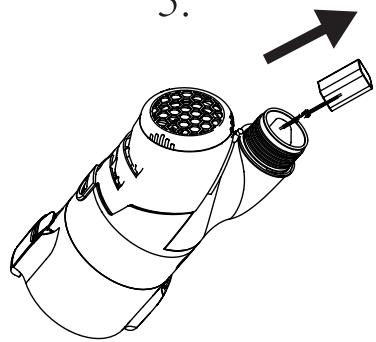
natural_image
Line drawing of a mechanical device with a handle and internal components, no text or symbols present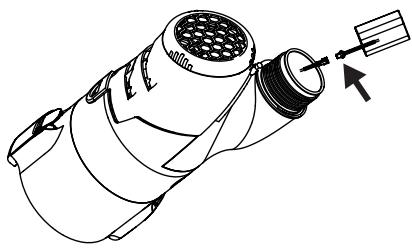
natural_image
Technical line drawing of a mechanical component with a tool and arrow indicating direction (no text or symbols)natural_image
Diagram of a mechanical device with a downward arrow indicating force or direction (no text or symbols present)
natural_image
Technical line drawing of a mechanical device with cylindrical components and a base (no text or symbols)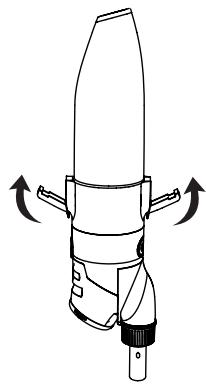
natural_image
Diagram of a mechanical device with directional arrows indicating rotation or movement (no text or symbols)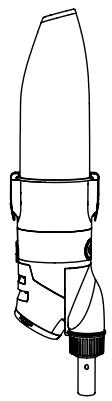
natural_image
Line drawing of a mechanical device with no visible text or symbolsnatural_image
Simple line drawing of a cleaning brush with an arrow indicating direction (no text or symbols)natural_image
Technical line drawing of a mechanical device with directional arrows indicating motion (no text or symbols)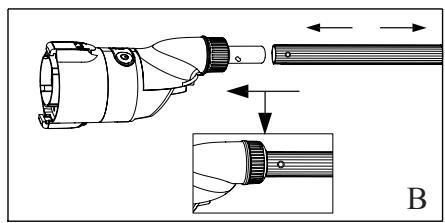
natural_image
Technical illustration of a handheld device with an inset showing a close-up view of its internal components (no text or symbols present)natural_image
Illustration of a cleaning tool applying material to a surface finisher (no text or symbols)natural_image
Line drawing of a handheld device with directional arrows indicating rotation or movement (no text or symbols)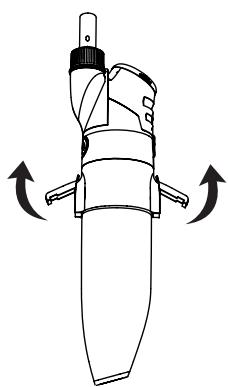
natural_image
Line drawing of a mechanical device with directional arrows indicating rotation or movement (no text or symbols)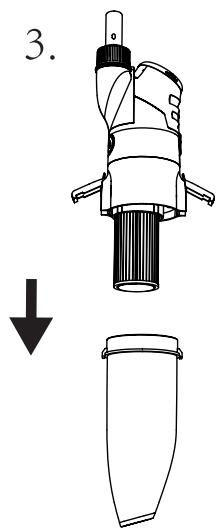
natural_image
Technical line drawing of a mechanical device with a downward arrow indicating a decrease or transformation (no text or symbols present)natural_image
Technical line drawing of a handheld device with an inset showing a close-up of a component detail (no text or symbols)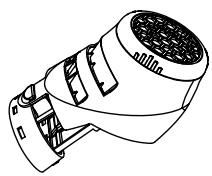
natural_image
Diagram of a device with internal components and arrows indicating rotation (no text or symbols)Schermo filtrante in metallo
natural_image
Line drawing of a handheld device with a handle and internal components, no text or symbols present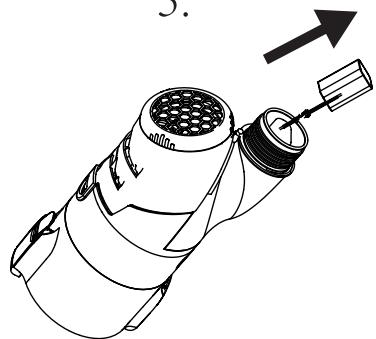
natural_image
Line drawing of a mechanical device with a pipe fitting and an arrow indicating direction (no text or symbols)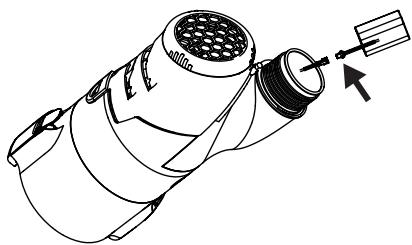
natural_image
Technical line drawing of a mechanical component with no visible text or symbolsVEILIGHEIDSWAARSCHUWING
natural_image
Technical line drawing of a handheld device with an attached plug and a magnified inset showing internal components (no text or symbols)Indicatielampje
2. Installatie
natural_image
Diagram of a mechanical device with a cylindrical component and a downward arrow, no text or symbols present.
natural_image
Technical line drawing of a mechanical device with two views: top shows top view, bottom shows side view (no text or symbols)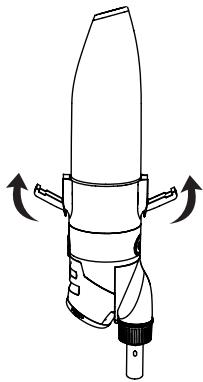
natural_image
Technical line drawing of a mechanical device with directional arrows indicating motion (no text or symbols)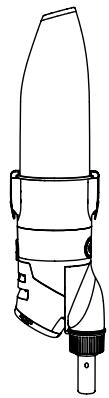
natural_image
Line drawing of a mechanical device with no visible text or symbolsnatural_image
Simple line drawing of a cleaning brush applying material to a surface, with an arrow indicating direction (no text or symbols)natural_image
Technical line drawing of a mechanical device with directional arrows indicating motion (no text or symbols)natural_image
Line drawing of a handheld device with directional arrows indicating rotation or movement (no text or symbols)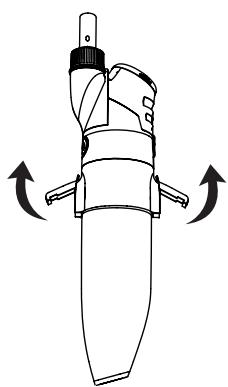
natural_image
Line drawing of a mechanical device with directional arrows indicating rotation or movement (no text or symbols)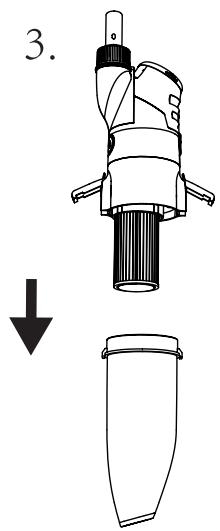
natural_image
Technical line drawing of a mechanical device with a downward arrow indicating a decrease or transformation (no text or symbols present)natural_image
Technical line drawing of a cylindrical mechanical component with internal vertical grooves and a central shaft (no text or symbols)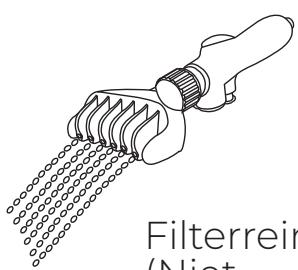
natural_image
Line drawing of a filterer tool emitting particles (no text or symbols)Filterreiniger
(Niet
bijgeleverd)
6.2 Achterste filters schoonmaken
natural_image
Technical line drawing of a handheld device with an inset showing a close-up of a component detail (no text or symbols)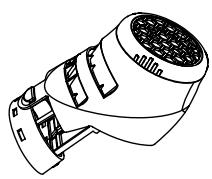
6.3 Accu vervangen
natural_image
Line drawing of a handheld device with a handle and internal components, no text or symbols present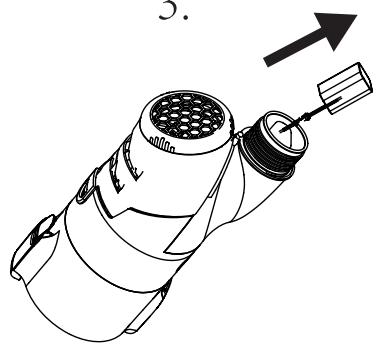
natural_image
Line drawing of a mechanical device with a lever and arrow indicating direction (no text or symbols)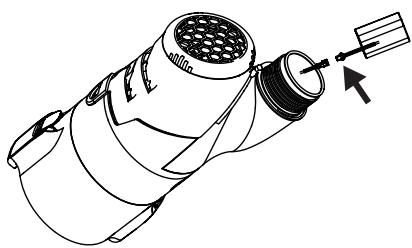
natural_image
Technical line drawing of a mechanical component with no visible text or symbolsOnderhoud en opslag
natural_image
Diagram of a mechanical device with a downward arrow indicating force or direction (no text or symbols present)
natural_image
Technical line drawing of a mechanical device with cylindrical components and mounting brackets (no text or symbols)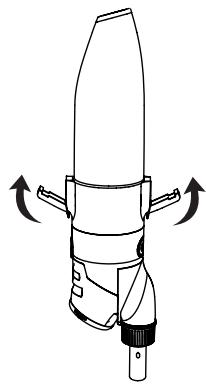
natural_image
Technical line drawing of a mechanical device with directional arrows indicating motion (no text or symbols)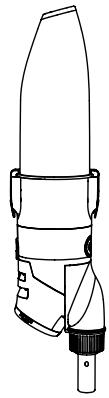
natural_image
Line drawing of a mechanical device with no visible text or symbolsnatural_image
Simple line drawing of a cleaning brush with an arrow indicating direction (no text or symbols)2.3 Montagem da asa
natural_image
Technical line drawing of a mechanical device with directional arrows indicating motion (no text or symbols)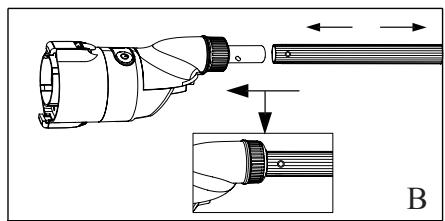
natural_image
Technical illustration of a mechanical device with an inset showing a close-up view of a cylindrical component (no text or symbols present)3. Para ligar o robô limpa-fundos and Turbo speed mode
natural_image
Line drawing of a handheld device with directional arrows indicating rotation or movement (no text or symbols)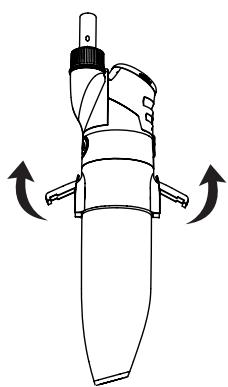
natural_image
Line drawing of a mechanical device with directional arrows indicating rotation or movement (no text or symbols)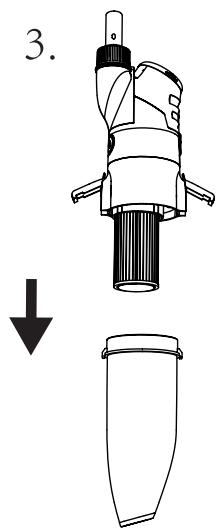
natural_image
Technical line drawing of a mechanical device with a downward arrow indicating a decrease or removal (no text or symbols present)natural_image
Line drawing of a handheld device with internal components (no text or symbols)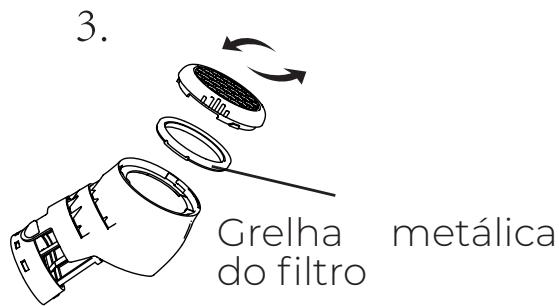
natural_image
Line drawing of a handheld device with a handle and internal components, no text or symbols present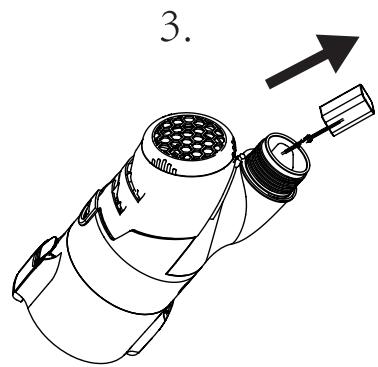
natural_image
Line drawing of a mechanical device with a labeled component (no text or symbols present)natural_image
Diagram of a mechanical device with a downward arrow indicating process (no text or symbols present)
natural_image
Technical line drawing of a mechanical device with cylindrical components and mounting brackets (no text or symbols)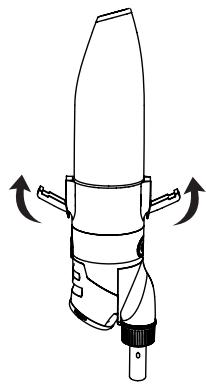
natural_image
Technical line drawing of a mechanical device with directional arrows indicating motion (no text or symbols)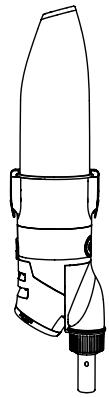
natural_image
Line drawing of a mechanical device with no visible text or symbolsnatural_image
Simple line drawing of a cleaning brush with an arrow indicating direction (no text or symbols)2.3 Montaż uchwytu.
natural_image
Technical line drawing of a mechanical device with directional arrows indicating motion (no text or symbols)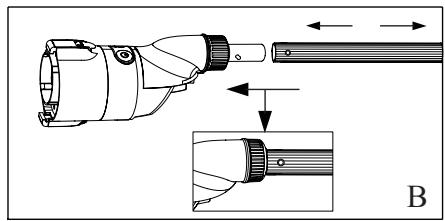
natural_image
Technical illustration of a mechanical device with an inset showing a close-up view of the component (no text or symbols present)flowchart
graph TD
    A["ON/Low speed"] <-->|Long press| B["High speed"]
    B <-->|Lightly press| C["OFF"]
    C <-->|Long press| A
    C <-->|Lightly press| B
natural_image
Line drawing of a handheld device with directional arrows indicating rotation or movement (no text or symbols)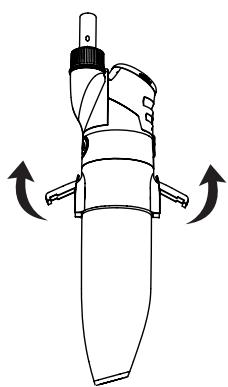
natural_image
Line drawing of a mechanical device with directional arrows indicating rotation or movement (no text or symbols)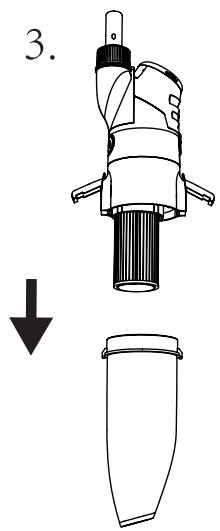
natural_image
Technical line drawing of a mechanical device with a downward arrow indicating a decrease or removal (no text or symbols present)natural_image
Technical line drawing of a handheld device with an inset showing a close-up of a component detail (no text or symbols present)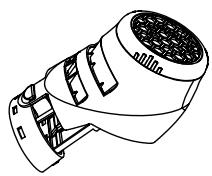
natural_image
Line drawing of a handheld device with a handle and internal components, no text or symbols present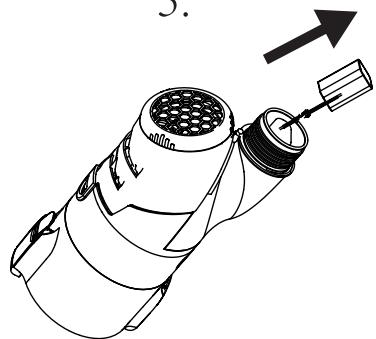
natural_image
Line drawing of a mechanical device with a pipe fitting and an arrow indicating direction (no text or symbols)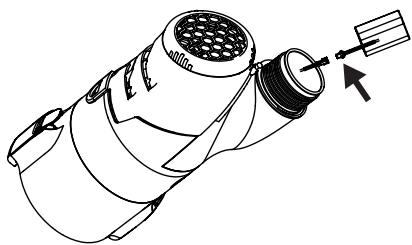
natural_image
Technical line drawing of a mechanical component with no visible text or symbolsnatural_image
Technical line drawing of a handheld device with an inset close-up showing internal components (no text or symbols)2. Instalace
natural_image
Diagram of a mechanical device with a downward arrow indicating force or direction (no text or symbols present)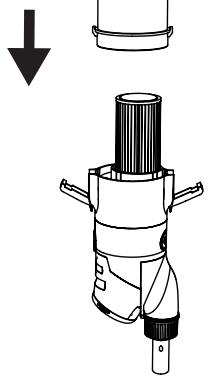
natural_image
Technical illustration of a mechanical device with a downward arrow indicating assembly or inspection (no text or symbols present)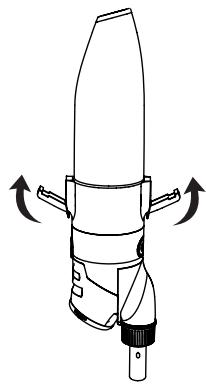
natural_image
Technical line drawing of a mechanical device with directional arrows indicating motion (no text or symbols)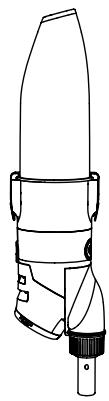
natural_image
Line drawing of a mechanical device with no visible text or symbolsnatural_image
Simple line drawing of a cleaning brush with an arrow indicating direction (no text or symbols)natural_image
Technical line drawing of a mechanical device with directional arrows indicating motion (no text or symbols)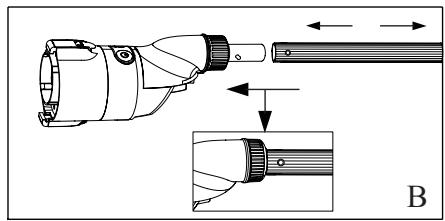
natural_image
Technical illustration of a handheld device with an inset showing a close-up view of its internal components (no text or symbols present)natural_image
Line drawing of a handheld device with directional arrows indicating rotation or movement (no text or symbols)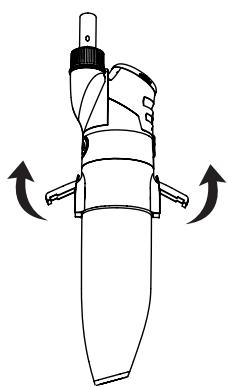
natural_image
Line drawing of a mechanical device with directional arrows indicating rotation or movement (no text or symbols)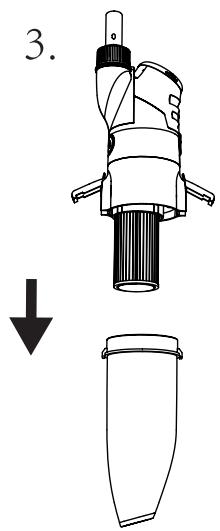
natural_image
Technical line drawing of a mechanical device with a downward arrow indicating a decrease or transformation (no text or symbols present)natural_image
Technical line drawing of a cylindrical mechanical component with internal vertical grooves and a central shaft (no text or symbols)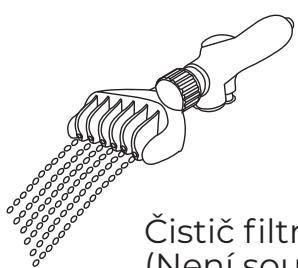
natural_image
Technical line drawing of a handheld device with an inset showing a close-up of the component (no text or symbols present)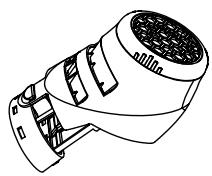
natural_image
Line drawing of a handheld device with a handle and internal components, no text or symbols present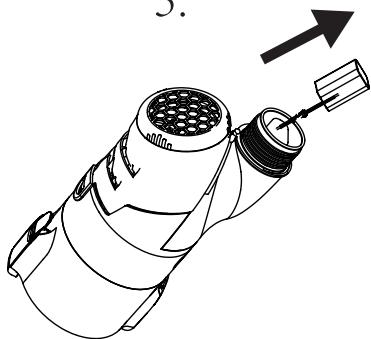
natural_image
Line drawing of a mechanical device with a handle and internal components, no text or symbols present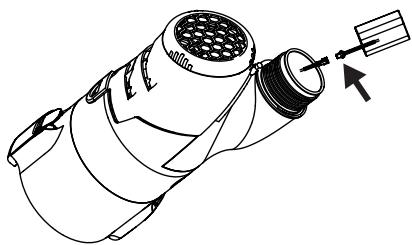
natural_image
Technical line drawing of a mechanical component with no visible text or symbolsÚdržba a skladování
natural_image
Technical line drawing of a microscope with an attached electrical plug and its internal component (no text or symbols)2. Inštalácia
natural_image
Diagram of a mechanical device with a downward arrow indicating force or direction (no text or symbols present)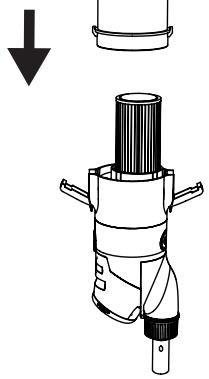
natural_image
Technical illustration of a mechanical device with a downward arrow indicating assembly or inspection (no text or symbols present)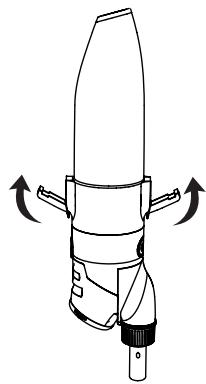
natural_image
Technical line drawing of a mechanical device with directional arrows indicating motion (no text or symbols)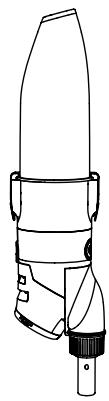
natural_image
Line drawing of a mechanical device with no visible text or symbolsnatural_image
Simple line drawing of a cleaning brush with an arrow indicating direction (no text or symbols)2.3 Montáž rukoväte
natural_image
Technical line drawing of a mechanical device with directional arrows indicating motion (no text or symbols)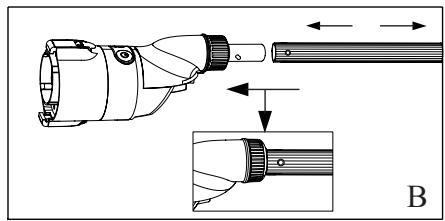
natural_image
Technical illustration of a handheld device with an inset showing a close-up view of its internal components (no text or symbols present)natural_image
Line drawing of a handheld device with directional arrows indicating rotation or movement (no text or symbols)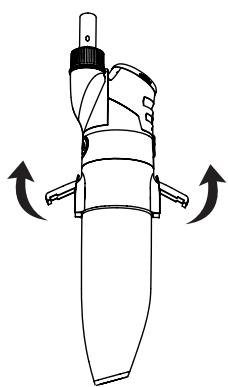
natural_image
Line drawing of a mechanical device with directional arrows indicating rotation or movement (no text or symbols)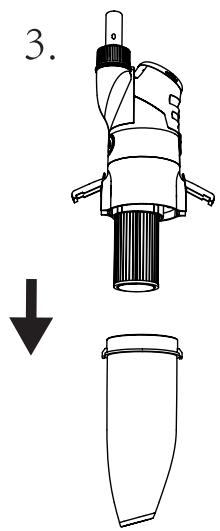
natural_image
Technical line drawing of a mechanical device with a downward arrow indicating a decrease or transformation (no text or symbols present)natural_image
Technical line drawing of a cylindrical mechanical component with internal vertical grooves and a central shaft (no text or symbols)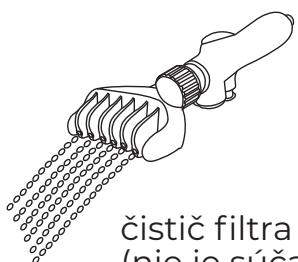
natural_image
Line drawing of a handheld device with internal components (no text or symbols)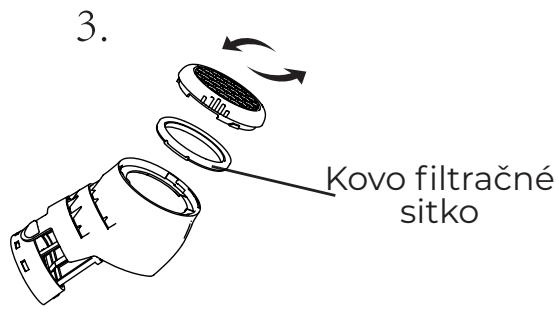
6.3 výmena batérie
natural_image
Line drawing of a handheld device with a handle and internal components, no text or symbols present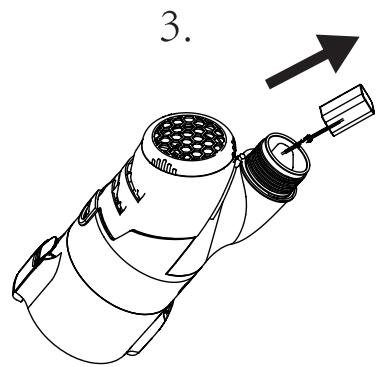
natural_image
Line drawing of a mechanical device with a labeled component (no text or symbols present)natural_image
Technical line drawing of a microscope with an attached electrical plug and its internal component (no text or symbols)Indicator luminos
2. Instalare
natural_image
Diagram of a mechanical device with a downward arrow indicating process (no text or symbols present)
natural_image
Technical line drawing of a mechanical device with cylindrical components and mounting brackets (no text or symbols)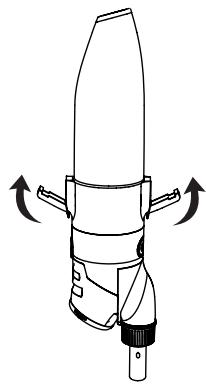
natural_image
Technical line drawing of a mechanical device with directional arrows indicating motion (no text or symbols)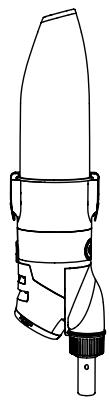
natural_image
Line drawing of a mechanical device with no visible text or symbolsnatural_image
Simple line drawing of a cleaning brush with an arrow indicating direction (no text or symbols)natural_image
Technical line drawing of a mechanical device with directional arrows indicating motion (no text or symbols)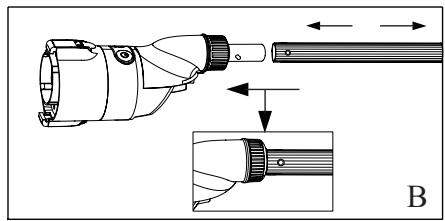
natural_image
Technical illustration of a handheld device with an inset showing a close-up view of its internal components (no text or symbols present)natural_image
Line drawing of a handheld device with directional arrows indicating rotation or movement (no text or symbols)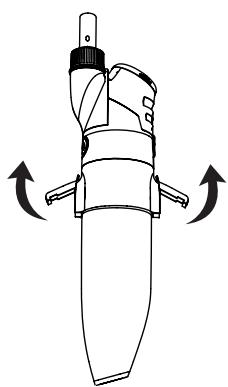
natural_image
Line drawing of a mechanical device with directional arrows indicating rotation or movement (no text or symbols)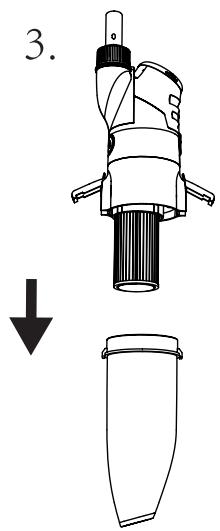
natural_image
Technical line drawing of a mechanical device with a downward arrow indicating a decrease or transformation (no text or symbols present)natural_image
Technical line drawing of a cylindrical mechanical component with internal vertical grooves and a central shaft (no text or symbols)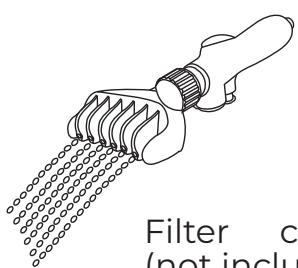
natural_image
Line drawing of a filter tool with meshing and a handle (no text or symbols)Filter cleaner (not included)
natural_image
Technical line drawing of a handheld device with an inset showing a close-up of the component (no text or symbols present)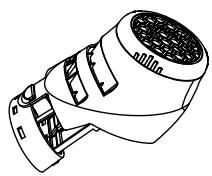
natural_image
Line drawing of a handheld device with a handle and internal components, no text or symbols present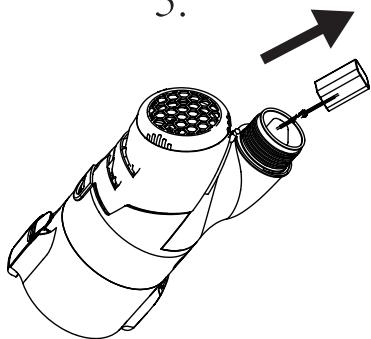
natural_image
Line drawing of a mechanical device with a handle and internal components, no text or symbols present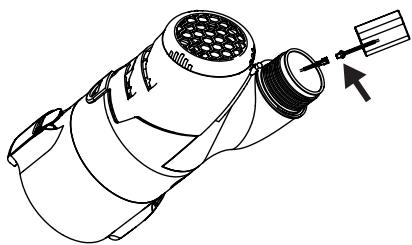
natural_image
Technical line drawing of a mechanical component with no visible text or symbolsnatural_image
Technical line drawing of a microscope with an attached electrical plug and its internal component (no text or symbols)2. Installing
natural_image
Diagram of a mechanical device with a downward arrow indicating force or direction (no text or symbols present)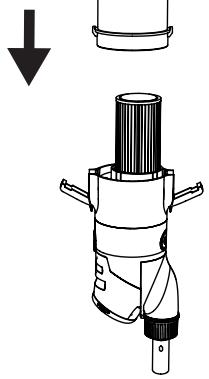
natural_image
Diagram of a mechanical device with a cylindrical component and a downward arrow indicating force or direction (no text or symbols present)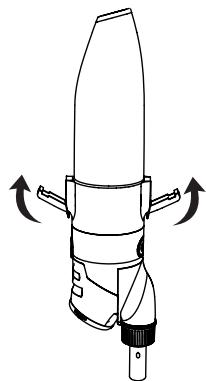
natural_image
Technical line drawing of a mechanical device with directional arrows indicating motion (no text or symbols)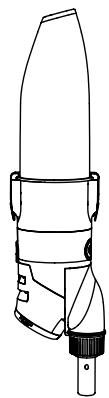
natural_image
Line drawing of a mechanical device with no visible text or symbolsnatural_image
Simple line drawing of a cleaning brush applying paint to a surface, with an arrow indicating direction (no text or symbols)natural_image
Technical line drawing of a mechanical device with labeled components and directional arrows (no text or symbols)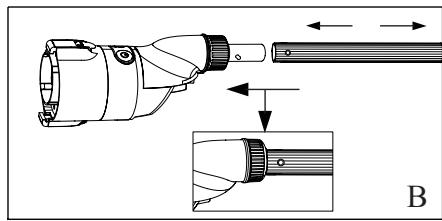
natural_image
Technical illustration of a mechanical device with an inset showing a close-up view of the component (no text or symbols present)flowchart
graph TD
    A["Indicatorlampa"] --> B["ON/Low speed"]
    A --> C["OFF"]
    D["WŁ/WYL"] --> E["High speed"]
    F["OFF"] --> G["Long press"]
    G --> H["Lightly press"]
    H --> I["Long press"]
    I --> J["Long press"]
    J --> K["Long press"]
    K --> L["Long press"]
natural_image
Line drawing of a handheld device with directional arrows indicating rotation or movement (no text or symbols)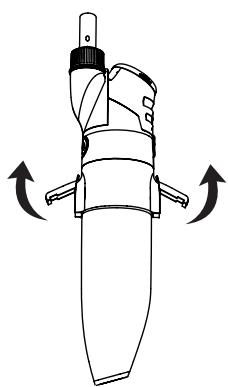
natural_image
Line drawing of a mechanical device with directional arrows indicating rotation or movement (no text or symbols)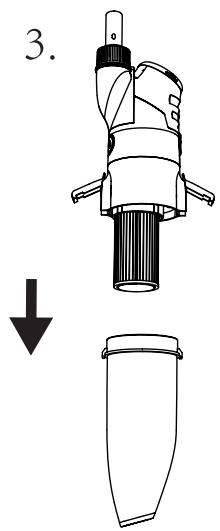
natural_image
Technical line drawing of a mechanical device with a downward arrow indicating a decrease or removal (no text or symbols present)natural_image
Technical line drawing of a cylindrical mechanical component with internal vertical grooves and a central shaft (no text or symbols)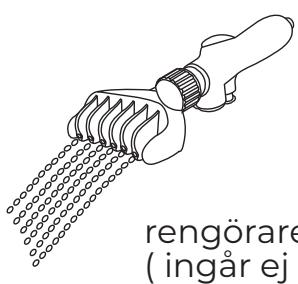
6.2 Rengöring Bakfilter
natural_image
Technical line drawing of a handheld device with an inset showing a close-up of a component detail (no text or symbols present)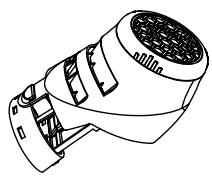
natural_image
Line drawing of a handheld device with a handle and internal components, no text or symbols present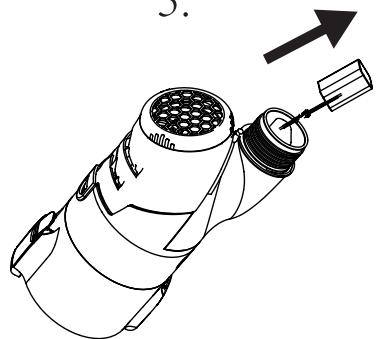
natural_image
Line drawing of a mechanical device with a pipe fitting and an arrow indicating direction (no text or symbols)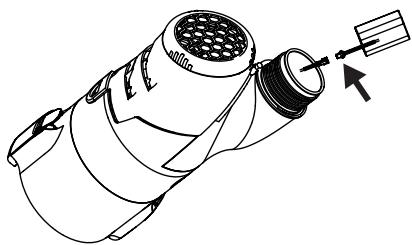
natural_image
Technical line drawing of a mechanical component with no visible text or symbolsDeclares under its sole responsibility that the products:
are in conformity with the following harmonized standards or specifications:
and therefore answers to the essential requirements of the following European directives:
Mungia, 27 April 2021
Authorized signatory / Signature autorisée/ Firmaautorizada/ Zeichnungsberechtigte /Firma autorizzata / Geautoriseerde handtekening/ Assinatura autorizada:
Angel Elorduy – General Manager
1- GUARANTEE CERTIFICATE
GENERAL TERMS
- In accordance with these provisions, the seller guarantees that the product corresponding to this guarantee (“the Product”) is in perfect condition at the time of delivery.
• The Guarantee Term for the Product is two (2) years from the time it is delivered to the purchaser. - In the event of any defect in the Product that is notified by the purchaser to the seller during the Guarantee Term, the seller will be obliged to repair or replace the Product, at his own cost and wherever he deems suitable, unless this is impossible or unreasonable.
• If it is not possible to repair or replace the Product, the purchaser may ask for a proportional reduction in the price or, if the defect is sufficiently significant, the termination of the sales contract. - The replaced or repaired parts under this guarantee, will not extend the guarantee period of the original Product, but will have a separate guarantee.
• In order for this guarantee to come into effect, the purchaser must provide proof of the date of purchase and delivery of the Product. - If, after six months from the delivery of the Product to the purchaser, he notifies a defect in the Product, the purchaser must provide proof of the origin and existence of the alleged defect.
- This Guarantee Certificate is issued without prejudice to the rights corresponding to consumers under national regulations.
INDIVIDUAL TERMS
• This guarantee covers the products referred to in this manual.
• This Guarantee Certificate will only be applicable in European Union countries.
- For this guarantee to be effective, the purchaser must strictly follow the Manufacturer's instructions included in the documentation provided with the Product, in cases where it is applicable according to the range and model of the Product.
- When a time schedule is specified for the replacement, maintenance or cleaning of certain parts or components of the Product, the guarantee will only be valid if this time schedule has been followed.
LIMITATIONS
- This guarantee will only be applicable to sales made to consumers, understanding by “consumer”, a person who purchases the Product for purposes not related to his professional activities.
- The normal wear resulting from using the product is not guaranteed. With respect to expendable or consumable parts, components and/or materials, such as batteries, light bulbs, etc. the stipulations in the documentation provided with the Product, will apply.
- The guarantee does not cover those cases when the Product; (I) has been handled incorrectly; (II) has been repaired, serviced or handled by non- authorised people or (III) has been repaired or serviced not using original parts. In cases where the defect of the Product is a result of incorrect installation or start-up, this guarantee will only apply when said installation or start-up is included in the sales contract of the Product and has been conducted by the seller or under his responsibility
2- CROSSED-OUT WASTE CONTAINER
- In order to reduce the amount of waste of electric and electronic apparatus, to reduce the danger of components, to encourage the reuse of apparatus, to assess waste and to set up a suitable waste treatment system, with the aim of improving the efficiency of environmental protection, a set of rules has been established applicable to the manufacture of the product and other rules regarding the correct environmental treatment when these products become waste.
- It is also intended to improve the environmental practices of all agents involved in electrical and electronic goods, including manufacturers, distributors, users and particularly those directly involved in the treatment of waste derived from these apparatus.
• From 13th August 2005, there are two ways of disposing of this apparatus:
• If you purchase a new equivalent apparatus or which has the same functions as the one you wish to dispose of, you can hand it over, free of charge, to the distributor when making your purchase, or
• You can take it to local collection points.
• We shall cover waste treatment costs.
- The apparatus are labelled with a symbol of a “crossed-out waste container”. This symbol means that the apparatus is subject to selected waste collection, different from general waste collection.
- Our products are designed and manufactured with top-quality, environmental-friendly materials and components, which can be reused and recycled. In spite of this, several parts of this product are not biodegradable and therefore it should not be left in the environment. For the correct recycling of this product, please completely detach the electrical motor from the rest of the filtration equipment.

1- CERTIFICADO DE GARANTÍA
ASPECTOS GENERALES
INDIVIDUÁLNÍ PODMÍNKY



- WARNING
- Charger
- Battery disposal
- Above warning and cautions are not intended to incorporate all possible instances for risks and/or severe injury. Pool/spa owners should always exercise intensive caution and common sense when operating the cleaner.
- How to use it
- Assembly
- Charger connection
- Installation
- Filter element assembly and body parts assembly
- Assembly of suction head
- Handle assembly
- Power on and Turbo speed mode
- When to use paper filter?
- How to use vacuum head?
- Garbage cleaning
- Back filters cleaning
- battery replacement
- NOTE: User must consult dealer before any battery replacement.
- Maintenance and storage
- Troubleshooting
- Montaje del asa
- Abfallreinigung
- Batteriewechsel
- VEILIGHEIDSWAARSCHUWING
- Installatie
- Achterste filters schoonmaken
- Accu vervangen
- Onderhoud en opslag
- Montagem da asa
- Para ligar o robô limpa-fundos and Turbo speed mode
- Instalace
- Údržba a skladování
- Inštalácia
- Montáž rukoväte
- výmena batérie
- Instalare
- Installing
- Rengöring Bakfilter
- 1- GUARANTEE CERTIFICATE
- GENERAL TERMS
- INDIVIDUAL TERMS
- LIMITATIONS
- 2- CROSSED-OUT WASTE CONTAINER
- 1- CERTIFICADO DE GARANTÍA
- ASPECTOS GENERALES
- INDIVIDUÁLNÍ PODMÍNKY
Brand : GRE
Model : VCB10P
Category : Pool cleaner