12ID2-25.1A 20ID3-60BL.2A - Cordless hammer drill DEXTER - Free user manual and instructions
Find the device manual for free 12ID2-25.1A 20ID3-60BL.2A DEXTER in PDF.



| Product Type | Cordless Impact Drill |
| Brand | DEXTER |
| Models | 12ID2-25.1A / 20ID3-60BL.2A |
| Rated Voltage | 12V DC / 18V DC (Max. 20V DC) |
| No-Load Speed | 0-400 / 0-1500 rpm (12V model); 0-500 / 0-2000 rpm (18V model) |
| Impact Rate | 6000-22500 bpm (12V); 8000-32000 bpm (18V) |
| Chuck Size | Ø10 mm (12V); Ø13 mm (18V) |
| Max Drilling Diameter (Wood) | 25 mm (12V); 45 mm (18V) |
| Max Drilling Diameter (Metal) | 8 mm (12V); 20 mm (18V) |
| Max Drilling Diameter (Concrete) | 6 mm (12V); 18 mm (18V) |
| Static Locking Torque | 24.9 Nm (12V); 29.5 Nm (18V) |
| Dynamic Peak Torque | 25 Nm (12V); 60 Nm (18V) |
| Weight | 0.92 kg (12V); 1.24 kg (18V) |
| Battery Type | Li-Ion, compatible with UP20 (models: MLC3H-202(SJ20) or 12BA2-40L.1) |
| Charger | UAOC-01: input 200-240 VAC, 50-60 Hz, output 12.9 V DC 1.5 A |
| Operating Modes | Drilling and Impact |
| Lighting | Built-in LED, turns on automatically |
| Rotation Direction | Forward / Reverse (switch) |
| Variable Speed | Yes, by trigger and adjustment wheel |
| Warranty | 60 months tool, 36 months battery/charger |
| Maintenance | Clean with a dry cloth; do not use water or chemicals |
| Safety | Wear hearing, eye, dust mask and gloves protection |
Frequently Asked Questions - 12ID2-25.1A 20ID3-60BL.2A DEXTER
User questions about 12ID2-25.1A 20ID3-60BL.2A DEXTER
0 question about this device. Answer the ones you know or ask your own.
Ask a new question about this device
Download the instructions for your Cordless hammer drill in PDF format for free! Find your manual 12ID2-25.1A 20ID3-60BL.2A - DEXTER and take your electronic device back in hand. On this page are published all the documents necessary for the use of your device. 12ID2-25.1A 20ID3-60BL.2A by DEXTER.
USER MANUAL 12ID2-25.1A 20ID3-60BL.2A DEXTER
B. MANUTENÇA O DO MOTOR
Ipoo0TeTc npoe1obonoiHoeic a0aFaeiaC
- Anepepyoioe aoeow to aeKpOe npaio eav to epaieo eoapoynC mIoKapei. Na eioe npoetouaepoi yu oynl tonipn optncn onpokae i KtoTma. To epaiaeio eoapuynC mIoKapei otav pkaepoi tseayixo epyaiaic n otav to aeKpOe npaieo utepoportuvetai.
-Kpatote to nEeKtpiK epyaleio e aaoaia. Otaov ophiye tka xalapwve teic bisec va eioTe npoeotuaouevoi yia npoooviva uynn porn opeync.
Aopaiot to teuxio epyaoic. Eva teayio epyoiaac nou stepeuwetai uoukeuec ouphiicn oevyevn ouypateitai ueyaluteepn aoaaleia an' o tto xepi.
Xpnouonoiote kataaannouc avxveute yia va diamotwete av unapxovkpuocpapmu c npoxuv coivic wpealeiac nvy nepioxynepaiaac kakote tvnti eataie kovic wphiaeia yia Bontheia. H enaen me nektpikoo acyawouc mtopei va npokaloei avdaneh kai nktponlanfia. H pokanon cnmuac oe aywoe aeploi unpoie va npokaloei ekpnn. H dielosuan oawlva ubpeuocn npokaleuiukic cnmuec n umopel va npokalaei nkepnlonlaia. - Epipéveté návta va σαμηθει εντελις to ηεκτρίο ἔργαλείο πιν to τοποθεθεότε κατω. To εργαλείο εφαρούης μιροείνα μιλοκάρει καινα σας κανείνα χάσετον ἐλέγχο του ηεκτρίού εργαλείου.
Koatntote to nEeKtpiO epyAeio otaBepa kai te a 60 xepia kai BepaWBeite ot EETe otaBepo nTnua. O eipiooc tou nEeKtpiou epyaieoi npayatooiietai me yeyalutep anphialeia xpnoiOnowvtau kai ta 60 xepia. - Ia va anofoyete nV akouoiia eevpyonoioiOn tou nEeKtpiok oepyaeiou, cekleisowte nV aofaieia oTo koumi. Ia va to kaVEte auto, pntote via liyo tov diakontn On/Off.
-Ta epyaEia Eapuoynmc npoei va unepepuaovbov kat a taioupyia. Ynpexi kivsuvoc ykaauatow kata nTu alayntou epaieio eapuoync. Xpoaonoiote npootateutika yavtia vla va aopaedeet to epyaEio eapuoync.
-Ta nsiia kai ta aubvama atopa dev npenei va xnpoionoiuov auto to epyaio. Ta nsiia npenei va enippovtai avnda stuyun oepintwnou bkoivta oto onou xpnoioiteita to epyaio.
Eiva tionc enitaktn avaykn va tpeite touc kavoviaouc npolnqnc atuxmuaw nou ioxouov otnv nepioxnaoc.
YIIOAEIINOMENOIKINADYNOI
Akoukaiotav to epyaleio xpoiunioliteal oumuwa u tic obnyiec, evival duvatov va eaaeiooiv ooi ol unoeinoevoi napayovtc kivsbvou.
Oi akolouoi kivduov ievexetai va npokuov o oxeon me tvkatakeun kai tov oxediao tou epyaieiou:
B. ΕYNTHPHΞH TOY KINHTHPA
H nepieiEtnc movadac kivnnpa elvai n Kapdi' tou nAektpikou epyaaleiou. Povtiote wote n nepieiEyn va unkataopae i /kai va unv bpaxei μe λadi n vepo
I. EAEIXXOESHKTPQN ANOPAKA (movo yia to oovteo oE pKtpeC)
O kvnntpac xpnauonoiie t p e c avbpaka oI onoiec eiva avalwoiua aptnuata. ebouevou ot n utepBoaikn dbopa twv t p w v avbpaka exei wc antoteAeaua tvv eufavion npobAnatwv otov kvnnpa, avtikataaontote mv t p a avbpaka me eva navoioiotuo aptma otav dapei opiaka n kovt a oio. EtniLeov,
diapte navta tic ktpc acvbpaka kaabapec kai va diaophializte oioiaivouv euebepa maon thkn twv npw.
ANTIMETQIIIZH IPOBAHMATQN
OBEPTAHH BIIPEJ/HA3A
- Д�� обертынна Впецд (за говинниковоюстриковою) Встановып лим положенna.
- Дя обетаннаи ha3aД (прOTи rOdINHнКоВОi CTpIKN) BCTaHOBiT bpeMnKaU y npabe NOLOKeHHN. He3BaXaIOu Na Te, LTO MEXaHIm 3bOKyBaHn 3aON6Birac 3MiH nAmpRMyK OeptaTHHa HcTPymEHTa NiJ cac pO6OTn DmryHaN, nepu HiK 3MiHOBaTN HaNPrMOK o6ePTaHHN, DoueKaIteC T nobHOI 3ynHNKn npInnaNy.

PONEPENKENH: Aki nopeMnKa uopeTahn BnepeHa3aBCTaHO B cHTpaIbHomy PNOJKeHH, puiJaHe BMnKaeTbcra.
BnBIP PEXKIMU yAPU/CBEPJIHHA
Bn6ip pexmy ynapy/cbeplinna 3diinchoetbca BiIOBIDHO do Tnny Heo6xioi iI. IHcTpymeHT MaE dapeKIMN:
- Pexim CbepnIHn:ДЯ CbepnIHn OTBopIB y DepeBnHi mTe TaHapTHi Cbepnla.
- Pexim yapy:Дя CBepnHЯ OTbopiB y KaMeHi n cergni. BnkOpncToByTe cbepda nja 6eToHy.

ПОЕРДЖЕнг: 3abKd npebEpiaTe, lo6n JxNbIeHnB BiINobiJaNo 3NaueHHIO,ЯKe Bka3aHe Na 3aBoDcbKi Ta6mUci iHcTpymenta.
Ley iHcTpymENT OCHaIeHNI FyHKJIeIO peryIyIOBaHNr IbIKoCTi o6epTaHHraKa Da e MoKJIINBicTb 36IbIbUByTu WbNkICtB 3abJAKn 36IbIbWeHHIO TnCKy Ha cnYcKOBI rayOK.
LbNdkicTbpeyIIOEtbcCnIOHOHaNTCKaHHeHa CnyckOBn RaOHK.
CbITIOJIOHa lamHa BMKAeTbcA BtOMaTHUHO, kUcIo HaTNCHTn Ha CNYCKOBn TauOK.
ПИД�OTOBКAO CBEPДПИНЯ
Lio6 3aynctnIn iHctpmeHT, HATNCHITb Ha cnyckOBn rayok peryIIOBAHHa 8BnKocTi o6epTaHH. Lio6 3yINHTn iHcTpmeHT, BiDnycTt b cnyckOBn rayok.
CBEPINHHOTBOPIB
Jkuo noTpi6HNo pOcBepdIHTn OTbip BENIKoro diAmeTp aHOJI BAPTO noaTn 3i CBepeJa MeHJOro po3Mipy, a notim po3UnpInTu OTbip Do nOtp6HOro po3Mipy. Lc 3anobirae nepeBaHTaKeHHIO dpnla.

PIONEДЖЕHЯ: Barato Heuacnix BnnaKIB BiD6ybaTbca Yepe3 Henepe6aehi CnTuayi.
Pam'raTte, 10 BCBepdIIOBAHHa HebeNkoTOBOPY, OcO6nBO B MeTani, MoKe npu3BeCTn Do
3aTnCKaHHa CBepda.
-Пд ac BnCbePdIbOHaBnHr rIb6Knx OTbOpIB BnKOpuctObyTe MeToD 3aRn6JIeHHra I BnMaHnCBepda, lO6 BnDaIaTn CTpyKky 3 OTbOpY.
- JIcC BcpDIO 3acTpRIO, CII, HeaHIO BmKHyTN DpINb, IIO6 YHnKHyTN NOrO cepNo3HorO yIKoJKeHH.
- Lio6 BvBilbHHTn CBepeIIO, Cnpo6yTe 3MiHTn HAnpmaK Ono6eptaHHa.
-BuipBnIe CBepnlo B OTbopi. BIeai CBepnlo MaE BXOHTN B 3aOTOBky nID npramm Kytom. JkUoPiJuc CBepnHnKyt 3miHnBCr, To CBepnO MOKe 3naMaTncs, 3aCTpRHyTN B OTbopi i HabiB 3abDaTI TpaBMn.
-3MeHsItb Tnck, KOJI N CBePINO 6yIe 6IIN3bKO IO KpaIO MaTepiAly, B YKOMY BVcBepDIOCTbC O TBip.
- He TucHiTb Ha dprnIb. IHCTpyMeHT Maε npaцюBatu y BlaChOmy TemPi.
- CπiДκуǐ Te 3a Tm, ζιο6 cБερДλa 6υπI rOCTpɪmN.
CBEPJIINHJ DEPEBUNH
Дяготриманн hyкрацю pe3ультау пд чac CBepdniHь ВELIKnx OTbopib y DepeBnHi BKNOPUCTOByTe cnipalbhi abo nepobi CBepdna.
- IpebeeiMbIhctpymeHTypejkmIplniI.
-Почиайтсбердпинязmaолшвдкостс,юб nonepeintn 3icKOB3yBaHньсерду noyatkoi ToUci.36ilbshuYte shwDikcTb y mpy toro,Як сberdno BxOДТь DepeBHy.
6. TEXHIUHE OBCIyROBVAHHHBnIYHA
B. ORIIyIbHnx LITOK (TINbKN IJIy MoJeIeI 3I IITKOBIM DBNYHOM)
Y DnBHy Ni BKnOpICTOByOTbcra ByrInbHi 1iTk, kci E BVtnpaTHmM MATEpianAm. OckIbKn CnIbHO 3HoJHeA ByrInbHa 1iTkMAOe CNPmHHTN 360j y pOoTI dBNyHa, 3aMiHbT II iDeHTMuHO, KOJI BOHA 6yde NoBHCTIO a60 MaJKe NOBHCIO 3O hOHeJA. KpIM TORO, ByrInbHi 1iTk Heo6xIDHO yTPmUyBaTn Y uCtOTi Ta nepeBiprTa Nn BOHN BiNbHO pyXaOTbcra y 1iTkKOTpMaqi.
UCYHEHHH HECIPABHOCTEI
TapaTia He nooHnpuToBcra Ha HecnpaBHOCTi, NOB'3aHI 3 He npabunbHM BnKOpNCtAHm a60 HopMaIbHM 3HOCOM IHCTpyMeHTa.
Lc,30kpeMa,CTocyeTbc3Hocny nepemnkaiv,3anobixKHKIV Ta DnBHyHb.
ДяpoЗгладу npeteH3i 3a rapaHTieIO MaOTb 6yTu DoTpMaHI TaKi yMOBn:
-Пдтвердженидати Кунілі вигліді кВИтанці;
- Kɔŋdi CTOpOHHi Ooc6n He npoBOniPi peMoHT Ta/a60 3aminy DeTaJIeN;
-Пюблема He NOB'Язан 3прироДнIM 3HOCOM;
- IHCTpymEHT BnKOpNCTOBvBaCBy npaBnIbHo (He 6yIIO npeBaHTaxKeHHY iHCTpyMeHTa a60 He BnKOpNCTOBvBaIoc HEDO3BOJeHepuJa;
- Heo6xidihi p060Tn 3 TexHiyHoro 06cnyroBvBaHHa Ta peMoHTy 6yJIi BnKoHaHi HaNExKHIM YHOM;
- He 6yIIO BnIaIcKIB nepeBaHtAxeHH, HnepaBnIbHorO NOBoJxHeHH, HecaHKcIOHOBaHOro BnKOpNCtAHN a60 noUkOJKeHb;
- Hemae nouKoJKeHb BiД II 3OBHIhIX YHHNKiB a60 CTOpOHhIX npeDmetiB, HanpIKnA,I, nicky a60 kAmHHa;
- Hemae nouKoJxHeB yHacnIIOK HeIoTpMaHnI peKoMeHdaui i3 6e3neKn Ta IHcTpyKci 3 eknnyataui;
-3HaIoro60ky HeMaεKoDnHxΦOpc-MaXOpHnxObCTaBnH;
- He 6yIoo BVOKOpncTaHO JKOdHOI HeBIDIOBIDHOI DeTani, DeTani, BnroTOBNeHOI He KOMpaHieO Dexter, RaIc0 6yIe DOBeDeHO, Ioo CaMe BOHn BnRABbNlncr npuHIO nOriipSeHHra CTAHy;
- IpebeyBaHHI hCTpyMeHrA/kMyIaTopa/3apraHOrO npicTpoU y BOIorOMy cepeIOBnI (poca, DOu, 3aHypenHry BODy TOUo);
- OncsckaprNdoJaetbcra.
YMOBn rapaHTi3acTOcOByIOTBcB N0eIHaHHI 3 HaHIMN yMOBaMn npoJaKy IIOCTaBKn.
Hecnpabhi IHcTpymEnTH, 10o NiIyraIbT nobepHeHHIO KOMnHaII Dexter uepe3 npeCTabHnka Dexter, 6dytbpniHnTlIiue ToDi, KOINTOBAP 6yde HaneKHM YHOM ynaKOBaHNI.
KcHecnpabHi TOBapn BiDnpabJIOTbc 6e3nocepEnbO B KOMpaHIO Dexter, Dexter 3moKe o6oBuTu Ce BiDnpabHeHHr TlkbN B TOMy BInpAky, JaKIO BiDnpabHKn CnPaTb TpaHcnpTHi BNTpaTn.
Dexter He npiMae TOBapn, kYi npaKoBaHi HeHaJIeXHmI YINHom.
12ID2-25.1A
The machine is intended for driving in and loosening screws as well as for drilling in wood, metal and concrete.
Tools with electronic control and clockwise / anticlockwise rotation are also suitable for screwdriving.
Do not use machines, tools and accessories for additional applications (see manufacturer's instructions) or for works other than those for which they are designed for.
The drill and screwdriver bit recommendations are to be observed.

WARNING: Read all safety warnings, instructions, illustrations and specifications provided with this power tool. Failure to follow all instructions listed below may result in electric shock, fire and/or serious injury.
Save all warnings and instructions for future reference.
SPECIFIC SAFETY WARNINGS
1/ Safety instructions for all operations
A. Wear ear protectors when impact drilling. Exposure to noise can cause hearing loss.
B. Brace the tool properly before use. This tool produces a high output torque and without properly bracing the tool during operation, loss of control may occur resulting in personal injury.
C. Hold the power tool by insulated gripping surfaces, when performing an operation where the cutting accessory may contact hidden wiring. Cutting accessory contacting a live» wire may make exposed metal parts of the power tool «live» and could give the operator an electric shock.
2/ Safety instructions when using long drill bits
A. Never operate at higher speed than the maximum speed rating of the drill bit. At higher speeds, the bit is likely to bend if allowed to rotate freely without contacting the workpiece, resulting in personal injury.
B. Always start drilling at low speed and with the bit tip in contact with the workpiece. At higher speeds, the bit is likely to bend if allowed to rotate freely without contacting the workpiece, resulting in personal injury
C. Apply pressure only in direct line with the bit and do not apply excessive pressure. Bits can bend causing breakage or loss of control, resulting in personal injury.
Additional safety warnings
- Switch the power tool off immediately if the application tool becomes blocked. Be prepared for high torque reactions which cause kickback. The application tool becomes blocked when it becomes jammed in the workpiece or when the power tool becomes overloaded.
- Hold the power tool securely. When tightening and loosening screws be prepared for temporarily high torque reactions.
- Secure the workpiece. A workpiece clamped with clamping devices or in a vice is held more secure than by hand.
- Use suitable detectors to determine if utility lines are hidden in the work area or call the local utility company for assistance. Contact with electric lines can lead to fire and electric shock. Damaging a gas line can lead to explosion. Penetrating a water line causes property damage or may cause an electric shock.
- Always wait until the power tool has come to a complete stop before placing it down. The application tool can jam and cause you to lose control of the power tool.
- Hold the power tool firmly with both hands and make sure you have a stable footing. The power tool can be more securely guided with both hands.
- In order to prevent the power tool from being switched on unintentionally, always unlock the lock on button. To do so, briefly press the On/Off switch.
-
Application tools can become hot during operation. There is a risk of burns when changing the application tool. Use protective gloves to remove the application tool.
-
Children and frail people must not use this tool. Children should be supervised at all times if they are in the area in which the tool is being used. It is also imperative that you observe the accident prevention regulations in force in your area.
RESIDUAL RISKS
Even when the tool is used as prescribed it is not possible to eliminate all residual risk factors.
The following hazards may arise in connection with the tool's construction and design:
- Risk of electrocution if electric cables are drilled into - Always grasp the tool by designated handles, do not touch the drill bits.
- Damage to the respiratory system - Wear respiratory protection masks containing filters appropriate to the materials being worked. Ensure adequate workplace ventilation. Do not eat, drink or smoke in the work area.
- Damage to hearing - Always wear effective hearing protection and limit exposure to noise.
- Damage to eyes from flying dust and debris particles - Always wear suitable eye protection.
- Injury caused by vibration - Hold the tool by designated handles and limit exposure to vibration. See "RISK REDUCTION".
- Injury caused by dust - Dust created by operating the product can cause respiratory injury. wear an appropriate dust control mask with filters suitable for protecting against particles from the material being worked on.
RISK REDUCTION

WARNING: the vibration emission and noise emissions during actual use of the power tool can differ from the declared total value depending on the ways in which the tool is used, especially what kind of work piece is processed; Identify safety measures to protect the operator that are based on an
estimation of exposure in the actual conditions of use (taking account of all parts of the operating cycle such as the times when the tool is switched off and when it is running idle in addition to the trigger time). Depending on the actual use of the product the vibration values can differ from the declared total! Adopt proper measures to protect yourself against vibration exposures! Take the whole work process including times the product is running under no load or switched into consideration! Proper measures include among others regular maintenance and care of the product and application tools, keeping hands warm, periodical breaks and proper planning of work processes!
This tool may cause hand-arm vibration syndrome if its use is not adequately managed. Helping to minimise your vibration and noise exposure risk :
- Always use sharp chisels, drills and blades.
- Maintain this tool in accordance with these instructions and keep well lubricated (where appropriate).
- If the tool is to be used regularly then invest in anti vibration and noise accessories.
- Plan your work schedule to spread any high vibration tool use across a number of days.
It's recommended to wear ear protection during operation with this machine.
| Read instruction manual carefully | |
| CE | This device complies with the applicable European directives and an evaluation method of conformity for these directives was done. |
| EAC | Single mark of circulation of products on the market of the Member States of the Customs Union |
| This device complies with applicable Ukraine technical regulations | |
| Waste electrical products must not be disposed of with household waste. Please recycle where facilities exist. Check with your local authorities or retailer for recycling advice. | |
| Recyclable products subject to extended producer responsibility. Observe the associated sorting instructions. | |
| Safety glasses mandatory | |
| Ear protection mandatory | |
| Protection gloves mandatory | |
| Dust mask mandatory | |
| This danger notice warns of damage to the appliance or others properties, or may cause physical injuries. | |
| For indoor use only, do not expose to rain. | |
| T3.15A | If the current of the charger is higher than 3.15A, the current to the outlet will be stopped by the fuse. |
| Read the instruction handbook and follow all warnings and safety instructions. | |
| Protection Class II | |
| MAXIMUM | Use and store the battery within an temperature below 45°C |
| Do not disassemble, crush, heat above 100°C; Never expose the battery to microwaves or high pressures. | |
| Li-on battery. This product has been marked with a symbol relating to 'separate collection' for all battery packs and battery packs. It will then be recycled or dismantled in order to reduce the impact on the environment. Battery packs can be hazardous for the environment and for human health since they contain hazardous substances. |
| Always unplug the device after use or before maintenance | |
| To reduce the risk of electric shock, do not expose to water |
UP20 Universal: compatible only with Sterwins UP20, Lexman UP20, and Dexter UP20
TECHNICAL DATA
| MODEL | 12ID2-25.1A | 20ID3-60BL.2A | |
| RATED VOLTAGE | 12V d.c | 18V d.c.(Max.20V D.C.) | |
| SPEED n0 | 0-400/0-1500/min | 0-500/0-2000/min | |
| IMPACT RATE | 6000-22500 bpm/min | 8000-32000 bpm/min | |
| CHUCK CAPACITY | Ø10mm | Ø13mm | |
| MAX DRILLING DIAMETER | Wood | 25mm | 45mm |
| Metal | 8mm | 20mm | |
| Concrete | 6mm | 18mm | |
| STATIC STALLING TORQUE | 24.9Nm | 29.5Nm | |
| DYNAMIC PEAK TORQUE | 25Nm | 60Nm | |
| WEIGHT | 0.92kg | 1.24kg | |
| SOUND PRESSURE Lpa | 75dB(A) | 79.6dB(A) | |
| SOUND POWER Lwa | 83dB(A) | 87.6dB(A) | |
| UNCERTAINTY Kpa, Kwa | 5dB(A) | 5dB(A) | |
| VIBRATION TOTAL VALUE Drilling in metal ah,D | 2.5m/S2 | 2.5m/S2 | |
| VIBRATION TOTAL VALUE Impactdrilling in concrete ah,ID | 3.49m/S2 | 5.6m/S2 | |
| UNCERTAINTY K | 1.5m/S2 | 1.5m/S2 | |
| BATTERY PACK AND CHARGERINFORMATIONS | Model no for battery pack:MLC3H-202(SJ20):12V d.c. 2.0Ah; 24Wh; 3 Li-ion cells12BA2-40L.1:12V d.c.;4.0Ah;48Wh,6 Li-ion cells; INR18650-2000;Model no for charger:UAOC-01Input: 200-240VAC, 50-60Hz, 24WOutput: 12.9V d.c. 1.5A | Compatible with all UP20 batteriesCompatible with all UP20 chargers | |

WARNING:
The vibration and noise emissions during actual use of the power tool can differ from the declared values depending on the ways in which the tool is used especially what kind of workpiece is processed;
The emissions value need to identify safety measures to protect the operator that are based on an estimation of exposure in the actual conditions of use (taking account of all parts of the operating cycle such as the times when the tool is switched off and when it is running idle in addition to the trigger time).
-
The declared vibration total value and the declared noise emission value have been measured in accordance with a standard test method and may be used for comparing one tool with another.
-
The declared vibration total value and the declared noise emission value may also be used in a preliminary assessment of exposure.
-
Evitati riscurile associate vibrantiilor
-
Avoid vibration risk.
Suggestion:
1) wear glove during operation
2) limit operating time and shorten trigger time
OPERATION

WARNING : The device should be disconnected from the mains before putting into operation
BIT INSTALLATION
When selecting a drill bit, use the right type for your job. For best performance, always use a sharp drill bit.
- To open the chuck jaws, hold its collar while turning the sleeve in the counter clockwise direction. Insert the drill bit deeply into the chuck, and then center the bit in the chuck jaws.
- To close the chuck jaws, hold the collar while turning the sleeve in the clockwise direction.Tighten securely.
- Remove the drill bit in reverse order.
NOTE: The chucks of reversible drills are always fixed by a screw with a left hand thread. The screw must be loosed before the chuck can be removed if necessary. To loosen the screw, turn it in a clockwise direction.
FORWARD / REVERSE ADJUSTMENT
- For forward (clockwise) rotation, push the forward /reverse switch to the left position.
- For reverse (counterclockwise) rotation, push the forward/reverse switch to the right position. Although an interlock prevents reversing the tool while the motor is running, allow it to come to a full stop before reversing.

WARNING: If the forward / reverse switch is in the central position, the tool can not be switched on.
SELECTING THE IMPACT/DRILL MODE
The impact/drill switch should be set according to the type of action required.
The tool has two settings:
- Drill mode: For drilling into wood and metal. Use standard drill bits.
- Impact mode: For drilling into stone and masonry. Use masonry drill bits.
VARIABLE SPEED TRIGGER SWITCH

WARNING: Always check that the power supply is the same as that indicated on the nameplate of the tool.
This tool has a variable speed switch which can reach higher speed with increased trigger pressure. Speed is controlled by the pressure to the switch trigger. The variable speed feature is particularly useful when starting drilling. It also enables you to select the best speed for a particular application.
To limit the maximum speed of the tool, rotate the dial on the front of the trigger until the desired setting is achieved. Turn the dial to the "+ direction to increase the speed and to the " - direction to decrease the speed.
NOTE: It is recommended to use the variable speed feature for a short time only. Do not continuously operate the tool at different speeds. It may damage the switch.
LED WORKLIGHT
The tool has a LED light to illuminate the work area and improve vision when working in areas with insufficient lights.
The LED light will switch on automatically while the trigger switch is depressed
START DRILLING
Start the tool by squeezing the variable speed trigger switch. Release the trigger to stop the tool.
HOLE DRILLING
When attempting to drill a large diameter hole, it is sometimes best to start with a smaller drill bit then work up to the required size. This prevents overloading the drill.

WARNING: Many accidents occur because of unforeseeable situations. Please pay attention that drilling-out a small hole may cause the drill bit to jam in the hole, especially when drilling metal.
- Remember to use a "wood-pecker" action on deep holes to allow the swarm to be ejected from the hole.
- If the drill bit snags, switch off immediately to prevent permanent damage to the drill.
- Try running the drill in reverse to remove the bit.
- Keep the drill in line with the hole. Ideally, the drill bit should enter at right angles to the work. If the angle is
changed during drilling, this could cause the bit to snap off, blocking the hole and perhaps causing injury.
- Reduce pressure as the drill is about to break through the item being drilled.
- Don't force the drill, let it work at its own pace.
- Keep the drill bit sharp.
DRILLING WOOD
For maximum performance when drilling larger holes, use auger bits or spade bits for wood drilling.
- Set the tool to the drill mode.
- Begin drilling at a very low speed to prevent the bit from slipping off the starting point. Increase the speed as it bites into the wood.
- When drilling through holes, place a block of wood behind the work piece to prevent ragged or splintered edges on the back of the hole.
DRILLING METAL
For maximum performance, use HSS drill bits for metal drilling.
- Set the tool to the drill mode.
- Mark off the center of the hole using a center punch.
- Use a suitable lubricant for the material you are working on.
- Begin drilling at a very low speed to prevent the bit from slipping off the starting point.
- Always clamp sheet metal. Support thin metal with a block of wood to avoid distorting it.
DRILLING CONCRETE
For maximum performance, use high quality carbide-tipped masonry drill bits when drilling holes in brick, tile, concrete etc.
- Use the drilling mode initially then revert to the impact mode once the holes are established.
- Apply light pressure and medium speed for best results in brick.
- Apply additional pressure and high speed for hard materials such as concrete.
- When drilling holes in tile, practice on a scrap piece to determine the best speed and pressure.
NOTE : Reverse rotation during impact drilling may damage the drill and drill bit.
SPECIAL SAFETY INSTRUCTIONS FOR BATTERY PACK AND CHARGER
a) This appliance can be used by children aged from 8 years and above and persons with reduced physical, sensory or mental capabilities or lack of experience and knowledge if they have been given supervision or instruction concerning use of the appliance in a safe way and understand the hazards involved.
b) Children shall not play with the appliance. Cleaning and user maintenance shall not be made by children without supervision.
c) Before the use of the charger and the battery pack, read the instruction manual for it carefully.
d) During the charge process, the current used should correspond to the current of the battery charger.
e) Never let moisture, rain or splashed water reaches the charging location.
f) The ambient temperature must not exceed 50^ . Never expose the device to direct insulation.
g) Only switch off the current when the battery pack has been inserted into the box or has been pulled out of the box.
h)Storage-battery pack, which are defective or damaged or can no longer be recharged, must be disposed of as hazardous waste. Hand them over at a special collection point Never harm our environment.Do not throw unusable storage-battery pack away into the domestic waste,into free or into water.
i) If the electrical cable is damaged, the wire may only be replaced by the supplier or by his repair workshop. Have repairs carried out only by an authorized specialist only.
j) Use only storage-battery pack, which have been produced by the original manufacturer.
k) Always keep the surface of the charger free from dust and dirt.
l) Insert the battery pack into the charger. Follow the guidelines provided concerning polarity.
m) Always remove battery pack before working on the machine.
n) When the battery pack is outside the drill, cover the contacts to avoid short circuits (e.g. from tools)
0)Do not throw Li-ion batteries into water or fire, risk of explosion!
p)Protect the battery pack from impacts, and don't open it.
q)Never discharge the battery pack completely and recharge occasionally if not used for a prolonged period.
r) Do not recharge non-rechargeable batteries, as they can overheat and break.

RESIDUAL RISKS: Even when the tool is used as prescribed it is not possible to eliminate all residual risk factors. The following hazards may arise in connection with the tool's construction and design:
- Damage to lungs if an effective dust mask is not worn.
- Damage to hearing if effective hearing protection is not worn.
- Health defects resulting from vibration emission if the power tool is being used over longer period of time or not adequately managed and properly maintained.

WARNING: This machine produces an electromagnetic field during operation. This field may under some circumstances interfere with active or passive medical implants. To reduce the risk of serious or fatal injury, we recommend persons with medical implants to consult their physician and the local implant manufacturer before operating this machine.
MAINTENANCE

WARNING: Do not allow brake fluids, gasoline, petroleum-based products penetrating oils, etc... come in contact with plastic parts. They contain chemicals that can damage, weaken or destroy the housing, thus compromising the integrity of the double insulation.

WARNING: Always disconnect the device before performing any adjustment or maintenance operation. If the supply cord is damaged, it must be replaced by the manufacturer or its service agent in order to avoid a hazard. Disconnect from the power supply immediately if the supply cord is
damaged. Take care not to expose this tool to the rain. If the carbon brushes need to be replaced, have this done by a qualified repair person (always replace the two brushes at the same time) Your power tool requires no additional lubrication or maintenance. Never use water or chemical cleaners to clean your power tool. Wipe clean with a dry cloth. Always store your power tool in a dry place. Keep the motor ventilation slots clean. Keep all working controls free of dust. Occasionally you may see sparks through the ventilation slots. This is normal and will not damage your power tool. The ambient temperature range for this tool use is 0^ - 40^ . The relative humidity of the area must be not more than 80% without direct exposure to rain and excessive dust content of the air. There are some user serviceable parts in your power tool.
Please refer to the list of spare part list of the manual.
A. INSPECTING THE MOUNTING SCREWS
Regularly inspect all mounting screws and ensure that they are properly tightened. Should any of the screws be loose, tighten them immediately. Failure to do so could result in serious injuries
B. MAINTENANCE OF THE MOTOR
The motor unit winding is the very "heart" of the power tool. Exercise due care to ensure the winding does not become damaged and /or wet with oil or water
C. INSPECTION OF THE CARBON BRUSHES (for brushed model only)
The motor employs carbon brushes which are consumable parts. Since excessively worn carbon results in motor trouble, replace the carbon brush with an identical part when it becomes worn to or near the limit. In addition, always keep carbon brushes clean and ensure that they slide freely within the brush holder.
TROUBLE SHOOTING
| PROBLEM | POSSIBLE CAUSE | SOLUTION |
| PRODUCT DOES NOT START | Not connected to power supply | Connect to power supply |
| Other electrical defect to the product | Check by a specialist electrician | |
| The battery is low power | Need to charge the battery pack before operating | |
| THE MACHINE STOPS WORKING AFTER ROTATING SLOWLY | Air vents are blocked | Clean the air vents |
| The battery is low power | Need to charge the battery pack before operating | |
| UNUSUAL VIBRATION DURING USE | Bit is not well assembled | Disassembly and assembly the drill bit by strictly following instructions |
| SPARKING-visible THROUGH THE HOUSING AIR VENTS | A small amount of sparking may be visible through the housing vents | This is normal and does not indicate a problem |
| UNSATISFACTORY RESULT | Drill bit is worn or not adapted to the material to drill | Replace with new bit or check the compatibility between drill bit and material to drill |
STORAGE AND TRANSPORTATION CONDITION
STORAGE
This product :
- must be stored in a dry place
- must be stored away from sources of high temperatures and exposure to sunlight
- must avoid sudden temperature changes during storage
- must be stored without packaging is not allowed
- must be stored in the manufacturer's packaging in warehouses at an ambient temperature of +0 to +40^ . Humidity should not exceed 80% .
TRANSPORTATION
This product :
- must be transported in closed vehicles in accordance with the rules for the carriage of goods in force on
this type of transport.
- during transportation and handling operations, the packaging with the product should not be subjected to sharp impacts and the effects of precipitation.
- when unloading / loading, it is not allowed to use any type of equipment that works on the principle of clamping the package
- must be transported at ambient temperature from -20^ to +50^ . Relative air humidity should not exceed 90% .
- after transporting the device in winter conditions, it is necessary to keep it at room temperature for at least 2 hours until the moisture is completely dry.
PROTECT OUR ENVIRONMENT
CAUTION! This product has been marked with a symbol relating to removing electric and electronic waste. This means that this product shall not be discarded with household waste but that it shall be returned to a collection system which conforms to the European WEEE Directive. Contact your local authorities or stocks for advice on recycling. It will then be recycled or dismantled in order to reduce the impact on the environment. Electric and electronic equipment can be hazardous for the environment and for human health since they contain hazardous substances.
WARRANTY
Dexter & UP20 products are designed to the highest DIY quality standards. We offer a 60-month warranty for DEXTER product (tool), and a 36-month warranty of UP20 products (charger & battery) from the date of purchase. This warranty applies to all material and manufacturing defects which may arise. No further claims are possible, of whatever nature, direct or indirect, relating to people and/or materials. Dexter products are not intended for professional use.
In the event of a problem or defect, you should first always consult your Dexter dealer. In most cases, the Dexter dealer will be able to solve the problem or correct the defect.
Repairs or the replacement of parts will not extend the original warranty period.
Defects which have arisen as a result of improper use or wear are not covered by the warranty. Amongst other things, this relates to switches, protective circuit switches and motors, in the event of wear.
Your claim upon the warranty can only be processed if:
- Proof of the purchase date can be provided in the form of a receipt.
- No repairs and/or replacements have been carried out by third parties.
- The issue is not a matter of normal wear and tear.
- The tool has not been subjected to improper use (overloading of the machine or fitting non-approved accessories).
- The required maintenance and repair works have been performed correctly.
- There has been no forcing, improper handling, unauthorized use, or accidents.
- There is no damage caused by external influences or foreign bodies such as sand or stones.
- There is no damage caused by non-observation of the safety instructions and the instructions for use.
- There is no force majeure on our part.
- No incorrect parts have been used, parts not made by Dexter, whereas they prove to be the cause of deterioration.
- The tool / battery / charger have been in a wet environment (dew, rain, submerged in water, ...).
- A description of the complaint is enclosed.
The warranty stipulations apply in combination with our terms of sale and delivery.
Faulty tools to be returned to Dexter via Dexter dealer will be collected by Dexter as long as the product is properly packaged. If faulty goods are sent directly to Dexter by the consumer, Dexter will only be able to process these goods if the consumer pays the shipping costs.
Products which are delivered in a poorly packaged condition will not be accepted by Dexter.
12ID2-25.1A
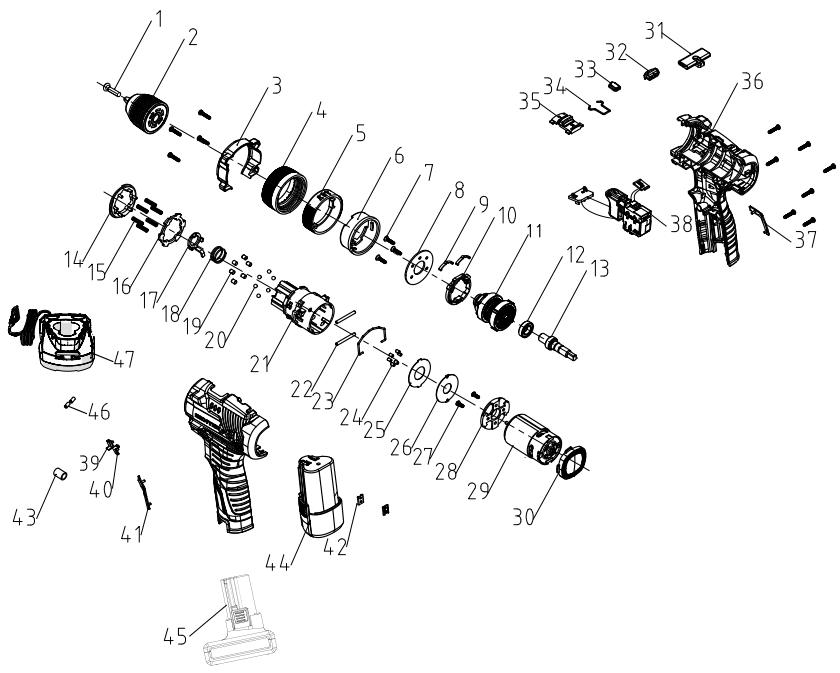
| n° | Description | n° | Description | n° | Description | n° | Description |
| 1 | Screw M5X22 T type | 15 | (No.21) Torque spring | 29 | Motor | 43 | Magnetic ring 9X5.2X12 |
| 2 | Chuck | 16 | Gasket for torque sleeve | 30 | Back cover | 44 | Tube battery pack |
| 3 | Head shell | 17 | Block | 31 | Push rod | 45 | Heat shrinkable tube |
| 4 | Torque sleeve | 18 | Reset spring (Gearbox No. 40) | 32 | Transparent lampshade | 46 | L shape Battery pack |
| 5 | Adjusting ring | 19 | Round pin | 33 | Lampshade for Power indicator | 47 | Charger |
| 6 | Adjusting inner ring | 20 | Steel ball | 34 | No.10 Elastic steel wire | ||
| 7 | Screw ST3*14(T type) | 21 | Gearbox housing (with inserts) + bushing | 35 | Speed adjustment button | ||
| 8 | Cover plate | 22 | Inner ring side pin | 36 | Housing | ||
| 9 | No 12 Tuning fork | 23 | Shift gear steel wire -7 | 37 | Right decorative part | ||
| 10 | Pressing plate | 24 | Self-lock pin | 38 | Switch assembly | ||
| 11 | No. 30 powder metallurgy assembly | 25 | Gasket | 39 | Left arrow | ||
| 12 | Deep groove ball bearing | 26 | Big gasket | 40 | Right arrow | ||
| 13 | Output shaft | 27 | Mechanical screw M3X6 | 41 | Left decorative part | ||
| 14 | Internal thread | 28 | Motor end cap | 42 | Metal card |
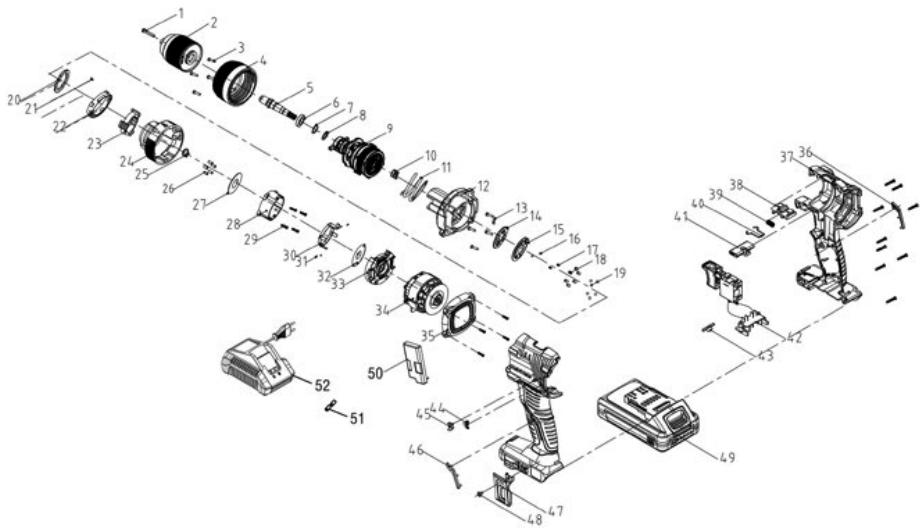
| n° | Description | n° | Description | n° | Description | n° | Description |
| 1 | Screw M6X24T type | 16 | Steel ball | 31 | Inner ring side pin | 46 | Left decorative part |
| 2 | Chuck | 17 | Sound spring | 32 | Big gasket | 47 | Belt hook No3 |
| 3 | Screw ST3*14(T type) | 18 | Torque needle roller | 33 | Motor end cap | 48 | Screw M4X8 |
| 4 | Torque sleeve | 19 | Steel ball | 34 | Motor and pcb assembly | 49 | Battery pack |
| 5 | Output shaft | 20 | Gasket for torque sleeve | 35 | Back cover | 50 | Protection board and support assembly |
| 6 | Deep groove ball bearing | 21 | Screw 2.5*8 T type | 36 | Right decorative part | 51 | Heat shrink tube |
| 7 | Steel ball | 22 | Toggle ring | 37 | Housing | 52 | Charger |
| 8 | Small gasket | 23 | Internal thread | 38 | Speed adjustment button | ||
| 9 | No.62 powder metallurgy assembly | 24 | Indicating ring | 39 | Spring for speed adjustment button | ||
| 10 | Impact spring | 25 | Circlip | 40 | No.7 elastic steel wire | ||
| 11 | Torque spring | 26 | Self-locking pin | 41 | Push rod | ||
| 12 | Front housing for gear box (Built-in moving teeth disk) | 27 | Gasket | 42 | Switch assembly | ||
| 13 | No 11 Tuning fork | 28 | Back shell for gear box | 43 | Transparent lampshade | ||
| 14 | Sound gasket | 29 | Srew ST2.8*12(T type) | 44 | Left arrow | ||
| 15 | Cover plate | 30 | Toggle support | 45 | Right arrow | ||
FR Ce produit est recyclable. S'il ne peut plus etre utiliseveuillez apporter dans un centre de recyclage des dechets.
Este producto es recicable. Si ya no se possible usar, llevo a un centro de recicaje de residuos.
Eeste prodeto e reciclavel. Se deixar de outilizar, entrega-o num centro de reciclagem de residuos.
Tt Qestto prodotto puo essere reciclato. Se deve essere smaltitto, portalo presso un centro de reciclaggio.
Auto to npioov etvai avakukwaiuo. Ecv dev mnpei nev vxa pnoonoi e, metapepet tny oe kanto oavakkawon anopmuatuv.
TL Ten produkt poddawany jest recyklingowy, kiedy przystaje byc uzyteczny danezy dostarczy go do punktu zbiörki odpadów.
1A Lle npdykT Moze nepepeob7nca. JaLso BOHO 6IbIe He e pnpdaTHe IaBnKOpNCTyBaHnHa, 3daIte HOrO Byttni3auiHHm ceHTp.
Ro Aceast produs este reciclabil. Dacu nu mai poate fi folosit, va rugam sa il aduceeti intr-un centru de reciclare a deseurilor.
EN This product is recyclable. If it cannot be used anymore, please take it to waste recycling centre.


FR. Machine Garantie 5 ans, batterie garantie 3 ans, chargeur Garantie 3 ans / ES. Maquina garantia 5 ans, batteria garantia 3 ans, cargador garantia 3 ans / PT. Maquina 5 ans de garantia, batteria 3 ans de garantia, carragader 3 ans de garantia / IT. Macchina 5 anni di garanzia, batteria 3 anni di garanzia, caricabatterie 3 anni di garanzia / EL. Mxovn 5 xovia eyyuon, umatapla 3 xovia eyyuon, FOPTOTIC 3 xovia eyyuON / PL. Maszyna 5 lat garanconi, batteria 3 lata garanconi, tadowarka 3 lata gwarancj / RU. Papantian ha Maunhy 5 net, rapantna Ha akkyumyIATop 3 rOda, rapantna Ha zapraHoe yctpoCTbro 3 rOa / UA. Papantian Ha Maunhy 5 poKIB, rapantna Ha akmyIATop 3 pOki, rapantna Ha zapraHn prntcripri 3 pOKI / KZ. MauninaHn Hneninirr 5 kbln, akkymnyIATopdrnKninirr 3 kbln, zaparTaNtBn Keinnirr 3 kbln / RO. Maina 5 ani garantie, batteria 3 ani garantie, incarcator 3 ani garantie / EN. Machine 5-year guarantee, battery 3-year guarantee, charger 3-year guarantee
ADEO Services -135 Rue Sadi Carnot - CS 00001
59700 RONCHIN - France
Imported by Adeo South Africa (PTY) LTD T/A Leroy Merlin, Hosted in Leroy Merlin Fourways Store 35 Roths Street, Witkoppen Ext 97, Sandton, 2191 Johannesburg, Gauteng, South Africa Tel: +27 10 493 8000 Email: contact@leroymerlin.co.za
Fabrique en China Made in China \Cpenaho B KItae
\KbItaJa JxacanraH \BvroToBnEo B KItai \
Origem : China
Imnpotep:TOB"JepyaMepnHcYpkaiHa",04201YpkaiHa,M.Kmib,ByI.
Pionrapha 17A, +380 44 498 46 00.Imnpotep npimmac npetehaIIb
cnoXHHaBH uOIO ToBayp,a TAKoX ppoobHb IHO ropeMOHT,TeHXHue i
raPahNTHe oOcbnyroBuBaHHa

- MANUTENÇA O DO MOTOR
- YIIOAEIINOMENOIKINADYNOI
- ΕYNTHPHΞH TOY KINHTHPA
- EAEIXXOESHKTPQN ANOPAKA (movo yia to oovteo oE pKtpeC)
- ANTIMETQIIIZH IPOBAHMATQN
- OBEPTAHH BIIPEJ/HA3A
- BnBIP PEXKIMU yAPU/CBEPJIHHA
- ПИД�OTOBКAO CBEPДПИНЯ
- CBEPINHHOTBOPIB
- CBEPJIINHJ DEPEBUNH
- TEXHIUHE OBCIyROBVAHHHBnIYHA
- ORIIyIbHnx LITOK (TINbKN IJIy MoJeIeI 3I IITKOBIM DBNYHOM)
- UCYHEHHH HECIPABHOCTEI
- SPECIFIC SAFETY WARNINGS
- 1/ Safety instructions for all operations
- 2/ Safety instructions when using long drill bits
- Additional safety warnings
- RESIDUAL RISKS
- Even when the tool is used as prescribed it is not possible to eliminate all residual risk factors.
- RISK REDUCTION
- WARNING:
- OPERATION
- WARNING : The device should be disconnected from the mains before putting into operation
- BIT INSTALLATION
- FORWARD / REVERSE ADJUSTMENT
- SELECTING THE IMPACT/DRILL MODE
- VARIABLE SPEED TRIGGER SWITCH
- WARNING: Always check that the power supply is the same as that indicated on the nameplate of the tool.
- LED WORKLIGHT
- START DRILLING
- HOLE DRILLING
- DRILLING WOOD
- DRILLING METAL
- DRILLING CONCRETE
- SPECIAL SAFETY INSTRUCTIONS FOR BATTERY PACK AND CHARGER
- MAINTENANCE
- INSPECTING THE MOUNTING SCREWS
- MAINTENANCE OF THE MOTOR
- TROUBLE SHOOTING
- STORAGE AND TRANSPORTATION CONDITION
- STORAGE
- TRANSPORTATION
- PROTECT OUR ENVIRONMENT
- WARRANTY
Brand : DEXTER
Model : 12ID2-25.1A 20ID3-60BL.2A
Category : Cordless hammer drill