
Buds 3 Tws Black - Wireless Earbuds Xiaomi - Free user manual and instructions
Find the device manual for free Buds 3 Tws Black Xiaomi in PDF.



| Product Type | True Wireless Earbuds |
| Brand | Xiaomi |
| Model | Buds 3 TWS Black (M2111E1) |
| Earbud Power Supply | 5 V --- 0.08 A (via case) |
| Case Power Supply | Input: 5 V --- 0.5 A, Output: 5 V --- 0.2 A |
| Charging Type | USB-C and Qi wireless charging |
| Connectivity | Bluetooth 5.2 Low Energy |
| Supported Audio Codecs | SBC, AAC |
| Main Functions | Active noise cancellation, transparency mode, touch controls (pinch), in-ear detection |
| Operating Temperature | 0°C to 45°C |
| Storage Temperature | -20°C to 45°C |
| Storage Humidity | 5% to 95% RH |
| Bluetooth Frequency | 2402 - 2480 MHz |
| Max BT TX Power | < 20 dBm |
| Max BLE TX Power | < 13 dBm |
| Wireless Charging Frequency | 110 - 205 kHz |
| Package Contents | Charging case, earbuds, USB-C cable, ear tips, quick start guide |
| Maintenance | Do not clean with alcohol or volatile liquid, avoid contact with liquids |
| Safety | Do not expose to temperatures below 0°C or above 45°C, do not disassemble, do not dispose of in fire |
| Battery | Built-in, non-user replaceable, replacement only by authorized service |
| Warranty | Statutory consumer warranty, information at www.mi.com |
| Manufacturer | Tiinlab Corporation (Mi Ecosystem company) |
Frequently Asked Questions - Buds 3 Tws Black Xiaomi
User questions about Buds 3 Tws Black Xiaomi
0 question about this device. Answer the ones you know or ask your own.
Ask a new question about this device
Download the instructions for your Wireless Earbuds in PDF format for free! Find your manual Buds 3 Tws Black - Xiaomi and take your electronic device back in hand. On this page are published all the documents necessary for the use of your device. Buds 3 Tws Black by Xiaomi.
USER MANUAL Buds 3 Tws Black Xiaomi
Xiaomi Buds 3 Quick Start Guide
Xiaomi Buds 3 Quick Start Guide
Xiaomi Buds 3·65 User Manual
Read this quick start guide carefully before use, and retain it for future reference.
Charging Case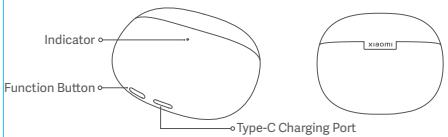
Earphones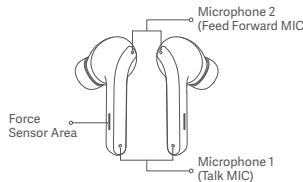
Illustrations of product, accessories and user interface in the quick start guide are for reference purposes only. Actual product and functions may vary due to product enhancements.
Package Contents
Charging Case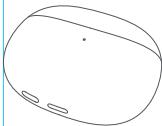
Earphones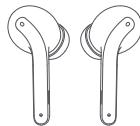
Quick Start Guide
Type-C Charging Cable
Ear Tips
Instructions
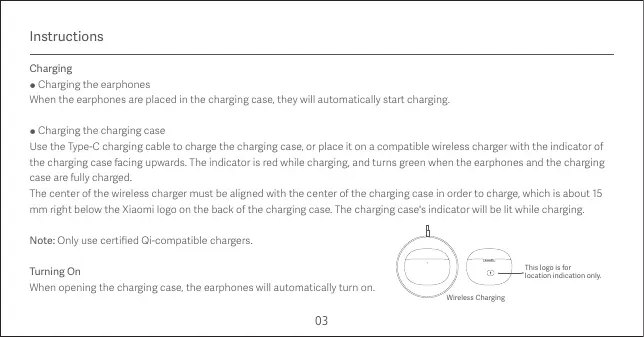
Charging
- Charging the earphones: When the earphones are placed in the charging case, they will automatically start charging.
- Charging the charging case
Use the Type-C charging cable to charge the charging case, or place it on a compatible wireless charger with the indicator of the charging case facing upwards. The indicator is red while charging, and turns green when the earphones and the charging case are fully charged.
The center of the wireless charger must be aligned with the center of the charging case in order to charge, which is about 15 mm right below the Xiaomi logo on the back of the charging case. The charging case's indicator will be lit while charging.
Note: Only use certified Qi-compatible chargers.
Turning On
When opening the charging case, the earphones will automatically turn on.
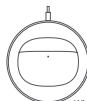

This logo is for location indication only.
Wireless Charging
| Sleep Mode Place the earphones back into the charging case and close the lid, the earphones will disconnect and go into sleep mode automatically. Wearing Take the earphones out of the charging case, and insert them into your ears according to the left (L) and right (R) marks. Note: After using the earphones, place them back into the charging case. This will extend their lifespan and help you avoid losing or misplacing them. Connecting |
| • Connecting the earphones to a new device 1. Make sure that the earphones are placed in the charging case, and press and hold the function button for two seconds when the charging case's lid is opened. The indicator will start blinking white to indicate that the earphones are awaiting a connection. If the earphones are not connected for one minute, they will enter the sleep mode and the indicator will turn off. 2. Enable the device's Bluetooth, then search for and connect to the "Xiaomi Buds 3". If a passcode is requested, enter "0000". |
Note: Before using the earphones for the first time, please place them into the charging case and press and hold the function button for five seconds to activate them. Once activated, the earphones will automatically enter the awaiting connection state.
Clearing connection history
- Place the earphones into the charging case.
- Press and hold the charging case's function button for at least 10 seconds, and release it once the indicator stays white.
The earphones have been reset, and the connection history has been cleared. The charging case's indicator blinks white, and the earphones are in pairing mode again.
Note: Due to the connection characteristics of the Bluetooth signal, in dense environments with 2.4 GHz electromagnetic signal interferences, there may be occasional disconnects or no sound.
Function Overview
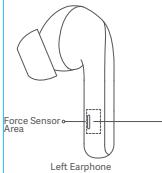
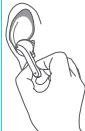
Incoming calls
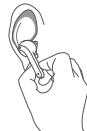
Pinch the force sensor area on either side of the earphones: Answer/end a call
Double-pinch the force sensor area on either side of the earphones: Decline a call
Music and voice assistant
While wearing both earphones:
Pinch the force sensor area: Play/pause
Double-pinch the force sensor area: Next track
Triple-pinch the force sensor area: Previous track
Press and hold the force sensor area for two seconds to cycle through: Enable noise cancellation >
Transparency mode > Disable noise cancellation
Take out either earphone: Pause music and wear the earphone back to resume playing
While wearing one earphone:
Pinch the force sensor area: Play/pause
Notes:
- When only using one earphone, place the other into the charging case and close the lid.
- Noise cancellation mode cannot be set to on in single earphone mode.
Specifications
Name: Wireless Earphones
Model: M2111E1
Earphone Input: 5 V----0.08 A
Charging Case Input: 5 V----0.5 A
Charging Case Output: 5 V---0.2 A
Wireless Connectivity: Bluetooth® Low Energy 5.2
Supported Audio Codes: SBC/AAC
Bluetooth Operation Frequency: 2402-2480 MHz (for EU)
Maximum Transmit Power for BT: <20 dBm (for EU)
Maximum Transmit Power for BLE: <13 dBm (for EU)
Wireless Charging Operating Frequency: 110-205 kHz
Operating Temperature: 0°C to 45°C
Storage Temperature: -20 °C to 45 °C
Storage Humidity: 5% - 95% RH
The Qi logo is a registered trademark of the Wireless Power Consortium.
The Bluetooth* word mark and logos are registered trademarks owned by Bluetooth SIG, Inc. and any use of such marks by Xiaomi Inc. is under license. Other trademarks and trade names are those of their respective owners.
WEEE Information

All products bearing this symbol are waste electrical and electronic equipment (WEEE as in directive 2012/19/EU) which should not be mixed with unsorted household waste. Instead, you should protect human health and the environment by handing over your waste equipment to a designated collection point for the recycling of waste electrical and electronic equipment, appointed by the government or local authorities. Correct disposal and recycling will help prevent potential negative consequences to the environment and human health. Please contact the installer or local authorities for more information about the location as well as terms and conditions of such collection points.

Hereby, Tiinlab declares that the radio equipment type M2111E1 is in compliance with Directive 2014/53/EU. The full text of the EU declaration of conformity is available at the following internet address: http://www.mi.com/global/service/support/declaration.html

Hereby, Tiinlab declares that the radio equipment type M211E1 is in compliance with Radio Equipment Regulations 2017. The full text of the UKCA declaration of conformity is available at the following internet address: https://www.mi.com/uk/service/support/declaration.html
Warning
Do not expose the product to environments with a temperature that is too low or too high (below 0°C or above 45°C). Do not use this product during thunderstorms. Thunderstorms may cause the product to malfunction and increase the risk of electric shocks. Do not clean this product with alcohol or other volatile liquids. Avoid any contact with liquids. Do not use the earphones while driving, and comply with the relevant regulations in your region or country. Keep the product's indicator away from the eyes of children and animals while the product is in use. Do not disassemble, puncture or crush the product nor expose it to fire.
To prevent possible hearing loss, do not use this product at high volume for long periods of time. These earphones and their accessories may contain small parts. Please keep them out of the reach of children. Disposal of a battery into fire or a hot oven, or mechanically crushing or cutting of a battery, can result in an explosion. Leaving a battery in an extremely high temperature surrounding environment can result in an explosion or the leakage of flammable liquid or gas. A battery subjected to extremely low air pressure may result in an explosion or the leakage of flammable liquid or gas. Product information and certification marks are located in the charging case.
The symbol indicates DC voltage.
The product has a built-in battery that cannot be removed or replaced. To avoid damage to the battery or the product, do not disassemble or modify the battery yourself. The battery can only be replaced by authorized service providers and must be replaced with the same type. Replacement of a battery with an incorrect type may defeat a safeguard (such as catching fire, explosion, and leakage of corrosive electrolyte). Do not put the battery in trash that is disposed of in landfills. When disposing of the battery, comply with local laws or regulations. - Stop using the product immediately if there is any swelling.
CAUTION
There is a risk of explosion if the battery is replaced incorrectly.
Only use and replace with the same or an equivalent type of battery.
This device is in compliance with Specific Absorption Rate (SAR) limits for general population/uncontrolled exposure.
Certification Information (Highest SAR)
SAR 10 g limit: 2.0 W/Kg
SAR Value: Head: 0.54 W/Kg (0 mm distance)
In some countries, the SAR limit is 1.6 watts per kilogram averaged over 1 gram of tissue for use against the head, body, and 4.0
watts per kilogram averaged over 10 grams of tissue for use on the wrist. In other countries, the SAR limit is 2.0 watts per kilogram averaged over 10 grams of tissue for use against the head, body, and 4.0 watts per kilogram averaged over 10 grams of tissue for use on the wrist.


80665/SDPPI/2022 9003
Manufactured for: Xiaomi Communications Co., Ltd.
Manufactured by: Tiinlab Corporation
(a Mi Ecosystem company)
Address: No. 3333, Liuxian Avenue, Tower A, 35th Floor, Tanglang City, Nanshan District, Shenzhen, China
For further information, please go to www.mi.com
Quick Start Guide Version: V3.0
Product Introduction
Address: No. 3333, Liuxian Avenue, Tower A, 35th Floor, Tanglang City, Nanshan District, Shenzhen, China
SAR limit 10 g: 2.0 W/Kg
Address: No. 3333, Liuxian Avenue, Tower A, 35th Floor
Tanglang City, Nanshan District, Shenzhen, China
SEPARATE COLLECTION
SAR limit 10 g: 2.0 W/Kg
SAR value: Head: 0.54 W/Kg (at 0 mm distance)
Address: No. 3333, Liuxian Avenue, Tower A, 35th Floor, Tanglang City, Nanshan District, Shenzhen, China
Tanglang City, Nanshan District, Shenzhen, China
Please read this quick start guide carefully before using the device, and keep it for future use.
Illustrations, accessories and user interface are for reference only. Actual product specifications and functions may vary with product improvements.
Package contents
Quick start guide
Address: China, No. 3333, Liuxian Avenue, Tower A, 35th Floor, Tanglang City, Nanshan District, Shenzhen, China
For more information, visit www.mi.com
Quick start guide version: V3.0
Product overview
SAR limit 10 g: 2.0 W/kg
Address: No. 3333, Liuxian Avenue, Tower A, 35th Floor, Tanglang City, Nanshan District, Shenzhen, Poland
More information: www.mi.com
Address: No. 3333, Liuxian Avenue, Tower A, 35th Floor, Tanglang City, Nanshan District, Shenzhen, China
https://www.mi.com/jp
Distributor: Xiaomi Communications Co., Ltd.
Manufacturer: Tiinlab Corporation
(Mi Ecosystem Enterprise)
Address: No. 3333, Lixian Avenue, Tower A, 35th Floor, Tanglang City, Nanshan District, Shenzhen, China. For more details, please visit www.mi.com.
V3.0
New
Note: No. 3333, Liuxian Avenue, Tower A, 35th Floor, Tanglang City, Nanshan District, Shenzhen, China
Clock Delay Timer V3.0
China

R-C-tCt-M2111E1
Address: No. 3333, Liuxian Avenue, Tower A, 35th Floor, Tanglang City, Nanshan District, Shenzhen, China
I. Overview
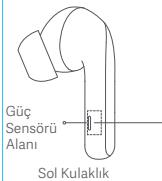
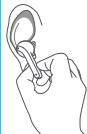
Incoming calls
Press and hold the power sensor area on either side of the earbuds to answer/end a call. Press the power sensor area on either side of the earbuds twice to reject a call.
Address: No. 3333, Liuxian Avenue, Tower A, 35th Floor, Tanglang City, Nanshan District, Shenzhen, China
Wireless Earphones:
M211E1:Jb
0.08=1g5:sslaawJ
0.5---cJg5:JaiJI JI
SBC/AAC: audio codec
(frequency band) 2402-2480 MHz: Bluetooth
(frequency band) 20 dBm: (BT) Bluetooth transmission power
(frequency band) 13 dBm: (BLE) Bluetooth Low Energy transmission power
110-205 kHz: switching frequency
45 0j0
45020-2jssll 1
a&&w a|gbj%95-%5:||jssuillagbj
aSLwIaIbIbIaIyIaIaIaIaIgQiJleW
Xiaomi Inc 10
.1gloolldo g sfoill a jolll slawilg a jolll coloalgl .
(aagjgclgagajgglalw)WEEE logle
EEL/19/2012 4g EwEE) aagclll clll lalai y jll lai lai glll glaalgl aal gao aagaaagaa agaa aal llalll alal alal alal alal alal alal alal alal alal alal alal alal alal alal alal alal alal alal alal alal alal alal alal alal alal alal alal alal alal alal alal alal alal alal alal alal alal alal alal alal alal alal alal alal alal alal alal alal alal alal alal alall


- (A) a1a2a3a4a5a6a7a8a9a10a11a12a13a14a15a16a17a18a19a20a21a22a23a24a25a26a27a28a29a30a31a32a33a34a35a36a37a38a39a40a41a42a43

Xiaomi Communications Co., Ltd. liangliang@126.com (Ji Li, Mie Pi Li, Ss Wu, Ji Li) Tiinlab Corporation: liangliang@126.com www.mi.com gengao@jieshou.com.cn V3.0:28
WARRANTY NOTICE · 01
GARANTIERKLÄRUNG·02
AVVISO SULLA GARANZIA·03
GARANTIE·04
AVISO DE GARANTÍA·05
TAPAHNIHOE YBEIDOMJIEHNE·06
GWARANCJA·07
WARRANTY NOTICE · 08
WARRANTY NOTICE · 09
WARRANTY NOTICE · 11
WARRANTY NOTICE · 12
WARRANTY NOTICE · 13
LIMITED WARRANTY · 14
WARRANTY NOTICE
As a Xiaomi consumer, you benefit under certain conditions from additional warranties. Xiaomi offers specific consumer warranty benefits which are in addition to, and not instead of, any legal warranties provided by your national consumer law. The duration and conditions related to the legal warranties are provided by respective local laws. For more information about the consumer warranty benefits, please refer to Xiaomi's official website https://www.mi.com/en/service/warranty/. Except as prohibited by laws or otherwise promised by Xiaomi, the after-sales services shall be limited to the country or region of the original purchase. Under the consumer warranty, to the fullest extent permitted by law, Xiaomi will, at its discretion, repair, replace or refund your product. Normal wear and tear, force majeure, abuse or damage caused by the user's negligence or fault are not warranted. The contact person for the after-sale service may be any person in Xiaomi's authorized service network, Xiaomi's authorized distributors or the final vendor who sold the products to you. If in doubt please contact the relevant person as Xiaomi may identify.
The present warranties do not apply in Hong Kong and Taiwan.
Products which were not duly imported and/or were not duly manufactured by Xiaomi and/or were not duly acquired from Xiaomi or a Xiaomi's official seller are not covered by the present warranties. As per applicable law you may benefit from warranties from the non-official retailer who sold the product. Therefore, Xiaomi invites you to contact the retailer from whom you purchased the product.
WARRANTY NOTICE
Xiaomi https://www.mi.com/en/service/warranty/

- XIAOMI BUDS 3 QUICK START GUIDE
- PACKAGE CONTENTS
- INSTRUCTIONS
- CHARGING
- FUNCTION OVERVIEW
- INCOMING CALLS
- MUSIC AND VOICE ASSISTANT
- NOTES
- SPECIFICATIONS
- WEEE INFORMATION
- WARNING
- CAUTION
- PRODUCT INTRODUCTION
- SEPARATE COLLECTION
- PRODUCT OVERVIEW
- NEW
- OVERVIEW
- (AAGJGCLGAGAJGGLALW)WEEE LOGLE
- WARRANTY NOTICE
Brand : Xiaomi
Model : Buds 3 Tws Black
Category : Wireless Earbuds