
Mi True Wireless Earphones Lite - Wireless Earbuds Xiaomi - Free user manual and instructions
Find the device manual for free Mi True Wireless Earphones Lite Xiaomi in PDF.


| Product Type | True Wireless Earbuds |
| Model | TWSEJ03WM |
| Charging Port | USB Type-C |
| Input Rating | 5 V = 1 A |
| Charging Time (Earphones) | Approx. 1.5 hours |
| Charging Case Battery Life | Approx. 16 hours (including charging earphones) |
| Bluetooth Range | 10 m (obstacle-free) |
| Bluetooth Profiles | HSP, HFP, A2DP, AVRCP |
| Supported Audio Codecs | SBC, AAC |
| Frequency Band | 2402–2480 MHz |
| Max Transmit Power (BT) | 10 dBm |
| Max Transmit Power (BLE) | 10 dBm |
| Controls | Touch controls: double tap for play/pause, answer/end calls, voice assistant |
| Automatic Connection | Yes, when removed from case |
| Fast Connection (Mi Phone) | Supported (some Mi phones, latest stable version) |
| Voice Assistant | Yes (if device supports) |
| Sleep Mode | Automatic when placed in case |
| Ear Tips Included | S, M, L (M pre-installed) |
| Cleaning | Use a dry cloth to clean earphones and charging case |
| Safety Precautions | Do not expose to excessive heat, do not disassemble, correct battery disposal |
| Spare Parts | Additional ear tips (S, M, L) available |
| Repairability | Not user-serviceable, contact authorized service |
| Warranty | Additional consumer warranty; see Xiaomi warranty policy |
Frequently Asked Questions - Mi True Wireless Earphones Lite Xiaomi
User questions about Mi True Wireless Earphones Lite Xiaomi
0 question about this device. Answer the ones you know or ask your own.
Ask a new question about this device
Download the instructions for your Wireless Earbuds in PDF format for free! Find your manual Mi True Wireless Earphones Lite - Xiaomi and take your electronic device back in hand. On this page are published all the documents necessary for the use of your device. Mi True Wireless Earphones Lite by Xiaomi.
USER MANUAL Mi True Wireless Earphones Lite Xiaomi
Read this manual carefully before use, and retain it for future reference.
Product Overview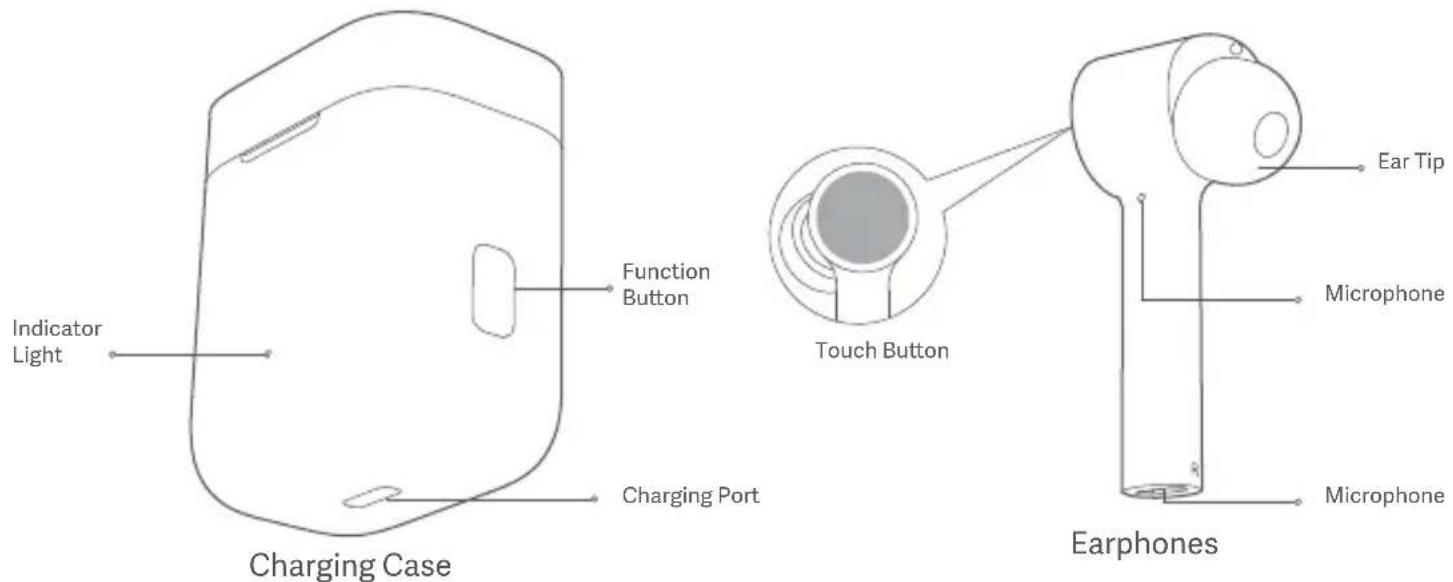
Illustrations of product, accessories, and user interface in the user manual are for reference purposes only. Actual product and functions may vary due to product enhancements.
Instructions
Charging
● Charging the earphones
When the earphones are placed in the charging case, they will automatically start charging.
● Charging the charging case
Use the included USB charging cable to charge the charging case. The indicator blinks white while charging, and turns off when fully charged.
Note: Prior to first use, the earphones are deactivated. To activate them, place them into the charging case, and press the function button for 5 seconds. We recommend fully charging the earphones before using them for the first time.
Checking Battery Level
- Checking the battery level of the earphones
After connecting the earphones to a phone, you can check the earphones' battery level on the phone's status bar.
Note: The phone's status bar always displays the battery level of the earphone with the lowest battery level. This feature is not supported by some phones.
- Checking the battery level of the charging case
Press the button on the charging case, the battery level of the
charging case is sufficient if the indicator is white, while the battery level is low if the indicator blinks white. Please recharge the case when the battery level is low as it is insufficient to fully charge the headphones.
- Checking the battery level by a Mi phone
Make sure the headphones are connected with your Mi phone that has Bluetooth enabled. Place the headphones into the charging case, and then keep close to the Mi phone. Press and hold the button for 2 seconds, a message box pops up on the phone. Then you can check the battery level of the headphones and the charging case.
Note: When checking the battery level on your phone, please update your Mi phone to the latest stable version. This feature is currently only supported by some Mi phones.
Turning On
To turn the earphones on, press and hold the button for 2 seconds, or remove the earphones from the charging case.
Sleep Mode
Place the earphones back into the charging case, the earphones will disconnect and automatically enter sleep mode.
Wearing
- Take the earphones out of the charging case, and insert them into your ears according to the left (L) and right (R) marks.
- You can switch to a different size ear tips to find the ones that suit you most (size M is installed by default).
Note: After using the earphones, place them back into the charging case. This will extend their lifespan and help you avoid losing or misplacing them.
Connecting
● Connecting the earphones to a new device
① Remove the earphones from the charging case when using for the first time, the earphones automatically enter the awaiting connection mode. Place the earphones into the charging case, then press and hold the button for 2 seconds. Once the charging case indicator starts blinking, the earphones are waiting for a connection.
② Enable the device's Bluetooth, then locate and connect to "Mi TW Earphones Lite". If a passcode is requested, enter "0000".
● Connecting the earphones with a Mi phone
Make sure your Mi phone is unlocked and its Bluetooth function is enabled. Place the headphones into the charging case, and then keep close to the Mi phone. Press and hold the button for 2 seconds, follow the on-screen instructions to connect the earphones to your phone. Note: The feature of fast connection is currently only supported by some Mi phones, please update your Mi phone to the latest stable version.
● Automatic connection
While removing the earphones from the charging case, the earphones will automatically connect to the most recently used Bluetooth device. If no connection history is detected, or if the earphones cannot successfully connect to any Bluetooth device, the earphones will automatically enter the awaiting connection mode.
Note: If the earphones cannot automatically connect to a device, you will need to manually connect the earphones to the desired device via the device's Bluetooth settings.
- Connect to a new device
Place the earphones into the charging case, then press and hold the button for 2 seconds. The indicator starts blinking white and the earphones enter the awaiting connection mode. Enable the Bluetooth on your device, then connect the earphones with your device.
● Clearing connection history
Place the earphones into the charging case, then press and hold the button for 10 seconds to clear the connection history of the earphones. The indicator stays white for 5 seconds then starts blinking white, then earphones enter the awaiting connection mode.
Due to the connection characteristics of the Bluetooth signal, in dense environments with 2.4 GHz electromagnetic signal interferences, there may be occasional disconnects or no sound.
Function Overview
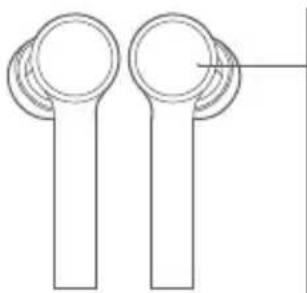
- Incoming calls
Gently tap either one of the
earphones twice: Answer/End calls
● Music and voice assistant
While wearing both earphones:
Gently tap the right (R) earphone
twice: Play/Pause music
Gently tap the left (L) earphone twice:
Access the voice assistant
Taking out an earphone: Pause music
While wearing one earphone:
Gently tap the earphone twice:
Play/Pause music
Notes:
① The voice assistant function can be used only if your device supports it, and this function needs to be granted permission on the device.
② When only using the left earphone, place the right earphone into the charging case and close the lid.
Specifications
Model: TWSEJ03WM
Charging Port: Type-C
Input: 5 V = 1 A
Charging Time: Approx. 1.5 h
Bluetooth Profiles: HSP/HFP/A2DP/AVRCP
Supported Codecs: SBC, AAC
Wireless Range: 10 m (in an obstacle-free environment)
Charging Case Battery Life: Approx. 16 h (Including charging the earphones)
Product Frequency Band: 2402–2480 MHz
Maximum Transmit Power for BT: 10 dBm (Declaration for EU)
Maximum Transmit Power for BLE: 10 dBm (Declaration for EU)
WEEE Information

All products bearing this symbol are waste electrical and electronic equipment (WEEE as in directive 2012/19/EU)
which should not be mixed with unsorted household
waste. Instead, you should protect human health and the
environment by handing over your waste equipment to a designated collection point for the recycling of waste electrical and electronic equipment, appointed by the government or local authorities. Correct disposal and recycling will help prevent potential negative consequences to the environment and human health. Please contact the installer or local authorities for more information about the location as well as terms and conditions of such collection points.
CE Hereby, Tiinlab declares that the radio equipment type TWSEJ03WM is in compliance with Directive 2014/53/EU. The full text of the EU declaration of conformity is available at the following internet address:
http://www.mi.com/global/service/support/declaration.html
Safety Caution
- Do not expose batteries or battery packs to excessive heat such as sunshine, fire or the like.
- Replacement of a battery with an incorrect type that can defeat a safeguard (such as catching fire, explosion, leakage of corrosive electrolyte etc).
- Disposal of a battery into fire or a hot oven, or mechanically crushing or cutting of a battery, that can result in an explosion. • Leaving a battery in an extremely high temperature surrounding environment that can result in an explosion or the leakage of flammable liquid or gas.
- A battery subjected to extremely low air pressure that may result in an explosion or the leakage of flammable liquid or gas.
- Risk of explosion if battery is replaced by an incorrect type.
- Dispose of used batteries according to the instructions. · The product operation maximum ambient temperature is 45°C.

To prevent possible hearing damage, do not listen at high volume levels for long periods.
The symbol indicates DC voltage
The Bluetooth® word mark and logos are registered trademarks owned by Bluetooth SIG, Inc. and any use of such marks by Tiinlab is under license. Other trademarks and trade names are those of their respective owners.
For the battery of earphone
Model: 600912
Manufactured by: Chongqing VDL Electronics Co., Ltd.
Address: Building 1-4, Puli Industrial New Area, Zhaojia Street, Kaizhou
District, Chongqing, China
For the battery of charging case
Model: AEC682725
Manufactured by: Apower Electronics Co., Ltd.
Address: 8 Jinghu Road, Xinya Street, Huadu District, Guangzhou, Guangdong, China
Manufactured for: Xiaomi Communications Co., Ltd.
Manufactured by: Tiinlab Acoustic Technology Limited
(a Mi Ecosystem company)
Address: Tianliao Building 1403, Tianliao Industrial Area A, Taoyuan
Street, Nanshan District, Shenzhen 518055, China
For further information, please go to www.mi.com
EU 38 mAh
Illustrations of product, accessories, and user interface in the user manual are for reference purposes only. Actual product and functions may vary due to product enhancements.
Instructions
Charging:
Address: Tianliao Building 1403, Tianliao Industrial Area A, Taoyuan Street, Nanshan District, Shenzhen 518055, China
● Incoming calls
Street, Nanshan District, Shenzhen 518055, China
http://www.mi.com/global/service/support/declaration.html
Precautions
Incoming calls
As a Xiaomi consumer, you benefit under certain conditions from additional warranties. Xiaomi offers specific consumer warranty benefits which are in addition to, and not instead of, any legal warranties provided by your national consumer law. The duration and conditions related to the legal warranties are provided by respective local laws. For more information about the consumer warranty benefits, please refer to Xiaomi's official website https://www.mi.com/en/service/warranty/. Except as prohibited by laws or otherwise promised by Xiaomi, the after-sales services shall be limited to the country or region of the original purchase. Under the consumer warranty, to the fullest extent permitted by law, Xiaomi will, at its discretion, repair, replace or refund your product. Normal wear and tear, force majeure, abuse or damage caused by the user's negligence or fault are not warranted. The contact person for the after-sale service may be any person in Xiaomi's authorized service network, Xiaomi's authorized distributors or the final vendor who sold the products to you. If in doubt please contact the relevant person as Xiaomi may identify. The present warranties do not apply in Hong Kong and Taiwan.
Products which were not duly imported and/or were not duly manufactured by Xiaomi and/or were not duly acquired from Xiaomi or a Xiaomi's official seller are not covered by the present warranties. As per applicable law you may benefit from warranties from the non-official retailer who sold the product. Therefore, Xiaomi invites you to contact the retailer from whom you purchased the product.
WARRANTY NOTICE
Brand : Xiaomi
Model : Mi True Wireless Earphones Lite
Category : Wireless Earbuds