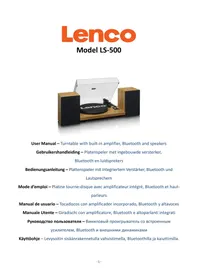
LS-500OK - Turntable LENCO - Free user manual and instructions
Find the device manual for free LS-500OK LENCO in PDF.

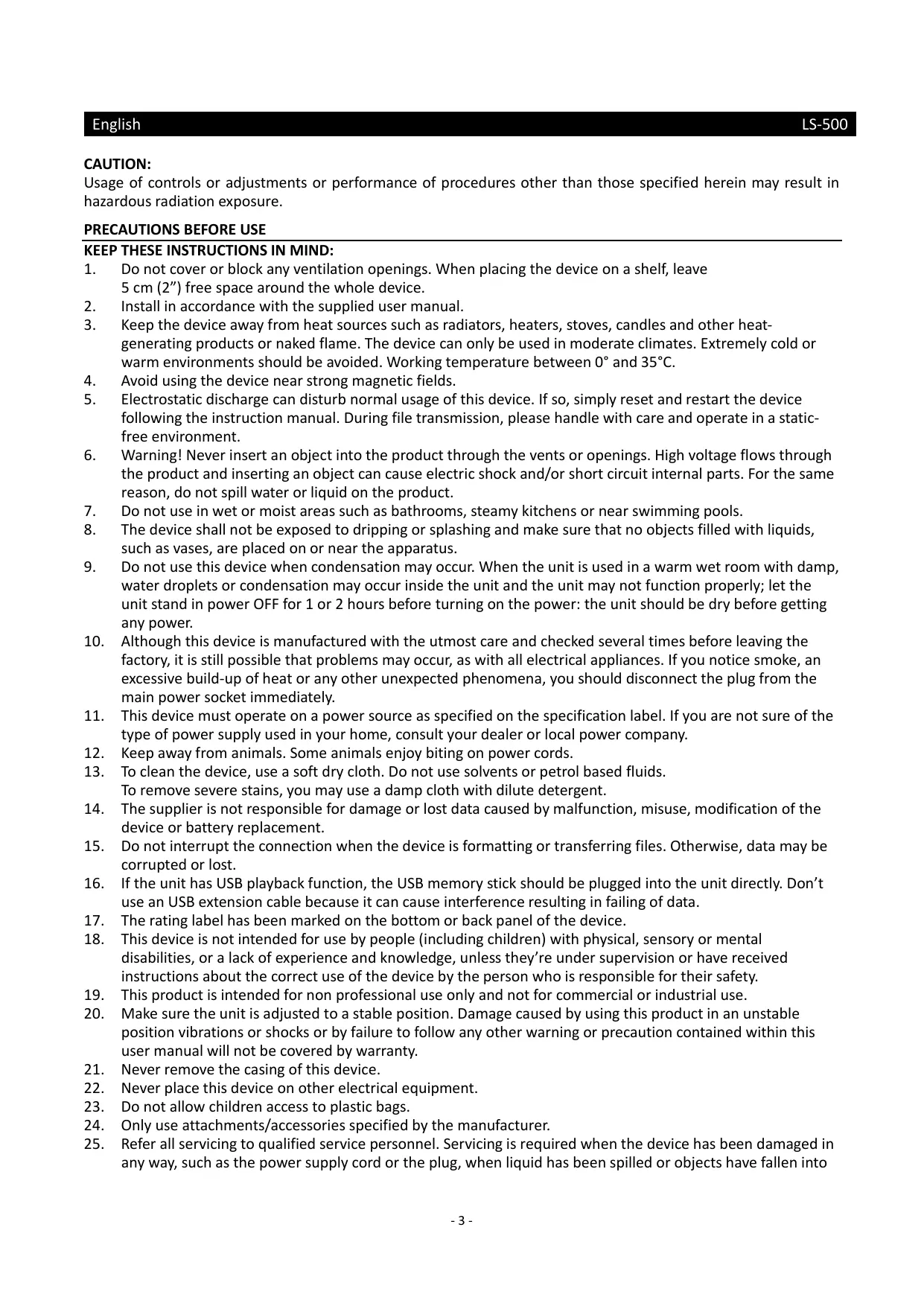


| Product type | Turntable with built-in amplifier, Bluetooth, and speakers |
| Brand | LENCO |
| Model | LS-500OK |
| Turntable dimensions (W x H x D) | 418 x 123 x 346 mm, with cover open 420 x 410 x 420 mm |
| Turntable weight | 5.77 kg |
| Speaker dimensions (W x H x D) | 162 x 248 x 158 mm |
| Speaker weight | 3.76 kg |
| Power supply | Power adapter 15 V DC 2400 mA, input 100-240 V 50/60 Hz |
| Power consumption | 36 W |
| Output power | 2 x 30 W RMS |
| Rotation speed | 33 1/3 and 45 RPM |
| Speed deviation | ± 1.0 % |
| Wow and flutter | < 0.15 % |
| Signal-to-noise ratio | 72 dB |
| Recommended tracking force | 3.0 ± 0.5 g |
| Effective tonearm length | 218.5 mm (8.6 inches) |
| Overhang | 18 mm (0.73 inch) |
| Cartridge | AT-3600L, moving magnet (MM), output 2.5 mV |
| Bluetooth | Version 5.0, reception only |
| Outputs | RCA jacks (phono/line switchable), passive speaker terminals |
| Main functions | Vinyl playback, Bluetooth streaming, built-in speakers, volume control |
| Care and cleaning | Use a soft dry cloth; clean the stylus with a soft brush from back to front |
| Safety and precautions | Do not open the device; avoid humidity; use only the provided adapter; maintain ventilation |
| Warranty | In compliance with European legislation, contact dealer for repair |
Frequently Asked Questions - LS-500OK LENCO
User questions about LS-500OK LENCO
0 question about this device. Answer the ones you know or ask your own.
Ask a new question about this device
Download the instructions for your Turntable in PDF format for free! Find your manual LS-500OK - LENCO and take your electronic device back in hand. On this page are published all the documents necessary for the use of your device. LS-500OK by LENCO.
USER MANUAL LS-500OK LENCO
User Manual - Turntable with built-in amplifier, Bluetooth and speakers
Usage of controls or adjustments or performance of procedures other than those specified herein may result in hazardous radiation exposure.
KEEP THESE INSTRUCTIONS IN MIND:
- Do not cover or block any ventilation openings. When placing the device on a shelf, leave 5cm ( 2'' ) free space around the whole device.
- Install in accordance with the supplied user manual.
- Keep the device away from heat sources such as radiators, heaters, stoves, candles and other heat-generating products or naked flame. The device can only be used in moderate climates. Extremely cold or warm environments should be avoided. Working temperature between 0^ and 35^ .
- Avoid using the device near strong magnetic fields.
- Electrostatic discharge can disturb normal usage of this device. If so, simply reset and restart the device following the instruction manual. During file transmission, please handle with care and operate in a static-free environment.
- Warning! Never insert an object into the product through the vents or openings. High voltage flows through the product and inserting an object can cause electric shock and/or short circuit internal parts. For the same reason, do not spill water or liquid on the product.
- Do not use in wet or moist areas such as bathrooms, steamy kitchens or near swimming pools.
- The device shall not be exposed to dripping or splashing and make sure that no objects filled with liquids, such as vases, are placed on or near the apparatus.
- Do not use this device when condensation may occur. When the unit is used in a warm wet room with damp, water droplets or condensation may occur inside the unit and the unit may not function properly; let the unit stand in power OFF for 1 or 2 hours before turning on the power: the unit should be dry before getting any power.
- Although this device is manufactured with the utmost care and checked several times before leaving the factory, it is still possible that problems may occur, as with all electrical appliances. If you notice smoke, an excessive build-up of heat or any other unexpected phenomena, you should disconnect the plug from the main power socket immediately.
- This device must operate on a power source as specified on the specification label. If you are not sure of the type of power supply used in your home, consult your dealer or local power company.
- Keep away from animals. Some animals enjoy biting on power cords.
- To clean the device, use a soft dry cloth. Do not use solvents or petrol based fluids. To remove severe stains, you may use a damp cloth with dilute detergent.
- The supplier is not responsible for damage or lost data caused by malfunction, misuse, modification of the device or battery replacement.
- Do not interrupt the connection when the device is formatting or transferring files. Otherwise, data may be corrupted or lost.
- If the unit has USB playback function, the USB memory stick should be plugged into the unit directly. Don't use an USB extension cable because it can cause interference resulting in failing of data.
- The rating label has been marked on the bottom or back panel of the device.
- This device is not intended for use by people (including children) with physical, sensory or mental disabilities, or a lack of experience and knowledge, unless they're under supervision or have received instructions about the correct use of the device by the person who is responsible for their safety.
- This product is intended for non professional use only and not for commercial or industrial use.
- Make sure the unit is adjusted to a stable position. Damage caused by using this product in an unstable position vibrations or shocks or by failure to follow any other warning or precaution contained within this user manual will not be covered by warranty.
- Never remove the casing of this device.
- Never place this device on other electrical equipment.
- Do not allow children access to plastic bags.
- Only use attachments/accessories specified by the manufacturer.
- Refer all servicing to qualified service personnel. Servicing is required when the device has been damaged in any way, such as the power supply cord or the plug, when liquid has been spilled or objects have fallen into
the device, when the device has been exposed to rain or moisture, does not operate normally, or has been dropped.
-
Long exposure to loud sounds from personal music players may lead to temporary or permanent hearing loss.
-
If the product is delivered with power cable or AC power adaptor:
-
If any trouble occur, disconnect the AC power cord and refer servicing to qualified personnel.
- Don't step on or pinch the power adaptor. Be very careful, particularly near the plugs and the cable's exit point. Do not place heavy items on the power adaptor, which may damage it. Keep the entire device out of children's reach! When playing with the power cable, they can seriously injure themselves.
- Unplug this device during lightning storms or when unused for a long period.
The socket outlet must be installed near the equipment and must be easily accessible. - Do not overload ac outlets or extension cords. Overloading can cause fire or electric shock.
- Devices with class 1 construction should be connected to a main socket outlet with a protective earthed connection.
Devices with class 2 construction do not require a earthed connection.
Always hold the plug when pulling it out of the main supply socket. Do not pull the power cord. This can cause a short circuit. -
Do not use a damaged power cord or plug or a loose outlet. Doing so may result in fire or electric shock.
-
If the product contains or is delivered with a remote control containing coin/cell batteries:
Warning:
- "Do not ingest battery, Chemical Burn Hazard" or equivalent working.
- [The remote control supplied with] This product contains a coin/burner cell battery. If the battery is swallowed, it can cause severe internal burns in just 2 hours and can lead to death.
- Keep new and used batteries away from children.
- If the battery compartment does not close securely, stop using the product and keep it away from children.
-
If you think batteries might have been swallowed or placed inside any part of the body, seek immediate medical attention.
-
Caution about the use of Batteries:
-
Danger of explosion if battery is incorrectly replaced. Replace only with the same or equivalent type.
- Battery cannot be subjected to high or low extreme temperatures, low air pressure at high altitude during use, storage or transportation.
- Replacement of a battery with an incorrect type that can result in an explosion or the leakage of flammable liquid or gas.
- Disposal of a battery into fire or a hot oven, or mechanically crushing or cutting of a battery, that can result in an explosion.
- Leaving a battery in an extremely high temperature surrounding environment that can result in an explosion or that leakage of flammable liquid or gas.
- A battery subjected to extremely low air pressure that may result in an explosion or the leakage of flammable liquid or gas.
- Attention should be drawn to the environmental aspects of battery disposal.
INSTALLATION
- Unpack all parts and remove protective material.
- Do not connect the unit to the mains before checking the mains voltage and before all other connections have been made.
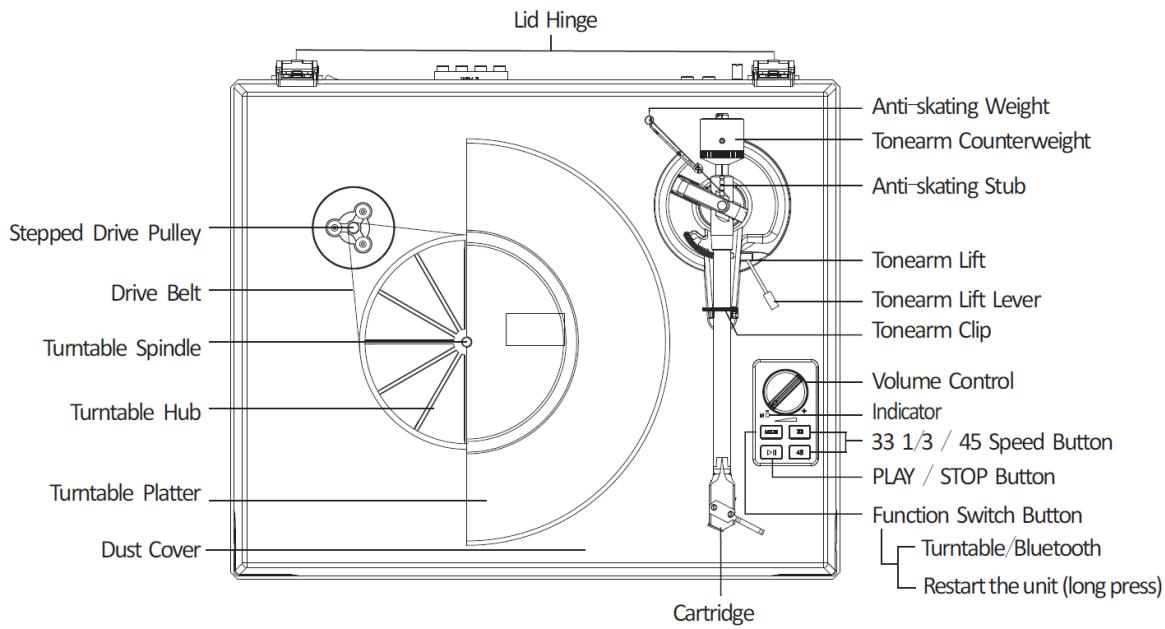
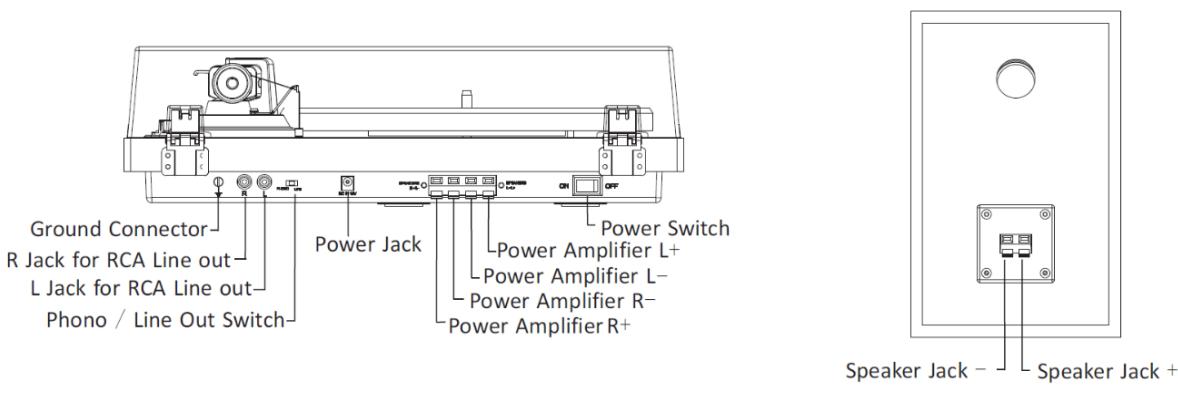
Initial Setup
- Place the unit on a flat and level surface. The selected location should be stable and free from vibration.
- Install the turntable lid to the hinges.
- Remove the tie-wrap that is holding the tonearm.
- Put the drive belt around the Turntable Hub, and then use the provided belt hoot to help pull the belt to fit around the slot of motor pulley.
- Place the turntable platter through the turntable spindle.
- Place the slip mat on top of the turntable platter.
- Slide Tonearm Counterweight onto tonearm and twist it lightly onto the rear shaft of the tonearm.
- Adjust the counterweight to set proper stylus pressure.
- Locate the anti-skating weight
- Connect AC-DC adaptor to the Power Jack of the unit.
Note: Do not plug the AC power adaptor to power outlet before all the assembly is completed.
Cartridge Down force Adjustment
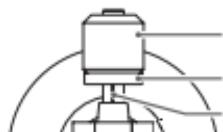
Counterweight
Downforce scale ring
Centerline
The Counterweight supplied is suitable for cartridges weighing between 3.0-6.0g.
Gently push and turn the Counterweight onto the rear of the tonearm (with the scale facing toward the front of the turntable).
Remove the cartridge protection cap.
Lower the tonearm lift and position the cartridge in the space between tonearm rest and platter.
Carefully rotate the Counterweight until the tonearm balances out. The tonearm should return to the balanced position if it is moved up or down. This adjustment must be done carefully.
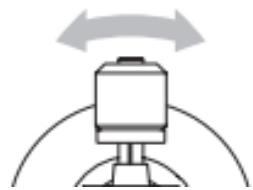
Once the tonearm is correctly balanced return it to its' rest. Hold the Counterweight without moving it, and gently rotate the Down force Scale ring until the zero is in line with black line on the rear of the tonearm. Check whether the arm still balances out.
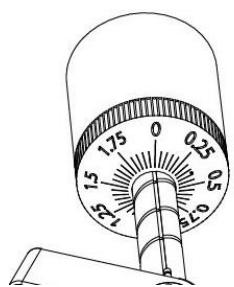
Rotate the counterweight counter clockwise (seen from the front) to adjust the down force according to the cartridge manufacturer's recommendations. One mark on the scale represents 0.05g of down force.
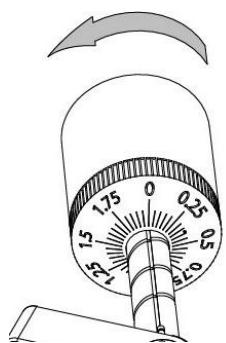
NOTE: The recommended down force for the factory fitted cartridge is 3.0 ± 0.5g .
Locate the anti-skating weight
You will find a anti-skating weight with small fishing line from the package, please follow below steps to locate the anti-skating weight:
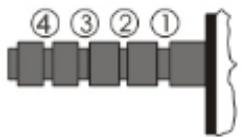
- Slip the looped end of the fishing line over the anti-skating weight adjustment stub and into the 3^rd groove (the correct anti-skating force for the factory-fitted cartridge).
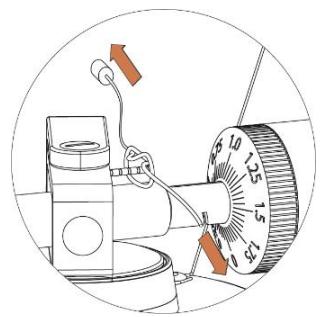
- Pull the anti-skating weight slightly to let the tie of the fishing line move to the stub.
- Lift the anti-skating weight over the anti-skating weight wire support. The anti-skating weight should now be dangling in free space to the left of support.
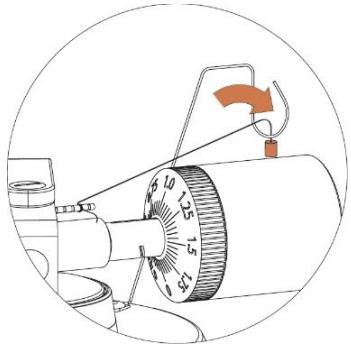
The anti-skating force must be adjusted corresponding to the down force as follows:
Down force
Groove in the stub
5-10mN
1 st from bearing rings
10 - 15mN
2nd" " "
15 - 20mN
3rd"''
20mN and bigger
4th''''
Stereo System Connection
RCA Jacks
- The RCA Jacks of this unit are shared as both the Phone output jacks and the Line output jacks. They are determined by the Phono/Line Switch.
- When used as a line output, the jacks output analog line-level signals and could be connected directly with a pair of active speakers or the appropriate input of your stereo system. When used as a Phono output, they should be connected to the phono pre-amplifier or the phono input of the stereo system.
- The Red plug connects with the Right channel and the White plug connects with the Left channel.
Note:
- If the Phono/Line switch is set at LINE position but RCA jacks connected to the stereo system's phono input, the sound might be distorted due to input overload and could damage your stereo system.
- If the Phono/Line switch is set at PHONO position but RCA jacks connected to the stereo system's line input, the volume will be very low due to lacking signal pre-amplification.
RCA Jack is not designed to be connected directly to the passive/unpowered speakers and if it does, the volume will be very low.
Speaker Connection
The spring clip speaker terminals deliver amplified, speaker-level signals as output and should be connected with the passive speakers.
Bluetooth Operation
- Press the Power Switch to turn on the power.
- Press the MODE button to choose Bluetooth mode, the indicator will light in blue. You will hear an activation sound from the unit.
Turn on the Bluetooth feature of your audio device, search for "Lenco LS-500" and pair.
- Once your device is successfully paired with the unit, you will hear a short confirmation sound from the unit.
- Play and stream music from your device to the unit.
Note: Bluetooth version - 5.0
This product has a bluetooth reception function, you can not transmit any bluetooth sound with it: this means that you can receive wirelessly a bluetooth sound signal from an external source like a smartphone
Turntable Operation
- Press the Power Switch to turn on the power.
- Press the MODE button to choose turntable mode, the indicator will light in red.
- Place the record on the turntable. Use the 45 RPM Adapter if necessary.
- Choose the right Anti-skating force.
- Remove the stylus protector from the stylus assembly.
Note: To avoid stylus damage, make certain the included stylus guard is in place whenever the turntable is being moved or cleaned.
- Open the tonearm clip from left to right.
- Press the PLAY/STOP button once, the platter start turning.
- Gently pull up the tonearm from its rest and move it over the record where play is desired to begin. Use the Tonearm Lift Lever to raise the Tonearm Lift and let the tonearm lay on it.
- Set the Tonearm Lift Lever back to the down position, the tonearm will descend slowly onto the record and begin playback.
- When the music has finished to play, use the Tonearm Lift Lever to raise the tonearm and then return it to the tonearm rest. To suspend the playback, repeat the same steps.
- Press the PLAY/STOP button again, the platter stop turning.
Cartridge Replacement
- Before replacement, put the stylus protector back on the stylus to prevent damage to the stylus during the replacement process.
- Carefully remove the wire leads from the original cartridge.
- Loosen the two screws on the headshell that are securing the cartridge and then remove the original cartridge.
- Mount the new cartridge to the headshell and tighten it lightly. Do not completely tighten the screws at this moment.
- Connect the wire leads to the new cartridge's terminals. The wire lead color are as below:
| White | Left channel positive | (L+) |
| Black | Left channel negative | (L-) |
| Red | Right channel positive | (R+) |
| Black | Right channel negative | (R-) |
- Adjust the cartridge's position to make sure it is precisely aligned on the headshell so that the stylus will be tracking the grooves in parallel perfectly.
To achieve this, place the included paper cartridge alignment protractor over the turntable spindle, carefully lift the tone arm and place the tip of the stylus on the points marked 130mm and 250mm respectively. Fine tune the cartridge's position on the headshell until the cartridge is perfectly in parallel with the reference lines at both posits.
- Tighten the screws completely once the perfect alignment is achieved.
Specifications
LS-500 Main Unit
Power AC power adaptor, DC output 15V 2400mA
Power Consumption 36W
Output power 2x30W RMS
Turntable Speed 331/3,45 RPM
Speed Variance ±1.0%
Wow and Flutter < 0.15%
Signal to Noise 72dB
Downforce Range 0-6.0g
Effective Tonearm Length 8.6" (218.5mm)
Overhang 0.73"
Turntable Dimensions (W X H X D) 418 X 123 X 346 mm, with lid open 420 X 410 X 420 mm
Weight 5.77kgs
LS-500 Speaker
Tweeter 8Ω 10W X 2
Woofer 4Ω30W X2
Speaker Dimensions (W X H X D) 162 X 248 X 158 mm
Weight 3.76kgs
Needle:AT-3600L
| Frequency Response | 20Hz - 20kHz |
| Channel Balance | <2.5dB |
| Channel Separation | >18dB |
| Output Voltage | 2.5mV |
| Recommended Load Resistance | 47kΩ |
| Amplifier connection | MM - input |
| Recommended Tracking Pressure | 3.0±0.5g |
| Weight | 5g |
Note:
- Design and specifications are subject to change without notice.
Power supply adaptor:
Manufacturer: Brightpower Optoelectronic Technology Co., Ltd.
Model Number: SW1502400-IM/ S036A1502400M
Input voltage: 100-240V
Input AC frequency: 50/60Hz
Output voltage: DC 15V
Output current: 2.4A
Output Power: 36W
Average active efficiency: 87.58%
Efficiency at low load (10%): 84 %
No load Power consumption: 0.080W
Use only the power supply listed in the user instructions
Turntable Maintenance
- Do not touch the stylus tip with your fingers. Avoid bumping the stylus on the turntable mat or a record's edge.
- Clean the stylus frequently with a soft brush with a back-to-front motion only.
- Clean the records to get rid of dust or grease with a record cleaning brush and record cleaning solution.
- Clean the turntable lid and turntable cabinet with a slightly damped microfiber cloth.
Note: Do not use cleanser other that contains alcohol, benzene or any other harsh chemicals, with might damage the paint and finish of the turntable.
Troubleshooting
There is no power
- Power adaptor is not connected correctly.
- No power at the power outlet.
Power is on, but the platter does not turn
- This unit is not in turntable mode. Press the MODE button to turntable mode, the indicator light in red.
- Need to press the PLAY/STOP button once to start playing.
- Turntable's drive belt is not installed or has slipped off.
Turntable is spinning, but there is no sound, or sound not loud enough
Stylus protector is still on.
- Tone arm is lift up by the lever.
- The Phono/Line switch is set at PHONO position but RCA jacks connected to the stereo system's line input.
- Forget to connect the speaker to the turntable.
Distorted of inconsistent sound from one or both channels:
- Turntable is connected to wrong input of amplifier.
- Needle or cantilever damaged.
- Drive belt overstretched or dirty.
- Platter bearing without oil, dirty or damaged.
- Dust on stylus.
- MM/MC switch on pre-amplifier set incorrectly.
Record sounds too fast or too slow
- Wrong speed selected for the record.
Strong hum on phono input
- The cable is not grounded correctly.
- Turntable too close to speakers.
Remark:
To protect the stylus, the platter will Stop automatically if no music has been playing for 1 min. For lowering the power consumption, the whole unit will switch to standby mode automatically if no music has been playing for about 20 minutes.
To restart the unit, hold press the "MODE" Button.
If your unit switches off regularly, this is no defect.
Guarantee
Lenco offers service and warranty in accordance to European law, which means that in case of repairs (both during and after the warranty period) you should contact your local dealer.
Important note: It is not possible to send products that need repairs to Lenco directly.
Important note: If this unit is opened or accessed by a non-official service center in any way, the warranty expires.
This device is not suitable for professional use. In case of professional use, all warranty obligations of the manufacturer will be voided.
Disclaimer
Updates to Firmware and/or hardware components are made regularly. Therefore some of the instruction, specifications and pictures in this documentation may differ slightly from your particular situation. All items described in this guide for illustration purposes only and may not apply to particular situation. No legal right or
entitlements may be obtained from the description made in this manual.
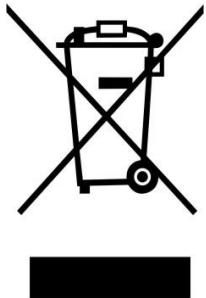
Disposal of the Old Device
This symbol indicates that the relevant electrical product or battery should not be disposed of as general household waste in Europe. To ensure the correct waste treatment of the product and battery, please dispose them in accordance to any applicable local laws of requirement for disposal of electrical equipment or batteries. In so doing, you will help to conserve natural resources and improve standards of environmental protection in treatment and disposal of electrical waste (Waste Electrical and Electronic Equipment Directive).
CE Marking
Hereby, Lenco Benelux B.V., Thermiekstraat 1a, 6361 HB Nuth, The Netherlands, declares that this product is in compliance with the essential EU directive requirements.
The declaration of conformity may be consulted via techdoc@commaxxgroup.com

Service
For more information and helpdesk support, please visit www.lenco.com
Lenco Benelux BV, Thermiekstraat 1a, 6361 HB, The Netherlands.
LET OP:
| Tweeter | 8 Ω 10 W X 2 |
| Woofer | 4 Ω 30 W X 2 |
Afmetingen luidspreker (B X H X D) 162 X 248 X 158 mm
Gewicht 3,76 kg
Naald:AT-3600L
Output current: 2.4A
Output Power: 36W
Average active efficiency: 87.58%
Efficiency at low load (10%): 84 %
No load Power consumption: 0.080W
Output current: 2.4A
Output Power: 36W
Average active efficiency: 87.58%
Efficiency at low load (10%): 84 %
No load Power consumption: 0.080W
Output current: 2.4A
Output Power: 36W
Average active efficiency: 87.58%
Efficiency at low load (10%): 84 %
No load Power consumption: 0.080W
Output current: 2.4A
Output Power: 36W
Average active efficiency: 87.58%
Efficiency at low load (10%): 84 %
No load Power consumption: 0.080W
MEPbI PPEDOCTOPOXHOCTN PEPEKNIYATALUEN
COBJIODAIte CLEUYOUUNE INHCTPYKUIN:
- He 3akpbIbaiTe n He 6IoknpyTe BENTINaIOHbIe OTBepCTn. Ppi pa3MeJeHHu yCTpoiCTBa Ha NOLKe OCTaBBte BOKpyr Hero 5 cm (2 IIOMa) CBO6oHOrO npocTpaHCTBa.
- UCTAOBNTe yctpoiCTBO B COOTBETCTBnC pyKOBoDCTBOM NOLb3OBaTeJI, BXOJaIIM B KOMPJIeKT NOCTABKN.
- UcpoCTBO DOJXHO HAXOHTbCBydAIn OT NCTOCHNKOB TeTnla, TaKx KaK 6aTapeu, O6orpeBaTeH, HArpeBaTeIbHbIe neu, CBeu n dpyrue N3dEIny, BbIeJeIouSne TeTnlo, IIN OTKpbItoe PnAmr. UcPoIcTBOMoJHo NcPONb3OBaTb TOnBko B YcNoBnx YMepeHHoro KInMaTa. CLedyet N36eRaTb Ype3MepHO BblCOkHXnIHN3KnX Tempeatyp OkpykaIoSei Cpebl. Pa6Oaay Tempepatya coctablanerot 0°do 35°C.
- He nCnoIb3yIte yctpoIcTBO B6IIN3N CnJIbHbIX MaHHTHbIX NOJIe.
- ΘleKtpoCTaTnueckn pa3pI M0xet NOMEuTaH HOpMaIbHOJ EKcPlyatauN yCTpoiCTBa.EcIIN 3TO TaK, npocTo nepe3arpy3nte n nepe3anycTne yCTpoiCTBO, cJeDy INHCTpykCmN NO EKcPlyatauN. Co6JIIOdaIte OCTopoXHOCtB pRn peepaue faiIOB n EKcPlyatnpyIte yCTpoiCTBO B cpeDe, CBO6OdHOn OT aTMocΦephIx NOMex.
- Претупгждени! He BCTablaЯтte Кади-лббо РрдмтБВ ИЗдени Урета В entnlaционье OTBepctna IINI npoembl.Черз ИЗдени пpoхолТ ВсICOKOE habржени,И BCTabLeHbIй ррдmet может Bbl3BaTbnpaжени ЗелктучеснIM TOKOM И/ИПОКOTKOЕ 3ambikaHne BHYtpeHHnxЧастен. ПО ТОЛЖЕпчине He npolnbayTe Ha ИЗдени Bodу ИПЛЮБУ ДPyrgYJO XNIDKOCtB.
- He nCnoJIb3yIte yCTpoIcTBO B NOMeUeHnX C NOBbIeHHoB BlaJxHOCTbIO, TaKnx KaK BaHHbIe KOMHaTbI, KxHn, HacblueHHbIe napOM, IIN OkOLO 6accSeHOB.
- He donyckaIte nonadaHna yctpoCtBO kaneIb nIb 6pbI3r. CJeIte 3a TeM, yTo6bHa ycTpoiCTBO nIpydOM C Hm HE CTaBnIinCb npedMeTbI, HaNOLHeHHbE JxNdkOcTBIO, HApimep Ba3bl.
- He nCnoIb3yIte 3TO yCTpoIcTBO B cpeDe, rIde BO3MOJHO o6pa3OBAHne KOHdEHCATA. KOrJa yCTpoIcTBO HcNoJIb3yETcB TTeILOM BlaJXHOM NOMEUeHN C NOBbIeHNO BLaJXHOCTbIO, BHyTpN yCTpoIcTBA MOryt O6pa3OBbIBaTcR KaIIIN BOdbI INI KONJeHcAT, I yCTpoIcTBO MOKeT pa6oTaTB HeNPaBnIbHO; daIte YCTPOIcTBy NOCTOaTB B VbIKLIOUeHOM COCTOAHN B TeueHne 1 INI 2 YacOB nepeD BKlIOUeHHeM PNTAHNA: yCTpoIcTBO DOnJXHO 6bITb CyXIM, IpexKeJe Yem NODKLIQUaTb PNTAHNE.
- Hecmotra Ha To, UTo 3To yctpoiCTBO h3rotobJeHO C Oco6o TuaTeIbHocTbU Ho Heckolbo pa3 npOBepeHo nepei BblYcKOM C 3aBoJa, Bo3HnKHOBeHne IpO6JIe BCE Je BO3MOXHO, KaI cO BCEMN 3JIeKTpUeCKMn Pnp6Opamn. Ecln Bbl 3aMeTNI NbIM, Ype3MePHe HArpeBaHne IIn IIO6bIe dpyrHe HeoJNDAHNBie RaBHeHna, Bam cIeNyET HeMeDJIeHNO OTKJIouHTb BNILky OT pO3eTKIeKTPoNTaHnI.
- 3TO yCTPOJcTBO DoJIxHO pa6OtaTb OT TaKOro NCTOCHNka PHTaHn, KaK YKa3aHO Ha 3aBODCKo T a6JIuYeCo CneUΦHKaUaMn. Ecln Bbl He yBepeHb I Tom, KaKo TnI NCTOCHNka PHTaHn IcNoJIb3yeTcB BAWeM DOME, pPOKOHcYbTnpUyITeCb c BaWM TopRObIM NocpeDnKOM nII MeCTHOJ 3JIeKTPo3HeprTeNuEcKO KOMNaHnei.
- Pa3meaTe yctpoiCTBO noaIbIe OT XINBOTbIX. HeKOTOpbIM XINBOTbIM HpaBNTcKycatb shHpy nITAHJ.
- Дя оунстк устюства И сплььше магкую сухую тkaнь. He И сплььше пасворител илждков на осове бенизна. Утосы удалиь усточи вьгіп,在а,Бы можete И сплььзовать влжниота.Tkaнь с рабавлени MOJOUMСрEDCTBOM.
- ПocstabuNK He Hecet OTBeTCTBeHHOCt3a NOBpeJdeHne IINI NOTepIO daHNbIX, Bbl3BaHHbIe HeNCpapBHOCTbI, HEnpaBnJIbHbIM NcNoJIb3OBaHHeM, peKOHCTpyKUneY cTpoiCTBa IINI 3aMeHOI 6aTapeN.
- He npepbIbaiTe coeHNHeHne, KOrda yCTpoiCTBO FOOpMaTIpye TnIn nepeJaet foaiJIbI. B npOTuBHom clyuae daHHbIe MOrT 6bITb NOBpeKdEhbl NnYtepaHbI.
- EcIn B yctpoiCTBe eCt b fynKzna BocpOun3BedeHnuepe3 USB, KapTy naMaTn USB cIeDyeT noDKluOaTb Hanprmyo K yctpoiCTBy. He nCnoJIb3yIte ydIINHTeHbHb Ka6eIb USB, TaK KaK OH MoJcET Bbl3bIBaTb NOMexn, YTO npBDeT K Notepe daHHbx.
- Ta6nUka C TexHnueckmN DaHHbIMn HaxOuNTcHa HnXHeN IIN 3aDHe N aHeN yCTpOcTba.
- 3TO yCTPOiCTBO He npEHa3HaueHO IJRA NcIOnb3OBAHnA JIOdbMn (BkIIOUaA JeTei) C fN3NueCKIMn, YMCTBeHHbIMn paCCTPOiCTBaAMn, pacCTPOiCTBaAMn UyBCTBeHHORO BOCpNpyTnI NJI C HeIOCTaTKOM OnbIta N
3HaHn, eCIn OHN He HaxoJATcN pOd Na6JIOpEHHeM NIn He NOLyHIn INCTpyKcNIO npaBnIbHOMy IcNoJIb3OBaHnU yCTpoiCTBa CO CTOPOHb IINuA, OTBeHuOeRo 3a INx 6e3OnaCHOCTb.
- 3To n3dJIe He npEHa3NaYeHO dJa npOeCCnOHaIbHOrO, KOMMepueckoro nn IpomblJeHHORo nCNoJIb3OBAHnI.
- Y6eHntecb, yTO yCTPOIcTBO yCTaHOBJIeHO B yCToYHBOE noLOXeHne. IapAHnHe paCnpocTpaHareTcHa nOBpeKdEHHN, Bbl3BaHHbIe 3KcIIyatauNeM 3TOrO n3DeJIra B HeCTa6bIbHOM noLOXeHHN, Bn6paZmIMn lnn yDapAMn, nIb6o Heco6bIooDeHneM IIOb6x dpyHX npdeUynpeJxDeHHn nn MeP npedocToPOxHocTn, cOdepKaunxCsB aDHHom pkyoBDCTBe nolb3OBaTeJIa.
- HnKoIgda He ChnMaIte KOpNc 3ToRo yCTpoIcTbA.
- Hikorda He nomeuaTe 3To yCtroBTO Ha dpyroe 3NeKtpnueckoe 6OpdyobAHne.
- He donyckaia Te irp deTei c nlaactIKOBbIMn naKeTaMn, IcnoIb3yeMbIMn,IJIa ynaKOBKn yCTpoiCTBa
- Исторы толък посокоблия/приhalджноctи, уka3aHHbIe npOINBODHTeJIeM.
- Iopuynte Bce 6cbnykubahne KbainnphiunpoBaHOMy 6cbnykubauoemy nepcoHaIy. Obcnykubahne Tpe6yeTc, KOrda yctpoiCTBO 6blIO nobpejdeHo, HapnpMep, erO shyp 3JIeKTPoNtAHnI ININ BILka, KOrda 6blIa npolnta JxndkoCTb INI KaKHe-JIbO npedMeTb UpaII HA yCTPOiCTBO, KOrda yctpoiCTBO NOdBeprIocb Bo3DeiCTBnIO DoJzIy INI BlaRn, KOrda yctpoiCTBO pa6OtaET HeHOpMaJIbHO, INI KOrda npOn30JIo naDeHne yCTpOiCTBa.
26.ДиntelbHoe BO3dEeCTBnE rPOMKx 3BYKO B LyuHbIX My3bIKAJIbHbIX nPOnrpbBaTeJe MoKeT npNBecTN K BpeMeHHo IIN NOCTOARHHo NOTepe Cnyxa. - Ecni n3dJIne noCTabJraETc Ka6eJem 3JeKTPoNtTaHnI yIa aJaNTepOM nepemEHHOrO Toka:
Bcnyae Bo3HnKHOBeHna KaHX-1n6o np6Ie OTKJIOnHTe UHyp NtAHnpepeMeHHoro ToKa n 06paTntecb 3a 06cnykBaHnem K KBaHnΦuNpOBaHHOMy nepcoHaIy.
He hactynaite Ha aadantep nittahn He 3aKImaTe ero. Bydbte OChb octopoxhbl, oc6eHHO Bo3ne wTekepoB u Ka6elbHoro BbIOda. He pa3meaite Ha aadantpe 3JeKtpoNTaHn TjKeIbIe npedMeTb, TAK KAK OHN MOyT NOBpeDHTb erO. XpaHtyeCTPOBCTBO HneOCTyHOM DJIa DeTei Mecte! Irgpar c Ka6elem 3JeKtpoNTaHn, OHN MOyT cepbe3HO nopAHntbcra.
- OTKIIOUaIte 3TO yCTPOIcTB OTO cTeN BO BpeM rpo3bI nIe cIIN He IcNoJIb3yTe B TeueHne DInIteJIbHO Bo BpeMeHn.
- Μτέπεινηλροσετκα Σόλχηλ δυβήνγεταύθουνηλρράσος Κ σόβρύγιδοναινημειν 6bιTb Hεποςρείπενθενημούθυνημειν Σόctyne.
He neperpykaTe po3eTkn nepemEnHoro ToKa nIyIINHtJIbHbIe shHypbl. Neperpyka MoKet BbI3BaTb BO3rOpaHne IInn nopaxKeHne 3JIeKTPnueckm TOKOM.
- UcTpoIcTbA, cnPoEeKTHpOBAHbIe B COOTBETCTBnC nepBbIM KlaCCOM 3JIeKTPoO6OpyIDOBaHnI PO EBpOeYckm CTaHdApTaM, «Class 1», Heo6XoJMo NOdklHuAtb K 3a3EmLeHHbIM po3EtKam 3JIeKTPoNITAHnI.
- UcTpoIcTBa, cnPoekTnipoBaHbIe B COOTBETCTBUN CO BTOpblM KlaCCOM 3JIeKtPoo6OpyDObAHnno EbponeiCKm CTaHdApTaM, «class 2», He Tpe6yIOT HAIuYn 3a3EMLeHHN B Cetn 3JIeKtPOnITaHHN.
- BbIHMaBnIky n3 7TeNceIbHoi po3eTKn, BcERda depXHTecb 3a BnIky. He TAHte 3a shHyp nItaHnY. 3TO MOxET BbI3BaTb KOpOTKoe 3AmbIkaHne.
He nCnoIb3yIte noBpeKJeHHbI uHyp 3JeKtpoNtAHn, BnIky IInn He3aKpeJIeHHyIO, OcIa6JIeHHyIO po3eTKy. 3TO MoJcET npINBeCTN K Bo3ropaHHIO IInn IopaKeHHIO 3JeKtpuYeCKm TOKOM.
-
Ecn npoykt coepknt nIIN NOCTaBnaTc C nyltom dNCTaHcNoHHoro ynpabHeHnC 6aTaapee TnPa «Ta6letka》/«MOhetka»:
-
PpeDynpexKdeneH:
«He nporlaTaBbTaB 6aTapeo, onaCHOCTb XIMnueckoro OXORA» IJIIN aHaIOrnHbIe DeiCTBna.
[Пульт достанцюногу управлия, BXODЯшь в КOMПЛЕКТ ] 3TOТ пордук ТОсержNT 6aTapeй КУ TИпа «ТаБлЕТКА»/ «MOнETКА».ЕслnpоглOTиь 6aTapeй К,эTO может Bbl3ВaТь срьеЗны ВЧтpeHHne OXKOrn BCero 3a 2 ча и пивесгС к Смер.T.
XpaHInTe HOBbIe I NcNoJIb3OBAHHbIe 6aTapeIN B HeIOCTyINHom IJra ITei MeCTe.
Ecn 6aTapeHbO TceK 3akpbBaetc HnAdexHo, npeKpaTnte NcNoIb3OBaHne npOdykTa n XpaHnte ero B HeDocTyHOM dJa DeTeMcte.
EcnBbCunTaTe,TO 6aTapeKIMoRn6bITb nporIOTNbHn OHMOrN nonactb KaKyio-Jin6o. qactb TeLa, HEmdJeHHO o6paNTecb 3a MeiunHCKoN NOMouhIO. -
Меры пе dioctopoxkHocTN ри Испьзовань saтapeste:
-
Пи Нрравильно заме He 6aTapeи cyuecTByeT onachocb B3pbIBa. 3aMeHЯrTe Tolbko Ha TaKyIO JKe 6aTaapeIO nII aHaIorNCHoro Tnna.
-
AkkymaTOp HeIb3a IOBepraTb BO3deJCTBnIO Upe3MepHO BbICOKHX NII HN3Knx TemnepaTpy, HN3KOrO DaBLeHnRA BO3dUxa Ha 6OJIbIoB BbICOTE BO BpEma NcPOnb3OBaHnA, XpaHeHnRA NII TpaHCnOPTnpOBKn.
3aMeHa 6aTapeHnnoDxoJyero Tuna MoKet npBecTu K B3pyIBy nIyTeUke BocnlaMeHyoJeC JNdkOCTn nn r3a. - Ytuln3aun akkymyIaTopa B ORHe nlln B ropaye dYXOBKe, MexaHueckoe pa3daBnBaHne nll pa3pe3aHne akkymyIaTopa MoKTe npNBecTn K B3pbIBy.
HaxoJdeHne 6aTapeB B OkpykaUe CpeDe C ouYe h BbICOKO TeMnepaTyPO MOnKET npNBecTN K B3pbIBy IIN yTeUKe BocPnaMeHaHOSeCra JNkOCTn IIN ra3a.
BaTape, haoJiaacn PoB Bo3JeCTBnem Upe3MepHO Hn3KOrO daBHeHn BO3dyXa MoKeT npNBecTN B3pbBy nIyTeUke BocPnaMeHnoeCra KndKoCTn IJI ra3a.
CleyuTb BnMaHne Ha 3KoIorMueckne acNeKtby yTnIn3aun6baTaep.
YCTAHOBKA
PacnakyTe BcKOMNoHEnTbI npOnrPbIBaTeJI N CHMNTe 3aUHTbIe MaTePnaJIbl.
He npdklouaTe yctpoiCTBO K 3JIeKTPocETn Do npOBepKn cTeBOrO HnprjXeHn I Do BbINOJIHeHn BCEx OCTaIbHbIX pOKLIUChen.
Oncsahne npoDyKta
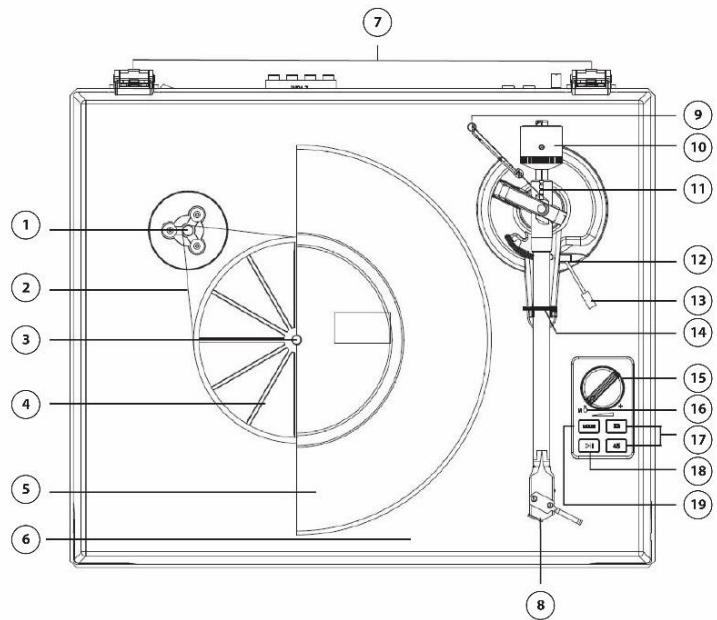
- CtyneHuaTbIi ShKnB
- Pemeh npBovda
-
Unnndelb
-
Ctynnuca nobopothoro cTona
- Tapelenka
- 3aunTHna KpbIka
7.петли
8. KaptpnIX
9. AHTN-CKeTNHRObB BEC
10. Потивовец ToHapMa
11. PerynipoBka aHTN-CKeTnHra
12. MexaHn3M NOdHrTn ToHapMa
13. Pbyar yctaHOBKn TOhapMa
14.ФИКСИРУЮОЕ KOЛБЦО
15. Peryunipobka rpoMkoctn
16. Инданкоторпитань.
17. IpekeJIIOUaTeIb ckOpocTei
18. KhoNka PLAY/STOP
19. Перешистене рекимов (Винл/Bluetooth) (певетауck почирьвател - дюгег нахате)
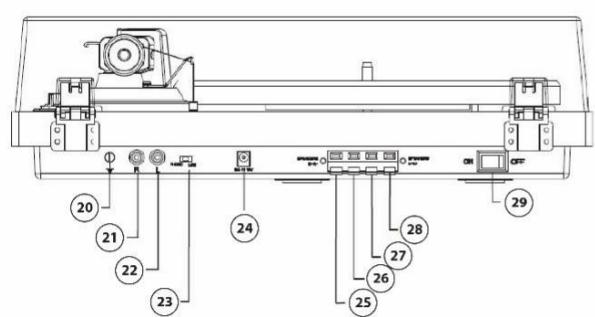
20. 3a3emJehne
21. Правьджек RCA line out
22. JIeBbI dXeK RCA line out
23. Пеклоченье phono/line
24. Pa3bem Ntahnra
25. YcnilnteIb R+
26. YcJIInTeJIb R-
27. YcJIInTeJIb L-
28. YcnilnteIb L+
29. Khonka BkJIIOueHnA
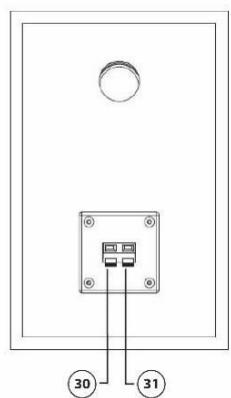
30. Pa3bemДжек-
31. Pa3bemДжек+
YctaHOBka
- UctaHOBInTe yCTpoIcTBo Ha pOBHyIO NOBepXHOCTb. MeCTO yCTaHOBKn DoJIxHO NCKJIooYaTB IOnBLeHne Bn6paun i DnIXeHn IOBepXHOCTn.
- YctaHOBInTe 3aunTHyU KpbIuKBy B neTIn yCTpoiCTBa.
- YdaIaIte MaRkn TpaHcNOpTnOboHyb I depKaTeMb c ToHaPMa.
- 06epnnte npnbodnopeMeHb BOKpyr cTynpuCbl NOBOPOTHO CToJa, a 3aTeM nCNoJIb3yIte npnilaraemyo 3acteKky, yTO6bl HATaHyTb peMeHb N pa3MeCTNtB eRo B na3e WKNBa DBNrAteJl.
- HadehbeTapekky Ha unHneIb.
- Pa3mecntte cInnMaT Ha tapeJIke.
- HadeNbTe npotnbOBec ToHapMa Ha cam ToHapM n CJIeKka 3akpyTnte Ha 3aDhem BaJy.
- HacpoTe npOTnBOBec TaK, UTo6bl OH COOTBeCTBOBaI npJxHmHNo cnJe nflbl.
- Pódèbēpùte Béc aHTnCKeɪTnHra.
- Пдклочи Te aanTpep nntaHn B COOTBeTCTByIoUm pa3bEm Ha KOpnyce npOnIrpbIbATEJIa.
IckaeHHb3Byk B ODHOM nHn 06oNX KaHaJax:
- IpnirpbIbATEnb IOdkHoueK HnePpaBnIbHOMy BXOdy yCnIInTeJIa.
- Поврждениngлblилкантлевера.
- Pemehb npnBOda paCTaHyIc nIIN 3aqrpa3HnIcra.
- Пошипнктapeлксухо,повржденилзагязн.
- PbIbHa nIgne.
- IpeekliouateIb MM/MC Ha npdyucnIteJe yctaHBOJIe H HeKOppeKTHom POLOJKeHN.
3Byk cInuKOM 6bICTpbHnn CInuKOM MeJeHHbH
- HeKOppeKTHO BbIbpaHa cKOpocTb npOnrpbBaHn3aHncEi.
CnIbHbI ryn
TapaHTHbIe 06ra3aTeJIbCTBa
Cpok rapaHTn coCTabIeT 1 (OINH) rOD c DaTbI npOdaJN. Cpok cnX6bl -do 5 (nATn) IeT.
Baxhoe npimechn: Kompana H I nco He oecneuBaet 6cnyuBaHne 6opudobHn B clyuae H enocpeDCTBeHHoro obaeHn B roIobHO oHc KOMpaHn.
BaxnHoe npimechnE: TapaHTnI He deiCTByeT, eCIn yCTpoiCTBO BCKpbIBaIOCb nIN NODBeprAIOCb n3MeHeHnM BHe oHnauhoro cepBvCHoro ceHTpa.
3TO yctpoiCTBO He npedHa3NaeHo Ira npocecnoHaIbHO rncOJIb3OBaHnB. B clyuae npocecnoHaIbHO rncOJIb3OBaHnra rapaHTnHbIe 6a3aTeIbCTBa pON3BOdntela He 6ydt BBINOJIHrTbcra.
3aBLeHne 06 orpaHueHn OTBeTcBeHHOCTn
O6HOBJIENn MmKpONpOrpaMM n/nn KOMNoHEnTOB annapatHoro o6ecneueHn npOn3BOJrTcpeyIrpHo. IToTMy HeKOTOpbIE INCTpyKcun, cpeuΦHKaunn H3O6paKeHn B 3ToJ DOkUMeHTaunn MOYr He3HaUnTeJbHO OTlNUaTbcr OBaWe J KOHKPeTHoCtTuauun. Bce 3JeMeNTbI, ONcaHHBe B daHHom pyKOBoDCTBe, ppeHa3NaueHbI TOJbKO dJa nnIOCTpaunn mOry T He OTHocHTbcra K KOHKpeTHo CtTuauun. N3 OINcaHn, npNBedeHHoro B 3TOM pKoBOODCTBe, HeJIb3a NOlyuHTb HNKaNX UOpNduuecknx npab.
Ytlln3aunnaObOpydoBaHna
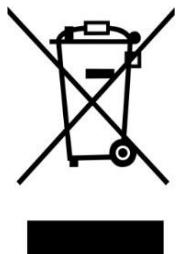
ТOTСИМВОЛ OЗнayaET,ЧTO COOTBETCTBvyOоe eэлкгpoobopydOBaHne nIиБатApEЯ He MoжET 6bITb yTnIn3InpOBaHa KaK ObbyuHbIe 6bITOBbIe OTxOdbI B Ebpone. YTo6bl ObeCpeuNTb KORpeKTHyU OyTnIn3aUcNIO DaHHoro OOBpyDObAHnRA pYKOBoDCTByITeCB MeCTNbIMn 3aKOHAMn IIN Tpe6OBaHnA mNo yTnIn3aUcNn əleKTrPOHnHO OOBpyDObAHnN IbTaapei. NocTyPnaTakIM O6pa3OM, Bbl NOMoJte coXpaHnTB npriPoDhble pecypcbI n yIyUshnTb cTaNdapTb 3aUnTbI OkpykaIoSeI cpeDbI pri O6pa6OTke n yTnIn3aUcNn əleKTrPnuYeCKNX OTxODoB
Data n3rOToBHeHn npOdyKcHn
Iod n Mecau, n3roTOBLeHn yPoDyKcun yKa3aHbI B HOMepe npTnN cepnHOM HOMepe npOdykTa. HnKe onncAbl CnOCo6bl yToUHeHn 3ToI daTbI.
- По Homepy napTи (Homep napTи yka3aH li6o Ha ynaKOBke yctpoiCTBa, li6o Ha TpaHcnpTnpOBOuHoi ynaKOBke).
OΦopMaT Homepa napTu: AAAABDDMY - По сершиму Homepy подукta (сершиму Homep уka3ан на усторостve).
OΦopMaT cepnHoro Homepa: AAAABDDMYSSSSS
Ie M (Bocbmoi cmbol cbe) paBeH Mecay npOn3BOcTBa, a Y (deBraTbI CNMBOJ cbe) paBeH rOdy npOn3BOdCTBa. Mecau npOn3BOdCTBa yKa3bIBAeTcA ODoHn n3 6yKB IaTHNCKOro aIabNTa.
CoOTBcETCTBnE 6yKBeHHbIX 06O3HaueHn MecaI npOn3BOcTBA:
PpimeppacuHΦroBKn no HmOpy npTn:
- Homep nanopin: 2461A05C0
- Где бухва Сто меса (MapT), a сифра 0 - постенья сифра за позьовдва (2020).
Ppimep paocnΦpOBKn no cepniHOMy Homepy:
- KEEP THESE INSTRUCTIONS IN MIND:
- INSTALLATION
- Initial Setup
- Cartridge Down force Adjustment
- Locate the anti-skating weight
- Stereo System Connection
- RCA Jacks
- Note:
- Speaker Connection
- Bluetooth Operation
- Turntable Operation
- Cartridge Replacement
- Specifications
- LS-500 Main Unit
- LS-500 Speaker
- Needle:AT-3600L
- Power supply adaptor:
- Turntable Maintenance
- Troubleshooting
- There is no power
- Power is on, but the platter does not turn
- Turntable is spinning, but there is no sound, or sound not loud enough
- Distorted of inconsistent sound from one or both channels:
- Record sounds too fast or too slow
- Strong hum on phono input
- Remark:
- Guarantee
- Disclaimer
- Disposal of the Old Device
- CE Marking
- Service
- LET OP:
- MEPbI PPEDOCTOPOXHOCTN PEPEKNIYATALUEN
- COBJIODAIte CLEUYOUUNE INHCTPYKUIN:
- YCTAHOBKA
- Oncsahne npoDyKta
- IckaeHHb3Byk B ODHOM nHn 06oNX KaHaJax:
- 3Byk cInuKOM 6bICTpbHnn CInuKOM MeJeHHbH
- CnIbHbI ryn
- TapaHTHbIe 06ra3aTeJIbCTBa
- 3aBLeHne 06 orpaHueHn OTBeTcBeHHOCTn
- Ytlln3aunnaObOpydoBaHna
- Data n3rOToBHeHn npOdyKcHn
- PpimeppacuHΦroBKn no HmOpy npTn:
- Ppimep paocnΦpOBKn no cepniHOMy Homepy:
Brand : LENCO
Model : LS-500OK
Category : Turntable