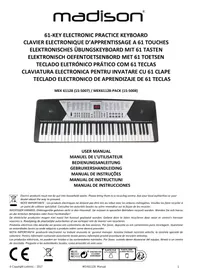
MEK61128 - Synthesizer MADISON - Free user manual and instructions
Find the device manual for free MEK61128 MADISON in PDF.



| Product type | Portable digital synthesizer |
| Brand | MADISON |
| Model | MEK61128 |
| Power supply | 9V DC power adapter (included) or 6 LR20 batteries (1.5V each, not included) |
| Number of keys | 61 keys (touch-sensitive keyboard) |
| Built-in speaker | Yes, one speaker |
| Tones | 128 tones (numbers 000 to 127) |
| Rhythms | 128 accompaniment rhythms (numbers 000 to 127) |
| Demo songs | 30 songs (numbers 000 to 029) |
| Metronome | 4 beats (1/4, 2/4, 3/4, 4/4) with adjustable tempo from 30 to 240 beats/minute |
| Effects | Vibrato, Sustain |
| Learning functions | Learning 1 and Learning 2 with LED guidance |
| Automatic chords | Single-finger chord (Single) and fingered chord (Fingered) on the first 19 keys |
| Recording and programming | Rhythm programming (up to 32 notes), melody recording (up to 92 notes) |
| Memory | 6 memory keys to save settings (not retained after power-off) |
| Transposition | From -6 to +6 semitones |
| Rear connectors | 9V DC jack, MIC jack (microphone), STEREO jack (headphone/audio output) |
| Display | 3-digit LED display |
| Maintenance and cleaning | Clean with a soft dry cloth, no alcohol or household cleaners |
| Safety | Do not disassemble, do not modify internal parts, unplug before cleaning, keep away from heat and moisture |
| Recycling | Do not dispose of with household waste, take to a specialized collection point |
Frequently Asked Questions - MEK61128 MADISON
User questions about MEK61128 MADISON
0 question about this device. Answer the ones you know or ask your own.
Ask a new question about this device
Download the instructions for your Synthesizer in PDF format for free! Find your manual MEK61128 - MADISON and take your electronic device back in hand. On this page are published all the documents necessary for the use of your device. MEK61128 by MADISON.
USER MANUAL MEK61128 MADISON
Electric products must not be put into household waste. Please bring them to a recycling centre. Ask your local authorities or your dealer about the way to proceed.
Read it carefully before proceeding
Only use the supplied mains adaptor. Change it whenever it shows any wear and tear, or goes wrong.
Don't disassemble the instrument nor make any change inside of it. In case of any anomalous function, stop using immediately and have it repaired by the qualified maintenance personnel.
Make sure that the both are power off when connecting the instrument with other amplifiers.
Don't leave the volume working in maximum or in uncomfortable stage for long time.
Keep the instrument away from the heat, which may damage the components.
Stop any liquid or other particles from getting into the instrument, which may corrode the body or result in short circuit.
Unplug the instrument before cleaning it. Don't plug or unplug the unit wet hands.
Clean the instrument with a piece of dry and soft cloth without detergent, alcohol or other chemical products.
Turn off and unplug the instrument after performance or for a long time of leaving it unused.
Warning! Don't put your ears close to the speaker. High volumes might damage your hearing.
Don't short-circuit the power supply contacts.
Keep the packing material as it contains important information.
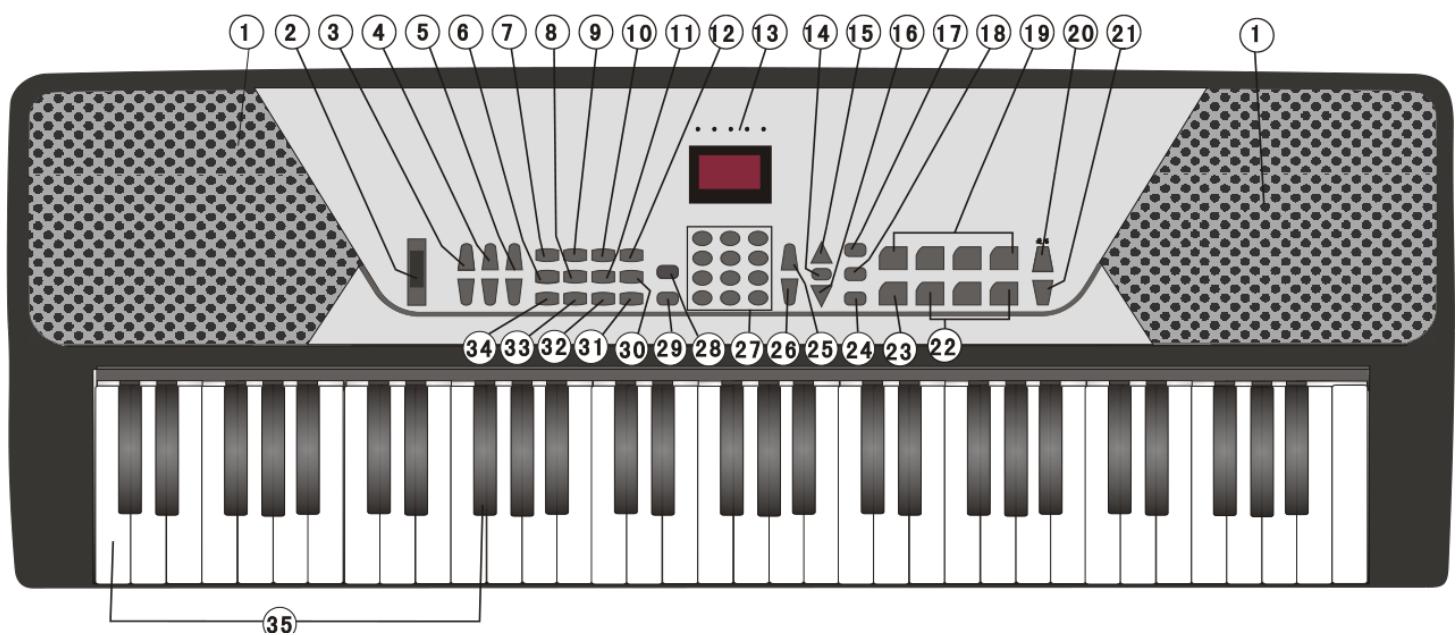
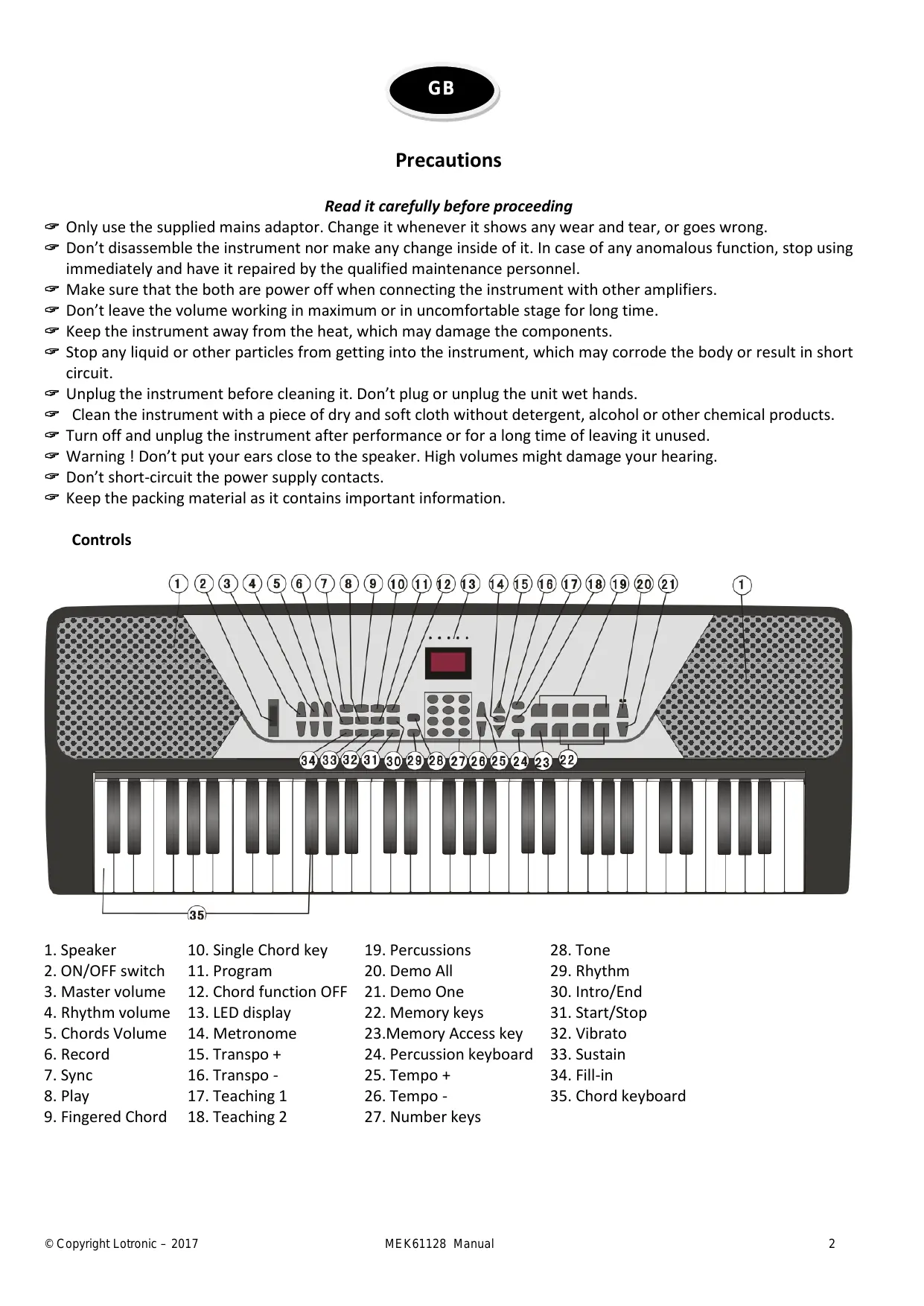
Controls
- Speaker
- ON/OFF switch
- Master volume
- Rhythm volume
- Chords Volume
- Record
- Sync
- Play
-
Fingered Chord
-
Single Chord key
- Program
- Chord function OFF
- LED display
- Metronome
- Transpo +
- Transpo -
- Teaching 1
-
Teaching 2
-
Percussions
- Demo All
- Demo One
- Memory keys
- Memory Access key
- Percussion keyboard
- Tempo +
- Tempo -
-
Number keys
-
Tone
- Rhythm
- Intro/End
- Start/Stop
- Vibrato
- Sustain
- Fill-in
- Chord keyboard
Rear panel connectors:
Connecting an external keyboard amplifier or stereo system
Connect the "L OUT R" jacks to the "LINE IN" or "AUX IN" jack on the audio device or amplifier.
Connecting headphones
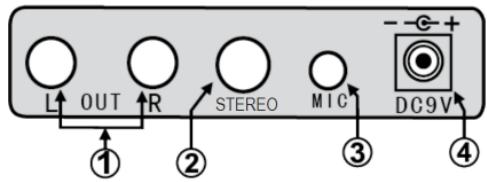
Plug in the headphones (not included) with a stereo mini-jack 6.35mm plug to the "STEREO" jack for private listening.
Using MIC
Insert the supplied microphone into the MIC jack, then you can sing along with the music.
Using AC/DC Power Supply Adaptor
The AC/DC power supply adaptor must be the one designated for the instrument. Before connecting the AC/DC adaptor to the wall outlet, ensure that all other connections have been made. Insert the small round plug firmly into the "DC 9V IN" jack on rear of instrument and then insert the other end into an available AC wall outlet (Please notice the input voltage should be the same as that of the power network).
Notes :
A. When headphones or an external audio device are connected, the main speakers will be automatically turned off.
B. Be sure that the instrument is set at a low volume level before connecting.
C. Increase the volume gradually for comfortable listening.
E. Always refer to the instruction manual of the amplifier for complete connection and usage details.
- Affix the music stand on keyboard
Insertion of batteries
The player will not operate on battery power when the AC/DC adaptor is connected.
Remove the cover of the battery compartment on the underside of the keyboard and insert six pieces of 1.5V "D" size batteries (not included) into the battery compartment following the indications (+/-) inside the compartment. Replace the cover.
Note: When the voltage of the batteries drops down and the instrument cannot perform naturally, the batteries should be replaced in time. If the instrument is left unused for a long time, the batteries should be taken out to avoid causing damage.
Do not mix up new and old or different types of batteries together. Keep batteries out of children's reach. Please observe the local regulations regarding the disposal of exhausted batteries.
LED DISPLAY
X=1 digit; XX=2 digits; XXX=3 digits
| LXX: Volume +/- chord | SUS: Sustain | SHG: Synchronize |
| FXX: Accompaniment volume +/- | TUB: Vibrato | SN: Chords |
| LX / -X: Transpose +/- | ETE: Tone | FIO: Fingered |
| LH: Default mode = Piano sound | RHY: Rhythm | PAG: Programming mode |
| FO: Activate a function | LXX: Song number | FEU: recording mode |
| LE: Leave a function | XXX: Rhythm number | PLQ: Playback |
| X: Number of beats | XXX: Tone number | LEQ: Teaching 1/2 |
When you switch the keyboard on, the display shows the default value of 000 which is piano sound. The rhythm is set by default to 000.
Select rhythm, tone or song. The LED display will show the current rhythm, tone or song number. When playing rhythm or a song, the dots on the display will flash to the rhythm of the beats.
Push the POWER switch (2) to the ON position to turn the keyboard on.
Press the MASTER volume buttons (3) to adjust the volume to the desired level.
Set the accompaniment volume RHYTHM (4) to the desired level between 1 and 16.
Set the chord volume CHORD (5) to the desired level between 1 and 16.
TONE SELECTION
Choose among 128 realistic sounds from 000 to 127. Before selecting the tone, press the TONE button (28) and then the number of the desired tone via the number buttons. Or browse through the tones via the + and - keys of the number pad.
VIBRATO Function (32)
Press this button to add a jitter effect to the sound. Press again to leave the function.
SUSTAIN Function (33)
Press the SUSTAIN key to lengthen the sound. Press again to cancel the effect.
KEYBOARD PERCUSSION (24)
If you press this button, all 61 keys of the keyboard become percussions. Press again to go back to normal keyboard.
PERCUSSION / ANIMAL keys (19)
The keyboard offers 4 percussion keys. Press any of the keys any time to add percussion to your piece of music. Press the KEYS DRUMS button (24) to activate the animal sounds.
TRANSPOSE (15 & 16)
This function raises or lowers the tone of the song. At every press on the TRANSPOSE + or TRANSPOSE - button, the tone will change by a half tone within a range of -6 to 6. The value is displayed on the digital screen. Press both buttons together to return to the original setting of 00.
METRONOME (14)
Press the METRONOME button to cycle through 1 / 4->2 / 4->3 / 4->4 / 4->OFF . The default speed is 120.
DEMO ALL (20)
Press DEMO ALL button to access to the demo songs. The display shows 000 and the first song of the list is played. You can select another song by typing the desired number on the numeric key pad or via the + and - buttons on the numeric keypad. To stop demo songs, press START/STOP button (31).
DEMO ONE (21)
Press DEMO ONE button and select the number of a song that you want to listen to. The song stops at the end.
LEARNING FUNCTION 1
Press TEACHING 1 button (17) to enter into one-touch mode. Press one of the white keys on the left side of the keyboard to select a melody. The accompaniment will start automatically. Press any key on the right side to play the melody. This function allows learning the rhythm of a song.
LEARNING FUNCTION 2
Press TEACHING 2 button (18) to enter into follow mode. Press one of the white keys on the left-hand side of the keyboard. The accompaniment will start but this time, the user has to press the correct key to play the melody. Press TEACHING 2 or START/STOP button to leave the learning function.
AUTOMATIC CHORD FUNCTION
1. Start the rhythm:
Press START/STOP button (31) and the rhythm accompaniment starts immediately. The dot on the display flashes regularly. Press START/STOP again to turn off rhythm accompaniment.
2. INTRO / ENDING (30):
When no rhythm is selected, press the INTRO/ENDING button and play a short prelude. During rhythm play, press the INTRO/ENDING button. The rhythm stops, your prelude is played and the rhythm play resumes.
3. Select the rhythm:
The instrument offers 128 rhythms from 000 to 127. Press the RHYTHM button first and select the rhythm you want to play by pressing the number keys.
4. Start rhythm synchronization
Press SYNC button and the digital dot starts flashing on the display. Press one of the 19 keys from the left to start the rhythm play. You can also press first SYNC and then MULTI- or SINGLE FINGER and then press one of the left-hand 19 keys so that rhythm chords and play are synchronized.
5. SINGLE Finger automatic chord
When rhythm or sync play are activated, press the SINGLE key. Now you can play the chords with 1 finger as on the figure below:

6. MULTI-FINGERED CHORDS
When rhythm or sync play are activated, press FINGER key. Press the keys as shown hereafter:
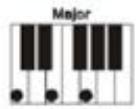
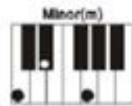
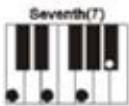
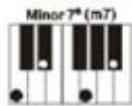
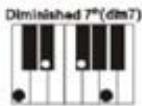
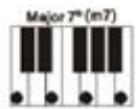
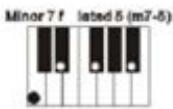
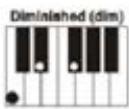
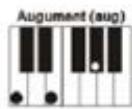
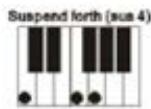
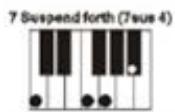
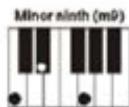
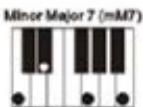
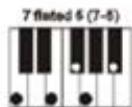
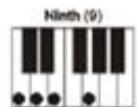
To stop the accompaniment, press CHORD OFF button. If you want to stop the accompaniment and rhythm together, press START/STOP button.
7. INSERT
During the rhythm play, if you want to insert some intermezzo, press the FILL IN button before continuing the rhythm accompaniment.
8. TEMPO adjustment
The default speed is set to 120 beats/minute. Press the TEMPO FAST or TEMPO SLOW key to speed up or slow down the tempo between 30 and 240 beats/minute. Hold down both buttons at the same time to go back to 120 beats/minute. Please note: This feature also works in programming and recording mode.
RECORDING & PROGRAMMING
1. Programming
Press the PROGRAM button and the programming features are displayed. Press the panel percussion button and play the percussions on the piano keys. You can record up to 32 percussion sounds. When your record is finished, press the PLAY button. Now you can listen to the percussion sounds that you just recorded. During playback you can adjust the tempo via the TEMPO FAST AND TEMPO SLOW buttons. To cancel programming, press PROGRAM or the START/STOP button.
2. RECORD & PLAYBACK
Press the REC button and play a melody. You can record up to 92 notes. Press the PLAY button to play the recorded song. To cancel the recording and playback function, press REC or START/STOP button.
MEMORY FUNCTION
If you want to record special settings such as speed, tone, rhythm, chords and other information, press the settings button (23) and one of the MEMORY buttons (22). Enter the required settings.
Please note: When the power is switched off, the memories will be erased.
Electric products must not be put into household waste. Please bring them to a recycling centre. Ask your local authorities or your dealer about the way to proceed.

Mises en Garde
OPNAME & PROGRAMMATIE
1. Programmatie
Electric products must not be put into household waste. Please bring them to a recycling centre. Ask your local authorities or your dealer about the way to proceed.

Precautii
Cititi cu atentie inainte de utiliser
Imported from China by LOTRONIC SA Avenue Zénobe Gramme 9 B - 1480 SAINTES