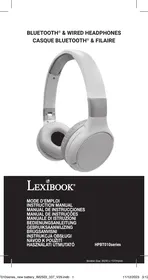
USER MANUAL Stitch HPBT010series LEXIBOOK
LOCATION OF CONTROLS
WIRELESS FUNCTION (BLUETOOTH®)
© 2020 Bluetooth SIG, Inc.
USE
https://www.lexibook.com/doc/hpbt010s/hpbt010s_1.pdf

Yiu Wai Man
UNPACKING THE DEVICE
When unpacking, ensure that the following elements are included:
1 x 2-in-1 Bluetooth® Headphones / 1 x USB Type C charging cable / 1 x 3.5mm audio cable / 1 x Instruction manual
WARNING: All packaging materials, such as tape, plastic sheets, wire ties and tags are not part of this product and should be discarded.
LOCATION OF CONTROLS
Refer to the diagram p.2:
- ON/Off - Bluetooth
- Next track / increase volume
- Aux In jack
- Previous track / decrease volume
- Play / pause
POWER SUPPLY
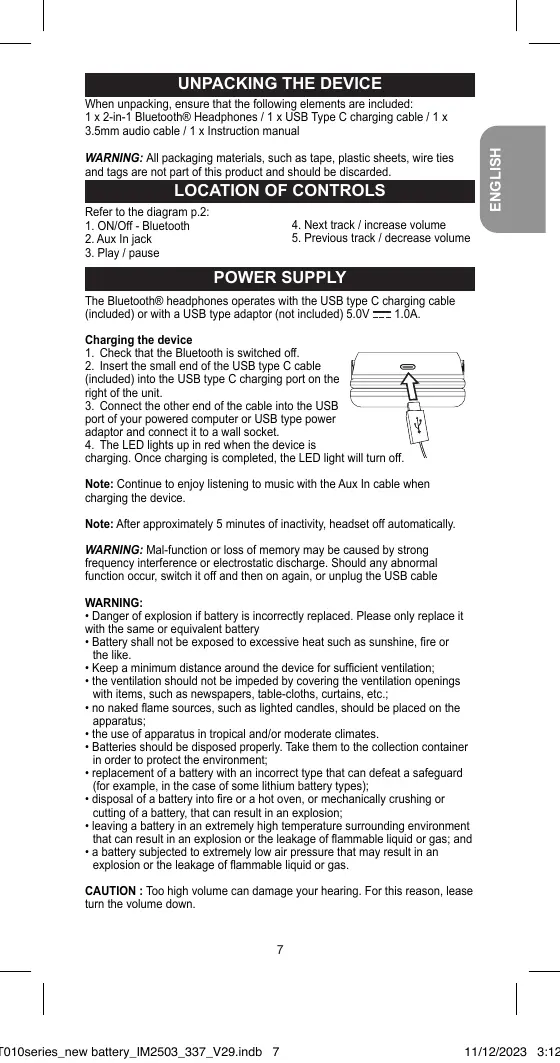
The Bluetooth® headphones operate with the USB type C charging cable (included) or with a USB type adaptor (not included) 5.0V = 1.0A.
Charging the device
- Check that the Bluetooth is switched off.
- Insert the small end of the USB type C cable (included) into the USB type C charging port on the right of the unit.
- Connect the other end of the cable into the USB port of your powered computer or USB type power adaptor and connect it to a wall socket.
- The LED lights up in red when the device is charging. Once charging is completed, the LED light will turn off.
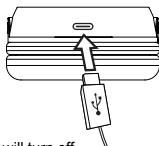
Note: Continue to enjoy listening to music with the Aux In cable when charging the device.
Note: After approximately 5 minutes of inactivity, the headset turns off automatically.
WARNING: Malfunction or loss of memory may be caused by strong frequency interference or electrostatic discharge. Should any abnormal function occur, switch it off and then on again, or unplug the USB cable.
WARNING:
- Danger of explosion if battery is incorrectly replaced. Please only replace it with the same or equivalent battery.
- Battery shall not be exposed to excessive heat such as sunshine, fire or the like.
- Keep a minimum distance around the device for sufficient ventilation;
- the ventilation should not be impeded by covering the ventilation openings with items, such as newspapers, table-cloths, curtains, etc.;
- no naked flame sources, such as lighted candles, should be placed on the apparatus;
- the use of apparatus in tropical and/or moderate climates.
- Batteries should be disposed properly. Take them to the collection container in order to protect the environment;
- replacement of a battery with an incorrect type that can defeat a safeguard (for example, in the case of some lithium battery types);
- disposal of a battery into fire or a hot oven, or mechanically crushing or cutting of a battery, that can result in an explosion;
- leaving a battery in an extremely high temperature surrounding environment that can result in an explosion or the leakage of flammable liquid or gas; and
- a battery subjected to extremely low air pressure that may result in an explosion or the leakage of flammable liquid or gas.
CAUTION: Too high volume can damage your hearing. For this reason, please turn the volume down.
WIRELESS FUNCTION (BLUETOOTH®)
- Long press the Bluetooth button (1) on the headphones. The LED indicator will flash.
- Activate the Bluetooth® function on your personal device (smartphone, MP3 player, etc.) and make sure it is in discoverable mode.
- Confirm pairing or select the Bluetooth® name "HPBT010" to connect your player to the headphones.
- If pairing is successful, the Bluetooth® light will stop flashing. You can play an audio or a video file.
- To stop the connection with the headphones, disconnect the Bluetooth on your audio player.
Notes:
- When turned on, the headphones automatically search for a device that has previously synchronized with.
- If your Bluetooth® device requires a password, the default password is 0000.
The Bluetooth® word mark and logos are registered trademarks owned by Bluetooth SIG, Inc. and any use of such trademark may not be reproduced or used without the owner's prior license. Other trademarks and trade names are those of their respective owners. © 2020 Bluetooth SIG, Inc.
SETTINGS
The headphones include 2 modes: wireless with Bluetooth connection and wired via the AUX-IN cable (included).
- In wired mode, connect the AUX-IN cable to the AUX-IN jack (2). Previous/ decrease volume (5), Play/Pause (3) and next/increase volume (4) buttons are disabled. Please use the control buttons on your music player.
- In Bluetooth®:
- Press Play/Pause (3) to start or pause the audio track.
- Short press Previous and Next buttons (4, 5) to change of audio track.
- Long press Previous and Next buttons (4, 5) to control the volume
- The headphones are equipped with a microphone that you can use for your calls. Press the call button (3) once to answer calls. To end a call, press the call button (3) again.
- To change mode, disconnect the AUX-IN cable on the headphones or the Bluetooth in your music player.
SPECIFICATIONS
- Bluetooth® 5.0 Technology
- Bluetooth® frequency range: 2402 - 2480 MHz Power transmitted: -1.05dBm Built-in rechargeable battery, 600mAh/3.7V Li-ion Polymer
- With 3.5mm audio in jack
- Charging current: DC5.0V, 1000mA
- Charging time: around 3-4 hours
- Playing time: up to 60 hours
- Effective distance: 10m (straight line without obstacle)
Lexibook® S.A.
6 avenue des Andes
Bâtiment 11
91940 Les Ulis - France
Lexibook UK
PO Box 423
UMBERLEIGH, EX32 2JW
United Kingdom
Kind of product: Bluetooth® Stereo Headphones
Type designation: HPBT010series
Hereby, Lexibook Limited declares that the radio equipment type
HPBT010series is in compliance with Directive 2014/53/EU. and Radio
Equipment Regulations 2017
The full text of the EU declaration of conformity is available at the following internet address:
https://www.lexibook.com/doc/hpbt010s/hpbt010s_1.pdf

Yiu Wai Man
Product Development Manager
Hong Kong
MAINTENANCE AND WARRANTY
Ensure that you switch off the device and unplug the power cable before cleaning. Wipe the device with a soft, dry cloth. If the surfaces are particularly dirty, clean them with a cloth that has been soaked in soapy water and then wrung out thoroughly. Wipe again with a dry cloth. Never use alcohol, petrol, solvents, cleaning products or other chemical products. And do not use compressed air to remove dust. At least charge the Bluetooth® Stereo Headphones once every 3 months in order to maintain the battery life.
This product is covered by our 2 years warranty program, except for the integrated battery which is covered by a 6-month warranty.
For any claim under the warranty or after sale service, please contact your distributor and present a valid proof of purchase. Our warranty covers any manufacturing material and workmanship defect, with the exception of any deterioration arising from the non-observation of the instruction manual or from any careless action implemented on this item (such as dismantling, exposition to heat and humidity, etc.). It is recommended to keep the packaging for any further reference.
In a bid to keep improving our services, we could implement modification on the colours and the details of the product shown on the packaging.
NOTE: Please keep this instruction manual, it contains important information.
Reference: HPBT010series
Designed and developed in Europe - Made in China
Lexibook
United Kingdom & Ireland
For after-sales service,
please contact us at
savcomfr@lexibook.com
Lexibook UK
PO Box 423
UMBERLEIGH
EX32 2JW
United Kingdom

This product
is not a toy.

www.lexibook.com
Environmental Protection:
Unwanted electrical appliances can be recycled and should not be discarded along with regular household waste! Please actively support the conservation of resources and help protect the environment by returning this appliance to a collection centre (if available).

Correct disposal of batteries in this product

(Applicable in countries with separate collection systems)
This symbol means that the product contains a built-in rechargeable battery covered by European Directive 2016/17.
2013/56/EU which cannot be disposed of with normal household waste. All batteries should be disposed separately from the municipal waste stream via designated collection facilities appointed by the government or the local authorities.
The correct disposal of your old batteries will help to prevent
potential negative consequences for the environment, animal and human health.
We strongly advise you to take your product to an official collection point or service center to have a professional remove the rechargeable battery. Inform yourself about the local separate collection system for electrical and electronic products and rechargeable batteries. Follow local rules and never dispose of the product and rechargeable batteries with normal household waste. For more detailed information about disposal of your old batteries, please contact your city office or waste disposal service centre.
PRODUCT UNPACKING
https://www.lexibook.com/doc/hpbt010s/hpbt010s_1.pdf

Yiu Wai Man
Product Development Manager
Hong Kong
MAINTENANCE AND WARRANTY
WIRELESS FUNCTIONS (BLUETOOTH®)
© 2020 Bluetooth SIG, Inc.
DEFINITIONS
Volume

WIRELESS FUNCTION (BLUETOOTH®)
WIRELESS FUNCTION (BLUETOOTH®)
WIRELESS FUNCTION (BLUETOOTH®)
© 2020 Bluetooth SIG, Inc.
SETTINGS
Volume

Yiu Wai Man
Product Development Manager
Hong Kong
WARRANTY
MAINTENANCE AND WARRANTY
IM code: HPBT010series_newbattery_IM2503