OBJECTIF HYRBIDE SL252 APO-SUMMICRO - Camera lens FLER - Free user manual and instructions
Find the device manual for free OBJECTIF HYRBIDE SL252 APO-SUMMICRO FLER in PDF.



| Product Type | Camera Lens |
| Brand | Fler |
| Model | OBJECTIF HYRBIDE SL252 APO-SUMMICRO |
| Focal Length | 75 mm |
| Maximum Aperture | f/2 |
| Mount | Leica L (bayonet) |
| Number of lenses / groups | 11 / 9 |
| Aspherical surfaces | 1 |
| Angle of view (diagonal, for Leica SL) | 32° |
| Minimum focus distance | 0.5 m |
| Maximum scale | 1:5 |
| Diaphragm | Electronic control, f/2 to f/22 |
| Filter | E67 (female thread) |
| Lens hood | External bayonet, supplied |
| Length (without/with lens hood) | 102 mm / 152 mm |
| Maximum diameter (without/with lens hood) | 73 mm / 88 mm |
| Weight (without/with lens hood) | 720 g / 770 g |
| Power supply | Powered by the camera via the bayonet |
| Housing material | Metal, black anodized |
| Cleaning | Soft brush or dry microfiber cloth, circular movements from center to edge |
| Available spare parts | Lens hood (ref. 12 302), front cap (16 045), rear cap (16 064), soft case (439-606.130-000) |
| Warranty | Refer to the warranty card supplied with the lens |
Frequently Asked Questions - OBJECTIF HYRBIDE SL252 APO-SUMMICRO FLER
User questions about OBJECTIF HYRBIDE SL252 APO-SUMMICRO FLER
0 question about this device. Answer the ones you know or ask your own.
Ask a new question about this device
Download the instructions for your Camera lens in PDF format for free! Find your manual OBJECTIF HYRBIDE SL252 APO-SUMMICRO - FLER and take your electronic device back in hand. On this page are published all the documents necessary for the use of your device. OBJECTIF HYRBIDE SL252 APO-SUMMICRO by FLER.
USER MANUAL OBJECTIF HYRBIDE SL252 APO-SUMMICRO FLER
Product Support / Software Support
Am Leitz-Park 5
D-35578 Wetzlar
Tel.: +49(0)6441-2080-111 /-108
Fax: +49(0)6441-2080-490
info@leica-camera.com /
software-support@leica-camera.com
LEICA CUSTOMER CARE
Thank you for your show of confidence in purchasing this lens. To ensure that you get many years of enjoyment from this high-quality product, please read these instructions carefully.
DESIGNATION OF PARTS
1 Lens hood
a Index point
2 Front mount
a External bayonet for lens hood
b Index point for lens hood
c Internal thread for filter
3 Focusing ring
4 Red index button for changing lenses
5 Contact strip

DISPOSAL OF ELECTRICAL AND ELECTRONIC EQUIPMENT
(Applies within the EU, and for other European countries with segregated waste collection systems)
This device contains electrical and/or electronic components and must therefore not be disposed of in general household waste! Instead, it should be disposed of at a recycling collection point provided by the local authority. This costs you nothing. If the device contains standard or rechargeable batteries, these must be removed first and also be disposed of in line with relevant regulations. Further information on the subject is available from your local administration, your local waste collection company, or in the store where you purchased this device.
TECHNICAL DATA
High-speed, apochromatically corrected short telephoto lens with outstanding imaging performance
| Compatible cameras | All Leica cameras with Leica L bayonet fitting1 |
| Angles of view(diagonal, horizontal, vertical) | For Leica SL-System: approx. 32°, 27°, 18°,for Leica TL-System: approx. 21°, 18°, 12° (corresponding to around 115 mm focal length in 35 mm format) |
| Optical design | |
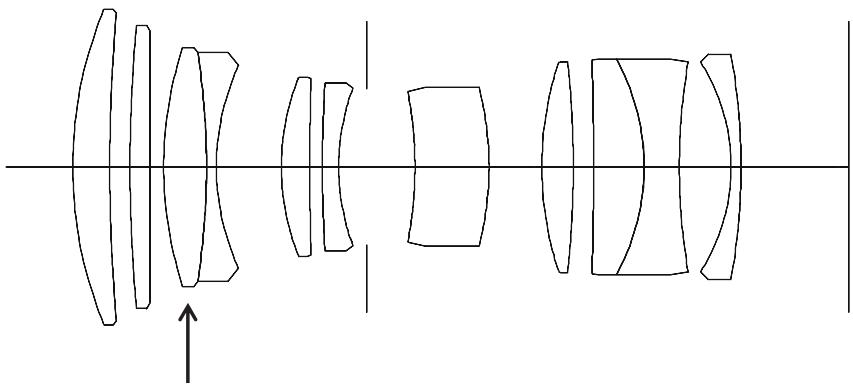
| Number of lenses/groups | 11/9 |
| Aspherical surfaces | 1 |
| Position of the entrance pupil(when infinite) | 36.1 mm(in the direction of light incidence behind the bayonet fitting contact area) |
| Distance setting | |
| Setting | Either automatic (Autofocus) or manual, modes are set on the camera |
| Focusing range | 0.5 m -∞ |
| Smallest object field/Biggest scale | For Leica SL-System: approx. 120 x 180 mm/1:5,for Leica TL-System: approx. 79 x 118 mm/1:5 |
| Aperture | |
| Setting/Function | Electronically controlled aperture, setting on the camera, half or third values can also be set |
| Lowest value | 22 |
| Bayonet fitting | Leica L bayonet mount with contact strip |
| Filter mount/Lens hood | External bayonet for lens hood (included), internal thread for E67-filter, filter mount does not rotate |
| Finish | Black anodized |
| Dimensions and weight | |
| Length of the bayonet fitting contact surface | approx. 102/152 mm (without/with lens hood) |
| Largest diameter | approx. 73/88 mm (without/with lens hood) |
| Weight | approx. 720/770 g (without/with lens hood) |
^1 Never hold the combination of a camera and this lens just by the camera bodyg; always support the lens as well. This relieves pressure on the camera bayonet mount.
DESIGN OF THE LEICA SL LENSES
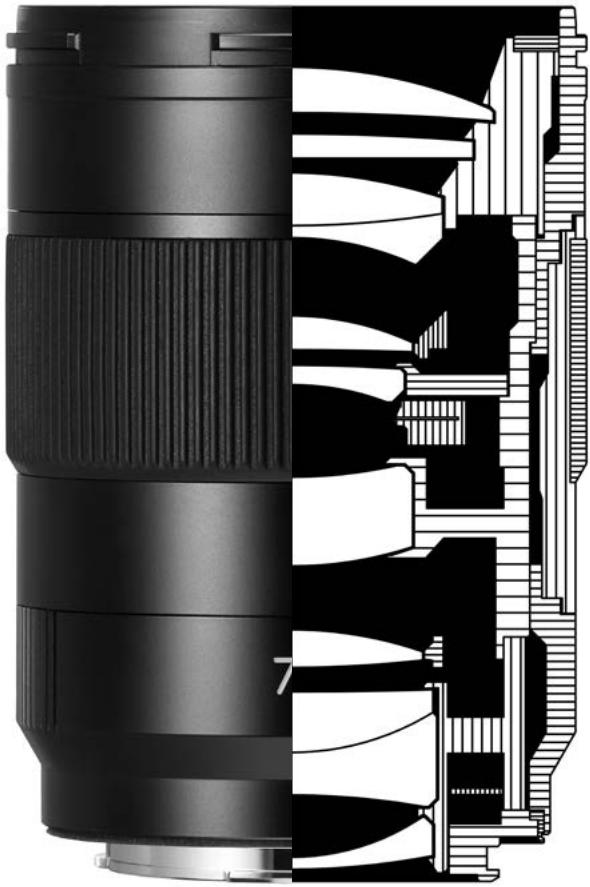
In principle, all Leica SL lenses have the same external design: There is an external bayonet 2a for the lens hood 1 and an internal thread for filters 2c on the front mount 2, as well as a focusing ring 3 and a red index buttin for changing lenses 4.
Inside the bayonet there is a contact strip 5 by means of which the entire data exchange between the camera and lens is effected, including the control commands for autofocus and the aperture.
ADJUSTMENT OF THE FOCUS
The camera focuses automatically in autofocus mode; in manual mode turn the focusing ring 3. The speed at which you turn the ring determines how quickly the setting changes. In this way, you can make fine adjustments just as precisely as you can quickly move from the close-up to long-distance range. Please refer to the relevant sections in the camera instructions for more details.
DEPTH OF FIELD
Since Leica SL lenses do not have an aperture ring, there is no depth of field scale. Instead, with the Leica SL you can read the relevant front and rear limits of the depth of field in the camera's cover display together with the distance set.
LENS HOOD
The Leica APO-Summicron-SL 75 f/2 ASPH. is supplied with a lens hood 1 precisely matched to the lens' angle of view. Thanks to its symmetrical bayonet it can be attached quickly and simply, or vice versa for space-saving storage. In both cases, with the lens cap removed, it is initially pushed onto the lens' front mount with one of its index points 1a precisely opposite the former's index point 2b. The lens hood is then turned by approx. 30° until it clearly engages, audibly and noticeably.
For as long as the camera is being carried and used ready for photography, the lens hood should always remain attached. It provides effective protection against contrast-reducing stray light and also against damage and soiling of the front lens element, e.g. from accidental fingerprints.
FILTERS
E67 screw-on filters can be used on the Leica APO-Summicron-SL 75 f/2 ASPH. The appropriate filters are available from Leica (available models: see Leica Camera AG website).
SPARE PARTS
Order No.
Rear cap....16 064
Front cap....16 045
Lens hood....12 302
Soft bag....439-606.130-000
TIPS ON LENS CARE
Dust on the outside of the lens should be removed only with a soft-haired brush or a soft, clean, dry microfiber cloth. If stains and fingerprints have to be removed, use such a cloth and clean carefully with a circular movement starting at the center of the lens and working towards the edge. The Leica Aquadura ^® coating allows simple cleaning. Do not apply any high pressure to maintain this property for as long as possible, even when wiping extremely dirty lens surfaces. Although the coating is highly abrasion-resistant, it can nevertheless be damaged by sand or salt crystals.
Special cleaning cloths for spectacles should not be used because they are impregnated with chemical substances that could be harmful to the glass and coatings used. Cleaning agents containing solvents or oil must never be used.
In addition to the designation by type, each lens has an individual serial number. Please note this number in your documents as a safety measure.
LEICA PRODUCT SUPPORT
The Leica Product Support department can provide you with an answer to any technical application questions relating to the Leica range either in writing, on the telephone or by e-mail. They are also the contact point for purchasing advice and to order instructions. Alternatively, you can send us your questions using the contact form on the Leica Camera AG homepage.
Leica Camera AG
Product Support / Software Support
Am Leitz-Park 5
35578 Wetzlar, Germany
Tel.: +49(0)6441-2080-111 /-108
Fax: +49(0)6441-2080-490
info@leica-camera.com/
software-support@leica-camera.com
LEICA CUSTOMER CARE
For service of your Leica equipment and in case of necessary repairs please contact the Customer Care department of Leica Camera AG or any national Leica Camera AG agency (see Guarantee Card for address list).
Leica Camera AG
Customer Care
Am Leitz-Park 5
35578 Wetzlar, Germany
Tel.: +49(0)6441-2080-189
Fax: +49(0)6441-2080-339
customer.care@leica-camera.com
AVANT-PROPOS
Product Support / Software Support
Am Leitz-Park 5
35578 Wetzlar, Germany
Tél. : +49(0)6441-2080-111 /-108
Fax: +49(0)6441-2080-490
info@leica-camera.com /
software-support@leica-camera.com
LEICA CUSTOMER CARE
35578 Wetzlar, Germany
Tél. : +49(0)6441-2080-189
Fax: +49(0)6441-2080-339
customer.care@leica-camera.com
VOORWOORD
Productsupport / Softwaresupport
Am Leitz-Park 5
35578 Wetzlar, Germany
Telefoon: +49(0) 6441-2080-111 /-108
Fax: +49(0) 6441-2080-490
info@leica-camera.com /
software-support@leica-camera.com
LEICA CUSTOMER CARE
35578 Wetzlar, Germany
Telefoon: +49(0) 6441-2080-189
Fax: +49(0) 6441-2080-339
customer.care@leica-camera.com
PREFAZIONE
Product Support / Software Support
Am Leitz-Park 5
35578 Wetzlar, Germany
Telefono: +49(0)6441-2080-111 /-108
Fax: +49(0)6441-2080-490
info@leica-camera.com /
software-support@leica-camera.com
LEICA CUSTOMER CARE
35578 Wetzlar, Germany
Telefono:+49(0)6441-2080-189
Fax: +49(0)6441-2080-339
customer.care@leica-camera.com
PRÓLOGO
Product Support / Software Support
Am Leitz-Park 5
35578 Wetzlar, Germany
35578 Wetzlar, Germany
35578 Wetzlar, Germany
電話:+49(0)6441-2080-111 /-108
傳真:+49(0)6441-2080-490
info@leica-camera.com /
software-support@leica-camera.com
LEICA顧客服務
35578 Wetzlar, Germany
電話:+49(0)6441-2080-189
傳真:+49(0)6441-2080-339
customer.care@leica-camera.com
前言
35578 Wetzlar, Germany
电话:+49(0)6441-2080-111/-108
传真:+49(0)6441-2080-490
info@leica-camera.com /
software-support@leica-camera.com
LEICA客户服务部
35578 Wetzlar, Germany
电话:+49(0)6441-2080-189
传真:+49(0)6441-2080-339
customer.care@leica-camera.com
서문
35578 Wetzlar, Germany
전화:+49(0)6441-2080-111/-108
팩스: +49(0)6441-2080-490
info@leica-camera.com /
software-support@leica-camera.com
LEICA 고객 서비스 센터
35578 Wetzlar, Germany
전화:+49(0)6441-2080-189
팩스: +49(0)6441-2080-339
customer.care@leica-camera.com
ПРЕДИСЛОВИЕ
35578 Wetzlar, Germany
35578 Wetzlar, Germany
35578 Wetzlar, Germany
Telp.: +49(0)6441-2080-111 /-108
Fax: +49(0)6441-2080-490
info@leica-camera.com /
software-support@leica-camera.com
LAYANAN PELANGGAN LEICA
35578 Wetzlar, Germany
Telp.: +49(0)6441-2080-189
Fax: +49(0)6441-2080-339
customer.care@leica-camera.com
natural_image
Diagram of optical lens system with multiple lenses aligned along a central axis (no text or labels)Aspherical surface
natural_image
Cross-sectional diagram of a camera lens showing internal structure and top view (no text or labels)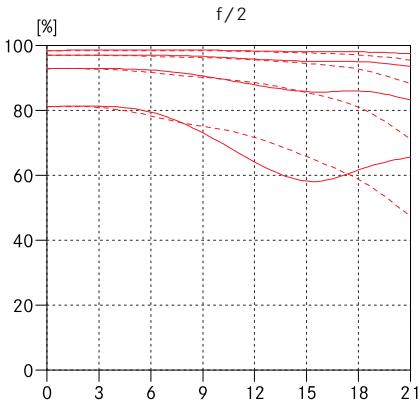
line
| x | Line 1 | Line 2 | Line 3 | Line 4 | Line 5 | |----|--------|--------|--------|--------|--------| | 0 | 98 | 98 | 98 | 98 | 80 | | 3 | 97 | 97 | 97 | 97 | 80 | | 6 | 96 | 96 | 96 | 96 | 80 | | 9 | 95 | 95 | 95 | 95 | 75 | | 12 | 94 | 94 | 94 | 94 | 70 | | 15 | 93 | 93 | 93 | 93 | 60 | | 18 | 92 | 92 | 92 | 92 | 65 | | 21 | 91 | 91 | 91 | 91 | 50 |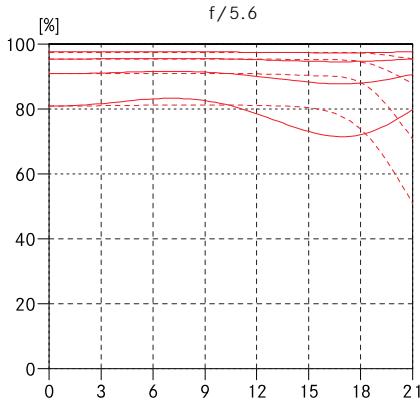
line
| x | Line 1 | Line 2 | Line 3 | Line 4 | Line 5 | |----|--------|--------|--------|--------|--------| | 0 | 90 | 80 | 90 | 80 | 90 | | 3 | 90 | 80 | 90 | 80 | 90 | | 6 | 90 | 80 | 90 | 80 | 90 | | 9 | 90 | 80 | 90 | 80 | 90 | | 12 | 90 | 80 | 90 | 80 | 90 | | 15 | 90 | 75 | 85 | 75 | 85 | | 18 | 90 | 70 | 80 | 70 | 80 | | 21 | 90 | 50 | 75 | 50 | 75 |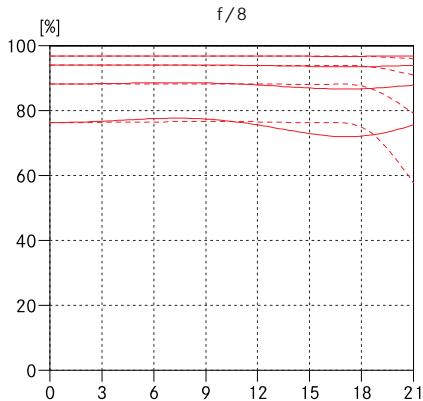
line
| x | y1 | y2 | y3 | y4 | y5 | |----|-------|-------|-------|-------|-------| | 0 | 95.0 | 95.0 | 95.0 | 95.0 | 78.0 | | 3 | 95.0 | 95.0 | 95.0 | 95.0 | 78.0 | | 6 | 95.0 | 95.0 | 95.0 | 95.0 | 78.0 | | 9 | 95.0 | 95.0 | 95.0 | 95.0 | 78.0 | | 12 | 95.0 | 95.0 | 95.0 | 95.0 | 78.0 | | 15 | 95.0 | 95.0 | 95.0 | 95.0 | 78.0 | | 18 | 95.0 | 95.0 | 95.0 | 95.0 | 78.0 | | 21 | 95.0 | 95.0 | 95.0 | 60.0 | 78.0 |
产品说明书附件 SUPPLEMENT TO PRODUCT INSTRUCTIONS
这个文件涉及的是在中华人民共和国境内进口或销售的电子信息产品
Include this document with all Electronic Information Products
imported or sold in the People's Republic of China
| 部件名称Part Name | Toxic and Hazardous Substances and Elements | |||||
| 铅 | 汞 | 镉 | 六价铬 | 多溴联苯 | 多溴二苯醚 | |
| Lead(Pb) | Mercury(Hg) | Cadmium(Cd) | HexavalentChromium(Cr(VI)) | Polybrominatedbiphenyls(PBB) | Polybrominateddiphenyl ethers(PBDE) | |
| 电路模块(Circuit Modules) | O | O | O | O | O | O |
| 电缆及电缆组件(Cables & Cable Assemblies) | O | O | O | O | O | O |
| 金属部件(Metal Parts) | X | O | O | O | O | O |
| 塑料和聚合物部件(Plastic and Polymeric parts) | O | O | O | O | O | O |
| 光学和光学组件(Optics and Optical Components) | O | O | O | O | O | O |
| 电池(Batteries) | O | O | O | O | O | O |
| 表示该有毒有害物质在该部件所有均质材料中的含量均在SJ/T11363-2006 标准规定的限量要求以下。O:Indicates that this toxic or hazardous substance contained in all of the homogeneous materials for this part is below the limit requirement in SJ/T11363-2006. | ||||||
| 表示该有毒有害物质至少在该部件的某一均质材料中的含量超出SJ/T11363-2006 标准规定的限量要求。X:Indicates that this toxic or hazardous substance contained in at least one of the homogeneous materials used for this part is above the limit requirement in SJ/T11363-2006. | ||||||
| All parts named in this table with an X are in compliance with the European Union's RoHS Legislation "Directive 2002/95/EC of the European Parliament and of the Council of 27 January 2003 on the restriction of the use of certain hazardous substances in electrical and electronic equipment." | ||||||
| 除非另外特别的标注,此标志为针对所涉及产品的环保使用期标志。某些零部件会有一个不同的环保使用期(例如,电池单元模块)贴在其产品上。此环保使用期限只适用于产品是在产品手册中所规定的条件下工作。The Environmentally Friendly Use Period (EFUP) for all enclosed products and their parts are per the symbol shown here, unless otherwise marked. Certain parts may have a different EFUP (for example, battery modules) and so are marked to reflect such. The Environmentally Friendly Use Period is valid only when the product is operated under the conditions defined in the product manual. |  | |||||

DAS WESENTLICHE.
Leica Camera AG | Am Leitz-Park 5