USER MANUAL HORIZON S MAX XGIMI
4ab = 2ab
.HDMI 2.1 HDMI 2.1
500 5:USB
Remote Control
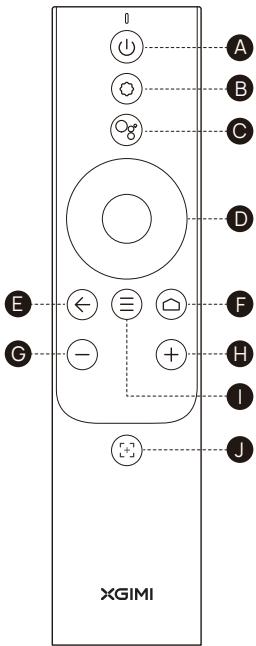
| A | B | C | D | E | F | G | H | I | J |
| EN | Power | Settings | Google Assistant | D-pad | Back | Home | VOL- | VOL+ | Menu | Focus |
| DE | Einschalten | Einstellungen | Google Assistant | D-pad | Zurück | Start | Lautstärke- | Lautstärke+ | Menü | Fokus |
| ES | Encendido y apagado | Ajustes | Asistente de Google | Cruceta | Abrás | Inicio | VOL- | VOL+ | Menü | Enfoque |
| FR | Marche /Arrêt | Paramètres | Google Assistant | Croix directionnelle | Retour | Accueil | VOL- | VOL+ | Menu | Mise au point |
| IT | Alimentazione | Impostazioni | Assistente Google | Pad-D | Indietro | Home | VOL- | VOL+ | Menu | Messa a fuoco |
| JP | 電源オーナフ | 設定 | Google Anisstaf | Naviègethon | 戾 | Hoem | 音量ダウ | 音量アソpp | Xenue | Xenone |
| KR | 朝원 | 선绝望 | Google 어nst성드 | D-iode | 류로 | 喜 | 自然界- | 自然界+ | 多媒体 | XBX |
| PL | Zasilanie | Ustawienia | Asystent Google | Klawiszekierunkowe | Wstecz | Poczatek | Gósniej- | Gósniej+ | Menu | Ostrość |
| PT | Alimentação | Definições | Google Assistant | Botões direcionais | Voltar | Início | VOL- | VOL+ | Menu | Focagem |
| RU | Питанे | Ностroyки | Google AccianteHT | Клавиши Навигаши | Назд | Главныйexample | Уменшени в гомковсту | Уvelочени в гомковсту | Menü | Фоксирobьк |
| TW | 電源 | 設定键 | Google助理 | 十字键 | 返回 | Home键 | VOL- | VOL+ | 選單鍵 | 對焦鍵 |
| AE | الله抵抗力 | الله抵抗力 Google | Google Google | الله抵抗力 Google | الله抵抗力 Google | الله抵抗力 Google | الله抵抗力 Google | الله抵抗力 Google | الله抵抗力 Google | الله抵抗力 Google |
Please read the user guide carefully before using this product.
Thank you for buying and using XGIMI products. You should read this user guide carefully before using the product for both your safety and interest.
XGIMI assumes no responsibility for any personal injury, damage to property or other loss caused due to failure to operate this product according to the instructions or precautions in this user guide.
About this user guide
The copyright of this user guide belongs to XGIMI.
The trademarks and names mentioned in this user guide belong to their respective owners. The content in the user guide may differ from the product.
Google, Android TV, and Google Cast are trademarks of Google LLC.
Google Assistant is not available in certain languages and countries. Availability of services varies by country and language.
IMAX ENHANCED
Manufactured under license from IMAX Corporation. IMAX® is a registered trademark of IMAX Corporation in the United States and/or other countries. For DTS patents, see http://patents.dts.com. Manufactured under license from DTS Licensing Limited. DTS, the Symbol, DTS and the Symbol together are registered trademarks or trademarks of DTS, Inc. in the United States and/or other countries. © DTS, Inc. All Rights Reserved.
HOMI
HDMI High-Definition Multimedia interface, and the HDMI Logo are trademarks or registered trademarks of HDMI Licensing Administrator, Inc.
dtshD
For DTS patents, see http://patents.dts.com.
Manufactured under license DTS Licensing Limited (for all other companies). DTS, DTS-HD Master Audio, DTS-HD, Virtual-X, and the DTS-HD logo are registered trademarks or trademarks of DTS, Inc. in the United States and other countries. © 2021 DTS, Inc. ALL RIGHTS RESERVED.
Dolby Vision
Dolby, Dolby Vision, Dolby Audio, and the double-D symbol are trademarks of Dolby Laboratories Licensing Corporation. Manufactured under license from Dolby Laboratories. Confidential unpublished works. Copyright © 1992-2022 Dolby Laboratories. All rights reserved.
Disposal instructions for used products:

The product is designed and manufactured with high quality materials and components that are recyclable.

Where you see either symbol on any of our electrical products, batteries or packaging, it indicates that the relevant electrical product or battery should not be disposed of as general household waste in the UK and EU countries. Turkey, or other countries with separate waste collection systems available. To ensure correct waste treatment, please dispose of them via an authorised collection facility, in accordance with any applicable laws or requirements. Waste electrical products and batteries may also be disposed of free of charge via retailers when buying a new product of the same type. Furthermore, within the UK and EU countries larger retailers may accept small waste electronic products free of charge. Please ask your local retailer if this service is available for the products you wish to dispose of. In so doing, you will help to conserve natural resources and improve standards of environmental protection in treatment and disposal of electrical waste. This symbol may be used on batteries in combination with additional chemical symbols. The chemical symbol for lead (Pb) will appear if the battery contains more than 0.004% lead.
Model: XM13Q
XGIMI Technology reserves the right to interpret and amend this user guide.
Getting Started
Power On / Off
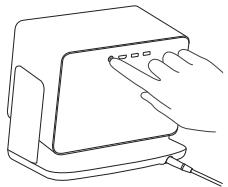
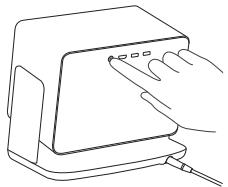
Connect to a power source, and press the power button on the back to turn on the device.
When the device is on, press the power button on the back to turn off the device.
Remote Control Pairing
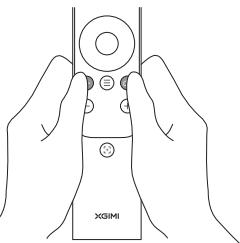
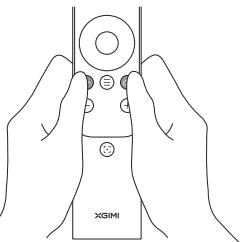
Place the remote control within 10 cm of the device.
Press and simultaneously, and an indicator light will begin flashing as the remote control enters pairing mode. Release the buttons as soon as the flashing begins. The connection is successful when you hear a "ding". If pairing fails, repeat the above steps after 30s.
Remote Control Functions
Focus adjustment fund
Short press to enable autofocus.
Long press to enable manual focus.
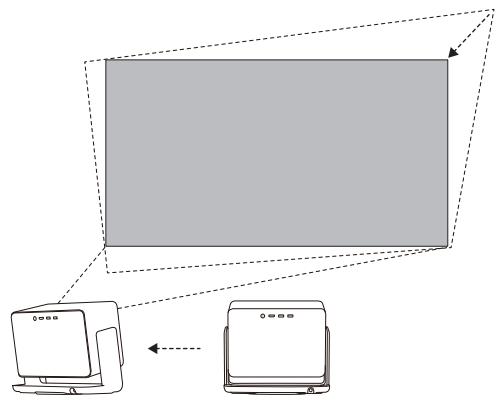
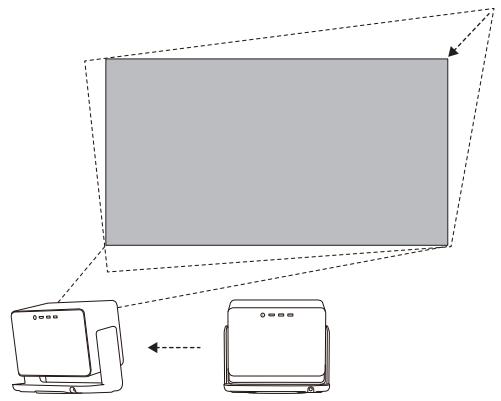
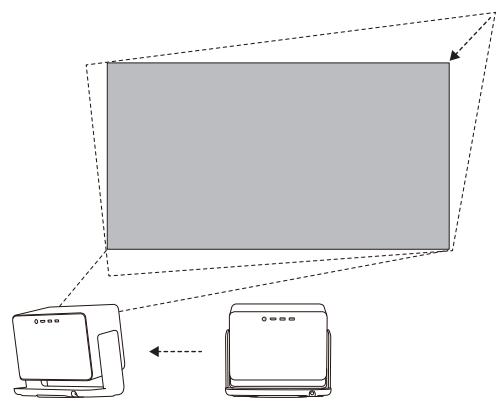
4 Uninterrupted Auto Keystone Correction
When Uninterrupted Auto Keystone Correction is enabled, the display will be adjusted automatically to a square image whenever you move the device slightly or to another location. In addition, Uninterrupted Auto Keystone Correction will not interfere with the projected content during the process, and the device will continue to work well on white, flat walls.
5 Google Assistant
Press the Google Assistant button on your remote control and use your voice to search for movies and shows, get answers to inquiries, receive recommendations to match your mood, control your smart home devices, and more.
Settings
Adjust device and image settings on any interface by pressing on the remote control. Specific functions for various settings are as follows:
| Keystone Correction | Adjust the keystone for the projected image |
| Picture Settings | Adjust image parameters under the video or signal source |
| Sound Settings | Adjust the device's voice output channel |
| 3D Video Setup | 3D settings for video and signal sources |
| Sleep Timer | Automatically shut down the device after a pre-set time |
| All Settings | Settings for other related functions |
- 3D mode and Image mode settings can only be adjusted via the video play or signal source channel.
- Frame ratio and HDMI version settings can only be adjusted via the HDMI channel.
Google Cast

Google Cast
Easily cast your favorite movies, music, and more to your TV with Google Cast.
Simply tap the Cast button on apps you already know and love to stream entertainment from your phone, tablet or laptop to the TV. While you're streaming, you can keep using your phone for other things like scrolling through social media, sending texts, and even accepting calls.
System Upgrade
Online upgrade
The online upgrade can be made through system setting.
WARNING:
Please refer to the information on the exterior bottom of the enclosure for electrical and safety information before installing or operating the device.
- Please refer to the actual system functions, as they are continuously updated.

Warning for remote control
- There is a risk of explosion if the battery is replaced with the wrong type of battery
- Disposal of the battery into fire, or mechanically crushing or cutting the battery may result in an explosion.
- Do not leave the battery in an environment with extremely high temperature, as doing so may result in an explosion or the leakage of flammable liquid or gas.
- Do not put the battery in an environment with extremely low pressure, as doing so may result in an explosion or the leakage of flammable liquid or gas.
Wi-Fi (5 GHz band) Warning
High-gain directional antennas apply only to the fixed peer-to-peer networking. Do not place the device near radar systems.
Frequency band: 5150 - 5250 MHz
Indoor use: Inside buildings only. Installations and use inside road vehicles and train carriages are not permitted. Limited outdoor use: If used outdoors, equipment shall not be attached to a fixed installation or to the external body of road vehicles, a fixed infrastructure or a fixed outdoor antenna. Use by unmanned aircraft systems (UAS) is limited to within the 5170 - 5250 MHz band.
Frequency band: 5250 - 5350 MHz
Indoor use: Inside buildings only. Installations and use in road vehicles, trains and aircraft are not permitted. Outdoor use is not permitted.
Frequency band: 5470 - 5725 MHz
Installations and use in road vehicles, trains and aircraft and use for unmanned aircraft systems (UAS) are not permitted.
Correct Use of the Device:
- Do not point lens into eyes as injury to the eyes can be caused by the strong projector light.
- Do not block the air inlet/outlet of the device in order to avoid damage to internal electronic devices arising from normal heat dissipation failure of the device.
- Do not wipe the lens directly with cleaning tools like paper or cloth to avoid damaging the lens; please only blow off the dust on the lens surface with an air blower.
- Do not wash the device with chemicals, detergents or any liquid to prevent corroding the circuit board. Rainwater, moisture and mineral-containing liquids may also damage the circuit board.
- Keep the device and its components and accessories out of the reach of children.
- Ensure that the device is used in a dry and ventilated environment.
- Do not store the device in extremely hot or cold places since extreme temperatures will shorten the lifespan of electronic devices. A safe storage and usage temperature is 0^ to 40^ .
- Do not put the device into any heating equipment (such as a dryer or microwave oven) for drying.
- Do not use excessive force on the device or place barriers behind it to prevent damaging it.
- Do not throw, strike, or sharply shake the device to prevent damaging the internal circuit board
- Do not try to disassemble and assemble the device yourself. Please contact XGIMI after-sales service for any issues.
- Do not repair any product on your own. In the case a product or component does not work, consult XGIMI after-sales service promptly or return it to the factory for repair.
- Operations in the 5.15-5.35 GHz band are restricted to indoor usage only.
- When installing and operating the device, the distance between a heat radiator and the device should be at least 20cm .
- As with any bright sources, do not stare directly into the beam. The device complies with RG2 IEC 62471-5:2015 as well as 21CFR 1040.10 and 1040.11 except for conformance as a Risk Group 2 LIP as defined in IEC 62471-5:Ed. 1.0. For more information see Laser Notice No. 57, dated May 8, 2019.
- Be cautious when using earphones with the device as there may be excessive sound pressure from earphones and headphones that can cause hearing loss.
- When rotating the device, make sure that there are no obstacles around it to prevent collisions. Also, please do not put your hand in gaps to avoid pinching.
Projector Laser
Max Power: 0.39 W
Emitted wavelength: 643 nm, 465 nm, 525 nm
VCSEL Laser
Max Power: 0.39 W
Emitted wavelength: 940 nm
Name and publication date of the standard: IEC 60825-1:2014

RG2
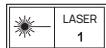
CONSUMER LASER PRODUCT EN 50689-2021
IEC 60825-1:2014
FCC Warning
The device meets provisions of part 15 of fcc rule. Operation meets the following 2 conditions: (1) the device will not cause harmful interference, and (2) the device must accept any interference received, including interference that may result in accidental operations. Users that intentional or unintentional modification and replacement of radiators without explicit approval from the responsible compliance party may prevent the user from operating the device. If the manual is provided in a form other than paper, such as, provided in computer disk through the Internet, then the information required in the section can be included in the manual in the alternative form under the premise that users can have access to the form information.
For B-class digital or peripheral device, instructions provided by users shall include the following or similar statements and put them in a prominent place of manual text:
Notes:
the device has been tested to meet restrictions of part 15 of FCC rule on B-class digital device. These restrictions are aimed at proving the effective prevention of harmful interference in a residential installation. If installation and use are not made according to the instructions, the device will generate and radiate radio frequency energy, and may cause harmful interference to radio communication. However, there is no guarantee that interference will not occur in a particular installation. If the device does cause harmful interference to radio or television reception (determined by stopping and starting the device), it is suggested that users should attempt to correct the interference by one or more of the following measures:
Reposition direction of receiving antenna.
Increase the distance between the device and the receiver.
Connect the device to a circuit socket different from the circuit connected to the receiver.
Consult distributors or experienced radio/television technicians to seek help.
FCCID:2AR82-SKWB663U11
XGIMI Technology Co., Ltd hereby declares that this product is in compliance with the essential requirements and other relevant provisions of Directive 2014/53/EU, Radio Equipment Regulations 2017, Directive 2011/65/EU.
This product is allowed to be used in some of EU member states as illustrated in the right chart.
This Frequency applies to the following Member States or the geographical area within a Member State where restrictions on putting into service or requirements for authorisation of use exist.
You can find the Declaration of Conformity on https://global.xgimi.com/pages/product-support
| BE | EL | LT | PT |
| BG | ES | LU | RO |
| CZ | FR | HU | SI |
| DK | HR | MT | SK |
| DE | IT | NL | FI |
| EE | CY | AT | SE |
| IE | LV | PL | UK(Ⅳ) |
ISED Warning
This device complies with the Innovation, Science and Economic Development License-exempt RSS standard(s). Operation is subject to the following two conditions:
(1) This device may not cause interference, and
(2) This device must accept any interference, including interference that may cause undesired operation of the device.
IC:24728-SKIWB663U11
Radiation Exposure Statement
The device is compiled by using FCC and ISED Innovation, Science and Economic Development radiation exposure limits specified for uncontrolled environments.
The transmitter shall not be placed or operated in conjunction with any other antenna or transmitter.
For the laser projector, the device meets FCC and ISED Innovation, Science and Economic Evelopment radiation exposure limits specified uncontrolled environments.
- Only use attachments/accessories specified or providedby the manufacturer (such as the exclusive supply adapter etc).
- Beware that this product may emit harmful light radiation.
Wireless Specification
- Bluetooth version: 5.1
- Bluetooth transmitter frequency range: 2402 MHz - 2480 MHz
- Bluetooth transmitter power: ≤ 10 dBm (EIRP)
Wi-Fi network: IEEE 802.11 a/b/g/n/ac (2.4GHz/5GHz)
- 2.4G Wi-Fi transmitter frequency range: 2412 - 2472 MHz (2.4 GHz ISM Band, USA 11 Channels, Europe and others 13 Channels)
2.4G Wi-Fi transmitter power: ≤ 20 dBm (EIRP)
5-Gi Wf- transmitter frequency range: 5.15 - 5.35GHz, 5.470 - 5.725GHz, 5.725 - 5.85
- 5G Wi-Fi transmitter power: 5.15 - 5.25GHz < 23dBm (EIRP), 5.25 - 5.35GHz & 5.470 - 5.725GHz < 23dBm (EIRP), 5.725 - 5.850GHz < 14dBm (EIRP)
Note: This power is for EU only
Parameter
Power Supply:19V = 15.79A
EAC RoHS C
- For more information, please find the electronic manual: xgimi.com/us/support/index
double, double double double D double-D double-D double-D double
Copyright © 1992-2022 Dolby Laboratories. All rights reserved.
中告

i

XGIMI 1
国,达之的自之,
南T
拉帕尼达.期新品套贝贝贝贝贝贝贝贝贝贝贝贝贝贝贝贝贝贝贝贝贝贝贝贝贝贝贝贝贝贝贝贝贝贝贝贝贝贝贝贝贝贝贝贝贝贝贝贝贝贝贝
https://global.xgimi.com/pages/product-support
| BE | EL | LT | PT |
| BG | ES | LU | RO |
| CZ | FR | HU | SI |
| DK | HR | MT | SK |
| DE | IT | NL | FI |
| EE | CY | AT | SE |
| IE | LV | PL | UK(N) |
ISED
Interfeis HDMI High-Definition Multimedia eraoz logo HDMI to znaki towarowle lub zarejostwarenznaki towarowc HDMI Licensing Administrator, Inc.
dtshD
IpeepnOJIb3OBaHmE yCTpoIcTBA BHNMaTeIbHO npouHTaTe pyKOBOdCTBO IOnJIb3OBaTeIa.
BlaqoapdM3a npno6pehenHe nncnloh 03ohne npdoynkunxGIMI. Jnro o6ceeneHHcOcbTeHNHb6e3oanchoCTn HnIOHO nCIOHOBHmBCex fHyKcuY cTpoCTBaBHmtehtBo pnoiHTAITE 3TO PYKOBODCTBO npbo38TBe
XGMI He Hecet OTBCTBEHOCHTI 3A NIO6Be TpABMb, NOBPEKDEHNE IMUJSECTBA INI pYTOI yuepeb, Bb3BaHHNc HecobliOeHNEM INCHyKLIN INI Mep Be3OnaCHOCTIN, YKa3aHHbV B 3TOM pyKOBOCTBe NoJIb3OBATEJI.
OpykoBoIDCTBeIOnlb3OBaTeTn
Dolby, Dolby Vision, Dolby Audio and B in Bine Dxy 6yBx D"B"YBRIOTCA3eRcHTrpOBeHHbM ToaBbHMn 3hAkm DYolab Laboratories Licensing Corporation. PnoivBedeNo no nIeHNmDolby Laboratory. KonfmdenuHaBne Heyn6bnKOBHeBn HaPoBTs. © Aetropcoe npaeo prnnaedekjT Dolby Laboratories, 1992-2022. Ce rnpaa 3aauuHne.

INHCTpykUIN NO yTmN3aUN INCNOlb3OBAHHbIX N3dEIN:

YCTOPCAEO30JDAHO3BbCOKOKHECTBEHbIXNpepeBaTaBaEMbIXMaTMePnIaNOB N KOMTOEHOTHO.

IIOBHOI 37KTHCMMBOB HAIHAXN 37KTKPOTEXHNHECKHXI DAEHIXX, 37MEMHTAX TNIATAHIN IYIYAKOBIE O3AHJEBAE, YTO COBOTETBHYOUIE 37KTKPOTEXPHENHECKHXI DAEHIXX NIIETAHN IYIEMETHNNTI IYIHN HEBILYIYIKIMPOBATK KAB 60EUBIE 60TBELOB B BY ENEIKOIPSHANTAH, CTAHPBX EC, TYPIIN L DPPYTX CPTBHX ACCTMEON P43AEBHNO G30PA OXO2008 UO656CEPN4Ht PpABINHbYIO NEPEAPOTKO XYKOBID, YTYNH1KPYVE IH XEP3EABTOP3OHANHHY INKTPC6B A COBOTETCBTBM C DECTYBOUOMKIAKOHAMIN TIP6BBAHON 37KTOBAPOTBPASR I M NTEMHNTI NITAHIN TAKAO MEKHOI 66EACNNI 37KTHMPOBATB KEP30HAYE CEBPOTCHNIOH POYCTB CEBPOTCHNIOH TOTG XEYNI. KPOME TORO, BY ENEIKOIPSHANTAH INCTPAHX EC KPNYIBHOYIOH CEBT CEBTI MYOT Y6EACNNI TOFRE NITAHIN MEKHOI 66EACNNI 37KTHMPOBATB KEP30HAYE CEBPOTCHNIOH POYCTB CEBPOTCHNIOH TOTG XEYNI. KPOME TORO, BY ENEIKOIPSHANTAH INCTPAHX EC KPNYIBHOYIOH CEBT CEBTI CYMTANIOH TOTFRE NITAHIN MEKHOI 66EACNNI 37KTHMPOBATB KEP30HAYE CEBPOTCHNIOH POYCTB CEBPOTCHNIOH TOTG XEYNI. KPOME TORO, BY ENEIKOIPSHANTAH INCTPAHX EC KPNYIBHOYIOH CEBT CEBTI CYMTANEOH TOTFRE NITAHIN MEKHOI 66EACNNI 37KTHMPOBATB KEP30HAYE CEBPOTCHNIOH POYCTB CEBPOTCHNIOH TOTG XEYNI. KPOME TORO, BY ENEIKOIPSHANTAH INCTPAHX EC KPNYIBHOYIOH CEBT CEBTI CYPKNYIKHOYIOH TOTG XEYNI. KPOME TORO, BY ENEIKOIPSHANTAH INCTPAHX EC KPNYIBHOYIOH CEBT CEBTI CYNTANIOH TOTG XEYNI. KPOME TORO, BY ENEIKOIPSHANTAH INCTPAHX EC KPNYIBHOYIOH CEBT CEBTI CYNTANIOH TOTG XEYNI. KPOME TORO, BY ENEIKOIPSHANTAH INCTPAHX EC KPNYIBHOYIOH CEBT CEBTI CYNTANIOH TGTG XEYNI. KPOME TORO, BY ENEIKOIPSHANTAH INCTPAHX EC KPNYIBHOYIOH CEBT CEBTI CYNTANIOH TGTG XEYNI. KPOME TORO, BY ENEIKOIPSHANTAH INCTPAHX EC KPNYIBHOYIOH CEBT CEBTI CYNTANIOH TGTG XEYYNI. KPOME TORO, BY ENEIKOIPSHANTAH INCTPAHX EC KPNYIBHOYIOH CEBT CEBTI CYNTANIOH TGTG XEYYNI. KPOME TORO, BY ENEIKOIPSHANTAH INCTPAHX EC KPNYIBHOYIOH CEBT CEBTI CYNTANIOH TGTG XEYYNI. KDOTHI YTN13A YCNPTCYA, YTOPTCYOB, KOPTOEBY BXTOHYE TYYN13APOBTB. TEM CAMMOI BLY NOMOKOTE CXQPHTAIYPRNPDHAIE PCYCPSU BY NOVBCSHTC STADTPBY 37AATPUQ OKKYKAOKUSCIPEB pyINPB 6063006060606060606060606060606060606060606060606060606060606060606060606060606060606060606060606060606060
- MoDénlb: XM13Q
- XGIMI Technology octabniert 3a coboi npabo Ha tpaKtOBky I KoprKeTIpOBky DaHnOro pyKOboDCTBa noJIb3oBATEy.
HauaNo pa6oTbI
BkIoueHne nIIN OTKIoueHne IITaHnI
EcnBcBaBHHe BbIOnHb He ydaONCb, NOBTOPI ONICAHHbE BbIe JeCTBnY uepe30c.
He nppepbBna aBtOMaTnuecka KOppeKcna TpaeneuJaIbHbIX NcKaKeHn
EcnB KJIUOeH aFHyKcIa HnpepebIbHO aBTOMATUNeCKoKorpeKlun
TpaueeauanbHbIX NcKaJKeHn, n3o6paKeHne 6yDeT aBTOMATUNeCKn
NoCTPANBaTcN oND KBaDpTaHoe pRn HeNaHTeJIbHOM
nepeBnBeHn yCTPOCTBa IINr eO npereMeuHne B DpyROe MecTo.
Kpome TOrO, 37a FyHKsIe Hbe 6yDeT MeMaTb PnoeUnpyEMomy
CoepxIMOMY BO VpEmaIpoUecca, n yCTPOCTBO 6yDeT KORpeKTHO
paBoTaTb pRn OTO6paKeHn MaTePnaIaON Ha bEnbIX, POBbIX CTHeax.
Google Accntent
Haxmnte KhONky Google AccncteHa Na Nylte Dv N cKaXnTe, KaKoH naTn FInbM nIi WOy, 3aJaTe BOpocbl, Ha KOTopbIe HJxKeH OTBET, NOYuNte peKOMeHaauNi, COOTBeTCTByUOuNe BaWEmy HAcTpoEHNo, UnpabnIte CMapT-YCTPOIcTBAMn I denaIte MHOroE dpYroe.
6 HactpoKu
HactpaBai Te npametpyi yctpoiCtBA H3o6paKeHnHa IIObOM INTepFeIce, Haximma Ha NylbTe DnCTaHIOHO HorO ynpabNeHn. HnKe npBedeHb KOHKpETHbe FyHKUIM dIpa3NIuHbIX hAcTpoEK:
| Koprêkuzia
trapanéuzidänbHoro
nckajkzenia | Hactrojka trapanéuzidänbHoro nckajkzenia [...]\
npoéüpμeMóG IO 3IO6paJzENIA |
| Hactrojki
n3O6paJzENIA | Hactrojka napametropov n3O6paJzENIA B INCTOCHNIke
BVIDeO IINI CNITHana |
| Hactrojki 3bVyka | Hactrojka kahala peyuEbo rByBOD yucPoIyCTBa |
| Hactrojka 3D vIDeO | Hactrojki 3D [...] nCTOCHNIKOB vIDeO I CNITHana |
| TaimerpepeXoDA B
cπaùniρ režiM | AβTOMATNUeCKOE OTKIIQUeHηNE yCtpoIyCTBa
Upeε3 zadānHoe BvEmr |
| Bce nactrojki | Hactrojki [...] duPyTHx CBY3AHbIX ΦyHKlss |
napametprd3D-pekmaI mpekmaI 3IO6paekhenMIOKHO HACTPOIT TOBJKO YEPE3 KAHAN BOCNPOBEDENH BNDEO INI INTOCHNK CINHANA;
napametprcooHTHOWeHEn3TOPOHN 3KpaHn IBepCn HDMIOMOXHO HACTPOINb TOLko
pece3kananHDMI.
Google Cast

Google Cast
C Google Cast yIobHo nepeBaTaB IIObMMyO My3bKy,ФиЛьМы И MHOrO epyrOe Ha TeleBeN3Op.
Eknaparauo O COOTBETCTBNI MOXHO HAIH N Adebce: https://global.xgimi.com/page/support
| BE | EL | LT | PT |
| BG | ES | LU | RO |
| CZ | FR | HU | SI |
| DK | HR | MT | SK |
| DE | IT | NL | FI |
| EE | CY | AT | SE |
| IE | LV | PL | UK(N) |
Ipeynpckdne ISED
COOTBETCTBNE B OTHOHEHIN BO3JeIcTBNA N3JIyHeHNI
UCTpOHTBcO BOOTCBETCBYtE OrpAHHENHnFMC FCC I SED B OTHouHEnNnO B03dECTBnV HnIyHnENB H eKoHtPONPiPyEmCpeDe.
PepedT-THKHeB3a3MaEEuBbIINHNCNOBb3OBeBbBcOHTMnpepeT-THKOM INaIaHTENHO.
Лаимсярноюку TСЧОТБАС COOTERTCTBYT ORРанИЗМЯFF C И ISED B OTHOWEHNI BOZDETNBIA MHTYENHEВ N HEKONTPONIpyEME CPEDE.
IcN0b3yTe TOJIbTOe PnHAnEHNKHOCTNnA KENCCBHy KOTOPBy KKA3aHBu INI pRQEOCTABNEHbpyPOB3BDENTHE (HANHPMEK, 3KKNQH3BHbY IANTADP NITAHN T.I).
* Bytbe OCTOPOKHbI: yCTpOINCTBO MOKeT INCnyCKaTb BpeHoe CBeTOBoe N3nyueHne.
XapakTepcntkynycTpoiCTBa6ecnpoBOHOCBra3N
Bercsna Bluetooth: 5.1
-ДианазончастперадатукaBluetooth:2402MfU-2480MfU
- MoococTb nepeaTnka Bluetooth: ≤10 dBM (3NIM)
- CeTb Wi-Fi: IEEE 802.11 a/b/g/n/ac (2,4/5 ITU)
ДианазанчадтпетердатуWA-Fi2.4TtU 2412-2472MfU(ДианазанHISM2.4TtB.CLIIA11KanahOB,ВЕрореиdггхстраимь 13KanahOB)
- MouHocTb nepeTaUka Wi-Fi 2,4Γι; ≤20 ΜΜ (ΘΗΜ)
-Дианазанчадт пораздунчikaWi-Fi5TtU; 5.15-5.35TtU,5.470-5.725TtU,5.725-5.850TtU
Mouhocb nepeadatnka Wi-Fi 5Tlu: 5,15-5,25TTU<2dBM(3VIMM),5,25-5,35TTU<4,70-5,725TTU<23dBM(3VIMM), 5,725-5,850TTU<41dBM(3VIMM)
PpmeaHne. 3Ta MoUHocb yka3aHa ToIbKO dA EC
Napametp
3neKtponTaHHe:19B = = 15,79 A
EAC RoHS C
*DonatihentnyuHkyoHfOpMRAUIO MOKHO HAIITN B INEKTPOHOM YKOBOCTBeXgmi.com/us/support/index
使用本產品前請先仔細閱讀使用者指南。
https://global.xgimi.com/pages/product-support
| BE | EL | LT | PT |
| BG | ES | LU | RO |
| CZ | FR | HU | SI |
| DK | HR | MT | SK |
| DE | IT | NL | FI |
| EE | CY | AT | SE |
| IE | LV | PL | UK(NI) |
ISED警告
Jlll lal 1d 1d 1d 1d 1d 1d 1d 1d 1d 1d 1d
ccllalag ciaow 1e bllglaigxGIMI a5w cliao cie 1e cll lss
gaiiall plaiuai iiaai iiaaiiail jiaei gaii
sglilaii aiiaai iaii gaiiaai aiai i ie aygaaia xGIMI Jaiix 8
jaiyai gaiiyaii aiayaii gaiiaaii iaiaii gaiiaai iaiai iaiai
1aiaiannl JJg
XGIMI ayai laa piaiunall clalai jailg gabll qagaa slo 98a
aai aai yagaa i aai yagai slawlg ayai cialao ai slao 98a
yai gai iai ic aliaa plaiai aai glayg gina agn 98
Google LLC a532 102 Google Cast,Android TV,Google
dallglll lalil 100000000000000000000000000000000000000000000000000000
IMAX 4551 alas yajy jayy 0j 0j IMAX IMAX yajy jayy jayy jayy jayy jayy jayy jayy jayy jayy jayy jayy jayy jayy jayy jayy jayy jayy jayy jayy jayy jayy jayy jayy jayy jayy jayy jayy jayy jayy jayy jayy jayy jayy jay yj 0j DTS 0j 0j DTS 0j 0j DTS 0j 0j DTS 0j 0j DTS 0j 0j DTS 0j 0j DTS 0j 0j DTS 0j 0j DTS 0j 0j DTS 0j 0j DTS 0j 0j DTS 0j 0j DTS 0j 0
IMAX ENHANCED
1234567890123456789012345678901234567890123456789012345678901234567890123456789012345678901234567890123456789
HOMI
http://patents.dts.com/gjagil, DTS [gjagil]c|c|c|c|c|c|c|c|c|c|c|c|c|c|c|c|c|c|c|c|c|c|c|c|c|c|c|c|c|c|c|c|c|c|c|c|c|c|c|c|c|c|c|c|c|c|c|c|c|c|c
gagagagagagagagagagagagagagagagagagagagagagagagagagagagagagagagagagagagagagagagagagagagagagagagagagagagagagagagagagagagagagagagagagagagagagagagagagagagagagagagagagagagagagagagagagagagagagagagagagagagag
dtshD
45dolaydolaydolaydolaydolaydolaydolaydolaydolaydolaydolaydolaydolaydolaydolaydolaydolaydolaydolaydolaydolaydolaydolaydolaydolaydolaydolaydolaydolaydolaydolaydolaydolaydolaydlDyholby Dolby Audio Dolby Visiting Dolby at Dolby at Dolby Laboratories Licensing Corporation Dolby 1992-2022 pale 633333333333333333333333333333333
Dolby Vision Dolby Audio
alaiiallllaiiallljgallll
gill 0cIy dIy cIig Sog 0gill aIc pI y gai gai all ai

yolalzll y 41 yll lagaagc gdlaylallg dylagllslllloa c0 jc jccjlll jll ylae 1 ygl 1 ygl 1 ygl 1 ygl 1 ygl 1 ygl 1 ygl 1 ygl 1 ygl 1 ygl 1 ygl 1 ygl 1 ygl 1 ygl 1 ygl 1 ygl 1 ygl 1 ygl 1 ygl 1 ygl 1 ygl 1 ygl 1 ygl 1 ygl 1 ygl 1 ycl 2y gl aegnlll alllllllllllllllllllllllllllllllllllllllllllllllllllllllllllllllllllllllllllllllllllllllllllllllllllllllllllllllllllllllllllllllllllllllllllllllll llg 1ygl aegnlll allll lal lal lal lal lal lal lal lal lal lal lal lal lal lal lal lal lal lal lal lal lal lal lal lal lal lal lal lal lal lal lal lal lal lal lal lal lal lal lal lal lal lal lal lal lal lal lal lal lal lal lALI (Pb) galselll galselll galselll galselll galselll galselll galselll galselll galselll galselll galselll galselll galselll galselll galselll galselll galselll galselll galselll galselll galselll galselll galselll galselll galselll galsell


XM13Q:jjbl
Lg 1sXGIMI Technology
lo 102 103 104 105 106 107 108 109 110 111 112 113 114 115 116 117 118 119 120
j0 8g jill gaiiall lal lal yig gaiy
Jgssssjjgssssglggs
jaiwssgaxllsui
jIw gauai JIO sJl sluul plaill clail pliaui
yjg aill jilwr jwlgl gao 1

Google Cast
JcIaJIaI aIaIbI aIaI bI aIaI IaI aIaI aIaI aIaI aIaI aIaI aIaI aIaI aIaI aIaI aIaI aIaI aIaI aIaI aIaI aIaI aIaI aIaI aIaI aIaI aIaI aIaI aIaI aIaI aIaI aIaI aII aII aII aII aII aII aII aII aII aII aII aII aII aII aII aII aII aII aII aII aII aII aII aII aII aII aII aII aII aII aII aII aII aII
Google Assistant
pssuog jg sall jgl ggsal Google Assistant j 1c bawl
jguagllg uuaaewll jg aol jlgauagllg gaaegllg j c cal lglg
clldy gddll adjial cljagj gddll gddll gld lwaii wgi jlc
jLgUuuaaullpssuwr
a# 1gag g aee jglgall gall
yjlll jbei aalblall gjgjglj jai jai jai jai jai jai jai jai jai
jlll
jll jyj:awssll jcjjwlaalglg jglll lglj plaaewaew aewell 2
glal glaoi aixu wlu baoaossll
9.0.39:ssagall aillbll
jiojigil525.ljogili465.ljogili643:Gallgall
VCSEL
0.39:all
jigbjg940:caiall gall jglbl
IEC 60825-1:2014: _w
y
EN 50689:2021
IEC 60825-1:2014

RG2
J 1
palll llll 1Jb jno cjjj juc ajjll sJ!Saa
:
aaleal ologell jlc xll aaleeall aagll algll algll alogell all
aJg jglal cji jolg aJyrgsll aolgj
jglg jglg jglg jglg jglg jglg jglg jglg jglg jglg jglg jglg jglg jglg jglg jglg jglg jglg jglg jglg jglg jglg jglg jglg jglg jglg jglg jglg jglg jglg jglg jglg jglg jglg j
(FCC) aIyIaIyIaIyIaIyIaIyIaIyIaIyIaIyIaIyIaIyIaIyIaIyIaIyIaIyIaIyIaIyIaIyIaIyIaIyIaIyIaIyIaIyIaIyIaIy
a a a a a a a a a a a a a a a a a a a a a a a a a a a a a a a a a a a a a a a a a a a a a a a a a a a a a a a a a a a a a a a a a a a a a a a a a a a a a a a a a a a a a a a a
JuaWJgJgJgJgJg
JlaiwJglg>glg>lljydsalwalolj
JUaWbI JgEaAiaai oJilJe aelisiOjld JaaJagll
https://global.xgimi.com/pages/product-support