
HORIZONULTRA - Projector XGIMI - Free user manual and instructions
Find the device manual for free HORIZONULTRA XGIMI in PDF.



| Product type | Projector |
| Brand | XGIMI |
| Model | HORIZONULTRA |
| Light source | LED |
| Power supply | 19 V ⎓ 15.79 A |
| Operating system | Android TV |
| Voice assistant | Google Assistant |
| Built-in Chromecast | Yes |
| Automatic focus | Yes |
| Automatic keystone correction | Yes |
| Video formats | Dolby Vision, DTS-HD |
| Audio formats | Dolby Audio |
| Wi-Fi connectivity | IEEE 802.11 a/b/g/n/ac/ax (2.4 GHz / 5 GHz) |
| Bluetooth | Version 5.2 |
| Operating temperature | 0 °C to 40 °C |
| Maintenance | Cleaning with compressed air, avoid chemical products |
| Safety | Do not look at the beam (RG2), minimum distance 20 cm |
| Spare parts | Contact XGIMI after-sales service |
| Compliance | FCC, CE, UKCA, ISED |
Frequently Asked Questions - HORIZONULTRA XGIMI
User questions about HORIZONULTRA XGIMI
0 question about this device. Answer the ones you know or ask your own.
Ask a new question about this device
Download the instructions for your Projector in PDF format for free! Find your manual HORIZONULTRA - XGIMI and take your electronic device back in hand. On this page are published all the documents necessary for the use of your device. HORIZONULTRA by XGIMI.
USER MANUAL HORIZONULTRA XGIMI
Please read the Product Instructions carefully before using the product.
Thank you for buying and using the products of XGIMI Technology Co., Ltd. (hereinafter referred to as "XGIMI Technology" or "XGIMI"). You should read the Product Instructions carefully before using this product for both your safety and interests.
XGIMI Technology will assume no responsibility for any personal injury, damage to property or other loss caused because due to failure to operate this product according to the Product Instructions or precautions.
About the Product Instructions (hereinafter referred to as "the Instructions")
Copyright of the Instructions belongs to XGIMI Technology;
Trademarks and names mentioned in the Instructions belong to their respective right owners;
In the case of inconvenience between the content of the Instructions and the actual product, the actual product shall prevail.
Google, Android TV, and Chromecast built-in are trademarks of Google LLC. Google Assistant is not available in certain languages and countries.
HOMI
HDMI High-Definition Multimedia interface, and the HDMI Logo are trademarks or registered trademarks of HDMI Licensing Administrator, Inc.
dtshD
For DTS patents, see http://patents.dts.com. Manufactured under license DTS Licensing Limited (for all other companies). DTS, DTS-HD Master Audio, DTS-HD, VirtualX, and the DTS-HD logo are registered trademarks or trademarks of DTS, Inc. in the United States and other countries. © 2021 DTS, Inc. ALL RIGHTS RESERVED.
Dolby Vision
Dolby, Dolby Vision, Dolby Audio, and the double-D symbol are trademarks of Dolby Laboratories Licensing Corporation. Manufactured under license from Dolby Laboratories. Confidential unpublished works. Copyright © 1992-2022 Dolby Laboratories. All rights reserved.
Dolby Audio
Disposal instructions for used products:

The product is designed and manufactured with high quality materials and components that are recyclable.

Where you see either symbol on any of our electrical products, batteries or packaging, it indicates that the relevant electrical product or battery should not be disposed of as general household waste in the EU, UK, Turkey, or other countries with separate waste collection systems available. To ensure correct waste treatment, please dispose of them via an authorised collection facility, in accordance with any applicable laws or requirements. Waste electrical products and batteries may also be disposed of free of charge via retailers when buying a new product of the same type. Furthermore, within the UK and EU countries larger retailers may accept small waste electronic products free of charge. Please ask your local retailer if this service is available for the products you wish to dispose of. In so doing, you will help to conserve natural resources and improve standards of environmental protection in treatment and disposal of electrical waste.
This symbol may be used on batteries in combination with additional chemical symbols. The chemical symbol for lead (Pb) will appear if the battery contains more than 0.004% lead.
- Model: XM13N
- XGIMI Technology reserves the right to interpret and amend the Instructions.
Getting Started
Power on / off
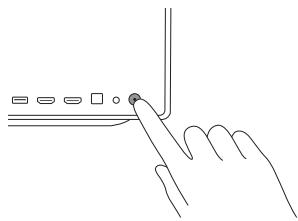
Connect to the power source, and press the power button on the back to turn on the device.
When the device is on, press the power button on the back to turn off the device.
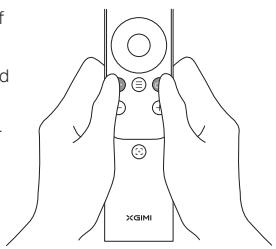
Remote control pairing
Place the remote control within 10cm of the device.
Press " 念 " and " 念 " simultaneously, and an indicator light will begin flashing as the remote control enters pairing mode.
Release the buttons as soon as the flashing begins. The connection is successful when you hear a "Ding"
If pairing fails, repeat the above steps after 30s.
Remote control functions
Focus adjustment function:
Short press the " " to enable autofocus.
Long press the " " to enable manual focus.
Shortcut button:
To access the shortcut button function, short-press the " 念 "
To access all settings, press "C".
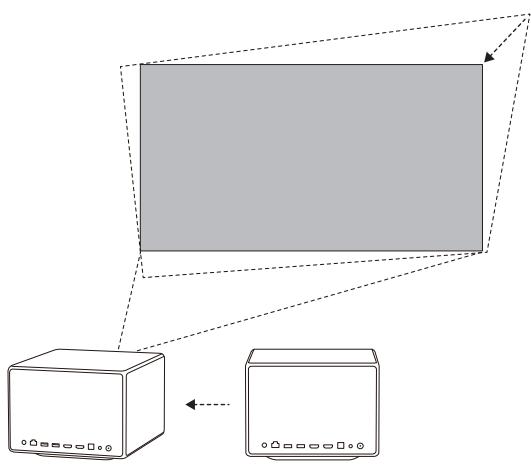
Intelligent Screen Alignment
When Auto Keystone Correction is enabled, the display will be adjusted automatically to a square image whenever you move the device slightly or to another location. In addition, Auto Keystone Correction will not interfere with the projected content during the process, and the device will continue to work well on white, flat walls.
5 Google Assistant
Google Assistant can be activated by pressing the" "button on the remote control.
Using your voice, you can quickly access entertainment, control smart devices, and get answers on screen.
Settings
Adjust device and image settings at any interface by pressing " ⑨ " on the remote control. Specific functions for various settings are as follows:
| Clear Apps | Remove apps from the device |
| Keystone Correction | Adjust the keystone for the projected image |
| Image Mode | Adjust image parameters under the video or signal source |
| Sound Settings | Adjust the device's voice output channel |
| 3D Video Setup | 3D settings for video and signal sources |
| Sleep Timer | Automatically shut down the device after a pre-set time |
| All Settings | Settings for other related functions |
- 3D mode and Image mode settings can only be adjusted via the video play or signal source channel.
- Frame ratio and HDMI version settings can only be adjusted via the HDMI channel.
7 Chromecast built-inTM
- Cast your favorite entertainment apps—movies, TV shows, music, games, sports, and more—from your Android or iOS devices, Mac, Windows computer, or Chromebook to the device. Find Chromecast-enabled apps at g.co/castapps.
- Quickly cast video and audio content to your TV by using "√" on the supported mobile application. Sceencasting will not be interrupted when you receive a call or message, and mobile phone battery consumption is minimal.
- Entire frames on Android phones or Chrome browsers via PC can be cast to your TV.
Note:
Sceancasting is optimized for selected services only. Streaming quality for other content might vary. Supported operating systems and devices: AndroidTM2.3 Gingerbread and higher, iOS® 7 and higher, Windows® 7 and higher, Mac OS10.7 and higher and Chrome OS (version 38 or higher).

System upgrade
Online upgrade
The online upgrade can be made through system setting
WARNING:
Please refer to the information on the exterior bottom of the enclosure for electrical and safety information before installing or operating the apparatus.
CAUTION
Warning for remote controller and portal device
- There is a risk of explosion if the battery is replaced with the wrong type of battery;
- Disposal of a battery into fire, mechanically crushing or cutting the battery, may result in an explosion;
- Do not leave battery in an environment with extremely high temperature that may result in an explosion or the leakage of flammable liquid or gas;
- Do not put battery in an environment with extremely low pressure that may result in an explosion or the leakage of flammable liquid or gas.
Correct use of the device:
- Do not face lens into eyes as injury to the eyes can be caused by the strong projector light.
- Do not block the air inlet/outlet of the device in order to avoid damage to internal electronic devices arising from normal heat dissipation failure of the device.
- Do not wipe the lens directly with cleaning tools including paper and cloth etc. in order to avoid damage to lens; please clean up the dust on the lens surface through clean air blowing
- Do not wash the device with chemicals, detergents or any liquid in order to avoid corrosion of circuit board by rainwater, moisture and mineral-containing liquids.
- Keep the device and its components and accessories out of reach of children.
- Ensure that the device is used in a dry and ventilated environment.
- Do not store the device in overheated or overcooled places because extreme temperatures will shorten the lifespan of electronic devices. Permissible storage and usage environments should have a temperature range of 0^ to 40^ .
- Do not put the device into any heating equipment (such as a dryer or microwave oven) for drying.
- Do not extrude the device firmly or place barriers on it or its back to avoid damage to the device.
- Do not throw, strike, or sharply shake the device to avoid damage to the internal circuit board.
- Do not try to disassemble and assemble the device yourself. Please contact XGIMI after-sales service for any issues.
- Do not repair any product on your own. In the case of normal operation failure of the device or any component, consult XGIMI after-sales service promptly or return it to the factory for repair.
- Operations in the 5.15-5.35 GHz band are restricted to indoor usage only.
- When installing and operating the device, the distance between radiator and body should be at least 20cm.
- As with any bright sources, do not stare directly into the beam, RG2 IEC 62471-5:2015
- Complies with 21 CFR 1040.10 and 1040.11 except for conformance as a Risk Group 2 LIP as defined in IEC 62471-5.Ed.1.0. For more information see Laser Notice No. 57, dated May 8, 2019.
- Be cautious when using earphones with the device as there may be excessive sound pressure from earphones and headphones that can cause hearing loss.

IEC 60825-1:2014

RG2

VCSEL Laser
Max output of laser radiation: Max. 60~ J
Pulse duration: 15 Hz
Emitted wavelength: 850 nm
Name and publication date of the standard: IEC 60825-1: 2014
Wi-Fi (5 GHz band) warning
High-gain directional antennas apply only to the fixed peer-to-peer networking.
Do not place the device near radar systems.
FCC warning
The device meets provisions of part 15 of FCC rule. Operation meets the following 2 conditions: (1) the device will not cause harmful interference, and (2) the device must accept any interference received, including interference that may result in accidental operations. Users that intentional or unintentional modification and replacement of radiators without explicit approval from the responsible compliance party may prevent the user from operating the device. If the manual is provided in a form other than paper, such as, provided in computer disk through the Internet, then the information required in the section can be included in the manual in the alternative form under the premise that users can have access to the form information.
For B-class digital or peripheral device, instructions provided by users shall include the following or similar statements and put them in a prominent place of manual text:
Notes:
the device has been tested to meet restrictions of part 15 of FCC rule on B-class digital device. These restrictions are aimed at proving the effective prevention of harmful interference in a residential installation. If installation and use are not made according to the instructions, the device will generate and radiate radio frequency energy, and may cause harmful interference to radio communication. However, there is no guarantee that interference will not occur in a particular installation. If the device does cause harmful interference to radio or television reception (determined by stopping and starting the device), it is suggested that users should attempt to correct the interference by one or more of the following measures:
* Reposition direction of receiving antenna.
Increase the distance between the device and the receiver.
Connect the device to a circuit socket different from the circuit connected to the receiver.
* Consult distributors or experienced radio/television technicians to seek help.
Be careful that the product may emit harmful light radiation
FCC ID: 2AR82-SKIWB921AU1
Declaration of Conformity
XGIMI Technology Co., Ltd hereby declares that this product is in compliance with the essential requirements and other relevant provisions of Directive 2014/53/EU, Radio Equipment Regulations 2017, Directive 2011/65/EU and UK.
The Restriction of the Use of Certain Hazardous Substances in Electrical, Electronic Equipment Regulations 2012, and compliance with REACH Directive (Regulation No 1907/2006).
This product is allowed to be used in some of EU member states as illustrated in the right chart.
This Frequency applies to the following Member States or the geographical area within a Member State where restrictions on putting into service or requirements for authorisation of use exist.
You can find the Declaration of Conformity on https://global.xgimi.com/pages/product-support
| BE | EL | LT | PT |
| BG | ES | LU | RO |
| CZ | FR | HU | SI |
| DK | HR | MT | SK |
| DE | IT | NL | FI |
| EE | CY | AT | SE |
| IE | LV | PL | UK |
| M | ||
| BE | HR | AT |
| BG | IT | PL |
| CZ | CY | PT |
| DK | LV | RO |
| DE | LT | SI |
| EE | LU | SK |
| IE | HU | FI |
| EL | MT | SE |
| ES | NL | UK |
| FR | ||
ISED Warning
This device complies with Innovation, Science and Economic Development Licence-exempt RSS standard(s). Operation is subject to the following two conditions:
(1) This device may not cause interference, and
(2) This device must accept any interference, including interference that may cause undesired operation of the device.
IC:24728-SKIWB921AU1
Radiation Exposure Statement
The device is compiled by using FCC and ISED Innovation, Science and Economic Development radiation exposure limits specified for uncontrolled environments.
The transmitter shall not be placed or operated in conjunction with any other antenna or transmitter.
For the LED projector, the device meets FCC and ISED Innovation, Science and Economic Evolution radiation exposure limits specified uncontrolled environments.
- Only use attachments/accessories specified or provided by the manufacturer (such as the exclusive supply adapter etc).
- Beware that this product may emit harmful light radiation.
Wireless Specification
- Bluetooth version: 5.2
- Bluetooth transmitter frequency range: 2400 MHz - 2483.5 MHz
- Bluetooth transmitter power: ≤ 10 dBm (EIRP)
Wi-Fi network: IEEE 802.11 a/b/g/n/ac/ax (2.4GHz/5GHz)
2.4G Wi-Fi transmitter frequency range: 2412 - 2472 MHz (2.4 GHz ISM Band, USA 11 Channels, Europe and others 13 Channels)
2.4G Wi-Fi transmitter power: ≤ 20 dBm (EIRP)
5GWi-Fi transmitter frequency range: 5.15-5.35GHz, 5.470-5.725GHz, 5.725-5.850GHz
5G Wi-Fi transmitter power: 5.15 - 5.25GHz < 23dBm (EIRP), 5.25 - 5.35GHz & 5.470 - 5.725GHz < 23dBm (EIRP), 5.725 - 5.825GHz < 14dBm (EIRP)
Note: This power is for EU only.
Parameter
Power Supply:19V---15.79A
EAC RoHS CECCA
- More information, please find the electronic manual: xgimi.com/us/support/index
Chromecast built-inTM
7 Chromecast built-inTM
Chromecast built-inTM
Chromecast built-inTM
7 Chromecast built-inTM
https://global.xgimi.com/pages/product-support
| BE | EL | LT | PT |
| BG | ES | LU | RO |
| CZ | FR | HU | SI |
| DK | HR | MT | SK |
| DE | IT | NL | FI |
| EE | CY | AT | SE |
| IE | LV | PL | UK |
| BE | HR | AT |
| BG | IT | PL |
| CZ | CY | PT |
| DK | LV | RO |
| DE | LT | SI |
| EE | LU | SK |
| IE | HU | FI |
| EL | MT | SE |
| ES | NL | UK |
| FR |
ISED警告
- Please read the Product Instructions carefully before using the product.
- About the Product Instructions (hereinafter referred to as "the Instructions")
- HOMI
- dtshD
- Dolby Vision
- Dolby Audio
- Getting Started
- Power on / off
- Remote control pairing
- Remote control functions
- Intelligent Screen Alignment
- Google Assistant
- Settings
- Chromecast built-inTM
- Note:
- System upgrade
- Online upgrade
- WARNING:
- CAUTION
- Warning for remote controller and portal device
- Correct use of the device:
- VCSEL Laser
- Wi-Fi (5 GHz band) warning
- FCC warning
- Notes:
- Declaration of Conformity
- ISED Warning
- Radiation Exposure Statement
- Wireless Specification
- Parameter
- EAC RoHS CECCA
- Chromecast built-inTM
- ISED警告
Brand : XGIMI
Model : HORIZONULTRA
Category : Projector