V11TotalClean - Vacuum Cleaner DYSON - Free user manual and instructions
Find the device manual for free V11TotalClean DYSON in PDF.



| Product type | Cordless stick vacuum |
| Brand | Dyson |
| Model | V11 Total Clean |
| Dimensions (approx.) | Height: 125 cm, width: 25 cm, depth: 26 cm |
| Weight (approx.) | 2.7 kg |
| Power | Removable lithium-ion battery, 3600 mAh, mains charger 100-240V |
| Charging time | Approximately 4.5 hours |
| Run time | Up to 60 minutes in Eco mode, 45 minutes in Auto mode, 12 minutes in Boost mode |
| Dustbin capacity | 0.54 liters |
| Filtration | Cyclonic filtration with washable filter unit (mesh and foam) |
| Motorized brush | High Torque brush with suction control slider (+, ▲, -) |
| Power modes | Eco, Auto/Med (motorized brush), Boost |
| Display | LCD screen with language selector, alerts and battery indicator |
| Noise level | Approximately 75 dB (A) |
| Maintenance | Monthly cleaning of filter unit (cold water, drying 24h); empty dustbin after each use |
| Safety | Automatic shut-off in case of blockage; overheat protection; locked battery |
| Warranty | 2 years parts and labor (excluding filters) |
| Included accessories | High Torque brush, combination tool, crevice tool, mini brush, charging station |
Frequently Asked Questions - V11TotalClean DYSON
User questions about V11TotalClean DYSON
0 question about this device. Answer the ones you know or ask your own.
Ask a new question about this device
Download the instructions for your Vacuum Cleaner in PDF format for free! Find your manual V11TotalClean - DYSON and take your electronic device back in hand. On this page are published all the documents necessary for the use of your device. V11TotalClean by DYSON.
USER MANUAL V11TotalClean DYSON
Setting up your language
Before using your machine, you will need to set up your preferred language option.
preferred linguage option. You can continue to use your machine without setting up the
language but you will be prompted each time you release
the trigger
To set up your language, top the Selection button to activate the screen.
Tap the button to scroll through the language list to your
preferred language. Press and hold the button until the countdown ends to set your language.
coolmidown ends to set your ringA green tick will appear on the s
language selection is complete.
To cancel your selection, release the button during
the countdown.
You can access a full list of available languages by selecting
'More ^+ from the language list.
BbIbopa (OT 2do4cekyHJ,HTo6bblBbIbpaTbA3bIK
Ha3kpaHnOaBntc3eHEnoRaIraOuKa, noKo3bIbAioUaH,
YTOBbIooPraBka3aBepueH.
TOObl OTMeHHTb BbIooP,OTNcyTNE KHONKY BO Bpemr
obpathoro otcheta. U.C
YbO6I OyRbHbN HnHbN CnCOK DcTynHbIX ABykOB,
BIBOEPHECINCHN
Nastavitev jezika
Pred uporabo naprave morate nastaviti zeleno
jezkovno mostn N
Napravo Ianko se hapre! uporabijare, he da bi
nastvili jezik, vendar bo prikazan poziv vsakic, ko
sprosife sproziled
Ce zeilite naslavir [e]zik, taphire gumb Selection (izbor), add elithi##r pe#o#
akivlre zasion
PrinskajegbzaIzIzabunjeZaIpmikanje meJezki.Cze za krotekrgos od 2do4 sekunde pridrjzte gumb za izbirjanie.
boste izbrali iziek.
Na zaslonu se prikaze zelena kljukica, ki kaze, da je izbira
jezika koncana.
Fully charge before first use
It's important to fully charge your new machine before using
it for the first time, and after every use.
Your machine has three power modes for different tasks.
Change cleaning modes quickly using a single button.
Eco: Maximum run time, for longer cleans.
Auto/Med: The optimum balance to clean all floors.
Attach your High torque cleaner head to activate Auto
mode, which automatically adapts power between carpets
and hard floors.
Boost: Intensive cleaning for ground-in dirt.
Leistungsstufen
3aBNCIMOCTHOT BbINONHReMOn 3aDQyN.PeXMBtObIcTpo
Iepeknokotc odHnnK
3K:MKCMJHOBHEBPEMAPOOITbI,IOJIbIe qYCTKD. ATOE OMOOTIOLOOIOIOIOIOIOIOIOIOIOIOIOIOIOIOIOIOIOIOIOIOIOIOIOIOIOIOIOIOIOIOIOIOIOIOIOIOIOIOIOIOIOIOIOIOIOIOIOIOIO
AHO/CpeHnO.01mJbHbN OuaHcIy yooepK
BcexHckpSbTn.
TIOKIOHOTIE HADCKY CBICOKM KBYIIMMOHEMOT
DnAeBIOEPEAABIOBTOPOMBOTNECK
OcIeTINIEI 1
BEBPENHINBPENHINNHNNNNNNNNNNNNNNNNNNNNNNNNNNNNNNNNNNNNNNNNNNNNNNNNNNNNNNNNNNNNNNNNNNNNNNNNNNNNNNNNNNNNNNNNNNNNNNNNN
typoo: mthcncn640
Nacini porabe energijne Nacini inatianin
Napravda imd in machine porabe energie za radzich
opravlia. Nadin ciscenja Ianko nitro spremenire's smo
enih gumbom Flu-Ni-d-liz
Eko: Najdalsi cas delovanja,primeren za dalsa ciscenja A. (C) O. C. D.
Auto/ Sred: Optimano ravnovesje za ciscenje vsen
talin povrsin.
Namestite cistilno glavo z visokim navorom, da vkloptfe
Thank you for choosing to buy a Dyson cord-free vacuum.
To read your manual in English go to page 3.
Scan with your phone or QR reader to get the most out of your machine.
Requires Apple iOS 11 or later, a compatible Android device or a QR reader.
Thank you for choosing to buy a Dyson cord-free vacuum
Activating your guarantee
We don't stop caring about our machines once they're yours.
After activating your free two-year guarantee, your Dyson cord-free vacuum will be covered for parts and labour (excluding filters) for two years from the date of purchase, subject to the terms of the guarantee.
Even after your guarantee has ended, we'll still be on hand to help.
Free Dyson parts and labour
Hassle-free replacement
Expert advice. Seven days a week
'How to' videos and helpful tips
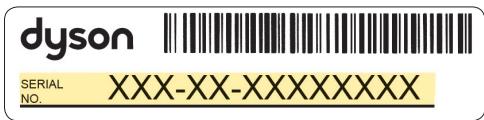
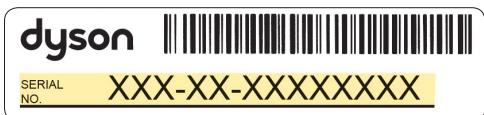
Your serial number can be found on your rating plate which is on the base of your machine.
Note your serial number for future reference.
This illustration is for example purposes only.
How can we help?
Solve a problem
Get tips and guides
Learn about Dyson technology and other Dyson machines
Online:
www.dyson.com
Phone:
0800 298 0298
Dyson customer care
If you have a question about your Dyson cord-free machine, call the Dyson Helpline with your serial number and details of where and when you bought the machine, or contact us through the Dyson website.
IMPORTANT SAFETY INSTRUCTIONS
BEFORE USING THIS APPLIANCE READ ALL INSTRUCTIONS AND CAUTIONARY MARKINGS IN THE USER MANUAL AND ON THE APPLIANCE.
When using an electrical appliance, basic precautions should always be followed, including the following:
WARNING
These warnings apply to the appliance, and also where applicable, to all tools, accessories, chargers, batteries or mains adaptors.
TO REDUCE THE RISK OF FIRE, ELECTRIC SHOCK, OR INJURY:
- This Dyson appliance can be used by children aged from 8 years and above and persons with reduced physical, sensory or reasoning capabilities, or lack of experience and knowledge, only if they have been given supervision or instruction by a responsible person concerning use of the appliance in a safe way and understand the hazards involved. Cleaning and user maintenance should not be performed by children without supervision.
- Do not allow to be used as a toy. Close attention is necessary when used by or near children. Children should be supervised to ensure that they do not play with the appliance.
- Use only as described in your Dyson User manual. Do not carry out any maintenance other than that shown in your User manual, or advised by the Dyson Helpline.
- Suitable for dry locations ONLY. Do not use outdoors or on wet surfaces.
- Do not handle any part of the charger or appliance with wet hands.
- Do not use with a damaged charger or cable.
-
If the appliance is not working as it should, if it has received a sharp blow, if it has been dropped, damaged, left outdoors, or dropped into water, do not use and contact the Dyson Helpline.
-
Contact the Dyson Helpline when a service or repair is required. Do not disassemble the appliance as incorrect reassembly may result in an electric shock or fire.
- Do not stretch the cable or place the cable under strain. Keep the cable away from heated surfaces. Do not close a door on the cable, or pull the cable around sharp edges or corners. Arrange the cable away from traffic areas and where it will not be stepped on or tripped over. Do not run over the cable.
- Do not use to pick up water.
- Do not use to pick up flammable or combustible liquids, such as petrol, or use in areas where they or their vapours may be present.
- Do not pick up anything that is burning or smoking, such as cigarettes, matches, or hot ashes.
- Keep hair, loose clothing, fingers, and all parts of the body away from openings and moving parts, such as the brush bar. Do not point the hose, wand or tools at your eyes or ears or put them in your mouth.
- Do not insert any objects into openings. Do not use with any openings blocked; keep free of dust, lint, hair, and anything that may reduce airflow.
- Use only Dyson recommended accessories and replacement parts.
- Do not use without the clear bin and filter(s) in place.
- Unplug the charger when not in use for extended periods.
- Use extra care when cleaning on stairs.
- To prevent unintentional starting, be careful to keep your hands and fingers away from the power trigger until you are ready to begin vacuuming, especially when picking up or carrying the appliance. Carrying the appliance with your finger on the power trigger invites accidents.
- Do not install, charge or use this appliance outdoors, in a bathroom or within 3 metres (10 feet) of a pool. Do not use on wet surfaces and do not expose to moisture, rain or snow.
- When removing or replacing a motorised brush bar, be careful not to pull the power trigger until the cleaner head has been reassembled.
-
Do not use a battery or appliance that is damaged or modified. Damaged or modified batteries may exhibit unpredictable behaviour resulting in fire, explosion or risk of injury. The battery used in this appliance may present a risk of fire or chemical burn if mistreated. Do not disassemble or short-circuit the battery's supply terminals. Do not expose the battery or appliance to fire or excessive temperatures. Exposure to fire or temperatures above 60^ (140°F) may cause explosion.
-
Use only the Dyson charger for charging this Dyson machine. Use only genuine Dyson batteries as other types may explode, causing injury and damage.
- Disconnect the battery from the appliance before cleaning, maintaining or storing the appliance for extended periods of time.
- When the battery is not in use, keep it away from other metal objects, like paper clips, coins, keys, nails, screws or other small metal objects, that can make a connection from one terminal to another. Shorting the battery terminals together may cause burns or a fire.
- The battery should be removed from the appliance and safely disposed of in accordance with local ordinances or regulations.
- The battery is a sealed unit and under normal circumstances poses no safety concerns. In the unlikely event that liquid leaks from the battery, do not touch the liquid as it may cause irritation or burns, and observe the following precautions:
- Skin contact – can cause irritation. Wash with soap and water.
- Inhalation – can cause respiratory irritation. Expose to fresh air and seek medical advice.
- Eye contact – can cause irritation. Immediately flush eyes thoroughly with water for at least 15 minutes. Seek medical attention.
- Disposal - wear gloves to handle the battery and dispose of immediately, following local ordinances or regulations.
-
Follow all charging instructions and refer to the 'Changing your battery' section for details on how to change the battery. Do not charge the battery or the appliance outside of the temperature range specified in the instructions. Charging improperly or at a temperature outside of the specified range may damage the battery and increase risk of fire.
-
FIRE WARNING – Do not place this appliance on or near a cooker or any other hot surface and do not incinerate this appliance even if it is severely damaged. The battery might catch fire or explode.
- FIRE WARNING – Do not apply any fragrance or scented product to the filter(s) of this appliance. The chemicals in such products are known to be flammable and can cause the appliance to catch fire.
READ AND SAVE THESE INSTRUCTIONS
This Dyson appliance is intended for household use only.
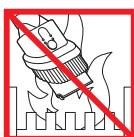
Do not use near naked flames.
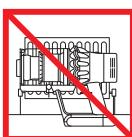
Do not store near heat sources.
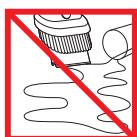
Do not pick up water or liquids.
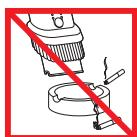
Do not pick up burning objects
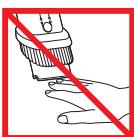
Do not put hands near the brush bar when the appliance is in use.
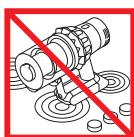
Do not place on or near a cooker.
The screen
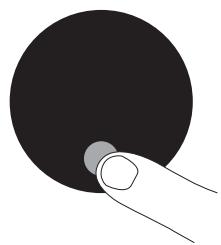
Settings menu
Control the settings on your machine using the Selection button.
To enter the settings menu, press and hold the button until the menu screen appears. Tap to scroll through the options available.
Change language


Follow the steps in the language set-up to change your language.
Change alert setting

Tap to scroll through the settings menu. Select the 'Alerts' option.
Scroll to select on or off. Hold the Selection button until the countdown ends and a tick appears on the screen.
To cancel your selection, release the button during the countdown.
Exit settings menu
To exit the settings menu, tap to scroll through the settings menu. Select 'Exit menu'.
Low battery
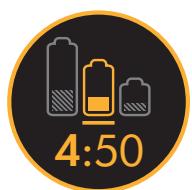
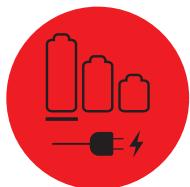
Your machine will pulse three times and a low battery icon will appear on the screen to alert you that your battery needs to be charged.
When your battery is empty, a final warning icon will appear on the screen.
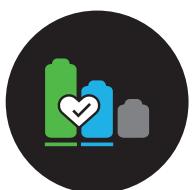
Battery health
To get the best performance and life from your battery, use Eco or Auto/Med mode.
Alerts
Alerts will appear on the screen when your machine needs your attention.
A filter icon will alert you when the filter isn't fitted correctly or needs cleaning.
A blockage icon will alert you when a blockage needs removing from your machine.
Charging and storing your machine
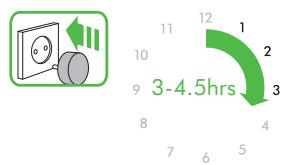
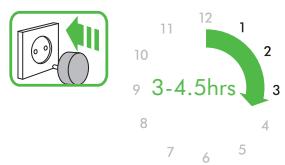
It's important to fully charge your new machine before using it for the first time, and after every clean. This is because the battery and monitoring system's algorithm 'learns' over time, and fully charging your machine helps it to more accurately calculate and display remaining run time.
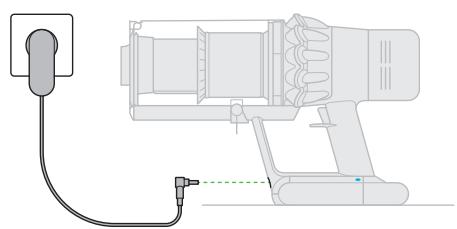

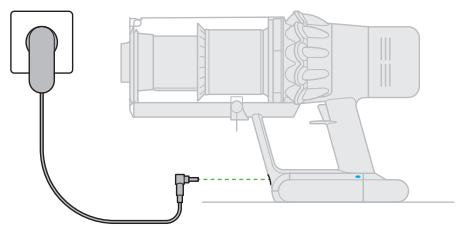
Connect to the charger either directly or in the docking station.
Your machine won't operate if the ambient temperature is below 0^ (32^) . This is designed to protect both the motor and battery.
The blue LEDs on either side of the battery will flash during charging.
When the battery is fully charged, both LEDs will light for 5 seconds.
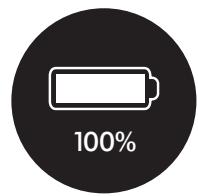
Your battery is fully charged when the display shows 100% .
Changing your battery
Where you have additional batteries, we recommend that you alternate the batteries to maintain even performance.
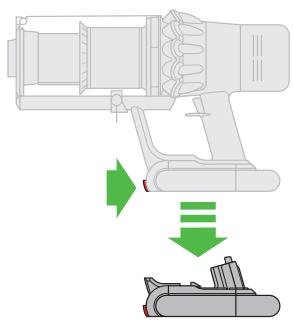
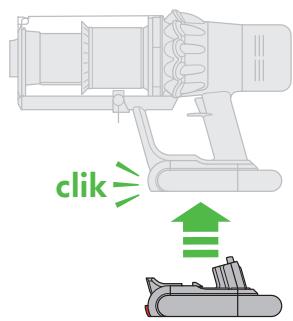
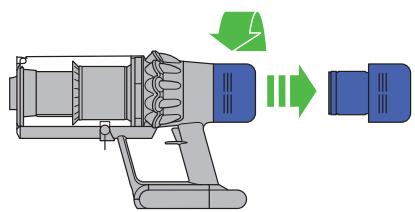
To remove a battery
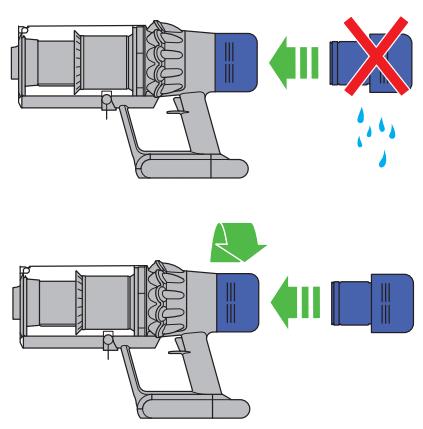
Hold your hand under the battery to support it.
Press the battery release button and slide the battery off the handle.
Place the battery on charge.
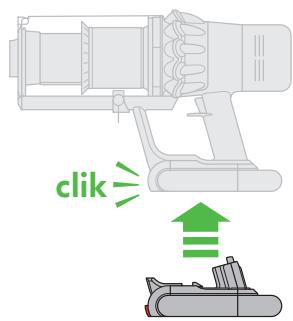
To install a battery Slide the battery onto the handle until it clicks securely in place.
Emptying your clear bin
2
3
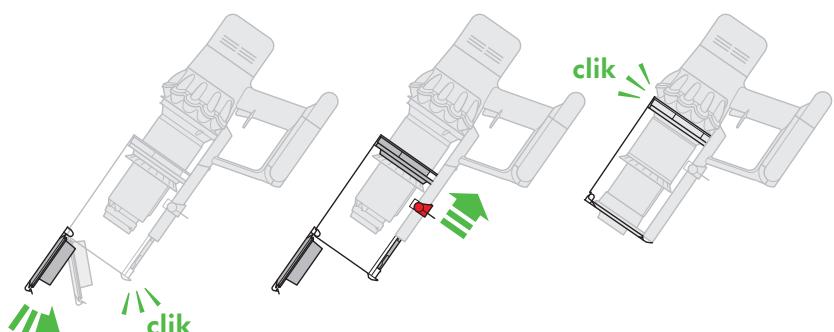
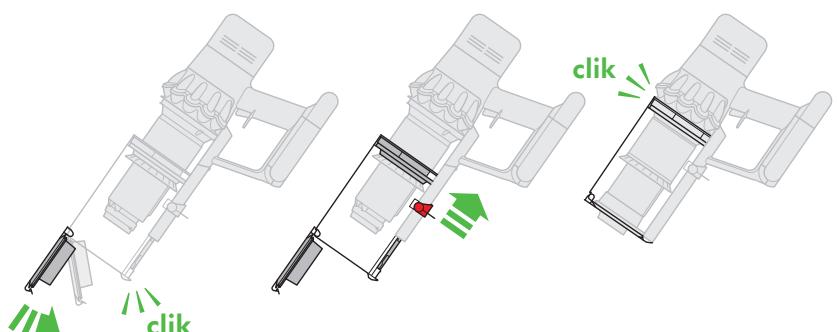
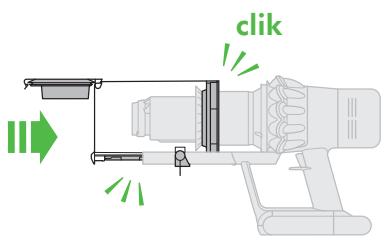
Close the clear bin by pushing the bin base upwards until the clear bin and bin base click into place.
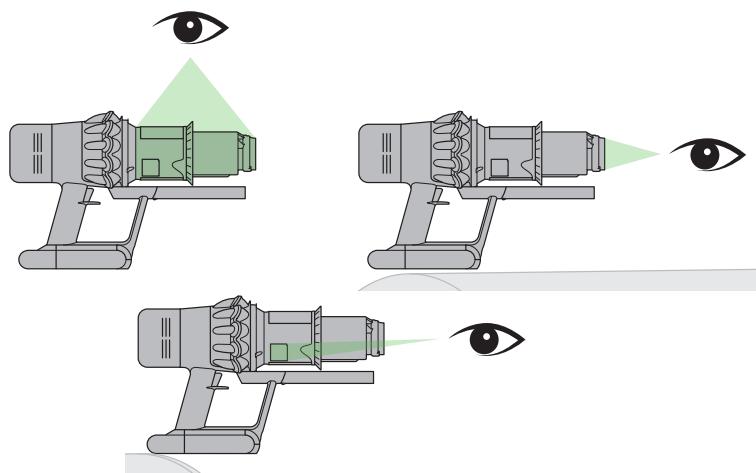
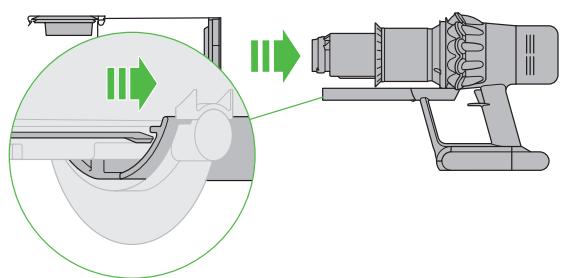
Looking for blockages



1
2
3
4
5
6
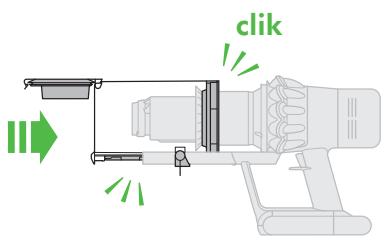
Close the clear bin by pushing the bin base upwards until the clear bin and bin base click into place.
Washing your filter unit

4
5
6
High torque cleaner head maintenance

2
3
1
Additional information
Please read the 'Important safety instructions' in the Dyson User manual before proceeding.
Installing your docking station
Unpack the docking station, charger and installation leaflet.
- Choose a suitable location for the docking station and make sure there is no pipework (gas, water or air), electrical cables, wires or ductwork directly behind the mounting location.
- Don't locate the docking station near a heat source such as a cooker, radiator or in direct sunlight.
- Follow the instructions on the installation leaflet.
- Click the tools into place on the docking station.
- Place the machine into the docking station.
Plug the charger into the mains electricity supply. Switch on (if necessary) to charge the battery.
It's important to fully charge your new machine before using it for the first time, and after every use.
The docking station must be mounted in accordance with regulations and applicable codes/ standards (state and local laws may apply).
Dyson recommends the use of protective clothing, eyewear and materials when installing the docking station.
Using your machine
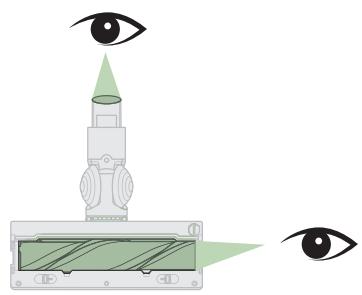
- Check that the underside of the cleaner head or tool is clean and free from foreign objects that may cause damage.
Before vacuuming your flooring, rugs and carpets, check the manufacturer's recommended cleaning instructions. - The brush bar on the machine can damage certain carpet types and floors. Some carpets will fuzz if a rotating brush bar is used when vacuuming. If this happens, we recommend vacuuming without the motorised floor tool and consulting with your flooring manufacturer.
Using your High torque cleaner head
Your High torque cleaner head has a slider control to adjust the suction of the cleaner head. To select the suction required, move the suction control slider on top of the cleaner head. Maximum suction for ground in dust and debris (+)
- For vacuuming durable floor coverings, hard floors and heavily soiled carpets and rugs. Suction for dust and debris (▲)
For vacuuming of lightly soiled carpets, rugs and hard flooring.
For vacuuming of large debris such as peanuts or rice.
Suction for deep pile carpets and delicate flooring (-)
- For vacuuming deep pile carpets or rugs and flooring where you experience greater resistance.
For vacuuming lightly soiled floors, and delicate flooring such as vinyl, parquet and lino.
Emptying your clear bin
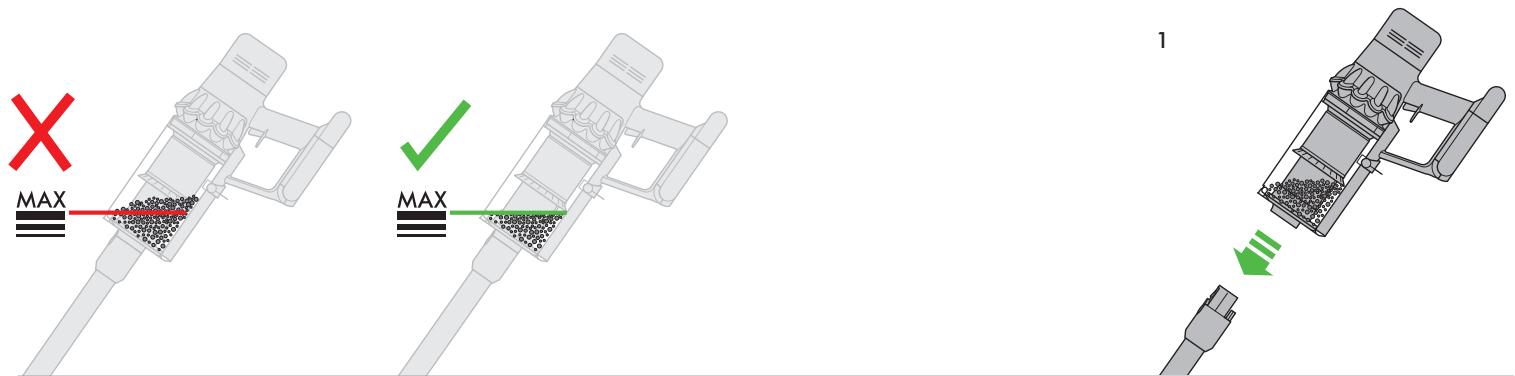
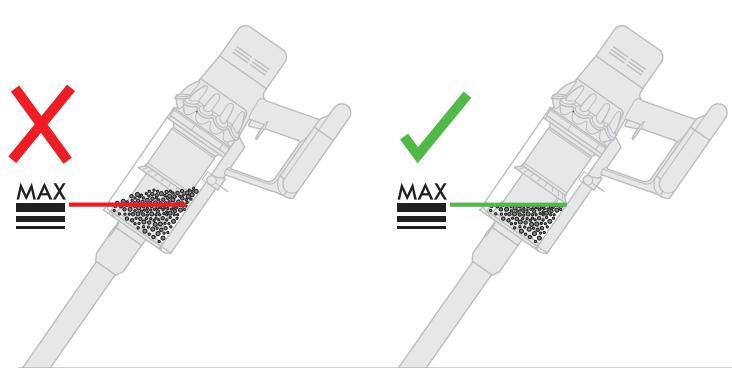
- Empty as soon as the dirt reaches the MAX level – don't overfill. Using the machine when the dirt is above the MAX line may cause the dirt to reach the filter and more frequent maintenance will be required.
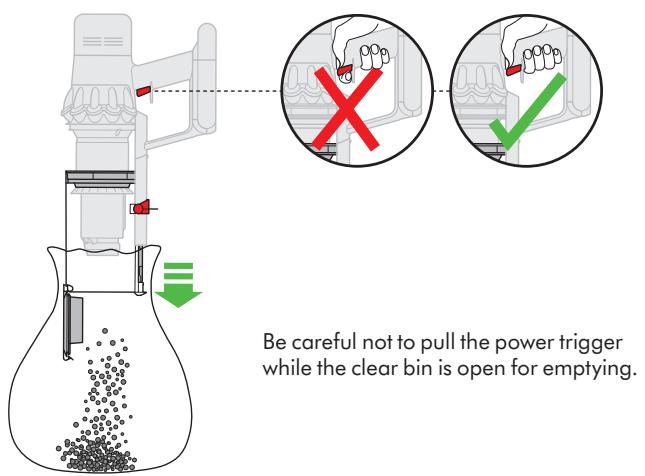
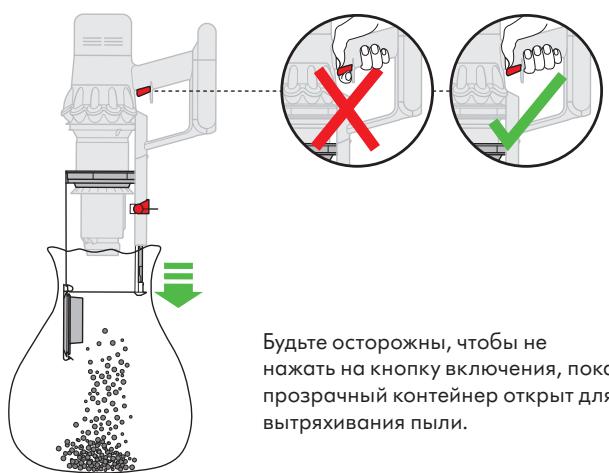
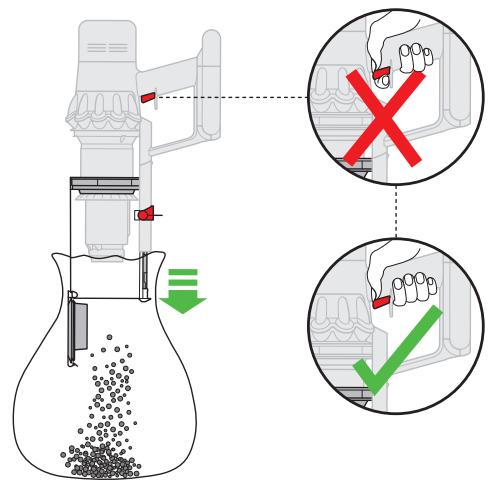
- Be careful not to pull the power trigger while the clear bin is open for emptying.
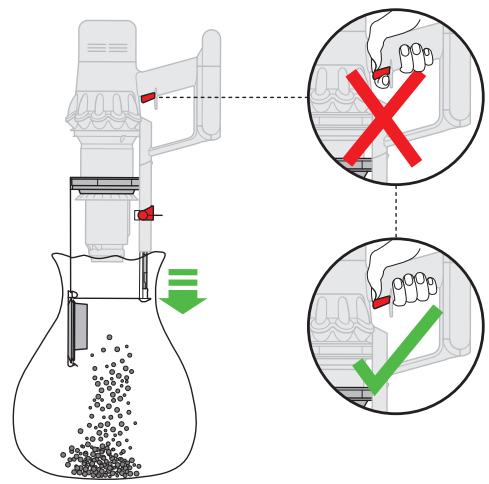
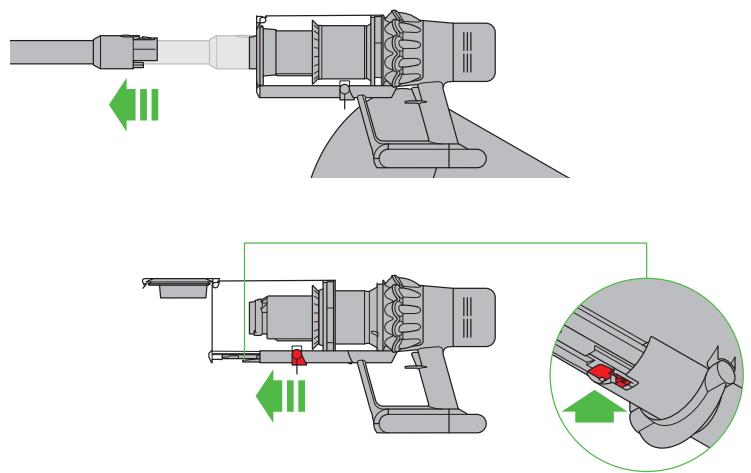
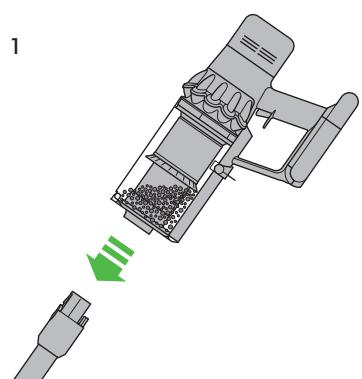
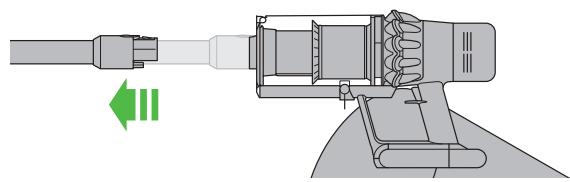
- Press the red wand release button and pull the wand away from the bin.
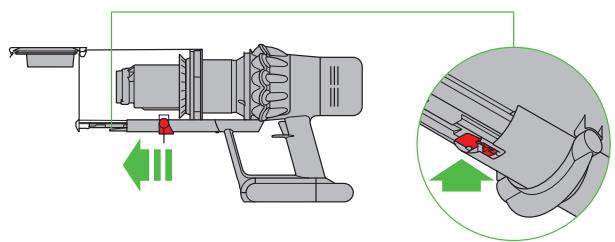
To release the dirt:
Hold the machine over a bin in a downwards position. - Firmly push the red bin release button.
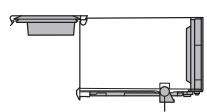
- The bin will slide down, cleaning the shroud as it goes and the bin base will open.
- The bin base won't open if the red bin release button isn't pushed down all the way.
To minimise dust/allergen contact when emptying, cover the clear bin tightly in a dust proof bag while you empty.
Remove the clear bin carefully from the bag. Seal the bag tightly and dispose. Be careful not to pull the power trigger while the clear bin is open for emptying
To close the clear bin:
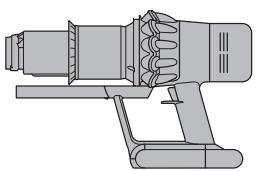
Push the bin base upwards until the clear bin and bin base click into place.
Cleaning your clear bin
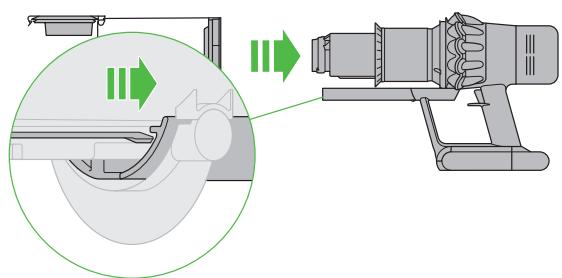
If it is necessary to clean your clear bin, empty the bin as shown in the 'Emptying your clear bin' section.
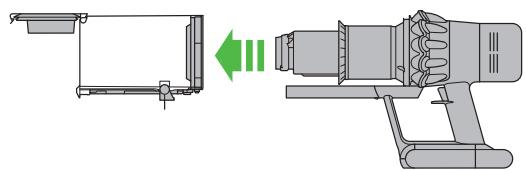
- Press the red button located on the bin runner to release the bin and slide the bin off the runner.
Clean the clear bin with a damp cloth only.
Make sure that the clear bin and seals are completely dry before replacing.
To refit the clear bin:
Insert the spine on to the bin runner. - Close the clear bin by pushing the bin base upwards until the clear bin and bin base click into place.
The clear bin is not dishwasher safe and the use of detergents, polishes or air fresheners to clean the clear bin is not recommended as this may damage your machine.
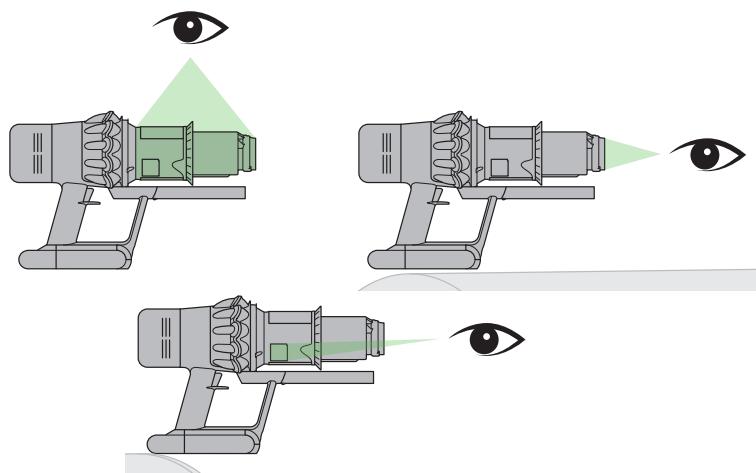
Looking for blockages
- Your machine is fitted with an automatic cut-out. If any part becomes blocked, the machine may automatically cut out.
The motor will pulse and the LCD screen will indicate that there is a blockage. - Leave to cool down before looking for blockages.
- Be careful not to pull the power trigger while looking for blockages.
Make sure any blockages are clear and all parts are refitted before using your machine. - Beware of sharp objects when checking for blockages.
Clearing blockages is not covered by your guarantee. - To check for blockages in the main body of your machine, remove the clear bin following the instructions in the 'Emptying your clear bin' section and remove any blockage.
-
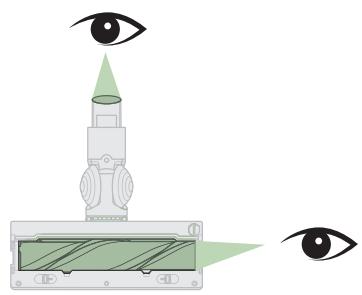
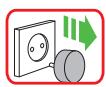
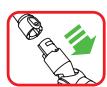
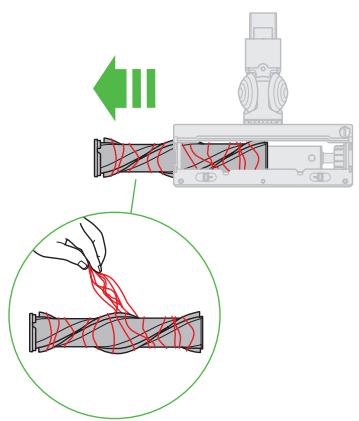
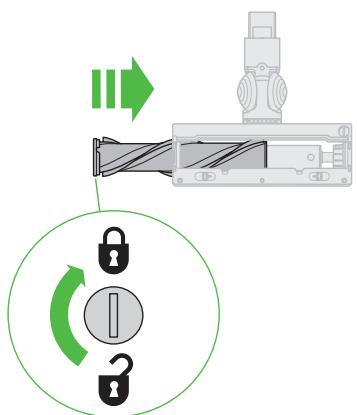
If you can't clear an obstruction from the cleaner head, you may need to remove the brush bar. Use a coin to unlock the fastener, slide the brush bar out of the cleaner head and remove the obstruction. Replace the brush bar and securely tighten the fastener. Make sure it is fixed firmly before using your machine.
-
Your machine has carbon fibre brushes. Take care if coming into contact with them, as they may cause minor skin irritation. Wash your hands after handling the brushes.
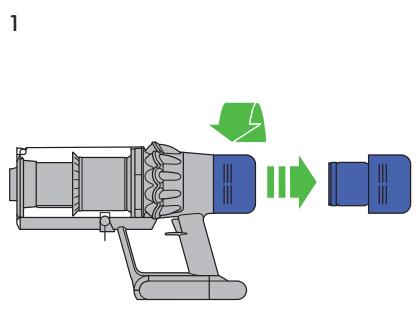
Washing your filter unit
To always get the best performance from your machine, it is important to regularly clean the filters and check for blockages.
The LCD display will alert you when the filter unit needs washing. We recommend that you wash your filter at least once a month or when your machine alerts you.
- Remove the filter unit by twisting it anticlockwise. Gently pull away from the machine.
- Tap the filter unit gently, to remove any excess dust and debris before washing it.
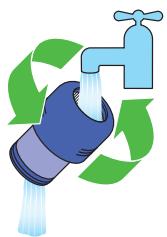
- Wash the filter unit in cold water only.
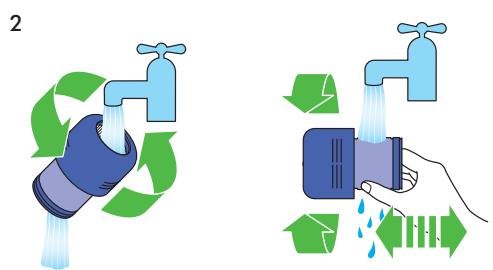
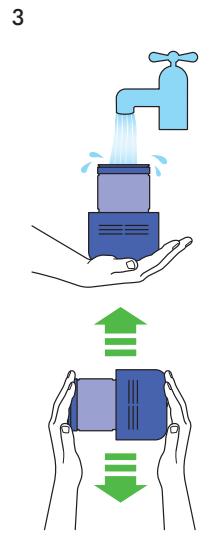
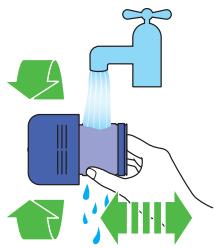
- Wash the pleated paper element of the filter unit first; hold the filter unit under a cold water tap with the foam element downwards and run cold water over the pleated paper.
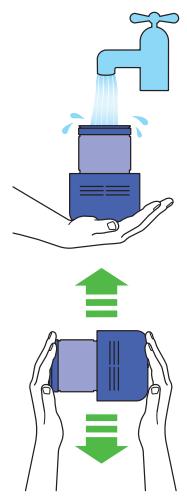
- Wash the foam element of the filter unit next; hold the filter unit under a cold water tap with the foam element downwards so that dirty water does not contaminate the pleated paper element. Run cold water over the inside and outside of the foam element and squeeze the foam gently to expel the dirt.
Repeat washing both parts of the filter unit until the water runs clear.
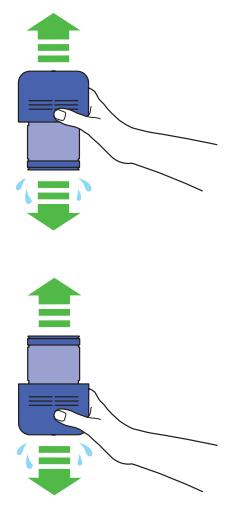
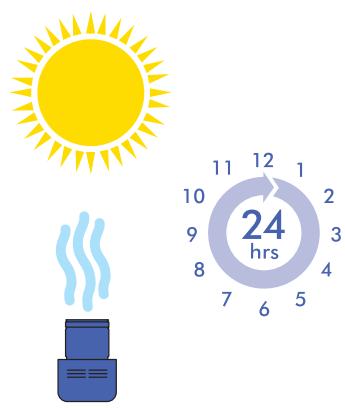
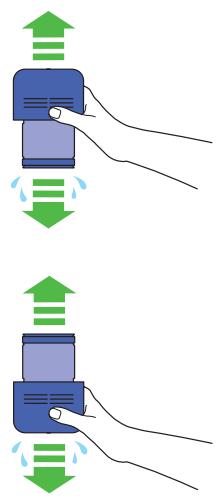
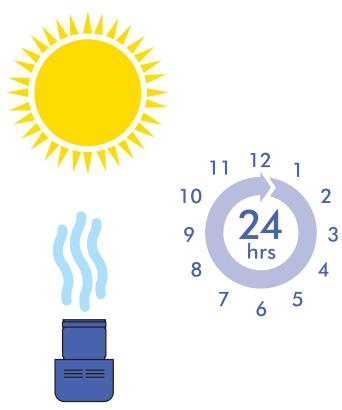
Gently shake the filter unit to remove any excess water and leave to drain with the foam element end facing up. - Leave the filter unit to dry completely in a dry environment with good airflow, for a minimum of 24 hours.
Check that the filter unit is completely dry.
To refit, position the filter unit in place on the main body and twist clockwise until it clicks into place.
The filter unit may require more frequent washing if vacuuming fine dust or if use is mainly in Boost mode.
Don't put any part of your machine in a dishwasher, washing machine, tumble dryer, oven, microwave or near a naked flame.
Looking after your High torque cleaner head
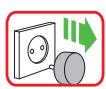
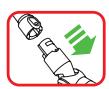
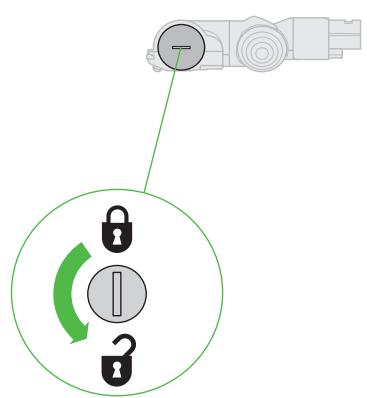
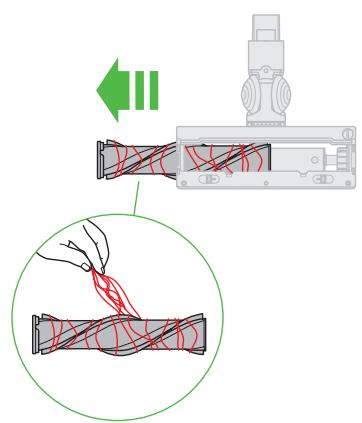
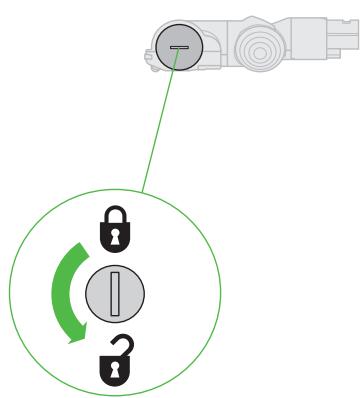
Turn the cleaner head upside down. Use a coin to turn the end cap a quarter anticlockwise until it clicks into the unlocked position.
- Slide the brush bar out of the cleaner head.
- Remove any hair, carpet fibres or other debris from the brush bar.
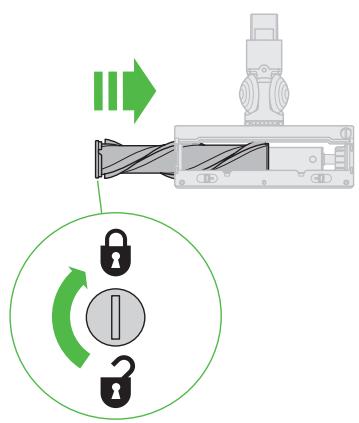
- Slide the brush bar back into the cleaner head.
- Turn the end cap a quarter turn until it clicks into the locked position.
Charging and storing
- Your machine won't operate or charge if the ambient temperature is below 5^ ( 41^ ). This is designed to protect both the motor and battery. The recommended temperature range for storage, operating and charging your machine is between 18^ ( 64^ ) and 28^ ( 82^ ).
- To help prolong battery life, avoid recharging immediately after a full discharge. Allow to cool for a few minutes.
- Avoid using the machine with the battery flush to a surface. This will help it run cooler and prolong battery run time and life.
Battery safety instructions
If the battery needs replacing, please contact the Dyson Helpline.
- Use only the Dyson charger for charging this Dyson appliance. Use only genuine Dyson batteries as other types may explode, causing injury and damage. If either part needs replacing, use only the Dyson Part Numbers provided at the end of the 'Additional information' section.

Caution
The battery used in this machine may present a risk of fire or chemical burn if mistreated.
Do not short contacts, heat above 60^ (140°F) or incinerate. Keep away from children.
Do not disassemble or dispose of in fire.
Disposal information
- Dyson products are made from high grade recyclable materials. Recycle where possible.
The battery should be removed from the machine before disposal. - Dispose of or recycle the battery in accordance with local ordinances or regulations.
- Dispose of the exhausted filter unit in accordance with local ordinances or regulations.
This symbol indicates that this machine should not be disposed with your general household waste. To prevent possible harm to the environment or human health from uncontrolled waste disposal, recycle it responsibly to promote the sustainable reuse of material resources. When this machine has reached the end of its serviceable life, please take it to a recognised WEEE (Waste Electrical and Electronic Equipment) collection facility such as your local civic amenity site for recycling. Your local authority or retailer will be able to advise you of your nearest recycling facility.
Limited 2-year guarantee
Terms and conditions of the Dyson 2-year limited guarantee are set out below. The name and address details of the Dyson guarantor for your country are set out elsewhere in this document - please refer to the table setting out these details.
What is covered
- The repair or replacement of your Dyson machine (at Dyson's discretion) if it is found to be defective due to faulty materials, workmanship or function within two years of purchase or delivery (if any part is no longer available or out of manufacture, Dyson will replace it with a functional replacement part).
- Where this machine is sold outside of the EU, this guarantee will only be valid if the machine is used in the country in which it was sold.
- Where this machine is sold within the EU, this guarantee will only be valid (i) if the machine is used in the country in which it was sold or (ii) if the machine is used in Austria, Belgium, Denmark, Finland, France, Germany, Ireland, Italy, Netherlands, Norway, Poland, Spain, Sweden, Switzerland or the United Kingdom and the same model as this machine is sold at the same voltage rating in the relevant country.
What is not covered
Dyson does not guarantee the repair or replacement of a product where a defect is the result of:
- Accidental damage, faults caused by negligent use or care, misuse, neglect, carelessness or operation or handling of the machine which is not in accordance with the Dyson User manual.
Use of the machine for anything other than normal domestic household purposes.
Use of parts not assembled or installed in accordance with the instructions of Dyson.
Use of parts and accessories which are not genuine Dyson components. - Faulty installation (except where installed by Dyson).
Repairs or alterations carried out by parties other than Dyson or its authorised agents. - Blockages – refer to the Dyson User manual for details on how to look for and clear blockages.
Normal wear and tear (e.g. fuse, brush bar etc.).
Use of this machine on rubble, ash, plaster.
Reduction in battery discharge time due to battery age or use (where applicable).
If you are in any doubt as to what is covered by your guarantee, please contact the
Dyson Helpline.
Summary of cover
The guarantee becomes effective from the date of purchase (or the date of delivery if this is later).
You must provide proof of (both the original and any subsequent) delivery/purchase before any work can be carried out on your Dyson machine. Without this proof, any work carried out will be chargeable. Keep your receipt or delivery note.
All work will be carried out by Dyson or its authorised agents
Any parts which are replaced by Dyson will become the property of Dyson.
The repair or replacement of your Dyson machine under guarantee will not extend the period of guarantee unless this is required by local law in the country of purchase.
The guarantee provides benefits which are additional to and do not affect your statutory rights as a consumer and will apply whether you purchased your product directly from Dyson or from a third party.
Important data protection information
When registering your Dyson machine:
- You will need to provide us with basic contact information to register your machine and enable us to support your guarantee.
- When you register, you will have the opportunity to choose whether you would like to receive communications from us. If you opt-in to communications from Dyson, we will send you details of special offers and news of our latest innovations.
We never sell your information to third parties and only use information that you share with us as defined by our privacy policies which are available on our website at privacy.dyson.com.
Dyson part numbers
Dyson battery Part Number: 355983
Dyson charger Part Number: 217160 / 270576
DE/AT/CH
This illustration is for example purposes only.
KakMbI MOXeM NOMOyb?
PeeHne npo6IeMbI
IOne3HbIE COBtBi IpyKOBoDCTBa
Y3haIte 6OJIbIe o TExHOrnIax I pyroI TeXnIke Dyson
Be6-caHr:
www.dyson.com.ru
TeIeΦoH: 8-800-100-100-2
Cnyk6a noDepxKn KJIneHTOB Dyson
Ecni y Bac ectb BOpocbl,
OTHOscIeNecK 6ecnpoBODHomy
PiJIeCocCy Dyson,Bbl MoJKeTe
IO3BOHnTb BCnyk6y NODepxKKn
KOMpaHn Dyson,Ha3BAB cepHnbI
Homep n yka3ab, rJe N KOrda
Bbl npno6peHn ycTroPoiCTBO,NII
CBraTbcr C Hamn Chepe3 Be6-caIT
KOMpaHn Dyson.
BAJKHbIE INHCTPYKcINI NO TEXHNKE B3OpAChOCTN
ПЕД ИСПОЛБ3OBAHиEM YCTPOИCTBA
ПОЧТАITE BCE ИНСТРУКЦИ N
ПЕДУПЕЖДEHЯВДAHHOM PYKOBODCTBE
ИHA YCTPOИCTBE
Прип польбовани заекторпором небхODIMО BCERДа COБЛЮДАТВ OCHOВНБIE Меры пет dioctopoxKHOCTN, BKJIQUAЯ Te, YTO ПриveDeHbI HIXe:
ПРЕДУПЕЖДЕНЕ
3TN npedynpejdeHnOTHOCrTc K yCTPOICTBY, a TAKKe K JIObIM CbeMHbIM npncnOcoJIeHnAM, npHaJleJekHOCTaM, 3apdHbIM yCTPOICTBAM n aadantepam NITAHN B CnyaX, rDe OHI npimehmbl.
BO N36EKAHNE PNUCKA BO3ΓOPAHNIA, NOPAXEHNJ əJIeKTPnueCKHm TOKOM INIIN IONUyeHnJ TPABMbI:
1.ДeTN B BO3pacte ot 8 let,Лиca C OrpaHnueHHbIMN Φn3nueCKnIMN,CEHCOPHBIMN IIN YMCTBHeHHbIMN BO3MOxHOCTaMn, a TAKKe JInuA,He IMeIOUne IOCTaTOUHOrO OnblTa N3HaHn,MOyT nCNoJIb3OBaTB 3TO yCTpoIcTB Dyson ToIbKO B npICyTCTBnI chelOBeka,OTBeuaIOUeTo 3a Hx 6e3OnacHOCTb, IINI NOcIe NOJyEHNr OT OTBETCTBEHNO rIiua INHcTpYkUnn PO 6e3OnaChOMy NCNoJIb3OBaHNu yCTpoIcTBa pRn ycIOBnI PONHMAnr CyIeCTByIOUx pNcKOB. OuchTKa n OcyuIeCTBnJeMoE nOJIb3OBaTeJIem O6cJIyXKNBaHne yCTpoIcTBa He DoJIxKnbl BblONHЯTbCra DeTbMn 6e3 npNCMOTpa.
2. He pa3pewaTe DeTm HrpaTb C yCTpOcTBOM. BybTe OueHb 6dnteIbHbI npn HCNoIb3OBaHHu YCTPOcTBA DeTbMn IIN pAOM C DeTbMn. 3KcNpyatauny cTPOcTBA DeTbMn BO3MOxHa TOJbKO NOD NOCToRHHbIM PnCmOTpOM B3PocJIbIX, YTO6bl DeTI He HrpaJIc HIM.
3. Исторы усторь Толков
В сождатов Суха Заням руховская
постбателу Dyson. He вишийся работы
no o6cnyxHBAHnO CAMoCToTeJbHo, Kpome yKa3aHHbIX B daHHOM pyKOBOdCTBe nIpeKOMeHDoBAHhIX cLyX6oN PoJaepKKKn KOMpaHn Dyson.
- Претимаизуени Ддя Испльбованя TOЛьКО в сухи мecтax. He ИсплььзуITE ВHEnomeшии Или НВ ЛжхьIx NOBepxHOCTЯX.
- He kacaitecbs kaKx-ln6o deTaJe yctpoiCTBa Hnn 3apAHO rOyctpoiCTBa BlaJXhIM pykAmn.
- He И сп пользуйуte устpoиство с повржденьblIM 3аразднblIM устpoиством Или Кабелем.
- Ecnn yctpoiCTBO He pa6oTaet, KaKdoJXHo, ecn no Hemy 6bln HaneceH pe3Kn yIap, ecn erO yPOHNI, NOBpeINI, OCTABNl Ha YIuIe IINI OHO NOnaIO B BOy, He NCNoJIb3yIte DaHHoe yCTpOiCTBO n O6paTInTeCb No TeJeΦOHy B cIyJ6by POndepxKk KOMPAnH N Dyson.
- Приноховимости роведеня облуживannahи пи ремонта образпесь В слжбу подержки Компанни Dyson. He pa3бираиte устpoистBO, tak кak зTO может сты пчноги пожара пи пожени эльекшическIM TOKOM.
- He pactaHbAitne HHe HataTnBaIte Ka6eJIb cInuKOM CInbHO. IepXHTe Ka6eJIb BdaJIN ot ropauHX NOBepxHocTe. He 3aUeMIAyTe Ka6eJIb DBePAM, He HAmATbIBaIte erO BOKpyr oCTpbIX KpaEB NIn yrIOB. He pacnoJaraIte Ka6eJIb B npoxoJax N B MeCTax, rJe Ha Hero MOnxHO HAcTyINtB NIn CNOTKHytbcra O6 Hero. He nepexHMaIte Ka6eJIb.
- He nCnoJIb3yIte IJy6OpKJ XnIDKoCTeJ.
- He noIb3yItecb nbIeCocOM dIa c6opa IeRKOBOcPnIaMeHraUxxCra NIIb B3pbIBOONaCHbIX XnIDKoCTe, TAKNX KAc 6eH3IN, n He NOIb3yItecb nbIeCocOM B MeCTax, rDe MOryt HAXODITbcr TaKHe XnIDKOCTN IIN INX napbl.
- He nCloNoJIb3yIte dIra c6opa rOpAJero nIIN TLeIoUeO MyCopa, TaKOrO KaK CnIrapTebl, CnNcKN nIIr rOpAur nepeI.
- CJIeIInTe, UTo6bI BOJocbl, KpaI OJeKdbI, PJIbUcbl I dpyrIe qactn TeJa He nOJaIaII IN OTBepCTnI INI NODBIXHbIe DeTAlN, HApPIMep B uETKy. He hAnpabIaIte IlaHr, Tpy6ky IN HAcAdkN B rIa3a IIIN yShn I He 6epIte INX B pot.
- He BCTabJnTe KaKHe-Jn6o npEmdetbI B OTBepCTnHa. He nCnoJIb3yIne YcTpoNCTBO, ecn erO OTBepCTnA 3a6NoKnpOBaHbI; CNeDnTe 3a TeM, yTO6bl Nblb, MyCop, BOIOcbI n np. He MeaJIn CBo6OdHOMy npOXxJdeHIO BO3dyuHOrO NOTOKa.
- Историяа толбко pekomehdyeMbie Dyson akceccyapbl n 3aunactn.
- He nCnoJIb3yIte, ecn He yCTaHOBJIeH npO3paHbI KONTeHep nnΦnblTp.
- OToCoeIHHaTe 3apraHoe yCTPOiCTBO OT cETn npN dIInTeJbHbIX nepepbIbAX B IcNoJIb3OBAHnN.
18.Будъе краиHe aKKypaTHbI npu y6opKe leCTHnU.
19.Bo n36exkHne cnyaHoro BKIOUeHn 6ydbTe ocToPOxHbI H He NODHOCTpe pyKn I naIbCuI K KypKByKJIIOUeHn, NOKa He 6yJeTe rOToBbl Haatb y6OpKy, OcOBeHHo KOrda Bbl 6epTe nn nepeHocHTe yCTpoiCTBO. Ecnn nepeHocHTb yCTpOoiCTBO, YdepXHBaI naLeu HA KypKe BKLIOUeHn, MoXeT pON3OHTN HeCuaCTHbI CNYaA.
20.Данhoe yctpoCTBO HeIb3a YcTahABnIBaTB, 3apjXaTB n HcNoJb3OBaTB BHe NOMEuEHNIA, BBAHHoKOMHATE nIN B ppeJeIax 3 MeTpOB ot 6accSeHa. He nCnoJb3yIte erO Ha BnaJxHbIX NOBepxHOCTaX n He IIOBBePraIte Bo3deIcTBnIO CbIpOCTN,doKJa nn Chera.
21. Пи сягейни замеоне щелковудь te octopokны, утоби He habжат ha Курok BKliюевеля, пoka He yctahOBITE Hacadky.
22. He IncnoJb3yIte aKKymyIaTOp nIIu yCTpoiCTBO B clyuae noBpeKJeHnA IIu MoIINKauN. IcNoJIb3OBaHne NOBpeKDeHHbIX IINI MOIINCuIPoBAHbIX aKKymyIaTOpOB MOKeT npIBeCTN K HEnpeDcKa3yeMOMy pe3yIbTaTy N CTaTB IIpuHIO NoXapA, B3pbIBA IIIN HAHeCEHn TpABMbI. He nOdbepraIte aKKymyIaTOp IINI yCTPOIcTBO BO3deIcTBnO ORHn IINI BBICOKNX Tempeatyp. IOD BO3dEICTBHeM OTHr IINI pRITempePAtype Bblwe 60^ BO3MOxeh B3pbIB.
23.ДяЗарядк npибopa Dyson Использун TeToльko 3apядhoe yctpoiCTBO Dyson.ИспоьзунTe TolькО opигн�аьньie 6aTapeN Dyson,Тak кak 6aTapeN ДpyrOro TnnaMOryT B3OpBaTbcR,чTO npINBeIeT K TpabMaMи MaTepHaJIbHOMy uшер6y.
24. OTKJIIOUaIte aKKyMylAToP OT yCTpoiCTBa nepei ouHcTKoJ, o6CJIyXkHBaHnEM nIN dJIInTeJbHbIMn nepepbIbAMN B IcNoJIb3OBAHnN.
25. Korda aKKymyIaTOp He nCNoJIb3YeTcra, Āperknte erO BДaIи OT dpyrHx MeTaJInuecknx npEIMTeOB, TAKHX KAK cKpeKN, MOHeTbI, KJIIOUH, rBO3dN, BnHTbI IJI N dpyrHne MeJIKne MeTaJInueckne npEIMTeB, KOTOpblE MOryt 3aMKHyTb KJIeMMbl aKKymyIaTOpa. 3aMbIkaHne KJIeMM aKKymyIaTOpa MoKeT npINBeCTn K OXoRam HJIN BO3HnKHOBENIO NOkapa.
26.ИЗВЛЕЧЕНЕ эЛЯМЕNTOB ПИТAHЯ ИЗ yCTpoIcTBa
ИХ 6e3ОпаСнЯ YТИЛиЗаця ДOLЖНы
OCUŞECTBЛЯТьСЯ B COOTВETCTВИ N C MECTHBIMN
ПпEDПИСАHЯМN ИЛ NIOCTAHOBJIeHЯМN.
27. AkkymларTopявлгетс repMeTHuHbIM yctpoiCTBOMИВ HOpMaJIbHbIX YcIIOBnIX He npedctabJareT onaChOCTn. BepoarTHocTb yteukn 3JIeKtpoJInta n3 AkkymларTopa KpaHne
MaJIa, Ho ecJn 3TO cIyUHIOcB, He TpOraIte 3JIeKTpOJInt, NockoJIbKY OH MOxET Bbl3BAbT bpa3dpaXeHne HJIOn OXoRn, n CO6JIuOJaIte CJIeDyUOJIne MepbI IpeIOCTOPOXHOCTN:
- Пи Контakte с кожей BO3MOЖно pa3драожени. Помойт e npажень bИ учactOK BODО CMbILOM.
BdIxHne 3JeKtpoIHTa MoKeT npINBeCTN K pa3dpaxeHNIO BepxHNX DbIXATEJIbHbIX NpTei. BbIIndTe Ha CBexn B03dyx n O6paTITecb 3a MeDnCnHcKo IOMOuI. - Пи пonaдань в гла3a BO3MOжно раздрахенье. Немеделно ТцаTeьно помоітse Гла3a ВODОВ Тсчене КAK минимуm 15 минут. Oбразпесь За менинсков ронOMICь.
- YtNiI3aun: npn o6paueHnn c aKKymyIaTOPOM HaeBaIte nepuATKn, a 3aTeM HeMeJleHNO YtNiI3npyIe Ix B COOTBcTCTBn C MeCThblIMn npabNlAmn HOpMaMn.
- CnéduyIte Bcem HNCTpyKcIyM NO 3apJdKe yctpoiCTBa, npeIcTABJIeHHbIM B DaHHom pyKOBOIDCTBe, IN He NbITaIteCb OCyUeCTBlABytB 3apJdKy yCTpoiCTBa, HaxOJaIeROcBHe pa6ooyero dHaapana3OHa TeMnepaTyp, yKa3aHHO B daHNOM pyKOBOIDCTBe. HenpaBnIbHaj 3apJdKa yCTpoiCTBa IN 3apJdKa, npoBOJaIaYcR BOBHe pa6ooyero dHaapana3OHa TeMnepaTyp, MOryt npINBeCTN K NOBpeJdeHInO aKKymJyTopa IN IOBbICHTb pNCK erO BO3rOpAHNIA.
- ПЕДУПЕЖДEHNE O NOXAKOONACHOCTH. He pa3MeaTe DAHHOE ySTPOJCTBO Ha NNITE NIN PRAOM C NNITOn HIN C JIO6bIMN DpyrIMN ROPaUMN NOBepxHOCTaMn Hc CXNIGaIte DaHHoe YCTPOJCTBO DAKe B TOM CJIyae,ecNI OHO cINbHo NOBpeKdEHO.AKKymJrTOp MOKeT BCnblxHyTB HIN B3OpBaTbcra.
- INPEДУПЕЖДECHNE O NOXAKOONACHOCTN. He npimehnyTe KФильтам данногу устpoиctBa KaKne-лбо apomatn3npyuОпe Или napfOMepHbIe npodukTBi. XmMnueckne BeшесТВВ TAKNX pOdykTAX YBJIaOTcR ЛergKOBocPJIamEHaJOUIMMnCЯ mOryT npINBECTN K BO3rOpAHNo ySTpoiCTBa.
ПОНТАЛТЕ И COXРАНTE ДАHHыE INHСТРУКЦИN
Данhoe устpoистBO Dyson пеДнанЗначенToлькОдЯ 6ытOBOrO NOьзOBAHЯ.
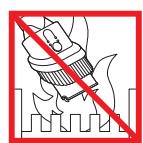
He nconlonb3yTe B6n3n OTKpbitoro orHa.
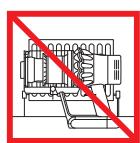
He xpaHnTe B6Jn3n HcToUHKnOB TeTnla.
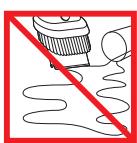
He ncpnoIb3yIte IJIy6OpKn BOblnKIOKCTe.
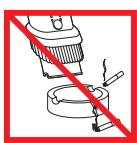
He nconnobnyte npy6opkn ropauxnpedmetob.
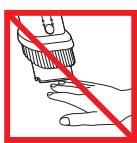
He KnaDnTe pykn B03eJeTkn npn nCnNoB3OBAHNy UcTpoCTBa.
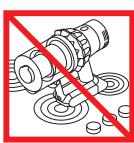
He pa3meaaihe Ha nIInTe HnI pRdOM C nIInToi.
Диспел'
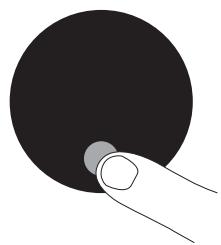
KhoNka BbI6opa
HactpoKn yctpoiCTBa MoxHO N3MeHrTb C NOMOJIbIO KhoNk BvIbOpa.
YTo6bI BoHTn B MeHIO HAcTpoE, HaxMnte N yDepXNBaITE KHNky Do Tex nop, noka He noRbNTcra 3KpaH MeHIO. HaxMaIte DnI pOKpyTKn DOCTyINbIX BapNaHTOB.
I3MeHeHneЯ3bIka


YTo6bI IN3MeHHTb Ra3bIK, BbIIOHNHe DeiCTBnB HAcTPOiKAX Ra3bika.
H3MeHeHne HAcTPOKn ONoBeUeHnA

Haxmamte Dn npokpytk MeHIO hactpoek. BbIbepnte NykT «Alerts》 (PpeynpekjdeHn).
BbINOHNTE npokpykTy dIy BKNIOUeHn IIN OTKIOUeHn N yDepXHBaTe KHOKNy DO OKOHuaHn 6bpaTHoro OTCeta, nocne yero Ha dnCnnee noBHTcraNoOka.
YTo6bl OTMeHntb BbI6Op, OTNCTnTe KHOKNy BO BpEmo6pathoro OTCeta.
BbIXoI N3 MeHIO HactpoeK
ДяВьIxOda n3 MeHIO HAcTpoek Haxmamte KhoNky dIЯ npokpyTKn MeHIO. Bb6epnte «Exit menu» (BbInTu n3 MeHIO).
Hn3kn ypoBHeh 3apraa aKKymyIaTOPa
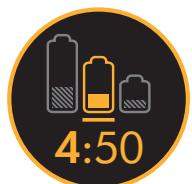
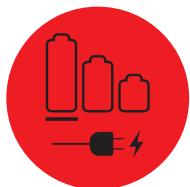
Ha dncnlee oTo6paKaetaeTc npdeynpeXeHne, KOrda yPoBeHb 3apraa AkKymlaTopa CTaHOBNTc H3KmM.
KordaakkymytaTop noJIHOCTbIO pa3PraNTcRA,Ha dIscnlee NOBHTc3 HAuOK nocJeHero npedynpeJckdHna.
CocToHnne aKKymyIaTOPa
Дя ообсенья lyшew npoH3BOdnteHbHocTn yBvEJIyehnCpoka cIyJ6bl aKkymJYrTopa nCNoJIb3yUte peKIM «Eco» (3ko) n «Auto/Med» (ABTO/CpeDnH).
PpeDynpexKeHnna
PpeDynpexdHnnoBnIOTcHa Dncnnee, KOrDa Baoe yCTpoIcTBo Tpe6yeT BnHMAnHn.
I3o6paqxeHne fnlbtpa 03hauaet, yTO fnlbTp yCTAHOBHeH HnpeBaHbHO nIu Tpe6yeT o6cnyxHBaHn.
Избражени заса ознayaet,уTO Tpe6yETc yCTpaHHTb 3acopenerB yCTpoICTBE.
3apraKa n xpaHene yctpoiCTBa
Ppeepnepbim HcnoIb3ObaHem nNoceKaXdoy y6OpKn BAXHO NoNHOCTbO 3aPrJaKbTb HOBOE yCTPOiCTBO.3To Heo6xOJIMTO, TAK KAnrOpHTM paBOtBt AKKymyTAIOpN CnCTEmBo MOnHTOPHNFa (nOlyuayet CBeDeHnry Ypee3 HeKOTOpoe BPmE, n ONNHa3apAKnC yCTPOiCTBa NOMoFAET Emy BoJeet TOUHO paccuHbIBaTb N OTO6paKbTa octabweecr BPMePAoBtI.
IopKJIIOUHTe yctpoiCTBO HENOCpeDCTBENHO K3apJADOMy yCTPOICTBY HIN YCTAHOBITE ERO B DOK-CTAHUNO.
YcTpoCTBO He 6yIeT pa6oTaTb npn TeMpePaType OkpykaOuSei cpebl Hnke O°C (32°F). TaKIM o6pa30m o6ecneuBaetcra 3aunita 3JNeKTPOdBnAteIa n AkkymyIaTropHoi 6atapen.
Bo Bpem 3apdKn 6ydyT Mngatb cnHHe HnDnKaTopbI, PO ODHOMY C kaxdo CTopoHbI aKKMyJrTopa.
Korda aKKymyIaTOp 3apJIITcra, o6a HnDnKATopa BkLIOUaTcra Ha 5ceyHa,a 3aTeM nOracHT.
Akkymytnop3apxkeH, KOrda Ha dinpnee yka3aH ypoBeHb 3apra 100%.
3aMeHa aKKymyIaTOpHoi 6aTapei
Pn HauHnHnnDOnOJHnHTeJIbHbIx 6aTapei peKomeHcyETcN xpeYyIrpHoeYepeoBOAHne dIy oBecneueHHN OINHAKOBn npOn3BOJNTbHOCTN.
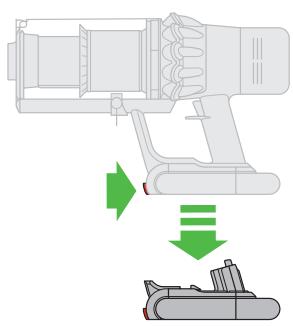
OToeHHeHne
aKKyMJIaTOpHoi 6aTapei
PomeCTnTe pyKu noi
6aTaapeo, yTo6bl
noDaeKbBaTb ee.
HaKMITE KHOKNy FHKcaunn
aKKyMJIaTOpHoi 6aTapeu n
OTcoeHNHTe ee ot pyKn.
PiocTabBe 6aTaapeo Ha
3apJky.
YctaHObKa
aKKymyIaTOPOH 6aTapeH
BCTaBte aKKymyIaTOPOHyO
6aTapeH b pyKoTky do
UeNka.
Onyctошени пpo3pauchoro KOHTeHepa
2
3
3aKpOte npo3paunbI KOtHeHep, npoDbNHyB OCHOBAHne npo3paunHO KOtHeHepa BBepx Do ueuKa.
Понь Засоров



1
2
3

4
5
6
3aKpoTe npo3paHbI KOHTeHep,
npOdBnHyOBCHOBaHne npO3paHoro
KoHTeHepa BBepx Do 1uKa.
OuHCTKaΦnJIbTpα

1
2
3
4
5
6

O6cIyXnBaHne HacadKn C BbICOKm KpyTaym MOMeHTOM

2
3
1
IPEEDIPOIOJIKEHENEMO3HAKOMbTcB CBAKHBIMN INHCTPYKUJMI N ITO TEXHIKE B3OPIACHOCTIN DAHHOM PYKOBOIDCTBE DYSON IO 3KCIPLYATAUIN.
YCTAHOBKA HACTEHORO KpenneHn
- OoctaHbTe n3 ynaKOBKn dok-CTaHcNIO, 3apraHoe yctpoiCTBO n HnctpyKcNIO no yctaHOBKe.
Bb6epnte MeTo dIyCTAHOBKn HactEHHOro KpeIeHnraTak, TTO6bl HenocepTeBHeHO 3a HactEHbIM KpeINeHnem He 6bIIO ty6 (raOBoVbIX, BOOpNOBcHbIX INI BENTHNIaIooHHbIX), 3JeKtpuyecknx Ka6eNei, npOBodN Ka6eBbHbIX Kopo6OB.
He p3aMeuai Te HaceHHe KpeIeHHe B6n3n HcToHKnOB Tenla, Hapnpimep y kXoHHo nPiBti Nbatape OToJIeHna, a TaKxe H3eOte nonadHaHa Hero npMraC oJHeHbixnyei.
CneyuTe HNCTpykcuu no yctahOBKe. - PnKpeHne Hacdkn do ueyka.
- Iomectyte yctpoiCTBO B HacteHHoe KpenneHne.
- Pódklouhne 3apádnoe yctpojctBO K pOstke 3nEklptponHTAHN. BkIouhne (npn Heo6xOaMocTH) dIJI 3pApKn AKKyMylToppa.
- Pered kaxdbim nCnOJb3OBaHHeM nOcIe Hrero BaxHo nONHO 3apAINTb yctpoiCTBO.
Hacthenhoe Kpenlenhne CnepdetycTahabNbBat B COOTBECTBNC H cHOPMATNBHOJ DOKymeHTaunHe N deCTBYUoMm 3AKOHAMn/CTAhdpTAm (MOxETpIMMeHrTBCK AKA MECHTO, TAKI NocSyapDCEBHNOA3KOHODATEBCTBO).
Pn yctahOBke hacteHoro kpeIeHHaKOMaHnaDyson peKoMeHdyET nCnoJIb3OBAtB 3aunTHyO OJezdy, 3aunTHbIe OcKn I npTne CpeCTBO 3aunTbI.
YnCTKa nblnecoCOM
KoHTeHep He oTKpoetcdo Tex nop, noka KpaCHa KhoNka qKcaTopa KoHTeHepa He 6ydet onyueta do KOHua.
YTo6bI cHn3ntb KOHTAKT C nbIbIO n anleprehAm npn onyctoWeHHn npo3paHoro
KoHTeHepa, PONHOCTbIO NOMECTHe ERO B NAKET DnA MyCOPa H ONyCTOWHTe.
OcToPOxHO DoCTaBAte Ipo3paHbI KOHTeHep n3 NaKeTa.
YTO He BXOaHTB rapaHTnHO
KOMPANHryDyson He rapaHTnpyET pemOH TYaMeHy yCTpOInCTB,depeKtBI KOTOpbIX noBnncB BP3yNbTate:
CnyauHoroOBpexdeHnHeNCnpaBHOCTei,BblBaHHbHexeBpexHoJ 3KcNpyATAuueHnObpaTeHNMe,HeaJaLnxAuaHmHCNoIb3oBOHnEM, xanatHOCTbUo,HeocTOPOXHoCTbUo,3KcNpyAuaChnHnObaPaeHNMe CytpoCTBOM, HnepeDycmOTPeHHbIMAnDaHHbIMpyKOBODCTBOM no 3KcNpyATAuHm Dyson;
IcnoJb3oBAHnYtOpyCTBaTnJaKANX-NN6O HNYkD,OTNNUHBxOT O6bUHbIX XOJIaBTHENHO-BiTOBbIXuCEJIeN;
IcNoJb3OBaHHaKMOHOHETOB, YCTAOHBNeHHbIX HE B COOTBETCTBm C HNCTpyKzHMRKOMQAHIN DYsO;
IcnoJbOBAHnIeTaeJI KOMNOHEHOB,HeJIaIOUxCpOPIINAHJIbHbIMAnquaCTMMyDyson;
HenpaBnBnBnoYCTAHOBK(3aHKJIQUEHEMCNYQAEB,KORdaYCTAHOBKaBbINHOJNlAocb cneuHaNCAMTAm Dyson);
Pa60T no pemohTy nInn 13MeHenn KOHCTpyKcnn, npOn3BODmblx He KOMpaHnei Dyson nInn He ee yOnlHomOueHHbIMn areHTAMn;
- UcpanaHHeNt 3acopoB - noOpNoBHe HnCtpyKuIINo NO nOscky u YcpanaHHeNt 3acopoB moXHO HnTb V pKoBOJcTeBne NIObSObaTeJIa Dyson.
HopmaIbHOroΦnIueCKoRIO3NOCa(HAnpIMep,npedoxpaHHTeJIe,tETINbHaBAIInKxH.T.D);
- IcnoIb3oBAHnY cTPOJcTBaIy6OporK Hc6BHa, 30JIbI, wTyKATpyPkN;
- CokpaSeHHe VpeMeHH pA3PraJa b4atapEn H3-3a cPoKa cnJy6bI nII yCIOBnI
- kCNPIyatauIIN (rJe prImeHmIo).
No BONPocam OTHOCHTeJIbHO cOepeXaHnRApaHTnI ObaaIteCbB cLyj6y IoJdepKKn KJIneHToB Dyson.
HΦopmaunOrapaHTN
「apnoTHnIpeoCTABJIETcM CMOHNTaNOKyTNK YCTPOICTBA(HINC DAtBI DOCTABKN,ecNI DOCTBAKn PNO3BDEHa NO3e)
MbI peKOMeHyEM npEOCTABNt bIOITBepxDIAOUIne DOKUMENTBI (OprrnHAnbl N KOHN) H aOCTABky/NOKNYC yCTPOINCTBA DO HAUaI KAKNX-NIO paBOT C yCTPOINCTBM Dyson Be3 3TOX DOKUMENTOB BCE BInONHHeBIE pEMOHTHBe PAoBOTs NOJLEXAT ONLATE. CoXPANHte DOKUMENTbO n ONoYeuHHeHHn IIN NOCTABKe YCTPOINCTBA.
Bce paoBoTb6yDyTnbpO3BeHBeHbKOMpanHne DYson nnEe abTOP3oABHHmI npEcCTabntTeJMa.
Bce KOMnoHentbI yctpoiCTBa, KOtOpbIe 3aMeHraTcB b npOecCe pa6Ot Ha HObbie, cTAHOBAtcCo6CTBeHHocTbIO KOMnAHmHyDyson.
- PemontиЗаменвашeroустбу Dyson no rapaHTHn He npoJneBAHOT rapaHTHnIbI cspOK, ecIn 3To He onpeJeIeTcMecThbIM 3aKoHOdATEJIbCTBOMВ b CTpAne NOKynKI.
Tapontna npedocablairenpemmyeCTBa, KOtOpbie raIbIOTcdoIOnHInTeIbIbIMn He bIaHOT HA BAsn 3akOHbte npBaV KaK Notpe6nte, H 6ydt npImeHrtcbcye3AbNCmoToToro, npNo6peTeH nB Awo npOdyKT hEnOcePeCTBeHNO y KOMpaHN dyson nnY tptbe CTOPHOH.
Baxhna HOpmaun O 3aunTe daHbix
Pn peHcTpaun yctpoNCTBa Dyson:
Bam Heo6x0dmo npedoctabnH aO c0hOBHy oKHTaKTHyIO HfOpMaioI DnpeRtncpauINBaOyctpoCTBaN p3aeWEnHa NAM BbIOJNHrTa rapAnHnBHe 63aTeNbCTBa.
Iocne peHnctpaunBbI cMOXeTe bbl6paTb,pa3peWntbHAM o6paatbcraK bAM nHn HET. EcnB bdaNTe corNaCe Ha o6paueHne K BAM OT hMeHN KOMaHN dyson, To 6ydtene NOnyutbHnHOFpMaUHO CneuaHbIbX npednoxhenx, a TAKxe HOBOCTOHOBBx pa3pa60kX hawei KomaHNs
MblnKoIa He nepeJaem Bawy HnOpMaunIO CTOpOHm IInzam HnO prAnH3auJAM nCnNoIb3yEm HnOpMaunIO, KOTOPYu BblnHAM npedocTabIN, KAK yka3aHO BHaWei nnlntke KOHNDeHnAHLbOCTn, KOTOPa DOctynHa Ha Hwem Be6-caTe no aDpecy: privacy.dsyson.com
| Hannmehoanhe n3dennia: Пылесoc 6eepnoboodno Dyson V11 Моев: SV17 |
| Hapяжени:питаннaya:220 Вовt Частota:50-60Tu Мошноctьnotpe6lrama:610Вt. Пожалуста,обатichte винимане:Мелкne detalnmoуг otlinчateьс от поka3aHHbix. |
| Сcod clynxbilly n3dennia:7 net. Сcod rapantnii:2 roda. |
| Hamprjoxcheni bves Bo3oMoxkhye ychlnra,чTo6bIи36e9axbIpo6bIXOu6bIXOu6bIXOu6bIXOu6bIXOu6bIXOu6bIXOu6bIXOu6bIXOu6bIXOu6bIXOu6bIXOu6bIXOu6bIXOu6bIXOu6bIXOu6bIXOu6bIXOu6bIXOu6bIXOu6bIXOU6bIXOu6bIXOu6bIXOu6bIXOu6bIXOu6bIXOu6bIXOu6bIXOu6bIXOu6bIXOu6bIXOu6bIXOu6bIXOu6bIXOu6bIXOu6bIXOu6bIXOu6bIXOu6bIXOu6bIXOv |
| Mechohaxoxdene oprohnaazouni,propon3bdoaaye pemont h texthyncceokoe obcnyxnbaine: r.MockBa,yn.BorpOnoucbckay,d.20. Сраза pron3b0dcbta yka3aHa b tabmukhe naobopote rykoobocdtba. Aadec n3rotobvtBentai:ДадоCon TexthnoLodKJIMnmtetd.,Tet6bpriXnI,Mamnc6bpri,Ymnlmpir,AHrlnna,CH16OPPI Hmnpotep h orpargn3aazouni,yonHmohouenHNA3rotobvtteMeH na pinnrtny pepteh3n: OOOДaiocon,119048,r.MockBayn.YucayBeBa,d.35A,ten.:+74995301212 |
| Ддннфорmaцоннoi noDapexkhu:help@dyson.ru, ten.:88001001002 (Звогок no PocsoN 6eCplnatbni) c 9:00do21:00 (КрOME roc.npa3dNHcoB) |
| Оп新股елене дыы pron3b0dcbta bo seperinHomoy homepy: Перета latinhckaa 6kyBa b VocbMnHauChm 6bKe OmbLoOB onpeIelnet rdo pron3b0dcbta: A-2009,B-2010,C-2011,D-2012,E-2013 H.T.D. no Bo3pactOnHBO COOTBETCTBNI c anltnkmmAnfahBtom. Сnéduуша latinhckaa 6kyBa b DnHApztoNe OT A do N (a HcKnluOeHem 6kyB I n L -Он He nCnoJIb3yIOTc) Оп新股елене meguzs 3rTOBolnEBA:A-YnBapB,B-ФeBpAlB,C-Mopt,D-αnpelb, E-Mai,F-HoHb,G-HoHb,H-abryct,J-cTeY6bp,B-KokT6bp,M-HoR6bp,N-DeKa6pb. |
| Товс cootBETCTBytet trpe6obAmHnarm Texthynccknx perlanentob TAmoxenHoro coho3a "O Be3oNACoTHCn H3K2OBoThORo 6obOpDabHnma"(TP TC 004/2011) "3JeKtpromatHnHTHO coBMeCTHMOCTN Texthynccknx crept"(TP TC 020/2011), oЧe CBnDETeNCTBYOT COOTBETCTBHyIOUe ceptHfNkatoB, a TAKKHe маркирobва това edinHbIM 3HakOM prOdoKunn ha pyHke rocyadpctb - чeHOB TAmoxenHoro coho3a. |
ApTnKyI Dyson
ApTnKyI 6aTapeN Dyson:355983
ApTnKyI 3apArdHoro yctpoiCTBa Dyson: 217160/270576
SI
TYTO POKNY SI PRECTETEA USCHOVEJTE
Installation of dockingstation
Names and address details for the purposes of Dyson's product guarantee
Dyson Limited, Tetbury Hill, Malmesbury,
Wiltshire, SN16 ORP
IE
Dyson Customer Care
askdyson@dyson.ie
014757109
Dyson Ireland Limited, Unit 2, Building
4 Vantage Central, Central Park,
Leopardstown, Dublin 18, Ireland
AT
Dyson Kundendienst
help@dyson.at
0800286745
Dyson Austria GmbH, Engerthstrasse 151,
1020, Vienna, Austria
BE/LUX
Dyson Helpdesk
help@dyson.be
BE:080039208
LU:08006245
Dyson BV, Fred. Roeskestraat 109,
1076 EE, Amsterdam, Netherlands
CH
Aradhippou Industrial Estate, Larnaka
7100, Cyprus, PO Box 41070
CZ
Dyson Denmark ApS, c/o Mazanti-
Andersen Korso Jensen, Amaliegade 10,
1256 Kobenhavn K, Denmark
ES
Burotek sarl (Member of Antaki Group)
info@antaki.com.lb
01-252474
Moutran Bldg., Sin El Fil Boulevard,
P.O.Box: 90-720, Beirut
LT
Dyson servitas
remontas@bcsc.lt
852058833
UAB Baltic Continent, P. Luksio g. 23,
Vilnius LT-09132, Lietuva
MA
Ideaplus sarl
info@idea-group.ma
0801 001 424
18 Rue Sidi Bennour, Quartier Ain Borja,
Casablanca, Maroc
NL
Dyson Helpdesk
help@dyson.nl
080 002 06 203
Dyson BV, Fred. Roeskestraat 109,
Dyson Norway AS, c/o KPMG Law
Adovkatfirma AS, Sorkedalsveien 6,
0369 Oslo, Norway
PL
CPM International Telebusiness SL,
CPM International Telebusiness SL,
Dyson Sweden AB, c/o Convendum,
Vasagatan 16, 111 20, Stockholm,
Sweden
SI
Gaber avdio video servis
Peter Kastelic s.p.
servis.gaber@gmail.com
38645376600
Partizanska cesta 8, SI-1290 Grosupleje,
Slovenija
TR
Dyson musteri hizmetleri
Tudortech, 4th floor Park On Long,
66 Long Street, Cape Town, 8001, South
Africa