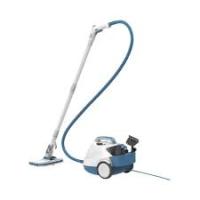
BHSMP2008-QS - Steam cleaner BLACK & DECKER - Free user manual and instructions
Find the device manual for free BHSMP2008-QS BLACK & DECKER in PDF.



| Product type | Steam cleaner |
| Brand | Black & Decker |
| Model | BHSMP2008-QS |
| Voltage | 230 V |
| Power | 2000 W |
| Water tank capacity | 1200 ml |
| Weight | 5.9 kg |
| Compatible floor types | Hardwood, laminate, linoleum, vinyl, tile, stone, marble |
| Included accessories | Floor head, extension tube, handle with trigger, tank, mop pad, hand attachment, steam concentrator, squeegee, round brush, flexible hose |
| Main functions | Steam cleaning for floors, clothes (with bonnet), wallpaper removal (with optional plate), grout cleaning |
| Steam adjustment | 3 levels (low, medium, high) depending on surface |
| Indicator lights | White light (power on), green (ready), red (empty tank) |
| Safety | Trigger lock, automatic shut-off in vertical position, pressure relief valve, overheat protection |
| Maintenance | Clean with a damp cloth; wash mop pads at 60°C without bleach or fabric softener |
| Warranty | 24 months |
Frequently Asked Questions - BHSMP2008-QS BLACK & DECKER
User questions about BHSMP2008-QS BLACK & DECKER
0 question about this device. Answer the ones you know or ask your own.
Ask a new question about this device
Download the instructions for your Steam cleaner in PDF format for free! Find your manual BHSMP2008-QS - BLACK & DECKER and take your electronic device back in hand. On this page are published all the documents necessary for the use of your device. BHSMP2008-QS by BLACK & DECKER.
USER MANUAL BHSMP2008-QS BLACK & DECKER
natural_image
Illustration of a vacuum cleaner with attached hose and base mount (no text or symbols)BHSMP2008
BHSMP2314
English (original instructions) 6

natural_image
Line drawing of a vacuum cleaner with coiled hose and base mount (no text or symbols)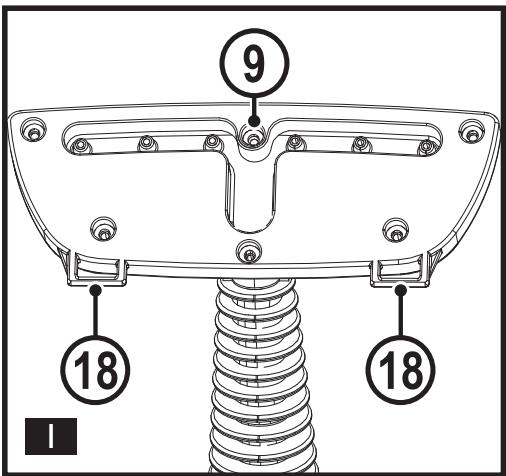
Intended use
Your BLACK+DECKER BHSMP2008, BHSMP2314 steam mops have been designed for cleaning sealed hardwood, sealed laminate, linoleum, vinyl, ceramic tile, stone and marble floors. These appliances are intended for indoor household use only.
Safety Instructions

Warning! Read all safety warnings and all instructions.
Failure to follow the warnings and instructions listed below may result in electric shock, fire and/or serious injury.

Warning! When using mains-powered appliances, basic safety precautions, including the following, should always be followed to reduce the risk of fire, electric shock, personal injury and material damage.
- The intended use is described in this manual.
- The use of any accessory or attachment or the performance of any operation with this appliance other than those recommended in this instruction manual may present a risk of personal injury.
- Retain this manual for future reference.
- The appliance can be used by persons with reduced physical, sensory or mental capabilities or lack of experience and knowledge, if they have been given supervision or instruction concerning use of the appliance in a safe way and understand the hazards involved. Children shall not play with the appliance.
- Children should be supervised to ensure that they do not play with the appliance.
- The plug must be removed from the socket-outlet before cleaning or maintaining the appliance.
-
The liquid or steam must not be directed towards equipment containing electrical components, such as the interior of ovens.
-
Care should be taken when using the appliance due to the emission of steam.
- Keep the appliance and its cord out of reach of children less than 8 years of age when it is energized or cooling down.
- If the supply cord is damaged, it must be replaced by the manufacturer, its service agent or similarly qualified persons in order to avoid a hazard.
- The appliance shall not be left unattended while it is connected to the supply mains.
- The appliance is not to be used if it has been dropped, if there are visible signs of damage or if it is leaking.
- Keep the appliance out of reach of children when it is energized or cooling down.
- The filling aperture shall not be opened during use.
Using your appliance
- Do not open the pressure relief valve during use.
- Do not direct steam at people, animals, electrical appliances or electrical outlets.
- Do not expose to rain.
- Do not immerse the appliance in water.
- Do not leave the appliance unattended.
- Do not leave the appliance connected to an electrical outlet when not in use.
- Never pull the power lead to disconnect the appliance from the socket.
-
Keep the appliance lead away from heat, oil and sharp edges.
-
Do not handle steam cleaner with wet hands.
- Do not pull or carry by cord, use cord as a handle, close door on cord, pull cord around sharp corners or expose cord to heated surfaces.
- Do not use appliance in an enclosed space filled with vapour given off by oil-base paint thinner, some mothproofing substances, flammable dust, or other explosive or toxic vapours.
- Check the type of floor with the manufacturer.
- Do not use on leather, wax polished furniture or floors, synthetic fabrics, velvet or other delicate, steam sensitive materials.

Warning! Do not use on unsealed wood or unsealed laminate floors. On surfaces that have been treated with wax or some no wax floors, the sheen may be removed by the heat and steam action. It is always recommended to test an isolated area of the surface to be cleaned before proceeding. We also recommend that you check the use and care instructions from the floor manufacturer.
- Never put descaling, aromatic, alcoholic or detergent products into the steam cleaner, as this may damage it or make it unsafe for use.
- If the home circuit breaker activates while using the steam function, discontinue product use immediately and contact the customer support centre. (Beware of the risk of electrical shock.)
- The appliance emits very hot steam to clean the area of use. This means that the steam head, cleaning pads and attachments get very hot during use.
Caution! Always wear suitable shoes when using your steam mop and when changing the accessories on your steam mop.
Do not wear slippers or open toed footwear.
- The lid may become hot during use.
- The surface of the nozzle may become hot during use
- Steam may escape from the appliance during use. Care should be taken when using this appliance. DO NOT touch any parts which may become hot during use.
- If steam is observed escaping from the body of the steam mop, switch off and disconnect the unit from the mains supply, allow to cool. Contact your nearest authorised repair agent.
- If steam is observed escaping from the pressure relief valve (21), switch unit off, disconnect the unit from the mains supply, wait for one hour for the appliance to cool, and then unscrew. Check the condition of the seal on the pressure relief valve.
If the seal is in good condition, screw back on completely to a tight fit. If steam continues to escape from the cap contact our nearest authorised repair centre.
DO NOT CONTINUE TO USE THE APPLIANCE.
After use
- Unplug the appliance and allow to cool before cleaning.
- When not in use, the appliance should be stored in a dry place.
- Children should not have access to stored appliances.
- Residual steam is under pressure in the hose once the unit is switched off. Please allow the unit to cool before pressing the trigger
Inspection and repairs
- Unplug the appliance and allow to cool before performing any maintenance or repairs.
- unplug the appliance and allow to cool, check that there is no steam in the system by activating the steam trigger on the steam handle (11) before unscrewing the pressure relief valve (21). The pressure relief valve should never be unscrewed until the appliance is cooled and no steam left in the system. Screw back on completely to a tight fit after maintenance.
- Before use, check the appliance for damaged or defective parts.
Check for breakage of parts, damage to switches and any other conditions that may affect its operation.
- Regularly check the power lead for damage.
- Do not use the appliance if any part is damaged or defective.
- Have any damaged or defective parts repaired or replaced by an authorized repair agent.
- Never attempt to remove or replace any parts other than those specified in this manual.
Residual risks
Additional residual risks may arise when using the tool which may not be included in the enclosed safety warnings. These risks can arise from misuse, prolonged use etc. Even with the application of the relevant safety regulations and the implementation of safety devices, certain residual risks can not be avoided. These include:
- Injuries caused by touching any moving parts.
- Injuries caused by touching any hot parts.
- Injuries caused when changing any parts or accessories.
- Injuries caused by prolonged use of the appliance. When using any appliance for prolonged periods ensure you take regular breaks.
Electrical safety

Warning! This product must be earthed.
Always check that the power supply corresponds to the voltage on the rating plate.
Power plugs must match the outlet.
Never modify the plug in any way.
Unmodified plugs and matching outlets will reduce risk of electric shock.
- If the supply cord is damaged, it must be replaced by the manufacturer or an authorised BLACK+DECKER Service Centre in order to avoid a hazard.
Extension cables & Class 1 product
- A 3-core cable must be used as your appliance is earthed and of Class 1 construction.
- Always use an approved extension cable suitable for the power input of this appliance (see technical data). Up to 30m of 1.50mm^2 extension cable can be used without loss of product performance.
Before use, inspect the extension cable for signs of damage, wear and ageing.
Replace the extension cable if damaged or defective.
When using a cable reel, always unwind the cable completely.
Labels on appliance
The following pictograms along with the date code are shown on the appliance.


CAUTION! Hot Steam
Wash at 60°C. Do not use bleach or fabric softener
CAUTION! Hot Surface
Features
This appliance includes some or all of the following features.
- On/off switch
1a. Red indicator light - Water empty warning light
1b. Green indicator light - Steam ready light
1c. White indicator light - Power on indicator
-
Main unit
-
Water tank
-
Accessory storage
5a. Extension pole A
5b. Extension pole B
-
Floorhead with storage hook
-
Wallpaper striper plate (Only supplied with unit BHSMP2314)
-
Steam concentrator
-
Hand nozzle (2 supplied with unit BHSMP2314)
-
L-shaped nozzle
-
Steam handle
11a. Lock off slider
-
Squeegee
-
Hand nozzle sock (2 supplied with unit BHSMP2314)
-
Floorpad (2 supplied with unit BHSMP2314)
-
Round brush (2 supplied with unit BHSMP2314)
-
Copper brush (Only supplied with unit BHSMP2314)
-
Flexible hose
-
Handle nozzle's latches
-
Squeegee peg
-
Squeegee rear hooks
-
Pressure relief valve
Assembly

Warning! Before attempting any of the following instructions, make sure that the appliance is switched off and unplugged and the appliance is cold and does not contain any water.
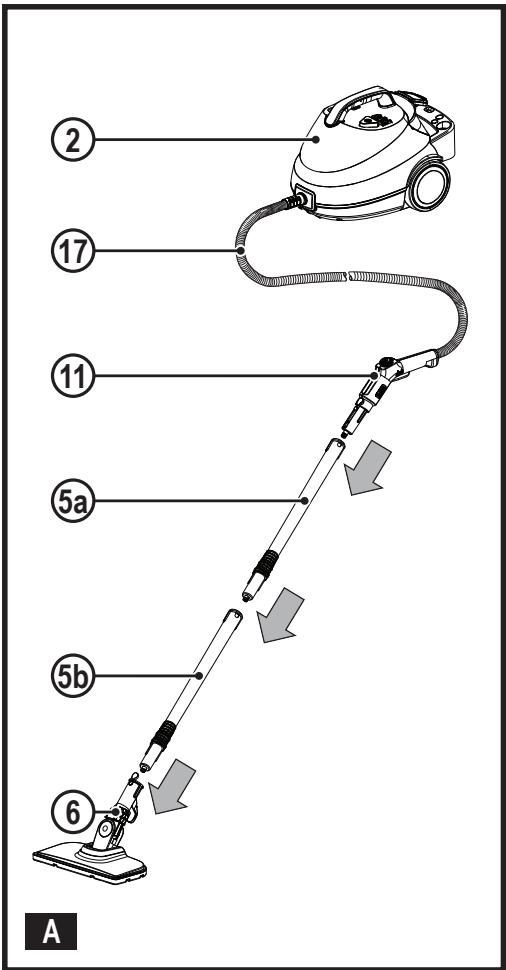
Attaching the floor extension to the floor cleaning head (Fig. A)
◆ Push the extension pole B (5b) into the floorhead (6) making sure it clicks securely into place, as shown in figure A.
Attaching the hand held hose unit to the floor extension (Fig. A)
◆ Push the steam handle (11) firmly onto extension pole A (5a) making sure it clicks securely into place.
◆ Connect extension pole A (5a) to extension pole B (5b)
Warning! Inspect the seal between the connection point on the steam handle (11) and the extension poles (5a and 5b) before each use. If the seal malfunctions or is damaged, please contact your nearest authorised repair agent. Do not use the appliance.
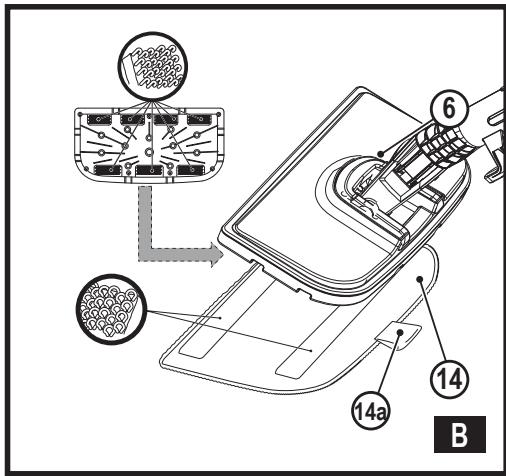
Attaching a cleaning pad (Fig. B)
Replacement cleaning pads are available from your BLACK+DECKER dealer :- (cat no. FSMP20-XJ).
◆ Place a cleaning pad (14) on the floor with the velcro 'loop' side facing up.
◆ Lightly press the steam mop down onto the cleaning pad.
Caution! Never leave the steam mop in one spot on any surface for any period of time. Always place the steam mop supported in the upright position when stationary and make sure the steam mop is turned off when not in use.
Removing a cleaning pad
Caution! Always wear suitable shoes when changing the cleaning pad on your steam mop.
Do not wear slippers or open toed footwear.
- Return the steam mop to the upright position and turn the steam mop 'OFF'.
◆ Wait until the steam mop cools down (approximately 5 minutes). - Lift the steam mop away from the cleaning pad (14) freeing it from the velcro fastening by putting weight on the cleaning pad removal tab (14a).
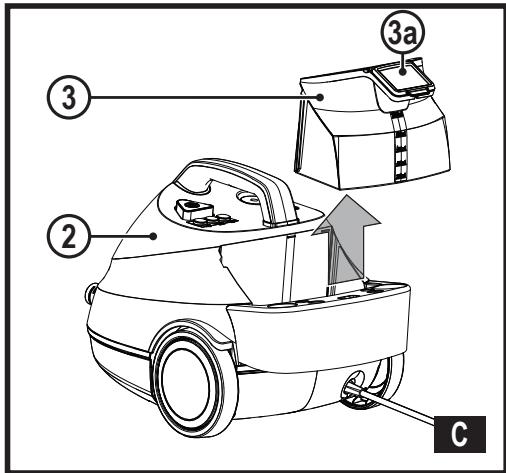
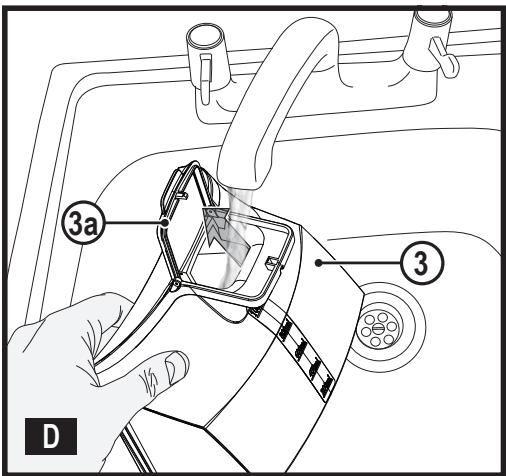
Attaching / Removing the water tank (Fig. C, D)
Note! Fill the water tank (3) with clean tap water (Do not use any additives or chemicals).
Note! In areas of hard water, the use of de-ionised water is recommended.
◆ Slide the water tank (3) up and away from the steam mop main unit (2).
◆ Water tank can be taken to the tap to be filled.
◆ Lift cap (3a) to fill.
Warning! When filling, maintain the water tank (3) in vertical position with the cap (3a) at the top.
Warning! Your water tank has a 1.2 litre capacity. Do not over fill the tank.
Note! Ensure the cap is firmly secured.
Attaching the water tank
- Slide the water tank (3) down using the ribs to locate into the main unit (2), ensure that the water tank is firmly seated to create a seal.
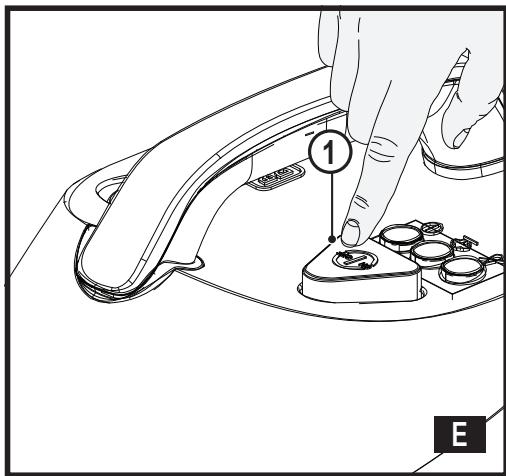
Switching on and off (Fig. E)
To switch the appliance on, press the ON/Off switch (1). The white light (1c) will illuminate when the power is on and the boiler is heating up. The green light (1b) will illuminate when the boiler is up to temperature the user must press the trigger on the steam handle (11b) to create steam.
◆ To switch the appliance off, press the ON/Off switch (1).
Caution! Never leave the steam mop in one spot on any surface for any period of time.
Always place the steam mop supported in the upright position when stationary and make sure the steam mop is turned off when not in use.
Caution! Always empty the water tank after use.
Note! when first filled or after running dry, it can take up to 180 seconds for steam to be produced
| Floor Worktop Surface | Setting |
| Wood/Laminate | Min/Low Steam setting |
| Tile/Vinyl | Mid Steam setting |
| Stone/Marble | Max/High Steam setting |
| Accessories | Setting |
| Grout Brush | Max/High Steam setting |
| Small Brush | Max/High Steam setting |
| Small Brush with copper bristles | Max/High Steam setting |
| Window / garment Squeegee | Min/Low Steam setting |
| Wall paper atachment | Max/High Steam setting |
Note: Always check you are using the correct setting of steam before using your steam mop.
Steam user interface
This steam mop is fitted with a Steam user interface panel which shows 3 indicator lights (1a, 1b and 1c). They are used to select the correct operating mode for your particular cleaning operation.
◆ Turn unit on by pressing the On/Off switch (1).
- White indicator light (1c) is illuminated when powered on and boiler is heating up.
◆ Green indicator light (1b) is illuminated when the unit is up to temperature and ready to use.
◆ User must slide the lock off button (11a) on the steam handle (11) from the locked position.
◆ Press the trigger (11b) on the steam handle (11) to create steam.
◆ After use always slide the lock off button (11a) on the steam handle (11) back to the locked position.
- The left indicator light (1a) is illuminated when the water tank (3) is empty, take out the water tank (3) and fill with water.
◆ To switch appliance off, press the on/off switch (1).
Note: Always check you are using the correct setting before using your steam mop.
Attaching accessories to the steam handle
Warning! Inspect the seal between the connection point on the steam handle and the accessories before each use. If the seal malfunctions or is damaged, please contact your nearest authorised repair agent.
Do not use the appliance.
Warning! The unit should be switched off before accessories are fitted.
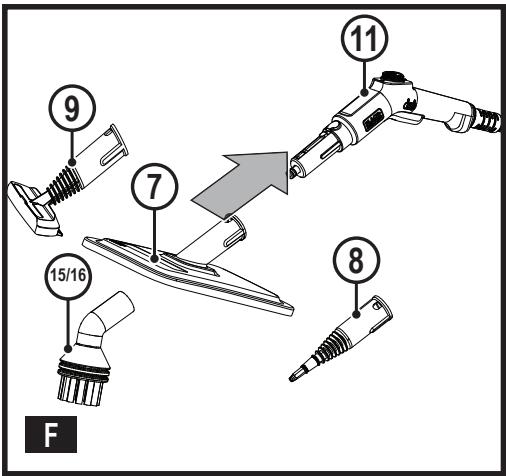
Attaching large accessories (Fig. F)
◆ Accessories 7,8 and 9 can be attached directly to the end of the steam handle.
◆ Align the accessory and push firmly onto the steam handle.
◆ Make sure latching feature is locked into position to create a seal
Important! All accessories must be attached to the steam handle (11) for use.
Removing a large accessory
- Press latch and pull accessory away from the steam handle (11).
Warning! Allow the unit and all accessories to cool before attempting to remove.
Attaching small brush accessories
◆ Attach steam concentrator (8) to the steam nozzle
◆ Small accessories 10,15,16 can be pushed directly onto the steam concentrator (8).
◆ Make sure the small accessory is pushed on to create a seal and stays in position.
Removing a small accessory 10,15,16
◆ Pull accesory away from the steam concentrator (8). Warning! Allow the unit and all accessories to cool before attempting to remove.
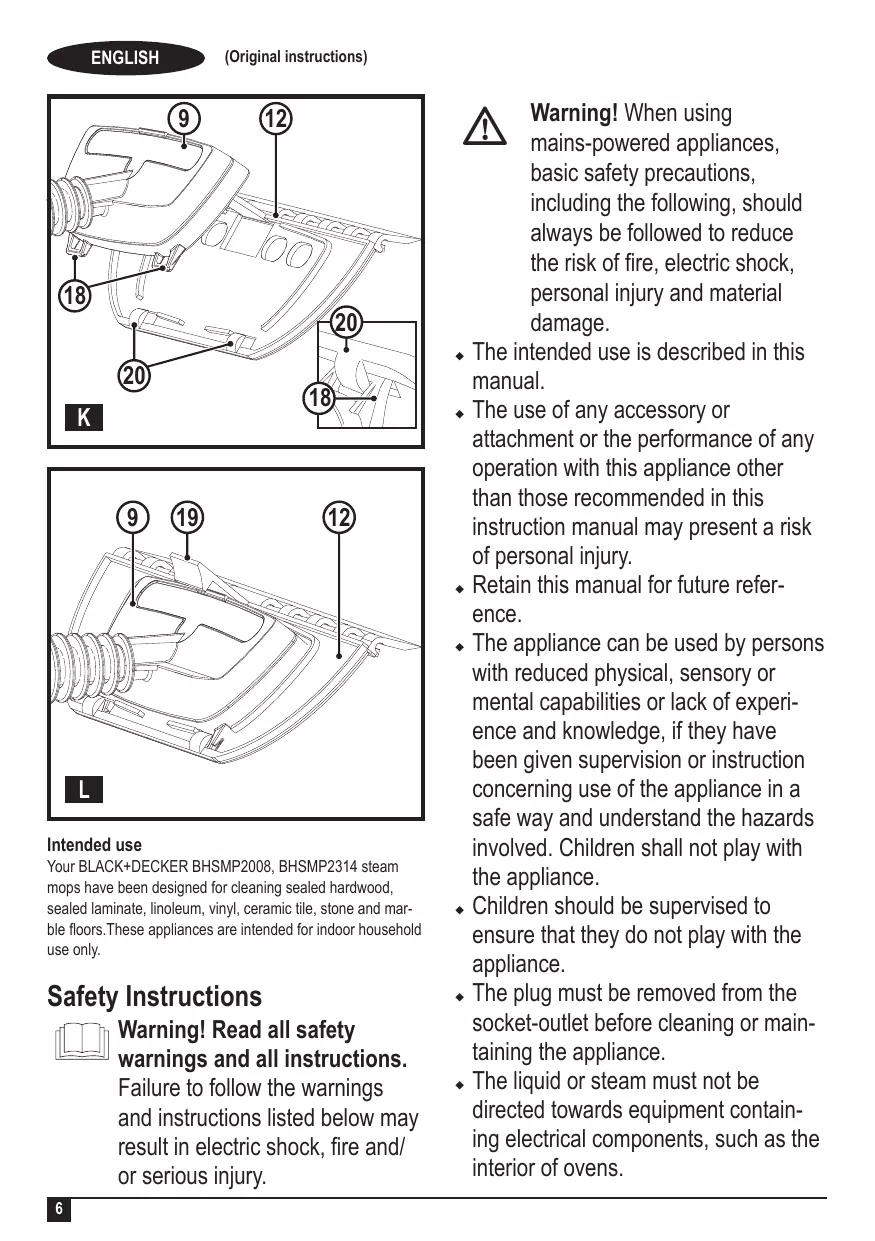
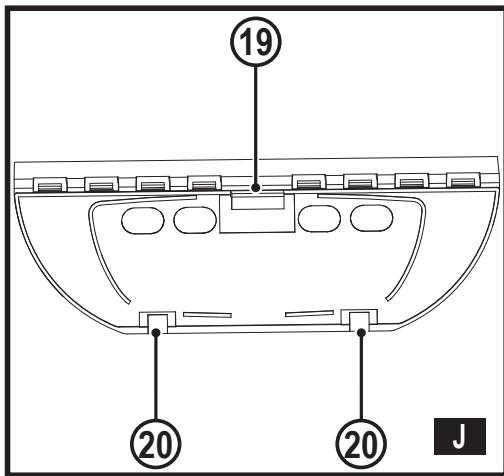
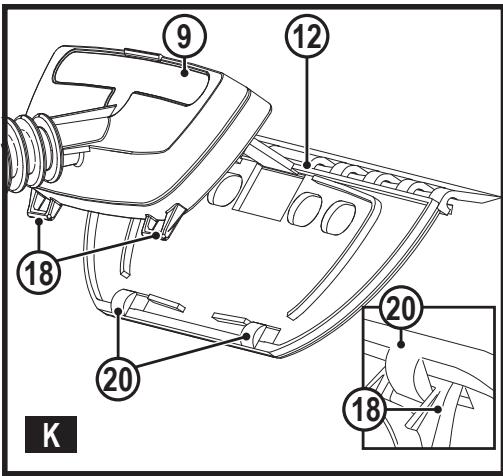
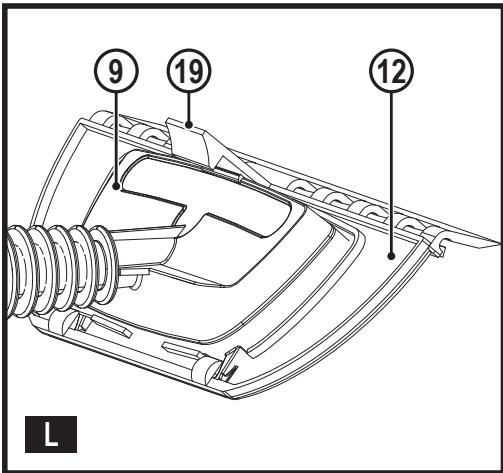
Fitting the squeegee onto the hand nozzle 12, 9 (Fig. I, J, K, L)
- Fit the squeegee rear hooks (20) into the handle nozzle's latches (18) as shown in figure K.
◆ Push the handle nozzle down until the body is locked by front peg of the squeegee (19) as shown in figure L.
Removing the squeegee from the hand nozzle
◆ Push the peg of the squeegee (19) forward to release hand nozzle.
- Rotate hand nozzle and unclip hand nozzle latches (18) from squeegee rear hooks (20) and pull away from each other.
Hints for optimum use
General
Caution: Never use the steam mop without first attaching a cleaning pad.
◆ Always vacuum or sweep the floor before using the steam mop.
- The easiest way to use the floorhead is to tilt the floorhead tube to a 45° angle and clean slowly, covering a small area at a time.
Use water only with no additives or chemicals with your steam mop. To remove stubborn stains from vinyl or linoleum floors, you can pre-treat with a mild detergent and some water before using the steam mop.
Steam Cleaning with the mop
◆ Fit steam handle to the floor extension.
◆ Place a cleaning pad (14) on the floor with the velcro 'loop' side facing up.
◆ Lightly press the steam mop down onto the cleaning pad (14).
◆ Connect the steam mop to the mains.
◆ Press the ON/OFF button (1). It takes approximately 180 seconds for the boiler to heat up.
Once boiler is up to temperature, adjust the flow rate to the required setting and press the trigger (11b) to start steam flow.
It takes a few seconds for steam to enter the cleaning pad. The steam mop will now glide easily over the surface to be cleaned.
◆ Push and pull the steam mop slowly across the surface to thoroughly steam clean each section.
When you have finished using the steam mop, release the trigger to stop steam flow, return to an upright position, making sure that it is supported and turn "OFF". Wait until the steam mop cools down (Approx 10 mins).
Caution! It is important to monitor the water level in the water tank. Red indicator light will illuminate when tank is empty. To refill the water tank and continue to clean stand the mop upright making sure the steam trigger is not pressed.
Caution! Never leave the steam mop in one spot on any surface for any period of time. Always place the steam mop supported in the upright position when stationary and make sure the steam mop is turned off when not in use.
After use
◆ Wait until the steam mop cools down.
◆ Unplug the steam mop from the electrical wall outlet.
◆ Empty the water tank.
- Remove the cleaning pad (14) and wash it ready for next use (take care to follow the wash care instructions printed on the cleaning pad).
Accessories
The performance of your appliance depends on the accessory used. BLACK+DECKER accessories are engineered to high quality standards and designed to enhance the performance of your appliance. By using these accessories you will get the very best from your equipment.
Garment steam cleaning (Fig. G)
◆ Attach the hand nozzle (9) to the steam handle (11).
◆ Attach the hand nozzle sock (13) around the hand nozzle (9).
Note! The hand nozzle (9) should not be used without the hand nozzle sock (13).
◆ Connect the steam mop to the mains.
◆ Press the ON/OFF button (1). The green indicator light will illuminate when the boiler is up to the temperature.
Note! When first filled or after running dry, it can take up to 180 seconds for steam to be produced.
- Once boiler is up to temperature, Press the required steam setting button to start steam flow.
When you have finished using the steam mop, press the steam flow button to stop steam flow, return to an upright position, making sure that it is supported and turn "OFF". Wait until the steam mop cools down (Approx 5 mins).
Using the wallpaper stripper
◆ Check the state of your plaster before you start work as high temperature steam can loosen weak, porous or poorly bonded plaster. Plaster is also loosened more readily in areas of cracks, holes or if the steam plate is held in one position for too long.
You may be able to detect if you have weak plaster by tapping a few areas of the walls with your knuckles. If this produces a hollow sound, we recommend proceeding only with extreme care.
In all cases test out the wallpaper stripper on a small area, about 100 cm^2 , before starting work properly.
If at any stage finishing plaster is loosened or you hear a crack, do not continue. The wallpaper stripper is safe for drywall/plaster board surfaces.
Due to the heat generated by this product, it is possible that certain surfaces, ie. carpets, soft furniture, table tops, cabinets etc., could be marked or damaged. To prevent this, ensure a wooden board or other barrier is placed under the boiler to prevent the heat damaging the surface. Dust sheets or newspapers are not adequate for this purpose.
- For best results, remove wallpaper with a scraper. Scrape off wallpaper in a downward direction.
◆ Always wear protection when removing wallpaper from the ceiling. Be careful of condensation collecting in the steam plate as hot water may drip.
Empty the steam plate regularly and never use directly above your head.
◆ Always place the steam plate in a suitable container when left unattended, even for a few seconds, and keep the steam plate facing away from you when in use.
Accessories storage (Fig. H)
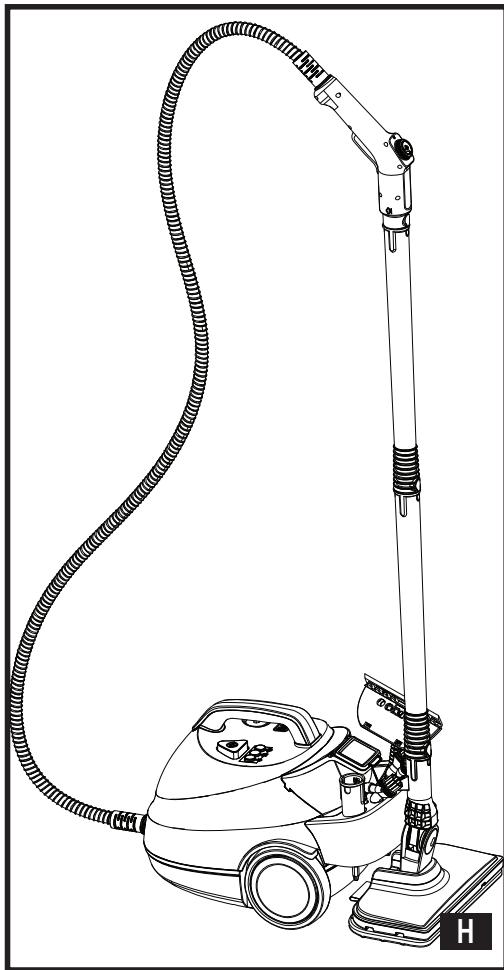
Small accessories along with the floorhead are stored on the rear of the unit.
The floorhead and tube can be located on the accessory storage (4). Locate the hook at the rear of the floorhead (6) and slide into the slot provided on the storage as see in (Fig H). Push firmly down and make sure the floorhead and tube are stable before releasing
Protecting the environment

Separate collection. Products and batteries marked with this symbol must not be disposed of with normal household waste.
Products and batteries contain materials that can be recovered or recycled, reducing demand for raw materials. Please recycle electrical products and batteries according to local provisions. Further information is available at www.2helpU.com
Technical Data
| BHSMP2008 | BHSMP2314 | ||
| Voltage | V_ac | 230 | 230 |
| Power | W | 2000 | 2300 |
| Tank Capacity | ml | 1200 | 1200 |
| Weight | kg | 5.9 | 6.1 |
Troubleshooting
If your appliance seems not to operate properly, follow the instructions below. If this does not solve the problem, please contact your local BLACK+DECKER repair agent. Details of your nearest BLACK+DECKER repair agent can be found on www.2helpu.com'
| Problem | Step | Possible solution |
| The steam mop is not turning on | 1. | Check the unit is plugged in at the wall socket |
| 2. | Check the unit is switched on using the ON/OFF switch (1) | |
| 3. | Check the fuse in the plug |
| The steam mop is not producing steam | 4. | The steam mop will only produce steam once the unit is switched on. The white indicator light will illuminate when power is on. The green indicator light will illimuate when the boiler is up to the temperature and then the steam flow trigger has been pressed on |
| 5. | Check that the water tank is full. If red indicator light is on then the tank is empty. Note: When first filled or after running dry it will take time to heat up, the green indicator light will illuminate when the boiler is up to the temperature. | |
| 6. | Check steps 1, then 2, then 3, then 4 | |
| The steam mop stops producing steam during use | 7. | Check steps 4, then 5, then 3 |
| The steam mop is producing too much steam during use | 8. | The unit has variable steam flow settings. Set the steam flow to low steam by rotating the dial on the steam handle. |
| The steam mop is producing too little steam during use | 9. | The unit has variable steam flow settings. Set the steam flow to high steam by rotating the dial on the steam handle. |
| Where can I get further information/accessories | 10. | http://www.blackanddecker.co.ukhttp://www.blackanddecker.ie |
Maintenance
Your BLACK+DECKER tool has been designed to operate over a long period of time with a minimum of maintenance. Continuous satisfactory operation depends upon proper tool care and regular cleaning.

Warning! Before performing any maintenance on the tool.
◆ Wipe your appliance over using a soft damp cloth.
- For stubborn marks you can use a mild solution of soap and water to dampen your cloth.
Guarantee
Black & Decker is confident of the quality of its products and offers consumers a 24 month guarantee from the date of purchase. This guarantee is in addition to and in no way prejudices your statutory rights.
The guarantee is valid within the territories of the United Kingdom, the Member States of the European Union and the European Free Trade Area and the United Kingdom.
To claim on the guarantee, the claim must be in accordance with Black&Decker Terms and Conditions and you will need to submit proof of purchase to the seller or an authorised repair agent. Terms and conditions of the Black&Decker 2 year guarantee and the location of your nearest authorised repair agent can be obtained on the Internet at www.2helpU.com, or by contacting your local Black & Decker office at the address indicated in this manual.
Please visit our website www.blackanddecker.co.uk to register your new Black & Decker product and receive updates on new products and special offers.
Verwendungszweck
FORSIKTIG! Varm over- flate
Funksjoner

- Intended use
- Safety Instructions
- Warning! Read all safety warnings and all instructions.
- Using your appliance
- DO NOT CONTINUE TO USE THE APPLIANCE.
- After use
- Inspection and repairs
- Residual risks
- Electrical safety
- Extension cables & Class 1 product
- Labels on appliance
- CAUTION! Hot Steam
- Features
- Assembly
- Attaching the floor extension to the floor cleaning head (Fig. A)
- Attaching the hand held hose unit to the floor extension (Fig. A)
- Attaching a cleaning pad (Fig. B)
- Removing a cleaning pad
- Attaching / Removing the water tank (Fig. C, D)
- Attaching the water tank
- Switching on and off (Fig. E)
- Steam user interface
- Attaching accessories to the steam handle
- Attaching large accessories (Fig. F)
- Removing a large accessory
- Attaching small brush accessories
- Removing a small accessory 10,15,16
- Fitting the squeegee onto the hand nozzle 12, 9 (Fig. I, J, K, L)
- Removing the squeegee from the hand nozzle
- Hints for optimum use
- General
- Steam Cleaning with the mop
- Accessories
- Garment steam cleaning (Fig. G)
- Using the wallpaper stripper
- Accessories storage (Fig. H)
- Protecting the environment
- Troubleshooting
- Maintenance
- Guarantee
- Verwendungszweck
- Funksjoner
Brand : BLACK & DECKER
Model : BHSMP2008-QS
Category : Steam cleaner