
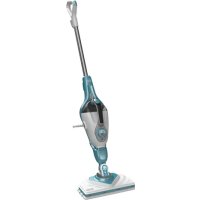
FSMP30 - Steam cleaner BLACK & DECKER - Free user manual and instructions
Find the device manual for free FSMP30 BLACK & DECKER in PDF.


| Product Type | Steam cleaner |
| Brand | Black & Decker |
| Model | FSMP30 |
| Voltage | 230 V~ |
| Power | 1600 W |
| Water Tank Capacity | 500 ml |
| Weight | 3.4 kg |
| Intended Floor Types | Sealed hardwood, sealed laminate, linoleum, vinyl, ceramic tile, stone, marble, carpets |
| Technology | Autoselect™ with settings for Wood/Laminate, Stone/Marble, Tiles/Vinyl |
| Steam Burst Function | Yes, for stubborn stains (10 seconds) |
| Heating Time | Approximately 15 seconds |
| Water Tank | Removable, anti-calc system |
| Accessories | Steam head cleaning pad, delta head cleaning pad, carpet glider, resting mat, cable tidy hooks |
| Delta Head | Built-in for corners and narrow gaps |
| Cleaning Pad Attachment | Hook & loop, easy removal with shoe tab |
| Storage | Stand-alone or wall mounting via hanging bracket |
| Safety Features | Automatic shut-off when handle upright, use on resting mat |
| Maintenance | Wash cleaning pads per instructions; descaling not required due to anti-calc system |
| Replacement Pads | Steam head pad: FSMP20-XJ; Delta head pad: FSMP30-XJ |
Frequently Asked Questions - FSMP30 BLACK & DECKER
User questions about FSMP30 BLACK & DECKER
0 question about this device. Answer the ones you know or ask your own.
Ask a new question about this device
Download the instructions for your Steam cleaner in PDF format for free! Find your manual FSMP30 - BLACK & DECKER and take your electronic device back in hand. On this page are published all the documents necessary for the use of your device. FSMP30 by BLACK & DECKER.
USER MANUAL FSMP30 BLACK & DECKER
Intended use
Your Black & Decker steam mop has been designed for sanitising and cleaning sealed hardwood, sealed laminate, linoleum, vinyl, ceramic tile, stone and marble floors and for refreshing carpets. This appliance is intended for indoor household use only.
Warning! Read all of the 'Safety, Maintenance, Service' manual carefully before operating this appliance.
Read all of this manual carefully before operating the appliance.
Features
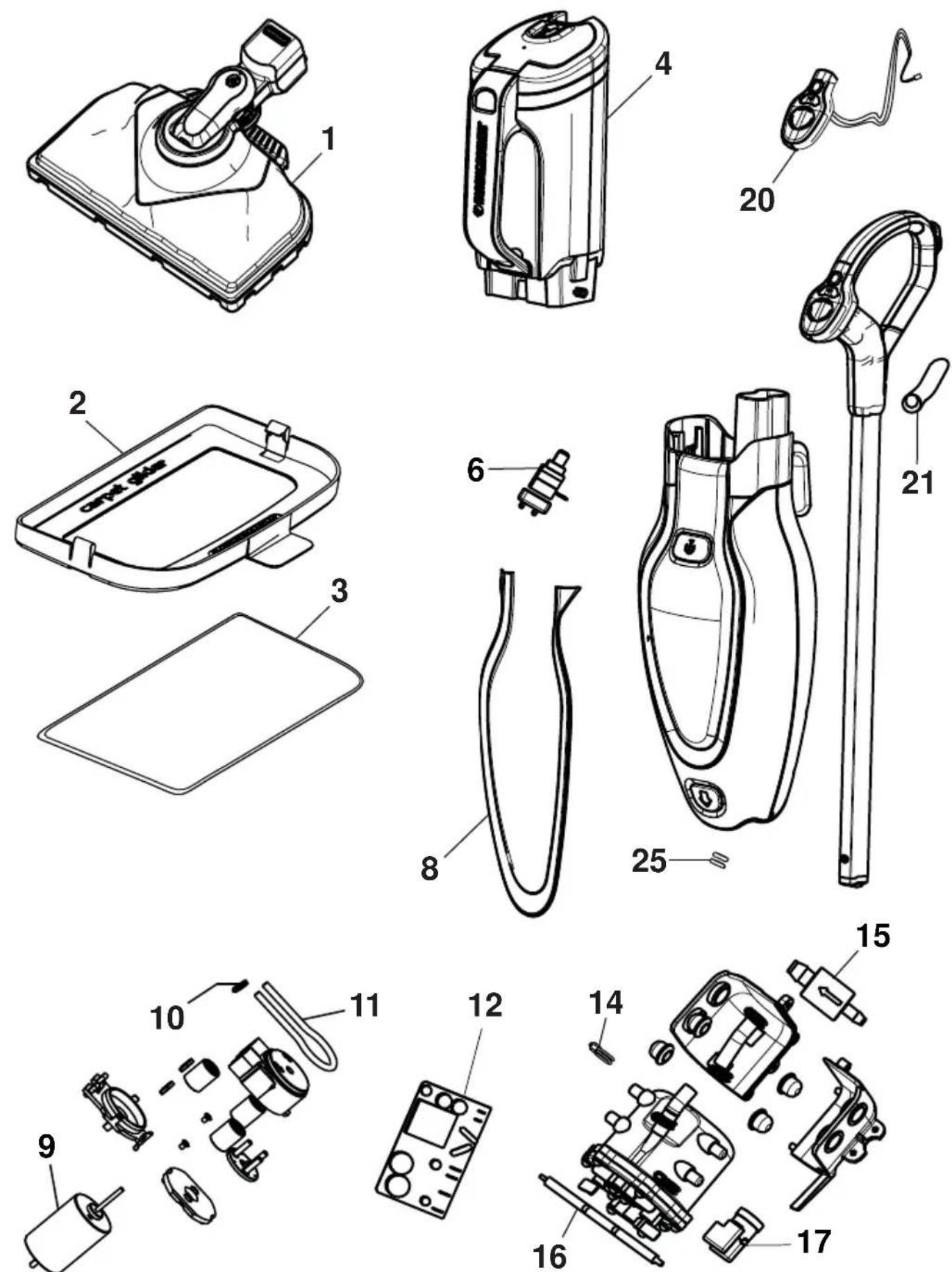
This appliance includes some or all of the following features.
- ON/Off switch
- Autoselect™ button
- Removable water tank
- Handle
- Steam head
- Steam head cleaning pad
- Delta head cleaning pad
- Resting mat
- Carpet glider
- Bottom cable tidy hook
- Top cable tidy hook
- Cable management clip
Assembly
Warning! Before attempting any of the following operations, make sure that the appliance is switched off and unplugged and that the appliance is cold and does not contain any water.
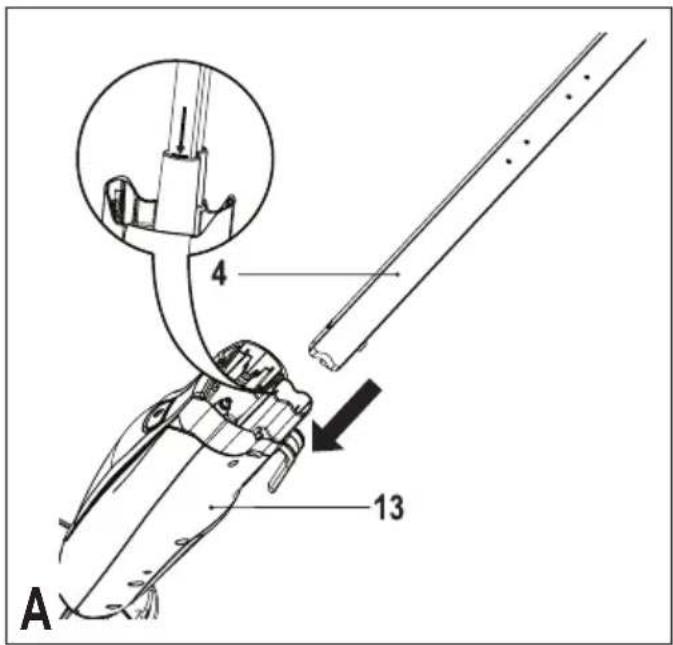
Attaching the handle (Fig. A)
- Slide the bottom end of the handle (4) into the top end of the steam mop body (13) until it clicks into place. The arrow on the handle (4) should be aligned with the top of the steam mop body (13).
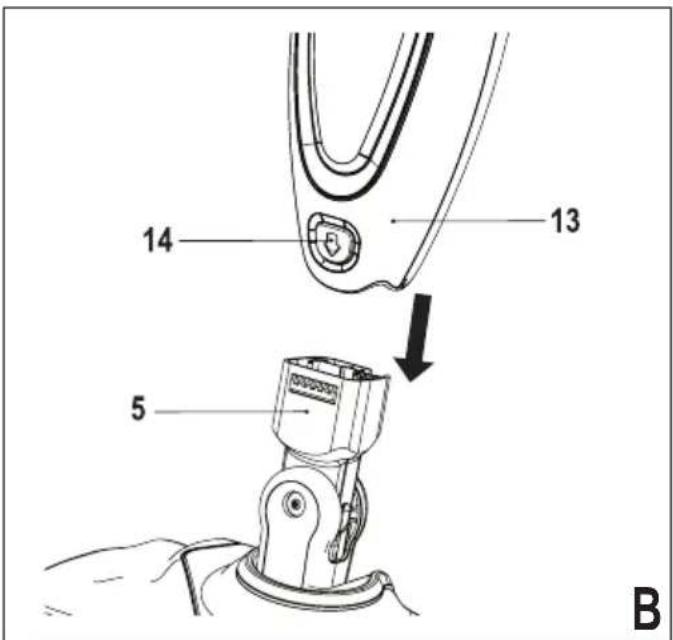
Attaching the steam head (Fig. B)
◆ Slide the bottom end of the steam mop body (13) onto the steam head (5) until it clicks into place.
- The steam head can be removed from the Steam mop body by pressing the steam head release button (14) and pulling the steam mop body (13) off the steam head (5).
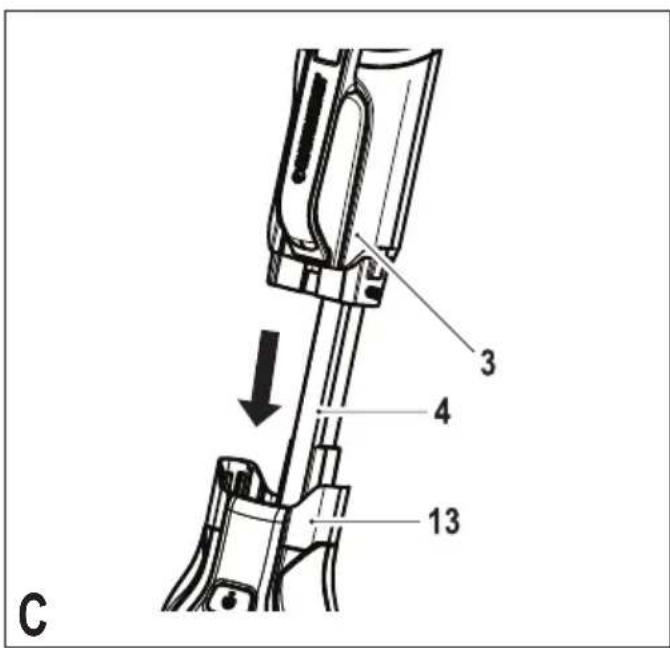
Attaching the water jug (Fig. C)
◆ Clip the water jug (3) onto the handle (4).
◆ Slide the water jug (3) down into the Steam mop body (13), ensure that the water jug is firmly seated.
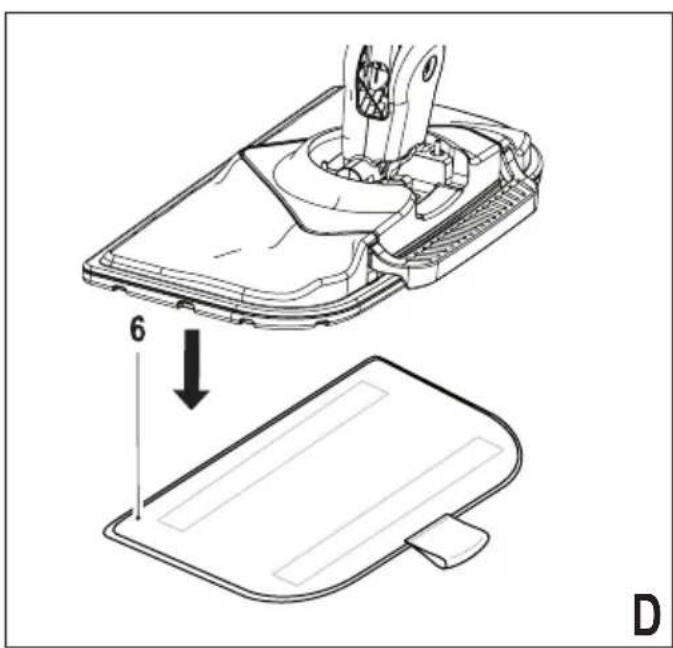
Attaching a cleaning pad (Fig. D)
Replacement cleaning pads are available from your Black & Decker dealer:- (cat. no. FSMP20-XJ).
Steam head cleaning pad - cat. no. FSMP20-XJ).
Delta head cleaning pad - cat. no. FSMP30-XJ (FSM1630 Only).
- Place a cleaning pad (6 or 7) on the floor with the 'hook & loop' side facing up.
◆ Lightly press the steam mop down onto the cleaning pad (6 or 7).
Caution! Always place your steam mop on the resting mat (8) with the handle (4) in the upright position when stationary and make sure the steam mop is turned off when not in use.
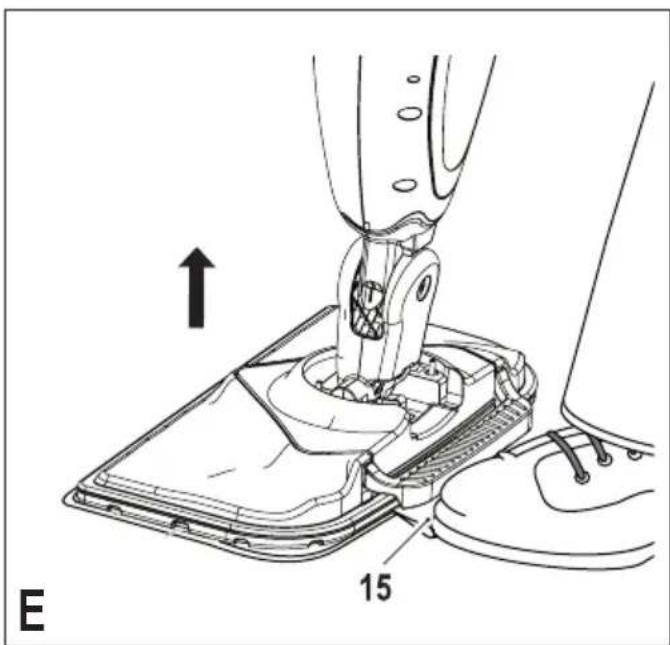
Removing a cleaning pad (Fig. E)
Caution! Always wear suitable shoes when changing the cleaning pad on your steam mop. Do not wear slippers or open toed footwear.
- Return the handle (4) to the upright position and turn the steam mop 'OFF'.
◆ Place the steam mop on the resting mat and wait until it cools down. (approximately five minutes)
◆ Place the front of your shoe onto the cleaning pad removal tab (15) and press down firmly.
◆ Lift the steam mop up off the cleaning pad.
Caution! Always place the steam mop on the resting mat (8) with the handle (4) in the upright position when stationary and make sure the steam mop is turned off when not in use.
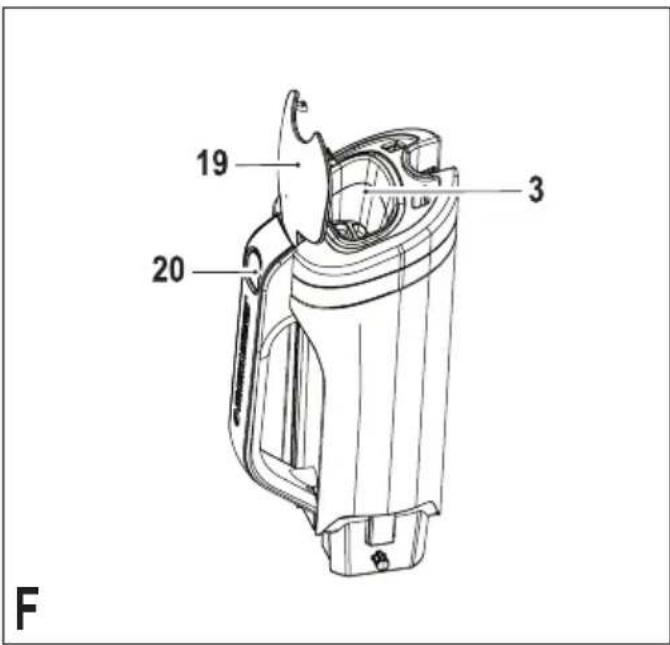
Filling the water tank (Fig. F)
The watertank on your steam mop is removable for convenient and easy filling.
This Steam Mop incorporates an anti-calc system to help prolong the life of the system.
Note: Fill the water tank with clean tap water.
Note: In areas of very hard water, the use of de-ionised water is recommended.
◆ Remove the water tank (3).
◆ Fill the water tank (3) with water.
◆ Open the filler cap (19) by pressing the release button (20).
Warning! Your water tank has a 0.5 litre capacity. Do not over fill the tank.
◆ Re-fit the filler cap (19).
◆ Re-fit the water tank (3).
Note: Ensure the filler cap is firmly secured.
Note: Do not use chemical cleaners with your steam mop..
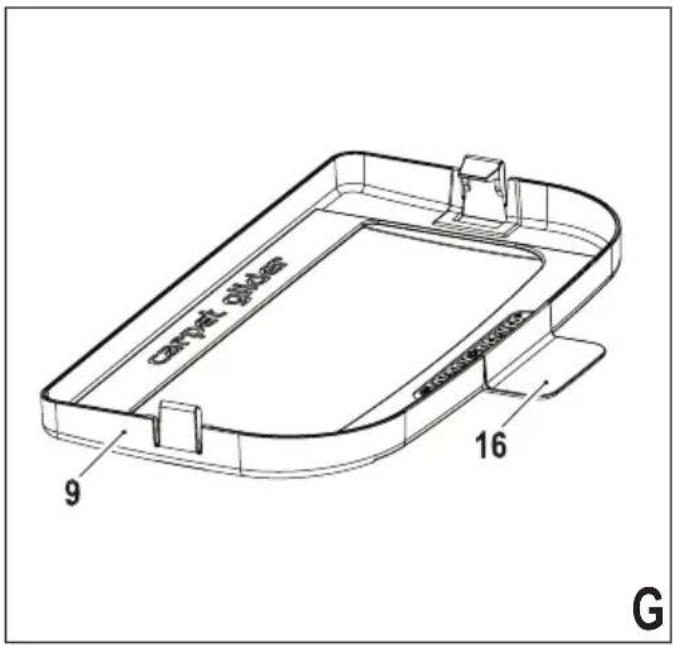
Attaching the carpet glider (Fig. G) (For use on carpets only)
◆ Place carpet glider on the floor.
◆ Attach a cleaning pad (6) to the unit.
◆ Lightly press the steam mop down onto the carpet glider
(9) until it clicks into place.
Caution! Always place the steam mop on the resting mat (8) with the handle (4) in the upright position when stationary and make sure the steam mop is turned off when not in use.
Removing the carpet glider (Fig. G)
Caution! Always wear suitable shoes when changing the carpet glider on your steam mop. Do not wear slippers or open toed footwear.
- Return the handle (4) to the upright position and turn the steam mop 'OFF'.
◆ Place the steam mop on the resting mat and wait until it cools down. (approximately five minutes)
◆ Place the front of your shoe onto the carpet glider removal tab (16) and press down firmly.
◆ Lift the steam mop up off the carpet glider (9).
Caution! Always place the steam mop on the resting mat (8) with the handle (4) in the upright position when stationary and make sure the steam mop is turned off when not in use.
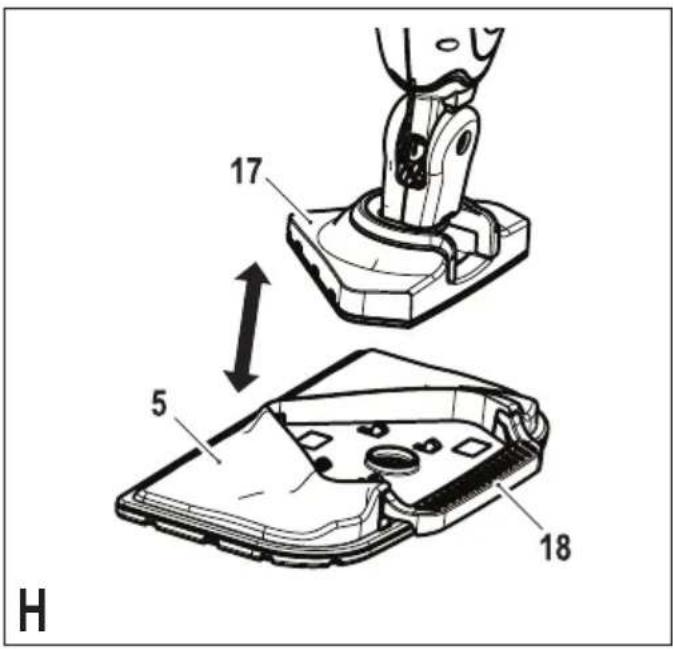
The Delta Head (Fig. H)
This Steam Mop incorporates a built in delta head which enables you to access into tight corners and narrow gaps.
Caution! Always wear suitable shoes when accessing the delta head on your steam mop. Do not wear slippers or open toed footwear.
- Return the handle (4) to the upright position and turn the steam mop 'OFF'.
◆ Place the steam mop on the resting mat and wait until it cools down. (approximately five minutes)
◆ Place the front of your shoe onto the steam head removal tab (18) and press down gently.
◆ Lift the delta head (17) up off the steam head (5).
◆ Fit the delta head cleaning pad to the bottom of the delta head.
Note: Remove the cleaning pad before re-fitting the delta head to the steam head.
- To refit the delta head, place the tip of the delta head into the steam head then press down firmly ensuring that the delta head clicks into place.
Caution! Always place the steam mop on the resting mat (8) with the handle (4) in the upright position when stationary and make sure the steam mop is turned off when not in use.
Use
Important! This unit will kill 99.9% of bacteria & germs when used in accordance with this manual and with the micro fibre pad fitted and a continuous run time of 90 seconds.
Switching on and off
◆ To switch the appliance on, press the ON/OFF button (1). It takes approximately 15 seconds for the steam mop to
heat up.
Note: When the steam mop is first turned on the water reservoir will glow red. Once the steam mop is ready to use the water reservoir will glow blue.
◆ To switch the appliance off, press the ON/OFF button (1). Caution! Never leave the steam mop in one spot on any surface for any period of time. Always place the steam mop on the resting mat (8) with the handle (4) in the upright position when stationary and make sure the steam mop is turned off when not in use.
Caution! Always empty the steam mop after use.
Note: When first filled or after running dry it can take up to 45 seconds for steam to be produced.
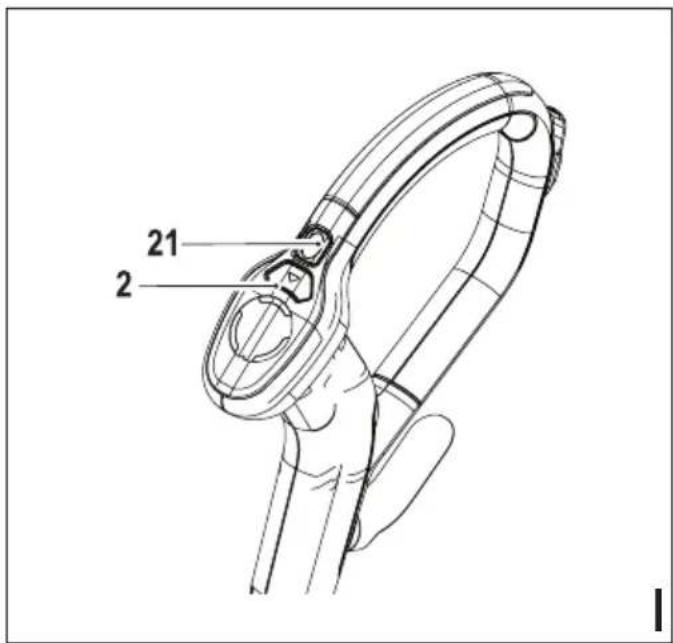
Autoselect™ Technology (Fig. I)
This steam mop is fitted with an Autoselect™ button (2) which shows various cleaning applications. They are used to select the correct operating mode for your particular cleaning operation.
Using Autoselect™, choose from one of the following applications by pressing the autoselect button (2) until the required setting is selected:
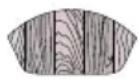 | Wood/Laminate |
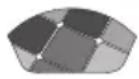 | Stone/Marble |
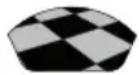 | Tiles/Vinyl |
The steam mop will select the correct volume of steam required for your particular cleaning operation.
Note: Always check you are using the correct setting before using your steam mop. For convenience the steam mop will remember the last setting you chose.
Steam burst (Fig. I)
The steam mop is equipped with a steam burst button to aid in the removal of stubborn marks and stains.
- During use, press the steam burst button (21) to apply extra cleaning power.
Note: The stem burst will last for 10 seconds then the steam mop will return to the chosen setting.
Hints for optimum use
General
Caution! Never use the steam mop without first attaching a cleaning pad.
◆ During use you can use the cable management clip (12) to
ENGLISH
(Original instructions)
keep your cable out of the way of the work area.
◆ Always vacuum or sweep the floor before using the steam mop.
- The easiest way to use the machine is to tilt the handle to a 45° angle and clean slowly, covering a small area at a time.
Do not use chemical cleaners with your steam mop. To remove stubborn stains from vinyl or linoleum floors, you can use the steam burst button to apply extra steam to the area or pre-treat with a mild detergent and some water before using the steam mop.
Steam cleaning
- Place a cleaning pad (6 or 7) on the floor with the 'hook & loop' side facing up.
◆ Raise the steam mop off the resting mat (8) and lightly press it down onto the cleaning pad (6 or 7).
◆ Place the steam mop on the resting mat.
◆ Connect the steam mop to the mains.
◆ Press the ON/OFF button (1). It takes approximately 15 seconds for the steam mop to heat up. - Press the Autoselect™ button (2) till the required setting is reached.
- Pulling the handle (4) back will activate the steam pump. After a few seconds steam will start to come out of the steam head.
Note: When first filled or after running dry it can take up to 45 seconds for steam to be produced.
- It takes a few seconds for steam to enter the cleaning pad. The steam mop will now glide easily over the surface to be sanitised/cleaned.
◆ Push and pull the steam mop slowly across the floor to thoroughly steam clean each section.
Note: During use you may turn off the steam pump by returning the handle to the upright position, this convenient feature will allow you to place the steam mop on the resting mat for a short time so that you may move items of furniture, then continue cleaning without the need to switch the appliance off.
When you have finished using the steam mop, return the handle (4) to the upright position and turn it 'OFF', place it on the resting mat (8) and wait until the steam mop cools down. (approximately five minutes)
Caution! It is important to monitor the water level in the water tank. To refill the water tank and continue to sanitise/clean, return the handle (4) to the upright position and turn the steam mop 'OFF'. Unplug the unit from the electrical wall outlet, remove and refill the water tank (3).
Caution! Never leave the steam mop in one spot on any surface for any period of time. Always place the steam mop on the resting mat (8) with the handle (4) in the upright position when stationary and make sure the steam mop is turned off
when not in use.
Carpet refreshing
◆ Place a cleaning pad (6) on the floor with the 'hook & loop' side facing up.
◆ Raise the steam mop off the resting mat (8) and lightly press it down onto the cleaning pad (6).
◆ Place the carpet glider (9) on the floor.
◆ Lightly press the steam mop down onto the carpet glider (9) until it clicks into place.
◆ Place the steam mop on the resting mat. (8)
◆ Connect the steam mop to the mains.
◆ Press the ON/OFF button (1). It takes approximately 15 seconds for the steam mop to heat up.
- Press the Autoselect™ button (2) to the Wood/Laminate setting.
- Pulling the handle (4) back will activate the steam pump. After a few seconds steam will start to come out of the steam head.
Note: When first filled or after running dry it can take up to 45 seconds for steam to be produced.
◆ Push and pull the steam mop slowly across the carpet to thoroughly refresh each section.
Note: During use you may turn off the steam pump by returning the handle (4) to the upright position, this convenient feature will allow you to place the steam mop on the resting mat (8) so that you may move items of furniture with out the need to switch the appliance off.
When you have finished using the steam mop, return the handle (4) to the upright position and turn it 'OFF', place it on the resting mat (8) and wait until the steam mop cools down. (approximately five minutes)
Caution! It is important to monitor the water level in the water tank. To refill the water tank and continue to sanitise/clean, return the handle (4) to the upright position and turn the steam mop 'OFF'. Unplug the unit from the electrical wall outlet, remove and refill the water tank (3).
Caution! Never leave the steam mop in one spot on any surface for any period of time. Always place the steam mop on the resting mat (8) with the handle (4) in the upright position when stationary and make sure the steam mop is turned off when not in use.
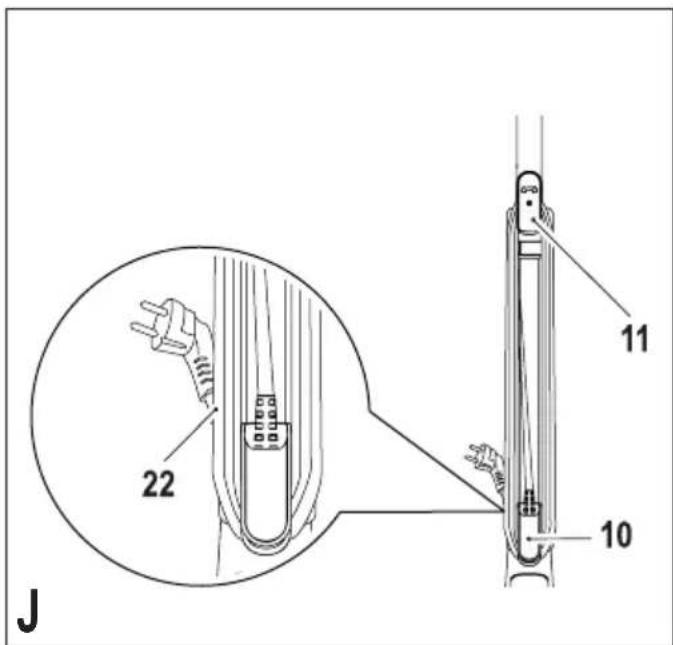
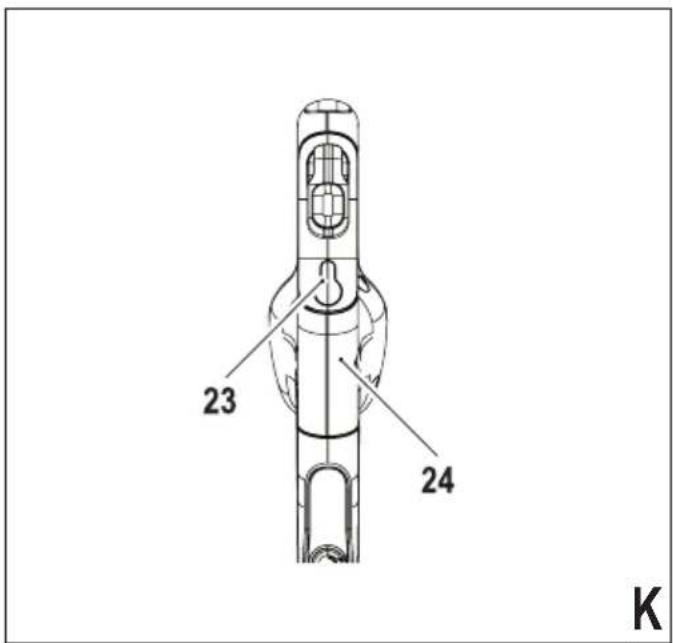
After use (Fig. J & K)
- Return the handle (4) to the upright position and turn the steam mop 'OFF'.
◆ Place the steam mop on the resting mat (8) and wait until the steam mop cools down. (approximately five minutes)
◆ Unplug the steam mop from the electrical wall outlet.
◆ Empty the water tank (3).
◆ Remove the cleaning pad (6 or 7) and wash it ready for
next use. (Take care to follow the wash care instructions printed on the cleaning pad).
- Wrap the supply cable around the cable tidy hooks (10 & 11).
Note: The top cable tidy hook (11) rotates to easily release the cable ready for next use.
◆ Clip the supply cable onto itself using the cable tidy clip (22) close to the plug.
◆ Place steam mop on the resting mat (8) for storage.
Note: With the handle (4) in the upright position, the cable neatly wrapped around the cable tidy hooks (10 & 11) and secured with the cable tidy clip (22) your steam mop will stand on its own for storage. Alternatively there is a hanging bracket (23) built into the hand grip (24) which will allow your steam mop to be hung from a suitable hook on the wall. Always ensure that your wall hook is capable of supporting the weight of the steam mop safely.
Technical data
| FSM1630(Type 1) | ||
| Voltage V | ac | 230 |
| Power W | 1600 | |
| Tank capacity ml | 500 | |
| Weight kg 3.4 |
Troubleshooting
If your appliance seems not to operate properly, follow the instructions below. If this does not solve the problem, please contact your local Black & Decker repair agent.
| Problem Step Possible solutions | ||
| The steam mop is not turning on. | 1 | Check the unit is plugged in at the wall socket. |
| 2 | Check the unit is switched on using the on/off switch (1). | |
| 3 Check the fuse in the plug. | ||
| The digital controls do not light up. | 4 | Check that the handle (4) of the steam mop is pushed firmly into the steam mop body (13). Check that the arrow on the handle is flush with the top of the steam mop body (13). |
| 5 Check steps 1, then 2, then 3. | ||
| Problem Step Possible solutions | ||
| The steam mop is not producing steam. | 6 | The steam mop will only produce steam once the handle is pulled back from the upright position. |
| 7 | Check that the water tank (3) is full and correctly fitted.NOTE:When first filled or after running dry it can take up to 45 seconds for steam to be produced. | |
| 8 | Check that the Steam head (5) is firmly docked into the steam mop body (13). | |
| 9 Check steps 1, then 2, then 3. | ||
| The digital controls go out during use. | 10 Check steps 4, then 5, then 1, then 2, then 3 | |
| The steam mop stops producing steam during use. | 11 Check steps 6, then 7, then 8, then 4, then 3. | |
| The steam mop is producing too much steam during use. | 12 | The steam mop has 3 settings. Press the autoselect button (2) to reduce the amount of steam being produced. |
| 13 | Check that the steam burst button (21) has not been pressed. | |
| The steam mop is producing too little steam during use. | 14 | The steam mop has 3 settings. Press the autoselect button (2) to increase the amount of steam being produced. |
| 15 | Press the steam burst button (21) to temporarily increase the amount of steam. | |
| Steam is escaping from unexpected areas of the unit. | 16 | Refer to the assembly chapter of the manual for correct fitting instructions of all parts and accessories. |
| Where can I get further information / accessories for my steam mop. | 17 www.blackanddecker.co.uk/steammopwww.blackanddecker.ie/steammop | |
©
ENGLISH
Do not forget to register your product!
www.blackanddecker.co.uk/productregistration
Register your product online at www.blackanddecker.co.uk/productregistration or send your name, surname and product code to Black & Decker in your country.
Australia
Black & Decker (Australia) Pty. Ltd. Tel. 03-8720 5100
20 Fletcher Road, Mooroolbark, Fax 03-9727 5940
Victoria, 3138
New Zealand
Black & Decker Tel. +64 9 259 1133
5 Te Apunga Place Fax +64 9 259 1122
Mt Wellington
Auckland 1060
United Kingdom
Black & Decker Tel. 01753 511234
210 Bath Road Fax 01753 551155
Slough, Berkshire SL1 3YD


- Intended use
- Warning! Read all of the 'Safety, Maintenance, Service' manual carefully before operating this appliance.
- Features
- Assembly
- Attaching the handle (Fig. A)
- Attaching the steam head (Fig. B)
- Attaching the water jug (Fig. C)
- Attaching a cleaning pad (Fig. D)
- Removing a cleaning pad (Fig. E)
- Filling the water tank (Fig. F)
- Attaching the carpet glider (Fig. G) (For use on carpets only)
- Removing the carpet glider (Fig. G)
- The Delta Head (Fig. H)
- Use
- Switching on and off
- Autoselect™ Technology (Fig. I)
- Steam burst (Fig. I)
- Hints for optimum use
- General
- ENGLISH
- (Original instructions)
- Steam cleaning
- Carpet refreshing
- After use (Fig. J & K)
- Troubleshooting
- Do not forget to register your product!
- Australia
- New Zealand
- United Kingdom
Brand : BLACK & DECKER
Model : FSMP30
Category : Steam cleaner