USER MANUAL BRAVIA KD85XG8596 SONY
For useful information about Sony products
Remote Control and TV. 5
Connection Diagram 6
Installing the TV to the Wall 8
Using the optional Wall-Mount Bracket . . .8
Detaching the Table-Top Stand from the TV. 9
Troubleshooting 10
Troubles and Solutions. 10
Specifications 10
Internet Connection and Data Privacy
This product connects to the internet during initial setup as soon as a network is connected in order to confirm internet connection, and later to configure the Home screen. Your IP address is used in these and all other internet connections. If you do not want your IP address be used at all, do not set-up the wireless internet function and do not connect an internet cable. Please refer to the privacy information presented in the set-up screens for further details of internet connections.
Introduction
Thank you for choosing this Sony product. Before operating the TV, please read this manual thoroughly and retain it for future reference.
Note
Before operating the TV, please read the "Safety Information" (page 3).
- Read the supplied Safety Information for additional safety information.
- Images and illustrations used in the Setup Guide and this manual are for reference only and may differ from the actual product.
- The "xx" that appears in the model name corresponds to a numeric digit, related to design, colour or TV system.
Help
Find more troubleshooting and other useful information directly from your TV. Press HELP on the remote control to display a list of topics, or to search by keyword.
Help Guide (Manual)
For more detailed information, select [Help Guide] from the Help menu on your TV. You can also check the Help Guide from your PC or smartphone (information provided on the back cover of this manual).
Location of the identification label
Labels for the TV Model No., Production Date (year/month) and Power Supply rating are located on the rear of the TV or package.
IMPORTANT NOTICE
Notice for Radio Equipment
Hereby, Sony Visual Products Inc. declares that the radio equipment types KD-85XG8596,KD-75XG8796,


KD-75XG8599, KD-75XG8596, KD-75XG8588, KD-75XG8505, KD-65XG8796, KD-65XG8599, KD-65XG8596, KD-65XG8588, KD-65XG8577, KD-65XG8505, KD-55XG8796, KD-55XG8599, KD-55XG8596, KD-55XG8505 are in compliance with Directive 2014/53/EU. The full text of the EU declaration of conformity is available at the following internet address: http://www.compliance.sony.de/
Notice for customers: the following information is only applicable to equipment sold in countries applying EU directives.
For this radio equipment, the following restrictions on putting into service or of requirements for authorization of use apply in AT, BE, HR, CY, CZ, DK, EE, FI, FR, DE, EL, HU, IE, IT, LV, LT, LU, MT, NL, PL, PT, SK, SI, ES, SE, UK, IS, LI, NO, CH, BG, RO, TR, AL, BA, MK, MD, RS, ME, Kosovo :
5150 - 5350 MHz band is restricted to indoor operations only.
Installation/Set-up
Install and use the TV set in accordance with the instructions below in order to avoid any risk of fire, electric shock or damage and/or injuries.
Installation
- The TV set should be installed near an easily accessible mains socket.
- Place the TV set on a stable, level surface to prevent it from falling over and causing personal injury or property damage.
- Install the TV where it cannot be pulled, pushed, or knocked over.
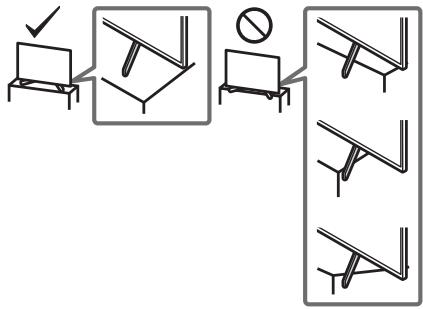
- Install the TV so that the TV's Table-Top Stand does not protrude out from the TV stand (not supplied). If the Table-Top Stand protrudes out from the TV stand, it may cause TV set to topple over, fall down, and cause personal injury or damage to the TV.
- Only qualified service personnel should carry out wall-mount installations.
- For safety reasons, it is strongly recommended that you use Sony accessories, including:
- Wall-Mount Bracket SJ-WL450
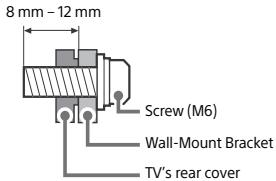
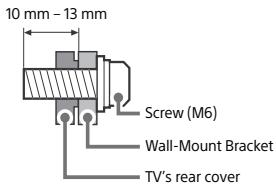
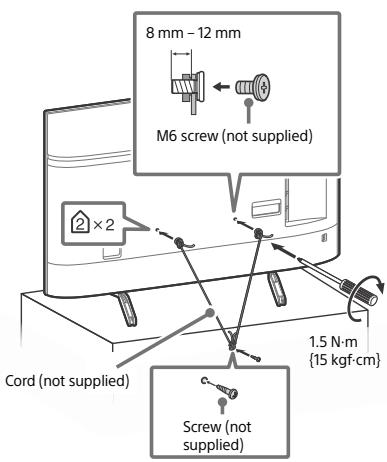
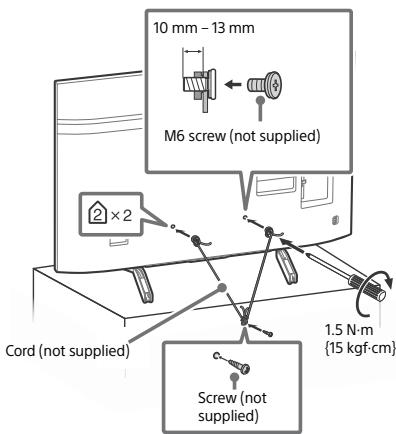
- Be sure to use the screws supplied with the Wall-Mount Bracket when attaching the Wall-Mount Bracket to the TV set. The supplied screws are designed as indicated by illustration when measured from the attaching surface of the Wall-Mount Bracket. The diameter and length of the screws differ depending on the Wall-Mount Bracket model.
Use of screws other than those supplied may result in internal damage to the TV set or cause it to fall, etc.
KD-85XG85xx
KD-75/65/55XG87xx, KD-75/65/55XG85xx
Transporting
- Before transporting the TV set, disconnect all cables.
- Two or more people (three or more people for KD-85XG85xx) are needed to transport a large TV set.
- When transporting the TV set by hand, hold it as shown below. Do not put stress on the LCD panel and the frame around the screen.
- When lifting or moving the TV set, hold it firmly from the bottom.
KD-85XG85xx
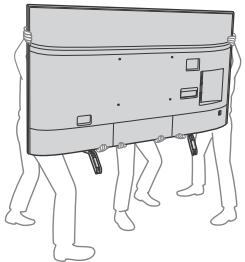
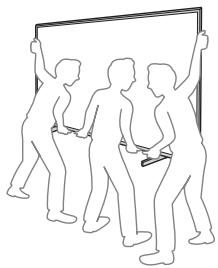
KD-75/65/55XG87xx, KD-75/65/55XG85xx
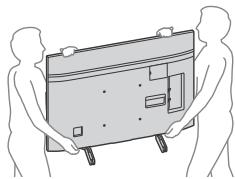
- When transporting the TV set, do not subject it to jolts or excessive vibration.
- When transporting the TV set for repairs or when moving, pack it using the original carton and packing material.
KD-85XG85xx
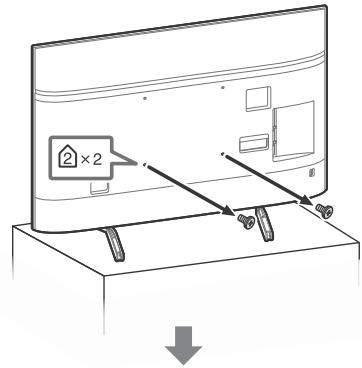
KD-75/65/55XG87xx, KD-75/65/55XG85xx
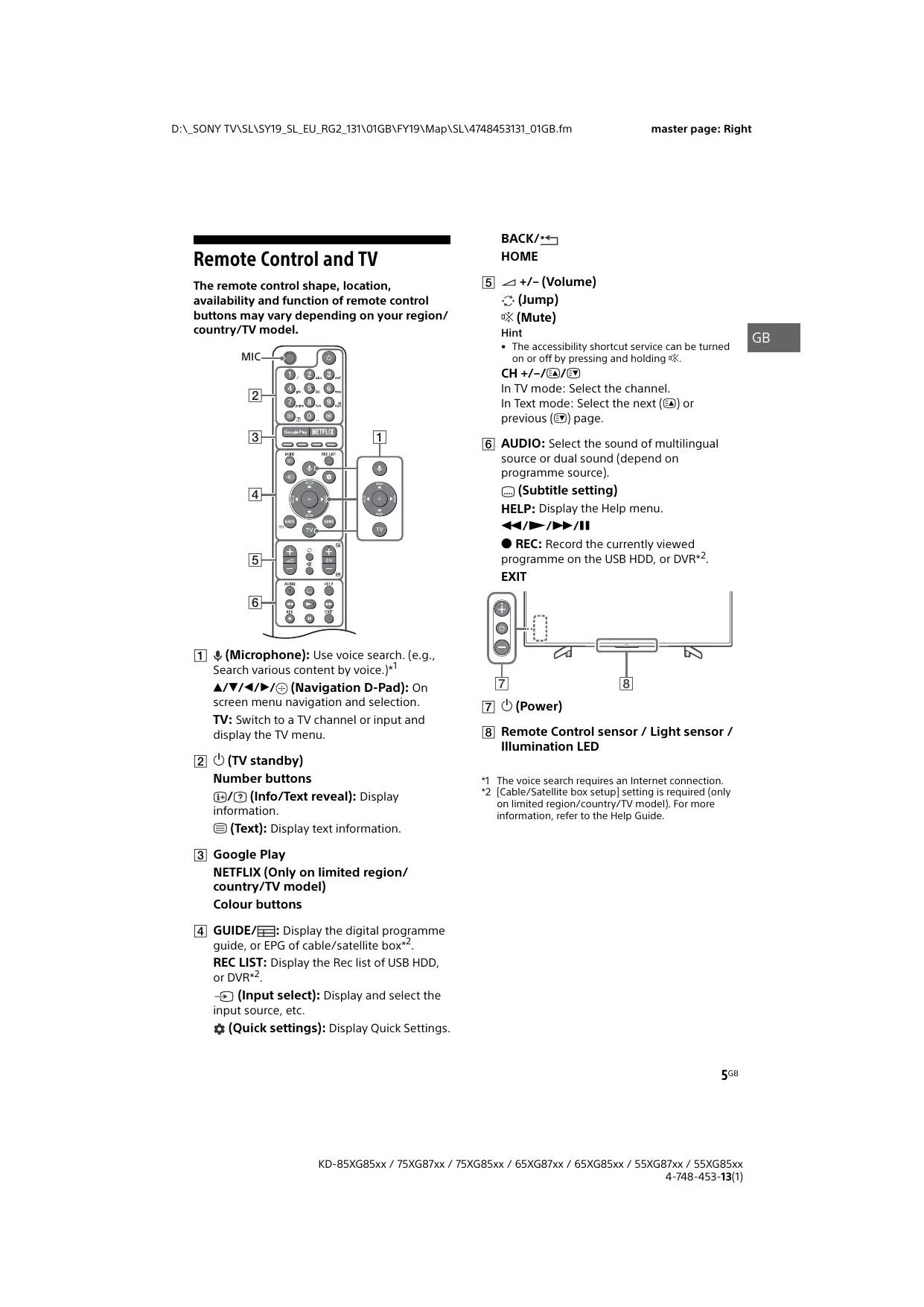
Remote Control and TV
The remote control shape, location, availability and function of remote control buttons may vary depending on your region/ country/TV model.
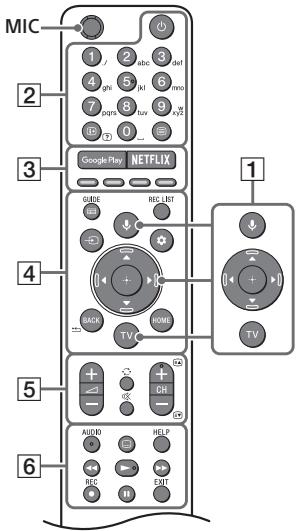
1 (Microphone): Use voice search. (e.g., Search various content by voice.)*1
/ / / / (Navigation D-Pad): On screen menu navigation and selection.
TV: Switch to a TV channel or input and display the TV menu.
2 (TV standby)
Number buttons
+1/? (Info/Text reveal): Display information.
(Text): Display text information.
3 Google Play
NETFLIX (Only on limited region/ country/TV model)
Colour buttons
4 GUIDE/:Display the digital programme guide, or EPG of cable/satellite box*2.
REC LIST: Display the Rec list of USB HDD, or DVR*2.
Input select): Display and select the input source, etc.
Quick settings): Display Quick Settings.
BACK/
HOME
5 + / - (Volume)
(Jump)
(Mute)
Hint
- The accessibility shortcut service can be turned on or off by pressing and holding .
CH+/-/3A/3T
In TV mode: Select the channel.
In Text mode: Select the next (E) or previous (E) page.
6 AUDIO: Select the sound of multilingual source or dual sound (depend on programme source).
(Subtitle setting)
HELP: Display the Help menu.
←/→/→/11
REC: Record the currently viewed programme on the USB HDD, or DVR*2.
EXIT
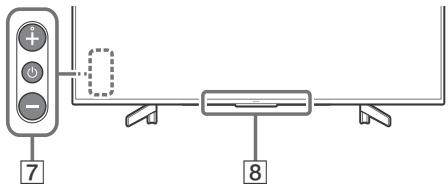
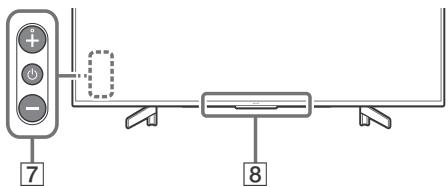
7 (Power)
Remote Control sensor / Light sensor / Illumination LED
1 The voice search requires an Internet connection.
2 [Cable/Satellite box setup] setting is required (only on limited region/country/TV model). For more information, refer to the Help Guide.
Connection Diagram
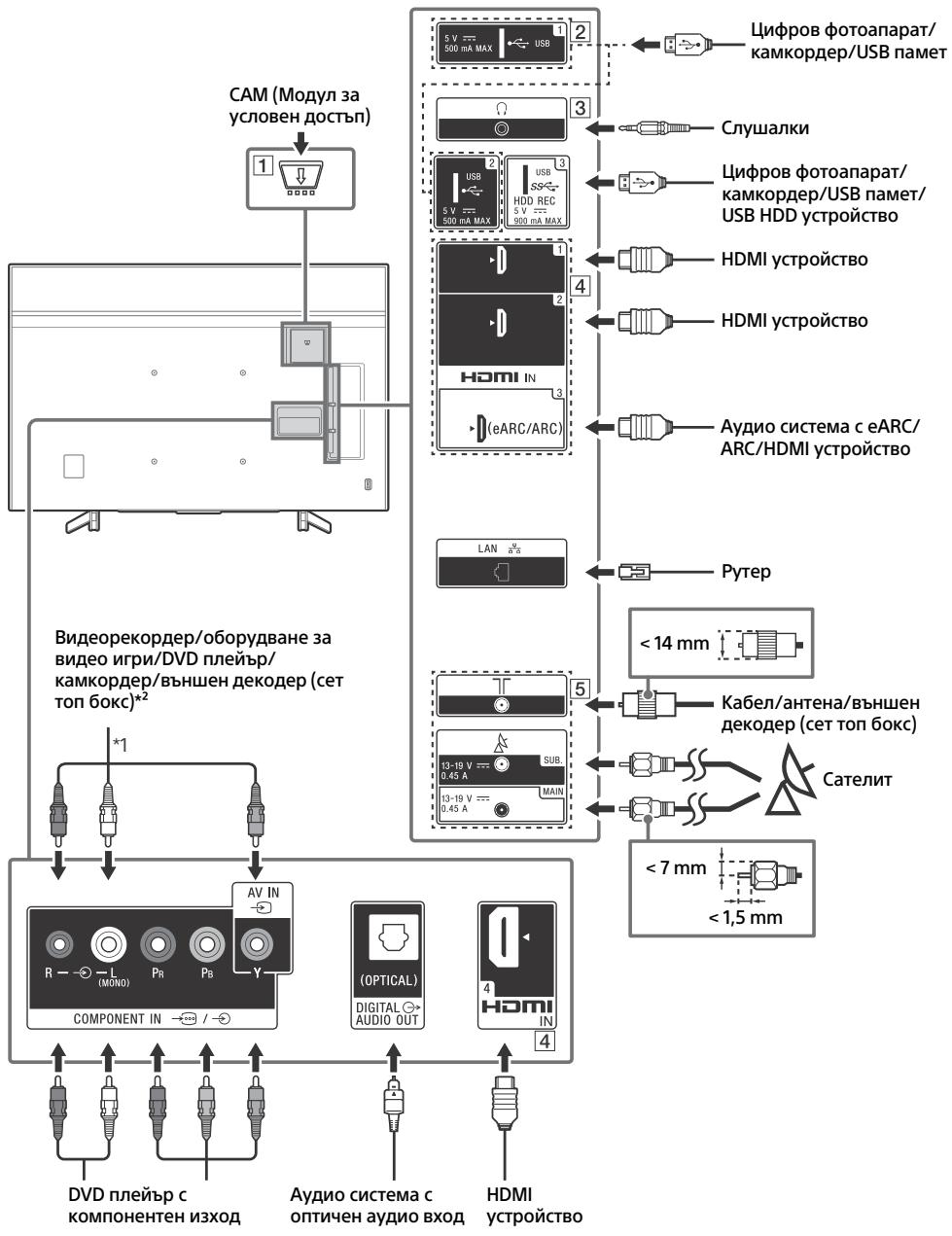
For more information on connections, refer to the Help Guide by pressing HELP on the remote control.
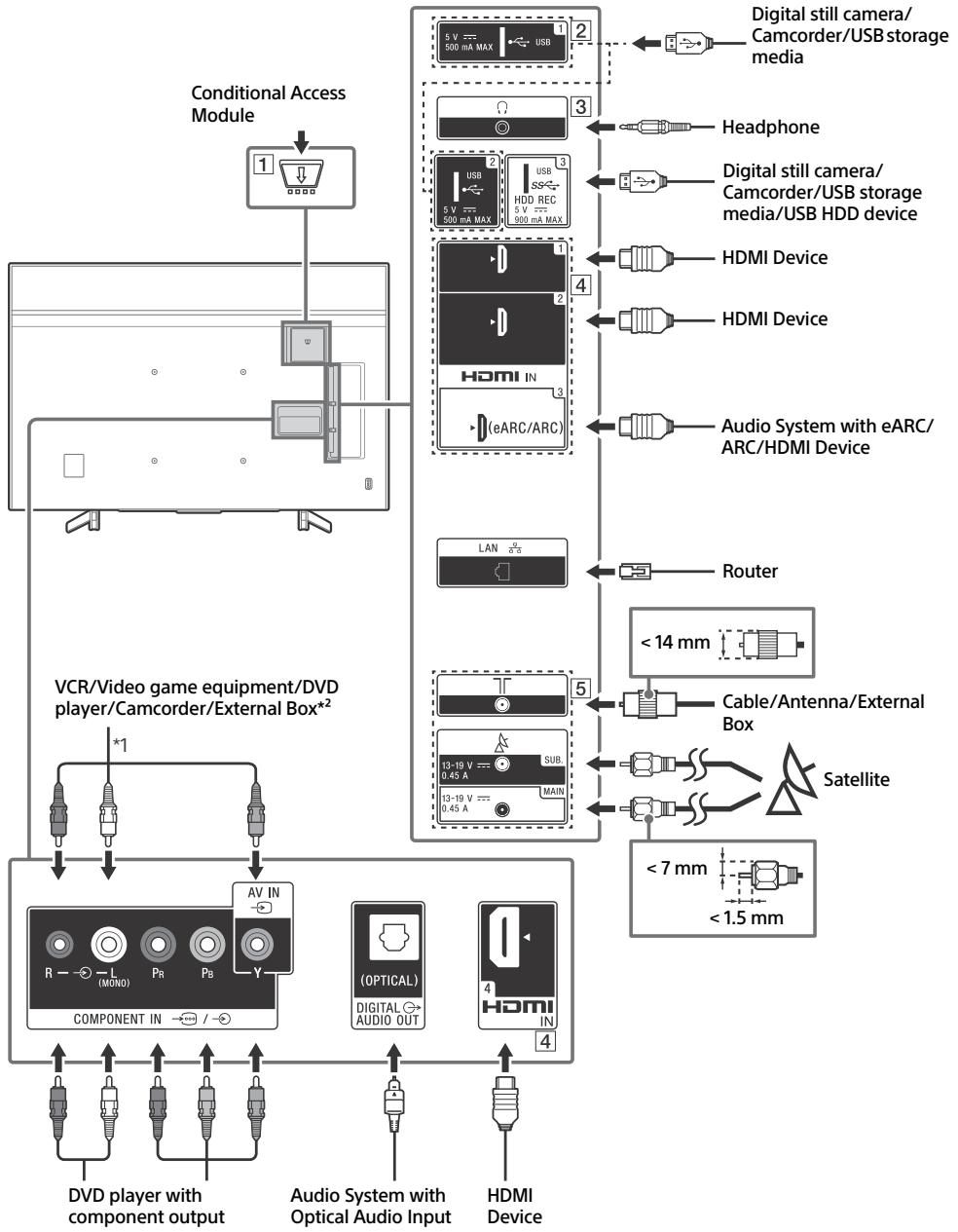
1 CAM (Conditional Access Module)
- Provides access to pay TV services. For details, refer to the instruction manual supplied with your CAM.
- Do not insert the smart card directly into the TV CAM slot. It must be fitted into the Conditional Access Module provided by your authorised dealer.
- CAM is not supported in some countries/ areas. Check with your authorised dealer.
- A CAM message may appear when you switch to a digital programme after using the Internet video.
2 USB 1/2, SS USB 3 (HDD REC)*3
- Connecting a large USB device may interfere with other connected devices beside it.
- When connecting a large USB device, connect to the USB 1 port.
- Connect a USB HDD device to the USB 3 port (blue).
3 (Headphone)
Supports 3-pole stereo mini jack only.
- You cannot output sound from both the headphone and the TV speakers at the same time.
4 HDMI IN 1/2/3/4
- HDMI interface can transfer the digital video and audio on a single cable.
-
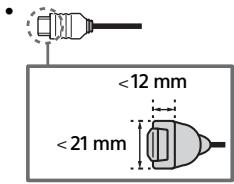
To enjoy high quality 4K 50p/60p contents, connect a Premium High Speed HDMI cable and set the [HDMI signal format] to [Enhanced format]. Do this setting individually for each connected HDMI IN terminal. For details of supported formats, refer to the "Specifications" in this manual (page 10-12).
-
HDMI IN 3 eARC/ARC (Enhanced Audio Return Channel/Audio Return Channel)
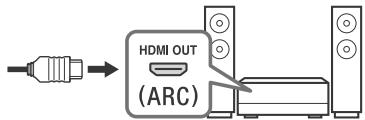
Connect your audio system to the HDMI IN 3 to route TV audio to your audio system. An audio system that supports HDMI eARC/ARC can send video to the TV, and receive audio from the TV via the same HDMI cable. If your audio system does not support HDMI eARC/ARC, an additional connection with DIGITAL AUDIO OUT (OPTICAL) is necessary.
- Use the HDMI cable with Ethernet to connect audio system with eARC.
- Connections for terrestrial/cable and satellite. Connection steps: SUB. MAIN Antenna
- For SUB. jack, connect only when you are using twin tuner mode except for Single Cable Distribution EN50494.
1 When connecting mono equipment, connect to the L (MONO) audio jack (socket).
2 For an external device which has only SCART AV OUT, use a SCART-RCA adaptor.
*3 Only on limited region/country/TV model.
Installing the TV to the Wall
Using the optional Wall-Mount Bracket
This TV's instruction manual only provides the steps to prepare the TV for Wall-Mount installation before it is installed on the wall.
To Customers:
For product protection and safety reasons, Sony strongly recommends that installation of your TV be performed by Sony dealers or licensed contractors. Do not attempt to install it yourself.
To Sony Dealers and Contractors:
Provide full attention to safety during the installation, periodic maintenance and examination of this product.
Sufficient expertise is required for installing this product, especially to determine the strength of the wall for withstanding the TV's weight. Be sure to entrust the attachment of this product to the wall to Sony dealers or licensed contractors and pay adequate attention to safety during the installation. Sony is not liable for any damage or injury caused by mishandling or improper installation.
Use the Wall-Mount Bracket SU-WL450 (not supplied) to install the TV to the wall.
When installing the Wall-Mount Bracket, also refer to the Operating Instructions and Installation Guide supplied with the Wall-Mount Bracket.
Note
- Be sure to store the removed screws in a safe place, keeping them away from children.

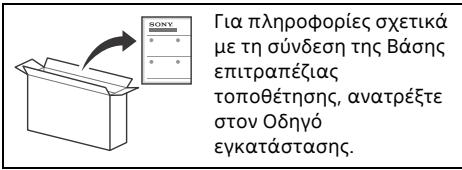
For instructions on Wall-Mount Bracket installation, see the Installation Information (Wall-Mount Bracket) on the product page for your TV model.
www.sony.eu/support/
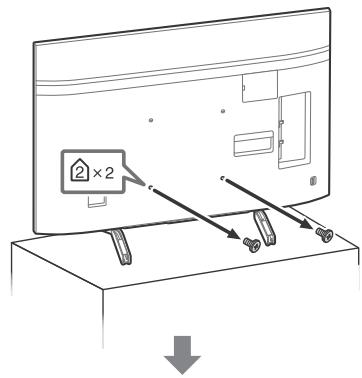
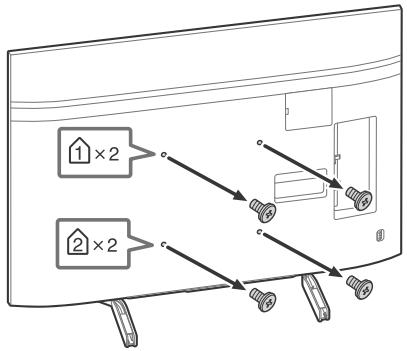
Remove the screws from the rear of the TV.
1 Remove one side of the Table-Top Stand at a time. Firmly hold the Table-Top Stand securely with both hands while the other people lift up the TV.
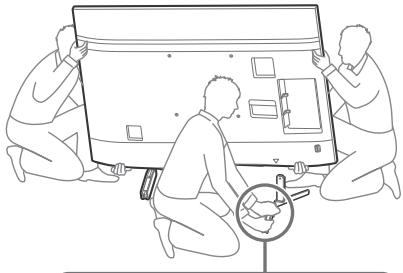
KD-85XG85xx
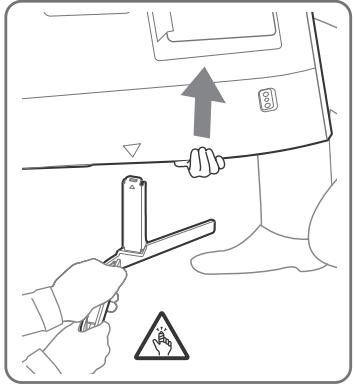
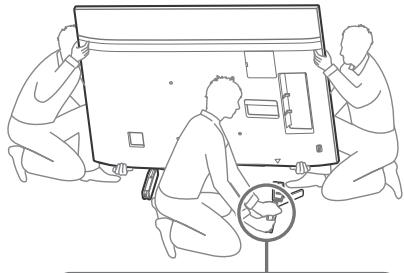
KD-75/65/55XG87xx, KD-75/65/55XG85xx
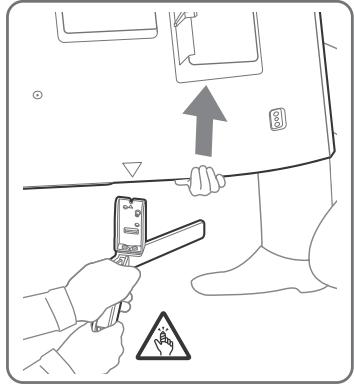
2 Repeat the previous step and remove the other side of the Table-Top Stand.
Note
- Three or more people are required to detach the Table-Top Stand.
- Be careful not to use excessive force while detaching the Table-Top Stand from the TV as it may cause the TV set to fall resulting in personal injury or physical damage to the TV.
- Take care when handling the Table-Top Stand to prevent damage to the TV.
- Be careful when lifting the TV as the Table-Top Stand is detached, the Table-Top Stand may topple over and cause personal injury.
- Take care when removing the Table-Top Stand from the TV to prevent it from falling over and damaging the surface that the TV is sitting on.
Troubleshooting
General troubleshooting for issues like: black screen, no sound, frozen picture, TV does not respond, or network is lost, do the following steps.
1 Restart your TV by pressing the power button on the remote control until a message appears. The TV will restart. If the TV does not recover, try unplugging the mains lead. Then press the power button on the TV and wait for two minutes, and plug in the mains lead.
2 Refer to the Help menu by pressing HELP on the remote control.
3 Connect your TV to the Internet and perform a software update. Sony recommends you to keep your TV software updated. Software updates provide new features and performance improvements.
4 Visit Sony support website (information provided on the front cover of this manual).
It takes time to initialize the system. Wait for about one minute, then operate it again.
Troubles and Solutions
When the illumination LED is flashing in red.
- Count how many times it flashes (interval time is three seconds).
Reboot the TV by disconnecting the mains lead until the illumination LED stopped flashing in red, then turn on the TV.
If the problem persists, disconnect the mains lead, and contact your dealer or Sony service centre with the number of times the illumination LED flashes.
Terrestrial/cable service cannot be received.
- Check the antenna (aerial)/cable connection and booster settings.
- Select terrestrial/cable service by pressing TV on the remote control, and then select [Digital] if the broadcasting service is not displayed.
- Terrestrial signal might be suppressed if there is a strong signal supplied nearby. Set [LNA (CH ---)] to [Off] in digital tuning settings.
- After moving to a new house or trying to receive new services, attempt a service search by selecting [Digital tuning].
Satellite service cannot be received.
- Check the satellite cable connection.
- When [No signal. LNB overload detected...] message is displayed, unplug the mains lead. Then, ensure the satellite cable is not damaged and the satellite signal line is not short-circuited in the satellite connector.
The remote control does not function.
The parental lock for broadcast password has been forgotten.
- Enter 9999 for the PIN code and select [Change PIN code].
The TV surrounds become warm.
- When the TV is used for an extended period, the TV surrounds become warm. You may feel hot when touching there by the hand.
Specifications
System
Panel system
LCD (Liquid Crystal Display) Panel, LED Backlight
TV system
Depending on your country/area selection/TV model
Analogue: B/G, D/K, I
Digital: DVB-T/DVB-C
DVB-T2*1
Satellite*1: DVB-S/DVB-S2
Colour system
PAL/SECAM/NTSC3.58 (Video only)/NTSC4.43 (Video only)
Channel coverage
Depending on your country/area selection/TV model
Analogue: UHF/VHF/Cable
Digital: UHF/VHF/Cable
Satellite*1: IF Frequency 950-2,150 MHz
Sound output
10W+10W
Wireless technology
Protocol IEEE802.11ac/a/b/g/n
(IEEE802.11ac may not be available depending on countries/
regions.)
Bluetooth Version 4.2
Frequency band(s)
| Wireless LAN (IEEE802.11ac/a/b/g/n) |
| Frequency range | Output Power |
| 2400-2483.5 MHz | < 20.0 dBm |
| 5150-5250 MHz | < 23.0 dBm |
| 5250-5350 MHz | < 20.0 dBm |
| 5470-5725 MHz | < 20.0 dBm |
| 5725-5850 MHz | < 13.9 dBm |
| Bluetooth |
| Frequency range | Output Power |
| 2400-2483.5 MHz | < 10.0 dBm |
Software version
This radio equipment is intended to be used with the approved version(s) of software that are indicated in the EU Declaration of Conformity.
Press HELP on the remote control to know the software version.
Remote control:
Select [Remote control] [Software version] from [Settings]. For more information, refer to the Help Guide.
The software loaded on this radio equipment is verified to comply with the essential requirements of the Directive 2014/53/EU.
Antenna (aerial)/cable
75 ohm external terminal for VHF/UHF
Satellite antenna*1
Female F Type Connector, 75 ohm.
DiSEqC 1.0, LNB 13 V/18 V & 22 kHz tone, Single Cable
Distribution EN50494
COMPONENT IN
YP_BPR (Component Video): 1080p (50, 60 Hz), 1080i (50, 60 Hz),
720p(50,60Hz),576p,576i,480p,480i
Audio input (phono jacks)
AVIN
Video input (common phono pin with Y input)
HDMI IN 1/2/3/4 (support 4K resolution, HDCP
2.3-compatible)
Video:
4096× 2160p (50, 60 Hz)*2*3, 4096 × 2160p (24 Hz)*2, 3840 ×
2160p (50, 60 Hz)*3, 3840 × 2160p (24, 25, 30 Hz), 1080p (30,
50, 60 Hz), 1080/24p, 1080i (50, 60 Hz), 720p (30, 50, 60 Hz),
720/24p, 576p, 480p, PC Formats*4
Audio:
In eARC (Enhanced Audio Return Channel) mode*5
Refer to the Help Guide for details.
Except eARC mode
5.1 channel linear PCM: 32/44.1/48/88.2/96/176.4/192 kHz
16/20/24 bits, Dolby Digital, Dolby Digital Plus, DTS
eARC/ARC (Enhanced Audio Return Channel/Audio Return
Channel) (HDMI IN 3 only)
In eARC mode*5
Refer to the Help Guide for details.
In ARC mode
Two channel linear PCM: 48 kHz 16 bits, Dolby Digital, Dolby Digital Plus, DTS
DIGITAL AUDIO OUT (OPTICAL)
Digital optical jack (Two channel linear PCM: 48 kHz 16 bits,
Dolby Digital, DTS)
USB device port (SS 3 USB HDD device for REC feature)
USB port 1 and 2 support High Speed USB (USB 2.0)
USB port 3 supports Super Speed USB (USB 3.1 Gen 1)
CAM (Conditional Access Module) slot
LAN
10BASE-T/100BASE-TX connector (Depending on the operating environment of the network, connection speed may differ. The communication rate and quality are not guaranteed.)
Others
Optional accessories
Wall-Mount Bracket: SU-WL450
Operating temperature
0^ - 40^
Operating humidity
10% - 80% RH (non-condensing)
Power, Product Fiche and others
Power requirements
220V-240VAC,50Hz
Energy Efficiency Class
KD-85XG85xx: A
KD-75XG87xx / KD-75XG85xx: A+
KD-65XG87xx / KD-65XG85xx: A
KD-55XG87xx / KD-55XG85xx: A
Screen size (measured diagonally) (Approx.)
KD-85XG85xx: 214.8 cm / 85 inches
KD-75XG87xx / KD-75XG85xx: 189.3 cm / 75 inches
KD-65XG87xx / KD-65XG85xx: 163.9 cm / 65 inches
KD-55XG87xx / KD-55XG85xx: 138.8 cm / 55 inches
Power consumption
In [Standard] m
KD-85XG85xx:216W
KD-75XG87xx / KD-75XG85xx: 158 W
KD-65XG87xx / KD-65XG85xx: 127 W
KD-55XG87xx / KD-55XG85xx: 111 W
In [Vivid] mode
KD-85XG8596:362W
KD-75XG8796:275W
KD-75XG8599:275W
KD-75XG8596:275W
KD-75XG8588:275W
KD-75XG8505:275W
KD-65XG8796:221W
KD-65XG8599:221W
KD-65XG8596:221W
KD-65XG8588:221W
KD-65XG8577:221W
KD-65XG8505:221W
KD-55XG8796:186W
KD-55XG8599:186W
KD-55XG8596:186W
KD-55XG8588:186W
KD-55XG8577:186W
KD-55XG8505:186W
Annual energy consumption*7
KD-85XG85xx: 300 kWh per year
KD-75XG87xx / KD-75XG85xx: 219 kWh per year
KD-65XG87xx / KD-65XG85xx: 176 kWh per year
KD-55XG87xx / KD-55XG85xx: 154 kWh per year
Standby power consumption89
0.50 W (25 W in software/EPG update mode)
Display resolution
3,840 dots (horizontal) × 2,160 lines (vertical)
Output Rating
USB 1/2
5V---,500mA MAX
USB3
5V----,900mA MAX
Dimensions (Approx.) (w× h× d)
with Table-Top Stand
KD-85XG85xx: 190.9 × 117.5 × 43.3 cm
KD-75XG87xx / KD-75XG85xx: 167.3 × 103.1 × 35.8 cm
KD-65XG87xx / KD-65XG85xx: 145.0 × 89.9 × 31.6 cm
KD-55XG87xx / KD-55XG85xx: 123.1 × 77.6 × 31.6 cm
without Table-Top Stand
KD-85XG85xx: 190.9 × 109.7 × 8.0 cm
KD-75XG87xx / KD-75XG85xx: 167.3 × 96.3 × 5.4 cm
KD-65XG87xx / KD-65XG85xx: 145.0 × 83.6 × 5.2 cm
KD-55XG87xx / KD-55XG85xx: 123.1 × 71.3 × 5.2 cm
Mass (Approx.)
with Table-Top Stand
KD-85XG85xx: 49 kg
KD-75XG87xx / KD-75XG85xx: 39.3 kg
KD-65XG87xx / KD-65XG85xx: 26.3 kg
KD-55XG87xx / KD-55XG85xx: 19.7 kg
without Table-Top Stand
KD-85XG85xx: 46.5 kg
KD-75XG87xx / KD-75XG85xx: 37.8 kg
KD-65XG87xx / KD-65XG85xx: 25.3 kg
KD-55XG87xx / KD-55XG85xx: 18.7 kg
1 Not all the TV sets have DVB-T2 or DVB-S/S2 technology or satellite antenna terminal.
2 When 4096 × 2160p is input and [Wide mode] is set to [Normal], the resolution is displayed as 3840 × 2160p . To display 4096 × 2160p , set [Wide mode] setting to [Full 1] or [Full 2].
3 To support 18 Gbps, set [HDMI signal format] to [Enhanced format].
4 Refer to the Help Guide for details.
5 eARC mode is active when [eARC mode] is set to [Auto], [Speakers] is set to [Audio system] and eARC compatible audio system is connected.
6 Only on limited region/country/TV model.
7 Energy consumption in kWh per year, based on the power consumption of the television operating 4 hours per day for 365 days. The actual energy consumption will depend on how the television is used.
8 Specified standby power is reached after the TV finishes necessary internal processes.
*9 Standby power consumption will increase when your TV is connected to the network.
Note
- Do not remove the dummy card or cover (availability depends on TV model) from TV CAM (Conditional Access Module) slot other than to insert a smart card fitted in CAM.
- Optional accessories availability depends on countries/region/ TV model/stock.
- Design and specifications are subject to change without notice.
Notes on Digital TV function
- Digital TV (DVB terrestrial, satellite and cable), interactive services and network functions may not be available in all countries or areas. Some functions might not be enabled or might not operate correctly with some providers and network environments. Some TV service providers may charge a fee for their services.
- This TV supports digital broadcasting using MPEG-2, H.264/MPEG-4 AVC and H.265/HEVC CODECs, but compatibility with all operator/service signals, which may change over time, cannot be guaranteed.
- The terms HDMI and HDMI High-Definition Multimedia Interface, and the HDMI Logo are trademarks or registered trademarks of HDMI Licensing Administrator, Inc. in the United States and other countries.
- Dolby, Dolby Vision, Dolby Audio, and the double-D symbol are trademarks of Dolby Laboratories. Manufactured under license from Dolby Laboratories. Confidential unpublished works. Copyright © 1992-2015 Dolby Laboratories. All rights reserved.
- BRAVIA, BRAVIA and BRAVIA Sync are trademarks or registered marks of Sony Corporation.
- Gracenote, the Gracenote logo and logotype, "Powered by Gracenote" logo are either registered trademarks or trademarks of Gracenote, Inc. in the United States and/or other countries.
- Vewd® Core. Copyright 1995-2019 Vewd Software AS. All rights reserved.
- Google, Google Play, Chromecast, YouTube, Android TV and other related marks and logos are trademarks of Google LLC.
- Wi-Fi®, Wi-Fi Alliance® and Wi-Fi Direct® are registered trademarks of Wi-Fi Alliance.
- The Wi-Fi CERTIFIED™ Logo is a certification mark of Wi-Fi Alliance.
- For DTS patents, see http://patents.dts.com. Manufactured under license from DTS, Inc. DTS, the Symbol, & DTS and the Symbol together are registered trademarks, and DTS Digital Surround is a trademark of DTS, Inc. © DTS, Inc. All Rights Reserved.
- The Bluetooth® word mark and logos are registered trademarks owned by the Bluetooth SIG, Inc. and any use of such marks by Sony Corporation is under license. Other trademarks and trade names are those of their respective owners.
- Netflix is a registered trademark of Netflix, Inc.
- DiSeq™ is a trademark of EUTELSAT. This TV supports DiSeqC 1.0. This TV is not intended for controlling motorized antennas.
- TUXERA is a registered trademark of Tuxera Inc. in the US and other countries.
-
USB-IF SuperSpeed USB Trident logo is a registered trademark of USB Implementers Forum, Inc. SS_总^2
-
All other trademarks are the property of their respective owners.
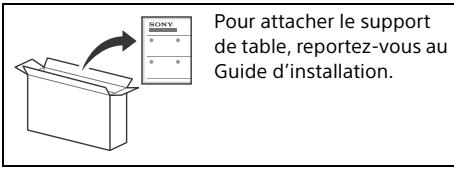
Table des matières
5 T(Entree RF), A (Entree satellite)
Analogue: B/G, D/K, I
Analogue: UHF/VHF/Cable
Entree audio (prises phono)
AVIN
2160p (50, 60 Hz)*3, 3840 × 2160p (24, 25, 30 Hz), 1080p (30,
50, 60 Hz), 1080/24p, 1080i (50, 60 Hz), 720p (30, 50, 60 Hz), 720/24p, 576p, 480p, Formats PC*4
Audio :
En mode eARC (Enhanced Audio Return Channel)*5
eARC/ARC (Enhanced Audio Return Channel/Audio Return Channel) (HDMI IN 3 uniqueness)
En mode eARC*5
1, 2, SS 3 (HDD REC)*b
10% - 80% HR (sans condensation)
10% - 80% RH (sin condensation)
eARC/ARC (Enhanced Audio Return Channel/Audio Return
Channel) (Alleen HDMI IN 3)
In stand eARC*5
DIGITAL AUDIO OUT (OPTICAL)
2160p (50, 60 Hz)*3, 3840 × 2160p (24, 25, 30 Hz), 1080p (30,
50, 60 Hz), 1080/24p, 1080i (50, 60 Hz), 720p (30, 50, 60 Hz), 720/24p, 576p, 480p, Computerformula ^4
Audio:
eARC/ARC (Enhanced Audio Return Channel/Audio Return
Sistema de television
Dependendo do País/area/modelos de teovisor
eARC/ARC (Enhanced Audio Return Channel/Audio Return
Channel) (Apenas nos modelos HDMI IN 3)
No modulo eARC
720p(50,60Hz),576p,576i,480p,480i
2160p (50, 60 Hz)*3, 3840 × 2160p (24, 25, 30 Hz), 1080p (30,
50, 60 Hz), 1080/24p, 1080i (50, 60 Hz), 720p (30, 50, 60 Hz),
720/24p, 576p, 480p, Formati PC*4
Audio:
eARC/ARC (Enhanced Audio Return Channel/Audio Return
Channel) (Solo HDMI IN 3)
In modalità eARC*5
REC LIST: Visa Rec-listan for USB HDD, ellr DVR*2.
eARC/ARC (Enhanced Audio Return Channel/Audio Return
Channel) (HDMI IN 3 endast)
I eARC-lage*5
Se Hjalpguiden for mer detaljer.
IARC-lage
Tvakanalig linjar PCM: 48 kHz 16-bitars, Dolby Digital, Dolby Digital Plus, DTS
念 DIGITAL AUDIO OUT (OPTICAL)
Digital optiktkest (tvakanalig linjär PCM: 48 kHz 16-bits, Dolby Digital, DTS)
(Stereominiuttag) Hörlur
1,2,SS3(HDDREC)*6
Satellite-service kan/DD
720p(50,60Hz),576p,576i,480p,480i
Lydindgang (phono-jackstik)
AVIN
2160p (50, 60 Hz)*3, 3840 × 2160p (24, 25, 30 Hz), 1080p (30,
50, 60 Hz), 1080/24p, 1080i (50, 60 Hz), 720p (30, 50, 60 Hz),
720/24p, 576p, 480p, Pc-formater*4
Lyd:
I eARC (Enhanced Audio Return Channel)-tilstand*5
Se Hjelpevejledningen for detailer.
eARC/ARC (Enhanced Audio Return Channel/Audio Return
Channel) (kun HDMI IN 3)
I eARC-tilstand*5
I [Standard]-tilstand
KD-85XG85xx:216W
KD-75XG87xx / KD-75XG85xx: 158 W
KD-65XG87xx / KD-65XG85xx: 127 W
KD-55XG87xx / KD-55XG85xx: 111 W
I [Kraftig]-tilstand
KD-85XG8596:362W
KD-75XG8796:275W
KD-75XG8599:275W
KD-75XG8596:275W
KD-75XG8588:275W
KD-75XG8505:275W
KD-65XG8796:221W
KD-65XG8599:221W
KD-65XG8596:221W
KD-65XG8588:221W
KD-65XG8577:221W
KD-65XG8505:221W
KD-55XG8796:186W
KD-55XG8599:186W
KD-55XG8596:186W
KD-55XG8588:186W
KD-55XG8577:186W
KD-55XG8505:186W
720p(50,60Hz),576p,576i,480p,480i
2160p (50, 60 Hz)*3, 3840 × 2160p (24, 25, 30 Hz), 1080p (30,
50, 60 Hz), 1080/24p, 1080i (50, 60 Hz), 720p (30, 50, 60 Hz),
720/24p, 576p, 480p, PC-muodot*4
Audio:
eARC (Enhanced Audio Return Channel)-tilassa*5
eARC/ARC (Enhanced Audio Return Channel/Audio Return
Channel) (Vain_HDMI IN 3)
eARC-tilassa*5
DIGITAL AUDIO OUT (OPTICAL)
Herved erCLAerer Sony Visual Products Inc. at radioustyrstypene
KD-85XG8596,KD-75XG8796,
KD-75XG8599, KD-75XG8596, KD-75XG8588, KD-75XG8505,
KD-65XG8796, KD-65XG8599, KD-65XG8596, KD-65XG8588
KD-65XG8577, KD-65XG8505, KD-55XG8796, KD-55XG8599
KD-55XG8596, KD-55XG8588, KD-55XG8577, KD-55XG8505 er i
hurtiginnstillinger.
BACK/
HOME
5 + / - (Volum)
(Hopp)
(Demp)
Tips
(Teksting-innstilling)
HELP: Vis Hjelp-menyen.
←/→/→/11
eARC/ARC (Enhanced Audio Return Channel/Audio Return
Channel) (tylko model HDMI IN 3)
W trybie eARC*5
2160p (50, 60 Hz)*3, 3840 × 2160p (24, 25, 30 Hz), 1080p (30,
50, 60 Hz), 1080/24p, 1080i (50, 60 Hz), 720p (30, 50, 60 Hz), 720/24p, 576p, 480p, PC formaty*4
Audio:
V režimu eARC (Enhanced Audio Return Channel)*5
eARC/ARC (Enhanced Audio Return Channel/Audio Return
Channel) (pouze modely HDMI IN 3)
V rezimu eARC*5
eARC/ARC (Enhanced Audio Return Channel/Audio Return
Channel) (Len model HDMI IN 3)
V rezime eARC*5
Podrobnosti najdete v Priruce.
V rezime ARC
Dvojkanalovy lineary PCM: 48 kHz 16 bitv, Dolby Digital, Dolby Digital Plus, DTS
DIGITAL AUDIO OUT (OPTICAL)
Digitalny opticky konkector (dvojkanalovy lineary PCM: 48 kHz 16 bitov, Dolby Digital, DTS)
4096×2160p (50, 60 Hz)2+3, 4096×2160p (24 Hz)2, 3840×2160p (50, 60 Hz)3, 3840×2160p (24, 25, 30 Hz), 1080p (30, 50, 60 Hz), 1080/24p, 1080i (50, 60 Hz), 720p (30, 50, 60 Hz), 720/24p, 576p, 480p, PC formatumok4
Audio:
DIGITAL AUDIO OUT (OPTICAL)
Digitalis optikalcstalakoz (kctcsatornas linearis PCM: 48 kHz 16 bit, Dolby Digital, DTS)
eARC/ARC (Enhanced Audio Return Channel/Audio Return
Channel) (Numai HDMI IN 3)
In modul eARC*5
Pentru detalii, consultati ghidul de asistenta.
In modul ARC
PCM linari pe doua canale: 48 kHz 16 biti, Dolby Digital, Dolby Digital Plus, DTS
DIGITAL AUDIO OUT (OPTICAL)
Mufa optica digitala (PCM liniar pe doua canale: 48 kHz 16 biti, Dolby Digital, DTS)
(Mini mufa stereo)
Castei
1,2,SS3 (HDDREC)*6
Port dispositive USB (SSS ^+ 3 dispositive HDD USB pentru.
characteristica REC)
(HaCtpoIka Ha cy6TnTpntE)
HELP:ПокаЗВА ПОМΟЦно MEHIO.
←/→/→/11
REC: 3aɪnɪcBA rɪŋeɪdəHaTa B Mòmeɪtā npʊrρaɪm Ha USB HDD uɪn DVR*².
EXIT
7 (3axpaHbHaHe)
8 CeH3Op 3aДиCTaHcNoHHOTO ynpaBJIeHne / CBeTJIiHEn ceH3Op / LED oCBetJIeHne
1 ΓλαCOBOTObTbpcHe N3NCKBa INHTepHET BpB3Ka.
^2 HeobxOjmaeHaCTpoKaTa[HacTPOKaHa Ka6BEnH/cateIHTENdeKOdE](CaMo3a OOrpaHnueH perOnn/CTpaHn/MoJeN TeLeB3OpN).3a NoBeue HOpMaJra BIXTe B POMoUHOTo pKOBODCTBO.
Диагама на CBbp3BaHe
3a noBue HnHOpMaun 3a Bpb3KNTe, BnXTe POMOuHOTo pkoBOdCTBO Upe3 haTnCKaHe Ha 6yToHa HELP Na nCTaHcNooHHOTo ynpabLeHne.
1 CAM (MouyIa yCIOBEN IOCTbN)
- PpeOCTaBЯДocTbIdoПlaTeHn TB yCnyr.3a nOdpO6HOctu BIXKTe PbkOBoDcTBOTa yNpTope6a,doCTaBeHo C bAunr CAM.
- He nocTabaTe cMapr KapTa Ta nipeKTHoB CAM cnota Ha TeleBnOpa. T rPra6Ba Da ce nocTabu B MoUla 3a yCIOBEN DoCTbI, npeIOCTaBeH OT BaUnia OnepAToP.
- CAM He ce noДьржа В Някои Дьржави/pernoHn. Пюверет рп вашяonepaTop.
Korato npBeknOHTe KbM uΦpOBA npOrpama CJIeI KaTO rIeIaTe INTEpHET BnIeO, MoKeJa Ce IoRbI CAM Cbo6uEHe.
2 USB 1/2, SS USB 3 (HDD REC)*3
Cbpb3BaHTo Ha rJlmo USB yctpoNCTBO MOnge Da nOBnIe Ha pa6oTaHa dpyrN CBbp3aHn yctpoNCTBa B 6bn3OcT Do Hero.
Korato CBbp3BaTe roJmo USB yCTpoIcTBO, Cbbp3BaIte rO KbM KynIyHra USB 1.
- CbpxTe USB HDD yCTpoIcTBO KbM USB 3 nopTa (cH).
3 (Cnyuajkn)
-ПдьржcaMo cTepeo MHN-Jak c Tprn
Полюca.
He moxke Ta nyskaTe 3Byk eHOBpeMeHHO OT CnyuJaIKte N BnCOKOrOBOpHTeJIte Ha TeJeBn3opa.
HDMI IN 1/2/3/4
ИnteppeHcT HDMIMoKeJa npehacZuΦpOBO BnDeo n ayDnO no eHN Ka6eN.
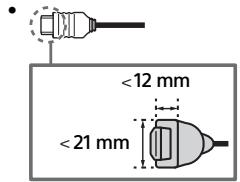
3a da ce hacnajaBaTe Ha BnCOKoKaeeCTBeHo 4K 50p/60p CbDbpXaHHe, CbPxTe KeaecTBeH BnCOCKOpocTeH HDMI Ka6en n 3aJaTe [FopMaT Ha HDMI cHaHa.] Ha [PiOobpeH FopMaT]. N3BbpSeTe Ta3n Hactpojka 3a BceKn CbP3An HDMl IN TepMInan. 3a nobeue IHΦOpMaJn OTHOCHO pndbpXaHIne ΦopMaTn BnKTe "CneuNfkaun" B ToBa PbkOBoDCBo (ctp.10-12).
- HDMI IN 3 eARC/ARC (Enhanced Audio Return Channel/Audio Return Channel) CbbypkeTe aydno cnCTeMaTa cn KbM HDMI IN 3, 3a da hacouite TeJeBnIOHnIy aydno cnHrHaI KbM BaWata aydno cnCTeMa. Aydno cnCTeMa, KoToNoDlbpxKa HDMI eARC/ARC, moKeJa n3npaSa BnDeO KbM TeJeBn3Opa n daNoJyUaba aydno OT TeJeBn3Opa Ype3 CbSma HDMI KaBeN. Ako BaWata aydno cnCTeMa He noDlbpxKa HDMI eARC/ARC, eHeo6xoIMMa DOnbJInTeHa Bp3ka c DIGITAL AUDIO OUT (OPTICAL).
- I3noI3BaIte HDMI k6eI c Ethernet, 3a
- da CbpxKeTe ayDIO nCtEma c eARC.
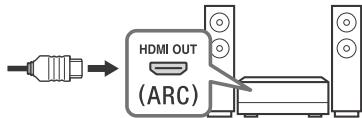
5 (RF BXoD), (CateJInteh BXoD)
- Kynluyn3a Ha3eMHa/Ka6eJHa n caTeJInTHa TeJeBn3n. CbPkN Ha CBbp3BaHe: SUB. MAIN AHTeha
CbpxTe SUB. Jaka, caMo KOrato N3No13BaTe peXm DBoEH TyHep, cN3KJIuOeHne Ha eNHOka6eHno pa3npdeJeHne EN50494.
1 Korato CBbp3BaTe MOHO o6OpyDbaHe, CBbpKxeTe KbM L (MONO) aydno Jxak.
2a BbHIno YcTpoICTBO, KOEt OMa CaO SCART AV OUT, n3noJ3BaTe SCART-RACA aadantep.
*3 Camo 3a orpaHueHn pernoHn/ctpaHn/MoJeN TeleBn3Opn.
MONTAX Ha TeJebn3opa Ha CTeHa
I3no3BaHe na onuHoaHaHaTa KOH3OJa 3a 3aKpeBaHe KbM cTeHa
B ToBa pIbKOBOJCTBO 3a yNOTpe6a e NOKa3aHa cAmO NIOIroTOBkata Ha TeJIeBn3Opa 3a MOHTaK Ha CTHe, PpeiN ToJ Da 6bJe MOHTnpaH Ha CTeHaTa.
Do notpe6nteJnte:
Ot cbo6paxeHn 3a 6e0nacnoct n 3a 3auNTa Ha npoDyKta, Sony npenopbUva MoHTaxkT ha Baunr TeLeBn3Op da 6bJe n3BbPseH ot nCtpr6byTop Ha Sony nIOn OT IInuEHNpaH noDn3bNHTeL. He ce ONITBaIte da ro MOHTnpaTe camn.
Do TbproBunTe n DoctabnUte Ha Sony:
IoiXoJeTe CIOUePteTao BHNMaHne KbM 6e3ONaCHOCCTa IIOBpeMe Ha MOHTaKa, IepNoDnHaTa TIOIrpBxKAnpOBePKaTa HTo3N pOdyKT.
3a MoHTaJa Ha To3n IpoJyKT Ce n3NcKBa 3HaunTeJeH OOnT, Oco6eHo 3a OnpeJeIaHe Ha 3dpabHbHaTa Ha CTehata, KOYTO Tp8Ba Da n3NbPjXn TeKeCTTa Ha TEJIeBmOpa. Ha BCya ZeHa NOpePeTe 3akpenBaHTo Ha To3n IpoJyKT KbM CTea Ha NcIcTpbnEyTopn HA Sony iIN JInu He3npuHn NOnI3nbLnHtEni N no Bpeme Ha MoHTaJa o6bpHeTe Oco6eHo BHNMaHne HA MepKnte 3a 6e3oNaCHost. Sony He Hoc NTobOpHoc 3a NobpeDi INI HapaHbAHn, pInuHneHn OT HeNPaBUNn MaHInylaCn INI MONTaX.
Cateun*1:DVB-S/DVB-S2
LBeTOba CNTema
PAL/SECAM/NTSC3.58 (camo bnujeo)/NTSC4.43 (camo bnujeo)
Pokpntne Ha KaHaJIte
B 3aBcNcMocT oBaTaTbIbPxABa/M36Op Ha 3OHa/MoJeH aTeBeuB3Opa
Analorob: UHF/VHF/ka6eI
UHF/VHF/ka6eJ
CateiHT*IFYeToTa950-2150MHz
3BykoB u3XoD
10W+10W
Be3xuHaTexHIOJnA
IEEE802.11ac/a/b/g/n npotoKoN
(IEEE802.11acMOXe da He e HAnuHO B3aBcMocT OT
CTpaHaTApereNoHa.)
Bluetooth Bepcna 4.2
UcctOTHa(u) nenta(n)
| Бezжун LAN (IEEE802.11ac/a/b/g/n) |
| Чебтейн обховат | Издяп мошист |
| 2 400-2 483,5 MHz | < 20,0 dBm |
| 5 150-5 250 MHz | < 23,0 dBm |
| 5 250-5 350 MHz | < 20,0 dBm |
| 5 470-5 725 MHz | < 20,0 dBm |
| 5 725-5 850 MHz | < 13,9 dBm |
| Bluetooth |
| Чебтейн обховат | Из:xoяда мошиност |
| 2 400-2 483,5 MHz | <10,0 dBm |
RMF-TX600E/TX500E
| Bluetooth |
| Чебтейн обховат | Из:xoяда мошиност |
| 2 400-2 483,5 MHz | <10,0 dBm |
CoΦTyepHa Bepn
Toba pao 60pduBahe e npdaHa3nhaeHc 3a yonptpe6a c o6obenHe Bepcn Ha coPtepa, KOIO Ca nocOeuHN B deknapaunra 3a cbOTBeCTBne HA EC.
HATCHENEH EELHP HAp STaCHTaONHOHTO ynpAbeHEnHe, 3a da BVInde BercpuraHa codTpeta.
ДиctaHcIOHNo ynpabHeHne:
N3epeTe [MntaHtuaHNO UnpaBneHnE] [CoΦTyepHa Bepcra:] OHTaCpOuKm]. 3a NObue HInΦopMaunu BIXte B NOMouHToTO bkoBdCTBO.
CodTpyeSt,3aepen H ToTa pAnio OobpyBaHe,e yOToCTOBepeK Hato CbOTBeTcBaHa NcbIeCTBeHnTe 13NCKBANHa N dIpuKeTbMa 2014/53/EC.
BxOJHO/u3XoJHn JkaKOBe
AHTeHa/ka6eI
75 OMa BbHueh TepMnHaJ 3a VHF/UHF
CateJInTHaAHTeHa
KoHEKTOp TnF, XeHcKn, 75 OMa.
DiSeQC 1.0, LNB 13 V/18 V & 22 kHz toh, Paopeenlne no 1 Ka6en EN50494.
-COMPONENT IN
YbPbR (KoMnOHeHTHO BvEe): 1080p (50, 60 Hz), 1080i (50, 60 Hz), 720p (50, 60 Hz), 576p, 576i, 480p, 480i
Aydno BXoD (foHO JkaKOBe)
AVIN
Bndeo BxOJ (06uΦOHO nH C YBXOJa)
HDMI IN 1/2/3/4 (noDlbpxa 4K pe3oJIOUra, CbbMeCTnM C
HDCP 2.3)
Bndeo:
4096×2160p (50, 60 Hz)2x3, 4096×2160p (24 Hz)2, 3840×2160p (50, 60 Hz)3, 3840×2160p (24, 25, 30 Hz), 1080p (30, 50, 60 Hz), 1080/24p, 1080i (50, 60 Hz), 720p (30, 50, 60 Hz), 720/24p, 576p, 480p, PC φopmatu4
Aydno:
B pexim eARC (Enhanced Audio Return Channel) ^+5 3a noobey nHOpmaun BnKTe PmouHoto pbKOBOCTBO.
Сикношие на рекиме eARC 5,1 kahaneeнишень PMC:32/44,1/48/88,2/96/176,4/192 kHz 16/20/24media,Dolby Digital,Dolby Digital Plus, DTS
eARC/ARC (Enhanced Audio Return Channel/Audio Return Channel) (cAmHDMI IN 3)
B pexm eARC*5
3a noBee uHOpMaun BnXTe PmOuHOTo pkoBOcTBO.
BARCpekm
Дыкален Линецн PMC: 48 kHz 16 mba, Dolby Digital, Dolby Digital Plus, DTS
DIGITAL AUDIO OUT (OPTICAL)
LizpoobOnOtHEnJxJAK (DykyahanEn HInHeeN PCM: 48 KHz 16 6n3a, Dolby Digital, DTS)
(CTepeo MHH JAK)
Cnywajkn
1,2,SS3 (HDDREC)*6
nopt 3A USB yCTPOBCTBO (SS<3 USB HDD yCTPOBCTBO 3a ΦkHz REC)
USB nopT 1 n 2 nopDbpxkat High Speed USB (USB 2.0)
USB nopT 3 noДьржа Super Speed USB (USB 3.1 Gen 1)

CAM (MOyI 3a yCIOBEN DOCTbI) rHe3do
LAN
TOBASE-T/100BASE-TX KOHeKToP (B 3abCmOcT OT yCNoBnTaHa paBosta Ha mpeKxTa, CKoPOCTa Ha npeHoc Ha daHNite Moke Da ce pa3nUvAba. KaNaJTebT N KauCeTBOto HA KOMyHKaunHa T He ca rapaHTnpani..
Дугн
DonbHnTeJIHn akcecoapn
KoH3OJa 3a 3akpenBaHe KbM CTeHa: SU-WL450
Pa60Tha tempeatypa
0^ - 40^
Pa60Tha BnaXHOCT
OTOHcTEnHa BnAaKHOCT 10 % - 80 % (6e3 o6pa3yBaHe Ha KOHNDe)
3axpaHbAhe, HnHa npOdyKta nDpyr
U3NCKBaHnna 3a 3axpaHbHaHeTo
220V-240VAC,50Hz
Eheprnien Knae
KD-85XG85xx: A
KD-75XG87xx / KD-75XG85xx: A+
KD-65XG87xx / KD-65XG85xx: A
KD-55XG87xx / KD-55XG85xx: A
P3ampeHa ekpaana (n3mepeH no nlaorohana) (npn6n.) KD-85XG85xx:214.8 cm / 85 Inha
KD-75XG87xx / KD-75XG85xx: 189,3 cm / 75 inHua
KD-65XG87xx / KD-65XG85xx: 163,9 cm / 65 nHua
KD-55XG87xx / KD-55XG85xx: 138,8 cm / 55 mHa
KohcymaunHa eHepnra
B [CtahapTeH] pexMM
KD-85XG85xx:216W
KD-75XG87xx / KD-75XG85xx: 158 W
KD-65XG87xx / KD-65XG85xx: 127 W
KD-55XG87xx / KD-55XG85xx: 111 W
B [Rpbk] pexm
KD-85XG8596:362W
KD-75XG8796:275W
KD-75XG8599:275W
KD-75XG8596:275W
KD-75XG8588:275W
KD-75XG8505:275W
KD-65XG8796:221W
KD-65XG8599:221W
KD-65XG8596:221W
KD-65XG8588:221W
KD-65XG8577:221W
KD-65XG8505:221W
KD-55XG8796:186W
KD-55XG8599:186W
KD-55XG8596:186W
KD-55XG8588:186W
KD-55XG8577:186W
KD-55XG8505:186W
TOniSha KOHCymaunHa eHeprna*
KD-85XG85xx:300kWh roDmshO
KD-75XG87xx / KD-75XG85xx: 219 kWh rodiuho
KD-65XG87xx / KD-65XG85xx: 176 kWh rouniho
KD-55XG87xx / KD-55XG85xx: 154 kWh roducho
KohcymaunHa eheprnB pexm FOTOBHOCT*8*9
0,50 W (25 W B pexm Ha akTyaun3aun Ha coΦTyep/EPG)
Pe30louuHa ducnneer
3840 toky (no xopn3oHTa) × 2160 peda (no BepTikana)
U3XOHN HOMHn DaHHN
USB 1/2
5V=,500mA(maKc.)
USB3
5V = = = 900mA(mKc.)
Pa3mepn (npn6n.) (wxBx)
C NOCTABKa 3a Maca
KD-85XG85xx:190,9×117,5×43,3 cm
KD-75XG87xx / KD-75XG85xx: 167,3 × 103,1 × 35,8 cm
KD-65XG87xx / KD-65XG85xx: 145,0 × 89,9 × 31,6 cm
KD-55XG87xx / KD-55XG85xx: 123,1 × 77,6 × 31,6 cm
6e3 nocTaBka 3a Maca
KD-85XG85xx: 190,9× 109,7× 8,0cm
KD-75XG87xx / KD-75XG85xx: 167,3 × 96,3 × 5,4 cm
KD-65XG87xx / KD-65XG85xx: 145,0 × 83,6 × 5,2 cm
KD-55XG87xx / KD-55XG85xx: 123,1 × 71,3 × 5,2 cm
Terno (npn6π.)
C NOCTABKa 3a Maca
KD-85XG85xx:49 kg
KD-75XG87xx / KD-75XG85xx: 39,3 kg
KD-65XG87xx / KD-65XG85xx: 26,3 kg
KD-55XG87xx / KD-55XG85xx: 19,7 kg
6e3 nocTaBka 3a Maca
KD-85XG85xx: 46,5 kg
KD-75XG87xx / KD-75XG85xx: 37,8 kg
KD-65XG87xx / KD-65XG85xx: 25,3 kg
KD-55XG87xx / KD-55XG85xx: 18,7 kg
^1 He BcHnK Tne TeneBnIeNIMat MDAvT-B2 nIeNvD-S/5 TEXHOJrA NNI KOHEKOT 3a catENHTA anthea.
2 KoraTo ce noJaBa 4096 × 216Op n [UllpOkoEeKpaHEn pEKHM] e Nahtpoen Ha [HOpMaEN], pe3oJIOniMaTa ce noKazBA kato 3840 × 216Op. 3a noKa3BaHe 286 × 216Op cNoKeTe HaNtpoKata [UllpOkoEeKpaHEn pEKHM] ha [TbJeH 1] iInn [TbJeH 2].
*3aNoIpaXaeHnA18GbpsNaCTpOJeT [FOpMnA HDMI cnHana]Ha[nPoiO6bepHopMfT]
4 3a noBee uHΦopMaζra BuxTe POMoUHOTo pBkoBOJCTBO.
5 Pekzim eAER e AKTINBE, KORATO [Pekzim eAER] e 3aJadegan h [ABTomat.], [Tobopitet] e 3aJadegan h [Ayuio cSCTema] n e Cbpl3aHa yauio cSCTema, cBbMectima cpezim eAER.
6 Camo 3a orpaHnueHn pernoHn/ctpaHn/MoJeN TeJeBn3Opn.
*7 GoDinHATA KOHCyMaZnHa Ha eHeprN B kWhe b3aHpaHa NA KCHCyMaZnTa H a TeNEB3Op, KOTo pAbOTn 4 hca H daH, 365 dHn. JeCTbntEnHata KOChyMaZnHa H eeprN 3abCnOT TOBA KAc CE 3nON3Ba TneBE3Opa.
*Ykazahata KOTcHymaunna Ha eHeprrn B pexmIM TOBOTBHOCT ce DOCTrA CNEI KaTO TEeBn3OpbT PnKIOuN Heo6OdMIMTe BtpeuHn Pooecn.
*90 KChyMaunHa eHepnra B PekmmTOROBOT HCe CE yBvneHJ, KORA Toa BaHrTJe TeneBHe3Ope C bCb3paH KbM MpeXa.
3a6eJexKa
He 13a8xJaIne tceBdo-Kaprtata uINu Kanaka (HaJIyHOnCTA m ABZcIno oT Modena h TaTeENbOpa) oTV CAM cNOT (Moynya 3a yCIOBEN DOCTbI), OCBEN 3a da NOCTBITE cMAPK KapTA B CAM.
HANJUHEIHO TAOBNIHTENJIH ANKCEOAPN 3ABCNIO NTbPbXABATA/PERNOHA/MODENA To TANEBIOPOA HANJUHOCTTA
Дманнытспселфкальптоюдлжат на промяна БЗ рпдунгждан.
3a6eIeKka 3a cHpObata fynKnna Ha TeIeBn3opa
ZMDFPOBA TELEBNI3 (DVB HAEMHO, CateJIHNOI KABELHO), INHEPATKAEHN BUCYTN I MPEKOBJO YHKNUKMOE DA He CA DOCTbNHN BvB BCMH KN TcPAHN IIN PAJOHNO. HAKON OYHKUIN MOEJa HE CA AKTHBUNPAHNI UIN MOEJa HE paBOITAR pANBUNC H KANYON DOCTABUNA N I MPEKOJCBpeDA.HAKON DOCTABUNA HAI TELEBNIIOHNN YCUYTN MOEJa HauNCNBAAT TAKCA 3a YCNUITE CN.
To3n TeneBuaKo npIbJxu KaФpObo npEdaBaHae, anIOn3BaIaKn MPEG-2.H.264 /MPEG-4AVC n.H.265 /HEVC KoJeun, Ho He Moje da 6bde rapaHTnpaHa cBbMeCTMOCTCa CBCNkCtHAnHa Na OpeTApOr/HcynTrn, KOTo M0KeJa ce pONEMHT C TEHeUHa N BPEMoTc.
Hhopmaun3aTbproBcKnMapkn
- TepMNHTe HDMI nHInTePfEc 3a MylTnMEdmC B CnOka paaednetaHna cnooc6hct HDMI (HDMI - High-Definition Multimedia Interface), kakTo n I noToTo HDMi ca zanaZehn Mapkn ha HDMI Licensing Administrator, Inc. b CbeDInHeNte zaTu n dpytn dspXabn.
Dolby, Dolby Vision, Dolby Audio, Inc MCMBoJHa DBOHOTo "D" ca TbPBoKcMnKu Ha Dolby Laboratories. Ptoa3BeDoHo no mIueHn Ha Dolby Laboratories. KonfienduHn HEN6BnkyBaHn TpODe. AToBtcko npabo © 1992-2015 Dolby Laboratories. BcNku npaba zan3eHNs.
“BRAVIIA”, BRAVIA u BRIAVA Synca t btrobocrk mapkn iJn pericrtprapani Mapkn ha Sony Corporation.
- Gracenote, noroto n norotinbT Gracenote, kakto n noroto "Powered by Gracenote" ca pernctpapani TpbroBckn Mapkn nll TpbroBckn Mapkn Ha Gracenote, Inc. B CALU n/nn npyur dbxjAxu.
- Vewd® Core. Copyright 1995-2019 Vewd Software AS. All rights reserved.
Google, Google Play, Chromecast, YouTube, Android TV and pyrnu cbyb3aeni mappki n lora ca zanaazenei mappki na Google LLC.
Wi-Fi®, Wi-Fi Alliance® Ni Wi-Fi Direct® ca péričtrpánuh Tbročevské márků na Wi-Fi Alliance.
- Jloroto Wi-Fi CERTIFIED™ e septiФкационenvн ЗИКи Wi-Fi Alliance.
3a DTS nateHTn, BnKte http://patents.dts.com. Ipn0n3BeHeno no liuehna h DTS, Inc. DTS, cmbolntb, & DTS n Cmbolntb 3aedno ca perinctprapani TpbrocbKn Mapkn, a DTS Digital Surround e tpbrocbka mapka h DTS, Inc. © DTS, Inc. BcnuKn npaba zanaehen.
3nabT Btlothn 9nPmHnTe 3nau Ca percnpaHn TbropBCM kmpk co6cbteHocn Ha Tbobet SLG, Inc. n 3nnoJ3baHTo Hn Tae3n 3naCn OT Sony Corporation e no nIuence3. Dpyr TbropBCM kmpk MHeMa ca npriTeXaHne Ha cbTBeBHnE IM Co6CBTHeMI.
- Netflix e perínctpipapá Na TbproBCKa Mapka Ha Netflix, Inc.
- DiSeqC™ e Tbρrobcka Марka на EUTELSAT. Този телевизор подьрха DiSeqC 1.0.Този телевизор не впразданачени зунравлины на сатенс мотор.
TUXERA e permtcnpaHa tbrovcbka Mapka Ha Tuxera Inc. B CALU n a npyrtn CTpaHn
- Iloroto USB-IF SuperSpeed USB Trident e pernctripana tbropcaba Mapka na USB Implementers Forum, Inc. SS
Bwckn kpytn Tbprobskni Mapka npntexkanhe Na cbtoBteHTHe IM cO6tbTeHNu
περιεχόμενα
\SHMANTIKH HMEI 2
2160p (50, 60 Hz)*3, 3840 × 2160p (24, 25, 30 Hz), 1080p (30,
50, 60 Hz), 1080/24p, 1080i (50, 60 Hz), 720p (30, 50, 60 Hz),
eARC/ARC (Enhanced Audio Return Channel/Audio Return
Channel) (μóvo yuα HDMI IN 3)
Dijital: UHF/VHF/Kablolu
Uydu*1:IF Frekansi 950-2.150 MHz
Ses cikisi
10W+10W
Kablosuz teknoljisi
IEEE802.11ac/a/b/g/n protokolu
2160p (50, 60 Hz)*3, 3840 × 2160p (24, 25, 30 Hz), 1080p (30,
50, 60 Hz), 1080/24p, 1080i (50, 60 Hz), 720p (30, 50, 60 Hz),
720/24p, 576p, 480p, PC Formatlan*4
Ses:
eARC (Enhanced Audio Return Channel) modunda*5
Ayrintilar icin Yardim Kilavuzuna bakin.
eARC modu hari
5,1kanal dogrusal PCM:32/44,1/48/88,2/96/176,4/192 kHz
16/20/24 bit, Dolby Digital, Dolby Digital Plus, DTS
eARC/ARC (Enhanced Audio Return Channel/Audio Return
Channel) (sadece_HDMI IN 3)
eARC modunda*5
Ayrintilar icin Yardim Kilavuzuna bakin.
ARC modunda
Iki kanal dogrusal PCM: 48 kHz 16 bit, Dolby Digital, Dolby
gital Plus, DTS
G DIGITAL AUDIO OUT (OPTICAL)
Dijtital optik jak (Iki kanal dogrusal PCM: 48 kHz 16 bit, Dolby Digital, DTS)
(Stereo Mini Jak)
Kulaklik
1,2,SS3 (HDDREC)*6
USB cihaz portu (SS 3 Kayit ozelligi icin USB HDD cihazi)
1 ve 2 USB portu High Speed USB'yi (USB 2.0) destekler
3 USB portu Super Speed USB'yi (USB 3.1 Gen 1) destekler