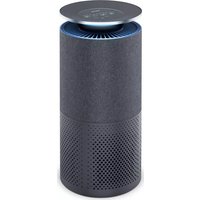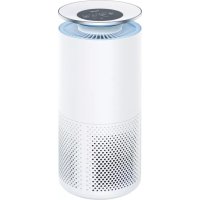
LR 500 - Air purifier BEURER - Free user manual and instructions
Find the device manual for free LR 500 BEURER in PDF.



| Product Type | Air Purifier |
| Brand | Beurer |
| Model | LR 500 |
| Dimensions (L × W × H) | 21 × 35 × 62 cm |
| Weight | 5.9 kg |
| Power Supply | Voltage indicated on the rating plate |
| Maximum Recommended Area | Up to 106 m² (according to NRCC-54013-2011) |
| Filtration System | Pre-filter + combined filter (activated carbon and HEPA H13) + UV lamp |
| Combined Filter | Activated carbon filter (gases, odors) and HEPA H13 filter (fine particles, 99.95%) |
| Pre-filter | Filters large particles (dust, hair) |
| UV Lamp | Eliminates germs and odors (smoke, cooking, pets) |
| PM2.5 Sensor | Detects fine particles up to 2.5 µm |
| Fan Speeds | 4 speeds + turbo mode |
| Night Mode | Silent operation with screen and indicator light off |
| Timer | 1 to 24 hours |
| Connectivity | Wi-Fi (2.4 GHz) and Bluetooth 4.0 |
| App | Beurer FreshHome (iOS and Android) |
| Noise Level | Night mode: <30 dB, Turbo: approx. 68 dB |
| Display | Air quality (color), temperature, humidity, PM2.5 value |
| Safety | Automatic shutdown if cover is removed, double insulation (class II) |
| Filter Maintenance | Clean the filter monthly with a vacuum; replace combined filter after 4320 hours |
| Replacement Part | Combined filter (pre-filter + activated carbon + HEPA) ref. 660.07 |
| Warranty | 3 years |
| Package Contents | Air purifier, combined filter, pre-filter, user manual, quick start guide |
Frequently Asked Questions - LR 500 BEURER
User questions about LR 500 BEURER
0 question about this device. Answer the ones you know or ask your own.
Ask a new question about this device
Download the instructions for your Air purifier in PDF format for free! Find your manual LR 500 - BEURER and take your electronic device back in hand. On this page are published all the documents necessary for the use of your device. LR 500 by BEURER.
USER MANUAL LR 500 BEURER
Read these instructions for use carefully and keep them for later use, be sure to make them accessible to other users and observe the information they contain.
Table of contents
- Getting to know your device. 16
- Intended use 17
3.Notes 17 - Device description 19
- Initial use 20
5.1 Removing the air purifier 20
5.2 Setting up the air purifier 20
- Operation 20
6.1 Connecting the air purifier to the "beurer FreshHome" app............20
6.2 Switching on the air purifier 20
6.3 Timer function 21
6.4 Automatic function 21
6.5 Fan speed + turbo mode 21
6.6 Night mode 22
6.7 UV light 22
6.8 Changing the filter pack 22
- Cleaning and storage 23
7.1 Cleaning the filter 23
7.2 Cleaning the PM 2.5 fine dust particle sensor .24
7.3 Cleaning the housing 24
7.4 Storage 24
8.What if there are problems? 24
9. Disposal 25
10. Replacement parts and wearing parts.....25
11. Technical data 25
12. Warranty / Service 26

WARNING
- This device may be used by children over the age of 8 and by people with reduced physical, sensory or mental skills or a lack of experience or knowledge, provided that they are supervised or have been instructed on how to use the device safely, and are fully aware of the consequent risks of use.
Children must not play with the device. - Cleaning and user maintenance must not be performed by children unless supervised.
- Disconnect the device from the mains supply during cleaning.
- Clean the device using only the methods specified. Under no circumstances may liquid enter the fan unit.
- Do not use any solvent-based cleaning products.
- If the mains connection cable of this device is damaged, it must be disposed of. If it cannot be removed, the device must be disposed of.
Dear customer,
Thank you for choosing one of our products. Our name stands for high-quality, thoroughly tested products for applications in the areas of heat, gentle therapy, blood pressure/diagnosis, weight, massage, beauty, air and babycare.
With kind regards,
Your Beurer team
Included in delivery
- 1x air purifier
- 1x combi filter (activated carbon/HEPA filter class H13)
- 1x pre-filter
- 1x these instructions for use
- 1x brief instructions
Signs and symbols
The following symbols appear in these instructions for use:
| A | WARNING Warning notice indicating a risk of injury or damage to health |
| A | IMPORTANT Safety note indicating possible damage to the device/accessory |
| i | Note Note on important information |
| Observe the instructions for use | |
| The device is double protected and therefore corresponds to protection class 2. | |
| Only use indoors. | |
| Manufacturer | |
| Disposal in accordance with the Waste Electrical and Electronic Equipment EC Directive – WEEE | |
| PAP | Disposition of packaging in an environmentally friendly manner |
| C E | CE labelling This product satisfies the requirements of the applicable European and national directives. |
| EAC | Certification symbol for products that are exported to the Russian Federation and members of the CIS |
1. Getting to know your device
Most of us spend up to 90% of our lives indoors. The quality of the ambient air both day and night plays a crucial role in our health and long-term well-being.
The air indoors can have two to five times the levels of allergens and harmful substances than the air outside. People who can't spend time outdoors during times of a peak pollen count would at least like to be able to breathe deeply indoors.
The LR 500 air purifier humidifies cleans the air with a three-layer filter system.
The LR 500 air purifier
- Filters the air with a combi filter (activated carbon filter against harmful gases and unpleasant odours, HEPA filter H13 against particles such as bacteria, viruses, mites, pollen and fine dust).
- Has a PM 2.5 sensor - recognises fine dust with particle sizes of up to 2.5 m .
- Operates quietly with four output levels, turbo mode and automatic function.
- Has a numerical colour display for showing ambient air quality.
-
Has a timer function (1 to 24 hours).
-
Shows the current humidity and room temperature.
- Is suitable for rooms up to 106m^2 (according to NRCC-54013-2011).
- Has an in-built UV light (to kill germs).
- Has a night mode with extremely quiet operation and switched-off display.
- Is energy saving and switches off automatically when the housing cover is removed.
Principle of air cleaning
- The air purifier's fan sucks in the contaminated air.
- The pre-filter filters out larger particles such as dust, dirt and hairs.
- Next, the activated carbon filter filters formaldehyde, benzene and other poisonous gases and odours out of the ambient air.
- Lastly, the HEPA filter filters out small particles such as pollen, bacteria or viruses.
- The switchable UV light inside the housing eliminates germs and odours (caused by animals, cooking or tobacco smoke).
- The cleaned air is emitted via the air outlet on top of the air purifier into the ambient air.

The HEPA H13 filter has a filter performance of 99.95% . That means that 99.95% of particles (e.g. bacteria, viruses and fine dust) can be filtered out.
"beurer FreshHome" app
You can also connect the air purifier with your smartphone via WiFi. To do this, all you need is the free "beurer FreshHome" app from the Apple Store (iOS) or from Google Play (AndroidTM).
The "beurer FreshHome" app provides the following functions:
Monitoring and evaluation of the air quality.
- Overview of all connected devices for long-term analysis of the indoor air quality.
- Notification in the event of values that are outside of the individually defined target range.
- Tips for improving the environment for your comfort.
System requirements: iOS ≥ 10.0, Android™ ≥ 5.0, Bluetooth® ≥ 4.0.
2. Intended use
This air purifier is intended exclusively for cleaning the air indoors.

WARNING
If you suffer from severe respiratory or lung disease, consult your doctor before using the air purifier.
This device must only be used for the purpose for which it was designed and in the manner specified in the instructions for use. Any form of improper use can be dangerous. The manufacturer is not liable for damage resulting from improper or careless use.
3. Notes
Read the notes carefully! Non-observance of the following information may result in personal injury or material damage.

WARNING
Keep packaging material away from children to avoid danger of suffocation.
Electric shock
WARNING
As with every electrical device, use this air purifier carefully and cautiously, in order to avoid hazards due to electric shock.
Therefore:
- Only operate the device at the voltage indicated on the device (the type plate is located underneath the device)
- Never use the device if it or its accessories show visible signs of damage
- Do not use the device during a storm
- In the event of defects or operational faults, switch the device off immediately and disconnect it from the mains socket. Do not pull on the mains cable or on the device to disconnect the plug from the socket. Never hold or carry the device by the mains cable. Keep the cables away from hot surfaces.
- Always switch off the device before disconnecting it from the mains.
- Never disconnect the mains plug with wet or damp hands.
- Keep the device away from sources of heat as the housing could melt and trigger a fire.
- Ensure that the openings of the air purifier and the mains cable do not come into contact with water, steam or other liquids.
- Do not use the device in close proximity to flammable or explosive gas mixtures.
- Never reach for a device that has been submerged in water. Disconnect the mains plug immediately.
- Do not use the device if it or its accessories are visibly damaged.
Repairs
WARNING
- Only specialist personnel may perform repairs on electrical devices. Improper repairs may subject users to considerable danger. For repairs, please contact Customer Services or an authorised retailer.
- Do not open the fan unit.
- It is not intended to replace the UV-C lamp. It is not permitted for the user to perform the replacement.
Risk of fire
WARNING
There is a risk of fire if the device is used improperly or these instructions for use are ignored.
Therefore, observe the following instructions for using the air purifier:
- Never use it underneath a cover, such as a blanket, pillow, etc.
- Never use it near petrol or other highly flammable substances.
Handling
IMPORTANT
The device must be switched off and disconnected from the mains after every use and before cleaning.
- Do not place any objects in device openings or in rotating parts. Ensure that the moving parts can move freely at all times.
- Do not place any objects on the device.
- Do not expose the device to high temperatures.
- Protect the device against sunlight and impacts and do not drop it.
- Never shake the device.
- Avoid water damage by handling the device carefully (e.g. water damage from splashing in the vicinity of wooden floors).
- Place the device on a firm, level and water-resistant surface.
4. Device description
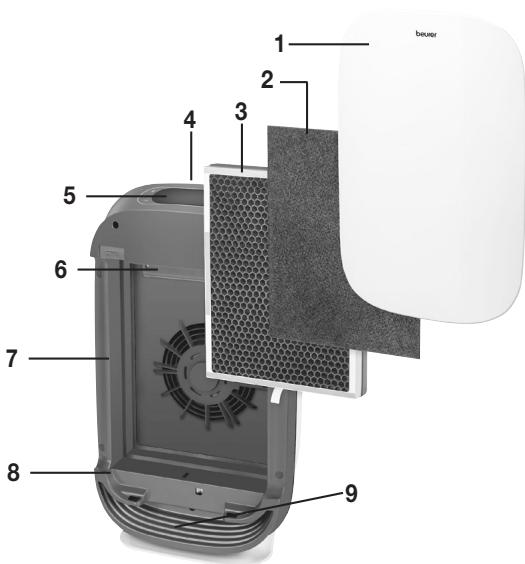
| 1 Housing cover |
| 2 Pre-filter Filters coarse dust and dirt, such as hairs |
| 3 Combi filter (activated carbon/HEPA filter H13) Activated carbon filter: To counter harmful gas- es and unpleasant smells HEPA filter H13: Filters particles such as bacte- ria, viruses, mites, pollen and fine dust |
| 4 Air outlet |
| 5 Display and buttons |
| 6 UV lamp Eliminates germs and odours (caused by ani- mals, cooking or tobacco smoke) inside the housing |
| 7 Air inlet |
| 8 Housing |
| 9 Ambient air indicator light |
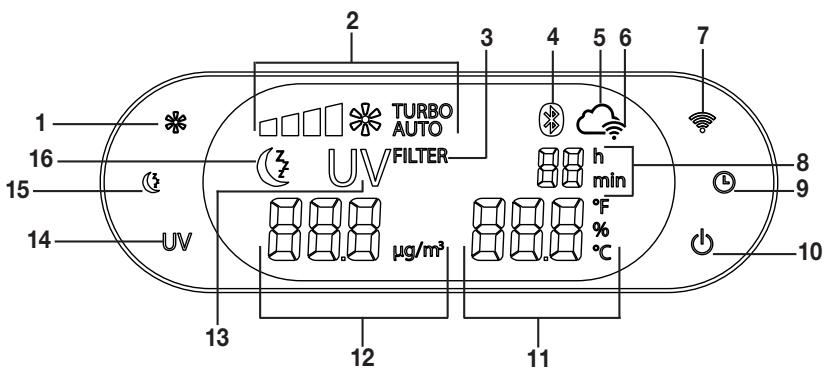
Display and buttons
| 1 Fan speed button | 9 Timer button |
| 2 Current fan speed | 10 ON/OFF button |
| 3 Change filter display | 11 Temperature/humidity display |
| 4 Bluetooth® symbol | 12 PM 2.5 value |
| 5 Cloud symbol | 13 UV light symbol |
| 6 WiFi symbol | 14 UV light button |
| 7 WiFi button | 15 Night mode button |
| 8 Timer display | 16 Night mode symbol |
5. Initial use
5.1 Removing the air purifier
- Open the cardboard packaging.
- Remove the device from the top of the box without opening the film bag.
- Now remove all plastic films.
- Remove the filter pack from the device (see "Filter change" section) and take it out of the plastic film. Then re-insert the filter pack into the device.
5.2 Setting up the air purifier
- Place the air purifier on a firm, level surface to prevent vibrations and noise.
- Set up the air purifier in such a way that provides 30~cm clearance on all sides.
- Make sure that the air inlet and air outlet are never blocked.
6. Operation
6.1 Connecting the air purifier to the "beurer FreshHome" app
You can also use the basic functions of the air purifier without the "beurer FreshHome" app. The additional features, such as recording the ambient air values and setting a cleaning schedule, as well as controlling and monitoring your device when you are on the go, are only available in conjunction with the "beurer FreshHome" app.
- Follow the instructions in chapter "5. Initial use".
- Insert the mains plug into a suitable socket. Ensure that the mains cable does not pose a trip hazard.
- Press the ON/OFF button " " to switch on the air purifier. The device takes approx. 10 seconds to display the most up-to-date value.
Note The WiFi symbol “ 電 ” flashes.
To connect your air purifier with the "beurer FreshHome" app, please proceed as follows:
4. Ensure that your smartphone is connected with your WiFi.
5. Activate Bluetooth® on your smartphone.
6. Download the free "beurer FreshHome" app from the Apple App Store (iOS) or at Google Play (Android™).
Note Depending on the settings for your smartphone, additional charges may be incurred for connecting to the Internet or transferring data.
- Start the "beurer FreshHome" app and follow the instructions.
6.2 Switching on the air purifier
- Follow the instructions in chapter "5. Initial use".
- Insert the mains plug into a suitable socket. Ensure that the mains cable does not pose a trip hazard.
- Press the ON/OFF button " " to switch on the air purifier. The device takes approx. 10 seconds to display the most up-to-date value.
Note The air purifier displays the humidity and temperature in an alternating manner, and permanently displays the fine dust particle value PM 2.5.
When the air purifier is used for the first time, it is set to the first fan speed.
Information on the display of air quality
The air quality display automatically switches on when the air purifier is switched on. After approx. 30 seconds, the air purifier displays the colour which corresponds to the concentration of particles in the ambient air around the device.
| Air quality | Ambient air indicator colour | PM 2.5 value in μm/m3 |
| Good | blue | ≤ 12 |
| Acceptable | yellow | 12.1 – 35.4 |
| Poor | orange | 35.5 – 55.4 |
| Very poor | red | ≥ 55.5 |
Optimal relative humidity and room temperature
| Room | Optimum temperature | Optimum rel. humidity |
| Living room | 20 °C (68 °F) | 40 – 60% |
| Bedroom | 16-18 °C (60.8-64.4 °F) | 40 – 60% |
| Child's bedroom | 20-22 °C (68-71.6 °F) | 40 – 60% |
| Kitchen | 18 °C (64.4 °F) | 50 – 60% |
| Bathroom | 23 °C (73.4 °F) | 50 – 70% |
| Cellar | 10-15 °C (50-59 °F) | 50 – 65% |
6.3 Timer function
The air purifier features a timer function that you can use to determine the number of hours the air purifier should run for before it automatically switches itself off. You can set the timer for between 1 and 24 hours.
- To set the timer, press the TIMER button "①" until your desired hourly value (e.g. 02) appears on the display. The air purifier will now automatically switch off after the set number of hours has passed.
- To deactivate the timer early, press and hold the timer button until " - - " appears on the screen.
6.4 Automatic function AUTO
The air purifier has an automatic function. When the automatic function is switched on, the fan speed automatically adapts to the ambient air quality. This means that, the poorer the quality of the ambient air, the higher the fan speed automatically set by the air purifier.
- To switch on the automatic function, press the fan speed button "..." while the air purifier is switched on. As soon as the automatic function is active, "AUTO" appears in the display.
- To switch off the automatic function, press the fan speed button "..." again.
"AUTO" goes out on the display. The device automatically switches to level 1.
6.5 Fan speed + turbo mode
The air purifier has four fan speeds and a turbo mode: (1), (2), (3), (4), TURBO.
- To switch between the individual fan speeds, press the fan speed button "※". The current fan speed setting lights up on the operating panel.
- In turbo mode, the air purifier is operated at the highest speed, and the UV light is also switched on. The turbo mode switches off after 15 minutes, and automatically changes over to the automatic function.
6.6 Night mode

The air purifier has a night mode in which it operates extremely quietly and all light sources are switched off.
- Press the night mode button " ( ) to switch on night mode on the device. The night mode symbol " ( ) is lit up on the operating panel. When the night mode is activated, the display and the colour ambient air quality indicator on the base of the housing automatically switch off after 5 seconds.
- Press the night mode button " 已 " again to switch off night mode.
Using the "beurer FreshHome" app, the UV light can be switched on and a timer can be set in night mode operation.
6.7 UV light UV
The UV light eliminates germs contained in the air. Here the UV light activates titanium oxides that break down foul-smelling odour molecules (caused by tobacco smoke, cooking smells or animals).
- To switch on the UV light, press the UV button "UV" on the air purifier while it is switched on. Once the UV light is active, UV lights up in the display.
- Press the UV button "UV" again to switch off the UV light.
6.8 Changing the filter pack FILTER
The three-layered filter should be replaced with a new one after 4320 operating hours. FILTER appears in the display after 4320 operating hours.
To change the filter, proceed as follows:
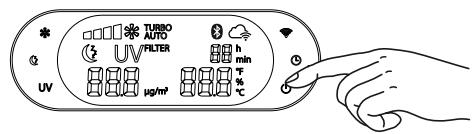
- Press the ON/OFF button to switch off the air purifier, and unplug it from the socket.
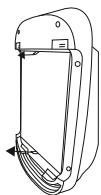
- To remove the filter pack, pull carefully on the side tabs.
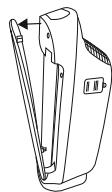
- Remove the housing cover as shown (magnetic fastening). First detach the magnetic fastening at the top, and then at the bottom.
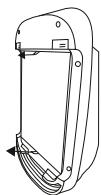
- Insert a new filter pack. To insert the filter pack correctly, align it with the side tabs as shown.

- Re-insert the housing cover as shown until you feel and hear it click into place (magnetic fastening). First attach the magnetic fastening at the bottom, and then at the top.
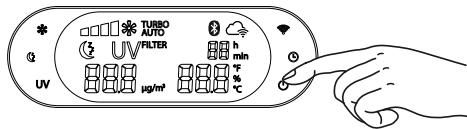
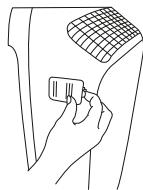
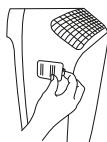
- Insert the mains plug into the socket. Ensure that the cable does not pose a trip hazard. Press the ON/OFF button. Now open the flap on the side of the device housing. A button is located here to set the operating hour counter to 0.
If you wish to change the combi filter at specific personal intervals (e.g. every 6 months), there is a sticker on the upper edge of the combi filter on which a date can be entered.
7. Cleaning and storage

WARNING
Before cleaning, always ensure that the mains plug of the air purifier has been properly disconnected.
7.1 Cleaning the filter
Regular cleaning of the filter (once a month) is a prerequisite for hygienic and fault-free operation.
- Clean the three-layered filter using the brush attachment of a vacuum cleaner. To carry out a thorough clean, pull out the pre-filter and clean the activated carbon filter located behind it and the HEPA filter located at the rear, also using the brush attachment from a vacuum cleaner. Then replace the pre-filter on the HEPA filter.
| Activated carbon filter | HEPA filter H13 |
| Front | Rear |

IMPORTANT
The three-layered filter should be changed after 4320 operating hours (see "Filter change" section). The three-layered filter cannot be washed.
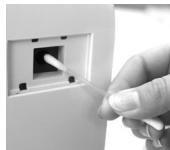
7.2 Cleaning the PM 2.5 fine dust particle sensor
The fine dust particle sensor should be cleaned every 2 months.

If the air purifier is used in a dusty environment, it may need to be cleaned more often.
To clean the sensor, switch off the air purifier and pull the mains plug out of the socket.
Open the cover on the side of the housing, and remove the cover.
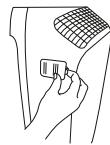
Clean the sensor, along with the air inlet and outlet using a moistened cotton bud.
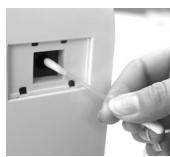
Afterwards, dry all of the cleaned parts using a dry cotton bud.
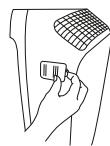
Attach the fine dust particle sensor cover again.
7.3 Cleaning the housing
Clean the housing of the air purifier with a damp cloth (water or a mild cleaning solution). When cleaning, do not use any solvents or other aggressive or abrasive cleaning agents, as the surface may become damaged.
7.4 Storage
If you do not plan to use the device for a long period of time, we recommend that you clean it and store it in the original packaging in a dry environment, ensuring it is not weighed down by additional items.
8. What if there are problems?
| Problems | Cause | Solution |
| The air purifier will not switch on. | The housing cover is not correctly installed. | Ensure that the housing cover is correctly installed. |
| The three-layered filter is not correctly inserted. | Ensure that the three-layered filter is correctly inserted. | |
| The mains part plug is not plugged in. | Plug the mains part plug into a suitable socket. | |
| Insufficient passage of air. | The filters are dirty. | Clean the filters (see “Cleaning and storage” section). |
| The air intake/air outlet is blocked. | Ensure that the air intake/air outlet is not blocked. | |
| Air purifier is very loud. | There is a foreign body in the air in-take/air outlet. | Remove the foreign body from the air intake/air outlet. |
| The filters are clogged. | Clean the filters (see “Maintenance and cleaning” section). | |
| The filters are not correctly inserted. | Insert the filters correctly. | |
| The air purifier is positioned on an uneven surface. | Position the air purifier on a level surface. | |
| Display does not light up/no display. | The mains plug is not connected to the socket and/or is not switched on. | Connect the mains plug and switch on the air purifier. |
| The device is in night mode. | Press the night mode button “OK”. Night mode operation is switched off and the display will illuminate brightly. | |
| The housing cover is not correctly installed. | Ensure that the housing cover is correctly installed. | |
| WiFi symbol “\(\text{ \circ} \)\( \circ \)“ flashes. | Air purifier is attempting to establish a connection to the WiFi router. | If this process takes more than 1 minute, check the status of your WiFi router and/or reconfigure the WiFi access of the air purifier via the app. |
| Cloud symbol “\(\text{ \circ} \)\( \circ \)” flashes. | Air purifier is attempting to establish a connection to the server. | If this process takes more than 1 minute, try again later or reconfigure the WiFi access of the air purifier via the app. |
9. Disposal
For environmental reasons, do not dispose of the device in the household waste at the end of its useful life.
Dispos of the device at a suitable local collection or recycling point. Dispos of the device in ac
cordance with EC Directive - WEEE (Waste Electrical and Electronic Equipment).
If you have any questions, please contact the local authorities responsible for waste disposal.

10. Replacement parts and wearing parts
Replacement parts and wearing parts are available from the corresponding service address (according to the service address list). Please state the corresponding order number.
| Designation | Item number and/or order number |
| Pre-filter, combi filter (HEPA filter H 13 and activated carbon filter) | 660.07 |
11. Technical data
| Model | LR 500 |
| Voltage/power | See type plate on the device |
| Dimensions (L x W x H) | 21.0 cm x 35.0 cm x 62.0 cm |
| Weight | 5.9 kg |
| Suitable for room sizes | from 34m² (according to ANSI / AHAM AC-1 2015) to 106m² (according to NRCC-54013-2011) |
| Volume | Nightmode: <30dB; TURBO: approx. 68dB |
| Permissible operating conditions | +5°C to +40°C, ≤ 90% relative humidity (non-condensing) |
| Protection class | Protection class II / ☐ |
Data transfer:
The product uses Bluetooth® low energy technology and WLAN, frequency band 2400.0 MHz - 2483.5 MHz, Bluetooth® transmission power max. 0 dBm, WLAN transmission power max. 18 dBm, compatible with Bluetooth® 4.0 smartphones/tablets.
12. Warranty / Service
Beurer GmbH, Söflinger Straße 218, 89077 Ulm, Germany (hereinafter referred to as "Beurer") provides a warranty for this product, subject to the requirements below and to the extent described as follows.
The warranty conditions below shall not affect the seller's statutory warranty obligations which ensue from the sales agreement with the buyer.
The warranty shall apply without prejudice to any mandatory statutory provisions on liability.
Beurer guarantees the perfect functionality and completeness of this product.
The worldwide warranty period is 3 years, commencing from the purchase of the new, unused product from the seller.
The warranty only applies to products purchased by the buyer as a consumer and used exclusively for personal purposes in the context of domestic use.
German law shall apply.
During the warranty period, should this product prove to be incomplete or defective in functionality in accordance with the following provisions, Beurer shall carry out a repair or a replacement delivery free of charge, in accordance with these warranty conditions.
If the buyer wishes to make a warranty claim, they should approach their local retailer in the first instance: see the attached "International Service" list of service addresses.
The buyer will then receive further information about the processing of the warranty claim, e.g. where they can send the product and what documentation is required.
A warranty claim shall only be considered if the buyer can provide Beurer, or an authorised Beurer partner, with - a copy of the invoice/purchase receipt, and
- the original product.
The following are explicitly excluded from this warranty:
- deterioration due to normal use or consumption of the product;
- accessories supplied with this product which are worn out or used up through proper use (e.g. batteries, rechargeable batteries, cuffs, seals, electrodes, light sources, attachments and nebuliser accessories);
- products that are used, cleaned, stored or maintained improperly and/or contrary to the provisions of the instructions for use, as well as products that have been opened, repaired or modified by the buyer or by a service centre not authorised by Beurer;
- damage that arises during transport between manufacturer and customer, or between service centre and customer;
- products purchased as seconds or as used goods;
- consequential damage arising from a fault in this product (however, in this case, claims may exist arising from product liability or other compulsory statutory liability provisions).
Repairs or an exchange in full do not extend the warranty period under any circumstances.
FRANÇAIS

Chere cliente, cher client,
App "beurer FreshHome"
App "beurer FreshHome"
Éanche possiblencollegareil depuratore d'aria alproprio smartphone tramiteWLAN.Basta scaricare l'app gratuita“beurer FreshHome”.L'app"beurer FreshHome"édisponibile suApple App Store (iOS)e Google Play (AndroidTM).
| Oda | Optimum sicalsı | Optimum®,®,®,®,®,®,®,®,®,®,®,®,®,®,®,®,®,®,®,®,®,®,®,®,®,®,®,®,®,®,®,®,®,®,®,®,®,®,®,®,®,®,®,®,®,®,®,®,®,®,®,®,®,®,®,®,®,®,®,®,®,®,®,®,®,®,®,®,®,®,®,®,®,®,®,®,®,®,®,®,®,®,®,®,®,®,®,®,®,®,®,®,®,®,®,®,®,®,®,®,® |
| Oturma odası | 20 °C (68 °F) | %40 – 60 |
| Yatak odası | 16-18 °C (60.8–64.4 °F) | %40 – 60 |
| Çocuk odası | 20-22 °C (68-71.6 °F) | %40 – 60 |
| Muffak | 18 °C (64.4 °F) | %50 – 60 |
| Banyo | 23 °C (73.4 °F) | %50 – 70 |
| Kiler | 10-15 °C (50-59 °F) | %50 – 65 |
OuHCTMTe DaTnK, a TaKke BO3dYXo3a6OpHNK/OTBepcTne nIy BbInyCKa BO3dyxa BaTHOH panoHkO, CMOeHHoB B OBe.
3aTeM npomokHNte OunueHbIe DeTaN cyxO BATHoN paIOyKoN.
UcTaHOBInTe KpbIiKu DaTnKa YactNI MekKo IbIIN Ha MeCTO.
7.3 OuInCTka Kopnyca
OuHsauIte Kopnyc Bo3dyooohntTeIaJxH0i CanfepKoi (CMoeyH0N BO0I INI Cna6bIM paCTBOPOM Ipy OunchTkn). He nCnoJIb3yIte paCTBOpNTeI, a TAKKe Jpyrme arpeccNBhIe OOHCTNeIN INI abpa3NBhIE YnCTraIne cpeCTBa, NocKOBky OHN MOrTy IOBpeDITb NOBepXHOCTb pIn6opa.
7.4 XpaheHne
Ecnn npin6bne HnCnOJb3yeTc nnIeJIbHOe BpeM, Mbl peKOMeHnyem XpaHNTb erO BOnIeHHOM BnDEB C yxom MeCTe B opunHaJIbHOH ynaKOBke. Pn 3Tom He cJeNyET KNaCTb Ha npin6bop KaKHe-JIno ppeMeTbI.
The Bluetooth® word mark and logos are registered trademarks owned by Bluetooth SIG, Inc. and any use of such marks by Hans Dinslage GmbH is under license. Other trademarks and trade names are those of their respective owners.
Apple and the Apple logo are trademarks of Apple Inc., registered in the U.S. and other countries.
App Store is a service mark of Apple Inc., registered in the U.S. and other countries.
Google Play and the Google Play logo are trademarks of Google LLC.
Android is a trademark of Google LLC.