
HGF95AMX - Cooker HOTPOINT - Free user manual and instructions
Find the device manual for free HGF95AMX HOTPOINT in PDF.



| Product type | Cooker hood (extractor or recirculation) |
| Reference | HGF95AMX |
| Brand | Hotpoint |
| Height | 61 - 82 cm (telescopic) |
| Width | 90 cm |
| Depth | 50 cm |
| Extraction duct diameter | 15 cm (reducible to 12 cm) |
| Supply voltage | 230 V ~ 50 Hz |
| Total absorbed power | 150 - 290 W depending on model |
| Lighting | 2 halogen bulbs 40 W or LED |
| Number of speeds | 3 speeds + booster (intensive) |
| Timer | Yes, up to 59 minutes |
| Grease filter | Metal, washable (dishwasher safe) |
| Charcoal filter (recirculation) | Optional, to be replaced every 20 months |
| Filter maintenance | Clean grease filter at least once a month |
| Safety distance (gas) | 65 cm minimum between the hood and the hob |
| Safety distance (electric) | 55 cm minimum |
| Protection class | Class II (double insulation) |
| Electrical connection | Accessible mains socket or bipolar switch |
| Installation type | Wall-mounted or recirculation (kit not provided) |
| Repairability | Bulbs and filters replaceable by the user |
Frequently Asked Questions - HGF95AMX HOTPOINT
User questions about HGF95AMX HOTPOINT
0 question about this device. Answer the ones you know or ask your own.
Ask a new question about this device
Download the instructions for your Cooker in PDF format for free! Find your manual HGF95AMX - HOTPOINT and take your electronic device back in hand. On this page are published all the documents necessary for the use of your device. HGF95AMX by HOTPOINT.
USER MANUAL HGF95AMX HOTPOINT
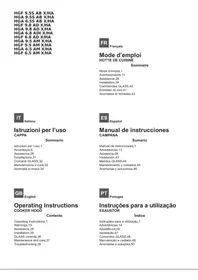
HGF 9.5S AB X/HA HGA 9.5S AB X/HA HGA 6.5S AB X/HA HGF 9.8 AD X/HA HGA 9.8 AD X/HA HGA 6.8 ADI X/HA HGF 6.8 AD X/HA HGA 9.5 AM X/HA HGF 9.5 AM X/HA HGA 6.5 AM X/HA HGF 6.5 AM X/HA
FR
French
User Manual
COOKER HOOD
Table of Contents
User Manual,1
Warnings,11
Assistance,28
Installation,39
GLASS Controls,40
Operating Instructions
COOKER HOOD
Contents
Operating Instructions,1
Warnings, 10
Assistance, 28
Installation, 35
GLASS controls, 36
Maintenance and care, 37
Troubleshooting, 38
ES
Spanish
Troubleshooting, 66
UA
Ukrainian
! Keep this manual for reference. If you sell, transfer or move the unit to another location, make sure to keep the manual with the product.
! Read the instructions carefully - they contain important installation, user and safety information. ! Do not tamper with the electrical or mechanical equipment of the product or its exhaust ducts.
General safety information
- The distance between the cookware support surface on top of the cooking appliance and the lowest part of the cooker hood must be at least:
65 cm if the hood is installed over a gas cooktop, 55 cm if the hood is installed over an electric cooktop.
If the installation instruction manual for the gas cooking appliance specifies a greater distance, this measurement should be taken into account.
- The cooker hood comes with anchor plugs which are suitable for use with most walls/ceilings. However, you must contact a qualified technician to check the suitability of the materials in relation to the type of wall/ceiling, which must be strong enough to support the weight of the unit.
- Caution! Do not hook the unit up to its electrical power supply until the installation has been completed.
- Before cleaning or servicing the unit, disconnect it from the mains by pulling the power plug or disconnecting the main circuit breaker.
- Always wear work gloves when installing and servicing the unit.
- It is not intended for use by children or persons with sensory or mental disability and lack of experience or familiarity, except under the supervision or instruction of a person responsible for their safety.
- Make sure children do not play with the unit.
- Never operate the unit without its grease filter installed!
- NEVER use the hood as a support, unless expressly instructed to do so.
- The room must be adequately ventilated if the hood is used at the same time with other equipment burning gas or other fuels.
- Extracted air must not be conveyed into a duct used for exhausting combustion fumes from gas or other fuel-fired equipment.
- Observe all regulations in relation to air extraction.
- NEVER cook food with an open flame under the hood; open flames will damage the filters and may cause fires. Never do this.
- Always supervise frying to make sure the heated oil does not catch fire.
- Strictly observe all local regulations in relation to the technical and safety measures to be employed in fumes extraction.
- Clean the product frequently, inside and out (AT LEAST ONCE A MONTH, and in observance of the maintenance instruction given in this manual).
- Failure to observe the hood cleaning and filter cleaning/replacement instructions can result in fires.
- Never use the hood without its bulbs properly installed - electrocution hazard.
- The manufacturer is not liable for any inconvenience, damage or fire caused by the unit as a result of failure to observe the instructions given in this manual.
- Caution! The unit's accessible parts can get very hot when used with cooking equipment.
Warnings
It is forbidden to use the appliance without the filter.
Never use the appliance without the properly installed grease filter.
Never use the hood over an open flame, except for the burners, when it is not indicated.
The appliance must be sufficiently ventilated when working together with other appliances on gas or other fuel.
- The appliance must not be installed in ducts used to evacuate fumes from appliances burning gas or other fuels.
- Follow all rules regarding the evacuation of fumes.
It is strictly forbidden to cook food on an open flame; open flames can damage filters and cause a fire. Therefore, avoid it in any case. - It is recommended to constantly monitor the cooking process with small flames to prevent overheating when oil is left. - For technical and safety dimensions that must be applied for the evacuation of fumes, strictly follow the instructions of local competent authorities. The appliance must be cleaned both internally and externally (at least once a year, following the instructions in the maintenance manual, or as directed by your supervisor). Failure to follow the rules for cleaning and for replacing and cleaning filters can lead to damage. Do not use the appliance without properly installed lamps, as this is dangerous due to the risk of electric shock. The manufacturer declines any responsibility for possible damage to the appliance, breakage, or malfunctions caused by failure to follow the instructions in this manual. - Warning! Parts with open access can heat up to high temperatures if used together with kitchen stoves.
! Never use the services of an unauthorised technician.
Please have the following information to hand:
The type of problem encountered. The appliance model (Mod.). The serial number (S/N).
The latter two pieces of information can be found on the data plate located on the appliance.
Assistance
! Do not contact unauthorized technicians.
When contacting the Technical Service Center, please provide:
The fault;
Model of the device (Mod.)
Serial number (S/N)
You will find this data on the nameplate located on the rear.
Assistance
! Contact only qualified professionals.
Please provide:
The fault; - Model of the device (Mod.) Serial number (S/N)
! The device must not be used by children or persons with reduced capabilities.
"Low voltage" Directive 2006/95/EC (12-12-2006) EMC" Directive 2004/108/EC (15-12-2004)
HGA 9.5 AM X/HA - HGF 9.5 AM X/HA
HGA 6.5 AM X/HA - HGF 6.5 AM X/HA
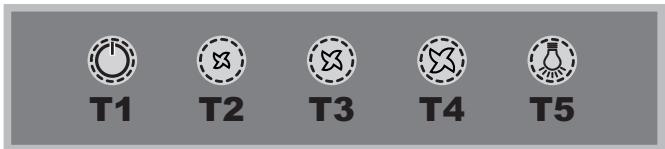
T1 Reset motor
HGF 9.5S AB X/HA - HGA 9.5S AB X/HA - HGA 6.5S AB X/HA
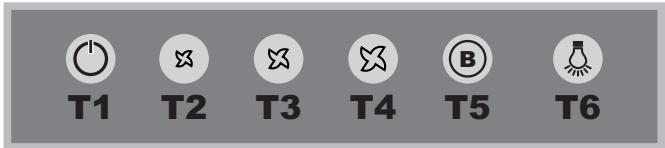
T1 Reset motor
HGF 9.8 AD X/HA - HGA 9.8 AD X/HA
HGA 6.8 AD X/HA - HGF 6.8 AD X/HA
T1
T2

T3

T3

T4
T5
T6
T1 ON/OFF motor
The installation procedure is illustrated in the first pages of this manual.
The installation must be done by a qualified technician.
Electrical hook up
The mains voltage must match that given on the ratings label inside the hood itself. If the hood has a power plug, connect the hood to an easily accessible regulatory power socket. If it does not (direct connection to the mains), or the socket is not easily accessible, install a two-pole regulatory switch to enable total disconnection from the mains in case of category III overvoltage, as required by the installation regulations.
Caution! Always check that the mains cable is hooked up properly and check that it operates correctly before reconnecting the hood to the mains.
Air exhaust (for ducted units)
Connect the hood to a duct and wall exhaust hole of a diameter equal to that of the air outlet flange. Using a smaller diameter tube and exhaust hole reduces the extraction capacity of the hood and also increases its running noise. The manufacturer is not liable for any consequences of doing so.
! Use the shortest duct required to achieve the purpose. ! Use a duct with as few bends as possible ! Avoid suddenly changing the diameter of the duct. ! The duct must have as smooth an inner surface as possible. ! The duct must be made of regulatory material. ! Do not connect the hood to flues carrying combustion fumes from other equipment (boilers, GLASSs, stoves, etc.). ! Observe the instructions of the competent authorities in relation to the air exhaust. The air being exhausted may not be exhausted into a wall cavity unless the cavity in question is specifically intended for this purpose. ! Equip the room with air intakes to prevent the hood creating suction pressure in the interior (this must not exceed 0.04 mbar). ! The manufacturer is not liable for any consequences of failure to observe these instructions.
Filter or ducted?
! Your hood is supplied as a ducted unit.
If you wish to use it as a filter unit, you must install the proper ACCESSORY KIT.
Note: If supplied with the hood, the accessory active charcoal filter unit may already be installed.
Instructions for transforming the hood from the ducted to the filter version are given in this manual (see "Filter version").

Ducted version
GB
The hood purifies the air and expels it outdoors via an exhaust duct (diameter 150 mm) connected to its outlet flange. The diameter of the exhaust tube must be equal to that of the outlet flange.
Caution! The exhaust duct is not supplied and must be purchased separately.
When routed horizontally, the tube must be angled slightly upwards (around 10 degrees) to enable the air to be conveyed outdoors more easily. If the hood is fitted with charcoal filters, they must first be removed.

Filter version
The hood purifies the air and returns it to the room. This version of the hood requires installation of an accessory active charcoal filter unit.
This version requires an air deflector, a reduction adapter and the charcoal filter/s. The top tube must have its air outlet slots uppermost.
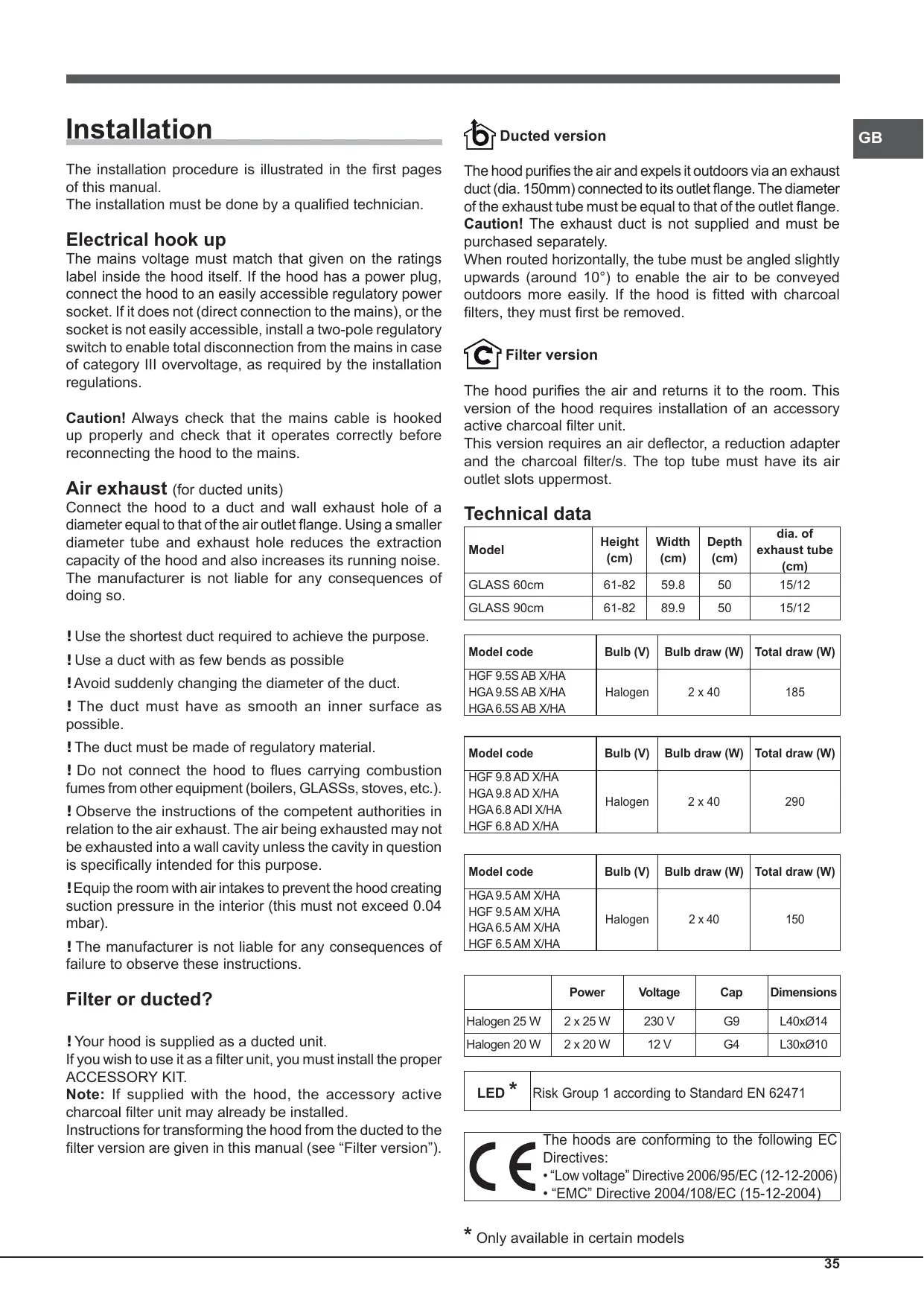
Technical data
| Model | Height (cm) | Width (cm) | Depth (cm) | dia. of exhaust tube (cm) |
| GLASS 60cm | 61-82 | 59.8 | 50 | 15/12 |
| GLASS 90cm | 61-82 | 89.9 | 50 | 15/12 |
| Model code | Bulb (V) | Bulb draw (W) | Total draw (W) |
| HGF 9.5S AB X/HA | |||
| HGA 9.5S AB X/HA | Halogen | 2 x 40 | 185 |
| HGA 6.5S AB X/HA |
| Model code | Bulb (V) | Bulb draw (W) | Total draw (W) |
| HGF 9.8 AD X/HA | |||
| HGA 9.8 AD X/HA | Halogen | 2 x 40 | 290 |
| HGA 6.8 AD I X/HA | |||
| HGF 6.8 AD X/HA |
| Model code | Bulb (V) | Bulb draw (W) | Total draw (W) |
| HGA 9.5 AM X/HA | |||
| HGF 9.5 AM X/HA | Halogen | 2 x 40 | 150 |
| HGA 6.5 AM X/HA | |||
| HGF 6.5 AM X/HA |
| Power | Voltage | Cap | Dimensions | |
| Halogen 25 W | 2 x 25 W | 230 V | G9 | L40xØ14 |
| Halogen 20 W | 2 x 20 W | 12 V | G4 | L30xØ10 |
LED*
Risk Group 1 according to Standard EN 62471

The hoods are conforming to the following EC Directives:
"Low voltage" Directive 2006/95/EC (12-12-2006) EMC" Directive 2004/108/EC (15-12-2004)
- Only available in certain models
GLASS controls
Models with mechanical keypad
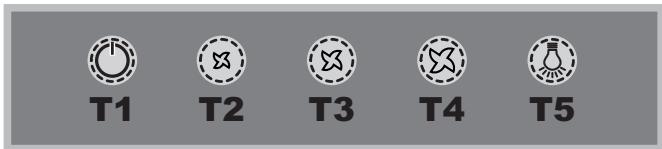
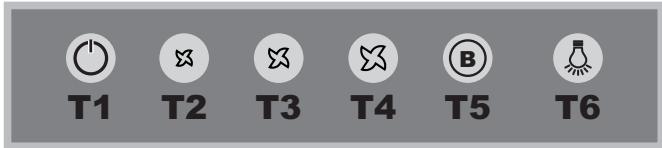
HGA 9.5 AM X/HA - HGF 9.5 AM X/HA
HGA 6.5 AM X/HA - HGF 6.5 AM X/HA
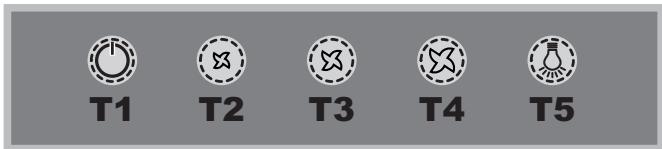
T1 Motor reset
Pressing the button while the hood is in operation turns it OFF.
T2 Speed 1
Pressing the button sets the hood to speed 1.
T3 Speed 2
Pressing the button sets the hood to speed 2.
T4 Speed 3
Pressing the button sets the hood to speed 3.
T5 Lights ON/OFF
Models with soft button keypad
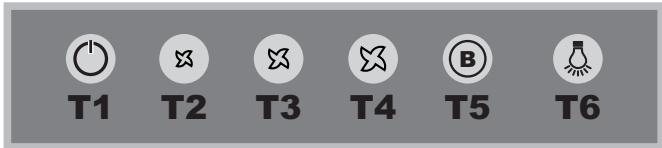
HGF 9.5S AB X/HA - HGA 9.5S AB X/HA
HGA 6.5S AB X/HA
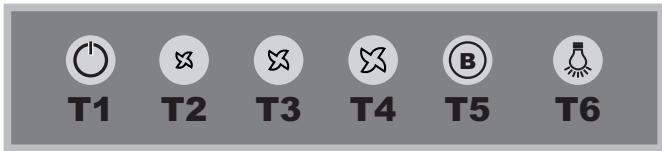
T1 Motor reset
Press the button with the hood off to set speed 1. Pressing the button while the hood is in operation turns it OFF.
T2 Speed 1
Pressing the button sets the hood to speed 1.
T3 Speed 2
Pressing the button sets the hood to speed 2.
T4 Speed 3
Pressing the button sets the hood to speed 3.
T5 Booster
Pressing the button sets the hood to high speed. After 5 minutes, the hood returns to the previous speed; pressing a speed button (T2, T3 or T4) quits booster mode and sets the selected speed.
T6 Lights ON/OFF
Grease/odour filter warnings
The T2 icon flashes to indicate that the grease filter is saturated, while T3 flashes to indicate that the odour filter is saturated, and if both are flashing then both filters are saturated. You must then clean/replace the grease filter (A) or odour filter (B) or both, accordingly (see "Maintenance and care").
To reset the filter counter:
Hold down T5 for three seconds while the hood is on.
The warning led flashes three times, then returns to its normal mode. If both filter warnings are active at the same time, you must reset each separately.
The first sequence resets the grease filter, while the second sequence resets the odour filter.
Hood configuration:
To set the operating mode of the hood, hold down T5 for 6 seconds while the product is off. Icons T2 or T3 will light up to show the type of installation: T2 ventilation, T3 filtering. You can change the type of installation by pressing T4 cyclically.
To save the new configuration press T1 individually.
Models with soft button keypad and display
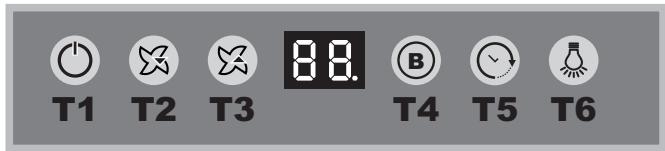
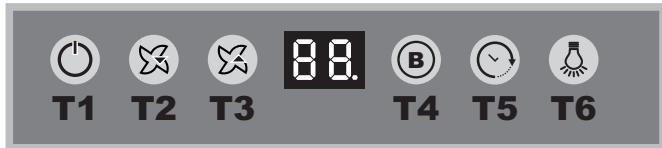
HGF 9.8 AD X/HA - HGA 9.8 AD X/HA
HGA 6.8 ADI X/HA - HGF 6.8 AD X/HA
T1
T2
T3

T3
T4
T5
T6
1 Motor ON/OFF
Press the button with the hood off to set speed 1. Pressing the button while the hood is in operation turns it OFF.
T2 Speed -
Pressing the button returns the hood to the previous speed.
T3 Speed +
Pressing the button returns the hood to the next speed.
T4 Booster
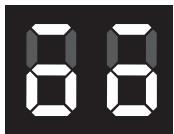
Pressing this button sets the hood to high speed; the letter "b" flashes slowly on the display. After 5 minutes, the hood returns to its previous speed; this can also be done while booster mode is on by pressing either speed button (T2 or T3).
T5 Timer
Pressing this button delays the hood turning off automatically by 5 minutes. The timer counts down on the display in minutes. The timer can only be set for manual speeds, not for booster mode.
T6 Lights ON/OFF
Grease/odour filter warnings
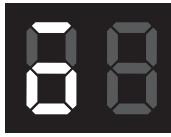
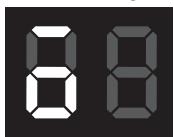
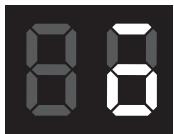
The bar at the top left flashes to indicate that the grease filter is saturated.
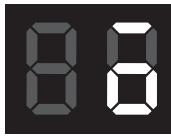
The bar at the top right flashes to indicate that the odour filter is saturated.
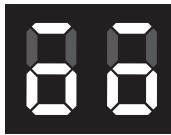
If both bars are flashing, then both filters are saturated.
You must then clean/replace the grease filter (A) or odour filter (B) or both, accordingly (see "Maintenance and care"). The latter only applies to the filter version.
To reset the filter counter:
Hold down T4 for three seconds while the hood is on. If both filter warnings are active at the same time, you must reset each separately. The first sequence resets the grease filter, while the second sequence resets the odour filter.
Configuring the hood
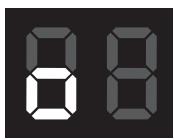
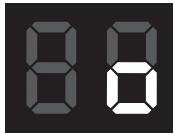
To set the operating mode of the hood, hold down T4 for 6 seconds, while the product is off. After a long beep, the type of installation displays:
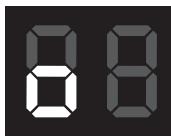
Ducted
(square at bottom left flashing).
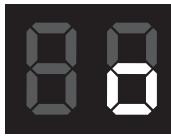
Filter
(square at bottom right flashing).
You can change the type of installation by pressing T4. To quit configuration mode, press T1 once; this switches the unit off and saves the last displayed setting.
Maintenance and care
Caution! Before cleaning or servicing the unit, disconnect it from the mains by pulling the power plug or disconnecting the main circuit breaker.
First cleaning
- Remove the protective film
- Clean with a damp sponge and a little neutral soap
- Rinse off with a damp cloth
- Dry with a soft cloth; if the hood is stainless steel, dry along the metal's grain
Periodic cleaning
The hood must be cleaned frequently (at least as often as you service the grease filter), inside and out. Use a damp cloth and a neutral liquid detergent with lukewarm water. Do not use abrasive or corrosive products.
Warning: Failure to observe the hood cleaning and filter cleaning/replacement instructions can result in fires. Follow the instructions carefully. The manufacturer is not liable for any damage to the motor or fires caused by incorrect care or failure to follow the above instructions.
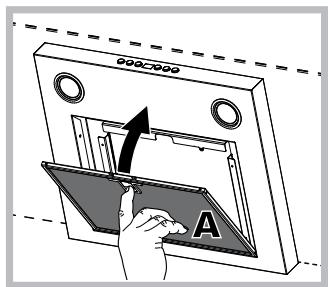
Servicing the grease filter (A)
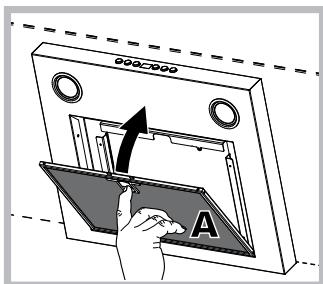
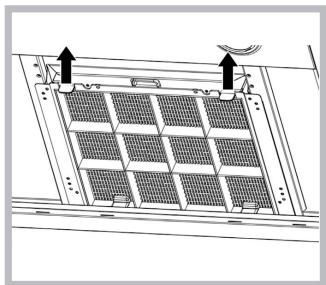
The grease filter retains the particles of grease produced during cooking; it must be cleaned at least once a month with a non-aggressive detergent, either by hand or with a low temperature, short dishwasher cycle.
To extract the grease filter, pull the spring loaded handle.
If washed in a dishwasher, the metal filter may change colour, but this does not affect its performance.
Servicing the charcoal filter (B)
The charcoal filter retains unpleasant cooking odours. The filter saturates after a variable time, depending on the type of cooking and how often the grease filter is cleaned. The cartridge must be replaced at least once every twenty months.
This filter can NOT be washed or regenerated

Disassembly: Remove the activated-carbon filter by pressing the two front levers which secure it to the hood.
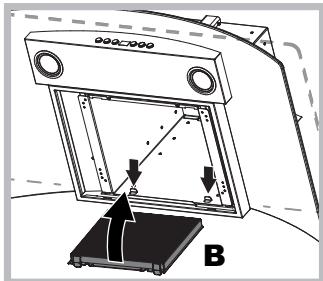
Assembly: Secure the activated-carbon filter first in the back using the hood's metal tabs and then in the front by pressing the two levers.
Replacing the bulbs
Disconnect the unit from the mains and remove the grease filter.
Caution! Make sure the bulbs are cool before touching them.
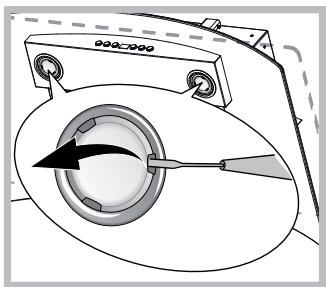
- Extract the guard by prising it out with a small flat head screwdriver or something similar.
- Replace the faulty bulb. Use only bulbs of the same type (for details, see the technical data in the following manual).
- Refit the guard (push it in).
Replacing the lights LED *
The hood is fitted with a lighting system based on LED technology. The LEDs ensure optimal lighting, longer life and lower consumption compared with traditional lights. To replace them please contact the assistance service.
Electrical cable
If the power cable is damaged, it can be replaced by the manufacturer or his technical service, to prevent any attendant risks.
SCRAPPING
The unit is marked for conformity with European Directive 2012/19/EC, Waste Electrical and Electronic Equipment (WEEE). By ensuring that the unit is scrapped properly, the user contributes to safeguarding the environment and public health.
The symbol on the product or on its accompanying documents indicates that the product may not be treated as domestic waste but must be handed over to a sorting centre for electrical and electronic waste. Dispose of it in accordance with local waste disposal regulations. For further information on the handling, recovery and recycling of this product, contact the local authority, domestic waste disposal service or the reseller from whom you purchased it
Troubleshooting
If something does not work, make the following simple checks before contacting Technical Service:
If the hood does not operate:
Check that:
the unit is powered up. - a speed has been set.
If the hood is not working effectively:
Check that:
- the selected motor speed is sufficient to handle the amount of smoke and steam being produced.
- the kitchen is adequately ventilated for the unit to take air in.
- the charcoal filter is not exhausted (filter version).
If the hood turns off during normal operation:
Check that:
the unit is powered up. - the circuit breaker has not tripped.
In case of faulty operation, before contacting Technical service, first disconnect the machine from the mains for at least 5 seconds by pulling its plug, then reconnect it. If the fault persists, contact Technical Service.
Installation
HGA 9.5 AM X/HA - HGF 9.5 AM X/HA
HGA 6.5 AM X/HA - HGF 6.5 AM X/HA
HGF 9.5S AB X/HA - HGA 9.5S AB X/HA - HGA 6.5S AB X/HA
HGE 9.8 AD X/HA - HGA 9.8 AD X/HA
HGA 6.8 AD X/HA - HGF 6.8 AD X/HA
T1
T2
T3

T4
T5
T6
HGA 9.5 AM X/HA - HGF 9.5 AM X/HA
HGA 6.5 AM X/HA - HGF 6.5 AM X/HA
T1
T2
T3
T4
T5
T1 Reset motor
HGF 9.5S AB X/HA - HGA 9.5S AB X/HA - HGA 6.5S AB X/HA
T1
T2
T3
T4
T5
T6
T1 Reset motor
HGF 9.8 AD X/HA - HGA 9.8 AD X/HA
HGA 6.8 ADI X/HA - HGF 6.8 AD X/HA
T1
T2

T3

T3

T4
T5
T6
T1 ON/OFF motor
HGA 9.5 AM X/HA - HGF 9.5 AM X/HA
HGA 6.5 AM X/HA - HGF 6.5 AM X/HA
T1
T2
T3
T4
T5
T1 Reset motor
HGF 9.5S AB X/HA - HGA 9.5S AB X/HA - HGA 6.5S AB X/HA
T1
T2
T3
T4
T5
T6
T1 Reset motor
HGF 9.8 AD X/HA - HGA 9.8 AD X/HA
HGA 6.8 ADI X/HA - HGF 6.8 AD X/HA
T1
T2
T3

T4
T5
T6
1 ON/OFF motor
"Low voltage" Directive 2006/95/EC (12-12-2006) EMC" Directive 2004/108/EC (15-12-2004)
HGA 9.5 AM X/HA - HGF 9.5 AM X/HA
HGA 6.5 AM X/HA - HGF 6.5 AM X/HA
T1
T2
T3
T4
T5
T1 Reset motor
HGF 9.5S AB X/HA - HGA 9.5S AB X/HA - HGA 6.5S AB X/HA
T1
T2
T3
T4
T5
T6
T1 Reset motor
HGF 9.8 AD X/HA - HGA 9.8 AD X/HA
HGA 6.8 ADI X/HA - HGF 6.8 AD X/HA
T1
T2
T3

T4
T5
T6
T1 ON/OFF motor
"Low voltage" Directive 2006/95/EC (12-12-2006) EMC" Directive 2004/108/EC (15-12-2004)
HGA 9.5 AM X/HA - HGF 9.5 AM X/HA
HGA 6.5 AM X/HA - HGF 6.5 AM X/HA
T1
T2
T3
T4
T5
T1 Engine reset
HGF 9.5S AB X/HA - HGA 9.5S AB X/HA - HGA 6.5S AB X/HA
T1
T2
T3
T4
T5
T6
T1 Engine reset
HGF 9.8 AD X/HA - HGA 9.8 AD X/HA
HGA 6.8 ADI X/HA - HGF 6.8 AD X/HA
T1 Engine ON/OFF
HGA 9.5 AM X/HA - HGF 9.5 AM X/HA
HGA 6.5 AM X/HA - HGF 6.5 AM X/HA
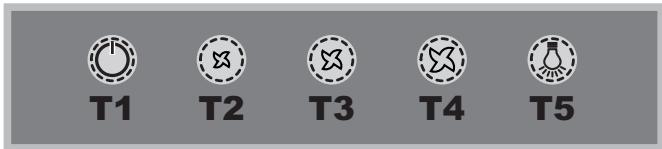
T1 Motor reset
When the hood is operating, pressing the button turns the unit off (OFF).
T2 Speed 1
HGF 9.5S AB X/HA - HGA 9.5S AB X/HA
HGA 6.5S AB X/HA
T1
T2
T3
T4
T5
T6
T1 Motor reset
HGF 9.8 AD X/HA - HGA 9.8 AD X/HA
HGA 6.8 AD X/HA - HGF 6.8 AD X/HA
T1
T2
T3


T4
T5
T6
1 Motor ON/OFF
HGA 9.5 AM X/HA - HGF 9.5 AM X/HA
HGA 6.5 AM X/HA - HGF 6.5 AM X/HA
T1
T2
T3
T4
T5
T1 Motor Stop
HGF 9.5S AB X/HA - HGA 9.5S AB X/HA - HGA 6.5S AB X/HA
T1
T2
T3
T4
T5
T6
T1 Exhaust fan control
When this button is pressed on the switched-off exhaust, the first speed is set. When the button is pressed during operation, the exhaust switches to the first speed.
T2 Speed 1
When the button is pressed, the exhaust switches to the 3rd speed.
T3 Booster device
When the button is pressed, the exhaust switches to the maximum speed. After 5 minutes, the exhaust switches back to the previously set speed; when the speed buttons (T2, T3 or T4) are pressed, the booster mode is switched off, and the exhaust switches to the set speed.
T6 Lighting on/off
Filter clogging indicator
The flashing symbol of the first speed T2 indicates clogging of the grease filter. The flashing symbol of the first speed T3 indicates clogging of the carbon filter. Both flashing symbols T2 and T3 indicate clogging of both filters. It is necessary to clean/replace the grease filter "A" and/or the carbon filter "B" (see "Maintenance and care").
HGF 9.8 AD X/HA - HGA 9.8 AD X/HA
HGA 6.8 ADI X/HA - HGF 6.8 AD X/HA
T1
T2
T3

T4
T5
T6
T1 Press and hold to switch on/off
When pressing this button, the set speed is set to the current speed. When pressing the button during operation, the speed is switched to the stored speed.
T2 Speed -
When pressing the button, the speed switches to the previous speed.
T3 Speed +
When pressing the button, the speed switches to the next speed.
T4 Voltage booster device
When this button is pressed, the hood switches to maximum speed; the letter "b" flashes on the display. After 5 minutes, the hood switches back to the previously set speed, which can also be done in the boost mode using the speed button (T2 or T3).
T5 Timer
With each press of this button, the automatic shutdown of the hood is extended by 5 minutes. The countdown of the timer minutes is shown on
If the hood does not work:
Check:
Presence of electrical power - the speed was set.
If the hood is not effective enough:
Check:
- That the set motor speed is sufficient for the removal of fumes. -That the kitchen ventilation is sufficient for air intake. Do not replace the charcoal filter (filter version of the hood).
If the hood turns off during operation:
Check:
The presence of electrical power did not trip the multi-pole circuit breaker.
In case of possible malfunctions, before contacting service, disconnect the hood for about 5 seconds from the power supply by unplugging the plug from the wall socket, then reconnect. If the malfunction is not resolved, contact service.
Accessories
The hood is designed for connection to the exhaust pipe (diameter 150 mm), or for installation in recirculation mode. The pipe diameter must be equal to the equivalent diameter of the recirculation kit.
The exhaust pipe is routed and must not be included in the delivery set and must be purchased separately. On the horizontal section, the pipe must have a slight upward slope (approximately 10°), and the exhaust outlet must be routed. If the hood is equipped with carbon filters, they must be removed.

Filter modification
The hood cleans the air and returns it to the room. To use the hood in recirculation mode, it is necessary to install a filter system based on activated carbon. This mode requires an air deflector, a reducer, and a carbon filter. In the upper pipe, there must be openings for air outlet, located in the upper part.
Technical data
HGA 9.5 AM X/HA - HGF 9.5 AM X/HA
HGA 6.5 AM X/HA - HGF 6.5 AM X/HA
T1
T2
T3
T4
T5
T1 Pre-switch of the fan
Pressing the key during operation will lead to malfunctions.
T2 Speed 1
HGF 9.5S AB X/HA - HGA 9.5S AB X/HA - HGA 6.5S AB X/HA
T1
T2
T3
T4
T5
T6
T1 Press the button
Pressing the button to turn on the device will lead to the first speed setting. Pressing this button during operation will lead to turning off the device.
T2 Speed 1
When pressing this button, the device will switch to the state, previous speed 1.
T3 Speed 2
When pressing this button, the device will switch to the state, previous speed 2.
T4 Speed 3
When pressing this button, the device will switch to the state, previous speed 3.
T5 Buzzer
When the exhaust hood is turned on, the extraction performance is set to intensive mode. After 5 minutes, the extraction will return to the performance that was set before. When the performance button (T2, T3, or T4) is pressed, the hood will exit the intensive mode and return to the set performance.
T6 Lighting
Signal for filter saturation and replacement of filters
Flashing of the LED, from the moment of reaching the first speed T2, indicates saturation of the grease filter. Flashing of the LED, from the moment of reaching the second speed T3, indicates saturation of the charcoal filter. Flashing of both LEDs T2 and T3 indicates saturation of both filters. Therefore, it is necessary to clean/replace the grease filters "A" and/or the charcoal filters against odors "B" (see "Maintenance and Technical Service").
To reset the filter signal:
With the hood turned on, press and hold the T5 button for 3 seconds. The signal light will flash three times, then return to normal operation display. In case of simultaneous saturation of both filters, it is necessary to perform the reset. The first procedure resets the grease filter, the second resets the charcoal filter against odors.
Configuration of the hood:
To set the hood to the desired operating mode, press and hold T5 in the off state for 6 seconds. While T2 or T3 are flashing, press the corresponding button to select the mode: T2 for suction mode, T3 for filtering mode. You can change the mode by pressing the T5 button again.
To save the new configuration, press the T1 button.
Control panel model Soft Button + Number
HGF 9.8 AD X/HA - HGA 9.8 AD X/HA
HGA 6.8 AD X/HA - HGF 6.8 AD X/HA
T1
T2
T3

T4
T5
T6
T1 Pressing the button switches the device on.
Pressing the button for 10 seconds will switch the device off. Pressing the button for 10 seconds during operation will switch the device off.
T2 Speed -
When the button is pressed, the speed decreases to the previous speed.
T3 Speed +
When the button is pressed, the speed increases to the next speed.
T4 Booster
Pressing the button switches the speed from the current state to the intensive speed; the display shows the letter "b". After 5 minutes, the speed returns to the previously set speed. The result can be obtained during booster operation if you press the speed button (T2 or T3).
T5 Timer
Each time you press this button, the automatic switch-off of the hood is delayed by 5 minutes. The remaining minutes according to the timer are shown on the display. The timer is set only for the manual speed and is not intended for the booster.
T6 Switching the lighting on/off
Press the button to switch the lighting on or off.
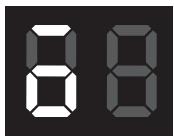
Configuration of the insert
To set the insert to the desired operating mode, press T4 and hold it for 6 seconds. (On the lower product) After the correction of the timer on the display, the following insert modification modes will appear:
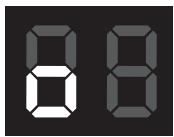
Deactivated
(the square at the bottom left lights up).
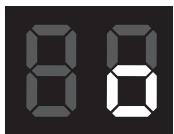
Filtering
(the square at the bottom right lights up).
You can change the modification by pressing the T4 button. To exit the configuration mode, press the T1 button once, which will lead to the execution of the insert with the preservation of the last setting.
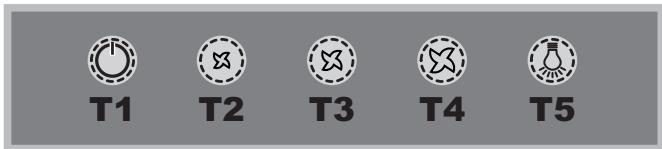
Models with mechanical button panel
HGA 9.5 AM X/HA - HGF 9.5 AM X/HA
HGA 6.5 AM X/HA - HGF 6.5 AM X/HA
HGF 9.5S AB X/HA - HGA 9.5S AB X/HA - HGA 6.5S AB X/HA
HGF 9.8 AD X/HA - HGA 9.8 AD X/HA
HGA 6.8 AD X/HA - HGF 6.8 AD X/HA
T1 Engine on/off
HGA 9.5 AM X/HA - HGF 9.5 AM X/HA
HGA 6.5 AM X/HA - HGF 6.5 AM X/HA
T1
T2
T3
T4
T5
T1 Motor reset
After pressing this button during operation, the extractor will switch OFF.
T2 Speed 1
HGF 9.5S AB X/HA - HGA 9.5S AB X/HA - HGA 6.5S AB X/HA
T1
T2
T3
T4
T5
T6
T1 Motor reset
After pressing this button with the extractor off, the first speed is set. After pressing this button during operation, the extractor turns OFF.
T2 Speed 1
HGF 9.8 AD X/HA - HGA 9.8 AD X/HA
HGA 6.8 ADI X/HA - HGF 6.8 AD X/HA
T1
T2
T3

T4
T5
T6
T1 Motor ON/OFF
HGA 9.5 AM X/HA - HGF 9.5 AM X/HA
HGA 6.5 AM X/HA - HGF 6.5 AM X/HA

T1

T2

T3

T4

T5
T1 contact type
The left contact is installed on the Turfan base, it is closed
T2 contact 1
The left contact is installed on the base of the first contact.
T3 contact 2
The left contact is installed on the base of the second contact.
T4 contact 3
The left contact is installed on the base of the third contact.
T5 sensor connection
Sensor panel with model
HGF 9.5S AB X/HA - HGA 9.5S AB X/HA HGA 6.5S AB X/HA

T1

T2

T3

T4

T5

T6
T1 Contact terminals
The terminals are inserted into the housing, pressed in, and locked. If the terminal is pressed in incorrectly, it will be released.
T2 Locking lance 1
When the terminal is inserted, the locking lance 1 engages.
T3 Locking lance 2
When the terminal is inserted, the locking lance 2 engages.
T4 Locking lance 3
When the terminal is inserted, the locking lance 3 engages.
T5 KyseuTekiu
Tуиme bacblfraHda copfbIw KxorapbI XblIaMblkKa opHaTbIaIbI. 5 MInHyTTaH KeiH, copfbIw aIbIHbI JxblIaMblkKa opaIaIbI; XblIaMblk TyImeci bacblnca (T2, T3 Hemece T4), copfbIw KUWeHTKIw pexKmIHeH sbIFbI, TaHdaIFaH XblIaMblkTbI opHaTaIbI.
T6 ⅢamapdbI KOCY/ΘUIPY
Ma/niic cy3rJIepiHin eckepTuJIepi
T2 6enriweci kblbIbIKtaca, demek Ma cy3ric KaHbIKKaH, an T3 6enriweci kblbIbIKtaca, on nic cy3ricinH KaHbIKKaHbIH 6ilipei, an ekeyi de kblbIbIKtaca, demek eki cy3ri De KaHbIKKaH. Ohdai JkaJda, MaJ cy3rici (A) a nic cy3rici (B) Hemece ekeyi De Ta3anay/aybcTbpy KaKet («TexnkaJIbIK Kbl3Met Kepcety XaHe KYTIM Kepcety» 6eimih KapaHbI3).
Cy3ri caHaBbIbH KaIbHa KeItripy:
Copfbl Kocbln Tpyfah Ke3e, T5 TyImeci6acbl, yUcKyHd YCTan Typblb3.
EckepTy dnobl yw pet XbInbIbIKTaIdbI da, KaIbIITbIpexIMre opanaDbI.
Bip yaKbIITa cy3ri eckepTynepiH ekeyi De Kocblica, onapdbIH apKaaicbIcbH 6eNEK KaIIbHa KeNTipy KepeK.
AndbimEn MaI cy3rici, OaH KeiH nic cy3rici KaIIbHa KeIipiJIeI.
CopfbiI KoHgurpaunacbI:
Copfbltih kymbic peximin opHaTy ysiin eHIM euiin TyprAh Ke3de T4 tymecin 6acbin, 6 cekyHn yctan typbHbI3. Ophaty TypiH Kepcety ysiin T2 He T3 6enriweenerip xanaIbI: T2 -KeIeTeY, T3-csy3y.
T4 Tymecin Kaia-Ta-Kaia Ta 6acbIn, opHaTy TypiH e3repTyre 6oanaBl.
KaHa KOHpUpaunHbI caTay yuH T1 TuMecIH XeKe 6aCbHb3.
CehcOpIbIK nAHeJIbMeH XaHe DnCpIeMHe Xa6DbIKTaJFaH MoDeJIbDep
HGF 9.8 AD X/HA - HGA 9.8 AD X/HA
HGA 6.8 ADI X/HA - HGF 6.8 AD X/HA

T1

T2

T3


T4

T5

T6
1 Motors Kosu/UIPY
Filters with pipe, reduced pressure, 1-way throttle. Filters with pipe, reduced pressure, on UIPY.
T2 Xylamdyk -
Tyme basylfanda sorfyla andylyf Xylamdykka oranaby.
T3 Kyldamdyk+
Tynme basyranda sorfyw kelesi Xylamdykka eteri.
T4 Kuzeewrkiw
The timer will automatically switch to the standby mode; the display «b» will light up. After 5 minutes, the timer will switch to the standby mode; the timer (T2 or T3) that was set last will switch to the standby mode via the button.
T5 timer
When the timer is pressed, the washing machine will automatically start after 5 minutes. The timer display shows minutes, not seconds. The timer can only be operated manually by the user; for the last setting, this is not possible.
T6 timer setting
Detergent dispensers
If the detergent is too thick, it may not dissolve completely.
If the detergent is too thick, it may not dissolve completely.
If two detergents are used, both may not dissolve.
In such cases, the detergent (A) and the detergent (B) or both need to be diluted or mixed (see "Technical Service and Maintenance" section). Then the detergent can be added to the dispenser.
Adding detergent to the dispenser:
When the detergent is added, press the T4 timer and hold for 3 seconds.
If the detergent is added while the dispenser is open, the dispenser must be closed.
Then the detergent will be added to the dispenser.
Detergent draining
To drain the detergent, press the T4 timer and hold for 3 seconds. The drain will start automatically.
Type of launch button
(Depending on the type of launch button).
Launch button
(Depending on the type of launch button).
Press button T4 once to turn on. To turn off, press button T1 once; if you press it again, the device will turn off and the parameters will be saved.
Technical maintenance and repair
Warning! If the device is damaged or requires maintenance, you must disconnect it from the power supply and contact a qualified specialist.
Cleaning
Before cleaning, disconnect the device from the power supply and let it cool down. If the device is dirty, clean it with a soft, dry cloth.
Deep cleaning
The inside and outside of the device should be cleaned regularly (especially after intensive use). Use a soft, slightly damp cloth with a mild detergent.
Do not use abrasive or aggressive cleaning agents. Note: If cleaning and maintenance instructions are not followed, the warranty may be void. Do not use sharp objects. Do not allow liquids to enter the motor or other openings.
Maintenance (A)
If the device is used frequently, the filter may become clogged; it should be cleaned at least once a month with a soft brush or vacuum cleaner.
To remove the filter, hold the handle
TapbIbI3. bIbIc KxyfblTa Kyyblnca, MeTaN Czy3riHt Yci e3repyIMMkiH, 6ipak OHbIH KymblcbiHa HkcaH KeMeiDi.
Kemip cy3rire Kbi3MeT kepcety (B)
Kemip cy3rici kafbimcbi TaFAM nicipy niCTepih yctaIdbi. Cy3ri nicipineniTaFAM tyPiHe KHe MaI cy3ricH ta3anay kinnirire 6aIIaHaBcIbIe np TyPiNknniknien KaHbIFIn OTbpaDbI. Kaptndk KEM dereHde knbipma aia dbip pet aybictbIpiny Tnic.
Byn cy3rihi kyyfa Hemece kaJIbIHa keJItpyre 6oMaJdbI
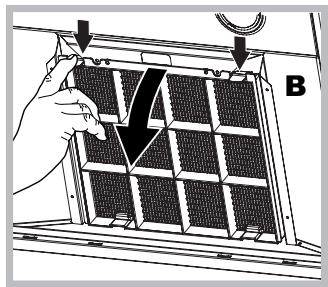
Bennektey: Copbikka 6ekitin TypaBH aIbIHbEki nHtipeKti 6acBn, 6enCeHdipilreh Kemip cy3ricih wewin aJIbHbI3.
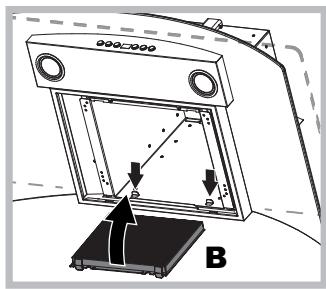
Kypactbipy:BeIceHdiipiren Kemip cy3ricin andbimc H copfbluTbH aptkb JkafbHda fb Me taJI TIIpeHH, Oan H KeiH anDbHfb XaFBHDAfb eKi iHTipeKtiH Kemerimeh 6ekithi3.
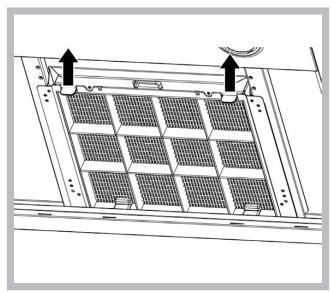
UamdapNbaybictbipy
KypbIfblHbTOKTaH aftlbIn, MaI cy3rici Wewin anblHbI3.
A6aB60JIbIb3!YCTaMaC 6ypbH,ShaMdap caKbIHdaFaHbHaKe3 XeTki3iHi3.
- CaKaTaNDbI pFbI WbI WbIFapBn aNbIHbI3: KiKHe Teric 6aCTbI 6ypaFbIwneH Hemece oran YKcac KypaImeH WbIFapBnHbI3. 2.A Ka y Nbl Ma Mbl aybictbipbHb3. Typi 6ipdei wamdapbl rHa KaJdaHbHb3 (MnImetany yWIn,TeMeHderi HycKayn depeKti KapaHb3).
- CaKaTHaBbIpBbIbTbI opHbIHbHa opHaTbIHbI3 (ntepin, opHaTbIHbI3).

UamdaapdbaybictbypLED*
Copfblt Ta IIOJ TexHONORncaHa Heri3JeIreH JapbIKTaHdbipy Kjueci 6ap. IIOJTap eDetteri WamdpFa KaparaHda OHtaJIbI JapbIKTaHdbipy, Y3aFbpaK XyMbIC icTeyd i XHe a3bpaK Kyat naJaIaNHydbI KaMTaMaCbI3 etedi. Onapbl aybICTbpy yuiH KEmek KepceTy KbImeTHe xaBapnacbl3.
3neKtp ka6eJI
KyaT Ka6eni 3aKbIMdAnca, TsyeKeIepePiH aIdbIH aNy yuH OHbl eHdipyWIRE HeMece OHbIH TexHnKaJIbIK KbI3MeTiHe aybICTbIPTuFa 6oNaBl.
KOKbICKA TACTAY
BvI KpybInfbl Koklc 3JIeKtp XHe 3JeKTPoHdbIK Jka6DbikKa (WEEE) KaTbictbl EC/2012/19 Eyponaibk DnpeKTnBaCbHa caikec keendi den beHrlneHre. KpybInfbl KOKbICKa dYpbic TaCTaIybiH KamTaMaCbI 3 ety apKbIbn naJaIaNHywbl KOpShaFah OpTa MeH KOFaMHbIH DeHCaylbfbH Koprayfa aT caIbicaBl.

HIMIEII Hemece OHbIH KxKaTTaMaCbIHDaFbI TaHbAcbl EHMdi TYMbICTbIK KObIC TactaJIMaybl, OHbIH OPhbHa 3NeKTP XeHe 3JeKTPoHdbIK KObICTbl CypblTay OTpAlbIfbHa Ta6bCTaLybl Tnic eKeHH bIDipei. XeprilikTi KObIC Tactay 3aHapbHa cAnkec apeket etiH3. OhimDi KOndany, KaJIbHa KeNTipy XeHe KaTa EhDey TypaBbKOcbIMwa MAnimet Any yuH In JepriKiTI Kx3bpNbI opraHapra, KObIC XInHay KbI3MeTHe Hemece EHIMdi catbIN anfah OpbIHFa xaabapnaCbIHbI3.
AkayIbIKTapdbI JxOHO
KyMbic icTeMei KaJca, TexHnKaIbIK Kbl3Met KePcety optaHbHa xa6apnaacnac 6ypbIH TeMeHderi KaapanaBIM KaFdaanapdbI Tekcepini3:
CopfbiiXyMbic icTeMece:
KeNeci KaFdaIaIapIbI TeKcepH3:
Kypblfbl KocblbnTYP. XbIJaMDbIK OPhaTbIJaH.
Copfbiu Tnimi jxmbic icTeMece:
KeNeci KaFdaIaIapIbI TeKcepH3:
TaHdaIHaH MOTOp XbIJaMdbIbIbIbIKKaH TyTih MeH 6y KeJIemIH eHdeYre xeTKJIikTi. KypblfbyayaaybyyushacyndeTnicBeHTnIaZna6ap. Kemip cy3ri KaHbIKnFaHaC (Cy3y HyCKacbl).
Kymbcic icTei TpyraH Ke3de, copfbiiw ewin KaIaTbIH 6onca:
KeNeci KaFdaIaIapDbI TeKcepiH3:
Kypblfbl KocblbnTyp. aBbIpbIn KockblILKocblIMaFaH.
AkaYbI JyMbIC icTeReH XaFdaJa,TEXHnKaIbIK KbI3MeT KepcTeTy opTaIbIFbIHa xaabapnacnac 6ypbIH, aIbIPbIH aftTy apKblbl KpyblfBbI TOkTaH KEM deReHde 5 ceKyHdka aftbIbIN, KaIta KocbIHbI3. AkaybIK WEEIWmecE,TEXHnKaIbIK KbI3MeT KepcTeTy opTaIbIFbIHa xaabapnacbIHbI3.
KZ
KZ
- USER MANUAL
- COOKER HOOD
- OPERATING INSTRUCTIONS
- WARNINGS
- ASSISTANCE
- T1 RESET MOTOR
- T1 ON/OFF MOTOR
- ELECTRICAL HOOK UP
- AIR EXHAUST (FOR DUCTED UNITS)
- FILTER OR DUCTED
- DUCTED VERSION
- FILTER VERSION
- GLASS CONTROLS
- MODELS WITH MECHANICAL KEYPAD
- T1 MOTOR RESET
- T2 SPEED
- T3 SPEED
- T4 SPEED
- T5 LIGHTS ON/OFF
- MODELS WITH SOFT BUTTON KEYPAD
- T5 BOOSTER
- T6 LIGHTS ON/OFF
- GREASE/ODOUR FILTER WARNINGS
- TO RESET THE FILTER COUNTER
- HOOD CONFIGURATION
- MODELS WITH SOFT BUTTON KEYPAD AND DISPLAY
- MOTOR ON/OFF
- T4 BOOSTER
- T5 TIMER
- CONFIGURING THE HOOD
- DUCTED
- FILTER
- MAINTENANCE AND CARE
- FIRST CLEANING
- PERIODIC CLEANING
- SERVICING THE GREASE FILTER (A)
- SERVICING THE CHARCOAL FILTER (B)
- REPLACING THE BULBS
- REPLACING THE LIGHTS LED
- ELECTRICAL CABLE
- SCRAPPING
- TROUBLESHOOTING
- IF THE HOOD DOES NOT OPERATE
- CHECK THAT
- IF THE HOOD IS NOT WORKING EFFECTIVELY
- IF THE HOOD TURNS OFF DURING NORMAL OPERATION
- INSTALLATION
- ON/OFF MOTOR
- T1 ENGINE RESET
- T1 ENGINE ON/OFF
- T1 MOTOR STOP
- T1 EXHAUST FAN CONTROL
- T3 BOOSTER DEVICE
- T6 LIGHTING ON/OFF
- FILTER CLOGGING INDICATOR
- T1 PRESS AND HOLD TO SWITCH ON/OFF
- T4 VOLTAGE BOOSTER DEVICE
- IF THE HOOD DOES NOT WORK
- CHECK
- IF THE HOOD IS NOT EFFECTIVE ENOUGH
- IF THE HOOD TURNS OFF DURING OPERATION
- ACCESSORIES
- FILTER MODIFICATION
- T1 PRE-SWITCH OF THE FAN
- T1 PRESS THE BUTTON
- T5 BUZZER
- T6 LIGHTING
- SIGNAL FOR FILTER SATURATION AND REPLACEMENT OF FILTERS
- TO RESET THE FILTER SIGNAL
- CONFIGURATION OF THE HOOD
- CONTROL PANEL MODEL SOFT BUTTON + NUMBER
- T1 PRESSING THE BUTTON SWITCHES THE DEVICE ON
- T6 SWITCHING THE LIGHTING ON/OFF
- PRESS THE BUTTON TO SWITCH THE LIGHTING ON OR OFF
- CONFIGURATION OF THE INSERT
- DEACTIVATED
- FILTERING
- MODELS WITH MECHANICAL BUTTON PANEL
- T1 MOTOR ON/OFF
- T1 CONTACT TYPE
- T2 CONTACT
- T3 CONTACT
- T4 CONTACT
- T5 SENSOR CONNECTION
- SENSOR PANEL WITH MODEL
- T1 CONTACT TERMINALS
- T2 LOCKING LANCE
- T3 LOCKING LANCE
- T4 LOCKING LANCE
- T5 KYSEUTEKIU
- T6 ⅢAMAPDBI KOCY/ΘUIPY
- MA/NIIC CY3RJIEPIHIN ECKEPTUJIEPI
- CY3RI CAHABBIBH KAIBHA KEITRIPY
- COPFBII KOHGURPAUNACBI
- CEHCOPIBIK NAHEJIBMEH XAHE DNCPIEMHE XA6DBIKTAJFAH MODEJIBDEP
- MOTORS KOSU/UIPY
- T2 XYLAMDYK
- T3 KYLDAMDYK
- T4 KUZEEWRKIW
- T6 TIMER SETTING
- DETERGENT DISPENSERS
- ADDING DETERGENT TO THE DISPENSER
- DETERGENT DRAINING
- TYPE OF LAUNCH BUTTON
- LAUNCH BUTTON
- TECHNICAL MAINTENANCE AND REPAIR
- CLEANING
- DEEP CLEANING
- MAINTENANCE (A)
- KEMIP CY3RIRE KBI3MET KEPCETY (B)
- UAMDAPNBAYBICTBIPY
- UAMDAAPDBAYBICTBYPLED
- NEKTP KA6EJI
- KOKBICKA TACTAY
- AKAYIBIKTAPDBI JXOHO
- COPFBIIXYMBIC ICTEMECE
- COPFBIU TNIMI JXMBIC ICTEMECE
- KYMBCIC ICTEI TPYRAH KE3DE, COPFBIIW EWIN KAIATBIH 6ONCA
Brand : HOTPOINT
Model : HGF95AMX
Category : Cooker