USER MANUAL PACW29HP WHIRLPOOL
6. TASTE 6TH SENSE (6TH SENSE)
Please read all instructions carefully before using this product. When using this appliance, always follow these instructions to reduce the risk of fire, electric shock, and injury to persons.
Please keep this manual. If you pass the appliance on to other users, hand over this manual as well.
These instructions are also available on the website: www.whirlpool.eu.
SAFETY PRECAUTIONS
- Installation and service/repair must be performed by a qualified technician, in compliance with the producer's instructions and following local safety norms. Do not repair or replace any parts of the appliance unless it is specifically stated in the user instructions.
- Do not pull the power supply cord to remove it from the socket. Do not twist or press the power supply cord, and make sure it is not damaged.
- Do not touch the power plug, circuit breaker, or emergency button when your hands are wet.
- Do not insert your fingers or foreign objects into the air inlet/outlet of the indoor and outdoor units.
- Never block the air inlet or outlet of the indoor and outdoor units.
- Physically or mentally disabled people, children, and people without any experience with the product are only allowed to use
the appliance if they have received specific training on how to operate it by a person responsible for their safety and well-being. The appliance is not intended for use by disabled people or very young children without supervision.
- Children should be supervised to ensure that they do not play with the appliance (including the remote control).
- This appliance can be used by children aged 8 years and above and persons with reduced physical, sensory, or mental capabilities or lack of experience and knowledge if they have been given supervision or instruction concerning use of the appliance in a safe way and understand the hazards involved. Children shall not play with the appliance. Cleaning and user maintenance shall not be performed by children without supervision.
AIR CONDITIONER PRECAUTIONS
Please strictly follow the below instructions:
- Long and direct exposure to cool air might be harmful to health. It is advisable to set the louvers in order to avoid direct cool air and deflect it within the room.
- Upon malfunctioning first turn the appliance off by pressing the ON/OFF button on the remote control, then disconnect it from power supply.
- Always turn off the air conditioner by remote control first. Do not use the power supply circuit breaker or pull off the plug to turn it off.
- Do not switch the appliance on and off too often as this can damage the appliance.
- Do not place any objects on the outdoor unit.
- Disconnect the air conditioner from the power supply if it is to be left unused for a long period of time or during a thunder/lightning storm.
- This product contains Fluorinated Greenhouse Gases covered by the Kyoto Protocol, the refrigerant gas being in a hermetically sealed system. Refrigerant gas: R410a has a Global Warming Potential (GWP) 2087.5.
SAFEGUARDING THE ENVIRONMENT
- This appliance has been made of recyclable or re-usable material. Scrapping must be carried out in compliance with local waste disposal regulations. Before scrapping it, make sure to cut off the mains cord so that the appliance cannot be re-used.
- For more detailed information on handling and recycling of this product, contact your local authorities who deal with the separate collection of rubbish or the shop where you bought the appliance.
SCRAPPING OF PACKAGING
- The packaging can be 100% recycled as confirmed by the recycling symbol. The various parts of the packaging must not be dispersed in the environment, but must be scrapped in line with local authority regulations.
SCRAPPING OF APPLIANCE
- This appliance is marked according to the European Directive 2002/96/EC, Waste Electrical and Electronic Equipment (WEEE).
- By ensuring that this product is disposed of correctly, you will help to prevent potentially negative consequences for the environment and for human health.
The symbol on the product or on the documents accompanying the product indicates that this appliance should not be treated as household waste, but must be given to the appropriate local gathering place where electric and electronic appliances are stored and recycled.
STARTING YOUR LOCAL AIR CONDITIONER
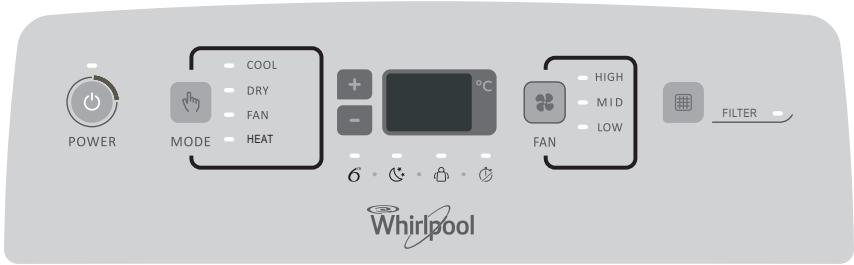
This section explains proper local air conditioner operation.
IMPORTANT:
- The air conditioner display shows the setting temperature.
- Only in standby mode the display shows the ambient temperature.
- When changing modes while the air conditioner is operating, the compressor will stop for 3 to 5 minutes before restarting.
If a button is pressed during this time, the compressor will not restart for another 3 to 5 minutes.
- In Cooling or Dry mode, the compressor and condenser fan will stop when the room temperature reaches the set temperature.
NOTE: In the event of a power failure, your air conditioner will operate at the previous settings when the power is restored.
1. Select the mode. See "Mode." 2. Select the fan speed. See "Fan Speed." 3. Set the temperature. See "Temperature." 4. Press ON/OFF button to start the air conditioner.
POWER
NOTE: When the air conditioner is turned on for the first time after it is plugged in, it will run in the 6th Sense Mode control.
When the air conditioner is turned on at all other times, it will run according to the previous settings. 6th Sense Mode can be selected with the remote control only.
Only if the unit is operated in UNLIKELY VERY HUMID air, water will be collected in the container inside the unit. If the water container is full, the air conditioner will stop. The screen will display "E5" to inform you to empty the internal container.
STORAGE AND TIPS FOR USING THE RC
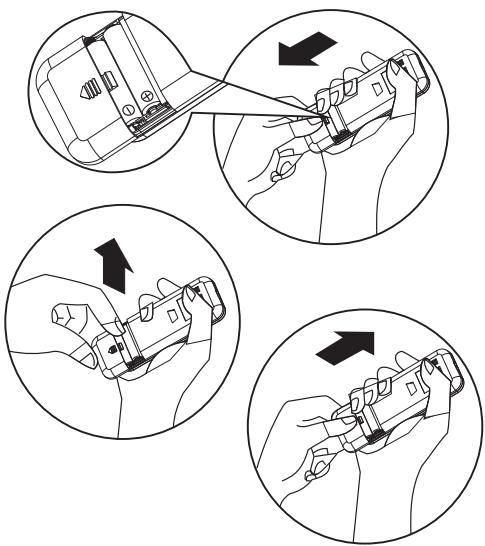
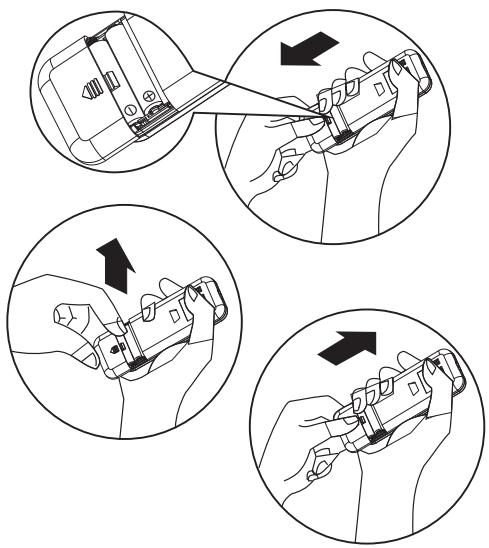
How to insert the batteries
Insert a pin and gently press down on the battery cover and push in the direction of the arrow to remove, as shown. 2 Insert 2 AAA batteries (1.5V) into the compartment. Ensure that "+" and "-" polarity is correctly positioned. 3 Close the battery cover on the remote control.
How to remove the batteries
Remove the battery cover in the direction of the arrow.
Press the positive pole of the battery softly with your fingers, then draw the batteries out of the compartment. All this should be done by adults, children are forbidden to remove the batteries from the remote control in order to avoid danger of swallow.
Disposal of the batteries
To protect natural resources and to promote material reuse, please separate batteries from other types of waste and recycle them through your local, free battery return system.
Precautions
- When replacing the batteries, do not use new batteries with old batteries, or different types of batteries as this may cause the remote control to malfunction.
- If you do not expect to use the remote control for some time, take the batteries out to prevent leakage of battery acid in the remote control.
- Operate the remote control within effective range. Keep the remote control at least 1 meter from any TV set or HI-FI equipment.
- If the remote control does not work normally, take the batteries out and reinstall after 30 seconds. If it still does not work, install new batteries.
- To operate the appliance by remote control, point the remote control at the receiving device on the indoor unit to ensure receiving sensitivity.
- To send a message from the remote control, the symbol will flash for 1 second. On receipt of the message, the appliance will emit a beep.
- The remote control will operate the air conditioner at a distance of up to 7m. Each time the batteries are replaced in the remote control, the remote control is pre-set at Heat mode.
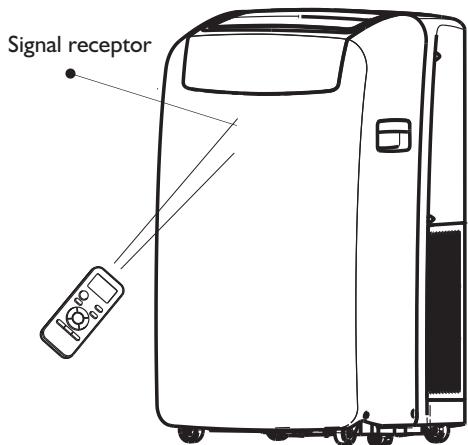
OPERATING MODE DESCRIPTION
Operating modes:
I. Press and release MODE until you see the symbol glow for the desired setting.
MODE
- Choose Cooling, Dry, Fan Only, or Heating.
Cooling - Cools the room. Press FAN to select High, Mid, or Low. Press the Plus or Minus button to adjust the temperature.
COOL
- Dry - Dries the room. The air conditioner automatically selects the temperature. The fan runs on Low speed only.
NOTE: Dry mode should not be used to cool the room.
DRY
- Fan Only - Only the fan runs. Press FAN to select High, Mid, or Low.
FAN
- Heating - Heats the room. Press FAN to select High, Mid, or Low. Press the PLUS or MINUS button to adjust the temperature.
NOTE: Heating is NOT available for cooling-only air conditioners.
HEAT
Fan Speed
I. Press and release FAN to choose the desired fan speed.
FAN
- Choose High, Mid, or Low.
High - for maximum fan speed
HIGH
Mid - for normal fan speed
MID
- Low - for minimum fan speed
LOW
Filter Reset
- When the Filter Reset indicator light is lit, remove, clean and replace the air filter. See "Cleaning the Air Filter."
- Press and release FILTER button after replacing the air filter.

NOTE: After 360 hours of fan operating time, the Filter indicator light will turn on. It will remain on for 180 hours or until you press FILTER button. After 180 hours, it will turn off automatically.
Temperature
- Press the PLUS button to raise the temperature. Press the PLUS button once to increase the set temperature by 1°C.

- Press the down Adjust button to lower the temperature. Press the down Adjust button once to decrease the set temperature by 1°C, or press twice to decrease the set temperature by 2°C.

NOTES:
- In the Cooling and Heating mode, the temperature can be set between 18°C and 32°C.
- In Fan Only mode, the temperature cannot be set.
- In Dry mode, press the PLUS/MINUS button to change the set temperature by 2°C.
REMOTE CONTROL FUNCTIONS AND INDICATORS
Starts and/or Stops the appliance by pressing this button.
Used to select the operation mode.
Used to select fan speed in sequence auto, high, medium or low.
Used to select the room temperature. Used to set time in timer mode and real time clock.
Sets or cancels 6th sense operation.
Stops or starts horizontal adjustment louver swinging and sets the desired up/down airflow direction.
Sets or cancels Sleep Mode operation.
Used to set or cancel Around U function.
Used to start or stop the fast cooling or heating.
Used to set or cancel the timer on operation. Used to set or cancel the timer off operation.
Used to turn on or turn off display light on indoor unit.
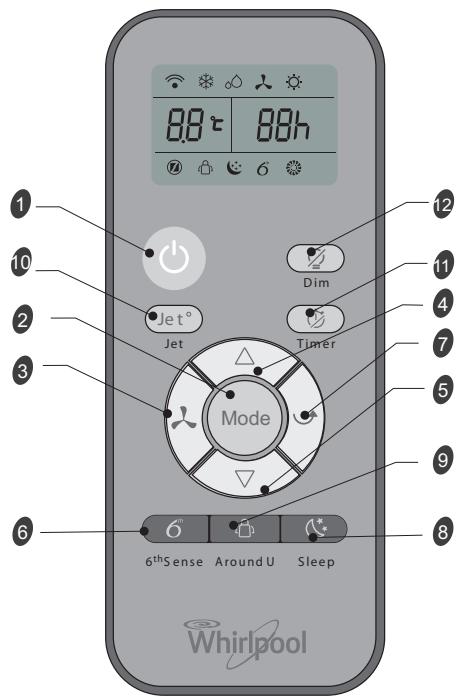
INDICATOR SYMBOLS ON RC DISPLAY

Cooling indicator

6th Sense indicator

Dry indicator

Sleep indicator

Fan only indicator

Around U indicator

Heating indicator

Jet indicator

Auto fan speed

Signal transmission

High fan speed

Display set timer

Medium fan speed

Display set temperature

Low fan speed
FUNCTION DESCRIPTIONS
Power On or Off
Press ON/OFF button to turn on or off the unit.

NOTE:
- Changing the mode during operation. Sometimes the unit does not respond at once, wait 3 minutes
- Wait 3 minutes before restarting the appliance.
Selecting mode
I. Press and release MODE until you see the symbol glow for the desired setting.
Mode
- Choose Cooling, Dry, Fan Only, or Heating.
Cooling - Cools the room. Press Fan to select Auto, High, Mid, or Low. Press the up or down Adjust button to adjust the temperature.

- Dry - Dries the room. The air conditioner automatically selects the temperature. Fan runs on Low speed only.
NOTE: Dry mode should not be used to cool the room.
In "Dry" mode, the unit can decrease or rise 2°C (3°F or 4°F) if you still feel uncomfortable.

- Fan Only - Only the fan runs. Press FAN to select High, Mid, or Low.

NOTE: Auto fan speed cannot be selected in Fan Only mode.
- Heating - Heats the room. Press FAN to select the fan speed. Press the up or down button to select the temperature.

6th Sense mode
The air conditioner automatically selects Cooling or Dry mode, depending on room temperature, and sets the target temperature.

Operation mode and temperature are determined by indoor temperature.
Electric Heat models
| Indoor temperature | Operation mode | Target temperature |
| 21°C or below | HEATING | 22°C |
| 21°C-23°C | FAN ONLY | |
| 23°C-26°C | DRY | Room temperature decrease 2°C after operating for 3 minutes |
| Over 26°C | COOLING | 26°C |
| Indoor temperature | Operation mode | Target temperature |
| 21°C or below | FAN ONLY | |
| 23°C-26°C | DRY | Room temperature decrease 2°C after operating for 3 minutes |
| Over 26°C | COOLING | 26°C |
Cooling only models
NOTE: Temperature, airflow, and direction are controlled automatically in 6th Sense mode.
However, a decrease or rise of up to 2°C can be set with the remote control if you still feel uncomfortable.
- Press 6th Sense button.

6th Sense
- In Fan Only mode, press Fan to select High, Mid or Low.
Jet mode
Jet button is used for fast cooling or heating.
NOTE: 6th Sense mode button does not operate when Jet function is selected.
I. Press Jet in cooling mode. The air conditioner automatically sets the fan speed and the temperature to 18°C. Fast heating operates at auto fan speed, changing the set temperature to 32°C.

- To exit Jet mode press any button except Timer Around U and Swing button.
Fan Speed
I. Choose desired fan speed.

- Each time the "FAN" button is pressed, the fan speed is changed in sequence:

- Auto - automatically controls fan speed depending on current room temperature and temperature control setting.
NOTE: Auto fan speed cannot be selected in Fan Only mode.

High - for maximum cooling

Mid - for normal cooling

- Low - for minimum cooling

Temperature
- Press the UP adjust button to raise the temperature. Press the UP Adjust button once to increase the set temperature by 1°C, or press twice to increase the set temperature by 2°C.

- Press the DOWN adjust button to lower the temperature. Press the DOWN adjust button to decrease the set temperature by 1°C, or press twice to decrease the set temperature by 2°C.

NOTES:
- In the Cooling or Heating mode, the temperature can be set between 18°C and 32°C.
- In Fan Only mode, the temperature cannot be set.
- In Dry mode, press the UP/DOWN button to change the set temperature by 2°C.
Around U function

When you press this button, the remote control transmits signal of the actual room temperature around it to the unit, and the appliance will operate according to this temperature to let you feel more comfortable.
Please keep the remote control in a location where it can transmit the signal to the unit properly. Press once to set and press again to cancel.
Sleep mode
Press Sleep button on remote control and the indicator in LCD lights up, the appliance operates in sleep mode and the fan speed is automatically set to low speed.

NOTES:
- The appliance will stop operation automatically after operating for 8 hours. Fan speed is automatically set at low speed.
- In Cooling mode, if the current room temperature is below 26°C, the temperature will automatically increase by 1°C during the first hour after Sleep control is activated, then remain the same.
- In Heating mode, the setting temperature will decrease by 3°C at most for 3 hours constantly, then keeps steady.
1. Press MODE to select Cooling, Dry, or Heating. NOTE: Sleep mode cannot be selected when Fan Only is selected. 2. Press the or button to set the temperature. 3. Press SLEEP. After 10 seconds, the lights on the control panel display will dim.
NOTE: The temperature and airflow direction may be adjusted during Sleep control. The fan speed is automatically set to Low speed. After 10 seconds, the lights on the control panel display will dim again. 4. To turn off Sleep control, press SLEEP, MODE, FAN, ON/OFF, or wait 8 hours for Sleep control to turn off automatically.
DIM function
Press the DIM button to turn off the light and the display in the unit.

NOTES: When the light is off, receiving a signal will turn on the light again.
TIMER function
It's convenient to set the timer on with the TIMER button before you leave so that you will come back to the comfortable room temperature you set. Press the TIMER button to set a switch-on timer when the appliance is off. Press the TIMER button to set a switch-off timer during operation.

How to set TIMER
1. Set the desired operating mode, temperature setting, and fan speed firstly, then press the TIMER button and "01h" flashes on the LCD. 2. Set the desired operating mode, temperature setting, and fan speed firstly, then press the TIMER button and "01h" flashes on the LCD. 3. Point the remote control at the signal receptor of the unit, press the + or - button when "01h" flashes.
Choose the timer you want, then press the TIMER button.
A "beep" can be heard. - Timer indicator on the control panel lights up. - "h" stops flashing. 4. To cancel the set timer: press the TIMER button again, a "beep" can be heard.
NOTES:
- The range that can be set is 1 hour to 10 hours. After setting a switch-on timer when the appliance is off, the Timer light on the control panel lights and
- Setting a switch-off timer when the unit is working, the Timer light of the control panel lights up.
Changing Air Direction
Press SWING once to change vertical airflow direction. Press again to stop airflow louver at desired airflow direction.

Normal Sounds
When your air conditioner is operating normally, you may hear sounds such as:
Air movement from the fan. - Clicks from the thermostat cycle. - Vibrations or noise due to poor wall or window construction. - A high-pitched hum or pulsating noise caused by the modern high-efficiency compressor cycling on and off.
MAINTENANCE
Draining the Air Conditioner
(in accordance with the indication of Water Full under "Starting your local air conditioner".)
1. Press ON/OFF to turn off the air conditioner. 2. Unplug air conditioner or disconnect power. 3. Move the appliance gently and stably to a draining location or outside to drain water. Do not move the unit before water is drained out completely. 4. Remove the secondary drain plug and drain water completely. 5. Remove the primary drain hose from the drain hose clip. Remove the drain hose plug from the end of the primary drain hose and drain water completely.
NOTE: If air conditioner will be stored after use, see "Storing After Use."
- Reinstall the drain hose plug and the secondary drain plug.
- Reattach the primary drain hose to the drain hose clip.
- Reposition the air conditioner.
- Plug in air conditioner or reconnect power.
- Press ON/OFF to start the air conditioner.
Cleaning the Air Filter
1. Press ON/OFF to turn off the air conditioner. 2. Open the filter panel door on the back of the air conditioner and remove it. 3. Remove the air filter from the filter panel door. 4. Use a vacuum cleaner to clean the filter. If filter is very dirty, wash filter in warm water with a mild detergent.
NOTE: Do not wash filter in the dishwasher or use any chemical cleaners.
- Air dry filter completely before replacing to ensure maximum efficiency.
- Reattach the air filter to the filter panel door.
- Reinstall filter panel door.
- Press ON/OFF to start the air conditioner.
Cleaning the Outside
1. Unplug air conditioner or disconnect from power. 2. Remove the air filter and clean separately. See "Cleaning the Air Filter." 3. Wipe outside of the air conditioner with a soft, damp cloth. 4. Plug in air conditioner or reconnect power. 5. Press ON/OFF to start the air conditioner.
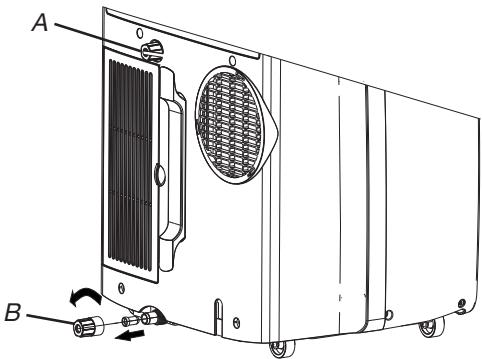
A. Secondary drain plug B. Drain hose plug
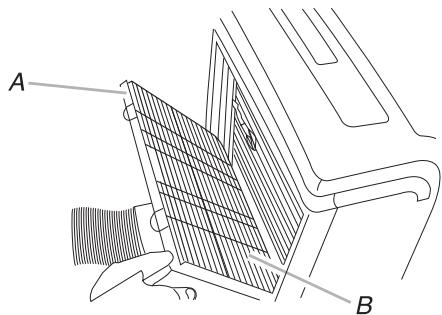
A. Filter panel door B. Air filter
Storing After Use
1. Drain the water (see the "Draining the Air Conditioner") 2. Run the air conditioner set to Fan Only for approximately 12 hours to dry the air conditioner. 3. Unplug air conditioner. 4. Remove flexible exhaust hose and store with air conditioner in a clean, dry area. See "Installation Instructions." 5. Remove window kit and store with air conditioner in a clean, dry area. See "Installation Instructions." 6. Remove the filter and clean. See "Cleaning the Air Filter." 7. Clean the outside of air conditioner. See "Cleaning the Outside." 8. Reinstall filter. 9. Remove the batteries and store the remote control with air conditioner in a clean, dry area.
TROUBLESHOOTING
Before calling for service, try the suggestions below to see whether you can solve your problem without outside help.
| Trouble | Analysis |
| Air conditioner does not operate | ·The power supply cord is unplugged. Plug into a grounded outlet. See "Electrical Requirements."·A household fuse has blown, or a circuit breaker has tripped. Replace the fuse, or reset the circuit breaker. See "Electrical Requirements."·The On/Off button has not been pressed. Press ON/OFF.·The local power has failed. Wait for power to be restored.·Time-delay fuse or circuit breaker of the wrong capacity is being used. Replace with a time-delay fuse or circuit breaker of the correct capacity. See "Electrical Requirements." |
| Air conditioner blows fuses or trips circuit breakers | ·Too many appliances are being used on the same circuit. Unplug or relocate appliances that share the same circuit.·You are trying to restart the air conditioner too soon after turning off air conditioner. Wait at least 3 minutes after turning off air conditioner before trying to restart it.·You have changed modes. Wait at least 3 minutes after turning off air conditioner before trying to restart the appliance. |
| Air conditioner seems to run too much | ·Is there a door or window open? Keep doors and windows closed.·In cooling mode: the air conditioner is in a heavily occupied room, or heat producing appliances are in use in the room. Use exhaust vent fans while cooking or bathing and try not to use heat producing appliances during the hottest part of the day. Local air conditioners are designed as supplemental cooling to local areas within a room. A higher capacity air conditioner may be required, depending on the size of the room being cooled.·In heating mode: the air conditioner is in a very cool room. Local air conditioners are designed as supplemental heating to local areas within a room. A higher capacity air conditioner may be required, depending on the size of the room being heated up. |
| Air conditioner runs for a short time only, but room is not cool or hot | ·Set temperature is close to room temperature. Lower or Higher set temperature. See "Operating mode description". |
| Display error code | ·If the unit display error code E5, it is water full in the unit, you should drain the water, see "Draining the air conditioner". After draining, you can operate the unit.·If the unit display error code E1/E2/E3/E6/E7/EA, please contact customer service. |
| Air conditioner runs, but does not cool/hot | ·The filter is dirty or obstructed by debris. Clean the filter.·Air outlet is blocked. Clear air outlet.·The setting temperature is not compatible. In cooling mode: set temperature is too high. Lower set temperature. In heating mode: set temperature is too low. Higher set temperature. |
| Air conditioner cycles on and off too much | ·The air conditioner is not properly sized for your room. Check the cooling/heating capabilities of your local air conditioner. Local air conditioners are designed as supplemental cooling/heating to local areas within a room.·The filter is dirty or obstructed by debris. Clean the filter.·In cooling mode there is excessive heat or moisture (open container cooking, showers, etc.) in the room. Use a fan to exhaust heat or moisture from the room. Try not to use heat-producing appliances during the hottest part of the day. In heating mode the temperature of the environment is too high. Do not use your air conditioner when the temperature of the environment is too high.·The louvers are blocked. Install the air conditioner in a location where the louvers are free from curtains, blinds, furniture, etc.·The outside temperature is below 18°C. Do not try to operate your air conditioner in the cooling mode when the outside temperature is below 18°C. |
INSTALLATION REQUIREMENTS
Gather the required tools and parts before starting installation. Read and follow the instructions provided with any tools listed here.
1. Tools needed: Phillips screwdriver, saw, cordless drill with a 1/8-inch bit, scissors, pencil.
2. Parts Supplied
The company provides only one plan to install the local air conditioner. See "Install Local Air Conditioner".
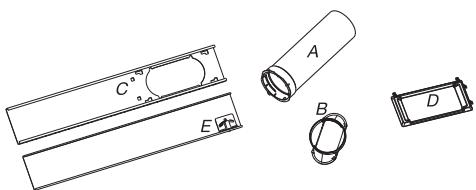
A. Flexible exhaust hose, B. Window exhaust adapter, C. Outer slider section, D. Rain cover, E. Inner slider section.
Location Requirements
NOTES:
- The flexible exhaust hose allows placement of the air conditioner between 23 1/2 inches and 67 inches (60 cm and 170 cm) from the window or door.
- Local air conditioners are designed as supplemental cooling for local areas within a room. To ensure proper ventilation, keep the required distance from the return air outlet to the wall or other obstacles at least 23 1/2 inches (60 cm).
- Do not block the air outlet.
- Provide easy access to a grounded outlet.
Electrical Requirements
- The local air conditioner should be connected to a 220-240V / 50Hz, 20-amp fused grounded outlet.
- The use of a time-delay fuse or time-delay circuit breaker is recommended.
- All wiring must comply with local and national electrical regulations and be installed by a qualified electrician. If you have any questions, contact a qualified electrician.
Use your power supply cord:
Plug power supply cord into a grounded outlet.
NOTES:
- A damaged power supply cord must be replaced with a new power supply cord obtained from the product manufacturer and must not be repaired.
Vertical Slide Window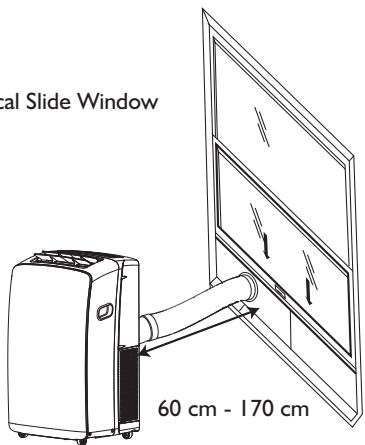
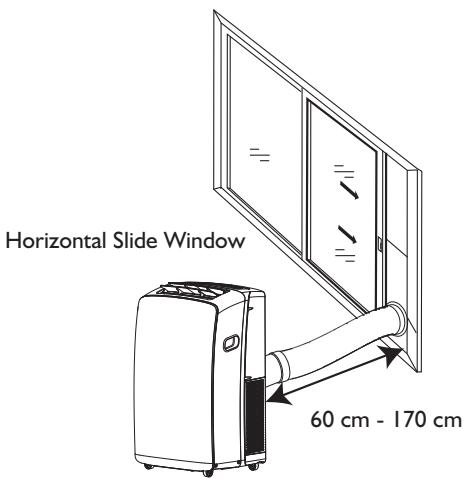
INSTALLATION INSTRUCTIONS
Unpack the Air Conditioner
Remove packaging materials
- Remove and dispose of/recycle packaging materials. Remove tape and glue residue from surfaces before turning on the air conditioner. Rub a small amount of liquid dish soap over the adhesive with your fingers. Wipe with warm water and dry.
- Do not use sharp instruments, rubbing alcohol, flammable fluids, or abrasive cleaners to remove tape or glue. These products can damage the surface of your air conditioner.
Install Local Air Conditioner
Install Exhaust Hose and Adapter
1. Open the window. 2. Measure the window opening. - If the window opening is too narrow for the window slider kit, remove the inner slider from the window slider kit.
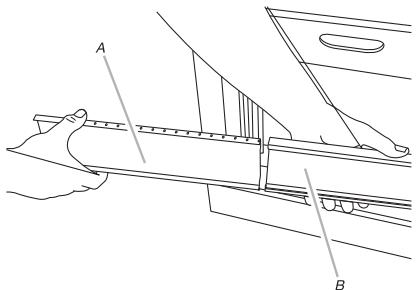
A. Inner slider section
B. Outer slider section
- Using a saw, cut the inner slider section to fit the window opening.
- Slide the inner slider section into the outer slider section of the window slider kit.
- Place the window slider kit into the window, extending it to fit the width of the window. Be sure the rain cover is on the outside of the window.
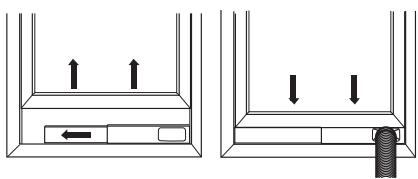
NOTE: For casement window installation, the window slider kit may be installed vertically with the window slider kit opening at the bottom.
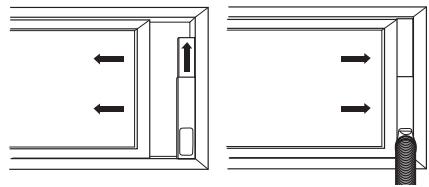
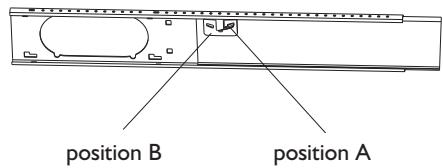
- Use a special plastic device with spring to fix the window brackets: Place the device to position A, the pin may stretch out then lock the brackets, when place the device to position B, the pin will draw back and the brackets will be released from the window slider kit.
- Close the window onto the window slider kit to secure.
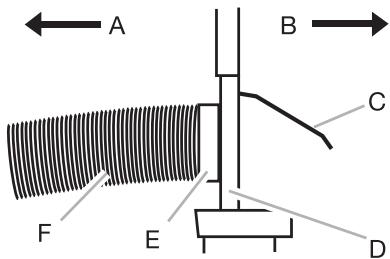
A To local air conditioner B Outdoors C Rain cover D Window slider kit E Window exhaust adapter F Flexible exhaust hose
Install Exhaust Hose and Adapter
1. Roll the air conditioner to selected location. See "Location Requirements". 2. Attach the window exhaust adapter to the flexible exhaust hose. Turn anticlockwise until securely locked into place.
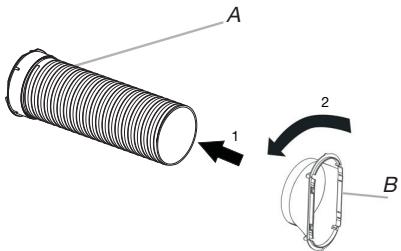
A Flexible exhaust hose B Window exhaust adapter
- Insert the dummy coupling into the slot on the back of the air conditioner.
- Put and rotate to lock the hose into place.
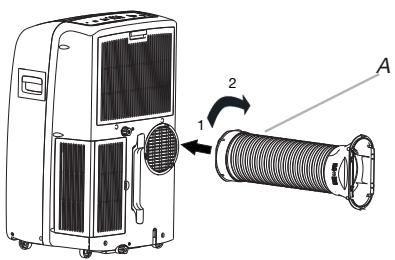
A. Flexible exhaust hose
Window Installation
1. Your window slider kit has been designed to fit most standard vertical and horizontal window applications. Roll the air conditioner to the selected location. See "Location Requirements". 2. Insert the window exhaust adapter into the slot on the window slider kit.
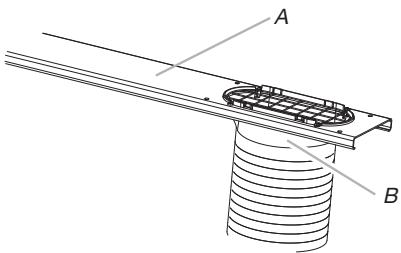
A. Window slider kit B. Window exhaust adapter
Rain Cover Installation
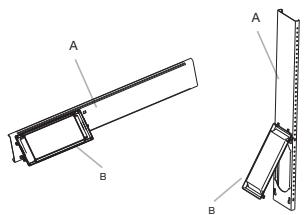
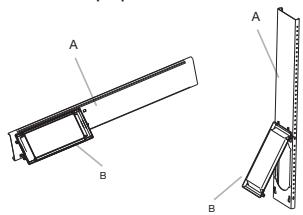
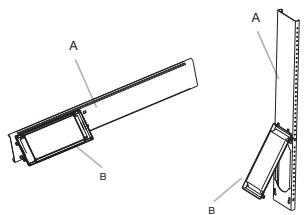
Attach the rain cover to the holes of the outer slider section. Then slide the rain cover until it is securely locked in place.
Vertical Installation
Horizontal Installation
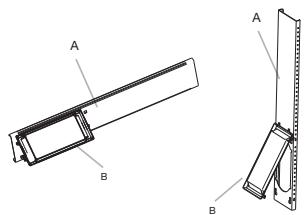
A. Outer slider section B. Rain cover
Complete Installation
1. Place the window-lock bracket on top of the lower window and against the upper window sash. 2. Use a 1/8-inch drill bit to drill a starter hole through the hole in the bracket. 3. Attach the window-lock bracket to the window sash with the wood screw (provided) to secure the window in place.
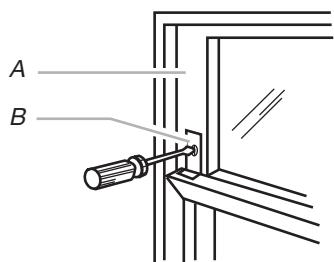
A. Upper window sash B. Window-lock bracket
- Insert the foam seal behind the top of the lower window sash and against the glass of the upper window.
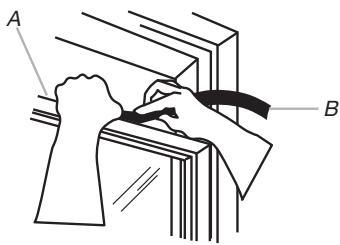
A. Top of lower window sash B. Foam seal
AFTER SALES SERVICE
1. Try to solve the problem yourself based on the descriptions given in the "Troubleshooting" section. 2. Turn the appliance off and restart it to see if the fault persists.
Please give:
- a short description of the fault; the exact model of the air conditioner;
- the service number (this is the number found after the word Service on the rating plate), located on the back of the appliance. The service number can also be found in the warranty booklet;
- your full address;
- your telephone number.
If repair work has to be carried out, contact the Customer Care Centre (Use of original spare parts and a proper repair is guaranteed).
You will need to present the original invoice.
Failure to comply with these instructions could compromise the safety and quality of your product.

BEFORE USING THE APPLIANCE
6th Sense Mode
Electrical connection requirements
DISPOSAL OF PACKAGING
DISPOSAL OF THE APPLIANCE
Vertical installation
Horizontal installation
How to remove the batteries
7. SWING BUTTON (Oscillation)
Press the SWING button to activate the horizontal oscillation of the air flow and to stop the vertical up/down direction of the air flow.
8. SLEEP BUTTON (Sleep mode)
- Press the 6th Sense button.

6th Sense
A. Flexible exhaust hose B. Programmed exhaust hose
- Insert the exhaust hose into the support on the side of the air conditioner.
- Position and rotate the flexible hose to secure it in its place.
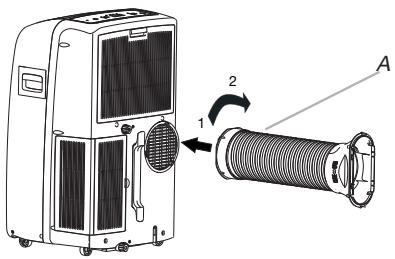
A. Flexible exhaust hose
Programmed hose
- The exhaust hose kit has been designed to be suitable for most typical vertical and horizontal window openings. Move the air conditioner to the selected position. See the section "Installation requirements".
- Use the product only for the intended purpose described in the instructions.
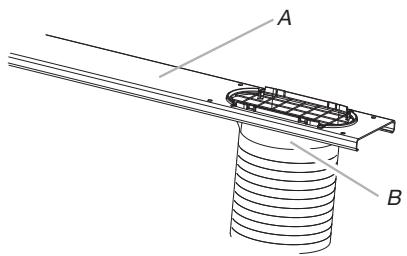
A. Intended purpose of the product B. Product description
Place the unit for the drain
Place the unit for the drain on the hooks of the outer section of the unit. Then, secure the unit for the drain until it is locked in place.
Vertical installation
Horizontal installation
Mid (Mellan)- for normal kylning

Vertical installation
Horisontell installation
SAFETY REGULATIONS FOR THE AIR CONDITIONER
Show timer setting
BB
Show set temperature
FUNCTION DESCRIPTIONS
Power off or on
Horizontal installations
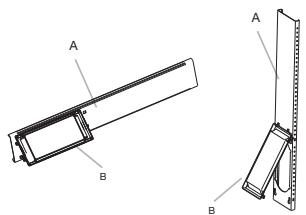
A. Outer sliding part B. Rain cover
Complete installation
1. Place the window sash bracket on top of the lower window frame and against the upper window frame. 2. Use a 1/8" drill bit to drill a mounting hole through the hole in the bracket. 3. Attach the window lock bracket to the window frame with the wood screw (4) to secure the window in place.
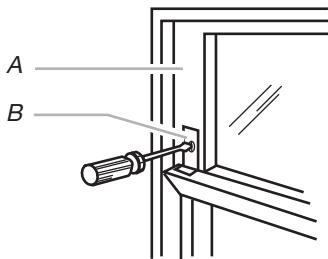
A. Upper window frame B. Window lock bracket
BEFORE USING THE APPLIANCE
6th Sense indicator
Snooze indicator
Around U indicator
Jet indicator
Signal transmission
BBh Shows set timer
BB Shows set temperature
FUNCTION DESCRIPTIONS
On or Off
Press the ON/OFF button to turn the device on or off.

NOTE:
Storage after use
FUNCTIONS AND ICONS OF THE REMOTE CONTROL
I. POWER BUTTON
6. 6TH SENSE BUTTON
STARTING THE FREE-STANDING AIR CONDITIONER
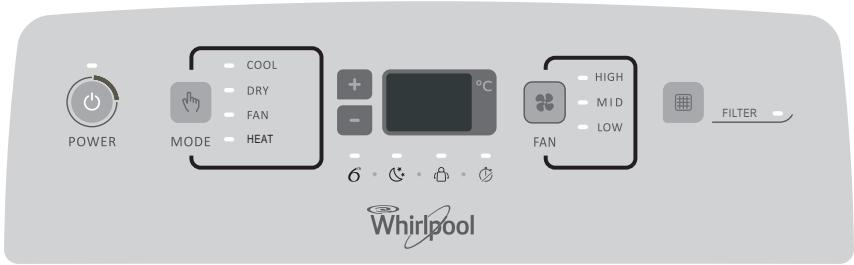
DESCRIPTION OF OPERATING MODES
Operating modes:
4-5. TEMPERATURE BUTTON
SAFETY MEASURES
- Installation and technical maintenance/repair must be performed by a qualified technician in accordance with the manufacturer's instructions and current local safety regulations. It is forbidden to repair or replace parts of the device, except for cases specifically mentioned in the operating instructions.
It is forbidden to pull the power cord to unplug the device from the socket. Do not bend or squeeze the power cord, keep it in good condition. It is forbidden to touch the plug, the circuit breaker, and the emergency stop button with wet hands. It is forbidden to insert fingers or foreign objects into the air intake/exhaust openings of the indoor and outdoor units. - In no case should you block the air intake/exhaust openings of the indoor and outdoor units. For people with limited capabilities, children, and persons without experience
using the device, it is allowed to use it only after they have received special training on the use of the device under the supervision of a person responsible for their safety and health. The device is not intended for use by people with limited capabilities or children without supervision.
How to insert batteries
1. Open the battery compartment cover and slide it in the direction indicated by the arrow on the housing, as shown in the figure. 2. Install 2 AAA-type batteries (1.5 V) in the compartment. When installing, observe the indicated polarity (+ and -). 3. Close the battery compartment cover.
How to remove the batteries
Slide the battery compartment cover in the direction of the arrow.
Gently press the battery retaining strips with your fingers, then remove the batteries from the compartment. Battery replacement should be done by adults.
Children are prohibited from removing batteries from the remote control to avoid swallowing them.
Battery disposal
To protect natural resources and ensure the reuse of materials, batteries must be separated from other types of waste and disposed of using the local free battery return system.
Safety precautions
- When replacing batteries, do not use new batteries together with old ones, and do not use batteries of different types, as this may lead to damage to the remote control.
- If a long break in the use of the remote control is expected, it is recommended to remove the batteries from it to prevent possible electrolyte leakage and damage to the remote control.
- The remote control should be operated within its range of action. Do not place the remote control at a distance of less than 1 m from television receivers or Hi-Fi equipment. If the remote control malfunctions, remove the batteries for a few seconds, then reinstall them. If the remote control's functionality is not restored, replace the batteries. When using the remote control, point it at the sensor window on the indoor unit of the air conditioner to improve command reception.
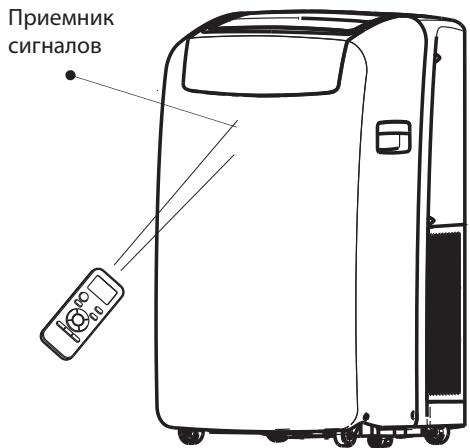
When sending commands to the remote control, the indicator will flash for 1 second. When a command is sent from the remote control to the air conditioner, a sound signal will be emitted.
- The remote control provides control of the air conditioner at a distance of up to 7 m. Each time batteries are installed in the remote control, it enters the heating mode.
- The remote control provides control of the air conditioner at a distance of up to 7 m. Each time batteries are installed in the remote control, it enters the heating mode.
DESCRIPTION OF OPERATING MODES OF THE DEVICE
Operating modes:
- Press the MODE button and hold it until the symbol corresponding to the desired setting appears.
MODE
- Select Cooling, Dry, Fan Only, or Heating.
- Cooling mode - cools the room. Press the FAN button to select the desired fan speed: High, Mid, or Low. Press the plus or minus button to adjust the temperature.
COOL
- Dry mode - dehumidifies the air in the room. The temperature setting is adjusted automatically. The fan operates only at low speed (Low).
NOTE: Do not use Dry mode to cool the air in the room.
DRY
Fan Only - only the fan operates. Press the FAN button to select the desired fan speed: High, Mid, or Low.
FAN
- Heating mode - heats the room. Press the FAN button to select the desired fan speed: High, Mid, or Low. Press the plus or minus button to adjust the temperature.
NOTE: The heating function is not available in models that only cool.
HEAT
Fan speed
- Fan speed selector knob (VENTILATOR) for selecting the fan rotation speed.
FAN
- Select one of the options: High, Mid, or Low.
- High - maximum fan speed.
HIGH
Mid - normal fan speed.
MID
LOW
Filter reset
- When the Filter Reset indicator lights up, it is necessary to clean the air filter and reinstall it in place. See the "Cleaning the Air Filter" section. 2. After installing the cleaned filter in place, press and hold the FILTER button.

Used to set the timer shutdown.
12. DIM BUTTON (BACKLIGHT)
Used to turn on and off the backlight on the internal unit.
Heating indicator
Heating mode indicator
Heating mode indicator
Heating mode indicator
Automatic fan speed
High fan speed
Medium fan speed
Low fan speed
6th Sense mode indicator (6th sense)
Sleep mode indicator (Sleep)
Around U mode indicator (Ambient temperature)
Jet mode indicator (Fast)
Signal relay
Timer setting increase
Temperature setting increase
Description of operating modes
Switching on and off
Press the ON/OFF button (ON/OFF) to turn the appliance on or off.

NOTE:
Changing the mode during appliance operation. Sometimes the appliance does not react immediately; wait 3 minutes. - Wait 3 minutes before restarting the appliance.
Selecting the mode
- Press the MODE button and hold it until the symbol corresponding to the desired setting appears.

- Select Cooling, Dry, Fan Only, or Heating.
- Cooling mode - cools the room. Press the Fan button to select the fan speed: Auto (automatic selection), High, Mid, or Low. Press the adjustment button with the arrow up or down to set the desired temperature.

- Dry mode - dehumidifies the air in the room. The temperature setting is done automatically. In this mode, the fan operates only at low speed (Low).
6th Sense mode (6th sense)
The operating mode and temperature depend on the temperature in the room.
Model with electric heater
PexMM Jet (5b1cTpbl)
Khonnka Jet (bictpbpekm) nCnOJb3yETcIa 6bictporo oxlaqdeHn nn o6orpeBa.
IPMMEYAHHE: KhoNka pexkMa "6-e UyBCTBO" He pa6oTaet, KOrda BbI6paH 6bICTpbI pexkM.
- Haxmte Jet b pexime oxnaekdeHn. KoHnIIOHeP aBTOMaTNUeCKN 3aJaET ckOpocTB BpaueHnBEHTINJIaTOPa n TEMpePaTy p 18°C. 5bICTpbO6OrpeB OcUeCTBJIeTcA aBTOMaTNUeCKo CKOpOCtBu BEHTNIaTOPa, npn 3Tom 3aDaHHaT EMMepaTypa aBTOMaTNUeCKn yctHaBnIBNaEt cHa 32°C.

2.ДЯ Bы IXODa ИЗ 6bICTPOrO peKIMa HaxMnte IIO6yI KHOINy, KpOMe KHOINr TaHMePa,ФункuIn Around U (TempepaTpa OkpykaUoSei cpeB)И Swing (KauaHne).
Ckopoctb BeHTnlaTopa
- BbIbepeTe HnyKHyO cKopoocTb BpaueHnBcHTINaTopa.

Co6epnte Heo6xOaMbIe IHCTpyMeHTbI n DeTaII, npexJe Yem HaunHaTb MOHTaJ. IpouHtaiTe INcoHIOaJIte IHCTpyKcUN KO BcEM nepeUncJIeHHbIM 3deCb IHCTpyMeHTaM.
- Heo6xOaMbIe INCTpyMeHTbl Kpecto06pa3HaJ OTBepTka ·Пила AkkymyIaTOPHaI dpeIb co CBePLOM 1/8 IIOMa HOxHnUbI KapaHdaa
- BSYTOH "FAN" (BEHTNUATOP)
U3noI3Ba ce 3a n36Op Ha cKoPocHa BENTUNaTOPA B NOCLEIOBAteHNOCT: aBTOMaTnUHa, BVCOKA, CpeHNa, HNCa.
4-5. BYTOH "TEMPERATURE" (TEMNEPATyPA)
- BYTOH "SWING" (3ABbPTAHE)
Cnnpa nn nyska 3aBbPtaHTo Ha kany3nte 3a XOpN3OHTaIIHO peryInpaHe N 3aJaBa KjelaHaTa Nocoka Harope/HaOny Ha Bb3DyUHHn IOTOK.
- BSYTOH“SLEEP”(CINIILPEXIM)
Press the "AROUND U" button again to turn it off.
- Button "AROUND U" (around us)
Used to turn on or off the "Around U" function.
- Button "JET" (turbo)
Used to turn on or off the fast cooling or heating function.
- Button "TIMER" (timer)
Used to turn on or off the "Timer for turning on" function.

Used to turn on or off the "Timer for turning off" function.
12. Button "DIM" (dim)
High fan speed
Medium fan speed
Low fan speed
6. Indicator "Motion sensor"
Indicator for sleep mode
Indicator "Around U"
NOTE: The "6th Sense" mode will not function when the "Turbo" function is selected.
- Press the Jet (Turbo) button in cooling mode. The appliance will automatically adjust the fan speed and the temperature to 18°C. When the temperature drops, the appliance will operate at the automatic fan speed until the set temperature of 32°C is reached.
Jet
- To exit the Turbo mode, press the button again, except for the Timer, Around U, and Swing buttons.
Fan speed
Air conditioner operation
(For models with a water tank, see "Starting the local air conditioner")
- Press ON/OFF to turn off the air conditioner. 2. Remove the air conditioner plug from the socket and wait before storing. 3. Carefully drain the water from the drain hole and the water tank. Do not tilt the unit while draining. 4. Remove the drain plug and drain the water completely. 5. Replace the main drain plug on the bottom of the unit. Replace the drain cap on the main drain plug and drain the water completely.
NOTE: If the air conditioner will be stored after use, see "Storage after use". 6. Replace the drain cap on the main drain plug and the additional drain plug. 7. Replace the main drain plug on the bottom of the unit. 8. Return the air conditioner to its place. 9. Turn on the air conditioner and restore the power supply. 10. Press ON/OFF to turn on the air conditioner.
Cleaning the air filter
- Press ON/OFF to turn off the air conditioner.
- Open the front panel of the air filter, which is on the top of the air conditioner, and remove it. 3. Remove the air filter from the front panel. 4. Clean the filter with a vacuum cleaner. If the filter is very dirty, wash it with warm water and a mild detergent.
NOTE: Do not wash the filter in a dishwasher and do not use any chemical cleaners.
5. Dry the air filter thoroughly before putting it back in place to ensure maximum efficiency. 6. Attach the air filter to the front panel of the filter. 7. Put the front panel of the filter back in place. 8. Press ON/OFF to turn on the air conditioner.
Cleaning the exterior
1. Remove the plug from the contact before cleaning it. 2. Remove the air filter and clean it. See "Cleaning the air filter". 3. Wipe the climate control with a damp cloth. 4. Plug the climate control back in and restore the power supply.
A. Drain hose for draining B. Drain hose for draining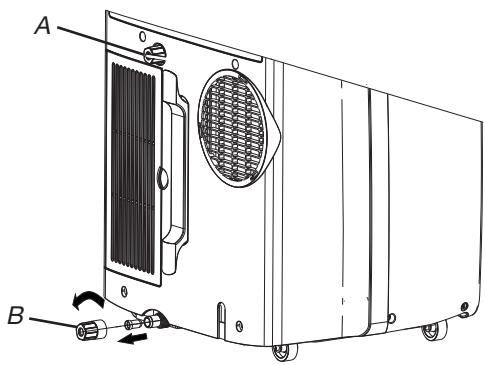
A. Filter cover B. Air filter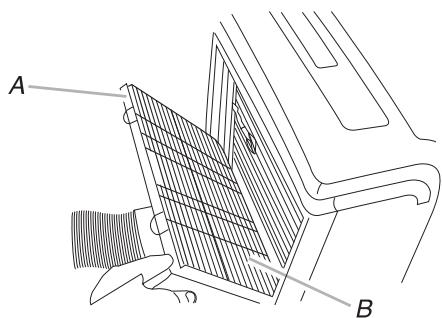
- Press ON/OFF (ON/OFF) to turn on the climate control.
Storage after use
1. Drain the water (see "Draining the climate control"). 2. Leave the climate control running in "Fan only" mode for about 12 hours to dry it out. 3. Remove the plug from the climate control contact. 4. Wrap the power cord around the cord wrap for storage together with the climate control in a clean, dry place. See "Installation instructions." 5. Remove the remote control and store it together with the climate control in a clean, dry place. See "Installation instructions." 6. Remove the filters and clean them. See "Cleaning the air filter". 7. Clean the climate control from dust. See "Cleaning from dust". 8. Put the filter back in its place. 9. Remove the batteries and store the remote control separately from the climate control in a clean, dry place.
TROUBLESHOOTING
Before calling for service, try the suggestions below - they may help you solve the problem without professional help.
| Helen3npabnoct | Анали3 |
| КлиматникТ не раобтп | • 3axpaHBaunrKa6e e n3KlouchEN OT KOHTaKtA. BkIoucheTe ypeBa D 3a3Emen KOHTAKT. Bx.
"ИзckBANHЯ KMМЕLEKTPO3aXpAHBaHToE".
• Изоргел e npednauTeB T a6NtO haДOMa Bn IINI ppeKbCBAuYb H a ENEKTPUeCKaTb ApeRHa ce e n3KlouH.I. CmeHete npednauTeI INI BKNIOUeTe OTHOBo PpeKbCBAuHa Bepurata. Bx.
"ИзckBANHЯ KMМЕLEKTPO3aXpAHBaHToE".
• He e HATsCHaT 6byTohB ON/OFF (BKJL./IV3KJI). HATsCHete ON/OFF (BKJL./IV3KJI).
• Пекьсано t e eNEKTPO3aXpAHBaHToE. ИЗчakait Da bZbSTAHOBaT eNEKTPO3aXpAHBaHToE.
• ИзлONБANHЯ npednauTeI INI ppeKbCBAu CbS 3aKbCSHeHne NO BpeMe e C heNDoxOlaH.
Кадут. Смени c npednauTeI INI ppeKbCBAu CbS 3aKbCSHeHne NO BpeMe C NOxdoaH.
Кадут. Вд. "ИзckBANHЯ KMМЕLEKTPO3aXpAHBaHToE". |
| КлиматникТ пчинява n3garapHe NaPpeNa3nteIиI INI ppeKbCBAuHa NaPpeKbCBAuHa NaPpeKbCBAuHa NaPpeKbCBAuHa NaPpeKbCBAuHa NaPpeKbCBAuHa NaPpeKbCBAuHa NaPpeKbCBAuHa NaPpeKbCBAuHa NaPpeKbCBAuHa NaPpeKbCBAuHa NaPpeKbCBAuHa NaPteKmuaH. | • ИзOLBATE TBbPdme MNoRo UpeHb E EdH a ENEKTPUeCKaBepRiA. ИЗкLOUeTe OT KOHTAKTII INI ppeMecTe HЯКОУeB Dpyra ENEKTPUeCKaBepRiA.
• OnITBate ce da pectaTIPrate Klinmatika TBbPdme CkOpC CleD kaTo CTe ro IN3KlouHII. ИЗчakait NOH3 MHNUTI CleD IN3KlouHApHa Klinmatika, ppeHda rO pectaTIPrate.
• CmenIIc Tce pexkma. ИЗчakait Nohe 3 MInHyTu CleD IN3KlouHApHa To BPEM C NOxdoaH.
KlinmatikK c NO-TGAM KanauzHET.
• Браим "OTOnPENHe": кlinmatikK b E MNO STyEDH NOMEseHne. ЛokALHite KlinmatiHa Ca ppeH2aHNe 3a ДОпБЛHITeH OXIAJDAHne Ha ONeDEHEn MeCTa B NOMEseHToE. B zABICMocT ot pazMeRa Ha oxJAZDaHOT OMEseHne MOpEeHne Moje Da e HeO6xOIMK Klinmatik C NO-TGAM KanauzHET.
• Bраим "OTOnPENHe": кlinmatikK b E MNO STyEDH NOMEseHne. ЛokALHite KlinmatiHa Ca ppeH2aHNe 3a ДОпБЛHITeH OTOPIeH MeCTa B NOMEseHToE. B 3aBACIMocT ot pazMeRa Ha OTOnPABaHOT OMEseHne Moje Da e HeO6xOIMK Klinmatik C NO- TGAHm KanauzHET. |
| Изг leжда, ч КлиматникТ работи TBbPdme MNoHO | • ИмЯ ИОТВОЕВ BrATA II INI pOZOreUe? ДрЖte BProTITE N I PZOZOPUITE 3aTBopeHn.
• Bраим HA OXIAJDAH: KlinmatikK b E B NOMEseHne, B KoToE MMa MNOHO XOpa IINI CE IN3KlouHII.
ОТПОТЕ N I PZOZOPUITE BENTHAT OTBEXDAH, KORATO TOTBVEI INI CE KByTe, INCE
Спостаразе пзз НИ.TOTNТРАЧТСТСТСТСТСТСТСТСТСТСТСТСТСТСТСТСТСТСТСТСТСТСТСТСТСТСТСТСТСТСТСТСТСТСТСТСТСТСТСТСТСТСТСТСТСТСТСТСТСТСТCSTCSTCSTCSTCSTCSTCSTCSTCSTCSTCSTCSTCSTCSTCSTCSTCSTCSTCSTCSTCSTCSTCSTCSTCSTCSTCSTCSTCSTCSTCSTCSTCSTCSTCSTCSTCSTCSTCSTCSTCSTCSTCSTCSTCSTCSTCSTCSTCSTCSTCS T.
• Браим "OTOnPENHe": кlinmatikK b E MNO STyEDH NOMEseHne. JOKALHite KlinmatiHa Ca ppeH2aHNe 3a DОпБЛHITe H OINaHOT OTOPIEH MeCTa B NOMEseHToE. B 3aBACIMocT ot pazMeRa Ha OXIAJDAHOT OMOseHne MOpEeHne Moje Da e HeO6xOIMK Klinmatik C NO- TGAHm KanauzHET. |
| КлиматникТ работи сamo 3a КратуКВЕм, HO B NOMeшeHToE He e XlaIDNo IINI TOnILO | • HabroeHATA TempeLatya e b3n3ka Do StaiHata. YBvileHete IINI HamaLeTe HacTPOeHata TempeLatya. Bx.
"ОпSCAnHe NapeKIMITE Ha pAObota". |
| Показан e kOD ha Гrelшka | • АкDiNcPleT Ha ypeA pOKAZBA KaD 3a rPeWka E5, 3aHany che e PbIeN KONTeHepbT 3a BOda.
ИЗTOUeTe BODa, Bx.
"ИЗTOUeHabe Na peKIMATiKA". Ccle N3TOUbHTo NapeKIMTeMeJozTe ДуPyCHe To BOCHEH MeCTa B NOMEseHToE. B 3aBACIMeTg Ha OTOPIAHa OTOPIAHa BPEM.
• АкDiNcPleT Ha ypeA pOKAZBA KaD 3a rPeWka E1/E2/E3/E6/E7/EA, obaIaTe Ce B cepBz3a. |
| КлиматникТ работи, HO He OXIAJda/3aTOnILO | •ФИNTbPbTe Мрbcsen IINI e 3aIyUnSeH ot OTNadBuI. ПОчstete ФИNTbPb.
•ИЗхODHЯ TOTBp 3a Bb3dux E bOLOKipan. ПОчstete IN3XODHЯ OTBOP 3a Bb3dux.
• HabtroeHATA TempeLatya He e NOXODaHa. B pEXKIM "OxIAJDAH": habtroeHATA TempeLatya e pEXKIM "OTOnPENHe": habtroeHATA TempeLatya e pEXKIM "OTOnPENHe": habtroeHATA TempeLatya e pEXKIM "OTOnPENHe", habtroeHATA TempeLatya e pEXKIM "OTOnPENHe", habtroeHATA TempeLatya e pEXKIM "OTOnPENHe", habtroeHATA TempeLatya e pEXKIM "OTOnPENHe", habtroeHATA TempeLatya e pEXKIM "OTOnPENHe", habtroeHATA TempeLatya e pEXKIM "OToPENHe", habtroeHATA TempeLatya e pEXKIM "OTOnPENHe", habtroeHATA TempeLatya e pEXKIM "OTOnPENHe", habtroeHATA TempeLatya e pEXKIM "OTOnPENHe", habtroeHATA TempeLatya e pEXKIM "OTOnPENHe", habtroeHATA TempeLatya e pExKIM "OTOnPENHe", habtroeHATA TempeLatya e pEXKIM "OTOnPENHe", habtroeHATA TempeLatya e pEXKIM "OTOnPENHe", habtroeHATA TempeLatya e pEXKIM "OTOnPENHe", habtroeHATA TempeLatya e pEXKIM "OTOnPENHe", habtroeHATA TemePAtya e pEXKIM "OTOnPENHe", habtroeHATA TemePAtya e pEXKIM "OTOnPENHe", habtroeHATA TemePAtya e pEXKIM "OTOnPENHe", habtroeHATA TemePAtya e pEXKIM "OTOnPENHe", habtroeHATA TemePAtya e pEXKIM "OTOnPENHa.
•ФИNTbPbTe Mрbcsen IINI e 3aIyUnSeH ot OTNadBuI. ПОчstete ФИNTbPb.
•ИЗнOLHЯ NaOxIAJDAH NaOmeSEHne IMA npOKOMeHne NaOPEKOMeHpa TOnLIHa IINI BnAga (rotBeHe B OTOBENi CbDOBE, dUsoBoe I.DpI.
•ИЗнOLBÄMte BeHTINaTAP 3a OTBEXDAH Na TOnLIHATA IINI BnAga AT OMOseHToE. TocapaIte ce pIe3 hAI-TOnLaTaa cact O Te DeHЯ DA He IN3OJIaBte YpeDIn, KOnTo INIbYBaT OTOPIAHa. B pEXKIM "OTOnPENHe" BbNShHa TatempeLatya e npEXKIM Ho BVCoka. He
N3OJIaBte KlinMATiKA, KORATO BbNShHa TatempeLatya e npEXKIM Ho BVCoka.
•ЖалуЗITE ca 6blOKIPaHn. МOnTpArte NaOteH Na MCTO, KbIeTO HnIto He 6blOKIPA Jxalyzite, NaPrimper nepdeta, azopri, mebEsI IN.T.H.
•Вьншatura TempeLatya e pod 18°C. He IN3OJIaBte KlinMATiKA bpeKIM Ha OXIAJdaH, KOrato BbNShHa TatempeLatya e pod 18°C. |