
ACULASER CX17 - Laser printer EPSON - Free user manual and instructions
Find the device manual for free ACULASER CX17 EPSON in PDF.



User questions about ACULASER CX17 EPSON
0 question about this device. Answer the ones you know or ask your own.
Ask a new question about this device
Download the instructions for your Laser printer in PDF format for free! Find your manual ACULASER CX17 - EPSON and take your electronic device back in hand. On this page are published all the documents necessary for the use of your device. ACULASER CX17 by EPSON.
USER MANUAL ACULASER CX17 EPSON
Epson AcuLaser CX17 Series
Safety Information Guide
NPD4432-00
Safety Instructions
Important Safety Instructions
The illustrations used in this section show the Epson AcuLaser CX17NF/CX17WF Series.
Setting up the printer
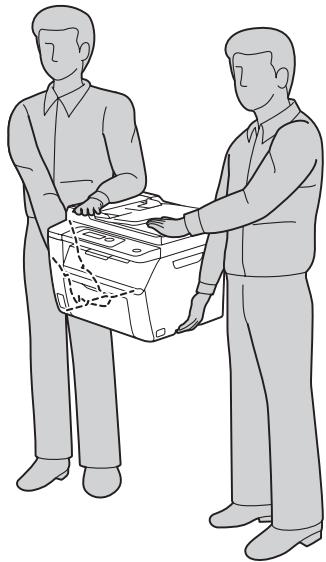
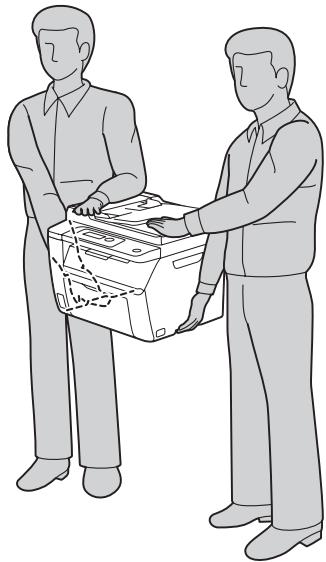
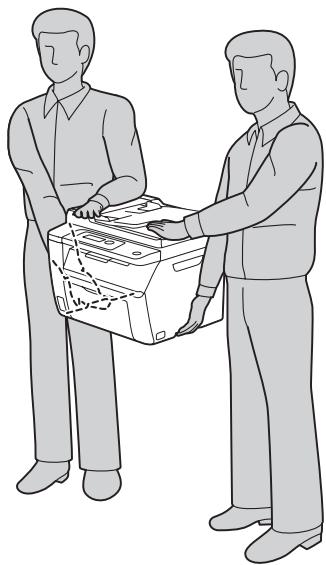
Because the printer weighs approximately 14kg (30.9 lb) for Epson AcuLaser CX17, 15 kg (33.1 lb) for Epson AcuLaser CX17NF/WF with consumable products installed, one person should not lift or carry it. Two people should carry the printer, lifting it by the correct positions as shown below.
When moving the printer, always keep it horizontal.
If you are unable to insert the AC plug into the electrical outlet, contact an electrician.
- Be sure the AC power cord meets the relevant local safety standards. Use only the power cord that comes with this printer. Use of the another cord may result in fire or electric shock. This printer's power cord is for use with this printer only. Use with other equipment may result in fire or electric shock.
If damage occurs to the plug, replace the cord set or consult a qualified electrician. If there are fuses in the plug, make sure you replace them with fuses of the correct size and rating.
Use a grounded outlet that matches the printer's power plug. Do not use an adapter plug.
- Avoid using an electrical outlet that is controlled by wall switches or automatic timers. Accidental disruption of power can erase valuable information in your computer's and printer's memory.
Make sure that there is no dust on the socket. - Be sure to insert the plug completely into the electrical outlet.
Do not handle the plug with wet hands.
Unplug this printer from the wall outlet and refer servicing to a qualified service representative under the following conditions:
| A | When the power cord or plug is damaged or frayed. |
| B | If liquid has been spilled into it. |
| C | If it has been exposed to rain or water. |
| D | If it does not operate normally when the operating instructions are followed. Adjust only those controls that are covered by the operating instructions since improper adjustment of other controls may result in damage and will often require extensive work by a qualified technician to restore the printer to normal operation. |
| E | If it has been dropped or the cabinet has been damaged. |
| F | If it exhibits a distinct change in performance, indicating a need for service. |
- Avoid sharing outlets with other appliances.
- Connect all equipment to properly grounded power outlets. Avoid using outlets on the same circuit as photocopiers or air control systems that regularly switch on and off.
- Connect your printer to an electrical outlet that meets the power requirements of this printer. Your printer's power requirements are indicated on a label attached to the printer. If you are not sure of the power supply specifications in your area, contact your local power company or consult your dealer.
If you use an extension cord, make sure that the total of the ampere ratings on the products plugged into the extension cord does not exceed the extension cord ampere rating. - When connecting this printer to a computer or other device with a cable, ensure the correct orientation of the connectors. Each connector has only one correct orientation. Inserting a connector in the wrong orientation may damage both devices connected by the cable.
Finding the place for the printer
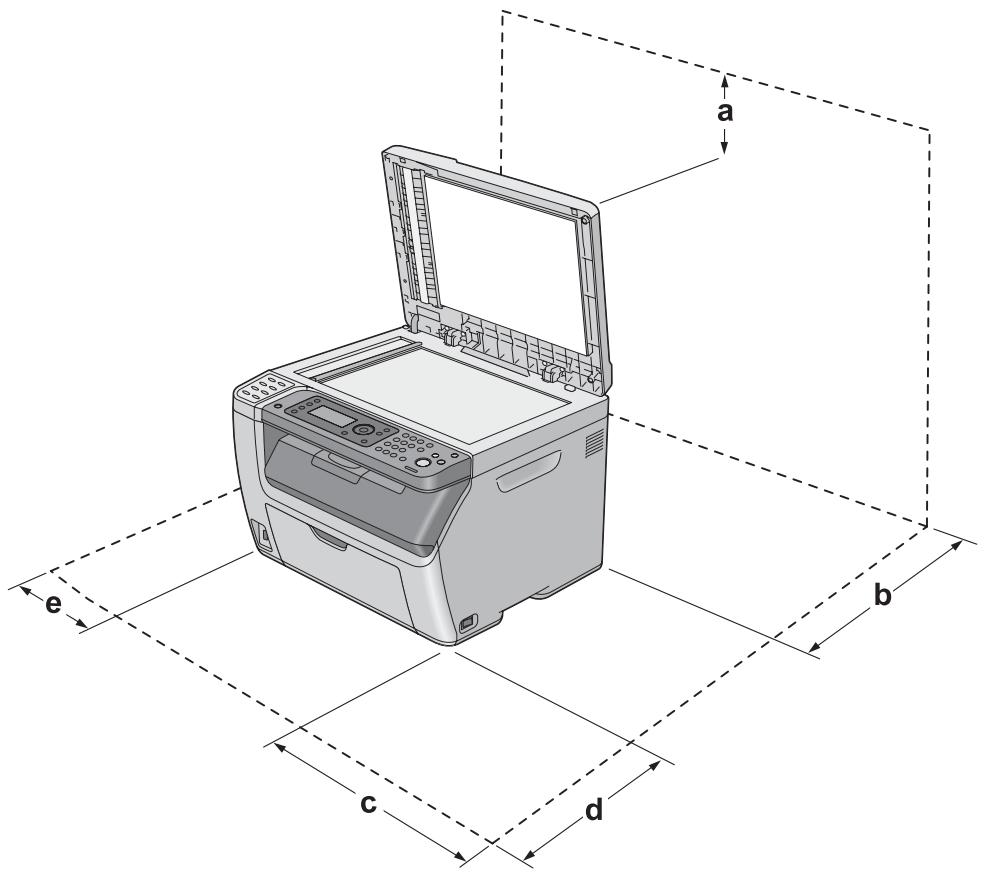
When relocating the printer, always choose a location that has adequate space for easy operation and maintenance. Use the following illustration as a guide for the amount of space required around the printer to ensure smooth operation.
| Epson AcuLaser CX17 | Epson AcuLaser CX17NF/CX17WF | ||
| a | 10 cm | a | 10 cm |
| b | 27 cm | b | 27 cm |
| c | 34 cm | c | 34 cm |
| d | 29 cm | d | 29 cm |
| e | 10 cm | e | 14 cm |
In addition to space considerations, always heed the following precautions when finding a place to locate the printer:
Place the printer near an electrical outlet where you can easily plug in and unplug the power cord.
Do not put your printer where the cord will be stepped on.
Do not use printer in a damp environment.
- Avoid locations that are subject to direct sunlight, excessive heat, moisture, oil vapor, or dust.
Do not place the printer on an unstable surface.
- Slots and openings in the cabinet and the back or bottom are provided for ventilation. Do not block or cover them. Do not put the printer on a bed, sofa, rug, or other similar surface or in a built-in installation unless proper ventilation is provided.
- Keep the entire computer and printer system away from potential sources of interference, such as loudspeakers or the base units of cordless telephones.
Leave adequate room around the printer to allow for sufficient ventilation.
Using the printer
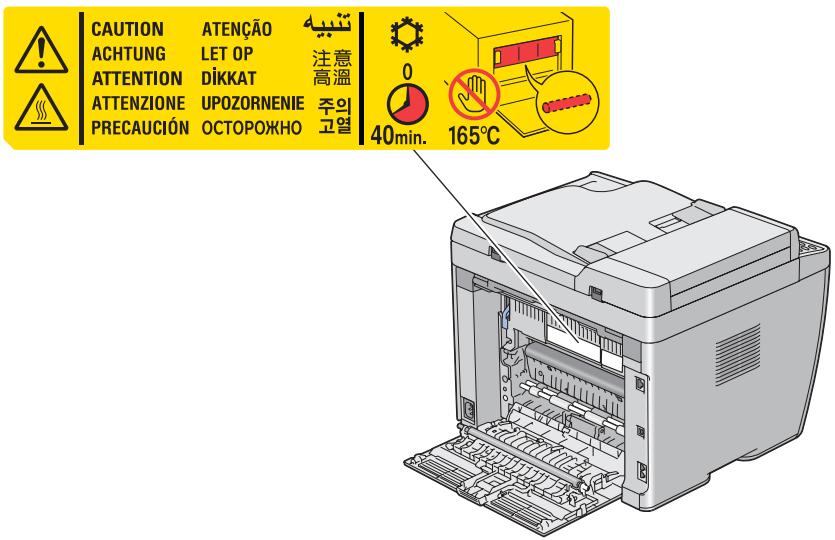
- Be careful not to touch the fuser, which is marked CAUTION, or the surrounding areas. If the printer has been in use, the fuser and the surrounding areas may be very hot. If you must touch one of these areas, turn off the printer and wait 40 minutes to allow the heat to subside before doing so.
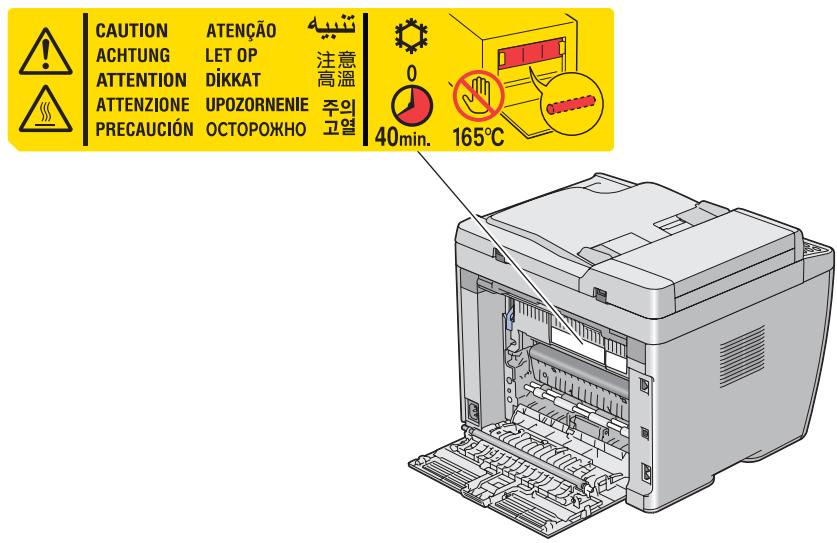
The illustration shows Epson AcuLaser CX17NF/CX17WF.
- Do not insert your hand deep into the fuser unit as some components are sharp and may cause injury.
- Never push objects of any kind through cabinet slots as they may touch dangerous voltage points or short out parts that could result in a risk of fire or electric shock.
Do not sit or lean on the printer. Do not put heavy objects on the printer.
Do not use any kind of combustible gases in or around the printer. - Never force the printer's components into place. Although the printer is designed to be sturdy, rough handling can damage it.
Do not leave jammed paper inside the printer. This can cause the printer to overheat.
Never spill liquid of any kind on the printer. -
Adjust only those controls that are covered by the operating instructions. Improper adjustment of other controls may result in damage and may require repair by a qualified service representative.
Do not turn off the printer: -
After turning on the printer, wait until Read appears on the LCD panel.
- While the Data light is flashing.
- While printing.
Avoid touching the components inside the printer unless instructed to do so in this guide.
- Follow all warnings and instructions marked on the printer.
Except as specifically explained in the printer's documentation, do not attempt to service this printer yourself.
Periodically disconnect the plug from the electrical outlet and clean the blades.
Do not disconnect the plug while the printer is on.
If the printer will not be used for a long time, disconnect the plug from the electrical outlet.
Unplug this printer from the wall outlet before cleaning.
Use a well-wrung cloth for cleaning and do not use liquid or aerosol cleaners.
Handling consumable products
-
Do not burn used consumable products because they might explode and injure someone. Dispos of them according to local regulations.
-
Be sure to keep consumable products out of the reach of children.
- When handling a toner cartridge, always place it on a clean, smooth surface.
Do not attempt to modify a toner cartridge or take it apart.
Do not touch the toner. Always keep toner away from your eyes. If toner gets on your skin or clothes, wash it off with soap and water immediately.
If toner is spilled, use a broom and dustpan or a damp cloth with soap and water to clean it up. Because the fine particles can cause a fire or explosion if they come into contact with a spark, do not use a vacuum cleaner.
Wait at least one hour before using a toner cartridge after moving it from a cool to a warm environment to prevent damage from condensation.
To get the best print quality, do not store the toner cartridge in an area subject to direct sunlight, dust, salty air, or corrosive gases (such as ammonia). Avoid locations subject to extreme or rapid changes in temperature or humidity.
Do not let the paper's edge slide across your skin because the edge of the paper may cut you.
Safety Information
Ozone safety
Ozone emission
Ozone gas is generated by LED printers as a by-product of the printing process. Ozone is produced only when the printer is printing.
Ozone exposure limit
The Epson LED printer generates less than 3mg / h of continuous printing.
Minimize the risk
To minimize the risk of exposure to ozone, you should avoid the following conditions:
Use of multiple LED printers in a confined area
Operation in conditions of extremely low humidity
Poor room ventilation
Long, continuous printing together with any of the above
Printer location
The printer should be located so that the exhaust gases and heat generated are:
Not blown directly into the user's face
Vented directly out of the building whenever possible
Standard and approvals
European model
| Epson AcuLaser | ||||
| CX17 | CX17NF | CX17WF | ||
| Low voltage directive 2006/95/EC | EN60950-1 | ✓ | ✓ | ✓ |
| EMC directive 2004/108/EC | EN55022 Class B | ✓ | ✓ | ✓ |
| EN61000-3-2 | ✓ | ✓ | ✓ | |
| EN61000-3-3 | ✓ | ✓ | ✓ | |
| EN55024 | ✓ | ✓ | ✓ | |
| R&TTE directive 1999/5/EC | EN300 328 | - | - | ✓ |
| EN301 489-1 | - | - | ✓ | |
| EN301 489-17 | - | - | ✓ | |
| ETSI ES203 021 | - | ✓ | ✓ | |
| EN60950-1 | - | ✓ | ✓ | |
For European users (Epson AcuLaser CX17NF only)
We, Seiko Epson Corporation, hereby declare that the equipment model L662B is in compliance with the essential requirements and other relevant provisions of Directive 1999/5/EC.
For use only in:
Ireland, United Kingdom, Austria, Germany, Liechtenstein, Switzerland, France, Belgium, Luxembourg, Netherlands, Italy, Portugal, Spain, Denmark, Finland, Norway, Sweden, Iceland, Cyprus, Greece, Slovenia, Bulgaria, Czech Republic, Estonia, Hungary, Poland, Romania, Slovakia, Malta.
For European users (Epson AcuLaser CX17 WF only)
We, Seiko Epson Corporation, hereby declare that the equipment model L662C is in compliance with the essential requirements and other relevant provisions of Directive 1999/5/EC.
For use only in:
Ireland, United Kingdom, Austria, Germany, Liechtenstein, Switzerland, France, Belgium, Luxembourg, Netherlands, Italy, Portugal, Spain, Denmark, Finland, Norway, Sweden, Iceland, Cyprus, Greece, Slovenia, Bulgaria, Czech Republic, Estonia, Hungary, Poland, Romania, Slovakia, Malta.
Only indoor operation is permitted in France.
If used outside of own premises, general authorization is required in Italy.
Epson can not accept responsibility for any failure to satisfy the protection requirements resulting a non-recommended modification of the products.

English
The crossed out wheeled bin label that can be found on your product indicates that this product and incorporated batteries should not be disposed of via the normal household waste stream. To prevent possible harm to the environment or human health please separate this product and its batteries from other waste streams to ensure that it can be recycled in an environmentally sound manner. For more details on available collection facilities please contact your local government office or the retailer where you purchased this product. Use of the chemical symbols Pb, Cd or Hg indicates if these metals are used in the battery.
Deutsch
This information only applies to customers in the European Union, according to DIRECTIVE 2006/66/EC OF THE EUROPEAN PARLIAMENT AND OF THE COUNCIL OF 6 September 2006 on batteries and accumulators and waste batteries and accumulators and repealing Directive 91/157/EEC and legislation transposing and implementing it into the various national legal systems.
For other countries, please contact your local government to investigate the possibility of recycling your product.
Sicherheitshinweise
The crossed out wheeled bin label that can be found on your product indicates that this product and incorporated batteries should not be disposed of via the normal household waste stream. To prevent possible harm to the environment or human health please separate this product and its batteries from other waste streams to ensure that it can be recycled in an environmentally sound manner. For more details on available collection facilities please contact your local government office or the retailer where you purchased this product. Use of the chemical symbols Pb, Cd or Hg indicates if these metals are used in the battery.
Deutsch
This information only applies to customers in the European Union, according to DIRECTIVE 2006/66/EC OF THE EUROPEAN PARLIAMENT AND OF THE COUNCIL OF 6 September 2006 on batteries and accumulators and waste batteries and accumulators and repealing Directive 91/157/EEC and legislation transposing and implementing it into the various national legal systems.
For other countries, please contact your local government to investigate the possibility of recycling your product.
The crossed out wheeled bin label that can be found on your product indicates that this product and incorporated batteries should not be disposed of via the normal household waste stream. To prevent possible harm to the environment or human health please separate this product and its batteries from other waste streams to ensure that it can be recycled in an environmentally sound manner. For more details on available collection facilities please contact your local government office or the retailer where you purchased this product. Use of the chemical symbols Pb, Cd or Hg indicates if these metals are used in the battery.
Deutsch
This information only applies to customers in the European Union, according to DIRECTIVE 2006/66/EC OF THE EUROPEAN PARLIAMENT AND OF THE COUNCIL OF 6 September 2006 on batteries and accumulators and waste batteries and accumulators and repealing Directive 91/157/EEC and legislation transposing and implementing it into the various national legal systems.
For other countries, please contact your local government to investigate the possibility of recycling your product.
The crossed out wheeled bin label that can be found on your product indicates that this product and incorporated batteries should not be disposed of via the normal household waste stream. To prevent possible harm to the environment or human health please separate this product and its batteries from other waste streams to ensure that it can be recycled in an environmentally sound manner. For more details on available collection facilities please contact your local government office or the retailer where you purchased this product. Use of the chemical symbols Pb, Cd or Hg indicates if these metals are used in the battery.
Deutsch
This information only applies to customers in the European Union, according to DIRECTIVE 2006/66/EC OF THE EUROPEAN PARLIAMENT AND OF THE COUNCIL OF 6 September 2006 on batteries and accumulators and waste batteries and accumulators and repealing Directive 91/157/EEC and legislation transposing and implementing it into the various national legal systems.
For other countries, please contact your local government to investigate the possibility of recycling your product.
The crossed out wheeled bin label that can be found on your product indicates that this product and incorporated batteries should not be disposed of via the normal household waste stream. To prevent possible harm to the environment or human health please separate this product and its batteries from other waste streams to ensure that it can be recycled in an environmentally sound manner. For more details on available collection facilities please contact your local government office or the retailer where you purchased this product. Use of the chemical symbols Pb, Cd or Hg indicates if these metals are used in the battery.
Deutsch
This information only applies to customers in the European Union, according to DIRECTIVE 2006/66/EC OF THE EUROPEAN PARLIAMENT AND OF THE COUNCIL OF 6 September 2006 on batteries and accumulators and waste batteries and accumulators and repealing Directive 91/157/EEC and legislation transposing and implementing it into the various national legal systems.
For other countries, please contact your local government to investigate the possibility of recycling your product.
The crossed out wheeled bin label that can be found on your product indicates that this product and incorporated batteries should not be disposed of via the normal household waste stream. To prevent possible harm to the environment or human health please separate this product and its batteries from other waste streams to ensure that it can be recycled in an environmentally sound manner. For more details on available collection facilities please contact your local government office or the retailer where you purchased this product. Use of the chemical symbols Pb, Cd or Hg indicates if these metals are used in the battery.
Deutsch
This information only applies to customers in the European Union, according to DIRECTIVE 2006/66/EC OF THE EUROPEAN PARLIAMENT AND OF THE COUNCIL OF 6 September 2006 on batteries and accumulators and waste batteries and accumulators and repealing Directive 91/157/EEC and legislation transposing and implementing it into the various national legal systems.
For other countries, please contact your local government to investigate the possibility of recycling your product.
The crossed out wheeled bin label that can be found on your product indicates that this product and incorporated batteries should not be disposed of via the normal household waste stream. To prevent possible harm to the environment or human health please separate this product and its batteries from other waste streams to ensure that it can be recycled in an environmentally sound manner. For more details on available collection facilities please contact your local government office or the retailer where you purchased this product. Use of the chemical symbols Pb, Cd or Hg indicates if these metals are used in the battery.
Deutsch
This information only applies to customers in the European Union, according to DIRECTIVE 2006/66/EC OF THE EUROPEAN PARLIAMENT AND OF THE COUNCIL OF 6 September 2006 on batteries and accumulators and waste batteries and accumulators and repealing Directive 91/157/EEC and legislation transposing and implementing it into the various national legal systems.
For other countries, please contact your local government to investigate the possibility of recycling your product.
Placering of printeren
Placering of printer
The crossed out wheeled bin label that can be found on your product indicates that this product and incorporated batteries should not be disposed of via the normal household waste stream. To prevent possible harm to the environment or human health please separate this product and its batteries from other waste streams to ensure that it can be recycled in an environmentally sound manner. For more details on available collection facilities please contact your local government office or the retailer where you purchased this product. Use of the chemical symbols Pb, Cd or Hg indicates if these metals are used in the battery.
Deutsch
This information only applies to customers in the European Union, according to DIRECTIVE 2006/66/EC OF THE EUROPEAN PARLIAMENT AND OF THE COUNCIL OF 6 September 2006 on batteries and accumulators and waste batteries and accumulators and repealing Directive 91/157/EEC and legislation transposing and implementing it into the various national legal systems.
For other countries, please contact your local government to investigate the possibility of recycling your product.
Turvallisuusohjeet
The crossed out wheeled bin label that can be found on your product indicates that this product and incorporated batteries should not be disposed of via the normal household waste stream. To prevent possible harm to the environment or human health please separate this product and its batteries from other waste streams to ensure that it can be recycled in an environmentally sound manner. For more details on available collection facilities please contact your local government office or the retailer where you purchased this product. Use of the chemical symbols Pb, Cd or Hg indicates if these metals are used in the battery.
Deutsch
This information only applies to customers in the European Union, according to DIRECTIVE 2006/66/EC OF THE EUROPEAN PARLIAMENT AND OF THE COUNCIL OF 6 September 2006 on batteries and accumulators and waste batteries and accumulators and repealing Directive 91/157/EEC and legislation transposing and implementing it into the various national legal systems.
For other countries, please contact your local government to investigate the possibility of recycling your product.
The crossed out wheeled bin label that can be found on your product indicates that this product and incorporated batteries should not be disposed of via the normal household waste stream. To prevent possible harm to the environment or human health please separate this product and its batteries from other waste streams to ensure that it can be recycled in an environmentally sound manner. For more details on available collection facilities please contact your local government office or the retailer where you purchased this product. Use of the chemical symbols Pb, Cd or Hg indicates if these metals are used in the battery.
Deutsch
This information only applies to customers in the European Union, according to DIRECTIVE 2006/66/EC OF THE EUROPEAN PARLIAMENT AND OF THE COUNCIL OF 6 September 2006 on batteries and accumulators and waste batteries and accumulators and repealing Directive 91/157/EEC and legislation transposing and implementing it into the various national legal systems.
For other countries, please contact your local government to investigate the possibility of recycling your product.
The crossed out wheeled bin label that can be found on your product indicates that this product and incorporated batteries should not be disposed of via the normal household waste stream. To prevent possible harm to the environment or human health please separate this product and its batteries from other waste streams to ensure that it can be recycled in an environmentally sound manner. For more details on available collection facilities please contact your local government office or the retailer where you purchased this product. Use of the chemical symbols Pb, Cd or Hg indicates if these metals are used in the battery.
Deutsch
This information only applies to customers in the European Union, according to DIRECTIVE 2006/66/EC OF THE EUROPEAN PARLIAMENT AND OF THE COUNCIL OF 6 September 2006 on batteries and accumulators and waste batteries and accumulators and repealing Directive 91/157/EEC and legislation transposing and implementing it into the various national legal systems.
For other countries, please contact your local government to investigate the possibility of recycling your product.
The crossed out wheeled bin label that can be found on your product indicates that this product and incorporated batteries should not be disposed of via the normal household waste stream. To prevent possible harm to the environment or human health please separate this product and its batteries from other waste streams to ensure that it can be recycled in an environmentally sound manner. For more details on available collection facilities please contact your local government office or the retailer where you purchased this product. Use of the chemical symbols Pb, Cd or Hg indicates if these metals are used in the battery.
Deutsch
This information only applies to customers in the European Union, according to DIRECTIVE 2006/66/EC OF THE EUROPEAN PARLIAMENT AND OF THE COUNCIL OF 6 September 2006 on batteries and accumulators and waste batteries and accumulators and repealing Directive 91/157/EEC and legislation transposing and implementing it into the various national legal systems.
For other countries, please contact your local government to investigate the possibility of recycling your product.
The crossed out wheeled bin label that can be found on your product indicates that this product and incorporated batteries should not be disposed of via the normal household waste stream. To prevent possible harm to the environment or human health please separate this product and its batteries from other waste streams to ensure that it can be recycled in an environmentally sound manner. For more details on available collection facilities please contact your local government office or the retailer where you purchased this product. Use of the chemical symbols Pb, Cd or Hg indicates if these metals are used in the battery.
Deutsch
This information only applies to customers in the European Union, according to DIRECTIVE 2006/66/EC OF THE EUROPEAN PARLIAMENT AND OF THE COUNCIL OF 6 September 2006 on batteries and accumulators and waste batteries and accumulators and repealing Directive 91/157/EEC and legislation transposing and implementing it into the various national legal systems.
For other countries, please contact your local government to investigate the possibility of recycling your product.
The crossed out wheeled bin label that can be found on your product indicates that this product and incorporated batteries should not be disposed of via the normal household waste stream. To prevent possible harm to the environment or human health please separate this product and its batteries from other waste streams to ensure that it can be recycled in an environmentally sound manner. For more details on available collection facilities please contact your local government office or the retailer where you purchased this product. Use of the chemical symbols Pb, Cd or Hg indicates if these metals are used in the battery.
Deutsch
This information only applies to customers in the European Union, according to DIRECTIVE 2006/66/EC OF THE EUROPEAN PARLIAMENT AND OF THE COUNCIL OF 6 September 2006 on batteries and accumulators and waste batteries and accumulators and repealing Directive 91/157/EEC and legislation transposing and implementing it into the various national legal systems.
For other countries, please contact your local government to investigate the possibility of recycling your product.
The crossed out wheeled bin label that can be found on your product indicates that this product and incorporated batteries should not be disposed of via the normal household waste stream. To prevent possible harm to the environment or human health please separate this product and its batteries from other waste streams to ensure that it can be recycled in an environmentally sound manner. For more details on available collection facilities please contact your local government office or the retailer where you purchased this product. Use of the chemical symbols Pb, Cd or Hg indicates if these metals are used in the battery.
Deutsch
This information only applies to customers in the European Union, according to DIRECTIVE 2006/66/EC OF THE EUROPEAN PARLIAMENT AND OF THE COUNCIL OF 6 September 2006 on batteries and accumulators and waste batteries and accumulators and repealing Directive 91/157/EEC and legislation transposing and implementing it into the various national legal systems.
For other countries, please contact your local government to investigate the possibility of recycling your product.
The crossed out wheeled bin label that can be found on your product indicates that this product and incorporated batteries should not be disposed of via the normal household waste stream. To prevent possible harm to the environment or human health please separate this product and its batteries from other waste streams to ensure that it can be recycled in an environmentally sound manner. For more details on available collection facilities please contact your local government office or the retailer where you purchased this product. Use of the chemical symbols Pb, Cd or Hg indicates if these metals are used in the battery.
Deutsch
This information only applies to customers in the European Union, according to DIRECTIVE 2006/66/EC OF THE EUROPEAN PARLIAMENT AND OF THE COUNCIL OF 6 September 2006 on batteries and accumulators and waste batteries and accumulators and repealing Directive 91/157/EEC and legislation transposing and implementing it into the various national legal systems.
For other countries, please contact your local government to investigate the possibility of recycling your product.
The crossed out wheeled bin label that can be found on your product indicates that this product and incorporated batteries should not be disposed of via the normal household waste stream. To prevent possible harm to the environment or human health please separate this product and its batteries from other waste streams to ensure that it can be recycled in an environmentally sound manner. For more details on available collection facilities please contact your local government office or the retailer where you purchased this product. Use of the chemical symbols Pb, Cd or Hg indicates if these metals are used in the battery.
Deutsch
This information only applies to customers in the European Union, according to DIRECTIVE 2006/66/EC OF THE EUROPEAN PARLIAMENT AND OF THE COUNCIL OF 6 September 2006 on batteries and accumulators and waste batteries and accumulators and repealing Directive 91/157/EEC and legislation transposing and implementing it into the various national legal systems.
For other countries, please contact your local government to investigate the possibility of recycling your product.
The crossed out wheeled bin label that can be found on your product indicates that this product and incorporated batteries should not be disposed of via the normal household waste stream. To prevent possible harm to the environment or human health please separate this product and its batteries from other waste streams to ensure that it can be recycled in an environmentally sound manner. For more details on available collection facilities please contact your local government office or the retailer where you purchased this product. Use of the chemical symbols Pb, Cd or Hg indicates if these metals are used in the battery.
Deutsch
This information only applies to customers in the European Union, according to DIRECTIVE 2006/66/EC OF THE EUROPEAN PARLIAMENT AND OF THE COUNCIL OF 6 September 2006 on batteries and accumulators and waste batteries and accumulators and repealing Directive 91/157/EEC and legislation transposing and implementing it into the various national legal systems.
For other countries, please contact your local government to investigate the possibility of recycling your product.
Sigurnosne upute
Vázne sigurnosne upute
Ilustracije korištene u ovom odjeljku prikazuju serije Epson AcuLaser CX17NF/CX17WF.
Postavljanje pisača
Buduci da s instaliranim potrošnim proizvodima pisač Epson AcuLaser CX17 teži približno14 kg, a Epson AcuLaser CX17NF/WF 15 kg,{jedna osoba ga ne bi trebala sama podizati ni nositi. Pisač trebaju nositi dvije osobe, podizuči ga na pravilnim mestima kao što je prikazano dolje.
The crossed out wheeled bin label that can be found on your product indicates that this product and incorporated batteries should not be disposed of via the normal household waste stream. To prevent possible harm to the environment or human health please separate this product and its batteries from other waste streams to ensure that it can be recycled in an environmentally sound manner. For more details on available collection facilities please contact your local government office or the retailer where you purchased this product. Use of the chemical symbols Pb, Cd or Hg indicates if these metals are used in the battery.
Deutsch
This information only applies to customers in the European Union, according to DIRECTIVE 2006/66/EC OF THE EUROPEAN PARLIAMENT AND OF THE COUNCIL OF 6 September 2006 on batteries and accumulators and waste batteries and accumulators and repealing Directive 91/157/EEC and legislation transposing and implementing it into the various national legal systems.
For other countries, please contact your local government to investigate the possibility of recycling your product.
Бeзбedingуnamсma
Baxhu 6e36eHDocHu ynamcmba
O30HcN rac ce rehepnpa co LED peyatau KaKo HycIprOn3BOD IIpr IIpoIecOT Ha IpeaTeHe. O30Hot ce IIPOUN3BeIyBa caMO KORA peyatauyot IpeaTN.
OspaHuCyBaIbe Ha u3IoKyuBaIbe Ha 03OH
LED Epson Neuataot npo3BvBa NOMaIKy oJ 3 Mrg/Oh O3OH npi HeIpeKnIO NeuaTeHe.
MuHumu3upaHe pu3uk
Tpe6a Ia rI cIeIITe cIeIHNITE yCIOBn 3a Ia Iro MmHmMn3nPaTe pN3IKOT OJ N3IOKyBaHe Ha O3OH:
YIIOrpe6a Ha IIOBeKe LED NeuatauN BO 3aTBoPeH IpocToP
Pa60Ta BO yCIOBn Ha NCKIyUHTeJIHO HNCKa BJaXHOCT
Cna6a BeHTnlaunja Ha npocTopujara
IoiIO, KOHTINHynpaHO IIeauTeHe 3aeHNO co Koe 6nIO oI rOpe IIOcoUeHOTo
Mecmonolox6a ha neyamaayom
Ieataot Tpe6a da ce nocTabn TaKa IITO reHepnPauHTe N3yBn racOBn I TOIIHa:
HeMa Ia IyBaat INpeKTHO BO IINeTo Ha KOpIChNkOT
Ke ce BeHTnIInpaat InpeKTHo HaIBOp o3rpaIaTa OHamy KaJe IITO Toa e MOxHO
CpaHdapD u odo6peHuja
Ebponcku modej
| Epson AcuLaser | ||||
| CX17 | CX17NF | CX17WF | ||
| Диuropeptides 3a НizOK нараз 2006/95/EC | EN60950-1 | ✓ | ✓ | ✓ |
| EMC диuropeptides 2004/108/EC | EN55022 Клaca B | ✓ | ✓ | ✓ |
| EN61000-3-2 | ✓ | ✓ | ✓ | |
| EN61000-3-3 | ✓ | ✓ | ✓ | |
| EN55024 | ✓ | ✓ | ✓ | |
| Диuropeptides R&TTE 1999/5/EC | EN300 328 | - | - | ✓ |
| EN301 489-1 | - | - | ✓ | |
| EN301 489-17 | - | - | ✓ | |
| ETSI ES203 021 | - | ✓ | ✓ | |
| EN60950-1 | - | ✓ | ✓ | |
Camo 3a kopuchuцу bo Ebpona (camo Epson AcuLaser CX17NF)
Hne, Kopnpaunjata Seiko Epson, n3jaByBaMe IeKa OIIpeMaTa MoJeI L662B e BO corJIacHOCT co OCHOBnTe II6apyBaHa I npTu 3HaUajHn OJpeIbHa JInpeKTHBaTa 1999/5/EC.
3a yIIOTe6a cAmO Bo:
IpcKa, OBeiHHeTo KpaIcTBo, ABcTpNja, TepMaHnJa, IINHexeHITajH, IIBaJzapnJa, PhaHnJa,
BeIInJa, LyKcem6ypr, XoHaHnJa, ITaIina, IOpTyraInJa, IIIaHnJa, JaHcKa, FInHcKa, HopBWeHa,
IIIBeIcKa, IcIaHd, KIInap, GruNa, CIOBeHnJa, Byraptna, PEny6IIka YeIIka, EctOnHa, YHRapnJa,
PiIcKa, PomAnHa, CIOBaKnJa, MaIta.
Camo 3a kopuchuц bo Eepona (camo Epson AcuLaser CX17 WF)
Hne, Kopnpaunjata Seiko Epson, n3jaByBaMe neKa onpeMaTa moJeI L662C e BO corIacHOCT co OCHOBnTe IIO6apyBaHa n npTu 3NauchajHn Ondpei6n Ha IIpeKTHBaTa 1999/5/EC.
3a yIIOrpe6a cAmo BO:
Irpcka, O6eHHeTo KpaIcTBo, AByctpna, RepMaHnja, IInHexeHITajH, IIIBaJcapna, PhaHnja, BeIInja, LyKcem6ypr, XoIaNJa, NtAlnja, IpOpTyraNja, IIHaHnja, JaHcKa, FmHcKa, HopBeHka, IIIBeIcKa, IcIaN, KIIap, GruJa, CIOBHeNa, ByrApna, PEny6nKa YeHka, EctOnHa, YHrapna, PoMaHnja, CIOBaKnja, MaIHa.
Bo PhaHnju e IozBOJIeHa OIIepIpaIbe caMo BO 3aTBopeHa IIpocToPnja.
Ako ce kopnstn haBov op on cboNTe pocstopn, BO NtaJna e IOTpe6Ho OIIITO OBlaCTyBaHbe.
Epson He Moze Ia IIpeB3eMe OJIOROBOpHocT 3a He3aIOBOJYBaIbe Ha IIO6apyBaIbTa 3a 3aIIITNa IopaIi HeIIpeIopaUJIbN I3MeHn Ha IIPOUN3BOJNTe.

English
The crossed out wheeled bin label that can be found on your product indicates that this product and incorporated batteries should not be disposed of via the normal household waste stream. To prevent possible harm to the environment or human health please separate this product and its batteries from other waste streams to ensure that it can be recycled in an environmentally sound manner. For more details on available collection facilities please contact your local government office or the retailer where you purchased this product. Use of the chemical symbols Pb, Cd or Hg indicates if these metals are used in the battery.
Deutsch
This information only applies to customers in the European Union, according to DIRECTIVE 2006/66/EC OF THE EUROPEAN PARLIAMENT AND OF THE COUNCIL OF 6 September 2006 on batteries and accumulators and waste batteries and accumulators and repealing Directive 91/157/EEC and legislation transposing and implementing it into the various national legal systems.
For other countries, please contact your local government to investigate the possibility of recycling your product.
The crossed out wheeled bin label that can be found on your product indicates that this product and incorporated batteries should not be disposed of via the normal household waste stream. To prevent possible harm to the environment or human health please separate this product and its batteries from other waste streams to ensure that it can be recycled in an environmentally sound manner. For more details on available collection facilities please contact your local government office or the retailer where you purchased this product. Use of the chemical symbols Pb, Cd or Hg indicates if these metals are used in the battery.
Deutsch
This information only applies to customers in the European Union, according to DIRECTIVE 2006/66/EC OF THE EUROPEAN PARLIAMENT AND OF THE COUNCIL OF 6 September 2006 on batteries and accumulators and waste batteries and accumulators and repealing Directive 91/157/EEC and legislation transposing and implementing it into the various national legal systems.
For other countries, please contact your local government to investigate the possibility of recycling your product.
Инструкции по бeзогасноCTN
Baxkhble nHctpyKuN IO 6e3oNaChOCTN
IauHocTpauiu, npBBeEHHbIe B daHHOM pa3aIe, oTHocTcK MoaeAIm Epson AcuLaser CX17NF/CX17WF Series.
OrpaHnueHne Ha BbIXoA O3OHa
CBeToAIOAHbI IpiHTep Epson co3aet MeHee 3 Mr/Un nn HeIIpepbIBHOI neaTN.
MHHMM3aIpaNpa
AЯ yMeHbIeHn pyCKa BbIXOda O3OHa ocTepeaTecb CaeDyIOJIero:
IcIOb3OBaHHe HeCKoABKHX CBeTOaHOHBIX IpnHTepOB B 3aMKHyTOM IOMeJeHN;
pa60TbI BycAOBnJx Ype3BbIyauH Hn3KoB BLaXHOCTn;
IIOXOINBEHTNIAIINIOMEIIJEHN;
IPOAOJKTaeBHOH HeIIpepbHBHOI PeaTN B COeTaHn C AIObIM N3 BBIIIEINPBeAeHHBX YCAOBNI.
PazmecheNe npHTepa
Прип electdoлженбытbpa3MeIeH TaKIM obpa3OM,ТTO6bI BbIXOДIJIne Ra3bI I ПОИЗВОДИМоTeПАО:
He 6bIaHaNHaIIpaBaeHbIBAIO IOIOaB3ObaTeA;
IIPIIIOUIN BbITJXKHOI BeHTNAAJIUN BBIBOANNCb HAnpMyIO 3daHNA,ecnTO BO3MOxKH0.
CTaHApTbI N AOnyCKN
MoAeIb AIAE BpONbl
MoAeIb COOTBeTcByeT Tpe6OBAHnI M HOpMaTHBbIX OOKyMeHTOB FOCT P M3K 60950-1-2005, FOCT P 51318.22-99 (Kaacc B), FOCT P 51318.24-99, FOCT P 51317.3.2-2006 (Pa3A.6,7), FOCT P 51317.3.3-2008.
| Epson AcuLaser | ||||
| CX17 | CX17NF | CX17WF | ||
| ДиректINA O NH3KOM напräжени 2006/95/EC | EN60950-1 | ✓ | ✓ | ✓ |
| ДиректINA ob элaelКТРOMагинто совмecимости 2004/108/EC | EN55022 Class B | ✓ | ✓ | ✓ |
| EN61000-3-2 | ✓ | ✓ | ✓ | |
| EN61000-3-3 | ✓ | ✓ | ✓ | |
| EN55024 | ✓ | ✓ | ✓ | |
| R&TTE directive 1999/5/EC | EN300 328 | - | - | ✓ |
| EN301 489-1 | - | - | ✓ | |
| EN301 489-17 | - | - | ✓ | |
| ETSI ES203 021 | - | ✓ | ✓ | |
| EN60950-1 | - | ✓ | ✓ | |
UpaaHAn, BeaKo6pTuHaHn, AbcTpy, RcpMaHn, AnxTeHITeH, IIBeiJapn, PhaHn, BeAByn, AIOKceM6ypr, HApAaHbI, NTaAun, POpTyraun, NcHn, DaHn, PhHAn, HopBerHn, IIIBeuHn, NcAaHn, Knpp, TpeuHn, CAoBeHn, BoIrapn, Yexn, 3ctOnHn, BeHrpHn, PoAbHs, PyMbHn, CaOBAKn n MaBt.
Bo PpaHnpu3peIeHO nIOAIBOBAHHe TObKO B IOMeIJIeHNx.
B IVaHn Tpe6yeTcya pa3peIeHHe Ha NCIOAIBOBAHne BHe IOMeIeHn.
Epson He Hecet OTBETCTBEHHOCTH, CB3aHHOc c AIObIMN IIOAMKaMn N3-3a HepeKOMeHDoBAHHORIOIIOAB3OBAHNA MOnMOAINKauyn yCTPONCTBa.

Ihcmpykuji3 mexHiku 6e3neku
Baxlubi iHcmpykuii 3 mexhiku 6e3neku
Ha iIIOCTpaizyx y daHomy po3iiIi 3o6paXeHa moJIb cepii Epson AcuLaser CX17NF/CX17WF.
YcmaHOBLeHn npuHmepa
OckiIbKn IIpnHTep BaJntb IIpi6II3Ho 14 Kr IJIa Epson AcuLaser CX17, 15 Kr IJIa Epson AcuLaser CX17NF/WF 3 BnTpAaMIM MaTePiaIaMn, OJHi IIOHNI He cIi IINHaMaTn a60 IpeHocNTn Ioro. IpeHocNTn IIpnHTep IOTPi6HO BIDox, IINHaIoUH NOro y TaKn CnOci6, Jk 3o6paJKeHo HIXQe.
IiJ uac IepHeceHnI pInHTepa 3aBXn TpMaTe Ioro B rOpN3OHTaJIbHOMy IIOJOxEHHI.
YKIO BV He MoKTe PiI'eHaT N IITeNcIb 3MiHHO cTpyM y IO eJIeKTPuHoi pO3ETKN, 3BepHiTbcra O eJIeKTPnka.
IpekoHaTeC8B TOMy,IO Ka6eJIb JKNBHeHn 3mHHOrO cTpy My BiINIOBiae BiINOBiHNM MicueBIM cTaHApTAM 6e3IIeKn. BnKOpNcTOByTe IInIe Ka6eJIb JKNBHeHn,IO IOCTaBJIeTBc8 3 IIpnHTepOM.BnKOpNcTAHn iHIoro Ka6eIIO MoKe Iprn3BeCTn IO BnHnKHeHn IooKeXi a6o BpaJKeHH eIekTpUHNM cTpyom. Ka6eJIb JKNBHeHn,IO IOdaETbc8 IO IIpnHTepa, IIpn3NaueHn IJIg BnKOpNcTAHn IInIe 3 IIm IIpnHTepOM.BnKOpNcTAHn IcBOrO Ka6eIIO IJIg II'EDHaHH nIHoiIo aIAPAtpuMoKe IIprn3BeCTn IO BnHnKHeHn IooKeXi a6o BpaJKeHH eIekTpUHNM cTpyom.
YKIIIOIHIKOJKeHO IITeIcEJIb, 3aMIHiTb yBeCb Ka6eJIb a6O 3BepHITbcra Jo KBaJIiΦIKOBaHO eJIeKTPnKa. YKIIo y IITeIcEJIb yCTaHOBLeHo 3aIIO6IXHK, IpekoHaITeC8 B TOMy, IIO IHO 3aMIHeHO Ha 3aIO6IXHK IOTpi6HOrO p03MIPy Ta HOMHaJIy.
BnKOpncTOByTe y3eMJIeHy po3eTKy, IIO BiIIOBIIaE IITeIcEIIo Ka6eJIIO JKNBIIeHHN IpiHTepa. He BnKOpncTOByTe aIaIITep IJIa IIITeIcEJIa.
He BnKOpNCToBvIe eIeKTpNHy po3ETky, IIO KepyETbcHAcTiHHMn BmNKaUAMn a6o abTOMaTHHmN TaIMePamN. BnIaIKOBe po3MnKaHH NaHIOrA eIeKTPoXNBJIeHHa MoKe IIpN3BecTI Do BtpaTN cIHHOi IHΦopMaqii 3 NAm'YtI KOMN'OTepa Ta IIpNHTepa.
IpekeHaiTeCByTOMy,IOBpo3eTciHeMaEIIIy.
IpekoHaTecB TOMy, IIO IITeIcIb Ka6JIIO JKNBIIeHn IOBHicTb BCTaBHeHO B eJIeKtpnHy po3etKy.
He TopkaTecsIITeIcEJI BOLIOHMn pyKaMn.
Bi'edHaIe IIpHnTe BiN HacTIHHoI pO3eTKn Ta 3BepHiTbc8a 06cIyTOByBaHHm IO KBaIIiΦIKOBaHO r OpeIcTaBHnKa cepBicHO rEHTpy B TaKnx BnIaKax:
a a a a a a a a a a a a a a a a a a a a a a a a a a a a a a a a a
.
.45 45
aaii jssii
40 40 40 40
Lgub gblibl
.Epson AcuLaser CX17NF/CX17WF
2
a 1
.
.
J 1
.
.
1 1
:山山
LCD 1000 Read 1000
.
a|b|c|d|
.
A
Jg
.
.
.
Lg 1
.
a5y1y1 y1y1b1 20 Jolzil
.
JbI Jglg 1y
aegbgsd ldsg 0000000000000000000
y
111 111 111 111 111 111 111 111 111 111 111 111 111 1
a aai jn 1 1 1 1 1 1 1 1 1 1 1 1 1 1 1 1 1 1 1 1 1 1 1 1 1 1 1 1 1 1 1 1 1
gulj gulu u 10000000000000000000000000000000000000000000000
gJ gJ gJ gJ gJ gJ gJ gJ gJ gJ gJ gJ gJ gJ gJ gJ gJ gJ gJ gJ gJ gJ gJ gJ gJ gJ gJ gJ gJ gJ gJ gJ gJ gJ gJ gJ gJ gJ gJ gJ gJ gJ gJ gJ gJ gJ gJ gJ gJ gJ gJ
.
a0xwll log120
jg jgjj 20xw
jgjjll
g b luee b 8 g jy g . a c b u y s oLg S LED a a a a a a a a a a a a a a a a a a a a a a a a a a a
jgjj j
. 3 3 3 3 3 3 3 3 3 3 3 3 3 3 3 3 3 3 3 3 3 3 3 3 3 3 3 3 3 3 3 3
joll
aLl lI I 1g aLw L L L L L L L L L L L L L L L L L L L L L L L L L L L L L L L L L L L L L L L L L L L L L L L L L L L L L L L L L L L L L L L L L L L L L L L L
.EC/1999/5 a.s
: 1 1
(bEpsilon AcuLaser CX17 WF)
L662C jIb. Seiko Epson Corporation .EC/1999/5 4
: 1
.aaalalal 150
.
. 11111111111111111111111111111111111111111
C E ①