
BEAT - Game controller DICOTA - Free user manual and instructions
Find the device manual for free BEAT DICOTA in PDF.



| Product type | Foldable video game controller |
| Brand | DICOTA |
| Model | BEAT |
| Connectivity | Wired USB port |
| Number of buttons | 8 sensitive buttons + 8-directional D-pad |
| Special functions | Turbo, Clear, built-in vibration |
| Design | Foldable |
| Power supply | Via USB port (no battery) |
| Operating system compatibility | Microsoft Windows 98/2000/ME/XP/Vista |
| Required processor | Pentium® or equivalent |
| Installation | Installation CD provided with automatic drivers |
| Calibration | Via Windows Control Panel (game settings) |
| Cleaning | Damp cloth, no harsh chemicals, do not spray |
| Warranty | 2 years |
| After-sales service | info@dicota.com |
| Certification | Compliant with WEEE directive (electronic waste) |
| Box contents | Controller, installation CD, USB cable, manual |
Frequently Asked Questions - BEAT DICOTA
User questions about BEAT DICOTA
0 question about this device. Answer the ones you know or ask your own.
Ask a new question about this device
Download the instructions for your Game controller in PDF format for free! Find your manual BEAT - DICOTA and take your electronic device back in hand. On this page are published all the documents necessary for the use of your device. BEAT by DICOTA.
USER MANUAL BEAT DICOTA
Thank you for choosing DICOTA Beat, a user-customized super performance gamepad with 8 ultra-sensitive buttons specially designed for all action-oriented games and educational programs. This USB gamepad is equipped with well positioned buttons ensuring your gaming comfort and is intended for use under Microsoft Windows 98/2000/ME/XP/Vista. This user's guide will provide you with the necessary information for easy installation and basic operation of this gamepad.
System requirements
- Pentium processor or compatible
- Available USB port
- Microsoft Windows® 98/2000/ME/XP/Vista
Hardware overview
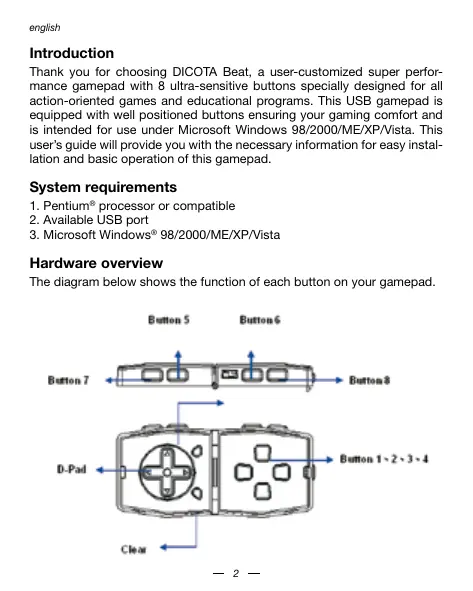
The diagram below shows the function of each button on your gamepad.
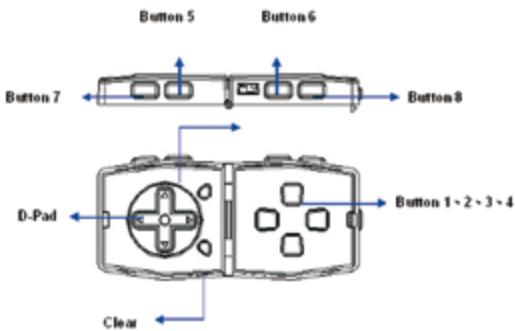
- Button 1-8: Functional buttons.
D-Pad: 8-way control pad. - Turbo: Turbo functions - Press "Turbo" and "Functional buttons" together if you want to activate Turbo Function as corresponding buttons. Note: ONLY one functional buttons can work as turbo functional at the same time.
- Clear: Clear Function - Press "Clear" and "preset turbo button" together if you want to deactivate the Turbo Function.
- Foldable shape design.
Vibration function.
Installation
Attention: Please install the software before connecting DICOTA Beat to your computer.
a) Software Installation
- Insert the Installation CD into your CD-ROM; wait for a few seconds for your computer to load the disc.
- If your system is setup to automatically read a new inserted CD, then the autorun program will be executed and the welcome screen for installation will appear. Please follow the on-screen installation instructions.
- If your system does not launch the installation software automatically, please find the file "Install.bat", which is located in the directory of your CD drive and doubleclick it, then follow the on-screen installation instructions.
The installation procedure:
- Install Shield Wizard information: The system is ready to install, click "Next".
- The copyright agreement: Select "Agree" and click "Next".
- User information: Key in "User name" and "Company". If your system is Window 2000/XP/Vista, select an appropriate usage limit.
- Confirm to start install: Click "Install".
-
Finish the install: Click "Finish".
-
Upon completing software installation, restart your PC as the installation screen requests.
b) Hardware Installation
- Connect the gamepad plug with a USB port or a USB hub and ensure it is connected correctly.
- After it is connected, the monitor will show the message "New hardware found" and the standard USB driver will be located for you to be able finish the easy installation and play games immediately.
- The system will add an item in the game-controller board automatically, and you can test the function of gamepad buttons and vibration.
Set-up in Windows System
After setting up the hardware, Windows® will auto-detect the USB device. Then, start to set-up and configure your gamepad.
a. Select Start \ Setting \ Control Panel \ Game Controllers and Joysticks.
b. Select the right gamepad "USB, 2-axis 8-button gamepad" from the Game Controller Menu.
c. Click on "Properties" and then "Calibrate".
d. When the "Controller Calibration" page appears, you can calibrate the gamepad button functions. If it doesn't work properly, you have to configure via the "Settings" page as below:
1) Set the gamepad center position, and then press any gamepad button.
2) Select the range of motion and turn the directional pad 2 or 3 turns, then press any gamepad button.
3) Confirm the center and press any gamepad button.
4) Click on "Finish" and back to the Game Controller Properties page.
5) Click on "Test page". Please turn the directional pad and press each functioning button on your gamepad to test the adjustments. If all functions are correct, then click on "OK".
Note: If the device does not work properly, it means that the above calibration failed. Please repeat the above calibration again until the calibration procedure is exactly performed.
e. Back to Game Controller "Properties" page, and click on "OK" or "Apply" to complete the calibration procedure.
You are now ready to start up the game software for fun.
Important:
- Once the gamepad is properly plugged to your PC but it seems does not work with the game, please enter the Game Controller Setting in Control Panel and select "Advanced" page to check whether the USB, 2-axis 8-button gamepad ID is the "Joystick 1" or not.
- Note: When there is only one game controller connected to your PC, this gamepad must be the "Joystick 1" towork properly. If the gamepad is not "Joystick 1", please remove it from the Game Controllers Setting in the Control Panel, as well as other installed joysticks. Subsequently re-install the gamepad and complete the calibration procedure, then it will work as usual.
Attention
- Make sure your software supports the Game Controller/Joystick.
- Not every game requires all functioning buttons (8 buttons in total) on your gameplay. If you find some buttons do not work inside the game, please check the game settings.
- The function of the gamepad buttons may vary in different games. Before changing the game settings inside the game, always read the game manual carefully to configure the best game settings.
- Your Mini Gamepad needs little care and services. You may clean it with a damp cloth periodically. Do not use abrasive cleaners of any type and do not spray liquid cleaners directly on your gamepad. Any fluid leaks inside the joystick may cause unexpected damages.
Disclaimer
Information in this document is subject to change without notice. The manufacturer does not make any representations or warranties (implied or otherwise) regarding the accuracy and completeness of this document and shall in no event be liable for any loss of profit or any commercial damage, including but not limited to special, incidental, consequential, or other damage. No part of this document may be reproduced or transmitted in any form by any means, electronic or mechanical, including photocopying, recording or information recording and retrieval systems without the express written permission of the manufacturer.
Customer Service:
If you encounter any problem with your DICOTA Beat, please contact our local subsidiary, partner or dealer, or send us your inquiry to info@dicota.com.
2 years warranty. Please find the complete text in our guarantee on the internet: www.dicota.com.
All the products and software mentioned above are registered trademarks of their respective owners. Errors and omissions excepted.


N1879


This symbol (crossed out bin wheelie symbol according to WEEE Annex IV) indicates separate collection of waste electrical and electronic equipment in the EU countries. Please do not throw the equipment into the domestic refuse. Please use the return and collection systems available in your country for the disposal of this product.
Einführung
HCTaJIJIaIaIaIaIaIaIaIaIaIaIaIaIaIaIaIaIaIaIaIaIaIaIaIaIaIaIaIaIaIaIaIaIaIaIaIaIaIaIaIaIaIaIaIaIaIaIaIaIaIaIaII
Bhmanmhe: Toxaknycta, hntctannpyte nporpammmho obce- nehenme nepeednpcoedneneHEMDICOTA BeK omkbItopty
a. BvIbePrte Start \ Setting \ Control Panel \ Game Controllers n Joysticks.
B. BbvBeIpy ntpabI kJIOKtNIK "USB,2-axis 8-button gamepa"Ha MeHIO IroboR OKTponJIepa.
c. Kπικητε Ḥa "Properties/CbοῦntBa" η 3amet "Calibrate/Kaɪnɪpɒbaɪt".
KoIaONBnTcA 控calBaKan6pOka KOnHpOnpaBbBbBbBbBbBbBbBbBbBbBbBbBbBbBbBbBbBbBbBbBbBbBbBbBbBbBbBbBbBbBbBbBbBbBbBbBbBbBbBbBbBbBbBbBbBbBbBbBbBbB
1) YctaHOBnte uehtpaIbHoe nIOJoxHeNe dKoIcTnKa n HaxMnte IIObYIO
KHONKY DXXOJCTNka.
2)Блберпгдианазон ДвінЖЕні N NOBEPHNITe pepeKIIHOTaTeNB Haprablenh Na 2 mln 3 obopota N HAKMNTe ПIO6by K HoniKy JdXOJCTNka.
3)Подтевердenteцentинаджмпглобукногку дковсka.
4)KINHMHTE "Finish/3abepumTb" in EBpntteCb 3a3d Na ctpAHUY Properties/CboiTa" INPBOBOR KOHTPONepa.
5)КлнкнITE "Test page /страица Incьытани". Пожалуоста, поBEReинче nepekночаюн Барравлий и Нжмite Кждуну Фуншоньу Кноку на Вашием Дожимостпд Лсньлгану Perуллорбк.Ес ninthе Фуншоньу павльни, Клнckeче на OK".Примецни:Ес ninthустpo委书记 He paobotaet npabinьно,То 30 o3Hачет otkaz oncaанн Вьше калнборвк.Пожалуоста, noBToPHTe KaNl6bOByE ue pao do tex nop, noka npocecc KaNl6bOByKHe bБdYnONH ToTO.
e. BepHnTeB hA strPAnuCy "Properties/CbOyCTBa" irpOBOr KOHTpOllnepa, KlnKHNte Ha "OK" nIi "Apply/InCpOnb3oBaTb" dIra 3aBepSeHna npouceCa KaNboPbKn.
TenebpBb totoBk 3aanyck nporpammmoro oecneueheny irpy nonye HYOBOCTBn.
BaxhnaMHΦopMaζη:
- ECNI JXOJCTN KpABINbBO BCTBANB IN Bau PIK, IN pRNI 3OTM OH KAK 6yTDo 6bI he paB0aTeB I MRPE, OTKPOITE HAcPTOIM IRPOBOI KOHTPONepa Ha naHEni YnpABeHnE N bB6poTe CTpaHnUc "Advanced" PpOAnHyTbIe" FOR TTO, TcObIpoNeBtB, Yka3AH N I "DJOJICTN 1" B "USB,2-axis 8-button gamepad" INN Het.
-Пимецчес:Когд К Вашем YК рпсбсднген Тольк один IGROВО KOTPONJIPE,TO TOTДЖСТКД ДОЛСЕН 6БТь 3AZAH KAK "Joystick 1/ДжоctTK"Д"ЯбочецьnpablnSBO paOBJT.ЕСИЗ.TOTДЖОCTKHe JOyStick1",TO ydANITE erO n3 HACTPOVI IGROBO KOJTOPNJIPE NaHaENI YNpABRNENH,TAKAE KIC ApyrTNY cYSTAHOBENHbДжоCTKNI.NOCNE STOTO pOBeDHTe NOBtOPHyIO NHCSTALJIaUNIOxdoJCTNKa I 3aBePunTe PnoEcc KaINb6PoBVK,ToDAOn 6bET da60TaTbk KaO b6bIHO.
BHHMaHne
I. POBepTe, nOdApEkrBaBt eN Baue npOrpAmMHe o6eCneHene IrpoBoi KTOrponJIep/IXoKoiTbK.
2.HeIaKxdoIrpBtOpTe6bOcBCEFyHKUHOHaBbIe KHOKNB(B 0eIeCLOXHOCTN8KHOONK),KOTOpBIE MHeTOCtHbA Bauem JKOCTMKe. EcnI bblObHApKHTe,YTOHEKOpTBe KHOKNHe FyHKUHOHPuOT BIrpe,To,POkAnyIcTa,npOBepBe HAcTPOKnIrpBt。
3.ФУнкIMN KHOKNCTKMA MORYT 6bITb pa3HbIMN B pa3HBIXrpaX.Перед ИЗменин IMACToPkn INRbI B INRpe,OBa3aTeBnBOBHMATEBnIOpoHTaNE HcTpyKUNK INRpeДЯTOTOR,TObOkAnMOxHO JYUHc KOHNIFrpyPOBaTb HAcTPOKn INRpsI.
4.Ду Baewero MmHn DxohctNka Tpe6yetc He6oIbwoi yXoIa cepbc. Bbl MoTeE BpMeOT bEmHeMn pOToptapB er OBAxhoHn TpnoKoHKn. He IcNoPb3yIte abPazAHNBt HcOnCTNeTm HIo6oR Ttna n He 6bpI3raTte JHXkHMn OHcCTNTeLMn HEnOpceDCTBeHHo Na DxoCTNk. LIObaa XIKoKTb, POnOHKaIOaA BHTpb, MoKeT bI3BaTb HeOxHdAAHNbIE NoBpeJDeHNA.
Ccblnka
HnΦopMaunB b 3OM DOKMHTE MOrYT 6bItb NcnpBaBneHb 663 npedynpexdenni. IpnzBDOImTeB hBeBcAa3NnHKAnKnpeTeh3n a Hn rapaHTn C B3rIgDMa ToHCTObC b KOMPNEKTHOCTb 3TOD OKOpMaTHa, n He Hecet OTBETcBHeHcOtn 3a Kakyo JIn6o NToepIO pnp6blm n nn MaTepaHbNbH yUeep6 (CneuianbH yUeep6, CnyauhN, HnepMO, n T. d.) Hn Onda Chua tto ETO DKMHTA HEMOxet 6bItb KOnipOBaHa, nepeCbHa ha, npepaHa, n H b KAKoΦomE n Hukakmm CpeCTBaMn (B eEnkTPOHOM Bunde nIIy MeXAHueNeck), BKlOChA KOnipOBaHne, ZaINcBBAHne, nI6o nepENncsBaHinne INHΦopMaunB b NInckKBaHme B INHΦopMaONHbHex CStEmax, 6ez prAmOTo NcBMeHHORo COrTACNA.
KlneHTckn cepBnc:
Ecnin 6ydtene Hmteb kkanhe npo6nEMbI c npoDKTOM DICOTA Beat, KOthaktpuyTe hac noxaknycta Ha: dicota@dicota.cz nInn Ha ctrpaniux www.dicota.com.
Garapthya 2 roda.Bolee noDpo6hna INHOpmaia Ha INTEpNET cTpaHuaX: www.dicota.com.
Bce npOkyTbI mOcTePBy kya3aHbYe bIiuee RaJIIOCTaERIMCTpOBAHHoMKoopCOTBETCTBtuOikn coC6TBENHKoK.


N1879


This symbol (crossed out bin wheelie symbol according to WEEE Annex IV) indicates separate collection of waste electrical and electronic equipment in the EU countries. Please do not throw the equipment into the domestic refuse. Please use the return and collection systems available in your country for the disposal of this product.