
STREAM - Laptop Accessories DICOTA - Free user manual and instructions
Find the device manual for free STREAM DICOTA in PDF.



User questions about STREAM DICOTA
0 question about this device. Answer the ones you know or ask your own.
Ask a new question about this device
Download the instructions for your Laptop Accessories in PDF format for free! Find your manual STREAM - DICOTA and take your electronic device back in hand. On this page are published all the documents necessary for the use of your device. STREAM by DICOTA.
USER MANUAL STREAM DICOTA
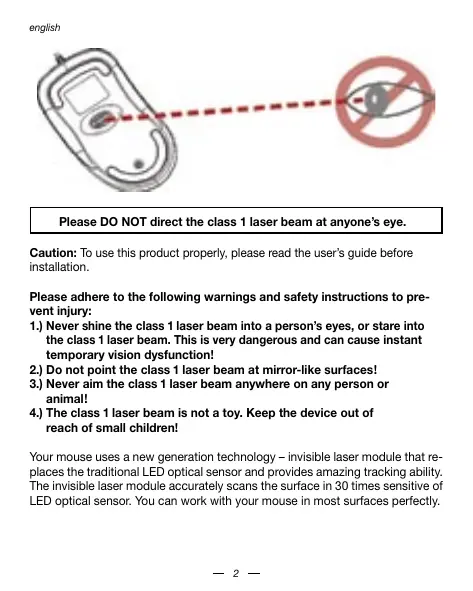
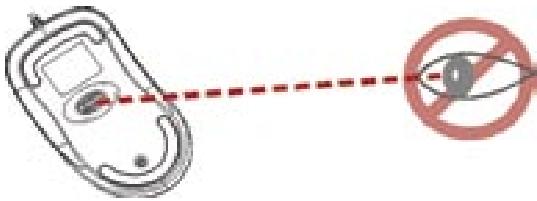
Please DO NOT direct the class 1 laser beam at anyone's eye.
Caution: To use this product properly, please read the user's guide before installation.
Please adhere to the following warnings and safety instructions to prevent injury:
1.) Never shine the class 1 laser beam into a person's eyes, or stare into the class 1 laser beam. This is very dangerous and can cause instant temporary vision dysfunction!
2.) Do not point the class 1 laser beam at mirror-like surfaces!
3.) Never aim the class 1 laser beam anywhere on any person or animal!
4.) The class 1 laser beam is not a toy. Keep the device out of reach of small children!
Your mouse uses a new generation technology – invisible laser module that replaces the traditional LED optical sensor and provides amazing tracking ability. The invisible laser module accurately scans the surface in 30 times sensitive of LED optical sensor. You can work with your mouse in most surfaces perfectly.
Safety notice:
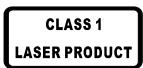
- This product complies with IEC 60825-1, class 1 laser product.
- This product complies with FCC and CE rules.
- This product has no serviceable parts. Use of controls or adjustments of procedures other than the user guide mentiones may result in malfunction or dangerous.
SETUP the Mouse
The mouse is connected to your computer via the USB cable. It needs to be plugged in to your Notebook or PC by a USB port or a mouse port.
For PS/2 mouse port installation
Please turn off your computer before installing your mouse. Plugging and unplugging cables to your computer's mouse port while the computer is running can damage the mouse port or your computer.

PS2 Mouse Port
For USB port installation
Windows 98 (or higher) is required for USB port installation. Connect the receiver cable to the USB port on the computer. For Windows, you may be prompted to insert the Windows software CD.

USB Port
Insert the Windows driver CD into the computer's CD-ROM drive when asked to do so. Follow the instructions steps.
CAUTION:
Change or modifications not expressly approved by the manufacturer responsible for compliance could void the user's authority to operate the equipment.
Using your mouse
How to use the wheel
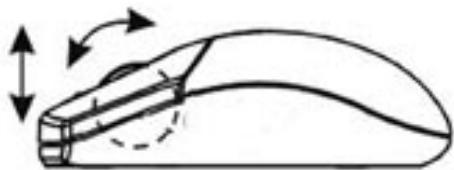
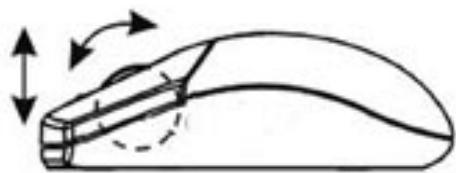
Your mouse has a wheel that functions both as a wheel for Windows scrolling and also as a customized button. It can be used as a standard mouse button, click (press down) the wheel. To use the middle button, directly press down the wheel. For scrolling the screen, simply move the wheel.
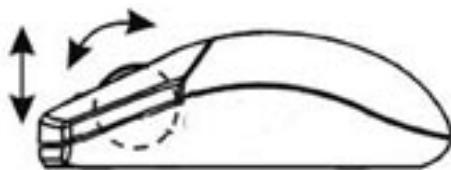
Caution: It may sometimes interfere the sensor of the mouse, if your tabletop surface is in red color, transparent as glass or highly reflective like a mirror. Try to use a mouse pad or use your mouse on a different tabletop surface.
Troubleshooting
Mouse does not work upon installation.
Try one or more of the following:
- Make sure you have installed the mouse correctly.
- Make sure the cable is plugged into the right mouse or USB port.
- Unplug the mouse and then plug in the mouse again. Make sure that the mouse has been detected by the operating systems properly.
- Make sure your mouse port has the proper configuration. Refer to your computer documentation for the correct port configuration.
Disclaimer
Information in this document is subject to change without notice. The manufacturer does not make any representations or warranties (implied or otherwise) regarding the accuracy and completeness of this document and shall in no event be liable for any loss of profit or any commercial damage, including but not limited to special, incidental, consequential, or other damage. No part of this document may be reproduced or transmitted in any form by any means, electronic or mechanical, including photocopying, recording or information recording and retrieval systems without the express written permission of the manufacturer.
Customer Service:
If you encounter any problem with your Stream, please contact our local subsidiary, partner or dealer, or send us your inquiry to info@dicota.com.
2 years warranty. Please find the complete text in our guarantee on the internet: www.dicota.com.
All the products and software mentioned above are registered trademarks of their respective owners. Errors and omissions excepted.



This symbol (crossed out bin wheelie symbol according to WEEE Annex IV) indicates separate collection of waste electrical and electronic equipment in the EU countries. Please do not throw the equipment into the domestic refuse. Please use the return and collection systems available in your country for the disposal of this product.
Kakpa6oTaTbcoCKpOJOM
Mblb co ckpOOM IMeET 2 ΦyKnm. Bo nepbIx, pa6oTaet kak kpyTaeee KONEcKIO B apnKauHx Windows, a BO BTOpbIX MOKeTe NcONb3ObaT b KAK cpeHIO KHOKNy.ДлЯ NOIb3OBAHry HNYKHXaHTb KONEcKO BHN3, aДг CBocApBHaNry DOCTATOHO NOKPYTITb KONEcKOM.
BHHMaHHe: B cnyae, ecn pa6oay npoiadb Ha KOTOPm CnONb3yeTe MblIb Stream Meet pePnekChbK npacbI bct, npO3paHa KAK cTeKnO nn NpO6HO 3epkany, to ETO MOKeT HEaTHBHO DeEcTBoBaTb Ha CeH3Op MblIuB 3 TOM cnyae nonB3yIteCb DpyIM KOBpKm.
PeWeHHe HeucnPpAbHOCTn:
MbIb Hepa6oTaet nocJe ycTaHOBKn.
Ponpo6yTe CneJeuOuee:
- Y6dMntTcB, npBnHbO H My Bbl cIeIaIIy cYtAHOH m npBnHbO H n pokNkOnuH KaeBb K/USB in PS2 nopta).
- OToeHNHnTe KaBEnb OT MbiuN Nnonpo6yIe TIOKJIIOHTb erO CHOBa.
- Y6eDInTeCb, yTO MbIb NpaBnBHO y3HaETcO nEpaunOHNo CnCTeMoI.
- YbdekteB in cnpabHncto KOnΦnpyaun PS2 npotra (B dOKymuNTaun KOMblbotepa).
CcbiKa
HnΦopMaunB b 3OM DOKyMeHTe MOrYT 6bItb NcnpBaBneHb 663 npedynpeXdHn. Ipn3BODmTeB hBeBcKHaN nKnAkuN npTeHcn a Hn rapaHTn C B3rTJDMo HA TOHOCTb KOMPNEKTHOCTb 3TOrDOKyMeHTa, HneHecet OTBETcBHeHOctn 3a Kakyo JIn6o NToepIPO np6bln iNn MaTepaHbNsH yUeep (CneuAnsH bYueep, CnyuBnH, HenpMoN, n T. d.) Hn DaNaCTb ETO DOKyMeHTa HEMOxet 6bItb KOnPiPoBaHa, nepeCbJaHa, npePaHa, Hn B kakOnΦOpme NHKaKmM cpeCTBaMn (B eEnkTOPHom Binde iNn MeXAHueNeck), BKIOChA KOnPiPoBAHne, ZaINcBbAHne, nI60 nepenNCbBaHIne INhΦopMaunB bInbKnBaHme B INhΦopMaonOHbHex CTMeTax, 63e pRMAOTIO NcMbEmHO rCorlTaac.
KIneHTckn cepBnc:
Ecn6bdeTe HmBt KAKHe np6bnbC npOdykTOM Laser, KOHTaKTIpye Hac noKanycTa Ha: dicota@dicota.cz nn Ha cTpaHncax www.dicota. com.
Garapthani 2 roda. Boonee noopobna nHnΦoMaia Na nHTepnr CTpaHuaq: www.dicota.com.
Bce npOukTbI mOcTePBy kyaAaHbYe bIiuee RaIyIOCTaepnIcTpoBaHAnm Koopman CoOTBETCTByuOikx CoCBTEHNKOBK.



Figyelmzetetes: It may sometimes interfere the sensor of the mouse, if your tabletop surface is in red color, transparent as glass or highly reflective like a mirror. Try to use a mouse pad or use your mouse on a different tabletop surface.