USER MANUAL HD-PXT : MINISTATION™ WITH HARDWARE ENCRYPTION BUFFALO
2.5 inch USB Hard Drive with Encryption
MiniStation HD-PXTU2
User Manual
Layout. 2
Recommended Usage. 3
Forgot your password? 6
Software 8
Specifications 10
Table of Contents
1 Layout 2
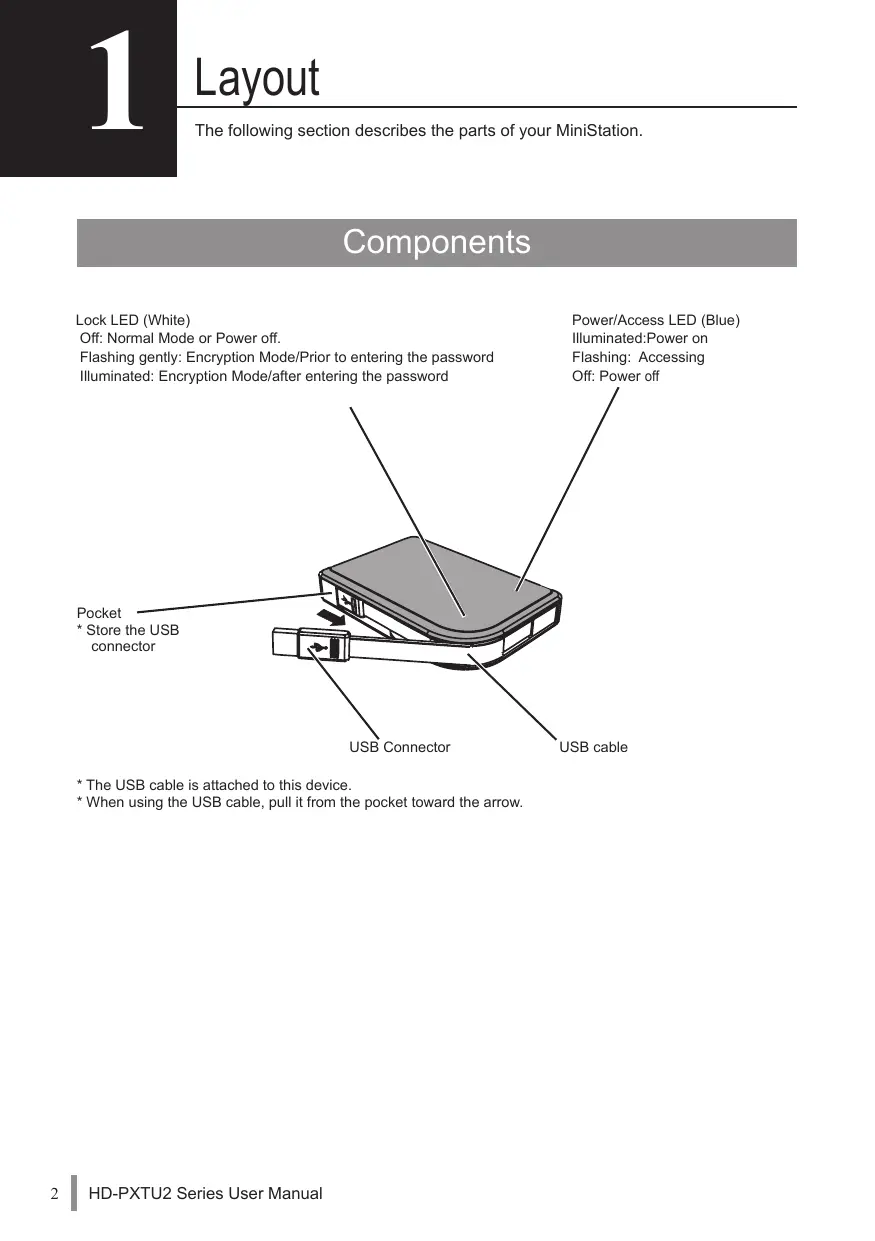
Components 2
2 Recommended Usage 3
Warning. 3
Locking the drive 5
3 Forgot your password? 6
Reset to factory defaults 6
4 Software (Windows) 8
Installing software on Windows 8
Optional Software 9
Secure Lock Manager Easy (Windows 7/Vista/XP) 9
TurboPC (Windows 7/Vista/XP)
TurboCopy (Windows 7/Vista/XP)
eco Manager (Windows 7/Vista/XP)............9
Picasa (Windows 7/Vista/XP) 9
5 Specifications 10
Specifications 10
Components
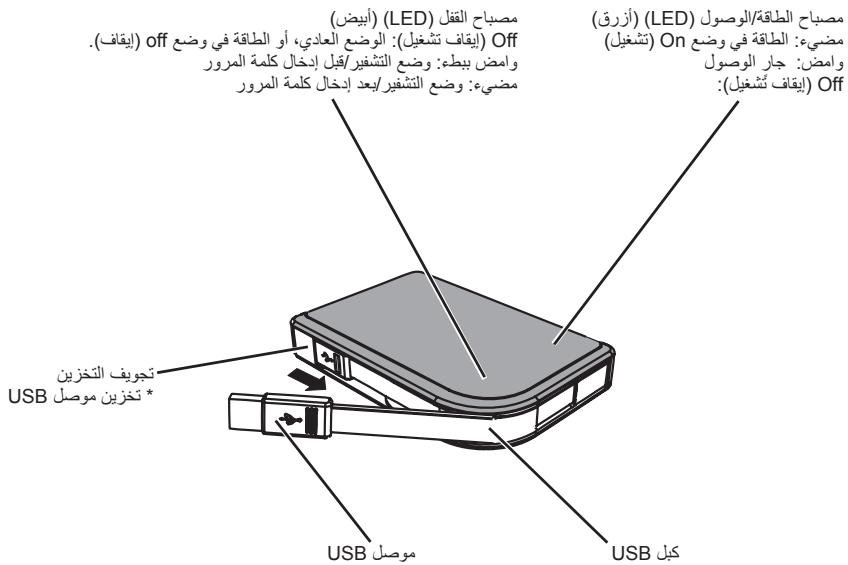
Lock LED (White)
Off: Normal Mode or Power off.
Flashing gently: Encryption Mode/Prior to entering the password
Illuminated: Encryption Mode/after entering the password
Power/Access LED (Blue)
Illuminated:Power on
Flashing: Accessing
Off: Power off
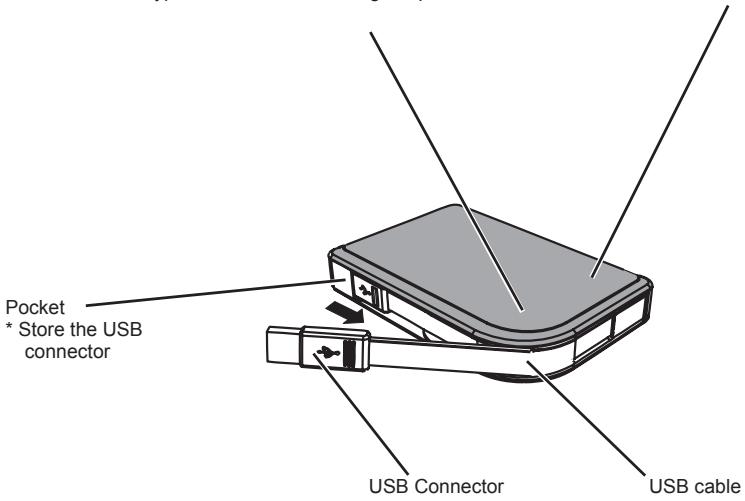
- The USB cable is attached to this device.
- When using the USB cable, pull it from the pocket toward the arrow.
Warning
To avoid damage to data, follow these precautions:
- Never configure this unit as a destination for virtual memory.
- Never do any of the following while data is being accessed and the data LED is flashing:
Unplug the USB cable or power cable
Turn off your computer
Put your computer into Standby, Hibernate or Sleep mode
Log off, log on or switch user
- Some computers may display a delayed write when they return from an energy-saving state. In such a case, unplug the unit before putting your computer into the energy-saving mode.
- If the power/access LED does not turn off when you turn off your computer, unplug the USB cable from the MiniStation. If the power/access LED does not go off, then the encryption mode will not be activated and your data will not be protected.
- Encryption mode is disabled by default. To protect your data with encryption, enable encryption mode and configure a password.
- Keep your password in a safe place. If you forget your password, you will not be able to access data stored on the drive in encryption mode.
- Encryption mode is not supported with Macintosh computers. To use this device with a Mac, do not enable encryption mode.
- Please keep your password safe. Don't give out your password to anyone.
- The first time you connect this unit, it may take approximately 20 seconds before the power/ access LED turns on.
-
The maximum size of a file on a FAT 32 hard drive is 4 GB. To work with larger files, reformat the drive with NTFS or Mac OS extended.
-
If you use this unit with multiple partitions, format each volume before use.
- When Mac OS is booted while the MiniStation is connected, the computer may not recognize it. If this happens, unplug the USB cable for a few seconds and then plug it again.
- Some computers may not boot Windows while this unit is connected. If this happens, leave the MiniStation disconnected until after the computer has booted. Consult your computer's manual for instructions on changing the BIOS settings to boot from an internal hard drive if you want to be able to turn on or off your computer while this unit is connected.
- The MiniStation supports hot-plugging. You can plug or unplug the USB cable while the MiniStation and your PC are on. However, never unplug the cable while the Power/Access LED is flashing, as data is being accessed. If you unplug the MiniStation while the Power/Access LED is flashing, your data may be damaged or lost.
- Refer to the manuals for your computer and peripheral devices.
- Do not boot your operating system from the MiniStation.
- Do not lean any object against this unit. It may cause the unit to malfunction.
- If the MiniStation is connected to a USB 1.1 plug, Windows will display a message that a high-speed USB device is connected to a non high-speed USB hub. Move the MiniStation to a USB 2.0 port for best performance, or click “X” to continue.
- You may hear some noise while the MiniStation is working, especially while it's booting or being accessed. This is normal.
- After installing the driver for the MiniStation, several devices are added to Device Manager. Display [Device Manager] by following the instructions below:
Windows 7/Vista.................................................. Click [Start], right click [Computer], and click [Manage]. When "A program needs your permission to continue" is displayed, click [Continue] and click [Device Manager].
Windows XP. Click [Start] and right-click [My Computer]. Click [Manage] and then [Device Manager].
| OS | Device | Device Name in Device Manager |
| Windows 7/Vista | Universal Serial Bus controllers | USB Mass Storage Device |
| Disk Drive | BUFFALO HD-PXTU2 USB Device |
| DVD/CD-ROM Drive | BUFFALO Virtual Cdrom USB Device |
| Windows XP | USB Controller | USB Mass Storage Device |
| Disk Drive | BUFFALO HD-PXTU2 USB Device |
| DVD/CD-ROM Drive | BUFFALO Virtual Cdrom USB Device |
Locking the drive
In encryption mode, the MiniStation will be locked in the following situations.
| Windows 7/Vista/XP | Mac OS |
| Secure Lock Manager Easy | V | Encryption mode is not supported |
| Shutting down | V |
| Reboot | V |
| Unplug this unit | V |
| Standby | V |
| Hibernate | V |
| Logging off | - |
| Switching user | - |
V: Will be locked.
- : Will not be locked
X: Not supported
- The MiniStation doesn't lock when you log off or switch users. Unplug the MiniStation to lock it.
- Encryption mode is not supported with Mac OS.
Forgot your password?
If your MiniStation is in encryption mode and you forget your password, follow the procedure below to reset the unit back to the factory default settings.
Note: A Windows computer is required to reset this drive. The Secure Lock Manager Easy software does not support Mac OS.
Reset to factory defaults
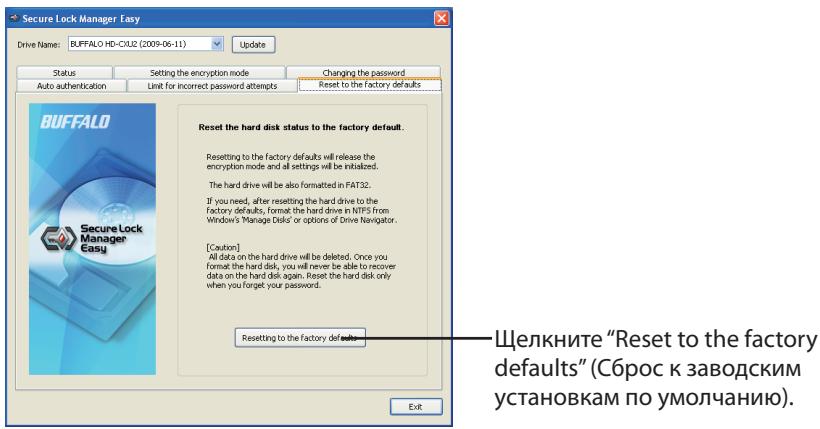
If you forget your password and you have no way to remember it, reset to factory defaults. If you reset to factory defaults, all data and password saved on this hard drive will be deleted.
Note: After resetting to factory defaults, the drive will be formatted in FAT 32 and all data in it will be erased. If you want to be able to save files larger than 4 GB, format the hard drive with NTFS or Mac OS extended after resetting to factory defaults.
1 Connect this unit to your Windows PC.
If the password verification screen is displayed, close it.
The autoplay screen may be displayed if you are using Windows Vista. If so, close it.
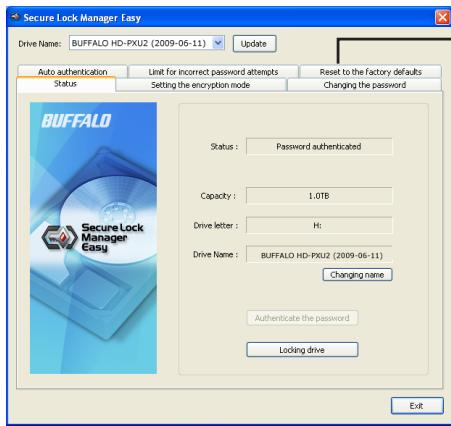
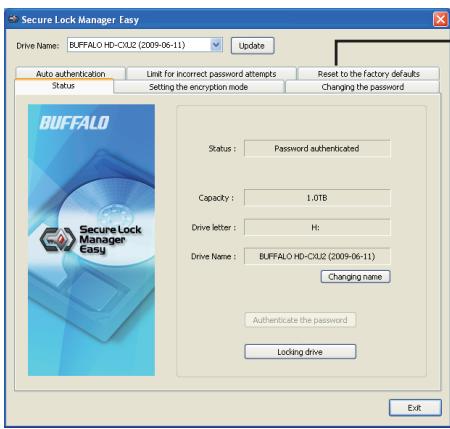
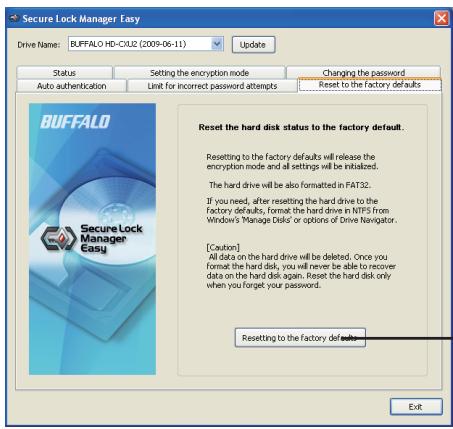
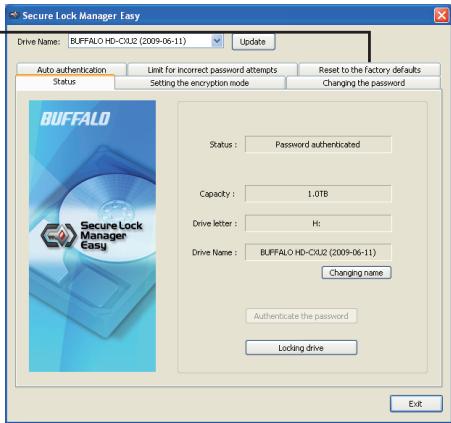
2 Click [Start] - [(All) Programs] - [BUFFALO] - [Secure Lock Manager Easy] - [Secure Lock Manager Easy].
Secure Lock Manager Easy will launch.
3
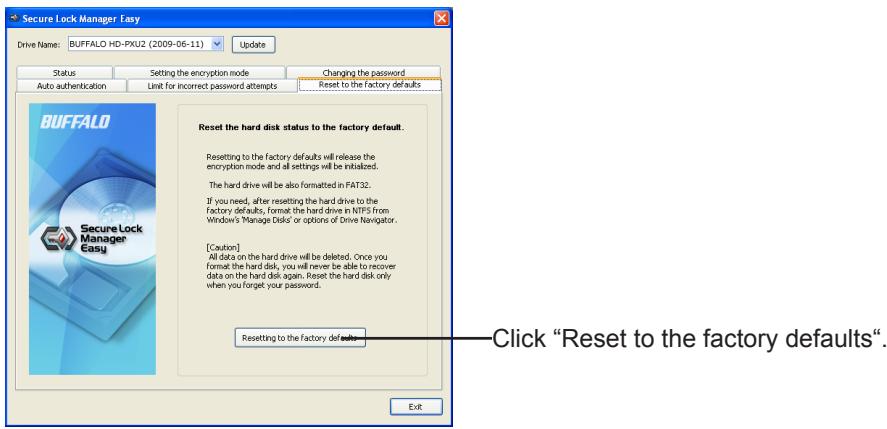
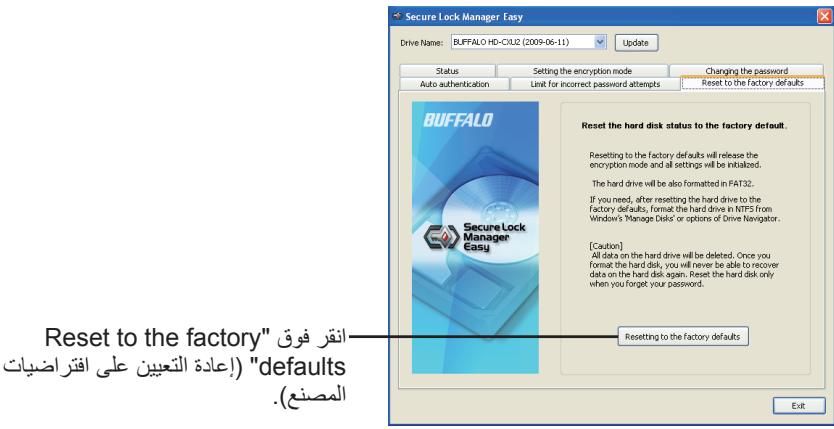
Click "Reset to the factory defaults".
4
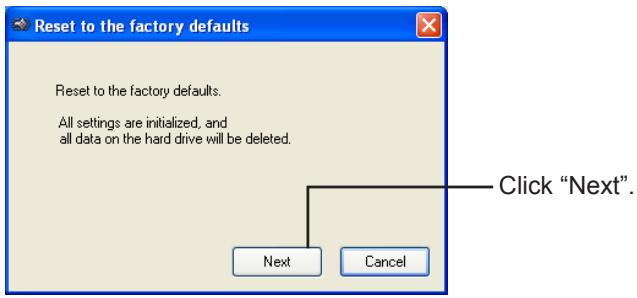
5
Follow the instructions displayed on the screen.
All data saved on the hard drive will be erased! You will not be able to undo this. After a reset, all data on the drive will be lost.
6 When "The hard disk status is now reset to the factory defaults." is displayed, click "OK".
The reset is now complete. Wait until the hard drive is recognized. If it is not recognized, unplug the hard drive and reconnect it.
The MiniStation includes several optional software packages.
Installing software
Install the software from the DriveNavigator wizard. Follow the steps below.
1 Connect the MiniStation to your computer.
2 Right-click on "Utility_HD-PXTU2 ( ) in My Computer, and select "Open".
3 Double click on "DriveNavi.exe"().
DriveNavigator wizard will launch.
- if "A program needs your permission to continue" is displayed by Windows Vista, click "Continue".
4 Click "Begin Installation".
5 Click "Additional Software Installation".
6 Select the target software and click "Install".
The wizard will guide you through installation.
Optional Software
Secure Lock Manager Easy (Windows 7/Vista/XP)
This software controls the MiniStation's encryption features. Use it to enable encryption, set the password, configure auto-authentication, etc. Encryption is not enabled by default.
TurboPC (Windows 7/Vista/XP)
TurboPC can increase data transfer speeds for your Buffalo product.
TurboCopy (Windows 7/Vista/XP)
TurboCopy uses caching to increase data transfer speeds.
eco Manager (Windows 7/Vista/XP)
eco Manager for HD lets you put the MiniStation into "sleep" mode to save power.
Picasa (Windows 7/Vista/XP)
Picasa organizes and edits digital photos.
Note: An Internet connection is required to share digital photos or send photos via e-mail.
Specifications
- Check Buffalo's website (www.buffalotech.com) for information about the latest products or compatible models.
| Interface | USB |
| Standard conformed | USB Specification Rev. 2.0 |
| Connector | USB Series Mini-B Connector |
| Sector size | 512 bytes |
| Seek time | 13 msec Maximum |
| Transfer speed (Logical value) | 480 Mbps (*1) Maximum |
| Factory default format | FAT 32 (1 partition)
Encryption (Encryption mode) is disabled (*2) |
| External dimensions | 134 (D) X 90 (H) X 20 (W) mm (excluding protruding parts) |
| Consumption Power | 2.5 W (While Reading/Writing) |
| Power | 5V±5% |
| Operating Environment | Temperature | 5~35°C (41~95°F) |
| Humidity | 20 - 80 % (no condensing) |
| Compatible Models | Following computers equipped USB connectors as standard
• DOS/V Machine (OADG specification)
• Apple Mac Series (models with Intel Processor)
Following computers equipped with USB interface manufac-tured by Buffalo
• DOS/V Machine (OADG specification) |
| Compatible OS | DOS/V Machine | Windows 7/Vista/XP |
| Macintosh | Mac OS X 10.4 or later (*2) |
1 Connect the MiniStation to a USB 2.0 port for best transfer speeds. The MiniStation will function when connected to a USB 1.1 port, but data transfer will be much slower.
2 With OS X, encryption mode is not supported.
PykoBoDCTBO NOIb30BaTeJia
PacnooloxeHne 2
PekomehnyeMoE uCnoJb3OBaHne... 3
3a6bIIN CBOI napoiB? 6
PporpamMhoe o6ecneueHne ....8
TexHHueckne xapaKTepeNCTnKn... 10
1
2
3
4
5
OrlaBJIeHne
1 PacnooloxeHne. 2
KoMnoHeHtbl 2
2 PeKoMeHnyeMoE nCnoIb3OBaHne.....3
IpeynpekdeHne 3
Muraet: BbInonHReTcdoctyn
OFF:Питанne OFF
Kapmawek
* XpaheHne pa3bema USB
- Ka6eNB USB npnkpennen K ΚΤΟΥ yctροίctBy.
- Пин Исторьанни Ka6eЯ USB Вытainede erо n3 Kapmaшka B Haprableni n CTpeKN.
PpeDynpexKdEHe
Bo n36exaHne noBpeKdEHHaBux daHHbIX co6IouaTe cJeduoune Mepbl ppeOcTOPOXHOCTn:
- Hukorda He KOHfIgPyIte 3TO yCTpoIcTBo B KaueCTBe Ha3NaUeHnI dJI BnPryaJIbHoi namrTn.
- Hukorda He BbInonHnIe HnKaKne n3 CneDuOuNX DeIcTBn, NOKa BbInonHnReTc DaOCTyn K daHHbIM m Muraet NHdNKaTop daHHbIX:
OTcoeHHeHne Ka6eJy USB nKa6eJnTahnJy
BbIKIOueHne KOMnbIOTepa
IpebeoKOMnbIoTepaB pexnOxuJaHn,OctaHOJIeHHbI uNcPau n peXm
OTKJIIOUeHHe, noDJIIOUeHHe nnn nepeKIIIOUeHne noIb3ObaTeNa
- Ha HeKOTopbIX KOMNbIOpExpAX MOXeT OTo6paXaTbC8 OwN6ka 3aApEckn 3aPnci, KOrDa OHN BO3BpaAiaOTcN 3C oCtOraHn 3HeproSc6epExeHn. B TAKOM cNyae OTcoeHNHTe yCTpoiCTBO nepei pepeBOJOM KOMNbIOTePA B pexim 3HeproSc6epExeHn.
- Ecnn INHdkaTop nHTaHa/DOctyna He ractht Prn BByKJIIOUeHm KOMNbIOTepa, OToeDINHtKe Ka6ebb USB ot MiniStation. Ecnn INHdkaTop nHTaHa/DOctyna He nOracHeT, pexIM KoDInpObaHnE he akTbBpyETcN BAsu daHHbIe He 6ydt 3aunuieHbl.
- Pexim KODINPOBAHNA OTKIIOUeH NO yMOJuaHIO. ДЯЗИТБI BaIIX dAHHbIX C NOMOUIK ONDINPOBAHNA BKNIOHTe peXIM KODINPOBAHNA I CKOHΦNHyPUPyIte napOB.
- XpaHnte cBoi napoB b HndexHom MeTe. EcIn BbI 3abydeTe cBoi napoB, Bbl He CMOkeTe nOlyuHTb doCTyn K daHbIX, XpaHraIIMcra Ha HakOniTene B pexime KoDipobAHnIa.
- Pexim KojinpobAHnHa He NoidepKnBaetc Ha KOMnbIbTepax Macintosh. Дя Испoly3OBaHnAустюCTBa Bmecte c Mac He BKJIouaHte pexim KoJinpobAHnHa.
- Toxanyieta, HaidexhO coXpaHIne CbO napOB. HnKOMy He coo6aJte BaW npObl.
- Пип nepвом посоединецустpoисва до тор, Касларится Индikatop пintaHTY/ДocTypa мочет поадобитс риблnteьнho 20 секун.
- Мaksимальний размер Фальна на На когптеле на јессхдоскх в сорmate FAT 32 coctabлaret 4 Г. Дяразовы с Фальmaу бльшero размета посяфокатугту На когптель с состем NTFS ил Mac OS Extended.
-
EcnBbI nCnOJIb3yeTe 3o yCTPOIcTBO C HecKoJIbKIMN pa3dEJaMn, nepeI nCnOJIb3OBAHHeM oTΦOpMaTIpyuTE kKaJDbI O6BeM.
-
Korga Mac OS 3a rgykaetc npn noDcoeHHeHm yctpoictbe MiniStation, kOMnbIopep moKeT he paCno3HaTb erO. Ecnn 3to npoicXoHt, oTcoeHNHTe Ka6eB USB ha HeckonbKO cekyHd, a 3aTe m noDcoeHNHTe erO eue pa3.
- Ha HeKOTopbIX KOMlbIOpex Windows MoKeT He 3aRpyKaTbC, KOrJa NODCoEINHeNo 3TO yCTpoIcTB. EcInn 3To npOnCxOJNT, OCTabTe yCTpoIcTBo MiniStation HEnODCoEINHeHbIM Do tex nop, nOKa He 3aRpy3ITcKOMlbIOTp. ObpaTIncB K pyKOBOdCTBy NO kCkNpyatauIM BaWero KOMlbIOTepa OTHOCInTeBHO I3MeHENHry CTAHOBKN BIOS drr 3aRpy3Kn C BHyTpeHrero JecTKORO DnCKA, ecInn Bbl XOTIne BKJIIOUaTb INII BbIKLIIOUaTb KOMlbIOTeP, nOKa NODCoEINHeNo 3TO yCTpoIcTB.
- MiniStation подерживает подени能在е 6e3 Вьключени сстемы. Вь можete поденияп ил отоединят bабел USB, рoka включени MiniStation ил Baш ПК.Одану Нковогда He отоединят кабел, рoka мURAгет лamночка патаня/достуна, тak касуцесовая сьобрашиные К данньим.Е相关内容 Вь отоединITE MiniStation, рoka мURAгет лamночka патаня/достуна, Baш наданные мordут等相关邮件 ил утегны.
- 06patnttecb k pykoBODCTBAM n OeknIyatauIN BaWero KOMNbHTepa n nepiΦeepnHbIX yCtpoiCTB.
- He zarpykaïte Baùy onepaúnoHnyc nctemy c yctpoiCTBa MiniStation.
- He pinclohnye HnkaKne npedMeTb K 3ToMou yCTpoNCTBy. 3To MoKxET npINBcTn K HEnCpabHbOcTn yCTpoNCTBa.
- Ecni yctpoictBO MiniStation noDcoeDInHeNo K pa3bemy USB 1.1, Windows oTo6pa3nt coo6uene, uTO BbICOKOCKOPOCTHoe yctpoictBO USB noDKJIoueNo He K BbICOKOCKOPOCTHOMy KOHcHTpApOTy USB. IpeMeCTnTe MiniStation K npotTy USB 2.0 Дя наиушero ФункцнрOBaHЯ Илп сeКнITE "X"дяnpodonkeHЯ.
- Bo Вторяразовы усторец Ви можete усторец Некот OPУМ, особен по заузке пелю образшени К симу. Это явлгетсу Hopmaьнblm.
- Посné установки драиьерда MiniStation Heckолько усторь добавлготс К порогамме
Менижер усторь.
OTo6pa3nte [MeHedJep ycTropoCTB], cIeDy npNBedeEHbIM HNKe IHCTpyKuIaM:
Windows 7/Vista. [Ipyck], [IypaBn] npaBov knaBnwee [Kommbotep] n [YnpabLeHne]. Pn oTo6paXeHm coo6uHnra "IJa npOdoJIxHeHn nporpAmMbI Tpe6yeTc Baae pa3peHne" IeJKNthe [IpOdoJIxntb] n I eJKNthe [MeHeJke yctpoiCTB].
Windows XP. ⅢeKNHTe [NcK] n ⅢeKNHTe npaBoi KnaBnWei [MoI KombIyTeP]. ⅢeKNHTe [YnpabLeHne], a 3aTeM [MeHeJxep yctpoiCTB].
1 PoiocoeiHnIte 3TO yCTpoIcTBO K kOMnbTepy c OC Windows.
Ecnn oTo6paKaetc 3KpaH npOBepKn npoJna, zakpoIte erO.
ПиИСПОЛБЗOBAHINOCWindowsVistaMOKETOTO6paKaTbCЯКранaBTOBOcPOn3BeDEHnA.B 3Tom cIyae 3akpoIte erO.
2 Μευκητέ [Πύς] - [(Bce) ΠρορραμΜβί] - [BUFFALO] - [Secure Lock Manager Easy] - [Secure Lock Manager Easy].
3aŋpy3ntc nporpamma Secure Lock Manager Easy.
3
UeKnTe"Resettof the factory defaults"(C6pocK3aBODcKm yCTaHOBkam IOyMOJuaHIO).
4
5
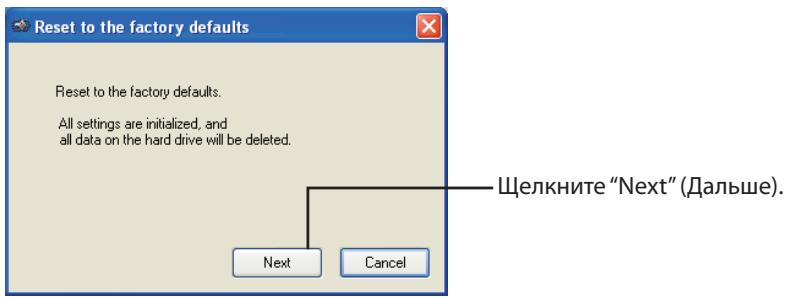
CneyuTe uHcTpkyuM, OTo6paKaembIM Ha ekpaHe.
Bce daHHbIe, coXpaHHeHbIe Ha hakONITeHa JxecTKnx dNcKax, 6ydyT ydaJIeHb! Bbl He cMOxTe OTMeHNbIpe3yJbTaTbI eToi npOeDpybl. Iocne BblOnJIeHnca C6pOca Bce daHHbIe Ha hakONITe 6ydyT yTePAHbI.
6 Пи отобрахенни сообшени "The hard disk status is now reset to the factory defaults." (Соctаянце ќесъкого дись сбршени К заюckим установке по умочаши.) селкни "OK".
Tepe npoeupa c6poca 3aBepsha. IpoJoxHte, noka He 6ydt paCno3HaH hAKoNtIeH na JcEcknx dNCKax. Ecln OH He paCno3HaETcA, OTCoeDHNTE Ha KcEeKHX dNCKax i 3aHOBO npOcEINHTe erO.
YctaHObKa npOrpaMMHoro o6ecneueHn
UctaHOBITE nporpamMHOe oecneueHne n3 nporpaMMbl-Mactepa DriveNavigator. CnedyTe deiCTBnAM npuBeDeHHbIX HnKe NyHKTOB.
1 PoiocoeiHnIte yctpoIcTBo MiniStaion B KOMnbIOTepy.
2 Μεικητe πανού κλαυπεών no “Utility_HD-PXTU2” ( ) B Moι κόΜβοτεριν BBiδεριτe “ΟΚρβΙΤΒ”.
3ДвждыцелкнITE no"DriveNavi.exe"( 3arpyuNTc nporpamma-mactep DriveNavigator.
Secure Lock Manager Easy 9
TurboPC. 9
TurboCopy 9
eco Manager. 9
Picasa 9
5 仕樣. 10
仕樣 10
各部の名称
Secure Lock Manager Easy
aRe的zitnsahgathatra[]tJr]
Windows 7/Vista.[]
2 Click [SIK] - [(MOnD) FIOLO] - [BUFFALO] - [Secure Lock Manager Easy] - [Secure Lock Manager Easy] to the lock manager.
Secure Lock Manager Easy 块的值。
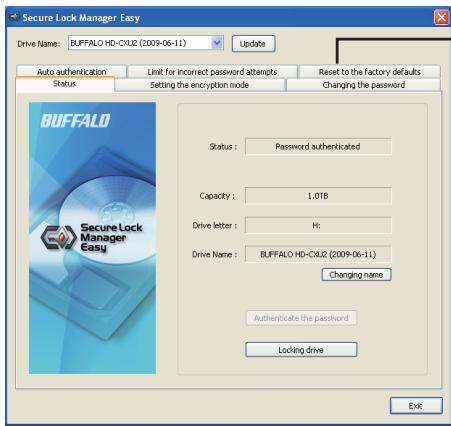
3
"Reset to the factory defaults" (公豎歴歟歟歟歟歟歟歟歟歟歟歟歟歟歟歟歟歟歟歟歟歟歟歟歟歟歟歟歟歟歟歟歟歟歟歟歟歟歟歟歟歟歟歟歟歟歟歟歟歟歟歈)
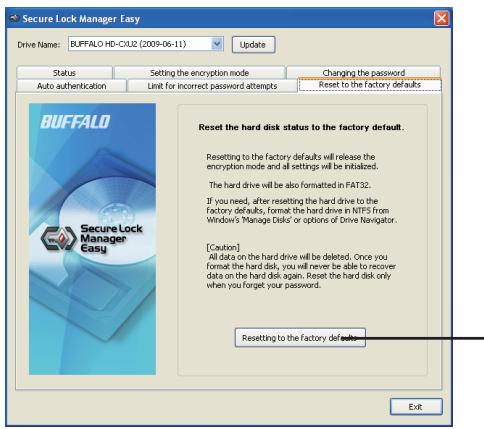
4
"Reset to the factory defaults" (公豎歴歟士其本就以爲原進)
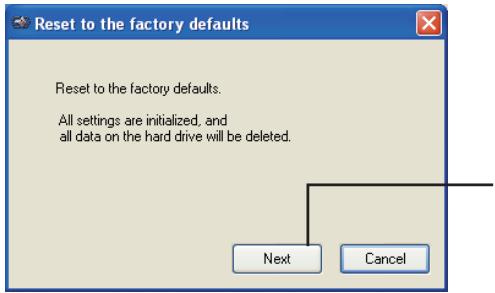
5
"Next" (daum) to kIcklchnni.
哉用的匝士是的,于山
hachd 3raaibr hae jn 100 n 100 100 100 100 100 100 100 100 100 100 100 100 100 100 100 100 100 100 100 100 100 100 100 100 100 10
6 “The hard disk status is now reset to the factory defaults.” (ohm dei stk. 30.2.1.5) 士。
新締終詞白藥賊成。有三德二法,即三法。
Wauunu uuiuuaanu uuuuuaaunuauuauuauuauuauuuuuuuuuuuuuuuuuuuuuuuuuuuuuuuuuuuuuuuuuuuuuuuuuuuuuuuuuuuuuuuuuuuuuuuuuuuuuuuuuuuuuuuuuuuuuuuuuuuuuuuuuuuuuuuuuuuuuuuuuuuuuuuuuuuuuuuuuuuuuuuuuuuuuuuuuuuuuuuuuuuuuuuuuuuuuuuuuuuuuuuuuuuuuuuuuuuUU
- wunnnnnaaannnnaaennnnnnaaennnnnnaaennnnnnaaennnnnnaaennnnnnaaennnnnnaaennnnnnaaennnnnnaaennnnnnaaennnnnnaaennnnnnaaennnnnnaaennnnnnaaennnnnnaaennnnnnaaennnnnnaaennnnnnaaennnnnnaaennnnnnaaennnnnnaaennnnaaennnnnnaaennnnnnaaennnnnnaaennnnnnaaennnnnnaaennnnnnaaennnnnnaaennnnnnaaennnnnnaaennnnnnaaennnnnnaaennnnnnaaennnnnnaaennnnnnaaennnnnnaaennnnnnaaennnnnnaaennnnnnaaennnnnnaaenn
- wu山lqyjwvovnuovnuovnuovnuovnuovnuovnuovnuovnuovnuovnuovnuovnuovnuovnuovnuovnuovnuovnuovnuovnuovnuovnuovnuovnuovnuovnuovnuovnuovnuovnuovnuovnuovnuovnuovnuovnuovnuovnuovnuovnuovnuovnuovnuovnuovnuovnuovnuovnuovnuov\n
*
nLLED uauuunnuu/nuuunnuu uuuu uauu uauu uauu uauu uauu uauu uauu uauu uauu uauu uauu uauu uauu uauu uauu uauu uauu uauu uauu uauu uauu uauu uauu uauu uauu uauu uauu uauu uauu uauu uauu uauu uauu uauuu
* Tnnnnsrnnnnae nnne nnnnne nnnnne nnnnne nnnnne nnnnne nnnnne nnnnne nnnnne nnnnne nnnnne nnnnne nnnnne nnnnne nnnnne nnnnne nnnnne nnnnne nnnnne nnnnne nnnnne nnnnne nnnnne nnnnne nnnnne nnnnne nnnnee
lnuuunnuuunnuuunnuuunnuuunnuuunnuuunnuuunnuuunnuuunnuuunnuuunnuuunnuuunnuuunnuuunnuuunnuuunnuuunnuuunnuuunnuuunnuuunnuuunnuuunnuuunnuuunnuuunnuuunnuuunnuuunnuuunnuuunnuuunvu
* mnnnnae nannnnae nae Macintosh nnnnnae NnneMac
* 1uunununununununununununununununununun
* 20 1uW LED uuuu/uuu
* yuunyuyuyuyuyuyuyuyuyuyuyuyuyuyuyuyuyuyuyuyuyuyuyuyuyuyuyuyuyuyuyuyuyuyuyuyuyuyuyuyuyuyuyuyuyuyuyuyuyuyuyuyuyuyuyuyuyuyuyuyuyuyuyuyuyuyuyuyuyuyuyuyuyuyuyuyuyuyuyuyuyuyuyuyuy
- 陳國林/李國林/周國林/王國林/李國林/王國林/王國林/王國林/王國林/王國林/王國林/王國林/王國林/王國林/王國林/王國林/王國林/王國林/王國林/王國林/王國林/王國林/王國林/王國林/王國林/王國林/王國林/王國林/王國林/王國林/
- MaTurwuu Mac OS 1uWuuWuuuauu MiniStation uauWuuuuuuuuuuuuuuuuuuuuuuuuuuuuuuuuuuuuuuuuuuuuuuuuuuuuuuuuuuuuuuuuuuuuuuuuuuuuuuuuuuuuuuuuuuuuuuuuuuuuuuuuuuuuuuuuuuuuuuuuuuuuuuuuuuuuuuuuuuuuuuuuuuuuuuuuuuuuuuuuuuuuuuuuuuuuuuuuuuuuuuUU
- 陳國華 董明社報 网站 Windows 2017 版本 2.0 版本 2.0 版本 2.0 版本 2.0 版本 2.0 版本 2.0 版本 2.0 版本 2.0 版本 2.0 版本 2.0 版本 2.0 版本 2.0 版本 2.0 版本 2.0 版本 2.0 片
* MiniStation ravvunnuuauuauuauuauuauuauuauuauu uus USB uuuuur MiniStation uauuuvuuaaauuauuauuauuauuauuauu uuuuuu uuuuuu uuuuuu uuuuuu uuuuuu uuuuuu uuuuuu uuuuuu uuuuuu uuuuuu uuuuuu uuuuuu uuuuuu uuuuuu uuuuuu uuuuuu uuuuuu uuuuuu uuuuuu uuuuuu uuuuuu uuuuuu uuuuuu uuuuuu uuuuuu uuuUU
- a#nMiniStation
- aivvivnngwovnuuauuuvnuuauuauuauuauu
- MiniStation USB 1.1 Windows Windows Windows USB
- USB MiniStation USB MiniStation USB 2.0
* nanaaunnnnnae annnnnne NmiStation nannnnnnae nnnee aannnnnnae nnnee nannnnnnae
* nnnnnaeaeeeeee eeeeee eeeee eeeeee eeeee eeeeee eeeeee eeeeee eeeeee eeeeee eeeeee eeeeee eeeeee eeeeee eeeeee eeeeee eeeeee eeeeee eeeeee eeeeee eeeeee eeeeee eeeeee eeeeee eeeeee eeeeee eeeeee eeeeee eeeeee eeeeee eeeeee eeeeee eeeeee eeeeee eeeeee eeeeee eeeeee eeeeee eeeaae
Windows 7/Vista . . . . . . . . . . . . . . . . . . . . . . . . . . . . . . . . . . . . . . . . . . . . . . . . . . . . . . . . . . . . . . . . . . . . . . . . . . . . . . ..
Windows XP. [m] uaiyian [nauwuaayu] SFibn [n] anun
2 n [n] - [uun (uun) - [BUFFALO] - [Secure Lock Manager Easy] - [Secure Lock Manager Easy] Secure Lock Manager Easy

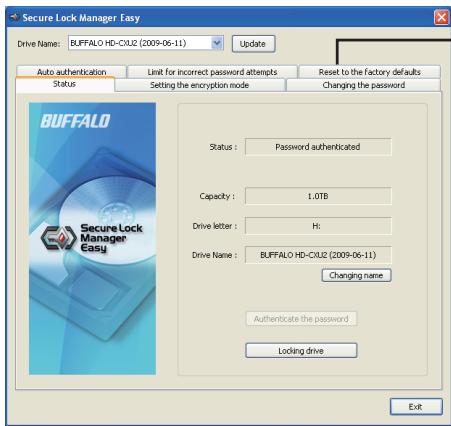
"Reset to the factory defaults" (vuaaunuauuauuauu)
4
1 MiniStation
2 "Utility_HD-PXTU2" u u u u u u u u u u u u u u
3 3
- Windows Vista 10.0.0 Windows XP Professional" "Windows XP Professional" "Windows XP Professional"
4 "nn"
5 nann"n7nnaa
6 1
Secure Lock Manager Easy (Windows 7/Vista/XP)
WwWwWwWwWwWwWwWwWwWwWwWwWwWwWwWwWwWwWwWwWwWwWwWwWwWwWwWwWwWwWwWwWwWwWwWwWwWwWwWwWwWwWwWwWwWwWwWwWwWwW
TurboPC (Windows 7/Vista/XP)
TurboPC wwnnnnnaaannnnnnaaennnnnnnnnnn nnnn nnnn nnnn nnnn nnnn nnnn nnnn nnnn nnnn nnnn nnnn nnnn nnnn nnnn nnnn nnnn nnnn nnnn nnnn nnnn nnnn nnnn nnnn nnnn nnnn nnnn nnnn nnnn nnnn nnnn nnnn nnnn nnnn n nn
TurboCopy (Windows 7/Vista/XP)
TurboCopy
eco Manager (Windows 7/Vista/XP)
eco Manager for HD lnnaaannnnnnae MiniStation lnnaaennnna "aai" waaanrwwwau
Picasa (Windows 7/Vista/XP)
Picasa 2
WuWu: 1
2
* uuuaaBuffalo (www.buffalotech.com) uauayauauauauuuuauuuuuuuuu
Secure Lock Manager Easy
9 (Windows XP/Vista/Windows 7)
9....... (Windows XP/Vista/Windows 7) TurboPC
9 (Windows XP/Vista/Windows 7) TurboCopy
9....... (Windows XP/Vista/Windows 7) JcEco Manager
9....... (Windows XP/Vista/Windows 7) Picasa
- 1.
L
jLJL JUJU USB
aalal aalal alalalalalalalalalalalalalalal
#
aaiiiaaiii
AaBbBbBbBbBbBbBbBbBbBbBbBbBbBbBbBbBbBbBbBbBbBbBbBbBbBbBbBbBbBbBbBbBbBbBbBbBbBbBbBbBbBbBb
:LED) 1
aJL USB
jgssll jgs
"jgssll" j"lulssll" j"lulssll" ggs jgssll jgs kgs
paannnll jgi Jgall Jggi gdl
Jus 1 Jus 1 Jus 1 Jus 1 Jus 1 Jus 1 Jus 1 Jus 1 Jus 1 Jus 1
aalbll jgi gai jgai ai jia
k k 1 (LED) Ua/Alal ball
Jn nnnn nn nnnnnnnnnnnnnnnnnnnnnnnnnnnnnnnnnnnnnnnnnnnnnnnnnnnnnnnnnnnnnnnnnnnnnnnnnnnnnnnnnnnnnnnnnnnnnnnnnnnnnnnnnnnnnnnnnnnnnnnnnnnnnnnnnnnnnnnnnn
A
a 1
a 1 a 1 1 1 1 1 1 1 1 1 1 1 1 1 1 1 1 1 1 1 1 1
Jaa jssss jess sasss. Macintosh ssss sssss sssss
yMac
Jus Jus Jus Jus Jus Jus Jus Jus Jus Jus Jus Jus Jus
. 100
. Mac OS extended NTFS all
gaii i j 100
Jn Jn Jn Jn Jn Jn Jn Jn Jn Jn Jn Jn Jn Jn Jn Jn Jn Jn Jn Jn Jn Jn Jn Jn Jn Jn Jn Jn Jn Jn Jn Jn Jn Jn Jn Jn Jn Jn Jn Jn Jn Jn Jn Jn Jn Jn Jn Jn Jn Jn Jn
- 5
X 1
Jn Jn Jn Jn Jn Jn Jn Jn Jn Jn Jn Jn Jn Jn Jn Jn Jn Jn Jn Jn Jn Jn Jn Jn Jn Jn Jn Jn Jn Jn Jn Jn Jn Jn Jn Jn Jn Jn Jn Jn Jn Jn Jn Jn Jn Jn Jn Jn Jn Jn Jn
BISOS
aai 1 aai jai
J 1 J 1 J 1 J 1 J 1 J 1 J 1 J 1 J 1 J 1 J 1 J 1 J 1 J 1 J 1 J 1 J 1 J 1 J 1 J 1 J 1 J 1 J 1 J 1 J 1 J 1 J 1 J 1 J 1 J 1 J 1 J 1 J 1 J 1 J
J 1 J 1 J 1 J 1 J 1 J 1 J 1 J 1 J 1 J 1 J 1 J 1 J 1 J 1 J 1 J 1 J 1 J 1 J 1 J 1 J 1 J 1 J 1 J 1 J 1 J 1 J 1 J 1 J 1 J 1 J 1 J 1 J 1 J 1 J
A. A 1111"X"GJgJ,USB2.0 MiniStation
J 1
"0j 11 j 11 11 11 11 11 11 11 11 11 11 11 11 11 11 11 11
ailllll llll l [j j]
jg 1 [3] j. [] j[1] .[1]
[0] [0] [0] [0] [0] [0] [0] [0] [0] [0] [0] [0] [0] [0] [0] [0] [0] [0] [0] [0] [0] [0] [0] [0] [0] [0] [0] [0] [0] [0]
0;j 5,1
| الإستعمال الحرفية | الإستعمال | الإستعمال |
| USB Mass Storage ج晗 | ج晗 | Universal Serial Bus |
| BUFFALO HD-PXTU2 USB ج晗 | م ...................................... | Windows 7/Vista |
| BUFFALO Virtual Cdrom USB ج晗 | م ...................................... | Windows XP |
| USB Mass Storage ج晗 | USB ج晗 | Windows XP |
| BUFFALO HD-PXTU2 USB ج晗 | م ...................................... |
| BUFFALO Virtual Cdrom USB ج晗 | م ...................................... |
J 1
A MiniStation
| Mac OS X 12.0 Mac OS X 12.0 | Linux Linux Linux Linux Linux Linux Linux Linux Linux Linux Linux Linux Linux Linux Linux Linux Linux Linux Linux Linux Linux Linux Linux Linux Linux Linux Linux Linux Linux Linux Linux Linux Linux Linux Linux Linux Linux Linux Linux Linux Linux Linux Linux Linux Linux Linux Linux Linux Linux Linux Linux Linux Linux Linux Linux Linux Linux Linux Linux Linux Linux Linux Linux Linux Linux Linux Linux Linux Linux Linux Linux Linux Linux Linux Linux Linux Linux Linux Linux Linux Linux Linux Linux Linux Linux Linux Linux Linux Linux Linux Linux Linux Linux Linux Linux Linux Linux Linux Linux Linux LinuxLinuxLinuxLinuxLinuxLinuxLinuxLinuxLinuxLinuxLinuxLinuxLinuxLinuxLinuxLinuxLinuxLinuxLinuxLinuxLinuxLinuxLinuxLinuxLinuxLinuxLinuxLinuxLinuxLinuxLinuxLinuxLinuxLinuxLinuxLinuxLinuxLinuxLinuxLinuxLinuxLinuxLinuxLinuxLinuxLinuxLinuxLinuxLinuxLinuxLinuxLinuxLinuxLinuxLinuxLinuxLinuxLinuxLinuxLinuxLinuxLinuxLinuxLinuxLinuxLinuxLinuxLinuxLinuxLinuxLinuxLinuxLinuxLinuxLinuxLinuxLinuxLinuxLinuxLinuxLinuxLinuxLinuxLinuxLinuxLinuxLinuxLinuxLinuxLinuxLinuxLinuxLinuxLinuxLinuxLinuxLinuxLinuxLinuxLinuxLinux LinuxLinuxLinuxLinuxLinuxLinuxLinuxLinuxLinuxLinuxLinuxLinuxLinuxLinuxLinuxLinuxLinuxLinuxLinuxLinuxLinuxLinuxLinuxLinuxLinuxLinuxLinuxLinuxLinuxLinuxLinuxLinuxLinuxLinuxLinuxLinuxLinuxLinuxLinuxLinuxLinuxLinuxLinuxLinuxLinuxLinuxLinuxLinuxLinuxLinuxLinuxLinuxLinuxLinuxLinuxLinuxLinuxLinuxLinuxLinuxLinuxLinuxLinuxLinuxLinuxLinuxLinuxLinuxLinuxLinuxLinuxLinuxLinuxLinuxLinuxLinuxLinuxLinuxLinuxLinuxLinuxLinuxLinuxLinuxLinuxLinuxLinuxLinuxLinuxLinuxLinuxLinuxLinuxLinuxLinuxLinuxLinuxLinuxLinux Linux Linux Linux Linux Linux Linux Linux Linux Linux Linux Linux Linux Linux Linux Linux Linux Linux Linux Linux Linux Linux Linux Linux Linux Linux Linux Linux Linux Linux Linux Linux Linux Linux Linux Linux Linux Linux Linux Linux Linux Linux Linux Linux Linux Linux Linux Linux Linux Linux Linux Linux Linux Linux Linux Linux Linux Linux Linux Linux Linux Linux Linux Linux Linux Linux Linux Linux Linux Linux Linux Linux Linux Linux Linux Linux Linux Linux Linux Linux Linux Linux Linux Linux Linux Linux Linux Linux Linux Linux Linux Linux Linux Linux Linux Linux Linux Linux LinuxLinux LinuxLinuxLinuxLinuxLinuxLinuxLinuxLinuxLinuxLinuxLinuxLinuxLinuxLinuxLinuxLinuxLinuxLinuxLinuxLinuxLinuxLinuxLinuxLinuxLinuxLinuxLinuxLinuxLinuxLinuxLinuxLinuxLinuxLinuxLinuxLinuxLinuxLinuxLinuxLinuxLinuxLinuxLinuxLinuxLinuxLinuxLinuxLinuxLinuxLinuxLinuxLinuxLinuxLinuxLinuxLinuxLinuxLinuxLinuxLinuxLinuxLinuxLinuxLinuxLinuxLinuxLinuxLinuxLinuxLinuxLinuxLinuxLinuxLinuxLinuxLinuxLinuxLinuxLinuxLinuxLinuxLinuxLinuxLinuxLinuxLinuxLinuxLinuxLinuxLinuxLinuxLinuxLinuxLinuxLinuxLinuxLinuxLinux Linux LinuxLinux Linux Linux Linux Linux Linux Linux Linux Linux Linux Linux Linux Linux Linux Linux Linux Linux Linux Linux Linux Linux Linux Linux Linux Linux Linux Linux Linux Linux Linux Linux Linux Linux Linux Linux Linux Linux Linux Linux Linux Linux Linux Linux Linux Linux Linux Linux Linux Linux Linux Linux Linux Linux Linux Linux Linux Linux Linux Linux Linux Linux Linux Linux Linux Linux Linux Linux Linux Linux Linux Linux Linux Linux Linux Linux Linux Linux Linux Linux Linux Linux Linux Linux Linux Linux Linux Linux Linux Linux Linux Linux Linux Linux Linux Linux Linux Linux Linux LinuxinuxLinuxLinuxLinuxLinuxLinuxLinuxLinuxLinuxLinuxLinuxLinuxLinuxLinuxLinuxLinuxLinuxLinuxLinuxLinuxLinuxLinuxLinuxLinuxLinuxLinuxLinuxLinuxLinuxLinuxLinuxLinuxLinuxLinuxLinuxLinuxLinuxLinuxLinuxLinuxLinuxLinuxLinuxLinuxLinuxLinuxLinuxLinuxLinuxLinuxLinuxLinuxLinuxLinuxLinuxLinuxLinuxLinuxLinuxLinuxLinuxLinuxLinuxLinuxLinuxLinuxLinuxLinuxLinuxLinuxLinuxLinuxLinuxLinuxLinuxLinuxLinuxLinuxLinuxLinuxLinuxLinuxLinuxLinuxLinuxLinuxLinuxLinuxLinuxLinuxLinuxLinuxLinuxLinuxLinuxLinuxLinuxLinuxLinuxLinuxOSXOSOSXOSOSXOSOSXOSOSXOSOSXOSOSXOSOSXOSOSXOSOSXOSOSXOSOSXOSOSXOSOSXOSOSXOSOSXOSOSXOSOSXOSOSXOSOSXOSOSXOSOSXOSOSXOSOSXOSOSXOSOSXOSOSXOSOSXOSOSXOSOSXOSOSXOSOSXOSOSXOSOSXOS(OS)OS(OS)OS(OS)OS(OS)OS(OS)OS(OS)OS(OS)OS(OS)OS(OS)OS(OS)OS(OS)OS(OS)OS(OS)OS(OS)OS(OS)OS(OS)OS(OS)OS(OS)OS(OS)OS(OS)OS(OS)OS(OS)OS(OS)OS(OS)OS(OS)OS(OS)OS(OS)OS(OS)OS(OS)OS(OS)OS(OS)OS(OS)OS(OS)OS(OS)OSTSOSTSOSTSOSTSOSTSOSTSOSTSOSTSOSTSOSTSOSTSOSTSOSTSOSTSOSTSOSTSOSTSOSTSOSTSOSTSOSTSOSTSOSTSOSTSOSTSOSTSOSTSOSTSOSTSOSTSOSTSOSTSOSTSOSTSOSTSOSTSOSTSOSTSOSTSOSTSOSTSOSTSOSTSOSTSOSTSOSTSOSTSOSTSOSTSOSTSOSTsOSOSOSOSOSOSOSOSOSOSOSOSOSOSOSOSOSOSOSOSOSOSOSOSOSOSOSOSOSOSOSOSOSOSOSOSOSOSOSOSOSOSOSOSOSOSOSOSOSOSOSOSOSOSOSOSOSOSOSOSOSOSOSOSOSOSOSOSOSOSOSOSOSOSOSOSOSOSOSOSOSOSOSOSOSOSOSOSOSOSOSOSOSOSOSOSOSOSOSOS(OS)OS(OS)OS(OS)OS(OS)OS(OS)OS(OS)OS(OS)OS(OS)OS(OS)OS(OS)OS(OS)OS(OS)OS(OS)OS(OS)OS(OS)OS(OS)OS(OS)OS(OS)OS(OS)OS(OS)OS(OS)OS(OS)OS(OS)OS(OS)OS(OS)OS(OS)OS(OS)OS(OS)OS(OS)OS(OS)OS(OS)OS(OS)OS(OS)osOSOSOSOSOSOSOSOSOSOSOSOSOSOSOSOSOSOSOSOSOSOSOSOSOSOSOSOSOSOSOSOSOSOSOSOSOSOSOSOSOSOSOSOSOSOSOSOSOSOSOSOSOSOSOSOSOSOSOSOSOSOSOSOSOSOSOSOSOSOSOSOSOSOSOSOSOSOSOSOSOSOSOSOSOSOSOSOSOSOSOSOSOSOSOSOSOSOSOSOSTSOSTSOSTSOSTSOSTSOSTSOSTSOSTSOSTSOSTSOSTSOSTSOSTSOSTSOSTSOSTSOSTSOSTSOSTSOSTSOSTSOSTSOSTSOSTSOSTSOSTSOSTSOSTSOSTSOSTSOSTSOSTSOSTSOSTSOSTSOSTSOSTSOSTSOSTSOSTSOSTSOSTSOSTSOSTSOSTSOSTSOSTSOSTSOSTSOSTSSOSTSOSTSOSTSOSTSOSTSOSTSOSTSOSTSOSTSOSTSOSTSOSTSOSTSOSTSOSTSOSTSOSTSOSTSOSTSOSTSOSTSOSTSOSTSOSTSOSTSOSTSOSTSOSTSOSTSOSTSOSTSOSTSOSTSOSTSOSTSOSTSOSTSOSTSOSTSOSTSOSTSOSTSOSTSOSTSOSTSOSTSOSTSOSTSOSTSOSTSFOSOSOSOSOSOSOSOSOSOSOSOSOSOSOSOSOSOSOSOSOSOSOSOSOSOSOSOSOSOSOSOSOSOSOSOSOSOSOSOSOSOSOSOSOSOSOSOSOSOSOSOSOSOSOSOSOSOSOSOSOSOSOSOSOSOSOSOSOSOSOSOSOSOSOSOSOSOSOSOSOSOSOSOSOSOSOSOSOSOSOSOSOSOSOSOSOSOSOSASOSASOSASOSASOSASOSASOSASOSASOSASOSASOSASOSASOSASOSASOSASOSASOSASOSASOSASOSASOSASOSASOSASOSASOSASOSASOSASOSASOSASOSASOSASOSASOSASOSASOSASOSASOSASOSASOSASOSASOSASOSASOSASOSASOSASOSASOSASOSASOSASOSASOSAOSASOSASOSASOSASOSASOSASOSASOSASOSASOSASOSASOSASOSASOSASOSASOSASOSASOSASOSASOSASOSASOSASOSASOSASOSASOSASOSASOSASOSASOSASOSASOSASOSASOSASOSASOSASOSASOSASOSASOSASOSASOSASOSASOSASOSASOSASOSASOSASOSASOSASSOASOSASOSASOSASOSASOSASOSASOSASOSASOSASOSASOSASOSASOSASOSASOSASOSASOSASOSASOSASOSASOSASOSASOSASOSASOSASOSASOSASOSASOSASOSASOSASOSASOSASOSASOSASOSASOSASOSASOSASOSASOSASOSASOSASOSASOSASOSASOSASOSASOSASASOSASOSASOSASOSASOSASOSASOSASOSASOSASOSASOSASOSASOSASOSASOSASOSASOSASOSASOSASOSASOSASOSASOSASOSASOSASOSASOSASOSASOSASOSASOSASOSASOSASOSASOSASOSASOSASOSASOSASOSASOSASOSASOSASOSASOSASOSASOSASOSASOSASOKSOSKKSOKSOKSKKSOKKSOKKSOKKSOKKSOKKSOKKSOKKSOKKSOKKSOKKSOKKSOKKSOKKSOKKSOKKSOKKSOKKSOKKSOKKSOKKSOKKSOKKSOKKSOKKSOKKSOKKSOKKSOKKSOKKSOKKSOKKSOKKSOKKSOKKSOKKSOKKSOKKSOKKSOKKSOKKSOKKSOKKSOKKSOKKSOKKSOKKSOKKSOKKSOKKSOKKS OKSOKSOKSOKKSOKKSOKKSOKKSOKKSOKKSOKKSOKKSOKKSOKKSOKKSOKKSOKKSOKKSOKKSOKKSOKKSOKKSOKKSOKKSOKKSOKKSOKKSOKKSOKKSOKKSOKKSOKKSOKKSOKKSOKKSOKKSOKKSOKKSOKKSOKKSOKKSOKKSOKKSOKKSOKKSOKKSOKKSOKKSOKKSOKKSOKKSOKKSOKKSOKKKSOKKSOKKSOKKSOKKSOKKSOKKSOKKSOKKSOKKSOKKSOKKSOKKSOKKSOKKSOKKSOKKSOKKSOKKSOKKSOKKSOKKSOKKSOKKSOKKSOKKSOKKSOKKSOKKSOKKSOKKSOKKSOKKSOKKSOKKSOKKSOKKSOKKSOKKSOKKSOKKSOKKSOKKSOKKSOKKSOKKSOKKSOKKSOKKSOKKSokSOKSOKSOKSOKSOKSOKSOKSOKSOKSOKSOKSOKSOKSOKSOKSOKSOKSOKSOKSOKSOKSOKSOKSOKSOKSOKSOKSOKSOKSOKSOKSOKSOKSOKSOKSOKSOKSOKSOKSOKSOKSOKSOKSOKSOKSOKSOKSOKSOKSOKSokSOKSOKSOKSOKSOKSOKSOKSOKSOKSOKSOKSOKSOKSOKSOKSOKSOKSOKSOKSOKSOKSOKSOKSOKSOKSOKSOKSOKSOKSOKSOKSOKSOKSOKSOKSOKSOKSOKSOKSOKSOKSOKSOKSOKSOKSOKSOKSOKSOKsOKsOKsOKsOKsOKsOKsOKsOKsOKsOKsOKsOKsOKsOKsOKsOKsOKsOKsOKsOKsOKsOKsOKsOKsOKsOKsOKsOKsOKsOKsOKsOKsOKsOKsOKsOKsOKsOKsOKsOKsOKsOKsOKsOKsOKsOKsOKsOKsOKsOKgOSKgOSKgOSKgOSKgOSKgOSKgOSKgOSKgOSKgOSKgOSKgOSKgOSKgOSKgOSKgOSKgOSKgOSKgOSKgOSKgOSKgOSKgOSKgOSKgOSKgOSKgOSKgOSKgOSKgOSKgOSKgOSKgOSKgOSKkOSKkOSKkOSKkOSKkOSKkOSKkOSKkOSKkOSKkOSKkOSKkOSKkOSKkOSKkOSKkOSKkOSKkOSKkOSKkOSKkOSKkOSKkOSKkOSKkOSKkOSKkOSKkOSKkOSKkOSKkOSKkOSKkOSKkIOSKkOSKkIOSKkIOSKkIOSKkIOSKkIOSKkIOSKkIOSKkIOSKkIOSKkIOSKkIOSKkIOSKkIOSKkIOSKkIOSKkIOSKkIOSKkIOSKkIOSKkIOSKkIOSKkIOSKkIOSKkIOSKkIOSKkIOSKkIOSKkIOSKkIOSKkIOSKkIOSKkIOSKkIOSKkIOSKKosososososososososososososososososososososososososososososososososososososososososososososososososososososososososososososososososososososososososososososososososososososososososososososososososososos os OS OS OS OS OS OS OS OS OS OS OS OS OS OS OS OS OS OS OS OS OS OS OS OS OS OS OS OS OS OS OS OS OS OS OS OS OS OS OS OS OS OS OS OS OS OS OS OS OS OS OS OS OS OS OS OS OS OS OS OS OS OS OS OS OS OS OS OS OS OS OS OS OS OS OS OS OS OS OS OS OS OS OS OS OS OS OS OS OS OS OS OS OS OS OS OS OS OS OS OS Os OS OS OS OS OS OS OS OS OS OS OS OS OS OS OS OS OS OS OS OS OS OS OS OS OS OS OS OS OS OS OS OS OS OS OS OS OS OS OS OS OS OS OS OS OS OS OS OS OS OS OS OS OS OS OS OS OS OS OS OS OS OS OS OS OS OS OS OS OS OS OS OS OS OS OS OS OS OS OS OS OS OS OS OS OS OS OS OS OS OS OS OS OS OS OS OS OS OS OS(OS) OS OS OS OS OS OS OS OS OS OS OS OS OS OS OS OS OS OS OS OS OS OS OS OS OS OS OS OS OS OS OS OS OS OS OS OS OS OS OS OS OS OS OS OS OS OS OS OS OS OS OS OS OS OS OS OS OS OS OS OS OS OS OS OS OS OS OS OS OS OS OS OS OS OS OS OS OS OS OS OS OS OS OS OS OS OS OS OS OS OS OS OS OS OS OS OS OS OS OS IOS IOS IOS IOS IOS IOS IOS IOS IOS IOS IOS IOS IOS IOS IOS IOS IOS IOS IOS IOS IOS IOS IOS IOS IOS IOS IOS IOS IOS IOS IOS IOS IOS IOS IOS IOS IOS IOS IOS IOS IOS IOS IOS IOS IOS IOS IOS IOS IOS IOS IOS IOS IOS IOS IOS IOS IOS IOS IOS IOS IOS IOS IOS IOS IOS IOS IOS IOS IOS IOS IOS IOS IOS IOS IOS IOS IOS IOS IOS IOS IOS IOS IOS IOS IOS IOS IOS IOS IOS IOS IOS IOS IOS IOS IOS IOS IOS IOS IOS IOS iOS IOS IOS IOS IOS IOS IOS IOS IOS IOS IOS IOS IOS IOS IOS IOS IOS IOS IOS IOS IOS IOS IOS IOS IOS IOS IOS IOS IOS IOS IOS IOS IOS IOS IOS IOS IOS IOS IOS IOS IOS IOS IOS IOS IOS IOS IOS IOS IOS IOS IOS IOS IOS IOS IOS IOS IOS IOS IOS IOS IOS IOS IOS IOS IOS IOS IOS IOS IOS IOS IOS IOS IOS IOS IOS IOS IOS IOS IOS IOS IOS IOS IOS IOS IOS IOS IOS IOS IOS IOS IOS IOS IOS IOS IOS IOS IOS IOS IOS IOS DOS DOS DOS DOS DOS DOS DOS DOS DOS DOS DOS DOS DOS DOS DOS DOS DOS DOS DOS DOS DOS DOS DOS DOS DOS DOS DOS DOS DOS DOS DOS DOS DOS DOS DOS DOS DOS DOS DOS DOS DOS DOS DOS DOS DOS DOS DOS DOS DOS DOS DOS DOS DOS DOS DOS DOS DOS DOS DOS DOS DOS DOS DOS DOS DOS DOS DOS DOS DOS DOS DOS DOS DOS DOS DOS DOS DOS DOS DOS DOS DOS DOS DOS DOS DOS DOS DOS DOS DOS DOS DOS DOS DOS DOS DOS DOS DOS DOS DOS DOS OS OS OS OS OS OS OS OS OS OS OS OS OS OS OS OS OS OS OS OS OS OS OS OS OS OS OS OS OS OS OS OS OS OS OS OS OS OS OS OS OS OS OS OS OS OS OS OS OS OS OS OS OS OS OS OS OS OS OS OS OS OS OS OS OS OS OS OS OS OS OS OS OS OS OS OS OS OS OS OS OS OS OS OS OS OS OS OS OS OS OS OS OS OS OS OS OS OS OS.OS.OS.OS.OS.OS.OS.OS.OS.OS.OS.OS.OS.OS.OS.OS.OS.OS.OS.OS.OS.OS.OS.OS.OS.OS.OS.OS.OS.OS.OS.OS.OS.OS.OS.OS.OS.OS.OS.OS.OS.OS.OS.OS.OS.OS.OS.OS.OS.OS.OS.OS.OS.OS.OS.OS.OS.OS.OS.OS.OS.OS.OS.OS.OS.OS.OS.OS.OS.OS.OS.OS.OS.OS.OS.OS.OS.OS.OS.OS.OS.OS.OS.OS.OS.OS.OS.OS.OS.OS.OS.OS.OS.OS.OS.OS.OS.OS.OS.OS.OS(OS) |
AiiAii:V
Aiiolj
ps s.qs x : x
Ji 1
Aliai:MiniStation
Mac
g 1
aaii aai iai jaiy ciui yiy gao yiy juyu yuy juy
y 1
Mac jg Secure Lock Manager Easy
eaii iia jie 1c niiil dcl
eaiaii iie 1iie 1iie 1iie 1iie 1iie 1iie 1iie 1iie
FAT 32 dallal yd aol jdt alj n qaaat sdo! pss eallal lgl neeill sdo!
y 4 1 2 y
iilll jilge jlls! Mac OS extended .NTFS cdall
Windows
1
.Windows Vista 1
[Secure Lock Manager Easy]
. Secure Lock Manager Easy
"Reset to the factory defaults" 35

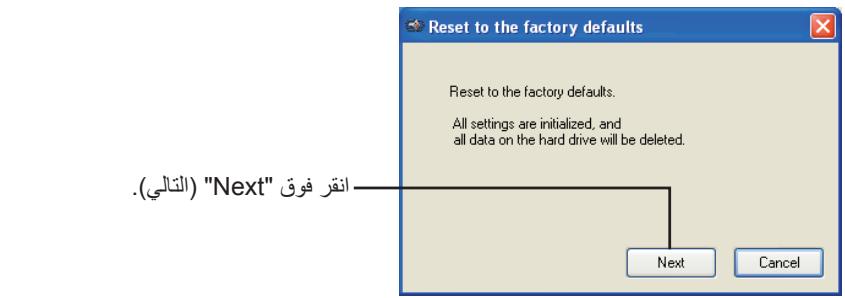

aillil gie aolal lalal
e 1
a a a a a a a a a a a a a a a a
"OK" gaj jil."gusall lal jil 1c jll u jll a!jll jll
.()
a a a a a a a a a a a a a a a a a a a a a a a a a a
A
C
a. dRivcNagator
JMiniStation
"G" "Utility_HD-PXTU2"
"DriveNavi.exe"
.DriveNavigator
"q"Windows Vista 111111111111111111111111111
"1 1
"
"
ailll lal
Secure Lock Manager Easy (Windows XP/Vista/Windows 7)
aallll 1 1 1 1 1 1 1 1 1 1 1 1 1 1 1 1 1 1 1 1 1 1 1 1 1 1
Jusua Jusua Jusua Jusua Jusua Jusua Jusua Jusua Jusua Jusua Jusua Jusua Jusua Jusua
(Windows XP/Vista/Windows 7) TurboPC
MiniStation 1
(Windows XP/Vista/Windows 7) TurboCopy
TuroCopy
(Windows XP/Vista/Windows 7) JcEco Manager