
PD7640 - Digital scale SOLAC - Free user manual and instructions
Find the device manual for free PD7640 SOLAC in PDF.


| Product type | Electronic scale with bioelectrical impedance analysis (BIA) |
| Brand and model | SOLAC PD7640 |
| Maximum capacity | 150 kg |
| Precision | 100 g |
| Measurement units | kg / lb / st (selectable) |
| Analysis technology | Bioelectrical impedance analysis (BIA) for body fat and water percentage |
| Main functions | Traditional weighing, body fat measurement, water content measurement, user memories |
| Number of user memories | 4 users (P1 to P4) |
| Weighing history | Last 5 weighings per user |
| Display | Digital screen showing weight, body fat percentage, water content, age, height, gender, user number |
| Power supply | 1 lithium battery (included) |
| Auto-off | Yes, after 10 seconds of inactivity |
| Turn-on | By pressing on the surface or button |
| Safety | Do not use with a pacemaker or other internal medical device; do not use if pregnant, for children under 10 or over 80; avoid water and wet surfaces |
| Maintenance and cleaning | Clean with a damp cloth and a mild detergent; dry thoroughly; avoid abrasive products and cosmetics |
| Spare parts and repairability | Entrust to an approved Technical Support Service for inspection and repair; do not throw away, recycle |
Frequently Asked Questions - PD7640 SOLAC
User questions about PD7640 SOLAC
0 question about this device. Answer the ones you know or ask your own.
Ask a new question about this device
Download the instructions for your Digital scale in PDF format for free! Find your manual PD7640 - SOLAC and take your electronic device back in hand. On this page are published all the documents necessary for the use of your device. PD7640 by SOLAC.
USER MANUAL PD7640 SOLAC
Solac is a registered Trade Mark
01/07
5- 9 • ESPAÑOL
10-14 • ENGLISH
15-19 • FRANÇAIS
20-24 • DEUTSCH
25-29 • PORTUGUÊS
30-34 • ITALIANO
35-39 • NEDERLANDS
40-44 • ČESKY
45-49 • POLSKA
50-54 • SLOVENSKY
55-60 • MAGYAR
61-65 • българск
66-70 • HRVATSKA
71-75 • ROMANA

Fig. 1


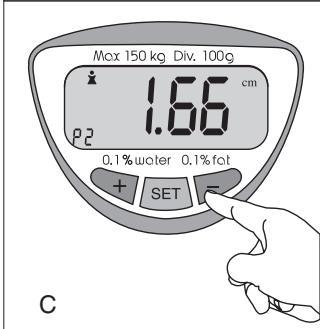

Fig. 3

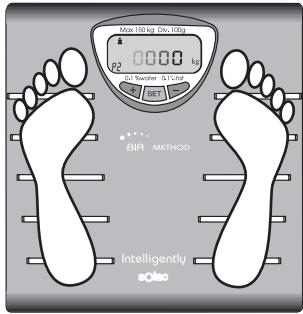
Fig. 4


10"
INTRODUCCIÓN:
Obesity, in other words, abnormal absorption of body fat, is a known risk for people's health: high blood pressure, heart disease, diabetes, etc. Less serious problems can also be caused by obesity, such as sleep apnoea, sleepiness during the day, etc. With these scales, you can now check your weight and body fat percentage without leaving your home.
These scales use one of the most reliable methods for analysing body composition: BIA (Bioelectrical Impedance Analysis). This system measures the resistance of the body to a small, harmless electrical current, which is carried up through the legs by water and other fluids. The value of this resistance is greater in fatty tissue.
When comparing the impedance with certain information, such as height, weight, age and sex, we can calculate the percentage of body fat.
REFERENCE TABLES:
1.- Body fat percentage:
Women:
| Age | Thin | Under-weight | Normal | Over-weight | Obese |
| 6-15 | < 8 | 8-15 | 15-22 | 22-29 | > 29 |
| 16-39 | < 13 | 13-20 | 20-27 | 27-34 | > 34 |
| 40-55 | < 14 | 14-21 | 21-28 | 28-35 | > 35 |
| 56-75 | < 15 | 15-22 | 22-29 | 29-36 | > 36 |
| Athlete^* | 15-25 |
Men:
| Age | Thin | Under-weight | Normal | Over-weight | Obese |
| 6-15 | < 8 | 8-15 | 15-22 | 22-29 | > 29 |
| 16-39 | < 10 | 10-17 | 17-24 | 24-31 | > 31 |
| 40-55 | < 11 | 11-18 | 18-25 | 25-32 | > 32 |
| 56-75 | < 12 | 12-19 | 19-26 | 26-33 | > 33 |
| Athlete^* | 3-15 |
Athlete: any person, aged between 15 and 50, who is involved in intense physical activity approximately 12 hours a week and who has a resting heart rate of approximately 60 beats per minute or less.
2. Body water percentage:
| Women | Men | |
| Children | 58-70 | 60-73 |
| Adults | 42-61 | 46-66 |
| Athletes | 56-71 | 60-73 |
Note: these data were gained by sampling. They are for reference purposes only. If you have any question about the results, please consult your doctor.
IMPORTANT NOTICE:
- Do not use the scales if you have a medical device implanted, such as a pacemaker.
- Please read the instructions for use carefully before using your bathroom scales.
• These scales have been designed to weigh people and should not be used for commercial or industrial purposes. - If you stop using the scales, do not throw them in the bin. To prevent harm to the environment, take the scales to an authorised technical service to remove the lithium battery.
• These scales must not be used near flammable fumes.
• These scales must not be used instead of professional diagnosis apparatus. Please consult your doctor. - This appliance must not be placed underwater.
- The maximum capacity of the scales is 150 kg. To avoid damage, never try to weigh yourself if you are over this weight.
- Try to distribute your weight over the scales in the same way each time you weigh yourself in order to ensure consistent results.
- Weigh yourself at approximately the same time each day. Food, liquids and your level of activity make your weight vary during the day.
- For more precise results, weigh yourself naked. The average weight of clothes, including shoes, is usually 1-2.5 kg for women and 2.5-3.5 kg for men.
- If you notice any malfunction in the scales, take them to an Authorised Technical Service shop for inspection and repair.
- Do not use the scales with wet feet or when the surface is wet, since you could slip.
- We do not recommend its use during pregnancy, athletes that train intensively during more than 10 hours a week or children.
- This device is not calibrated for children below the age of ten or people above the age of 80.

MAIN COMPONENTS: (FIG. 1)
- SET Button: start, menu selection and selection confirmation.
- "+" Button: start and moving up the menu.
- "-" Button: moving down the menu.
6.- Screen (Fig. 2):
- Weight
- unit of measurement
- height
- age
- fat percentage
- water percentage
- man
- woman
- user number
OPERATION:
- Before using your scales for the first time, remove the plastic cover. Open the battery's compartment and remove the protection. Inside the battery compartment, there is a selector that can be used to choose the measurement unit Move the selector to the desired measurement unit (Kg / Lb/St).
- Place the scales on a smooth surface. A hard surface gives greater precision. If you place the scales on a surface that is too soft, such as a rug, the folds may affect the precision of the weight shown.
- To start the scales, tap the surface with your foot, or press any key.
- Wait until "0.0" is displayed on the screen.
TRADITIONAL WEIGHING:
- To start the scales, tap the surface with your foot, or press any key.
- Wait until "0.0" is displayed on the screen.
- Stand on the scales whenever "0.0" appears on the screen. Stay standing on the scales until your weight appears. Your stabilised weight will blink thrice.
Note: if you do not wait before getting on the scales, an error will occur. If this happens, get off the scales, wait for them to turn off and start again.
BIA ANALYSIS METHOD:
• To measure your body fat and water levels, it is necessary for you first to enter some personal data. The scales have a 4-unit memory so that you do not have
to perform this operation every time you want to use the scales; every user can record his/her information making it more convenient to use the scales.
Fig. 3
1.- Press the SET button. The user number will come up on the screen and flash. Press the "+" or "-" buttons until you reach your user number (P1, P2, P3 or P4).
It you are using the system for the first time, select a free user number and use the same number the next times you use the scales.
Confirm the selection by pressing SET.
2.- Use the "+" and "-" buttons to select your gender. Confirm the selection by pressing SET.
3.- Enter your age with the "+" and "-" buttons. Confirm the selection by pressing the SET button.
4.- Enter your height with the "+" and "-" buttons. Confirm the selection by pressing the SET button.
- The data entered will blink before being recorded and they will be stored in the memory for future measurements.
- The scales will switch off if no buttons are pressed for 10 seconds.
WEIGHING WITH BIA ANALYSIS
- To start the scales, tap the surface with your foot, or press any key.
- Wait until "0.0" is displayed on the screen.
- Stand on the scales whenever "0.0" appears on the screen. Stay standing on the scales until your weight appears. During the weighing process, your feet must be on the metallic lines.
- After displaying your weight, an "o" will move from left to right. The scales will be carrying out the bio-magnetic impedance analysis, which will calculate your body's fat and water percentage. Please wait and do not get off the scales.
- After completing the analysis, the screen will display the body water and fat values, storing them in the user memory.
- Next, the screen will display an "o" moving from left to right, press the SET button (You have 5 seconds to do so).
- A number will start to flash on the screen (1-5). Press + or - to select the desired memory bank and press SET to confirm the selection. The memory banks that can be selected correspond to the last weights obtained by the user who has carried out the BIA analysis.
- The screen will display all data in your personal memory: weight, percentage body water and fat.
- To assess the results, see the "Reference Tables" section.
- If you used a user number, the screen will show the information from the last time you weighed yourself. This information will be displayed every time you use your user number. You can always request the data for the five last times you weighed yourself, as described in point 7 in this section.
• These scales turn off automatically after ten seconds without use.
POSSIBLE ERRORS:
- "Lo": Low battery. Please replace the batteries.
- "Err2%": body fat percentage error. Make sure you are standing barefoot in the right position and that the surface of the scales is dry.
- "OL": weight overload. The weight exceeds the capacity of the scales (max.: 150Kg)
MAINTENANCE:
- To avoid damage, ensure that the scales do not come into contact with cosmetics or bathroom liquids.
• To clean them, use a damp cloth and a gentle detergent. Dry the appliance carefully, since moisture could affect the internal parts of the scales. Do not use abrasive cleaning agents as they may damage the display.
TROUBLESHOOTING
- Ensure that the batteries are in place.
- Check that you have selected the correct weight measurement unit.
- Ensure that the scales is on a flat surface and that it does not touch the wall.
- Do not get on the scales before the screen displays "0.0".

CAUTION!: When you want to dispose of the appliance, NEVER throw it in the rubbish bin. Take it to your nearest CLEAN POINT or the waste collection centre closest to your home for processing. You will thus be helping to take care of the environment.
INTRODUCTION :
PESÉE AVEC ANALYSE BIA
VÁŽENÍ S BIA ANALÝZOU
VÁŽENIE S ANALÝZOU BIA


- INTRODUCCIÓN:
- REFERENCE TABLES:
- 1.- Body fat percentage:
- Body water percentage:
- IMPORTANT NOTICE:
- MAIN COMPONENTS: (FIG. 1)
- OPERATION:
- TRADITIONAL WEIGHING:
- BIA ANALYSIS METHOD:
- Fig. 3
- WEIGHING WITH BIA ANALYSIS
- POSSIBLE ERRORS:
- MAINTENANCE:
- TROUBLESHOOTING
- INTRODUCTION :
- PESÉE AVEC ANALYSE BIA
- VÁŽENÍ S BIA ANALÝZOU
- VÁŽENIE S ANALÝZOU BIA
Brand : SOLAC
Model : PD7640
Category : Digital scale