
GS-108B - Network switch ZYXEL - Free user manual and instructions
Find the device manual for free GS-108B ZYXEL in PDF.



| Product Type | Gigabit Unmanaged Network Switch |
| Model | GS-108B |
| Brand | ZYXEL |
| Number of Ports | 8 RJ-45 10/100/1000 Mbps Ports |
| Main Features | Auto-negotiation, Auto-MDIX, IEEE 802.3x Flow Control, Store-and-Forward |
| Power Supply | External AC Adapter 12V DC / 1A |
| Power Consumption | 6.12 Watts max |
| LED Indicators | PWR (power), LNK/ACT (per port) |
| Dimensions (W x D x H) | 154.5 x 85 x 26 mm |
| Operating Temperature | 0°C to 40°C |
| Operating Humidity | 10% to 90% (non-condensing) |
| Standards | IEEE 802.3 10BASE-T, IEEE 802.3u 100BASE-TX, IEEE 802.3ab Gigabit Ethernet |
| Safety and Compliance | FCC Class A, CE |
| Maintenance and Cleaning | Clean with a soft, dry cloth. Do not use abrasive or liquid cleaners. |
| Installation | Place on a flat, stable surface. Do not block ventilation openings. |
Frequently Asked Questions - GS-108B ZYXEL
User questions about GS-108B ZYXEL
0 question about this device. Answer the ones you know or ask your own.
Ask a new question about this device
Download the instructions for your Network switch in PDF format for free! Find your manual GS-108B - ZYXEL and take your electronic device back in hand. On this page are published all the documents necessary for the use of your device. GS-108B by ZYXEL.
USER MANUAL GS-108B ZYXEL
Copyright © 2008. All rights reserved.
1 Introduction
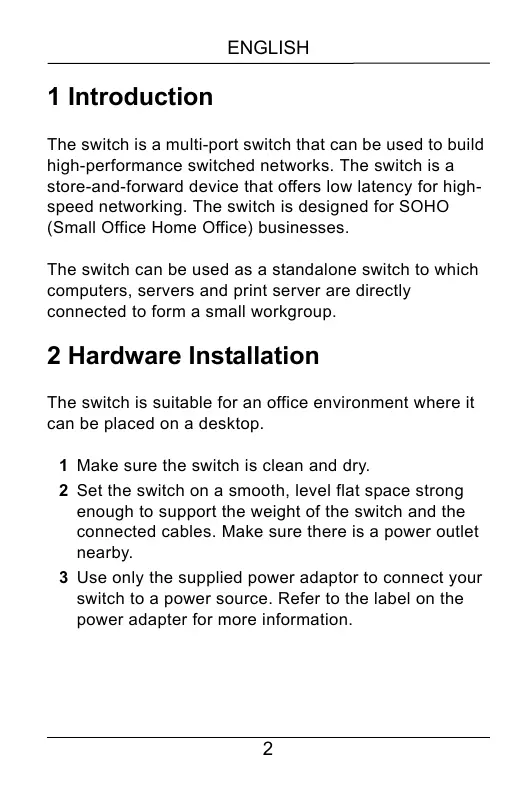
The switch is a multi-port switch that can be used to build high-performance switched networks. The switch is a store-and-forward device that offers low latency for high-speed networking. The switch is designed for SOHO (Small Office Home Office) businesses.
The switch can be used as a standalone switch to which computers, servers and print server are directly connected to form a small workgroup.
2 Hardware Installation
The switch is suitable for an office environment where it can be placed on a desktop.
1 Make sure the switch is clean and dry.
2 Set the switch on a smooth, level flat space strong enough to support the weight of the switch and the connected cables. Make sure there is a power outlet nearby.
3 Use only the supplied power adaptor to connect your switch to a power source. Refer to the label on the power adapter for more information.

Do not block the ventilation holes.
3 Hardware Connection
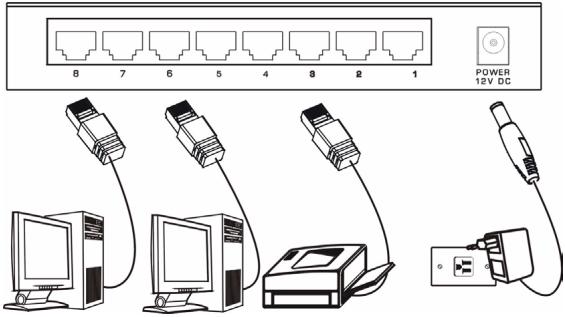
The power and the Ethernet ports are located on the rear panel.
3.1 Power Connection
Connect one end of the supplied power adaptor to the power port on the rear panel of the switch and the other end to the appropriate power source. The PWR LED turns on.
3.2 RJ-45 Auto-negotiating Ports
The switch comes with 5 or 8 10/100/1000M RJ-45 ports depending on the model of your switch. The auto-negotiation feature allows the switch to detect the speed of incoming transmission and adjust appropriately without manual intervention. It allows data transfers of 10 Mbps, 100 Mbps or 1000 Mbps in either half-duplex or full-duplex mode depending on your Ethernet network.
3.3 Auto-crossover Ethernet Ports
All ports are auto-crossover, that is auto-MDIX ports (Media Dependent Interface Crossover), so you may use either a straight-through Ethernet cable or crossover Ethernet cable for all Ethernet port connections. Autocrossover ports automatically sense whether they need to function as crossover or straight ports, so crossover cables can connect both computers and switches/hubs.
Refer to the Product Specifications section for the types of network cable used for the different connection speeds.
3.4 Front Panel LEDs
The LEDs on the front panel indicate the real-time status of the switch.


| LED | COLOR | STATUS | DESCRIPTION |
| PWR | Green | On | The switch is on and receiving power. |
| Off | The switch is not receiving power. | ||
| LNK/ACT | Green | On | The port is connected to an Ethernet network. |
| Blinking | The port is receiving or transmitting data. | ||
| Off | The port is not connected to an Ethernet network. |
4 Product Specification
| Standard | IEEE 802.3 10BASE-T Ethernet IEEE 802.3u 100BASE-TX Fast Ethernet IEEE 802.3ab Gigabit Ethernet IEEE802.3x Full Duplex Operation and Flow Control |
| Protocol | CSMA/CD |
| Technology | Store-and-Forward switching architecture |
| Transfer Rate | 14,880 pps for 10Mbps 148,800 pps for 100Mbps 488,000 pps for 1000Mbps |
| Connector | 5/8 Gigabit Copper: RJ-45 Auto-MDIX on all ports |
| MAC Address | GS-105B: 1K MAC address table GS-108B: 8K MAC address table |
| Memory Buffer | GS-105B: 104K byte GS-108B: 144K byte |
| Network Cable (Up to 100m or 328ft) | 10BASE-T: 100W 2-pair UTP/STP Cat. 3, 4, 5 100BASE-TX: 100W 2-pair UTP/STP Cat. 5 Gigabit Copper: 100W 4-pair UTP/STP Cat. 5 |
| Backplane | GS-105B: 10Gbps GS-108B: 16Gbps |
| LED | Per port: LNK/ACT Per unit: PWR |
| Power Supply | GS-105B: External power DC 5V/1A GS-108B: External power DC 12V/1A |
| Power Consumption | GS-105B: 3.7 Watt (maximum) GS-108B: 6.12 Watt (maximum) |
| Operation Temperature | 0°C to 40°C (32°F to 104°F) |
| Operation Humidity | 10% to 90% (Non-condensing) |
| Dimension | GS-105B: 121 x 75 x 26 mm (L x W x H) GS-108B: 154.5 x 85 x 26 mm (L x W x H) |
| EMI & Safety | FCC Class A, CE |
Certifications
Federal Communications Commission (FCC) Interference Statement
This device complies with Part 15 of FCC rules. Operation is subject to the following two conditions:
- This device may not cause harmful interference.
- This device must accept any interference received, including interference that may cause undesired operations.
FCC Warning
This device has been tested and found to comply with the limits for a Class A digital switch, pursuant to Part 15 of the FCC Rules. These limits are designed to provide reasonable protection against harmful interference in a commercial environment. This device generates, uses, and can radiate radio frequency energy and, if not installed and used in accordance with the instruction manual, may cause harmful interference to radio communications. Operation of this device in a residential area is likely to cause harmful interference in which case the user will be required to correct the interference at his own expense.
CE Mark Warning
This is a class A product. In a domestic environment this product may cause radio interference in which case the user may be required to take adequate measures.
Notices
Changes or modifications not expressly approved by the party responsible for compliance could void the user's authority to operate the equipment.
This Class A digital apparatus complies with Canadian ICES-003.
Taiwanese BSMI (Bureau of Standards, Metrology and Inspection) A Warning:
警告使用者
這是甲類的資訊產品,在居住的環境使用時
可能造成射频干擾,在這種情況下,
使用者會被要求採取某些適當的對策
Viewing Certifications
Refer to the product page at www.zyxel.com.
SafetyWarnings

For your safety, be sure to read and follow all warning notices and instructions.
- Do NOT use this product near water, for example, in a wet basement or near a swimming pool.
-
Do NOT expose your device to dampness, dust or corrosive liquids.
-
Do NOT store things on the device.
- Do NOT install, use, or service this device during a thunderstorm. There is a remote risk of electric shock from lightning.
- Connect ONLY suitable accessories to the device.
- Do NOT open the device or unit. Opening or removing covers can expose you to dangerous high voltage points or other risks. ONLY qualified service personnel should service or disassemble this device. Please contact your vendor for further information.
- Make sure to connect the cables to the correct ports.
- Place connecting cables carefully so that no one will step on them or stumble over them.
- Always disconnect all cables from this device before servicing or disassembling.
- Use ONLY an appropriate power adaptor or cord for your device.
- Connect the power adaptor or cord to the right supply voltage (for example, 110V AC in North America or 230V AC in Europe).
- Do NOT allow anything to rest on the power adaptor or cord and do NOT place the product where anyone can walk on the power adaptor or cord.
- Do NOT use the device if the power adaptor or cord is damaged as it might cause electrocution.
-
If the power adaptor or cord is damaged, remove it from the power outlet.
-
Do NOT attempt to repair the power adaptor or cord. Contact your local vendor to order a new one.
- Do not use the device outside, and make sure all the connections are indoors. There is a remote risk of electric shock from lightning.
- Do NOT obstruct the device ventilation slots, as insufficient airflow may harm your device.
- If you wall mount your device, make sure that no electrical lines, gas or water pipes will be damaged.
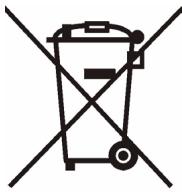
This product is recyclable. Dispose of it properly.

Warranty
ZyXEL Limited Warranty
ZyXEL warrants to the original end user (purchaser) that this product is free from any defects in materials or workmanship for a period of up to two years from the date of purchase. During the warranty period, and upon proof of purchase, should the product have indications of failure due to faulty workmanship and/or materials, ZyXEL will, at its discretion, repair or replace the defective products or components without charge for either parts or labor, and to whatever extent it shall deem necessary to restore the product or components to proper operating condition. Any replacement will consist of a new or re-manufactured functionally equivalent product of equal or higher value, and will be solely at the discretion of ZyXEL. This warranty shall not apply if the product has been modified, misused, tampered with, damaged by an act of God, or subjected to abnormal working conditions.
Note
Repair or replacement, as provided under this warranty, is the exclusive remedy of the purchaser. This warranty is in lieu of all other warranties, express or implied, including any implied warranty of merchantability or fitness for a particular use or purpose. ZyXEL shall in no event be held liable for indirect or consequential damages of any kind to the purchaser.
To obtain the services of this warranty, contact ZyXEL's Service Center for your Return Material Authorization number (RMA). Products must be returned Postage Prepaid. It is recommended that the unit be insured when shipped. Any returned products without proof of purchase or those with an out-dated warranty will be repaired or replaced (at the discretion of ZyXEL) and the customer will be billed for parts and labor. All repaired or replaced products will be shipped by ZyXEL to the corresponding return address, Postage Paid. This warranty gives you specific legal rights, and you may also have other rights that vary from country to country.
1 Einleitung
3.2 RJ-45 Auto-negotiating-Ports
3.3 Auto-crossover-Ethernetports
- Introduction
- Hardware Installation
- Hardware Connection
- Power Connection
- RJ-45 Auto-negotiating Ports
- Auto-crossover Ethernet Ports
- Front Panel LEDs
- Certifications
- Federal Communications Commission (FCC) Interference Statement
- FCC Warning
- CE Mark Warning
- Notices
- Taiwanese BSMI (Bureau of Standards, Metrology and Inspection) A Warning:
- Viewing Certifications
- SafetyWarnings
- Warranty
- ZyXEL Limited Warranty
- Note
- Einleitung
- RJ-45 Auto-negotiating-Ports
- Auto-crossover-Ethernetports
Brand : ZYXEL
Model : GS-108B
Category : Network switch