CAR KIT GENIUS - Car hands-free kit MR HANDSFREE - Free user manual and instructions
Find the device manual for free CAR KIT GENIUS MR HANDSFREE in PDF.


| Product Type | Car Hands-Free Kit |
| Brand | MR HANDSFREE |
| Model | CAR KIT GENIUS |
| Power Supply | 12 V DC, via cigarette lighter or direct battery connection |
| Fuse | 1.5 A, replaceable |
| Main Functions | Full-duplex communication, Mute function, phone charging, LED display, anti-theft system |
| Microphone | External microphone with sensitivity adjustment, cable at least 75 cm |
| Phone Compatibility | Special connector for each brand (Nokia, Ericsson, etc.) |
| Mute Function | Includes a brown wire to mute the car radio during a call |
| Mounting | Bracket with universal mounting clamp, screw or adhesive tape fixing |
| Maintenance | Do not expose to moisture, disconnect power cable when not in use |
| Safety | Do not obstruct airbags, stable installation accessible to the driver |
| Spare Parts and Repairability | Replaceable fuse, interchangeable cables, special connector available separately |
Frequently Asked Questions - CAR KIT GENIUS MR HANDSFREE
User questions about CAR KIT GENIUS MR HANDSFREE
0 question about this device. Answer the ones you know or ask your own.
Ask a new question about this device
Download the instructions for your Car hands-free kit in PDF format for free! Find your manual CAR KIT GENIUS - MR HANDSFREE and take your electronic device back in hand. On this page are published all the documents necessary for the use of your device. CAR KIT GENIUS by MR HANDSFREE.
USER MANUAL CAR KIT GENIUS MR HANDSFREE
mrHandsfree® carkit Genius
SMART MOBILE TECHNOLOGY™

NL
D
GB
F
1
E
1
P
GR
RU
H
HB
DK

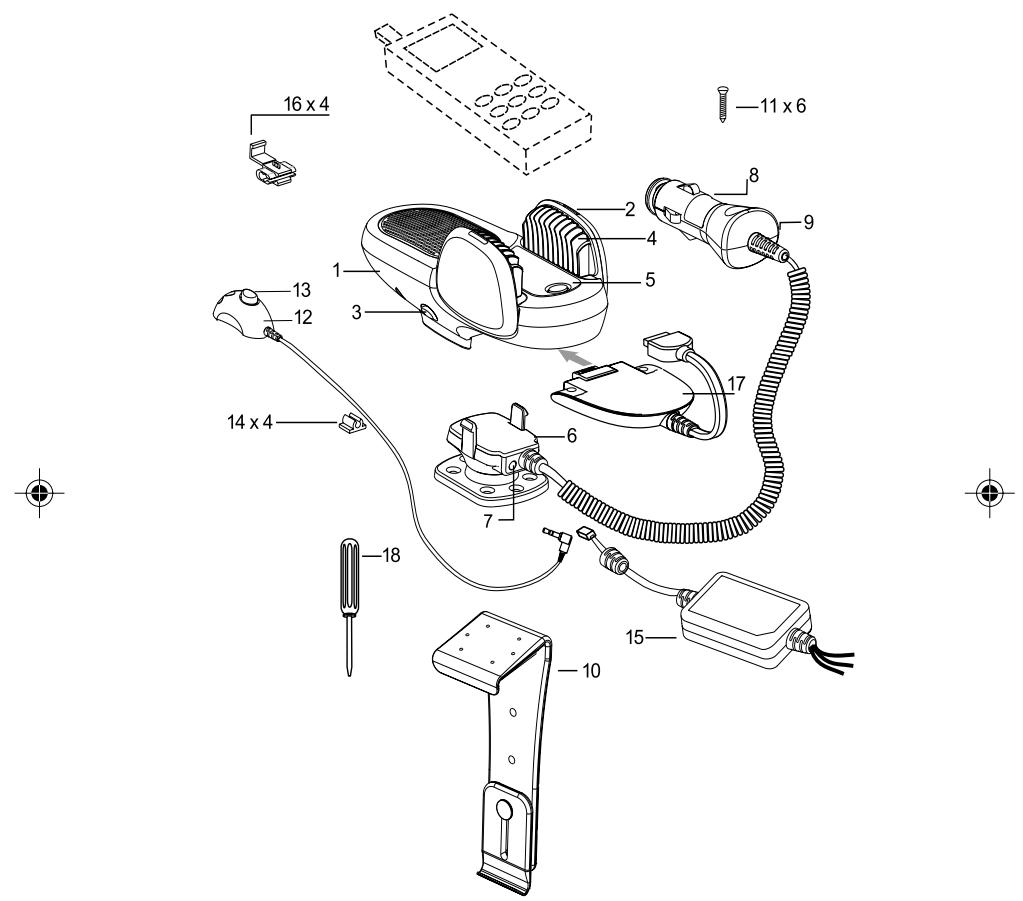




TABLE OF CONTENTS
WHAT DOES MR HANDSFREE GENIUS INCLUDE?............2
INSTALLATION 2
OPERATION OF MR HANDSFREE GENIUS. 6
TROUBLE-SHOOTING 7
MAINTENANCE. 9


Dear mr Handsfree Genius owner,
Congratulations on your purchase of one of the most sophisticated and easy to use car kits! This model provides you with the highest quality full-duplex voice communication. Now you can enjoy the safest telephone conversations in your car without any inconveniences.
WHAT DOES MR HANDSFREE GENIUS INCLUDE?
- Main Unit with built-in speaker.
- TALK mode LED indicators.
- Buttons for releasing the Main Unit from the Main unit holder.
- Holder for Mobile phone.
- Button to release the cramps of the Holder.
- Main unit holder.
- Microphone jack.
- Power adapter for cigarette plug:
8.1. Curled cord.
8.2. Removable fuse.
- LED indicator of Power Adapter.
- Mounting bracket.
- Long screws (15mm) for fastening the Mounting Unit to the dashboard of your car.
- Microphone.
- Button for microphone sensitivity.
- Clips for guiding the microphone cord.
- Adapter for connection to car power supply and Mute cord of Car Radio (CRM).
- Contact clips for connecting the cords.
- Connector for connecting Mobile Phone to the Main Unit (not included).
- Screw driver.
INSTALLATION
MOUNTING MR HANDSFREE GENIUS
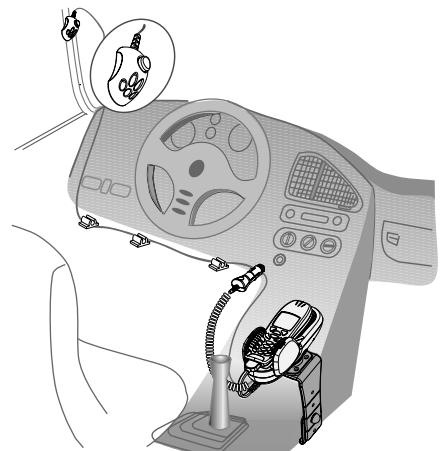
- Select the place where you want to install the Genius main unit. The place for the main unit has to be easily accessible for your hands, clearly visible for the phone's display and safe enough in case of accidents and for the operation of Airbags. Under no circumstances should the appliance prevent the driver from controlling or operating the car in any way.
- The mounting for the Genius main unit (this is also the phone holder) has to be done by using a mounting bracket. The Genius main unit has to be removed from the main unit holder. This holder is already screwed to the universal mounting bracket.
English 2

INSTALLATION
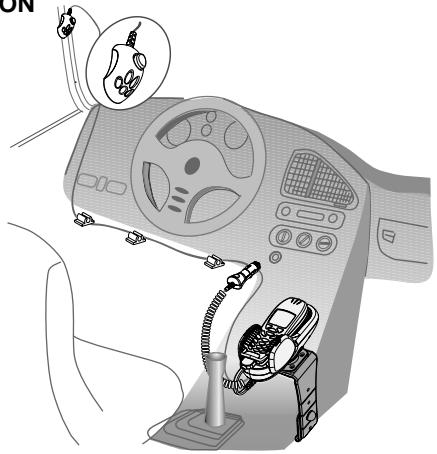
Mounting the Genius main unit holder
The Genius main unit can be mounted in two ways:
A. You can mount the universal mounting bracket with the supplied screws, or:
B. Remove the universal mounting bracket from the main unit holder by unscrewing the 6 screws.
- Screw the main unit holder to the dashboard or a bracket that is designed for your type of car.
How to fix the universal mounting bracket?
In most cars, the universal mounting bracket is placed on the right side of the gear-control console. Make sure that the mounting bracket does not block any airbags!
- Check for a location in your car (close to the gear-control console) where the mounting bracket fits and where it is comfortable for use.
- Make sure that the location in your car where you want to install your mr Handsfree Genius is free from dust and dirt. Remove the cover of the adhesive tape on the mounting bracket.
- Put the upper part of the mounting bracket, with the adhesive tape, over the edge of the console. Put the lower part of the mounting bracket, with the angle, under the edge of the console.
- Press both parts of the mounting bracket together until the face of the upper part is in a horizontal position. Insert the screw in the appropriate hole. Tighten the screw. Place the enclosed cap over the nut.
- You have now successfully installed the universal mounting bracket.
English 3




Connecting the electrical wires for power and mute function
A. When you want to use the cigarette plug with the curled cord, you have to insert this plug in the cigarette lighter of your car.
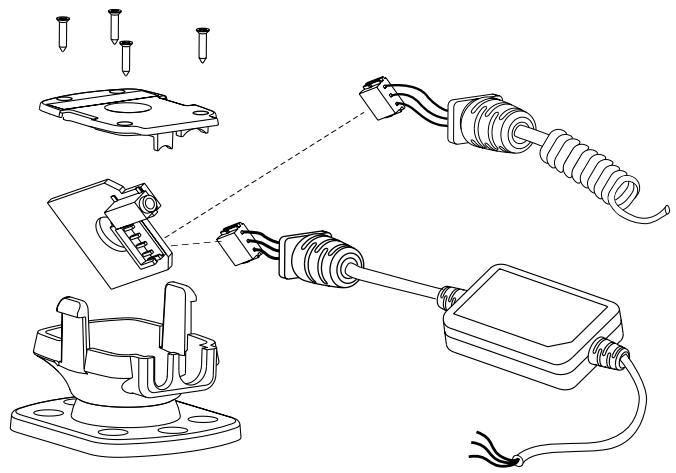
B. You can also change the curled cord of the cigarette plug into the straight cord. This way you can hide the cables easily and use the mute functions for your car radio. This mute function has to comply with the standard.
- Unscrew the 4 screws on the main unit holder.
- Unplug the curled cord and plug the straight cord in the socket.
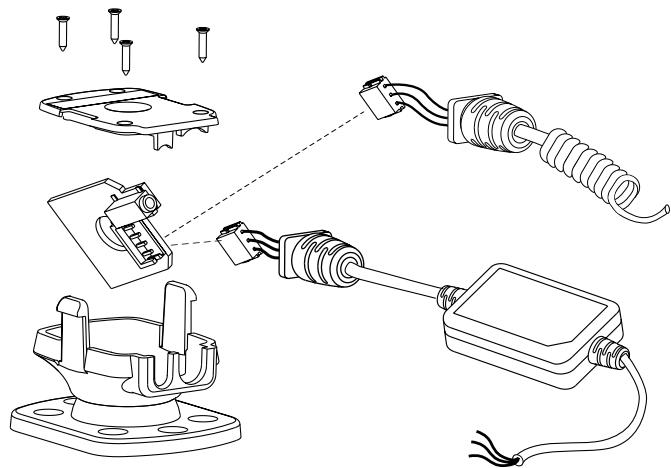

- Screw the cover plate back on the main unit holder.
- Connect the wires of the cord with the radio by using the supplied cable connectors.
Remark: We recommend to connect the + wire to the continuous power supply. This makes it able to use the car kit also when your engine is turned off. To prevent your car's battery from getting low, we recommend taking your phone out of the car kit when you leave the car.
- The wires are color coded. They are listed in Table 1 and each wire should be connected to the corresponding item listed in the column B.
Table 1.
| A | B |
| Red wire | The + voltage of the car's power supply |
| Black wire | The negative GND connection |
| Brown wire | Used for Car Radio muting (CRM) and is connected to Car Radio. |
Warning: Connect only to a negative ground electrical system and a +12 Volts power system.
English



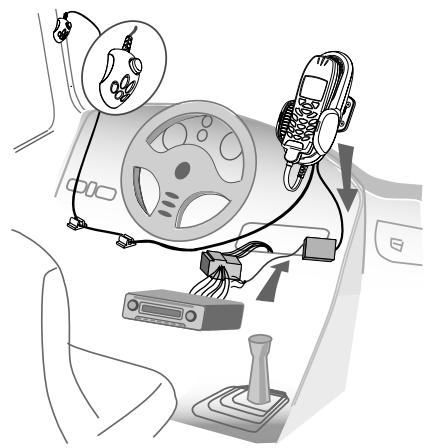
MICROPHONE CONNECTION
- For optimum performance, the microphone should be located at least 75 cm from the Genius main unit and 40-50 cm from the driver's mouth. Make sure that the holes of the microphone are directed towards the driver and not towards the Genius main unit.
- Place the microphone on its location using Velcro.
Use the supplied clips to guide the microphone cord. - Insert the microphone plug into the socket of the Genius main unit holder.
- By default, the button on the microphone is in OUT-position (unpressed position). Only for some telephones it is necessary to put the button in the ON-position.
ADJUSTMENT OF THE PHONE HOLDER
- Turn the big screw in the centre of the main unit holder to the left to make movements possible.
- Put the main unit holder in the preferred position.
- Fasten the big screw to the right to fix the main unit holder in the preferred position.
Warning: Do not move the main unit holder without unfastening the big screw.
This will damage the fixation rubber inside!
CONNECTING A CONNECTOR TO THE GENIUS MAIN UNIT
Take the Genius main unit of the Genius main unit holder.
- Connect the Genius connector to the Genius main unit.
- Place the Genius main unit back on the main unit holder.
English 5

HOW TO USE THE UNIVERSAL HOLDER?
- Release the cramps of the Genius main unit by pushing the button between the cramps.
Put your telephone between the cramps. - Close the cramps in a way that they hold the telephone and it therefore cannot fall.
- Take the telephone out of the holder without releasing the cramps by sliding the telephone to the top side.
- To insert the telephone, you slide it from the top side between the cramps of the Genius.
You only have to adjust the cramps to the size of your telephone once.
CONNECTING THE PHONE TO THE CONNECTOR CABLE
- Activate the power supply to the Genius by starting the engine and connecting the cigarette plug (if applicable).
- Connect the Genius connector to the mobile phone after the power supply is activated.
- Charging function is activated now (if applicable).
Important:
During installation always make sure that the power cord is inserted into the cigarette lighter and power provided before connecting your mobile phone. The connection of your mobile phone should ALWAYS be the LAST step of complete mr Handsfree installation.
The Genius main unit can be released from the holder. When the two buttons are pressed together, the main unit can be taken of the Genius main unit holder. This way you can remove all important electronics and avoid being robbed.
IMPORTANT!
Always read the 'TROUBLE-SHOOTING' chapter carefully.
- The mr Handsfree 'Special Brand' mobile phone connector can be obtained by mail or directly from your local supplier.
- Due to the 'Special Brand' mobile phone connector which can be ordered separately for each mobile phone model (Nokia, Ericsson etc.), your mr Handsfree Genius is suitable for any type of mobile phone.
OPERATION OF MR HANDSFREE GENIUS
HOW TO SWITCH ON YOUR GENIUS WHILE USING THE CIGARETTE PLUG?
- Insert your mr Handsfree power cord into the cigarette lighter of your car to switch mr Handsfree in ON-position. Please note that for several brands of cars the engine has to be turned on before the cigarette plug is activated.
LED indicator lights on the cigarette plug.
To switch off, you simply plug out your power cord from the cigarette lighter.
When the Built-in cable is used, and connected to the continuous power, the Genius is always switched on.
English 6



HOW TO ANSWER A CALL?
- Answer incoming calls as normal on your mobile phone. For most phones it is possible to enable the 'auto answer' function. In this case the phone will answer the call automatically.
You can start the conversation immediately by speaking into the microphone. - Adapt to the appropriate speaker-volume by using your mobile phone control panel.
HOW TO PLACE A CALL?
- Dial the telephone number on your mobile phone as normal.
- You can start the conversation immediately after being connected by speaking into the microphone.
HOW TO END A CALL?
At the end of your conversation hang up your mobile phone as normal.
HOW TO USE VOICE DIALING?
If your telephone supports the voice dialing function, you can pronounce the name of the person you want to call after activating the voice dialing function.

TROUBLE-SHOOOTING
| Problem | Reason | Elimination |
| The device does not charge, you don't hear the caller, the caller does not hear you, and the MUTE function does not work. | There is a bad connection between the main unit and the holder. | You should remove main unit from the holder and connect it again. If you made the connection correctly, you will hear a click. |
| Sometimes a high-frequency noise can be heard in the car radio. | It is possible that your car radio does not have enough RF distortions protection. | Please place the mr Handsfree Genius at least 20 cm from the car radio. |
English 7

| Problem | Reason | Elimination |
| Mr Handsfree does not work. Green LED of Cigar Adapter is off. | Cigarette lighter jack is damaged. No contact between Power Adapter and Cigarette lighter jack. 1.5A fuse in the Power Adapter is burned. Power Adapter is damaged. | Check the contact in the con- nection points. Use for connection contact clips which correspond to the standard of your car or another suitable type of connection. Replace the fuse. |
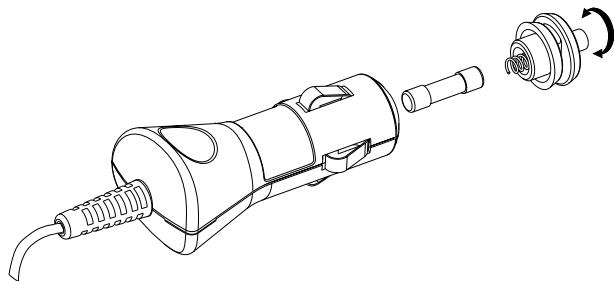
| Mr Handsfree Genius does not work. It is connected to Car Radio through Additional Adapter. Car Radio works. | No contact between the wires. Car Radio wires have smaller diameter than necessary (with cross section area less than 0.75mm²). 1.5A fuse in the Additional Adapter is burned. | Check if the Cigarette lighter functions normally. Clean the contact of the Cigarette lighter jack and the Power Adapter. Remove the Fuse. Unscrew the nut from the Power Adapter, open the housing and take out the Fuse (Illustration p.9.) Insert new 1.5A fuse. Assemble the Power Adapter. If items 1-3 did not help apply to a service center. |
| A caller does not hear you. | The microphone is disconnected. Microphone's cord is damaged. | Check the connection of the microphone and the micro- phone jack of the Mounting unit. Apply to a service center. |
| Your Mobile phone is connected to Mr Handsfree Genius but it does not work. | Telephone or connector contacts are dirty. | Clean the contacts of the telephone and connector. |
| Mr Handsfree Genius is connected to Car Radio but does not mute it during a call. | Car Radio Mute function needs additional settings to be activated. | Check your Car Radio User's Guide and make necessary settings. |
English 8

MAINTENANCE
Please check following mr Handsfree maintenance TIPS to keep your kit in top condition:
- Do not expose the appliance to moisture.
Always unplug the power cable when not in use.
mr Handsfree wishes you a nice and safe journey!


English 9



INHOUDSTAFEL
WAT OMVAT MR HANDSFREE GENIUS? 2
INSTALLATIE 2
WERKING VAN MR HANDSFREE GENIUS. 7
VERHELPEN VAN PROBLEMEN 8
ONDERHOUD. 9


WAT OMVAT MR HANDSFREE GENIUS?
WERKING VAN MR HANDSFREE GENIUS
HOE DE GENIUS AANSCHAKELEN BIJ HET GEBRUIK VAN DE SIGARENPLUG?
WAS ENTHÄLT DAS MR HANDSFREE GENIUS? 2
INSTALLATION 2
FUNKTION DES MR HANDSFREE GENIUS. 7
BESEITIGEN VON PROBLEMEN 8
WARTUNG. 9


WAS ENTHÄLT DAS MR HANDSFREE GENIUS?
MIBÓL ÁLL A MR HANDSFREE GENIUS?
AFSLUTNING AF EN SAMTALE
Nár De vil afl Slutte en samtale skal De afbryde forbindelsen på samme@made som med Deres normale mobittelefon.
BRUG AF 'VOICE DIALING'
PABOTA C YCTPOICTBOM MR HANDSFREE GENIUS.7
BO3MOXHbIe HENCIPABHOCTN IN NX YCTPAHEHNE...8
COBETbI IO 3KcPJIYATAUIN. 10
INHCTPYKLIII NO IPINOBPETEHNIKOHHEKTOPA.11
TAPAHINHbI CEPTNΦUKAT
AДPECA CEPBnCbIx UeHTPOB


YbaxaemblnokynataTeIb!
I03dpabJIbEM BAC c npIO6peTHeHem ycToPcTba mr Handsfree Genius - OHOH n3 cambIX COBepHEHbIX MOJEne ABTOMO6bINbHOI rPOMKo CBaNnO MObINbHX TeLEFOHOB. mr Handsfree Genius JyJIbTeC yHNBePCaJIbHbIM YcTOPOCTBOM, T.e. COBMeCTHMbIM C pa3NJHbIM MOJEnaMn TELEFOHOB, OeBCeYHBAIOUIM BbICOKoe KaueCTBO POJIHOJdYNPeKCHOI CBaN. UcTAHOIB N KOMPiKeT Mr Handsfree Genius B BAeWb AMTObOIne, BblCMoxete pa3rOBoAruBaTb NO TELEFOHy Be3 KaKx-PlIo HeUYIO6CBt N B pONHOI 6eONaChOCTN, TAK KAc Bam He NoITpE6ByeTcB bInyScKaTb pyNb n3pyK.
KOMПЛЕKTАЦЯ YCTPOИCTBA ГРOMКО CBЯЗИ MR HANDSFREE GENIUS
- BLOK rpoMKoB CBA3n CO BCTPOeHHbIM DInHaMkOM.
- CBeTOBoi INHnKaTOp pexkma pa3roBopa.
- KhoPkn OToCoeDInHeHn6BLOKa rPoMko CBa3N OT DePkaTeJIa.
4.ДерхателMo6иьногоТефona. - KhoNka peYnIPOBKn paCSTOHHm MExy CTBOPkAmn DePkaTeNaTeNoHa
6.ДерхаTeIb 6Ioka rPOMKo CBa3N. - He3do IOndKJIOueHnMnKpOfoHa
- AaTep IJI NaKIOUeHn 6Joka rPOMKo CBa3N K 6OpTOB0 CEaI abTomO6JIy Hepe3rHe3DIO npNKypNBaTeJIa:
8.1BntoKa6eNb
8.2 CmeHHbI npeOxpaHnteIb
9. CBetOBOn INHdNkAtop pa6oTbI aadntepa.
10. YHnBepcaJIbHbI KPOHHTeH
11. Ha6op camope3OB (15MM) Дя рфкcaидерха teя Na pahej n ABTOMO6NJIA.
12. MinkpooohrpoMkOcBra3n.
13. Khonka pepynilpoBKN uYBCTBNTeNbHOCTM MUKpOfoHa.
14. KpenexhblklnncbI dny MmKpOoHOrKa6eJIa.
15. AДантер Дли подклоченя 6лOKа Грмков CBЯЗК Cсети ABTomOБил И пpoBOу OTKЛоченя 3ВУka abTomOБиьнй MaHHTOnJIb (CRM).
16. KOHTaKTHbIe KJIINcBIs IJRA NOJKNIOUeHnI pOBOIoB
17. KOHHeKToP IJnI POJIckJIIOUeHmI MOBUNbHOrO TeneΦoHa K BIoKY rPoMKOI CBa3N (He BXoINT BKOMPJIeKT NocTaBKN IN pIioNopeTaETcR OTeJIbHO cM. CTp. 11).
18. OTBepTka.
YCTAHOBKA
YCTAHOBKA BLOKA TPOMKO CBRA3N
BbIbIpaJ MeTO dYCTaHOBKn YcTPOINCTBa, pNIMITE BO BHIMAHNE TO, cTO OHO BbIOJIHReT fynKcIIO DEpXaTeIa MO6nIbHoro TepeOHa, nOTOMy ero peKoMeHdyETc paCNOLOXnITb Ha paCtOHNu BVItHYToR pyKu BoNTeJIa NII 6bnke. Pn3 TOM Heo6xOAnMo OecneuHTb XopoWn Ob3Op DnCnIe IepeOHa n Cbo6oDnH bIOCTyn K erO KnabAtnpe. IpOBepbTe, he NOMEwaet nn Mr Handsfree Genius cpa6aTabiBaHIO NOpywn BezOnaChocTN. BnOK rPOMKO CBaIe H ne DOJKeH 3aTpPydNbY npabNeHne ABTomO6nIe Hn npri KaKHX o6ctOReTbCTBaX!




- Pn yctaHOBke mr Handsfree Genius BocnoIb3yIteC bXoJaUMB KOMPNeKT yCTaHOBOYHbIM Ha6bOpM. OTOeDInHte 6nok rpoMko CBnO TepKATEJN. DejxAteJIb 6loka rpoMko CBnU yKe 3aKepeJIeH ha YHbEpcalbHOM kOHNHe.
MOHTAX
BvNDy TOrO, YTO HEKOTOpbIe MaHHToTbI IMHeOt cNa6yU 3aushTy OT padIOuACTHOI nomExn, peKoMeHnyTeC aYctaHaBInBaTb mr Handsfree Genius He 6Jnxke 20 cm OT MaHHToTbI
UctahOBka dpeKsTeTn 6Joka mr Handsfree Genius
Mr Handsfree Genius moXHO yCTaHOBnTB DByMra CnOc6AmN:
A. Bby mojke t3aKePnITb yHINBepCaJIbHbI KPOHHTeIH Ha IaHeIaBTOMO6JIa C NOMOJIO CaMope3OB, BXOJUxN B KOMJIeKT, IINI:
5. EcInn B BaIeM aBToMoObIne npedymoTpeH wTaTHb KpOnHtEnH dIy UCTaHOBKN yCtpoNCTBa rPOMKoIN CBa3, 3aKePENITE depXaTeNb HENOCpeDCTBeHHo Ha HeM. IJr 3TOr OpeBapntbHo OTCoEHNHTe DepXaTeNb 6bIoka mR Handsfree Genius ot YHNBepCaNbHorO KpOnHtEnHa, OTBnINTB 6BVHTOB.
Kak yctaHOBnTb yHNBepCaJIbHbI KpoHHTeH?
B 60bnHCTBe Maunn HnBepCaNbHbN KpOHTeHn pacNoIaIOT C npabOi CTOPHOH KOHcOJN PepeKJIOUeHN CKoPOTeN. Y6eJIntEc, QTO yCTaHOBNEHHbK pOHtHeN He yDeT MeuAtb Cpa6aTbBAHIO NOyUweK 6e3OnaHcOHTn 3aTPDnHtB DoCTyn K OpraHAM NpyBaPENHEABTOM06nEM!
- HainDte noxDxOaJee MeTo dJa KpeJIeHnKpOnIteHa.
- OuICTIte MeCTO KpeIJIeHnI O T NblIN MAcJHbIX PJIteH. YdJInte 3aIHTHOe NOKpbITNe KJIeJIeTcO CIOA C ONDH CI TOPOHbIKPOHJTeHa.
- ПпnxMnte ВерхнIOу actb Кроштейна К углу KohCOJIи. 3aTeM ПпnxMnte HxKHIIO yactb Кроштейна К KohCOJIи.

- CoXmIte 06e qactn KpOHTeHa, Bpe3yIbTaTe BepxHra Yactb DOnJXHa 3aHrTb roPun3oHTaJIbHOe noloxHe. BCTabTe 6oT B OTBepCTne B Cko6e n 3aФИКСИРУ Te erogaiKo ero. 3akpoIe raiky KpbIweKo.
- Tenepb yHnBepcaIb HbI IdepKxTeIb yCTaHOBneH.
IopKnIOUeHne npOBODOB nHTaHn I OTKnIOUeHn 3ByKa abTOMo6bNbHO MaHHTOJIbI
BHUMAHNE:
UcpoCTBO rpoMKo CBa3n Mr Handsfree Genius pa6oTaET ToIbko OT 6oTobO CEtn ABTomO6nJIc HapJxKeHnEM 12 B n 3a3emHeHHbIM OtpuataJIbHbIM NIOLOCOM NCTOCHNKA NITAHIN.
A. EcIN Bby XOTIte NOdkIOUHTb mr Handsfree Genius K cetn aTOMoBnJIy uepe3 rHe3I0 IpnKUPnBaTeJIA, N3BLeKInTe aTOMo6NJbHbI npKUPnBaTeJb N3 rHe3Ja n Ha erO MeCTO BCTaBtE 7TEKeP aAnTepa.
5. TaKke Bbl MoKeTe NOdkIIOHHTb mr Handsfree Genius HenoCpeDCTBeHHo K 60pTOBOB Cetn ABTOMO6JIa, 3AeHINB AaANTep npKpyNBateJe C BNTbIM 1Hypom aadTepOM Dn BHTyPteHN HeYcTAHOBN C nHeHNbIM UHypom. TaKmO 6bpazOM, BcKpoTe IuHpybN cMOKeTe IcNoBbOaBT bYHKUHOOTKIOeHHnE 3Byka ABTOMO6JbHOB MaHIHTONBo BO BPema p3aRBOpa No TeteFOHy.
- CHINMITE KpbiUkcy DepeXaTeIg 6LOKa rPOMKoB CbR3N, OTBePHyB 4 BnHTa KpectOBOY OTBePTKOI.
- OToeDInHnTe BnToI ShHyp nHTaHnIy, yCTaHOBJIeHHbI 3aBOIDm npOn3BOJnteJIem, INIOKJIIOHTe BMeCTO Hero WTEKeP KaBeJIa NITaHnI, npINlaRaEMbl B KOMTIneKTe yCTPOJCTBa rPOMKO CBa3N.
3akpeHnTe KpbIuKBy BnHTaMn.
Pycckn 4



PnmeaHne: EcnB Baaem ABTomO6Jne Imeetc npoBoC noloKIn TeIbHbIM NIOLOCOM (+), B KOTOPOM COXPaHReTcN HApRJaEHe NITAHIN Pn OTKLIoueHN 3aXuRaHIN, peKomeHdyetc NIOKLIouHTc KpaCHbI npoBO yCTpoiCTBa rPMKOn CB3N K HEMy. Pt Nap TcoeUHeHN ceAHC CB3N He 6byTe npepbIbTaBCnYae OTKLIoueHN 3aXuRaHIN. EcnBbI haoIro noknlaete ABtomO6Jbn, peKomeHdyetc OTKLIouHTb TelefoHOr OY cTpoiCTBa rPMKOn CB3N BO n36ExaHne pa3pRdKn AKKMyJIrTopa.
PABOTA C YCTPOICTBOM MR HANDSFREE GENIUS
KAK IOJIKJIIOUHTb YCTPOICTBO MR HANDSFREE GENIUS YEPE3 PIPUKUPBATEJIb?
- TTo6bI BKIOUHTb yCTpoHCTBO mr Handsfree Genius, BCTabBe aanTep B npKypnBaTeB BaIero ABTomO6nIa.ДЯн HeKOTOpBX MoDeNei ABTomO6nIe, npExJe MeN pOdkLIOaHbTaAapTe pPknKypnBaTeN yCTpoHCTBa rPOMKO CB3N Heo6XoDmO 3aBeCTn DBIVaTeB.
- Пи NTOM Ha aДаNTepe ДОЛжЕн 3aRopeTbCЯ CBETOBОИ ИДИКaTOp peXIMa pa6Otbl.
- TTo6bI OTKJIIOUHTb mr Handsfree Genius npocTo BbIHbTe aanTep n3 npIKyPnBaTeJI.
EcnBbI NIOKIOHmMr Handsfree Genius K NCTOCHNY NOCTOHHORI nHTAHN,TO TOTOM Cnyae Mr Handsfree Genius Bcerda HaxoDITcBO BKIOUeHHOM COCTOHNI.
KAK OTBETNTb HA 3BOHOK?
- Ecni BaWt TenefoH noDdepxNBAeT abTomaTueckn npneM BblOba, nCnoJIb3yIte COoTBeTCTBvOuIe yUcAHOKu B MeHIO. B 3OM CnUyae npi NOctynHeHn BblOba rPOMKaCBsB6 BydET BkLIOueHa BAtOMaTueckn. Ecni JKe TenefoH ne Oe6ceNuBaH aTOMaTueckcn npneM BblOba, To dJa OTBeta HaxMNTe COoTBeTCTByOuIy KhoNkY Ha KnaBaNaType BaWero TeJefoHa.
Pexkmpa3roBopaHnDnucpyeTcIBymHaHnDnKaTopaMn.
Ecn6IbnKpromKOBc83nNoDKIOUeH K npOBOy MUTE ABTOMaTHOTOnbl, pnp NOCTyJIeHN 3BOHKn PONCXoOHT ABTOMaTUNeCKOE OTKIOUeHNE 3ByKa ABTOMaTHOTJbHa BPEMpa3ROBOpA. - Togobnte npmao napeodcooi (B HapnbLeHHn DInxkeHna. UcTaHObIte Heo6xoDImbI yPOBeHb rPOMKOTn DInHaMnKa ycTpoiCTBa rPOMKCB3n, IcNoJIb3y4 yHKUIN ynpabNeHHa BaWero MoBnIbHoro TenefoHa.
Pycckn 7

KAK BbIIOJIHHTb 3BOHOK?
Kak obuHNO, HabepeNTe Heo6xOIMbI HOMep TeJefoHa N HaKMITE KHOJky Bb3Oba Ha BaWem TeJefoHe.
Korda npoiz3oienet coeHHeNe, roBOpTe npraMo npeed c6oB (B HappaBHeHn DvIXeHn).
KAK 3ABEPUHTb PA3TOBOP?
По Okончани pa3roBopa haxMnTe COOTBETCTByIOUyIO KhoNky OTKJIIOHeHЯ KaJbAInaType BaWero MO6nIbHoro TelefoHa.
KAK INCIOJIb3OBATb TOLOCOBOH HABOP?
Ecnn Baan Tepeon noDnepxnaeT fyHKnIO roLOcoBOr Ho6opa Homepa, To Haxmnte KhoIky AKTNBaunr RoLocOBOr Ho6opa HaTeJeFOHe n IpOn3Hecnte roLOCOByo MeTKy H6npaemoro Homepa.
BO3MOXHbIE HENCnPABHOCTN INX YCTPAHEHNE
TapaHTINHbI cPOK IJnI3dEJIa TOpROBm MapKn mr Handsfree coCTaJIaTe 12 Mec. Co JnI npOaXn NOKyNaTeIIO.
TapaHTNJaDeiCTBnTebHaToJIbKO npri npeIbIaBHeHm npabINbHO 3aONHeHHORo
rapaHTNHOro cetpNcKata. DaHbIe cepNTpKaKT aJeT npABo Ha yctpaHHeHne
deFeKTOB n3dEHN B TeCHeHn rapaHTNHOro cpoKa, NOKpbBAIc TcOMMOCTb 3aNaChbIX
caTaeN no pemOHTy I3dEHNHa RaipaHTNHOe O6cLyXJbAHBe H3dEHN
npINHMaETcR B NOHOr KOMPNeKtaUc C 3aONHeHHbIM rapaHTNHBm cepTn
fKaTom. rapaHTNHiBe Tpe6oBaHn DOnJXbI b6tB npdebYBaHbI cpa3y nocJe
6bHApYxHeH HeCNpPaNBcHTo nn DeEKeTA. PPeIOCTaBnEma RapaHTNHe
6bocneuBaET Bo3MeUeHne Pnarmix NIK KocBeHHbx YbItKOB, nOpTeb NII
yUe6Ba.Ha KOMPNeKTyOuHne Yactn I3dEHN (aHTEnbI, AKkymJITopbI, zapAHybIe
ycTroOCTBa, UHpybl) rapaHTNHiB CpOK CoCTaBnE 6 MeCAueB.

HACTOUIA TAPAHTINHE PACPIOCTPAHARETCHA:
paXoHbIe MaTePnAJIb;
IOBpeJHnA, KOToPbIe IINuB B He3HaUHTeJIbHOI CTePeHN MOrYT IOBJIaRb Ha CTOUMOCTb IOTpe6HTeJIbCKNe CBOICTBa I3dEInr;
IOBpeKdEHHa, Bbl3BaHHbIe OTKIOHHeHem NITaIOUeRo HapJxHeHHa;
OTka3bI B pa6Ote, Bbl3BaHHbIe He6peXHbIM OTHoUHeHnEM Kn3JeJIIO:
MEXAHUeCKne IOBpeKdEHHN 3dEJIIN;
nonadaHne BlaHn BHyTpB Kopnyca;
3aIpa3HeHnBb3BaHHbIe6bITOBbIMnHaCEKOMbIMN;
I npyne;
IOBpeXdEHHa, BbI3BaHHbIE HecyAeM CJIyuae M IIN CTUXHbIM OeCTBnEM;
Cnyuain,KOrdaN3dJIeHne3KcPnIyataNPOBaIocb C hapyuHeHem npaBnI, N3IOJXeHHbIX B INCTpyKUIN PO3KcPnIyataUIN;
CnyuH, KOrJa HApUyEHHa B aPoBe 03bNHaKaIOT N3-3a 3NeKtpOMarHHTHOH HecOBMeTmOCTn C HecepTnΦnUpOBaHHbIM MInHcTePCTBOM C8a3n IIN MOpAJIbHo yCTapeBvHm O6OpYDaBAnHeM;
CnyuH, KOrTaOtKa3bI BpaOte IaJIeINIy Bbl3BaHbI HenPaBUNbHbIM BBODOM PIN-KoJOnB, KOJOB 6IoKpOBKn I dupyrMn DeIcTBnMn, He ONcaHHbIM N HInCTpyKuNIO NKcNPyatauN.
TAPAHNHEDEINCTBNTIELHABBCJEDYIOUHX CNYUAX

PnO6HApUyKeHNIeΦEKTOB,KOTOpbIE6blNbIb3BaHbHHe npaBbHbIMNCIOJIb3OBaHHEMNIIMaHHUYJLNAIMNIOCTOPOHHXJIu;
- rapaHTnHbIe Tpe6oBaHnI pPeIbYBJIeHbI He B COOTBETCTBnC HAcTOrIIMn
- rapaHTnHbIMN yCIOBnM;
- IN3dJIeNE IMeET CJIeBb BCKpbITnB, B IN3dJIeNE yCTaHOBJIeHb KOMNHOENTbI N IONOHNHTeBbHe YcTPOUcTBa, He COOTBeTcByUoiNe Tpe6oBaHnA M PON3BOIDTeJIe, OCBJyKuBaHne IIN PeMOHT IN3dJIeN BblIOJNHEB bPEMOHTHO MaCtepckOn, He IMeUeJ COOTBeTcByUoiMx IOJHOMOHn;
3aBODCKOHOMEPN3dEINyUdaJIENIINnI3MeHeH.
MaKcImaJIbHbI cPOK BbINOJIHEnHra rapaHTnHO rpeMOHTa yCTaHOBJIeN B COOTBeTCTBnC 3aKOHOM, peryUnpuyOuIM npBa nOTpe6nten.


ABTOPN3OBAHHbIe CepBnCHbIe LcHTpbI
Ceb cepBnchbix ueHTPOB Smile-Mobile c 1995 roda ocUyecTBJrEET npOpeCCNOHaJIbHbI peMOHT domaunHINu MObNbHbIX TenefoHOB, ppeIOCTabJrr NOtpeBcTIO BEc CNEKTP pa60f rapaHTNIHorO u NocJERapAHTNIHorO o6CnyJBAHIN, BKIOUay BbICUYIO KATEOPNIO CNOXHOCTN. Smile-Mobile RBJAEcRBeDyueKoKOMPNAHnei NO 06CNYJBAHINIO ABTOMObHbONrPOMKO CB83n mr Handsfree Ha TeppNTOpN PoCCn, a TaKKe IMeet npraMyIO abTOPn3aUIO OT KpyNHNeIMNX MmPoBIX npOn3BOIDTeJIe MObNbHbIX TenefoHOB.
O6paTbCBAceBnChbIeJeHTpBlSmile-Mobile BbMOKeTe no aDpecam:
| ГОРОД | HA3BAHNE | АДPEC | TELEФОH | ПОНМЕЧАНЕ |
| MOCKBA | SMILE MOBILE | 1-ий СMOЛЕнСКУ ПЕР., Д.22/10 | (095) 258-56-87 | OOO "ТЕLEКOM ПОИNT" |
| CAHKT-ПETEPБΥΡ | SMILE MOBILE | АLEКСАнДROВСКУ ПAPК, Д.5, OФИС 102 | (812) 346-60-66 | 3AO "OPINEHTA-CEPBИС |
| CAHKT-ПETEPБΥΡ | SMILE MOBILE | CEHHАЯ ПЛ., 1, Павильов 23Γ | (812) 310-57-08 | 3AO "OPINEHTA-CEPBИС |
| CAHKT-ПETEPБΥΡ | SMILE MOBILE | ПР. ПIOСВELSEVEN, Д.19, ТК "HOPД" | (812) 333-31-21 | 3AO "OPINEHTA-CEPIC |
www.smile-mobile.com

PernohaIbHbIe cepBnChbIe ceHTpbI:
| ГОРОД | HAЗBAHINE | АДPEC | ТELЕФОH |
| ВОПОHEЖ | OOO "ИRMOC" | УЛ. 20-ЛET OKТЯБР, 103, OФИС 222 | (0732) 777-314 |
| ВЛАДИВОCTOK | ИПЮЗЕФОВИЧВ.Γ. | НAPОДнБИЙ ПР.11 | (4232) 206-600, 207-700 |
| ЕКATEРINБΥΡΓ | СЦ "MCTRADE" | УЛ. ВИКУЛОВА Д.63,КОРПУС 3 | (343) 2-144-060,2-140-785,2-140-73 |
| ЕКATEРINБΥΡΓ | РADIОМПОТ | УЛ. 8 МАТА, Д.99 | (343) 257-44-62 |
| ИРКУТСК | СЦ "TEXHO-ПОТАЛ" | COBETСКАя 58, ТЦТПУМФ, OФИС 9 | (0112) 27-20-54, 27-34-32 |
| КАЛNHИΝΑД | BECTEP-CEPBИС OOO | УЛ. ГорьКОГО, Д.50 | (3952) 29-11-60 |
| КРACHОДAP | PEМС | УЛ. HOВОКУЗECHАя, 127 | (8612) 53-57-86, 55-94-98 |
| КРACHОДAP | СРSTЕХИЧECКИ ZEHTР | УЛ. КРACHОAPМЕСКАя, 45 | (8312) 13-09-09, 28-09-09 |
| Н. HOВГΟΡОД | TEXUCEНР «ЭЛTEК» | УЛ. ГорДЕБСКАя, Д.2A, ГUM, 2ЗТАЖ. | (8612) 53-48-51 |
| Новос二线РС | НГС PTO | УЛ. ДУСИ KOВАльчUK, Д.258/2 | (383-2) 26-93-11 |
| OMCK | КOMП. HOВБΙ TELEФОH | УЛ. DEKAБРИСТОВ, 45 | (3812) 53-45-61 |
| OPCK | ЗAO "STAHДAPT-N" | ПР. ЛEHINA, Д.46 (ОPEHБΥΡΤСКАЯ OБЛ.) | (3537) 21-12-12 |
| РЯЗАнь | СЦ "TEXCEPBИС" | УЛ.HOBАя, Д.51Γ | (912) 21-02-19, 24-60-12 |
| СAMAPA | CEPBИСНБΙ ZEHTRPС | УЛ. 3-И ПЮЕЗД, Д.57, ZEHT. BXOD | (8462) 60-90-20 |
| CAPATOB | OOO "AэЛNTA" | УЛ. мOCKOBСКАя 134\146 | (8452) 52-37-74 |
| CAPATOB | OOO "AэЛNTA" | УЛ. ПУТAЧЕВСКАя 137A | (8452) 72-66-22 |
| POCTOB-HA-ДОНУ | BOЛБТА-CEPBИС | ПЕР.CEMAШКО, 25 | (8632) 269-80-40 |
| POCTOB-HA-ДОНY | KOHTAKT-KOM | УЛ. BABИЛОВА, Д.54, OФИС 21 | (8632) 73-25-42, 73-25-67 |
| ЯROSЛавЛь | КACKад | УЛ. Б. OKТЯБРБСКАя, 28 | (0852) 30-78-87 |