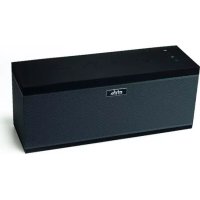
XXL Wifi Speaker - Speaker MR HANDSFREE - Free user manual and instructions
Find the device manual for free XXL Wifi Speaker MR HANDSFREE in PDF.



| Product type | Wireless stereo speaker |
| Brand | MR HANDSFREE |
| Model | XXL Wifi Speaker |
| Connectivity | Wi-Fi, Bluetooth, AUX, USB |
| Compatible applications | MrHandsfree (iOS/Android), Spotify, Tuneln, iHeartradio |
| Main functions | Music streaming, Internet radio, USB playback, multiroom grouping, Spotify Connect |
| Power supply | Rechargeable battery via mains charger and Micro USB cable |
| Package contents | Speaker, mains charger, Micro USB cable, 3.5 mm AUX cable |
| Care and cleaning | Dry, soft antistatic cloth, do not use solvents |
| Safety | Do not open, avoid sharp objects, heat, liquids, open flames, ventilation space required |
| Repairability | Do not repair yourself, contact Mr Handsfree support |
| Warranty | 2 years against material or manufacturing defects |
| Certifications | CE, compliant with directives 2011/65/EU, 2014/53/EU, 2014/35/EU & 2014/30/EU |
| Certified name | MR HANDSFREE WIFI SPEAKER XXL |
Frequently Asked Questions - XXL Wifi Speaker MR HANDSFREE
User questions about XXL Wifi Speaker MR HANDSFREE
0 question about this device. Answer the ones you know or ask your own.
Ask a new question about this device
Download the instructions for your Speaker in PDF format for free! Find your manual XXL Wifi Speaker - MR HANDSFREE and take your electronic device back in hand. On this page are published all the documents necessary for the use of your device. XXL Wifi Speaker by MR HANDSFREE.
USER MANUAL XXL Wifi Speaker MR HANDSFREE
natural_image
Black rectangular electronic device with musical notes floating above it, no visible text or symbols on the device itself.mrHandsfree®
XXL Wifi Speaker
USER'S MANUAL
GB NL
FR D
WIRELESS BLUETOOTH® STEREO SPEAKER
Manual/MHF-XXLWifiSpeaker/01-2017
DECLARATION OF CONFORMITY
Hereby,
Par la présente,
| Company:Entreprise: | TE-GROUP nv |
| Address:Adresse: | Kapelsestraat 61, 2950 Kapellen - BELGIUM |
declare that the following equipment:
conforms with the following safety requirements of the directives 2011/65/EU, 2014/53/EU, 2014/35/EU & 2014/30/EU. Conformity is guaranteed by the CE-symbol.
This product has been tested against following standards and specifications, applying versions valid on April 15th 2016.
Joseph van Oosterum, CEO TE-Group NV
Authorized Signature, 02/01/2017, Kapellen
SAFETY WARNING
- Never open the Mr Handsfree Wifi Speaker XXL
- Never touch the plug contacts with sharp or metal objects and handle with care
- Only use attachments or accessories specified by the manufacturer
- Use only the power supplies provided by the manufacturer
- Never place the device in the vicinity of heat sources and keep away from direct sunlight and naked flames
- Never place the device on surfaces that are heat sensitive
- Never place the device on other electrical equipment
- Never install the device in a confined space, always leave space for ventilation
- Protect the device from special liquids and vapors
- Protect the device from dripping or splashing
- Unplug the device from charging before cleaning
- Do not use any solvent based cleaning agents, only a soft, dry anti-static cloth
- Do not attempt repairs yourself
- If the unit is not properly installed or operated MrHandsfree cannot accept liability
INTRODUCTION
Whats in the box?
o Mr Handsfree Wifi Speaker XXL unit
o Home charger
o Micro USB Charging cable
o 3.5mm AUX cable
What else do you need?
To stream music via Wi-Fi you need:
o Wi-Fi router
o Android or iOS device such as a smartphone or a tablet
o Spotify premium account (optional)
How to use the Wifi Speaker XXL?
By using Wi-Fi, Bluetooth® or the AUX-cable you can:
o play music from Spotify
o play music from Internet radio stations
o play your local music
o play music from USB-memory

text_image
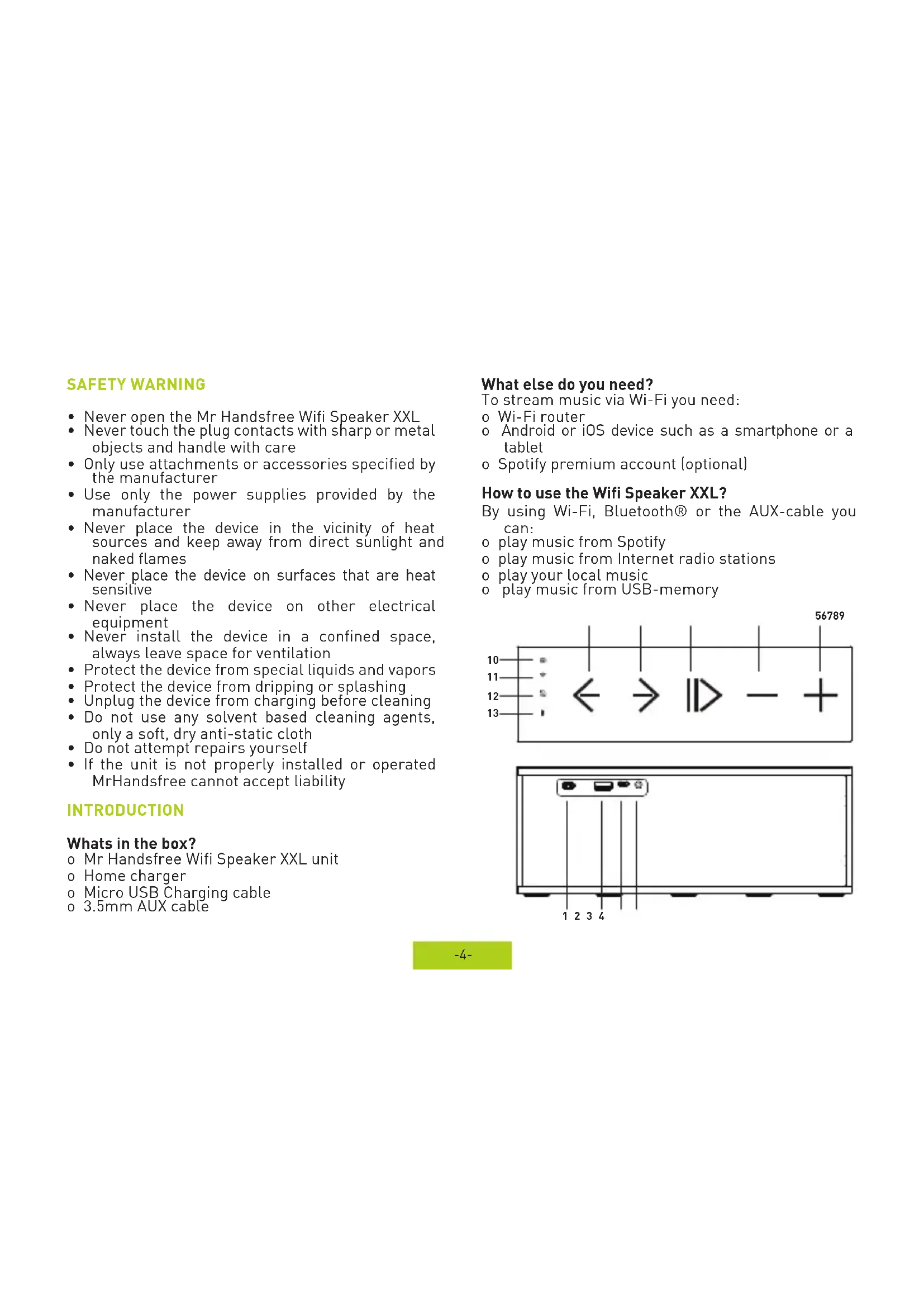
10 11 12 13 ← → || > - + 56789
text_image
1 2 3 4PARTS & BUTTONS
- ON / OFF switch
- USB-memory connection
- Micro USB Charging slot
- AUX-in
- Volume UP
- Volume DOWN
- Play / Pause
- Next track
- Previous track
- WPS connect button
- Wi-Fi Indication LED
- MODE button
- Bluetooth®
Indication LED
GETTING STARTED
Congratulations on purchasing your Mr Handsfree Wifi Speaker XXL multi room speaker.
! We recommend you to charge the device entirely before the first use!
CHARGING THE WIFI SPEAKER XXL
To charge the Wifi Speaker XXL, insert the included Micro USB cable into the Micro USB Charging slot (3) on one side and into the included Home Charger on the other side.
When the device is running out of battery you will hear a beep tone periodically and the MODE button (12) will start blinking RED.
When the device is charging the MODE button (12) will light up RED.
When the device is fully charged the MODE button (12) will not light up anymore.
TURNING ON/OFF
You can turn the device on by using the ON / OFF switch (1).
CONNECTING FOR THE FIRST TIME:
a. Pairing the speaker with local Wi-Fi network using WPS
Connect your smartphone to your local Wi-Fi network. Download the MrHandsfree app in the App Store (iOS devices) or Google Play (Android devices), run the app and follow the steps to add your first speaker.
i. Press 'Add Device' button
ii. Type the password of your Wi-fi network
iii. Press the WPS button on the speaker (10)
iv. The app automatically searches for the speaker and adds it to your network.
v. Select the preferred speaker name
b. Direct connection to the device using WPS
If there is no Wi-Fi router, you can connect directly to the device's Wi-Fi signal with your smartphone.
i. Turn your Mr Handsfree Wifi Speaker XXL on
ii. Go to "Settings" on your smartphone and make sure your Wi-Fi is turned on. Your smartphone will scan for devices, Select the Mr Handsfree Wifi Speaker XXL and the device will be paired automatically
iii. Open the Mr Handsfree app, press the "+" to add a speaker (If the app asks for a password, just press "Next")
iv. Press the WPS button (10) shortly on the Mr Handsfree Wifi Speaker XXL
v. Go to the next screen in the app, the searching will start automatically
vi. Wait for the voice notification and press next. The configuration will take place automatically
Attention : if you press the WPS-button for longer than 5 seconds, the device will return to the factory settings.
PLAY!
- Wi-Fi mode
When you turn the Mr Handsfree Wifi Speaker XXL on, the device will automatically be in Wi-Fi mode. If the device is in AUX mode, one push on the MODE-button (12) will change the mode to Wi-Fi. The Wi-Fi indication LED (11) will light up BLUE when the device is in the WI-Fi mode
- Bluetooth mode
To go to the Bluetooth mode, press the MODE-button (12) when you are in Wi-Fi mode.
The Bluetooth Indication LED (13) will start blinking in BLUE. This means that the Bluetooth mode is operative and that the device is waiting for pairing.
To set up a connection using Bluetooth:
i. Make sure your Mr Handsfree Wifi Speaker XXL is in the Bluetooth mode
ii. Go to the Bluetooth settings on your smartphone and make sure that Bluetooth is on.
iii. Search for devices and select the Mr Handsfree Wifi Speaker XXL. If the Wifi Speaker XXL doesn't appear in the search results, it's possible that it is still connected to another device. The pairing of your devices will be complete when the Bluetooth Indication LED (13) turns BLUE.
- AUX mode
You can also play music using the included AUX cable. Plug the AUX cable in the device and in your music device. Select the AUX mode by pressing the MODE-button (12). The indication LED will turn blue when you are in the AUX mode.
- USB-memory mode
You can insert (4) a USB stick with mp3s to play music from this device.
- Internet radio (Only in Wi-Fi mode and with the Mr Handsfree App)
You can also listen to Internet radio by using Tuneln or iHeartradio (iHeartradio requires a registered account). Search by genre or by country and select your preferred radio station.
- Spotify
You can use this app directly with Spotify. To play songs from your Spotify account, simply click "Spotify" in the App menu, connect with Spotify (Spotify requires a registered account). If you have a free Spotify account, you can use Airplay or DLNA. You can also play songs from Spotify via Bluetooth or the AUX-cable.
- Spotify Premium features
For certain Spotify features, you need a Spotify Premium account. This can be purchased in the Spotify App. Spotify Premium features are e.g. Special Quality sound, listen to your music offline, ad-free, play any song on demand, ... To use Spotify on wifi speakers you also need a Premium account.
APP
- Rename speaker
Select the speaker you wish to rename and press the settings icon. Choose "Rename" and choose one of the suggestions or personalize the name of your speaker.
- Group speakers
Choose the speaker you want to group with another one. Hold your finger until the dotted line is visible and then drag & drop it onto the "master" speaker. To ungroup, simply drag & drop the speaker out of the group.
It is possible to make more groups and have more speakers in one group. When you change the volume of a group, this will reflect on all speakers.
For every speaker in a group, you can decide whether to play the left or right channel only or both. This allows you to create a wider stereo sound.
CUSTOMER SUPPORT
For more information, technical questions and return requests concerning this product, you should contact support@mrhandsfree.com.
GUARANTEE
Copyright® Mr Handsfree®. Mr Handsfree® is a registered trademark of TE-Group NV. Mr Handsfree® brand stands for superior quality products and excellent customer service. Therefore Mr Handsfree® warrants this product to be free from defects in materials and workmanship for a period of two (2) years from the original purchase date of the product. The terms of this guarantee and the extent of responsibility of Mr Handsfree® under this warranty can be downloaded from the website: www.mrhandsfree.com.
VEILIGHEIDSVOORSCHRIFTEN
WIFI SPEAKER XXL OPLADEN
- Spotify Premium features
support@mrhandsfree.be