
FAMILY BODY CONTROL - Bathroom scale TERRAILLON - Free user manual and instructions
Find the device manual for free FAMILY BODY CONTROL TERRAILLON in PDF.



User questions about FAMILY BODY CONTROL TERRAILLON
0 question about this device. Answer the ones you know or ask your own.
Ask a new question about this device
Download the instructions for your Bathroom scale in PDF format for free! Find your manual FAMILY BODY CONTROL - TERRAILLON and take your electronic device back in hand. On this page are published all the documents necessary for the use of your device. FAMILY BODY CONTROL by TERRAILLON.
USER MANUAL FAMILY BODY CONTROL TERRAILLON
Enfants/adolescents Adulites

Sous poids Maigre

Normal Normal

It is a bathroom scale which gives an indication of the body fat of all the members of the family.
The Family Body Control scale indicates :
- Your weight,
- Your weight gain or loss compared to your previously saved weight,
- Your Body Mass Index (BMI),
- Your BMI classification according to 4 categories.
Who should use the Family Body Control scale?
It is designed for the whole family:
- Children and teenagers from 2 to 18 years
-
Adults (from 19 to 99 years*).
-
For adults over 65, the BMI classification can sometimes be inaccurate. However, using the Body Control does not in any way represent a health risk.
What is BMI (Body Mass Index)?
- For adults:
It is the ratio between a person's weight and height. This index is used to assess a person's body fat.
Calculation: BMI = weight (kg)/[height (m)]²
- For children and adolescents:
A child's body fat changes as he/she grows and differs at puberty according to gender.
For this reason, BMI is a function of age and gender. A percentile is then calculated enabling BMI to be classified.
How to use the Family Body Control scale?
The Family Body Control scale is very easy to use:
- Enter your personal data into the scale (height, age and gender),
- Your BMI (Body Mass Index) will then be calculated according to your weight,
-
The scale classifies your BMI according to 4 categories:
-
For adults:
| >30 | Between 25 and 29.9 | Between 18.5 and 24.9 | <18.5 |
| Obese | Overweight | Normal | Underweight |
- For children and adolescents:
| >95 P | Between 85 and 95 P | Between 5 and 85 P | <5 P |
| Overweight | Risk of overweight | Normal | Underweight |
The results bar indicates which category your BMI is in and offers you a clear and immediate result :
Children/Adolescents Adults

Underweight Underweight

Normal Normal

Risk of Overweight Overweight

Overweight Obese
English
ELECTRONIC BATHROOM SCALE
FAMILY BODY CONTROL
Dear Customer,
Thank you for purchasing this product. We hope you will find it satisfactory. Please read these instructions carefully to take full advantage of your product.
READ BEFORE USE
- Do not disassemble the scale as incorrect handling may cause injury.
- The product is not intended for professional usage in hospitals or medical facilities; it is intended for home/consumer use only.
- Clean after use with a lightly dampened cloth without allowing any water to get into the device.
Do not use solvents or immerse the product in water.
- Avoid excessive impact or vibration to the unit, such as dropping the product onto the floor.
- The scale must be reset each time it has been moved.
- Pause after each weighing.
PRODUCT SPECIFICATION
Function Keys
| 3-BUTION MODEL | 4-BUTION MODEL | ||
| ← | Turns the unit on and off. Enables you to confirm and obtain settings such as height, age and sex. Displays the 3 criteria (height, age and gender) saved in each memory slot. | ← | Turns the unit on and off. Enables you to confirm and obtain settings such as height, age and sex. Displays the 3 criteria (height, age and gender) saved in each memory slot. |
| RESET | Cleared contents of the user memory in quick recall mode. | ||
| ▼/▲ | Changes the height and age values; toggles between male and female. Selects memory in Memory mode & Recall mode. Clears contents of the user memory in Recall mode. | ▼/▲ | Changes the height and age values; toggles between male and female. Selects memory in Memory mode & Recall mode. |
Screen Display
| Height | % Tile | Body Mass Index Percentile (for children and adolescents) | |
| Weight | < | Thin/Underweight | |
| 2-18 | Age for children and adolescents | ~ | Normal |
| 19-99 | Age for adults | > | Overweight/Risk of Overweight |
| BMI | Body Mass Index (for adults) | >> | Obese/Overweight |
English
ELECTRONIC BATHROOM SCALE
FAMILY BODY CONTROL
PRODUCT USAGE
Initialisation
- Insert the battery(s) in the battery compartment respecting the polarities or pull the red tape to initialise the batteries for the first time. Remove the battery(s) if the product is not in use for an extended period.
- The scale needs to be initialised at the first time of use or after battery replacement. Place the scale on a hard, flat surface. Press briefly and sharply with your foot in the middle of the platform. The display reads 0000 or - - - -, then the scale automatically turns off. Your scale is now ready for use.
Note: it is recommended to take weight a constant time period daily for example: from 6 am to 7 am daily.
Operation
Please refer to the illustrations at the beginning of the instruction manual.
A: WEIGHT CALCULATION ONLY
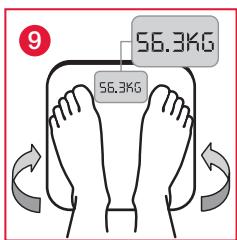
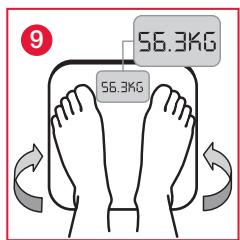
- Stand on the platform and keep still while the device measures your weight.
- Your weight will be displayed on the screen.
- The scales switch off automatically after use.
B: CALCULATION AND CLASSIFICATION OF BMI
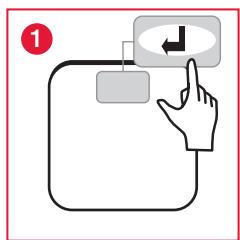
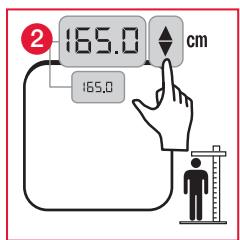
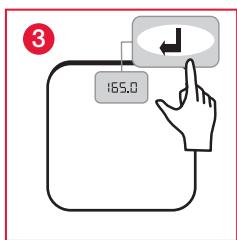
You must first configure your scales by indicating your height, age and sex.
The configuration process is the same for both adults and children:
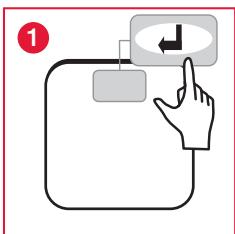
- Press the button to turn on the scales.
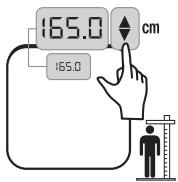
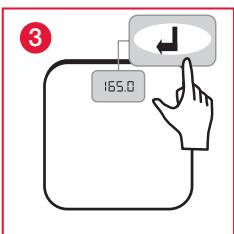
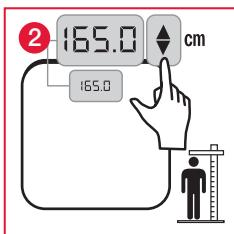
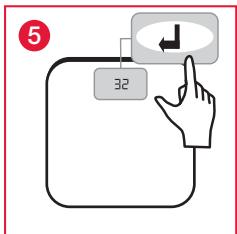
- Press the [] or [] buttons to enter your height and the button to confirm this setting.
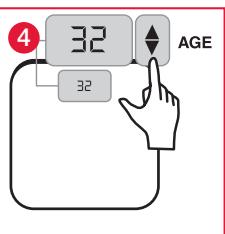
- Press the [] or [] buttons to enter your age and the button to confirm this setting.
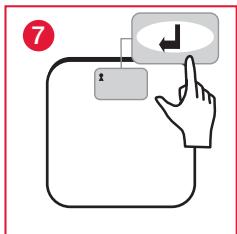
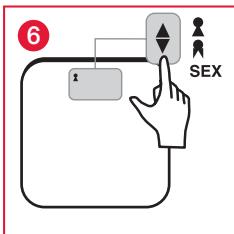
- Press the [] or [] buttons to enter your sex and the button to confirm this setting.
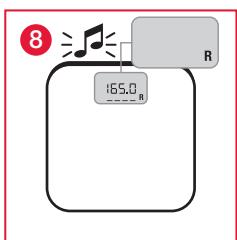
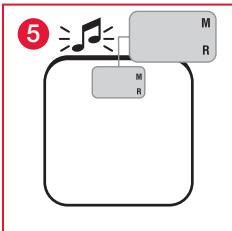
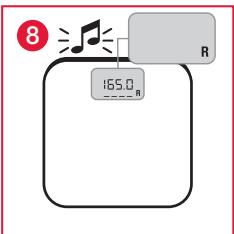
- Stand on the scales once you hear the confirmation beep.
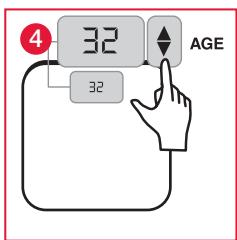
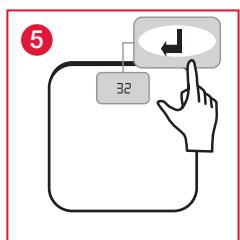
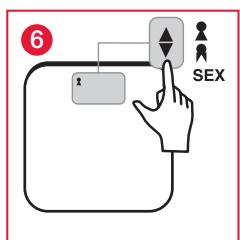
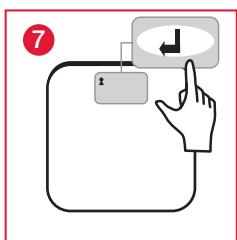
English
ELECTRONIC BATHROOM SCALE FAMILY BODY CONTROL
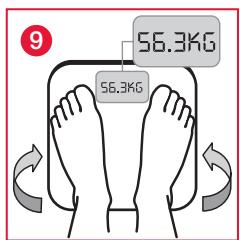
B.1 Indication of results for an adult
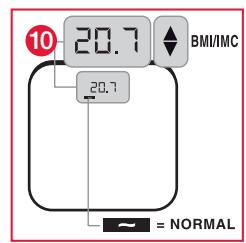
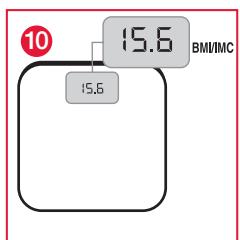
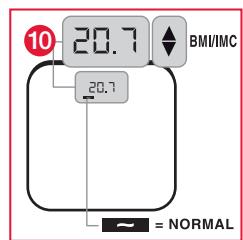
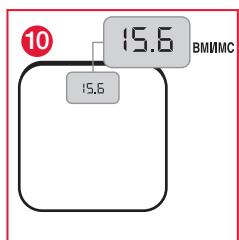
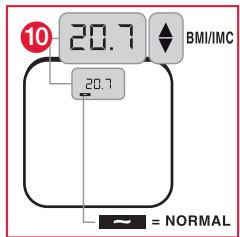
The screen first displays your weight then your BMI.
The icon on the bottom of the screen indicates the category your BMI is situated in.
B.2 Indication of results for children and teenagers
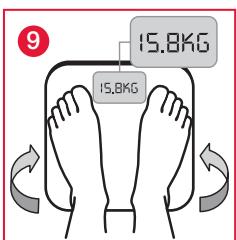
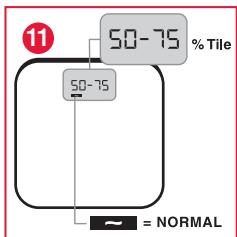
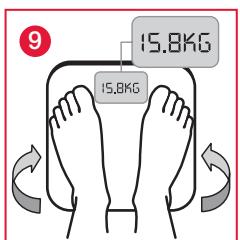
The screen displays your weight, your BMI and your BMI percentile, in this order.
The icon on the bottom of the screen indicates the category your percentile is situated in.
English
ELECTRONIC BATHROOM SCALE
FAMILY BODY CONTROL
C: MEMORY
C.1 Memorising settings
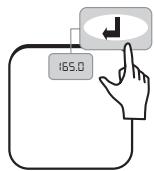
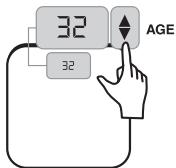
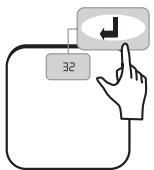
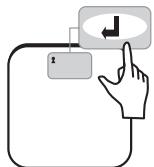
- First enter your data - height, age and sex (follow the instructions in paragraph B).
- When you hear a beep, select a memory slot by pressing the [] or [] buttons.
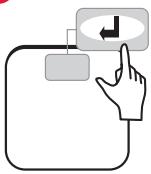
- Press the button to confirm your choice. A beep will sound.
1

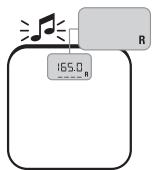
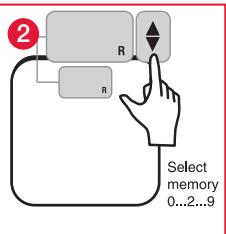
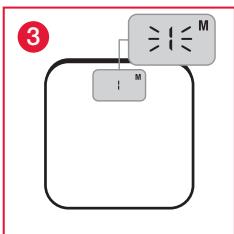
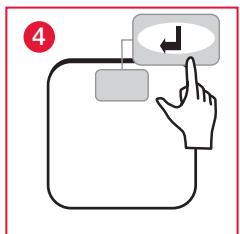
C.2 Memory recall
- Press the button for 3 seconds.
- The figure 1 will flash on the screen. Press the [▲] or [▼] buttons to go to the desired memory slot and the button to confirm your choice.
- Stand on the scales once you hear the confirmation beep.
C.3 Quick memory recall
- With the device switched off, press the [▲] or [▼] buttons to go to the desired memory slot and the ← button to confirm your choice.
- Stand on the scales once you hear the confirmation beep.
English
ELECTRONIC BATHROOM SCALE
FAMILY BODY CONTROL
D: MONITORING CHANGES IN YOUR WEIGHT
The process is the same for adults, children and teenagers. Only the screens displaying the results are different.
When weighing yourself for the first time
- First memorise your data (follow the instructions in paragraph C.1).
- Stand on the scales once you hear the confirmation beep.
- The scales will indicate your weight as well as your BMI (plus the BMI percentile for children and teenagers).
- The icon on the bottom of the screen indicates the category your BMI is situated in.
When weighing yourself subsequently
- Call up your memory slot (follow the instructions in paragraph C.3).
- Stand on the scales once you hear the confirmation beep.
- The scales will indicate your current weight plus the difference between your last weight measured (a " - " sign in front of the figure indicates weight loss).
- The scales will then indicate your BMI (plus the BMI percentile for children and teenagers).
- The icon on the bottom of the screen indicates the category your BMI is situated in.
Warning indicators
| Err0 | Incorrect initialisation - The scale must be reset. |
| Err1 | Unstable weight: start again. |
| Err2 | Overload: remove weight immediately. |
| Lo | Overload: remove weight immediately. |
| Memory Full. Press (▼/▲) or RESET to clear the data. |
PROTECT THE ENVIRONMENT
Dispose of used batteries in a designated container so that they can be collected and recycled. Do not mix different types of batteries. Do not mix new and used batteries.

After life, dispose of this product at a designated waste recycling point.
GUARANTEE
This product is guaranteed against defects in materials or manufacturing. During the guarantee period, any such defects will be repaired free of charge (proof of purchase must be shown in the case of a complaint under guarantee). The guarantee does not cover damage resulting from improper use or negligence. In the event of a claim, first contact the shop where you purchased the product.
Deutsch
ELECTRONIC BATHROOM SCALE
FAMILY BODY CONTROL
BESCHRIJVING VAN HET APPARAAT
Functietoetsen
BESKRIVELSE AF PRODUKTET
Funktionstaster
"BODY CONTROL" PERHE
"BODY CONTROL" PERHE
Hyvä asiakas,
"BODY CONTROL" PERHE
TUOTTEEN KAYTTÖ
Aloittaminen
"BODY CONTROL" PERHE
"BODY CONTROL" PERHE
C: MUISTI
"BODY CONTROL" PERHE
D: EROJEN SEURANTA 2 PUNNITUKSEN VÄLILLÄ
B.1 Nndkaun Ha 3kpaHepn B3BeuBaHHB3pocloro yeNoBeKa
Ha 3kpahe cnaa nHdiunpyetcBec,notom IMT.
KateropnIMT nHdNcnpyeTc3NaYKom, pacnoJIOXeHHbIM B HxHKe YacTn 3KpaHa.
B.2 INHdkauHa 3kpaHe npn B3BeunBaHHpe6eHKa IIN IOpOCTKa
Ha 3kpahe chaujala INHdunu npyeTc BEc,notom IMT,notom npoentnIb IMT.
KateropnI npoentnI INMT INHdIuPyetyeTc3NaYKom, paCnoIooJehbIM B HnXHeN qactn 3kpaHa.

Pycckn
"BODY CONTROL FAMILIAL"
C. リAMRTb
C.1 CoxpaHenne npaMeTpoB B namrtn
Pn nocJeDyUoXx B3BWeuBaHnax
- BbI3OBnTe CBoi pa3dien pAmrTn, yKa3aB erO Hmep (TaK, KaK oNICAHO B pa3deJe C.3.).
-ПослеЗыковоRoсинана-пдтевждениьстаНьTeHa Плaitформу BECOB - Ha 3kpane INHINuipyeTcBec, a NOTOM pnpabka B Bece C MOMeHTa ppebluyoero B3BeunBaHH (ecnnped Hei cToNT 3NaK « - », TO 3TO 3NaHT, UTO npOn3OwJa He npnbabka, a Notepra Beca).
-После зтого на дисплесиндицуетсу IMT (a поpeбенкил поростka - се и пpoцentnь IMT). - KaTeropnI IMT nHdIuPnyeTc 3HaYKom, pacNoJIOXKeHHbIM B HnKHeN acTn 3KpaHa.
CpeIaJIbHbIe COo6UeHNr
oJslal g lai jzj zj jz jz jz jz jz
(.c.d.p)dDpaasal 1
a a a a a a a a a a a a a a a a a a a a a a a a a a a a a a
Aa aaa aaa aaa aaa aaa aaa aaa aaa aaa aaa aaa
j jall jda jaj jge biaill
jll j j j g jll j j [V] []
guslll jiee e laa 2n jzall gle ggl

- 1
BODY CONTROL
1.
"clss k j 50" p 12j g j 3 1 1 1 1 1 1 1 1 1
"slw k j 1000
J 1
"ssal Jaaal" 1y jg y aas k ssa" p 4j g jg jg jg jg jg jg
ailllll lllllllllllllllllllllllllllllllllllllllllllllllllllllllll
a aaiia aaii iaiai iaiii
A. 与 A. B. C. D. E. F. G. H. I. J. K. L. M. N. O. P. Q. R. S. T. U. V. W. W. X. Y. Z

aie
y 1
J 1