
UR 1300 - Remote control VIVANCO - Free user manual and instructions
Find the device manual for free UR 1300 VIVANCO in PDF.



| Product type | Universal remote control |
| Brand | Vivanco |
| Model | UR 1300 |
| Power supply | 2 AAA batteries (R03 / UM4) 1.5 V |
| Number of keys | Approximately 40 keys |
| Infrared range | Up to 10 meters |
| Direct code entry | Yes, 3-digit code |
| Manual code search | Yes, via POWER key |
| Automatic code search | Yes, sends every 2 seconds |
| Code identification | Yes, by LED flashes (OK+1/2/3) |
| Volume lock setting | Yes (OK+5/6) |
| Factory reset | Yes (OK+0 until flash) |
| Brand compatibility | Multi-brand (TV, SAT, DVD, etc.) |
| Carrier frequency | Not compatible with 400 kHz |
| Manufacturer warranty | 2 years |
| Dimensions (approx.) | 20 × 5 × 2 cm |
| Weight (approx.) | 100 g (without batteries) |
| Care and cleaning | Clean with a soft, dry cloth. Do not use abrasive products. |
| Safety | Do not expose to moisture, heat sources or shocks. |
| Spare parts and repairability | Standard AAA batteries available everywhere. No internal spare parts planned. |
Frequently Asked Questions - UR 1300 VIVANCO
User questions about UR 1300 VIVANCO
0 question about this device. Answer the ones you know or ask your own.
Ask a new question about this device
Download the instructions for your Remote control in PDF format for free! Find your manual UR 1300 - VIVANCO and take your electronic device back in hand. On this page are published all the documents necessary for the use of your device. UR 1300 by VIVANCO.
USER MANUAL UR 1300 VIVANCO
Inserting the batteries
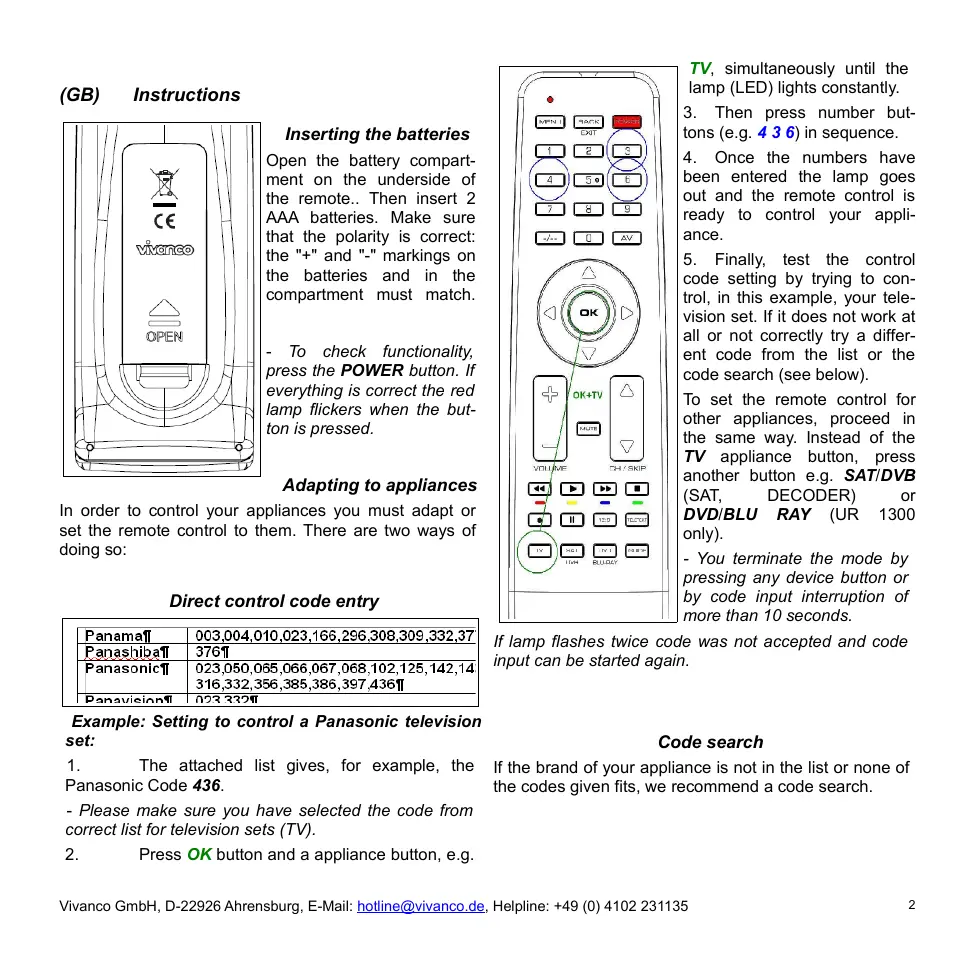
Open the battery compartment on the underside of the remote.. Then insert 2 AAA batteries. Make sure that the polarity is correct: the "+" and "-" markings on the batteries and in the compartment must match.
- To check functionality, press the POWER button. If everything is correct the red lamp flickers when the button is pressed.
Adapting to appliances
In order to control your appliances you must adapt or set the remote control to them. There are two ways of doing so:
Direct control code entry
| Panama¶ | 003,004,010,023,166,296,308,309,332,377 |
| Panashibat | 376¶ |
| Panasonic | 023,050,065,066,067,068,102,125,142,143,316,332,356,385,386,397,436¶ |
| Panavision | 023,332¶ |
Example: Setting to control a Panasonic television set:
- The attached list gives, for example, the Panasonic Code 436.
- Please make sure you have selected the code from correct list for television sets (TV).
- Press OK button and a appliance button, e.g.
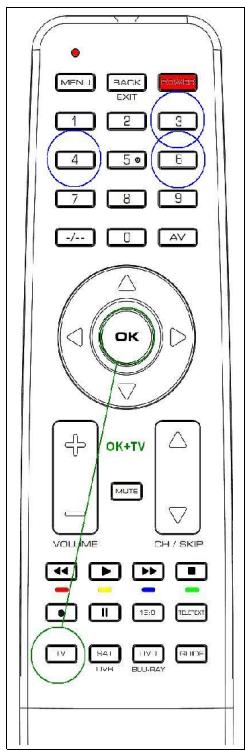
TV, simultaneously until the lamp (LED) lights constantly.
- Then press number buttons (e.g. 436) in sequence.
- Once the numbers have been entered the lamp goes out and the remote control is ready to control your appliance.
- Finally, test the control code setting by trying to control, in this example, your television set. If it does not work at all or not correctly try a different code from the list or the code search (see below).
To set the remote control for other appliances, proceed in the same way. Instead of the TV appliance button, press another button e.g. SAT/DVB (SAT, DECODER) or DVD/BLU RAY (UR 1300 only).
- You terminate the mode by pressing any device button or by code input interruption of more than 10 seconds.
If lamp flashes twice code was not accepted and code input can be started again.
Code search
If the brand of your appliance is not in the list or none of the codes given fits, we recommend a code search.
Manual code search
- Switch on the appliance to be controlled. Program is running.
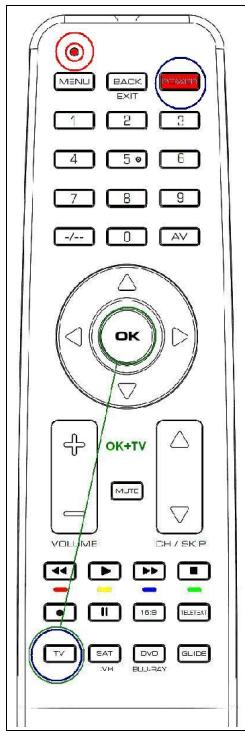
- To prepare code search, press the OK button and the appliance button, e.g. TV, simultaneously until the lamp (LED) lights constantly.
- Then point the remote control at the appliance to be controlled.
- Briefly press the ON/OFF POWER button once. The lamp (LED) blinks.
- Press the ON/OFF POWER button about any 1 second so often until the appliance, e.g. your TV reacts by power off.
- You can invert search direction by pressing the OK button and then POWER again.
- If your appliance has switched itself off, you must switch it back on again, e.g. on the appliance or with the original remote control, to
continue searching.
- When your appliance reacts you can also try out other buttons without interrupting the search. If some buttons do not work properly, simply continue searching by pressing ON/OFF POWER again.
- When your appliance reacts correctly, press the appliance button, e.g. TV for end of searching and saving of found code. The lamp (LED) goes out.
- The last code entered remains stored. The search stops after approx. 30 seconds of inactivity.
Automatic code search
- Switch on the appliance to be controlled. Program is running.
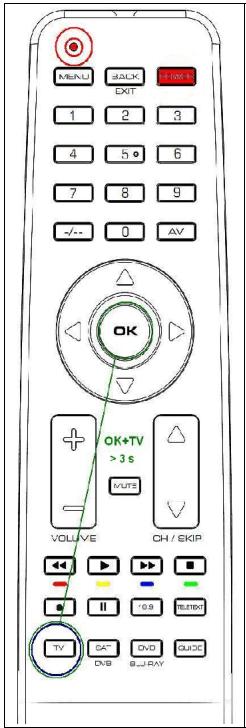
- To start the code search, press the OK button and the appliance button, e.g. TV, simultaneously for more than 3 seconds until the lamp (LED) goes off briefly.
-
Then point the remote control at the appliance to be controlled while the remote control emits a different ON/OFF signal every 1-2 seconds.
-
You can reverse search direction at any time by pressing OK button.
- When your appliance reacts, press any button except OK within 1-2 seconds, to end the search and save code..
-
If you ended the search too late, continue to search using the Manual Code Search (see above).
-
Finally, test the control code setting by trying to control, for example, your DVD appliance (UR 1300 only). If it does not work correctly, please try the code search again. The code search then begins with the found code in the sequence.
-
Remember to switch your appliance, e.g. DVD, back on again if you wish to continue searching.
Code identification
You can read off the 3-digit codes you have OK at any time:
- Press the appliance button of the appliance which code you want to read off, e.g. TV.
-
Press the OK button and 1,2,3 simultaneously, depending on the part of the code you want to read off. For example, if you press OK+1 and the code 436 (in this example) has been set, the lamp blinks 4 times after OK+1 is pressed to indicate that the hundred figure is 4. All you have to do is to count. The ten figure is indicated after pressing OK+2, e.g. it blinks 3 times for the 3 in 436. The one figure is indicated after OK+3 is pressed, e.g. it blinks 6 times for the 6 in 436.
-
There will be no flash in case of 0 indication.
Assigning volume and mute exclusively to one appliance
Press the appliance button of the appliance that you always want to use for volume control, e.g. TV. To lock, press OK + 5. To unlock, press OK + 6.
Reset To Factory Settings
Press OK+0 button until the lamp blinks twice in order to reset the remote to factory settings.
Operation
You operate your universal remote control basically in exactly the same way as if you were using the original remote control. As the symbols on a universal remote control could differ from those on the original remote controls, you may have to try out all the buttons in order to find the right functions.
Specifications
Batteries: 2x AAA batteries, R03, UM4
Range: max. 7 m
Not for 400 kHz equipment
2-year works guarantee
Should your remote control cease to work within 2 years of purchasing, you will receive a free replacement from Vivanco. Exceptions: missing codes, deliberate destruction and normal wear and tear of the housing and buttons.
| Panama¶ | 003,004,010,023,166,296,308,309,332,377 |
| Panashiba¶ | 376¶ |
| Panasonic¶ | 023,050,065,066,067,068,102,125,142,143316,332,356,385,386,397,436¶ |
| Panavision¶ | 023,332¶ |
| Panama¶ | 003,004,010,023,166,296,308,309,332,37 |
| Panashiba¶ | 376¶ |
| Panasonic¶ | 023,050,065,066,067,068,102,125,142,143 |
| 316,332,356,385,386,397,436¶ | |
| Panavision¶ | 023,332¶ |
Specifications techniques
Piles: 2 piles rondes, R03, UM4, AAA
Portee: max. 7 m
| Panama¶ | 003,004,010,023,166,296,308,309,332,37' |
| Panashiba¶ | 376¶ |
| Panasonic¶ | 023,050,065,066,067,068,102,125,142,144; 316,332,356,385,386,397,436¶ |
| Panavision¶ | 023,332¶ |
| Panama¶ | 003,004,010,023,166,296,308,309,332,37 |
| Panashibai | 376¶ |
| Panasonic | 023,050,065,066,067,068,102,125,142,143 |
| 316,332,356,385,386,397,436¶ | |
| Panavision | 023,332¶ |
| Panama¶ | 003,004,010,023,166,296,308,309,332,37 |
| Panashiba¶ | 376¶ |
| Panasonic¶ | 023,050,065,066,067,068,102,125,142,143 |
| 316,332,356,385,386,397,436¶ | |
| Panavision¶ | 023,332¶ |
| Panama¶ | 003,004,010,023,166,296,308,309,332,37 |
| Panashibat | 376¶ |
| Panasonict | 023,050,065,066,067,068,102,125,142,143 |
| 316,332,356,385,386,397,436¶ | |
| Panavision¶ | 023,332¶ |
| Panama | 003,004,010,023,166,296,308,309,332,37 |
| Panashiba | 376 |
| Panasonic | 023,050,065,066,067,068,102,125,142,143, 316,332,356,385,386,397,436 |
| Panavision | 023,332 |
| Panama¶ | 003,004,010,023,166,296,308,309,332,37 |
| Panashiba¶ | 376¶ |
| Panasonic¶ | 023,050,065,066,067,068,102,125,142,143,316,332,356,385,386,397,436¶ |
| Panavision¶ | 023,332¶ |
Exempel: fjarrkontrollen skastaillas in for en Panasonic TV:
| Panama¶ | 003,004,010,023,166,296,308,309,332,37' |
| Panashiba¶ | 376¶ |
| Panasonic¶ | 023,050,065,066,067,068,102,125,142,143' |
| 316,332,356,385,386,397,436¶ | |
| Panavision¶ | 023,332¶ |
| Panama | 003,004,010,023,166,296,308,309,332,37 |
| Panashiba | 376 |
| Panasonic | 023,050,065,066,067,068,102,125,142,143 |
| 316,332,356,385,386,397,436 | |
| Panavision | 023,332 |
Птумер: Habroka ducaMuHOnHo2O ynpaJIeHua meNeEu3Opa ФUpMbI ПаHaconHuk.
1.Из пиюхен Horo nepeuchry BbIbepeite, Hap., KOD 436дя Панacohnka.
Ioxanyucma, y6eumecb e mom, ymo Bby bblpaun kod dner meeneu3opa (TV).
2. HaxMMte OndHOBpeMeHHo Ha KhoNky OK u KhoNky, COOTBeTCTByOuSyU Tnny npnbopa, Hnnp., KhoNky TV, UTO6bI CBTeODIO (CIN) 3arOpenerc HnpepbIBHbIM CBeeHnEM.
3. После зтоунхмite послесоватьно уровык Honkn(Hapr.,436).
4.Посл eвда сифл пamnoчka norachet n yctpoi-CTBO duCTaHUNHOYU npabIeHn rOTOB K ynpabIeHnIO BaIIM npi6opom.
- B 3aknouhe npoBepbte HacTpoeHbI ynpabJIIOuN KOD, HApP., TeM, TTo Bbl nonpObyTe ynpabJIbTa BaWIM TeJeBn3Opom. EcIn 3To He fynKUOnHpyet nIIfynHKUOnHpyeT HenpaBnIbHO, To nonpObyTe nCnoJIb3OBaT bDaJIbHeNm KOD n3 nepeHry NIN NOcK KoJa, CMOTPN HIXke.
YTo6bI HAcTpoNTb BaIuNt DInCTaHcUHOHOrO ynpabHeHnHa DaPyrIe Pnp6Opbl, NOBTOpTE BbIeONuCAHHyU npOeDpy. ToIbKO BMeCTo KHOKN TV HaXKMITE KHOKNy SAT/DVB (SAT,DECODER) nJIN DVD/BLU RAY (ToIbKO UR 1300).
Ipekrammb eod koda moxho, haxae Ha kakyo-lu6o KhoNky, coomeemcmeyuouy umy npubopa, unu cdeJaae na3y bonee yem Ha 10 cekyHd.
JaMaHaem 2 pa3a, ecu Bbl eenu He npauBbI Ko. Iocne 3mo0 6oO koda moKHO noMopumb.
Nouck Koda
EcnI Mapka npnbopa He yka3aHa B nepeyHe nHn OINn I3 yka3aHHbIX KOIOB He IOXoIT, TO B TaKOM Cly-ae peKOMeHNyETcN ONCK KOA.
PyuHou noucK koda
- BkHouHTe, noXaIyIcTa, ynpBaIyEmbI np6Op. IporpAmMa BblOnHЯTc.
- Haxmte OndHbpeMeHHo Ha KhONky OK n KhoNky, COOTBeCTByUOyU Tnny npBopa, Hapr., KhoNky TV, YTObI CBToDIO (CIN) 3arOpencn HeHpepbIBhIM CBEHHeM
- 3aTeM HnPaBbTe yCtpoCTBO DnCTaHcNoHHOrO ynpabHeHn Ha ynpaBnaEmb np6Op.
4.Один pa3 корOTКо НажаТ b POWER (npi6op BKN/OTKn).Ламночka (CИД) мигаET. -
Mhorokpatno, npimepno kaxnyo ckyHny, hakmaite na KhoNk y POWER (Bkn/otkn npnbop), noka npnbop he otpearnpyet.
-
Bby MoXeme U3MeHumb HanpaeJeHue noucka, Haxa8
OK, a 3amem onymb POWER.
- Ecni npubop bkiuuncra, mo Bam Heo6xodmo, Hanp., Ha npubope unu c nomoubOpuaunhaBho2o ycmpoucmea ducmauonHoo2o ynpaenue Choea ekIyumb eo dor daJIbHeuweo noucka.
- Ecnu Bau npubop paeaupyem, mo Bby Mojeme ucnpoboeamb maKke u dpyeue KnaBuuu, He ebixodu3pekuma noucka. Ecnu Hekomopbie KnaBuuu He yvnkuohupyom npaunbHo, mo nouck cneedyem npocmo npodonkamcb nomoubuPOWER.
- Ecniu Baunpnpop pearnpyet npabnIbHo, To haxmTe npnbopHyo KlaBnUy TV n ppekpatnte TaKIM o-ba3om nonck. lamnocha (CIV) rachet.
- Ypee3 npu6n. 30 cek. 6e3deucmea nouck npepb1ba-emcra.
Aemomamuecku nouc koda
- BkIIOUHTe, noKaIyIcTa, ynpabIyEmbI npI6Op, UTO-6bI paOToTala OJHa n3 TeIeBn3IOHbIX npOrpamM.
- Haxmte KhoNky OK, a 3aTeM KhoNky, COOTBeTCTByIouyu Tnny npnbopa, Hanp., TV, npdoJnxTeJeBHoCTbO6oone 3 cekyHd, yTo6bI CBeToDiOn (CIV) Ha kopoTkoE Bpemr OTKIOHJIICr.
- 3aTeHnPaBbTe yCtpoCTBO DnctaHcnoHHoro ynpabHeHa y npaBmEhmy np6Op, B TO BpeM kak dntaHcNoHHoe ynpabHeHne KaKdIe 2 cekyHdbI nocblaet dpyro CnHaB BKl/OTKnI.
-BbMOKeme 3IIO6oe epemu 3MeHumb HAnpaaneHue noucka, Haxae KhoNky OK. - EcII Bau npBop peaHpyeT, To haxMMte KaKyHO-HN6yNb KJIaBnUy, KpOme OK, YTObI 3aKOHHTb NOINCK KOJa.
- B 3aKlNoeHne npoBepbTe HAcTpoEHbI ynpabJIIOuIou KOD. EcNn OH cyHKUHOHpyET HeNPaBUNbHO, To no npObyTe nOcK KOa, NoKaJyNCtA, eUe ODN pA3. PoNCK KOa 3aNyCKaETcB T TakOM cIyuae CJeDyIOUM KOdOM.-He 3a6yObme Baw npubOp, ecNu BBy JeNaeMe npodOnkumb nouck, noemopHo ekIooUmb Ha npubope.
Idehmufukaunka koda
BbMOxKeTe BJIIOBoe BpEmr npOuHTaTb yCTaHOBJIeHHbI TpEx3HaUHbIKoD:
- HaxaTb KnaBnUy Ha npnbope, Ha KoTOpom Bbl JeJaTe npOHTaTb KoI, HAp., meneBu3Op.
- HαkaTb OK nDOnONHnTeBHo 1, 2 nIi 3, B 3aBnCmOCTn OT TORO, kakoi pa3pRd KOA Bbl JKeJaTe Bbl6paTb. Hanp., ecnn Bbl HαkaII NOK+1, a BBeDeHHbI KO, HapPImep, 4 3 6, TO cBeToNDIOg MMHTet 4 p3a, noKa3bIba 3NaHeHne 4 nIra pa3pRda COTeH. Bam HyxHO ToIbKO ChITaTb. HαkaTneM OK+2 BblAaETc 3NaHeHne dIra pa3pRda DecrTKOB, Hanp., MmHET 3 pa3a, nOKa3bIba 3 n3 436. A HαkaTneM OK+3 nOKa3bIbaeTc 3NaHeHne pa3pRda EaHNu, Hanp., MmHET 6 pa3, nOKa3bIba 6 n3 436. - Ppu unduKauuu Hnyra MuaHue omcymcmeyem.
Idehmufuupoabmb apomkocmb u becuymhycxemy cneuaalho dno odno npubopa
Haxmnte npnbopnyo knaBnuy npnbopa, kotopb Bbl BCerda jeenaete nCnoIb3ObaTb dny ynpabNeHHa 3ByKOM, HAp., meeneu3Op. 3aTeM dny 6bnokpOBKn haxmnte knabNuy OK+5. Dnra de6bnokpOBKn haxmnte KnaBnuy OK+6.
3aodcke Hacpmouku
PnnpoDIOJKNTeJIbHOM HaxKaTIN OK+0(JaMaNpaDIOJXHa MmRhyTb 2 pa3a)Bce HAcTpoIKn C6paCbIbaOTcHa CTaHdApTHbIe 3aBODcKne yCTaHOBKn.
YnpaenHeue
Bby ynpabJyTe npakTueckn Baunm npnbopamn Tak Xke, kak Bam 3to 3NaKOMO C BauXn opuHnAblbXbX yctpoCTB nCTaHUNHO ynpabNeHn. TAK KAC mBOLbI yHnBepCaJIbHO nJIbTa nCTaHUNHO ynpabNeHn OTHNtUHaOTcR oC mBONOB BauXn opuHnAHLbXbY cTPOCTB nCTaHUNHO ynpabNeHn, BO3MOxHo, yTO dna HaxoJdeHn cyHKnBn Bam notpe6yET
TexHuueckue daHhbie
BaTapei: 2 MinkpoənemehTa, R03, UM4, AAA
Pányc DeiCTBn: MaKc. 7 M
He nCnoIb3yETcIaI npIb6OpOB 400 kT.
3aodckaaapanm2 2oda
EcIn B TeueHne 2 JeT nocNe nokynKn BaushyHnBepcaIbHbN Iybl TINCTaHcUHOHO ynpabIeHnBAIJeT N3 CTO,To B TAKOM clyuae BbI NOJYHe OTFpMbV Vivanco BeCcnPaTHyo 3AmEn. NckluOeHn:OTCYCTByUOJIe KOnbI, YmbIuJIeHHOe pa3pyuHHe N HopMaJIbHbN I3HOC KOpNyCa NKnAbNII.
(GR) O\nyieC\chi$ npoans
TOnoTeIeIOn mparapiwV
AvoiTE To kattaki Tns UTOOoxns Twv MTTATAPIW OTo TIOW MEPOCS TNS OUKKEUNCS, TIOE TE TA EALAOJATA EALAPWCGTPOC Ta KATKW KAITOTOBETIEOTE TIC 2 AKAIAKEC MIKPOIITATAPIE.C PNOOEETIC VEOIEEIG DIATAEGTS TUV TIOAW OTIW GAVYAPAOVTAI OTIS MTTATAPIECS KAOTN UTOOHN TOWV MTATAPIWV (+=+) .-Ia va ELEYEETENV LEITOUpyIA TAPAKALOUME TE OE TO PAnkKTPo POWER.Huxvia avaboBnVEi, EAV N LEITOUpyia Eivai EvrAeI.
Ipoosapuoyn oeuKeves
PpOKeIeVou va mTopeTe va eEyxTe Tc OuaKEuEs OaTpeTE va puBmuTe KataaAaNla to TnAExEpiotnpio Yia Tc EkaToTe OuaKEuEs. Ia auto UtnapXouv Duo DuvatOTntec:
Ateu3iae 1ioaywyn Kw8ikoou
| Panama¶ | 003,004,010,023,166,296,308,309,332,37' |
| Panashibai¶ | 376¶ |
| Panasonic¶ | 023,050,065,066,067,068,102,125,142,144;316,332,356,385,386,397,436¶ |
| Panavision¶ | 023,332¶ |
| Panama | 003,004,010,023,166,296,308,309,332,37 |
| Panashiba | 376 |
| Panasonic | 023,050,065,066,067,068,102,125,142,144;316,332,356,385,386,397,436 |
| Panavision | 023,332 |
| Panama | 003,004,010,023,166,296,308,309,332,37 |
| Panashiba | 376 |
| Panasonic | 023,050,065,066,067,068,102,125,142,144;316,332,356,385,386,397,436 |
| Panavision | 023,332 |
| Panama | 003,004,010,023,166,296,308,309,332,37 |
| Panashiba | 376 |
| Panasonic | 023,050,065,066,067,068,102,125,142,144,316,332,356,385,386,397,436 |
| Panavision | 023,332 |
| Panama | 003,004,010,023,166,296,308,309,332,37 |
| Panashiba | 376 |
| Panasonic | 023,050,065,066,067,068,102,125,142,144;316,332,356,385,386,397,436 |
| Panavision | 023,332 |
- INSERTING THE BATTERIES
- ADAPTING TO APPLIANCES
- EXAMPLE: SETTING TO CONTROL A PANASONIC TELEVISION SET
- CODE SEARCH
- MANUAL CODE SEARCH
- CONTINUE SEARCHING
- AUTOMATIC CODE SEARCH
- CODE IDENTIFICATION
- ASSIGNING VOLUME AND MUTE EXCLUSIVELY TO ONE APPLIANCE
- RESET TO FACTORY SETTINGS
- OPERATION
- SPECIFICATIONS
- 2-YEAR WORKS GUARANTEE
- SPECIFICATIONS TECHNIQUES
- EXEMPEL: FJARRKONTROLLEN SKASTAILLAS IN FOR EN PANASONIC TV
- ПТУМЕР: HABROKA DUCAMUHONHO2O YNPAJIEHUA MENEEU3OPA ФUPMBI ПАHACONHUK
- NOUCK KODA
- PYUHOU NOUCK KODA
- OK, A 3AMEM ONYMB POWER
- AEMOMAMUECKU NOUC KODA
- IDEHMUFUKAUNKA KODA
- IDEHMUFUUPOABMB APOMKOCMB U BECUYMHYCXEMY CNEUAALHO DNO ODNO NPUBOPA
- 3AODCKE HACPMOUKU
- YNPAENHEUE
- TEXHUUECKUE DAHHBIE
- 3AODCKAAAPANM2 2ODA
- (GR) O\NYIEC\CHI$ NPOANS
- TONOTEIEION MPARAPIWV
- IPOOSAPUOYN OEUKEVES
Brand : VIVANCO
Model : UR 1300
Category : Remote control