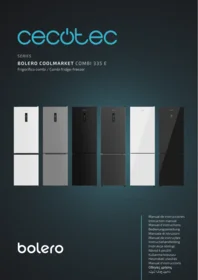
Bolero Coolmarket Combi 335 E - Refrigerator CECOTEC - Free user manual and instructions
Find the device manual for free Bolero Coolmarket Combi 335 E CECOTEC in PDF.


| Product type | Combined refrigerator-freezer |
| Model | Bolero Coolmarket Combi 335 E |
| Brand | Cecotec |
| Total capacity | 335 liters (refrigerator: 240 L, freezer: 95 L) |
| Dimensions (H x W x D) | 185 x 60 x 65 cm |
| Net weight | 68 kg |
| Power supply | 220-240 V ~ 50 Hz, power 150 W |
| Energy class | E (new EU standard) |
| Annual consumption | 268 kWh/year |
| Noise level | 39 dB(A) |
| Cooling type | Ventilated cooling (No Frost) in the refrigerator, static cooling in the freezer |
| Defrosting | Automatic for the refrigerator, manual for the freezer |
| Interior lighting | LED |
| Number of shelves | 4 adjustable glass shelves |
| Number of vegetable drawers | 1 sliding vegetable drawer |
| Freezer | 3 freezer drawers, freezing capacity 4 kg/24h |
| Autonomy in case of power failure | 12 hours |
| Refrigerant | R600a (isobutane) |
| Thermostat | Electronic with digital display |
| Special functions | Vacation mode, Super Cool function, Super Freeze function |
| Maintenance and cleaning | Clean with a soft cloth and warm water, do not use abrasive products |
| Spare parts and repairability | Available on the Cecotec website and from authorized dealers |
Frequently Asked Questions - Bolero Coolmarket Combi 335 E CECOTEC
User questions about Bolero Coolmarket Combi 335 E CECOTEC
0 question about this device. Answer the ones you know or ask your own.
Ask a new question about this device
Download the instructions for your Refrigerator in PDF format for free! Find your manual Bolero Coolmarket Combi 335 E - CECOTEC and take your electronic device back in hand. On this page are published all the documents necessary for the use of your device. Bolero Coolmarket Combi 335 E by CECOTEC.
USER MANUAL Bolero Coolmarket Combi 335 E CECOTEC
- Parts and components 101
- Before use 101
- Installation 102
- Operation 104
- Instructions on food storage 107
- Cleaning and maintenance 109
- Troubleshooting 110
- Technical specifications 113
- Disposal of old electrical
and electronic appliances 114 - Technical support and warranty 114
- Copyright 114
- Simplified EU Declaration of Conformity 115
SOMMAIRE
EU01_109100 - Bolero CoolMarket Combi 335 White E
EU01_109101 - Bolero CoolMarket Combi 335 Grey E
EU01_109102 - Bolero CoolMarket Combi 335 Black E
EU01_109103 - Bolero CoolMarket Combi 335 Inox E
EU01_109104 - Bolero CoolMarket Combi 335 Dark E
EU01_109105 - Bolero CoolMarket Combi 335 White Glass E
EU01_109106 - Bolero CoolMarket Combi 335 Black Glass E
EN · The coding in this manual is generic and applies to all code variants of the appliance.
Read these instructions thoroughly before using the appliance. Keep this instruction manual for future reference or new users.
- It is important to make sure all users are familiar with the operation and safety features of the appliance to prevent faults and unnecessary accidents.
- Make sure that the mains voltage in your house matches the voltage stated on the rating label of the appliance.
- This appliance can be used by children aged 8 and above and people with reduced physical, sensory, or mental capabilities or lack of experience and knowledge, as long as they have been given supervision or instruction concerning the use of the appliance in a safe way and understand the hazards involved. Children must not play with the device. The cleaning and maintenance of the appliance should not be carried out by children without supervision.
- Keep the packaging material away from children, as there is a risk of suffocation.
- WARNING: if the interior light is damaged, contact the official Cecotec Technical Support Service. Do not try to repair it on your own.
- WARNING: when positioning the appliance, make sure the power cable does not get trapped or damaged. A crushed or damaged plug may heat up and cause a fire.
- Make sure the appliance plug is accessible after installation.
- Do not place food directly against the air outlet on the interior of the appliance.
- Keep the ventilation openings clear from obstructions.
- Do not place carbonated or fizzy drinks in the freezer compartment, as this creates pressure in the container, which could explode and damage the appliance.
- WARNING: do not use mechanical appliances or other means to accelerate the defrosting process other than those recommended by Cecotec.
- WARNING: do not damage the refrigeration circuit.
- If the cable is damaged, it must be replaced by the manufacturer, the supplier, or qualified personnel to avoid hazards.
- WARNING: do not use electrical appliances inside the refrigerator.
- We recommend you check the power cable regularly to detect any sign of possible damage. Do not use the appliance if the cable is damaged.
- To avoid injuries or death caused by electric shock, do not use the appliance with your hands wet or over a wet surface.
- You should never use this refrigerator with an extension lead or a multi-socket adaptor. Make sure the appliance is plugged in directly to a power supply.
- When positioning the appliance, make sure there is enough free space at the rear, as it is the main heat outlet. This will allow for adequate ventilation.
- Do not place hot food or drinks in the refrigerator, allow them to cool down to room temperature beforehand.
- Do not place any other appliance on top of the refrigerator and do not get it wet.
- Do not store explosive substances such as aerosols or flammable propellants in this appliance.
- This appliance is designed for domestic use only and is not intended for bars, restaurants, farmhouses, hotels, motels, and offices.
- WARNING: to avoid any risk due to the instability of the refrigerator, you must install it according to the instructions.
- This appliance has a built-in earthed plug. Make sure the power supply in your house is properly earthed.
- Wait 5 minutes after a power failure before turning the appliance back on. Otherwise, the compressor may get damaged.
- This appliance is not intended to be operated by means of an external timer or separate remote-control system.
- Always handle the appliance carefully to avoid any damage on it.
- Frozen food can cause frostbites if consumed right after removing it from the freezer compartment.
- Do not remove or touch items in the freezer compartment with your hands wet, as it could cause skin abrasions or frost/freeze burns.
- Never use the base, drawers, or door as support.
- Do not overload the door shelves or place too much food on the drawers to prevent items from falling off and damaging the appliance.
- WARNING: do not attach multi-socket adaptors or multiple power supplies to the rear part of the appliance.
-
To avoid food contamination, please follow the instructions below:
-
Opening the door for a long period of time may cause a significant increase in temperature in the appliance compartments.
- Regularly clean the surfaces that come into contact with food and with the accessible draining systems.
- Clean the water tank if it has not been used for 48 hours.
- Store raw meat and fish in proper containers in the freezer, so they do not come into contact with or leak on other food.
-
The two-star compartments are suitable for storing pre-frozen food, storing or making ice cream, and making ice cubes.
-
Compartments with one, two, or three stars are not suitable for freezing fresh food.
-
If the appliance is not going to be used or be empty for a long period of time, switch it off, allow it to defrost, clean it, dry it, and leave the doors open to prevent interior mould growth.
-
Before carrying out any maintenance and cleaning task, turn off the appliance and unplug it.
- It is advisable to wait for at least four hours before connecting the appliance to allow oil to flow through the compressor.
- Air must flow around the appliance. Lack of air leads to overheating. To achieve good ventilation, follow the installation instructions.
- Whenever possible, the rear part of the appliance should not be too close to the wall to prevent it from touching or reaching the hot parts (the compressor and the condenser). To avoid risk of fire, follow the installation instructions.
- Make sure that the mains plug is accessible after installation of the appliance.
- All electrical work required to maintain this appliance must be carried out by a qualified electrician.
- Use the appliance only for the purposes described in this manual. Incorrect or improper use can damage the appliance and be dangerous for the user.
Temperature range
- The appliance temperature range information can be found on its marking. It indicates the optimum room temperature for proper operation of the appliance.
| Climate range | Optimum room temperature |
| SN | From +10 °C to +32 °C |
| N | From +16 °C to +32 °C |
| ST | From +16 °C to +38 °C |
| T | From +16 °C to +43 °C |
Note:
- Taking into account the limiting values of the room temperature range for the climates for which the appliance is designed and that internal temperatures may be affected by factors such as the location of the appliance, room temperature and frequency of door opening, it may be necessary to modify the setting of any temperature control device according to these factors.
- If the appliance is operated in an environment other than the specified climate type (i.e. beyond the rated ambient temperature range), it may not be able to maintain the desired indoor temperatures.
Refrigerant
- Isobutane refrigerant (R600a), contained within the refrigeration circuit of the appliance, is a natural gas with a high level of environmental compatibility; however, it is flammable. Make sure that no components of the refrigeration circuit have been damaged during the transport and installation of the appliance.
- WARNING: the refrigerant and the insulator gas are flammable. When disposing of the device, only dispose of it at an authorised waste-disposal facility. Do not expose it to flames.
- WARNING: the appliance contains refrigerant and gases in the insulation. The appliance and gases must be disposed of professionally, as they may cause injuries to eyes or ignition. Make sure the refrigeration-circuit pipe is not damaged before disposing of it correctly.
- This symbol means: warning, risk of fire/flammable materials.
-
If the refrigeration circuit is damaged:
-
Avoid open flames and sources of ignition.
o Completely air the room where the appliance is located.
INSTRUCTIONS DE SÉCURITÉ
- Refrigerator compartment
- Door shelves
- Glass shelves
- Refrigerator adjustable temperature drawer (Freshness Flex Hub)
- Crisper drawer cover
- Humidity-controlled crisper drawer (Humidity Flex Hub)
- Freezer compartment
- Freezer drawers
- Temperature knob (Fresh Flex)
- Humidity knob (Humidity Flex)
NOTE:
The graphics in this manual are schematic representations and may not exactly match the product.
2. BEFORE USE
- This appliance is packaged in a way as to protect it during transport. Take the appliance out of its box and remove all packaging materials. You can keep the original box and other packaging elements in a safe place to prevent damage to the appliance if you need to transport it in the future. If you wish to dispose of the original packaging, make sure all packaging materials are recycled accordingly.
- Make sure all parts and components are included and in good conditions. If there is any piece missing or in bad conditions, contact the official Cecotec Technical Support Service immediately.
- Do not remove the serial number of the appliance in order to keep a correct traceability of it in case of assistance.
Box content
- Refrigerator
- Instruction manual
Before using the refrigerator:
- Remove all transport packaging.
- Once installed, allow the refrigerator to stand for at least four hours before connecting it to the mains.
- It is recommended to clean the inside of the appliance before starting it up. To do this,
ENGLISH
use a solution of baking soda and warm water and then dry the inside of the refrigerator thoroughly. The refrigerator may give off a peculiar smell when it is opened for the first time. This smell will disappear as the appliance cools down.
3. INSTALLATION
Before using the refrigerator
Before starting the refrigerator, check the following:
- Make sure that the interior is dry and air can circulate freely at the rear.
- Clean the interior according to the instructions in the "Cleaning and maintenance" section.
- Connect the refrigerator's power cable to a suitable socket. When opening the freezer door, the interior lights should turn on.
- You will hear a sound when the compressor starts running; this is normal. The liquid and gases sealed within the refrigeration system may also produce noise, whether the compressor is running or not. This is perfectly normal.
- The front and side edges of the refrigerator may feel warm. This is designed to prevent condensation and is part of normal operation.
Placement and installation
Installation preparation
- Never install the appliance near heat sources, such as heaters or cookers, or in damp places.
- At least two people are required to transport and install the appliance safely. When lifting the appliance, edges may be sharp. Use appropriate protective equipment during transport and installation.
- To ensure that the refrigerator is level, adjust the front adjustable feet to the desired height.
- Make sure that the cooling system at the rear of the appliance does not touch the wall. The greater the gap, the better.
- The appliance must be installed in a well-ventilated area. Be sure to leave enough space above the appliance for air outflow and to maintain an adequate clearance between the rear side and the wall.
- Place the refrigerator in a stable place where vibrations do not occur. In earthquake-prone areas, secure the refrigerator to prevent it from falling and causing accidents.
- If insufficient space is left around the refrigerator, or if objects are placed on top or beside it, heat dissipation may be affected, leading to unnecessary power consumption.
- Contact between the rear surface of the appliance and the wall may cause vibrations and noise.
-
If the refrigerator is placed too close to a wall or other objects, they could be damaged due to heat dissipation.
-
If the refrigerator is placed near heat sources or in direct sunlight, cooling efficiency will be reduced, resulting in additional power consumption.
- Adjust the front feet to place the refrigerator in an upright position. If it is not properly levelled, noise and vibrations may occur.
- If the refrigerator is placed on a carpet or other soft surfaces, place a protective board underneath to prevent tipping and potential injury.
- Make sure that the refrigerator is properly connected to an earthed socket; otherwise, an electric shock may occur.
- Do not place the refrigerator in wet or humid places.
- During transport, prevent the refrigerator door from contacting any objects that could damage it, and ensure the tilt angle does not exceed 45^ .
- Place the refrigerator in a well-ventilated, dry place away from direct sunlight. Also avoid placing it near heat sources.
- Do not expose the refrigerator to low temperatures.
Levelling the refrigerator
- Turn the bottom levelling feet clockwise to raise the refrigerator.
- Turn the bottom levelling feet counterclockwise to lower the refrigerator.
Reversing the door opening direction
Tools needed:
- Crosshead screwdriver
- Flat-head screwdriver
- Hexagonal spanner
- Make sure the appliance is unplugged and empty.
- To remove the door, tilt the appliance backwards if necessary. Rest the appliance on a solid surface so it does not slip during the door reversing process.
Note: Keep all removed parts for door reinstallation.
- Do not lay the appliance flat, as this may damage the cooling system.
-
It is recommended to have two people handle the appliance during assembly.
-
Remove the four screws from the top cover and then lift it off. Fig. 2
- Unscrew the upper hinge, then remove the upper door and place it on a soft pad to prevent scratches. Fig. 3
- Remove the pin with a screwdriver and flip the hinge bracket. Then refit the pin to the hinge bracket. Fig. 4
- Unscrew the middle hinge. Then lift the lower door and place it on a soft pad to prevent scratches. Fig. 5
- Move the hinge hole covers from the left side to the right side. Fig. 6
ENGLISH
- Unscrew the lower hinge. Then remove the adjustable feet from both sides. Fig. 7
- Unscrew and remove the lower hinge pin, turn the bracket over and refit it. Fig. 8
- Reassemble the bracket with the lower hinge pin. Replace both adjustable feet. Place the lower door in the assembling position. Fig. 9
- Make the middle hinge reverse direction 180^ , then refit it to the left position. Place the middle hinge pin into the upper hole of the lower door and tighten the bolts. Fig. 10
- Refit the upper door. Ensure the door is aligned horizontally and vertically so that the seals are closed on all sides before fully tightening the upper hinge. Then insert the hinge and screw it to the top of the appliance. Fig. 11
- Put the top cover back in place and screw it. Fig. 12
4. OPERATION
Control panel
Fig. 13
The different functions of the refrigerator are shown below:
Setting and switching off the refrigerator compartment temperature
The refrigerator temperature can be adjusted between 2 °C and 9 °C. Each time you press the FRIDGE button, the temperature will increase by 1 °C. When it reaches the maximum temperature (9 °C), pressing the button will switch off the setting and the display will show “--”. Pressing the button again will automatically return to the minimum temperature (2 °C). Repeat this process.
Setting the Freshness Flex Hub refrigerator drawer temperature
The temperature of the drawer can be adjusted using the temperature knob.
If you slide the humidity regulator to the right, more gaps will be exposed, and the drawer will have a lower humidity level.
If you slide the humidity regulator to the left, less gaps will be exposed, and the drawer will have a higher humidity level.
Setting the Humidity Flex Hub refrigerator drawer humidity
The humidity regulator of the drawer is designed to keep moisture steady and the vegetable freshness.
If you slide the humidity regulator to the right, more gaps will be exposed, and the drawer will have a lower humidity level.
If you slide the humidity regulator to the left, less gaps will be exposed, and the drawer will have a higher humidity level.
Setting the freezer compartment temperature
The freezer temperature can be adjusted between -15 and -24 °C. Each time you press the FREEZER button, the temperature will increase by 1 °C. When it reaches the maximum temperature (-24 °C), pressing the button again will automatically return the setting to the minimum temperature (-15 °C). Repeat this process.
Smart mode
When pressing the SMART MODE button, the refrigerator enters the Smart mode. will appear on the display. The refrigerator will automatically adjust the temperature of both compartments according to the ambient temperature to maximise energy savings without affecting food preservation. It is advisable to use this mode.
Display lock and unlock
If there is no activity for a few seconds, the appliance will lock the display and the “” symbol will appear. In this state, you cannot set any function. To unlock the display, press the LOCK/UNLOCK ^3s button for a few seconds and the symbol will disappear. If you want to lock the display again, press and hold for a few seconds.
Fast Cooling
To quickly cool a large quantity of food, press and hold the FRIDGE _3s FAST COOL button for a few seconds. The symbol 🌐 will appear on the display. The refrigerator temperature will be set to 2 °C. The fast cooling will end automatically after a period of operation.
Note: This temperature is fixed and cannot be changed.
Fast Freezing
To quickly freeze a large quantity of food, press and hold the FREEZER 3S FAST FRZ button for a few seconds. The symbol ⚙️ will appear on the display. The freezer temperature will be set to -30°C. The fast freezing will end automatically after a period of operation.
Note: This temperature is fixed and cannot be changed.
Display energy saving
If no buttons are pressed for a few seconds, the appliance's display will turn off to save energy. To activate it again, press any button. After unlocking the display, press and hold the LOCK/UNLOCK 3s button for a few seconds to return to the display energy saving mode.
Open door alarm
If the refrigerator door remains open for too long, the "dr" symbol will appear on the display and an alarm will sound. To avoid cold loss and increased energy consumption, remember not to open the door too frequently or for too long.
ENGLISH
Error code
This product has an error detection function. If the temperature sensor fails, an error code (ER, EF, etc.) will appear on the display. In this case, the appliance may continue operating, but you should contact the official Cecotec Technical Support Service to ensure optimal performance.
Additional information on temperature
- The temperature inside the appliance is influenced by many factors such as ambient temperature, direct sunlight exposure, how often the door is opened and the amount of food stored. In most cases, we recommend that you choose an intermediate setting level.
- Do not put any food into the refrigerator before it has reached the optimal operating temperature. You should wait about 4 hours before doing so.
- You do not need to adjust the temperature every time the season changes. The increase in room temperature will be detected by the sensor and the compressor will automatically switch on for a longer period of time in order to maintain the set temperature inside both compartments.
- Please note that it is normal for slight temperature changes to occur during operation, especially if you have stored a large amount of fresh food or if you have opened the door frequently. This will not affect the condition of the stored food, as the temperature will quickly return to its set value.
Refrigerator compartment
- Close bottles and liquid containers tightly.
- Do not put hot or freshly cooked food directly into the refrigerator. Let hot food cool down to room temperature before putting it in the refrigerator compartment.
- Make sure that food is not in contact with the back wall of the refrigerator, as this can lead to frost formation and possible condensation problems.
- Be sure to wash the food and dry it thoroughly before placing it in the refrigerator.
- Wrap or cover food before placing it in the refrigerator. This will help prevent moisture loss, keep food fresh and prevent odours.
- When storing foods in the refrigerator, sort them according to their expiration day. Place foods that will be expiring soon at the front of the shelves to prevent them from spoiling if the door is left open by accident for an extended period of time.
- Do not overload the refrigerator with food. Make sure to leave enough space between the different foods so that cold air can circulate properly.
- Defrosting frozen foods in the refrigerator compartment will help maintain a low temperature and save energy.
- Separate raw meats from cooked products by using different shelves. This will prevent cross-contamination caused by the contact of raw meat juices with other foods.
Freezer compartment
- The freezer compartment is designed for freezing fresh food, storing deep-frozen products and making ice cubes.
- Do not put hot or warm foods directly into the freezer. Allow them to cool to room temperature before storing.
- When storing frozen foods, follow the storage instructions on the packaging. If it does not contain any specific information, the food must be consumed within three months from the date of purchase.
- Store food in small containers (ideally less than 1 kg) to reduce freezing time and improve quality after thawing.
- Wrap or cover food properly before placing it in the refrigerator. To prevent the film wrappings from sticking together, make sure they are completely dry.
- Before freezing food, label it indicating the type of product, freezing date and expiration date.
- Once thawed, food cannot be refrozen. Defrost only as much food as necessary to avoid food waste.
- Do not place bottled or canned beverages in the freezer, as they may explode.
- Do not exceed the maximum amount of food to be frozen.
5. INSTRUCTIONS ON FOOD STORAGE
Refrigerator and freezer storage chart
The longevity of freshness depends on temperature and exposure to moisture.
As product dates are not a guide to safe use, please refer to this chart and follow these tips.
Dairy products
| Product | Refrigerator | Freezer |
| Milk | 1 week | 1 month |
| Butter | 2 weeks | 12 months |
| Ice cream | - | 2-3 weeks |
| Fresh cheese | 1 month | 4-6 months |
| Cream cheese | 2 weeks | Not recommended |
| Yoghurt | 1 month | - |
Meat
| Product | Refrigerator | Freezer |
| Fresh roasts, steaks, chops | 3-4 days | 2-3 months |
| Fresh ground meat, stews | 1-2 days | 3-4 months |
| Bacon | 7 days | 1 month |
| Raw sausages (pork, beef, turkey) | 1-2 days | 1-2 months |
Poultry / Eggs
| Product | Refrigerator | Freezer |
| Fresh poultry | 2 days | 6-8 months |
| Poultry salad | 1 day | - |
| Fresh eggs (in shell) | 2-4 weeks | Not recommended |
Fish and seafood
| Product | Refrigerator | Freezer |
| Fresh fish | 1-2 days | 3-6 months |
| Cooked fish | 3-4 days | 1 month |
| Fish salad | 1 day | Not recommended |
| Dried or pickled fish | 3-4 weeks | - |
Fruit
| Product | Refrigerator | Freezer |
| Apples | 1 month | - |
| Peaches | 2-3 weeks | - |
| Pineapple | 1 week | - |
| Other fresh fruits | 3-5 days | - |
Vegetables
| Product | Refrigerator | Freezer |
| Asparagus | 2-3 days | - |
| Broccoli, brussels sprouts, peas, mushrooms | 3-5 days | - |
| Cabbage, cauliflower, celery, cucumbers, lettuce | 1 week | - |
| Carrots, beetroot, radishes | 2 weeks | - |
Refrigerator compartment (2 °C \~ 9 °C)
- Used for short-term storage of food items such as milk, eggs and bottled drinks.
- Store vegetables, melons and fruits in the appropriate drawer to prevent water loss.
- Place cooked foods in the refrigerator in sealed containers or storage bags to prevent them from freezing at the back and to save energy.
Freezer compartment (-24 °C \~ -15 °C)
- The freezer is used for long-term food storage.
- Cut fish and meat into small pieces before freezing. Wrap them in separate storage bags and store them in the freezer drawer.
- Do not store glass containers or sealed containers filled with liquid in the freezer to avoid the risk of freezing explosion.
- Do not store fresh food alongside frozen food.
Defrost
Defrosting the refrigerator compartment
If you notice a thick layer of frost on the back of the refrigerator and cooling is affected, defrost the refrigerator first. To do this, turn the temperature knob to level "0" and then return to the original position when the frost has disappeared.
Defrosting the freezer compartment
If you notice a thick layer of frost in the freezer evaporator, defrosting is necessary. Unplug and switch off the refrigerator, remove the freezer drawer and leave the refrigerator door open.
When the frost has melted, wipe the water off the evaporator, door seals and drawer with a clean, dry cloth and put the drawer back into the freezer.
Note:
- Do not use metal tools to remove frost, as this may damage the refrigerator.
- Do not use an electric heater to defrost the refrigerator.
6. CLEANING AND MAINTENANCE
- You should clean the refrigerator at least once a month.
- Unplug the refrigerator to avoid electrical shock.
- In case of oil stains, wipe with a damp cloth and a little neutral liquid soap. When cleaning is complete, make sure that no product residue remains.
- Do not clean the refrigerator with alkaline liquid detergent, washing powder, petrol alcohol or talcum powder to avoid damaging the coating and plastic.
- Remove dust from the back and bottom of the refrigerator periodically to keep it clean.
- Do not use abrasive cleaning agents, soap, household cleaners, detergents or wax polish to clean this appliance.
- Clean the refrigerator housing with warm water and dry it thoroughly.
- Make sure that water does not enter the light or other electrical parts.
- If the refrigerator will not be used for an extended period of time, unplug the power cable, remove all food, clean the refrigerator and leave the door slightly ajar.
- Check door gaskets regularly and make sure the refrigerator is clean and free of debris.
- Do not use chlorinated detergents or water to clean external surfaces or chrome-plated parts, as chlorine can damage metal.
- Do not use sharp objects, sharpening tools, soap, detergent, petrol, benzene, polish, etc. to clean the appliance. Plastic gaskets can be damaged and plastic parts will deform. Clean it with warm water and a soft cloth.
- In case of power failure: The door opening frequency should be reduced as much as possible when the power is cut off.
- If the refrigerator is not going to be used for a long time: disconnect the refrigerator from the power socket to avoid electric shock or fire due to the aging of the power cord. Cleaning
ENGLISH
the inside of the refrigerator: open the refrigerator door for a while and close it after the refrigerator is completely dry.
- When moving the refrigerator: Remove all food items from the appliance before relocating it, secure the glass partition and the fruit and vegetable crisper drawer with tape, and tighten the levelling feet. Close the refrigerator door tightly and secure it with tape to prevent it from opening. Do not place it upside down or horizontally during transportation. The angle of inclination during handling should not exceed 45 degrees. Do not grip the door or hinge during transportation.
Warning! Once the refrigerator is in operation, it is best to use it continuously. Under normal circumstances, do not switch off the refrigerator as this may affect its service life.
7. TROUBLESHOOTING
Error codes
| Digital display | Internal display | External display | Control system | |||
| Refrigerator | Freezer | Fast Cooling / Fast Freezing | Freezing | Cooling | ||
| Cooling sensor | “2” | ER | Automatic closing when leaving this state. | - | Cooling for 30 minutes after defrost-ing, then cooling for 6 minutes and pause for 14 minutes, and so on. | |
| Freezing sensor | “6” | EF | Automatic closing when leaving this state. | Cooling for 30 minutes after defrost-ing, then cooling for 15 minutes and pause for 15 minutes, and so on | - | |
| Ambient temperature sensor | “4” | EE | Controls the preset ambient temperature at 25 °C and maintains operation. | |||
| Freezer defrost sensor | “8” | ED | Enters defrost mode after 5 hours of operation. The defrosting process lasts 20 minutes. | |||
| Freezer defrost heating element | / | EL | Normal control | |||
| Communication failure between the main board and the control panel. | RX/TX error, “-21” flashes; GND/+5V error; control panel does not turn on. | CE | Operate according to the last correct setting when the buttons and display work normally. | |||
| Fan error | / | 2E | Do not disconnect the appliance from the mains until the error is cleared. | |||
Normal operation (no malfunctions)
| Problem | Cause |
| The sides and area between the refrigerator and the freezer compartment heat up. | The refrigerator tubes (heat exchanger, anti-fog tubes) are on the sides and front to dissipate heat and prevent condensation. |
| The door is very tight and difficult to open. | When opening the door immediately after closing it, warm air enters the refrigerator and contracts, creating a pressure difference. The door will open easily after a moment. |
| Water sounds inside the refrigerator. | When the compressor is running or stops, the refrigerant makes this sound. Defrosting water may also cause this sound. |
| A “click” or “tick” is heard inside the refrigerator. | The contraction and expansion of the housing produces this sound. It can also occur when the housing cools down or when the door is opened. |
| The refrigerator makes a buzzing sound. | The compressor produces this sound, which may be louder if the refrigerator is not level. |
| There is condensation or frost on the freezer door or on food items. | The ambient temperature or humidity is high. The door may have been open for too long, or food items with high water content may not be properly sealed or wrapped. |
| There is condensation on the inner light surface. | The light produces heat when turned on, and the door may have been open for too long. The temperature difference causes condensation in the light housing. |
| There is condensation and humidity on the outside. | The ambient humidity is high and moisture from the air accumulates on the housing, causing condensation. |
Failure analysis
Before requesting technical assistance, please check the following points:
| Problem | Possible cause | Possible solution |
| The refrigerator does not work or does not cool properly. | 1. The appliance is not connected to the mains.2. Exposure to direct sunlight or heat sources.3. Insufficient ventilation space. | 1. Connect the refrigerator to the mains.2. Place the refrigerator away from sunlight or heat sources.3. Make sure that there is enough clearance around the refrigerator. |
| Food items in the refrigerator are freezing. | 1. The set temperature is too low.2. Food items with high water content are placed too close to the back wall. | 1. Adjust temperature to a higher setting.2. Move food items with high water content towards the door. |
| The refrigerator makes an unusual noise. | 1. The refrigerator is not level.2. The refrigerator is too close to the wall.3. It is in contact with other objects. | 1. Adjust the feet to level the refrigerator.2. Leave enough space around the refrigerator.3. Remove any objects in contact with the refrigerator. |
| There is a strange odour in the refrigerator. | 1. Food not properly sealed.2. Lack of cleaning.3. Food stored for too long. | 1. Seal food properly.2. Clean the refrigerator regularly.3. Do not store food for a long time. |
| Condensation appears on the refrigerator side wall. | 1. The room temperature is too low.2. The door is opened frequently, or the ambient humidity is too high.3. Liquid food items in open containers or door not properly closed.4. The thermostat is set too cold. | 1. Reduce the door-opening frequency and shorten the opening time.2. Store food in sealed containers.3. Wipe off the condensation with a dry cloth and check if it reappears. |
- TECHNICAL SPECIFICATIONS
| Product | EU01_109100 | EU01_109101 | EU01_109102 | EU01_109103 |
| Reference | Bolero CoolMarket Combi 335 White E | Bolero CoolMarket Combi 335 Grey E | Bolero CoolMarket Combi 335 Black E | Bolero CoolMarket Combi 335 Inox E |
| QR code |  |  |  |  |
| Rated voltage | 220-240 V | 220-240 V | 220-240 V | 220-240 V |
| Rated frequency | 50 Hz | 50 Hz | 50 Hz | 50 Hz |
| Rated current | 0.8 A | 0.8 A | 0.8 A | 0.8 A |
| Climate class | SN, N, ST, T (*) | SN, N, ST, T (*) | SN, N, ST, T (*) | SN, N, ST, T (*) |
| Refrigerant | R600a (46 g) | R600a (46 g) | R600a (46 g) | R600a (46 g) |
| Insulator | Cyclopentane | Cyclopentane | Cyclopentane | Cyclopentane |
| Product | EU01_109104 | EU01_109105 | EU01_109106 |
| Reference | Bolero CoolMarket Combi 335 Dark E | Bolero CoolMarket Combi 335 White Glass E | Bolero CoolMarket Combi 335 Black Glass E |
| QR code |  |  |  |
| Rated voltage | 220-240 V | 220-240 V | 220-240 V |
| Rated frequency | 50 Hz | 50 Hz | 50 Hz |
| Rated current | 0.8 A | 0.8 A | 0.8 A |
| Climate class | SN, N, ST, T (*) | SN, N, ST, T (*) | SN, N, ST, T (*) |
| Refrigerant | R600a (46 g) | R600a (46 g) | R600a (46 g) |
| Insulator | Cyclopentane | Cyclopentane | Cyclopentane |
ENGLISH
(*) Refrigerating appliance intended for use at room temperatures between 10°C and 43°C.
Technical specifications may change without prior notification to improve product quality.
Made in China | Designed in Spain
9. DISPOSAL OF OLD ELECTRICAL AND ELECTRONIC APPLIANCES
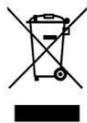
This symbol indicates that, according to the applicable regulations, the appliance and/or batteries must be disposed of separately from household waste. When this product reaches the end of its shelf life, you should dispose of the cells/batteries/accumulators and take them to a collection point designated by the local authorities.
For detailed information on how to properly dispose of electrical and electronic appliances and/or batteries, consumers should contact their local authorities.
Compliance with the above guidelines will help protecting the environment.
10. TECHNICAL SUPPORT AND WARRANTY
Cecotec shall be liable to the end user or consumer for any lack of conformity that exists at the time of delivery of the product under the terms, conditions and deadlines established by the applicable regulations.
Repairs should be carried out by qualified personnel.
If at any moment you detect any problem with your product or have any doubt, do not hesitate to contact the official Cecotec Technical Support Service at +34 96 321 07 28.
11. COPYRIGHT
The intellectual property rights over the texts in this manual belong to CECOTEC INNOVACIONES, S.L. All rights reserved. The contents of this publication may not, in whole or in part, be reproduced, stored in a retrieval system, transmitted, or distributed by any means (electronic, mechanical, photocopying, recording or similar) without the prior authorization of CECOTEC INNOVACIONES, S.L.
12. SIMPLIFIED EU DECLARATION OF CONFORMITY
CE Cecotec Innovaciones hereby declares that this appliance complies with the essential requirements and other relevant provisions of the regulations applicable in the European Union. This appliance has been designed, manufactured and tested to meet the required safety and quality standards. The full text of the EU Declaration of Conformity can be found on the following website: https://cecotec.es/es/information/declaration-of-conformity
FRANÇAIS
1. PIÈCES ET COMPOSANTS
Image 1
Snel invriezen (Fast Freezing)
7. PROBLEEMOPLOSSING
Foutcodes
Fig./Img./Abb./Afb./Rys. 2
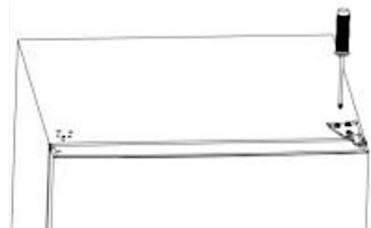
Fig./Img./Abb./Afb./Rys. 3

Fig./Img./Abb./Afb./Rys. 4
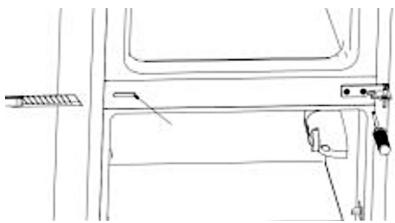
Fig./Img./Abb./Afb./Rys. 5

Fig./Img./Abb./Afb./Rys. 6

Fig./Img./Abb./Afb./Rys. 7


Fig./Img./Abb./Afb./Rys. 8

Fig./Img./Abb./Afb./Rys. 9
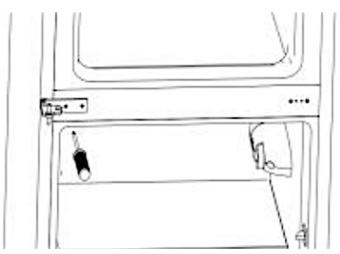
Fig./Img./Abb./Afb./Rys. 10

Fig./Img./Abb./Afb./Rys. 11

Fig./Img./Abb./Afb./Rys. 12


FRIDGE

FREEZER

FRIDGE
3s FAST COOL
FREEZER
3S FAST FRZ
SMART MODE
LOCK/UNLOCK
3s
Fig./Img./Abb./Afb./Rys. 13
www.cecotec.es

- SOMMAIRE
- Temperature range
- Note:
- Refrigerant
- INSTRUCTIONS DE SÉCURITÉ
- BEFORE USE
- Box content
- ENGLISH
- INSTALLATION
- Before using the refrigerator
- Placement and installation
- Installation preparation
- Levelling the refrigerator
- Reversing the door opening direction
- OPERATION
- Setting and switching off the refrigerator compartment temperature
- Setting the Freshness Flex Hub refrigerator drawer temperature
- Setting the Humidity Flex Hub refrigerator drawer humidity
- Setting the freezer compartment temperature
- Smart mode
- Display lock and unlock
- Fast Cooling
- Fast Freezing
- Display energy saving
- Open door alarm
- Error code
- Additional information on temperature
- Refrigerator compartment
- Freezer compartment
- INSTRUCTIONS ON FOOD STORAGE
- Refrigerator and freezer storage chart
- Refrigerator compartment (2 °C \~ 9 °C)
- Freezer compartment (-24 °C \~ -15 °C)
- Defrost
- Defrosting the refrigerator compartment
- Defrosting the freezer compartment
- CLEANING AND MAINTENANCE
- TROUBLESHOOTING
- Failure analysis
- DISPOSAL OF OLD ELECTRICAL AND ELECTRONIC APPLIANCES
- TECHNICAL SUPPORT AND WARRANTY
- COPYRIGHT
- SIMPLIFIED EU DECLARATION OF CONFORMITY
- FRANÇAIS
- PIÈCES ET COMPOSANTS
- Image 1
- Snel invriezen (Fast Freezing)
- PROBLEEMOPLOSSING
Brand : CECOTEC
Model : Bolero Coolmarket Combi 335 E
Category : Refrigerator