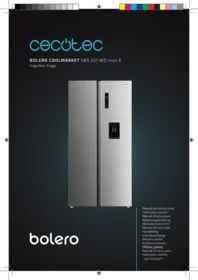
Bolero Coolmarket Sbs 551 Wd E - Refrigerator CECOTEC - Free user manual and instructions
Find the device manual for free Bolero Coolmarket Sbs 551 Wd E CECOTEC in PDF.


| Product Type | American fridge-freezer (side-by-side) |
| Brand | Cecotec |
| Model | Bolero Coolmarket Sbs 551 Wd E |
| Dimensions (H x W x D) | 179 x 91 x 71 cm |
| Net Weight | 98 kg |
| Total Capacity | 551 L |
| Fridge Capacity | 362 L |
| Freezer Capacity | 189 L |
| Energy Class | E (EU 2017/1369) |
| Annual Consumption | Approximately 330 kWh |
| Noise Level | 42 dB(A) |
| Climate Class | SN-T (sub-tropical to tropical) |
| Main Features | Ventilated cooling, water dispenser, LED lighting, vegetable compartment, glass shelves |
| Defrost Type | Automatic (No Frost) |
| Touch Screen | Yes, external |
| Power Supply | 220-240 V, 50 Hz |
| Maintenance and Cleaning | Clean seals and interior with a soft cloth and soapy water. Do not use abrasive products. |
| Safety | Child lock, open door alarm |
| Spare Parts and Repairability | Water filter, LED bulb, door seals available. Repairability index 6.5/10. |
Frequently Asked Questions - Bolero Coolmarket Sbs 551 Wd E CECOTEC
User questions about Bolero Coolmarket Sbs 551 Wd E CECOTEC
0 question about this device. Answer the ones you know or ask your own.
Ask a new question about this device
Download the instructions for your Refrigerator in PDF format for free! Find your manual Bolero Coolmarket Sbs 551 Wd E - CECOTEC and take your electronic device back in hand. On this page are published all the documents necessary for the use of your device. Bolero Coolmarket Sbs 551 Wd E by CECOTEC.
USER MANUAL Bolero Coolmarket Sbs 551 Wd E CECOTEC
bolero
Safety instructions 11
-
Parts and components 99
-
Before use 99
-
Installation 100
-
Operation 101
-
Energy-saving tips 105
-
Cleaning and maintenance 107
-
Troubleshooting 108
-
Recycling of electrical and electronic equipment 111
-
Copyright 112
-
Simplified EU Declaration of Conformity 112
SOMMAIRE
EU01_120297 Bolero CoolMarket SBS 551 WD Inox E
EN • The coding in this manual is generic and applies to all code variants of the appliance.
Read the following instructions carefully before using the appliance. Keep this instruction manual for future reference or new users.
- It is important to make sure all users are familiar with the appliance's operation and safety features to prevent faults and unnecessary accidents.
- Make sure that the mains voltage in your house matches the voltage stated on the rating label of the appliance.
- This appliance can be used by children aged 8 and above and persons with reduced physical, sensory, or mental capabilities or lack of experience and knowledge, as long as they have been given supervision or instruction concerning the use of the appliance in a safe way and understand the hazards involved. Children must not play with the appliance. Cleaning and maintenance should not be carried out by children without supervision.
- To avoid the risk of suffocation, keep the packaging material away from children.
- WARNING: if the interior light is damaged, contact the official Cecotec Technical Support Service. Do not try to repair it yourself.
- WARNING: when positioning the appliance, make sure the power cord does not get trapped or damaged. A crushed or damaged plug may heat up and cause a fire.
- Make sure the appliance plug is accessible after installation.
- Do not place food directly against the air outlet on the interior of the appliance.
- Keep the ventilation openings clear from obstructions.
- Do not place carbonated or soft drinks in the freezer compartment, as this creates pressure in the can, which
could explode and damage the appliance.
- WARNING: do not use mechanical devices or other means to speed up the defrosting process other than those recommended by Cecotec.
- WARNING: do not damage the cooling circuit.
- If the cord is damaged, it must be replaced by the manufacturer, the supplier, or qualified personnel to avoid hazards.
- WARNING: do not use electrical appliances inside the refrigerator.
- It is recommended to regularly check the power cord for any signs of damage. Do not use the appliance if the cord is damaged.
- To avoid injuries or death caused by electric shock, do not use the appliance with your hands wet or over a wet surface.
- Do not use the appliance with an extension cable or a multi-socket adaptor. Make sure the appliance is plugged in directly to a power supply.
- When positioning the appliance, make sure there is enough free space at the rear, as it is the main heat outlet. This will allow for adequate ventilation.
- Do not place hot food or drinks in the refrigerator, allow them to cool down to room temperature beforehand.
- Do not place any other appliance on the refrigerator and do not wet it.
- Do not store explosive substances such as aerosols or flammable propellants in this appliance.
- This appliance is intended for domestic use only and is not suitable for use in commercial establishments such as bars, restaurants, farms, hotels, motels, and offices.
-
WARNING: to avoid any risk due to the instability of the refrigerator, you must install it according to the instructions.
-
This appliance has a built-in earthed plug.
- Make sure the power supply in your house is properly earthed.
- Wait 5 minutes after a power failure before turning the appliance back on. Otherwise, the compressor may get damaged.
- This appliance is not intended to be operated by means of an external timer or separate remote-control system.
- Always handle the appliance carefully to avoid damaging it.
- Frozen food can cause frostbites if consumed right after removing it from the freezer compartment.
- Do not remove or touch items in the freezer compartment with your hands wet, as it could cause skin abrasions or frost/freeze burns.
- Never use the base, drawers, or door as support.
- Do not overload the door shelves or place too much food on the drawers to prevent items from falling off and damaging the appliance.
- WARNING: do not attach multi-socket adaptors or multiple power supplies to the rear part of the appliance.
- To avoid food contamination, please follow the instructions below:
A. Opening the door for a long period of time may cause a significant increase in temperature in the appliance compartments.
B. Regularly clean the surfaces that come into contact with food and with the accessible draining systems.
C. If your refrigerator features a dispenser, clean the water tank if it has not been used for 48 hours.
D. Store raw meat and fish in proper containers in the freezer, so they do not come into contact with or leak on other food.
E. The two-star compartments are suitable for storing
pre-frozen food, storing or making ice cream, and making ice cubes.
F. Compartments with one, two, or three stars are not suitable for freezing fresh food.
- Before carrying out any maintenance and cleaning task, turn off the appliance and unplug it.
- It is advisable to wait for at least four hours before connecting the appliance to allow oil to flow through the compressor.
- Air must flow around the appliance. Lack of air leads to overheating. To achieve good ventilation, follow the installation instructions.
- Whenever possible, the rear part of the appliance should not be too close to the wall to prevent it from touching or reaching the hot parts (the compressor and the condenser). To avoid risk of fire, follow the installation instructions.
- Make sure that the plug is accessible after installation of the appliance.
- All electrical work required to maintain this appliance must be carried out by a qualified electrician.
- Use the appliance only for the purposes described in this manual. Improper or incorrect use may pose a hazard to both the appliance and the user.
Temperature range
- The appliance temperature range information can be found on its marking. Indicates the optimum room temperature for proper operation of the appliance.
| Climate class | Optimal room temperature |
| SN | From +10 °C to +32 °C |
| N | From +16 °C to +32 °C |
| ST | From +16 °C to +38 °C |
| T | From +16°C to +43°C |
Notes:
- Taking into account the limiting values of the room temperature range for the climates for which the appliance is designed and that internal temperatures may be affected by factors such as the location of the appliance, room temperature and frequency of door opening, it may be necessary to modify the setting of any temperature control device according to these factors.
- If the appliance is operated in an environment other than the specified climate type (i.e. beyond the rated room temperature range), it may not be able to maintain the desired compartment temperatures.
Refrigerant
- Isobutane refrigerant (R600a), contained within the refrigeration circuit of the appliance, is a natural gas with a high level of environmental compatibility; however, it is flammable.
- Make sure that no components of the refrigeration circuit have been damaged during the transport and installation of the appliance.
- WARNING: the refrigerant and the insulator gas are flammable. When disposing of the appliance, only dispose of it at an authorised waste-disposal facility. Do not expose it to flames.
- WARNING: the appliance contains refrigerant and gases in the insulation. The appliance and gases must be disposed of professionally, as they may cause injuries to eyes or ignition. Make sure the refrigeration-circuit pipe is not damaged before disposing of it correctly.
- This symbol means: warning, risk of fire/flammable materials.
- If the refrigeration circuit is damaged:
A. Avoid open flames and sources of ignition.
B. Fully ventilate the room where the appliance is located.
INSTRUCTIONS DE SÉCURITÉ
Super Cooling → Super Freezing → Super Cooling / Super Freezing → Vacation → None
- LED light
- Glass shelf
- Door tray
- Crisper
- Crisper drawer
- Two star door tray
- Ice tray (not included in this model)
- Water tank
Note:
The graphics in this manual are schematic representations and may not exactly match the product.
2. BEFORE USE
- This appliance comes in a packaging designed to protect it during transport. Remove the appliance from its box. You can keep the original box and other packaging materials in a safe place to prevent damage to the appliance if you need to transport it in the future. If you wish to dispose of the original packaging, make sure all items are recycled properly.
- Check that all parts and components are included and in good condition. If any of them are missing or damaged, please contact Cecotec's Official Technical Support Service immediately.
- Remove the outer and inner packaging. Clean the exterior thoroughly with a soft, dry cloth and the interior with a warm, damp cloth.
- Avoid placing the appliance in narrow spaces or near heat sources, direct sunlight or moist environments.
- Leaving little space with respect to other objects can degrade freezing capacity and increase power consumption. Allow more than 100 mm clearance on both sides and at the top, and 50 to 75 mm at the rear when installing the appliance.
- Before connecting the refrigerator to the power supply, check that the voltage indicated on the appliance label corresponds to the voltage in your home. A different voltage may damage the device.
- This appliance must be connected to an earthed socket. Cecotec is not responsible for any damages that may occur from ungrounded use.
ENGLISH
Box content:
- Refrigerator
- Instruction manual
- Do not remove the product's serial number in order to keep proper traceability if technical assistance is required.
3. INSTALLATION
Installation dimensions
Figure 2 shows the dimensions required for installing the refrigerator. All dimensions are in millimeters.
| A | B | C | D | E | F |
| 897 | 1765 | 706 | 600 | 1600 | 1130 |
Device connection
- After installing the product, it should be left to stand for more than 2 hours before turning it on. Failure to do so may result in reduced cooling capacity or damage to the product.
- The unit should be allowed to run empty for 24 hours to allow the compartment to cool to the proper temperature.
Levelling feet
- To avoid vibrations, the device must be level.
- If necessary, the leveling feet should be adjusted to compensate for uneven floors.
- The front should be slightly higher than the rear to facilitate closing the door.
- The leveling feet can be easily rotated by slightly tilting the cabinet.
- Turn the leveling feet counterclockwise to raise the unit and clockwise to lower it.
Door levelling
Fig. 3
If the doors are not at the same height, they can be adjusted with a key.
A. Loosen the locking nut counterclockwise.
B. Turn the adjusting nut counterclockwise to adjust the door height.
C. When the door is correctly aligned, tighten the lock nut clockwise.
Fig. 3
- Fixed shaft
-
Adjusting nut
-
Lock nut
- Levelling feet
Replacing the light
Any replacement or maintenance of LED lamps must be carried out by qualified personnel.
Device movement
- Remove all items from the appliance.
- Unplug the power cord, insert it and attach it to the power cord hook on the back or top of the unit.
- Tape down parts such as shelves and the door to prevent them from falling during movement of the appliance.
- Move the device with more than two people carefully. When transporting the device over long distances, keep it in an upright position.
- After installing the appliance, connect the plug to a power outlet to turn the appliance on.
4. OPERATION
Notice: This cooling unit must be installed separately and cannot be used as a built-in unit. Otherwise, it will cause problems such as reduced performance and reduced lifetime of the device.
Control panel
Fig. 4
Display
- Refrigerator
- Freezer
- Super Cooling
- Super Freezing
- Lock / Unlock
- Vacation mode
Icons
A. Temperature increase
B. Temperature range selection
C. Temperature decrease
D. Mode / function settings
E. Lock / unlock function
ENGLISH
Functions
Lock/Unlock
In the unlocked state, press the touch icon Hold 3sec. Unlock for 3 seconds to enter the operation lock state, and the lock pattern will be displayed. In the locked state, press it again for 3 seconds to display the unlock pattern 🏻 and unlock.
Note: If no touch icon is pressed for 30 seconds, the refrigerator will automatically lock.
Mode settings
Press the "MODE" touch icon, and the SUPER COOLING, SUPER FREEZING and VACATION modes cycle as follows:
Super Cooling → Super Freezing → Super Cooling / Super Freezing → Vacation → None
- In Vacation mode, the freezer temperature is automatically set to -18^ , and the refrigerant compartment is closed.
- In Super Cooling mode, the temperature of the refrigerant compartment is automatically set to 2 °C. When exiting this mode, the set temperature of the refrigerant compartment will automatically return to the temperature set before the Super Cooling mode.
Exit Super Cooling mode if one of the following conditions is met:
A: Exit Super Cooling mode by operation of the touch icon
B: Super Cooling time ≥ 6h
- In the Super Freezing mode, the temperature of the freezing compartment is automatically set to -24^ (-22°F). When exiting this mode, the set temperature of the freezing compartment will automatically return to the temperature set before the super freezing mode.
Exit super freeze mode when one of the following conditions is met:
A: Exit Super Freezing mode by pressing the touch icon
B: Super Freezing time ≥ 24h
Caution: The Quick Freeze function is designed to maintain the nutritional value of the food in the freezer. You can freeze food in the shortest possible time. If a large amount of food is frozen at one time, it is recommended that the user activate the Super Freezing function and place the food inside. At this time, the freezing speed of the freezer compartment is increased, which can quickly freeze the food, effectively blocking the nutrition of the food and facilitating its storage.
Temperature settings
- Press the "TEMP.SELECT" touch icon to select the refrigerator compartment 🧑 or freezer
compartment Ⓞ, and the temperature zone icon and the corresponding set temperature will be displayed.
- Select the compartment to be adjusted and press the temperature increase touch icon “ ” to adjust the temperature upwards. Each time you press it, the temperature will increase by 1 degree. Each time you press it, the temperature will be reduced by 1 degree.
- The setting range of the refrigerator compartment is from 2 to 8 °C, and the setting range of the freezer compartment is from -24 to -16°C. The new set temperature takes effect after locking. When set to the limit value, pressing the corresponding temperature setting touch icon will emit an invalid key sound.
Recommended configuration:
Fridge: 4 °C
Freezer: -18°C
Open door warning
When the refrigerator door is opened, the door opening tone sounds. At the same time, press and hold the touch icon combination “ ” + “v” for 3 seconds to activate/deactivate the door opening warning tone (activated by default).
Open door alarm
When the refrigerator door is not closed for more than 120 seconds, an alarm sounds indicating that the door is not closed. Please close the door in time or press any touch icon in the operation area of the display to silence the alarm.
Storage in case of power outage
In the event of a power failure, the instantaneous operating status will be locked and maintained until re-electrification.
How to use the water dispenser
- Filling water is not allowed when the water box is removed from the machine door.
- Never fill more water than the maximum limit indicated on the water box.
- Check to see if the water box is on its base if you cannot get water normally.
- When attempting to move the water box, make sure there is no water in it.
- It is not allowed to remove any element from the water valve.
- When using the machine for the first time or if it has been out of use for a long time, remove and clean the box before use.
- If the water in this machine has not been used for a long period, it is best to drain it from the dispenser and add pure water, and then it can be used as usual.
ENGLISH
- It is suggested to clean the water dispenser tank every three to six months.
- When cleaning the tank and if cleaning solution is used, you should return the water box to its original position, fill the water box with water, and then drain 5 to 6 cups of water, in case any cleaning solution residue remains.
- When opening or closing the water dispenser door, try to prevent the water in the box from moving and overflowing.
- Do not touch the bottle frame when adding water.
Caution:
Only potable water may be used in this water dispenser, and both types must be free of impurities. Soft drinks, apple juice and other beverages containing carbon dioxide are prohibited.
Drinking water filling
- Open the lid of the water box.
- Add water and close the lid.
The water should be filled as shown in Figure 6.
How to serve water
- Push the lever in with the tumbler. Fig. 7
- When you push the lever in, there will be a flow of water.
How to remove and clean the water dispenser
Fig. 8
Step 1: Withdraw
- Remove the elements from the water box using both hands and pull them out at a 45-degree angle. Make sure the box is empty before moving it.
- Remove the gasket from the water box.
- For the water valve elements, use a screwdriver to twist and remove them at a 45 degree angle.
Step 2: Clean
- Remove the water box, its cover, gasket and valve elements.
- Clean the elements with cold or warm water.
- Dry with a clean cloth.
Step 3: Install
- Water valve elements: Place the guide platform in the slot and push down at a 45 degree angle until you hear a click.
- Water box gasket: Place the gasket on the bottom of the box, making sure it is well positioned.
- Elements of the water box: Align the slot in the box with the door brackets and set it in place at a 45 degree angle.
Caution
When cleaning the tank and using cleaning solution, return the water box to its original position, fill and drain 5 to 6 cups of water to remove any residue.
5. ENERGY-SAVING TIPS
- Do not place the appliance near ovens, radiators or other heat sources. If the ambient temperature is high, the compressor will run more frequently and longer, resulting in higher energy consumption.
- Ensure that there is sufficient ventilation at the base of the unit, sides and rear of the unit. Observe the space dimensions in the chapter "Installation dimensions".
- The arrangement of drawers, shelves and trays, as shown in the product overview, provides the most efficient use of energy and should be maintained as much as possible.
- To obtain a larger storage space, the middle drawers and shelves can be removed. Top and bottom drawers and shelves should be removed at the end if necessary.
- An evenly filled refrigerator/freezer compartment contributes to optimal energy use.
- Allow hot foods to cool before placing them in the refrigerator/freezer compartment. Food that has already been cooled increases energy efficiency.
- Allow frozen foods to defrost in the refrigerator compartment. Chilling frozen foods reduces energy consumption in the refrigeration compartment and thus increases energy efficiency.
- Open the door only as long as necessary to minimize cold loss. Opening and closing the door properly reduces energy consumption.
- Setting the temperature no colder than necessary contributes to the optimal use of energy.
- The seals of the appliance doors must be perfectly intact so that the doors close properly and energy consumption does not increase unnecessarily.
Food storage
Freezer compartment
- The freezer compartment is designed for low temperature freezing of food, long-term storage of frozen food and production of ice cubes.
- Attention should be paid to star ratings (4, 2 and 1 star) and recommended storage periods.
- Fresh and frozen foods should not be placed together
- When freezing large quantities of fresh foods, such as meat or fish, they should be divided into small portions so that they freeze quickly.
- The storage times recommended by the manufacturers should be followed. In the absence of information, frozen foods should not be stored for more than three months from purchase.
ENGLISH
- When buying frozen foods, you should make sure that they are at the right temperature and that the packaging is not damaged.
- Frozen foods should be kept in individual packages to avoid contamination. Thawed foods should be consumed immediately and not refrozen.
- In case of prolonged power failure or appliance failure, frozen foods should be removed and checked for edibility. They should be stored in a cool place or in another appliance.
- To defrost, foods should be removed from the freezer and left at room temperature or in the refrigerator. Microwave can be used for quick defrosting.
- If only a portion of a package is needed, remove the necessary portion and refreeze the rest immediately to avoid "freezer burn".
Refrigerator compartment
- To reduce humidity and ice formation, you should never put liquids in the refrigerator compartment in unsealed containers. Frost tends to concentrate in the coldest parts of the evaporator. Storing liquids uncovered results in a more frequent need for thawing.
- Never place hot food in the refrigerator compartment. They should first be cooled to room temperature and then placed to ensure adequate air circulation.
- Food or containers should not touch the back wall of the refrigerator, as they may freeze. You should not open the refrigerator door regularly.
- Cleaned meat and fish (packaged or in plastic wrap) can be placed in the refrigerator compartment and should be used within 1-2 days.
- Unpackaged fruits and vegetables may be placed in the part designated for fresh fruits and vegetables.
Caution: Storing too much food during operation, after initial connection to power, may adversely affect the freezing effect of the refrigerator.
Storage time and temperature
Note:
- Prolonged storage or storage at inadequate temperatures can cause loss of quality or spoiled food, which generates waste, is inedible and can cause food poisoning.
- The minimum temperature in most cases should be -18 °C or colder. Follow the recommended storage times below:
• Stew, ice cream, sausages, bread: 2-6 months.
• Fish, shrimp, lamb, meat: 4-8 months.
• Vegetables, fruits, poultry, veal: 6-12 months.
6. CLEANING AND MAINTENANCE
!Caution
- The appliance must be disconnected from the mains before performing any maintenance tasks. Wait at least 5 minutes before restarting the appliance, as frequent starting can damage the compressor.
- You should grasp the plug, not the cord, when unplugging the appliance.
- Frost and ice should not be scraped off with sharp objects.
- Do not use aerosol sprays, electric heaters, hair dryers, steam cleaners or other heat sources to avoid damage to the plastic parts.
- Dust should be removed from the back of the appliance at least once a year to avoid fire hazards and increased energy consumption.
- Check the door gasket regularly to ensure that there is no debris. Clean the gaskets with a soft cloth dampened with soapy water or diluted detergent.
- The inside of the refrigerator should be cleaned regularly to avoid odours.
- Use a soft cloth or sponge to clean the inside of the refrigerator with two tablespoons of baking soda mixed with a quarter of warm water. Then rinse with water and dry. After cleaning, leave the door open and allow it to dry naturally before turning on the appliance.
- For hard to clean areas, it is recommended to clean them regularly with a soft cloth, soft brush, etc., and when necessary, combined with auxiliary tools to ensure that there is no build-up of contaminants or bacteria.
- Soap, detergent, scouring powder, aerosol cleaners, etc. should not be used, as they may cause odours inside the refrigerator or contaminate food.
- Clean the exterior surface of the appliance with a soft cloth dampened with soapy water, detergent, etc., and then wipe dry.
- Do not use hard brushes, steel balls, wire brushes, abrasives, organic solvents, boiling water, acids or alkalis, as they may damage the surface and interior of the refrigerator.
Caution: Once started, the device should run continuously. Interrupting its operation could affect its useful life.
Defrosting
Although this appliance defrosts automatically, a layer of frost may form on the inside walls of the freezer compartment if the door is opened frequently or kept open for too long. If frost build-up becomes excessive, choose a time when food storage levels are low and proceed as follows:
-
Remove existing food and accessory baskets, unplug the appliance from the power supply and leave the doors open. Ventilate the room to speed up the defrosting process.
-
After defrosting is complete, clean the freezer compartment as described above.
ENGLISH
!Caution
- Do not use sharp objects to remove frost from the freezer compartment.
- Only after the interior is completely dry should you turn the unit back on and plug it into the electrical outlet.
Cleaning the door tray
- Following the direction of the arrow in Figure 9, use both hands to squeeze the tray and push it up to remove it.
- After washing the tray, you can adjust its installation height according to your needs.
Cleaning the crisper drawer
Fig. 10
- Remove the contents of the drawer. Hold the handle of the vegetable drawer and pull it all the way out until it stops.
- Lift the vegetable drawer and remove it.
Cleaning of the glass shelf
Fig. 11
- As the innermost part of the refrigerator liner, where the shelves have a stop, you must lift the shelves upwards to remove them.
- Adjust or clean the shelves according to your needs.
7. TROUBLESHOOTING
The following simple problems can be handled by the user. If the problem persists, contact Cecotec's Official Technical Support Service.
| Problem | Possible causes | Solution |
| The appliance is not working | - The power supply is not turned on and the plug is not properly inserted.- Low voltage, power failure or part of the circuit tripped. | - Insert the plug firmly.- Check the power supply at home. |
| The light does not turn on | - The appliance is not switched on.- The light is faulty. | - Unplug and plug the power cord back in.- Replace the light with a new one by a qualified technician. |
| Refrigerator/freezerovercooling | - The temperature control is not set correctly. | - Set the temperature higher. |
| The compressor runs for a long time | - High ambient temperature causing long working time.- Put too much food in at once.- The food is put in before it cools down.- Opening the door frequently.- The inner frost layer is too thick. | - This is normal.- Do not put too much food in at once.- Wait until the food cools before putting it in.- Do not open the door too often.- It needs to be thawed. |
| The door does not close properly | - The door is jammed with objects.- Too much food inside.- Deformed door seal. | - Do not put too much food.- Place the device in a stable position.- Contact Cecotec's Official Technical Support Service. |
| The outer wall is hot | - When the appliance is operating, heat is dissipated to the outside through the metal tubes inside the cabinet.- High ambient temperatures in summer cause the outside wall temperature to rise. | - Higher temperature on the outside wall is normal.- Increase the heat dissipation space or place the unit in a ventilated and cool place. |
| Cross beams or vertical beams are hot | - There are metal tubes inside the beams, and the heat released from the tubes prevents condensation. | - This is normal. |
| Odours. | - Food in bad condition.- Food with strong odors.- The interior compartment is dirty. | - Clean and remove any spoiled food.- Ensure that foods with strong odors are well wrapped.- Clean the inner compartment. |
| Actual temperature differs from set temperature | - When hot food is put in, the temperature will temporarily rise.- After setting a new temperature, it will take time for the temperature in the compartment to reach the set temperature when the door is not opened.- After temperature stability, the actual temperatures at different locations within the compartment are different, with a deviation of approximately ±3°C. | - This is normal.- Wait some time before testing the actual temperature. |
| Condensation forms on the outside | - Condensation can form when the humidity in the room is high. | - This is normal. Wipe off condensation with a dry cloth. |
| Condensation forms inside the refrigerator and drawers | - The refrigerator maintains high humidity to keep vegetables and other foods fresh.- The humidity is too high in the room and the doors have been opened frequently.- The door gasket is not tight. | - Wipe off condensation with a dry cloth.- Do not open the doors so often or do not keep them open too long.- Check the door gasket, clean or correct it. |
| Frost around ventilation grilles | - The door is not closed properly.- The door gasket is not tight. | - Make sure that food does not block the door.- Check the door gasket, clean or correct it. |
| Difficult to open the door | - The difference in air pressure between the inside and outside of the compartment may make it difficult to open the freezer door. | - Wait a few moments and then try to open the door slowly. |
| Does not make ice cubes (Only models with ice maker) | - The ice making function is not turned on.- The device is not being supplied with water.- The water pipe has kinks in it.- The water pipe connection is installed incorrectly.- The water pressure is too low. | - Turn on the ice maker. - Check if the water supply is turned on.- Straighten the folds.- Check the water connection.- Check the water supply pressure or if the filter is clogged. |
Certain sounds during normal operation are expected and do not affect proper operation.
Sounds that can be easily prevented:
- Noise caused by the unit not being level: adjust the position with the adjustable front feet. Alternatively, place pads of soft material under the rear wheels, especially when the unit is on tiles.
- Contact with adjacent furniture: move the refrigerator away.
- Drawer or shelf creaking: remove and replace the drawer or shelf.
- Clinking bottle sounds: separate bottles.
The sounds heard during normal use are mainly due to the operation of the compressor (starting and cooling) and the system (thermal expansion and contraction of the radiator caused by the flow of the cooling agent).
Error codes
The following warnings that appear on the display indicate corresponding faults in the refrigerator. Although the refrigerator may still have cold storage function with the following faults, the user should contact a service specialist to ensure optimal operation of the appliance.
| Error code | Error description |
| E1 | Refrigerator compartment temperature sensor fault |
| E2 | Freezer compartment temperature sensor fault |
| E5 | Freezer defrost sensor detection circuit fault |
| E6 | Communication fault |
| E7 | Room temperature sensor fault |
8. RECYCLING OF ELECTRICAL AND ELECTRONIC EQUIPMENT
This symbol indicates that, according to the applicable regulations, the product and/or battery must be disposed of separately from household waste. When this product reaches the end of its shelf life, you should dispose of the batteries/accumulators and take them to a collection point designated by the local authorities.
For detailed information on how to properly dispose of electrical and electronic equipment and/or the corresponding batteries, consumers
should contact their local authorities.
Compliance with the above guidelines will help protecting the environment.
ENGLISH
Information regarding national packaging recycling systems and their marking can be found on our website.
9. COPYRIGHT
The intellectual property rights over the texts in this manual belong to CECOTEC INNOVACIONES, S.L. All rights reserved. The content of this publication may not, either in part or in its entirety, be reproduced, stored in a retrieval system, transmitted or distributed by any means (electronic, mechanical, photocopying, recording or similar) without prior authorisation from CECOTEC INNOVACIONES, S.L.
10. SIMPLIFIED EU DECLARATION OF CONFORMITY
CE
Cecotec Innovaciones hereby declares that this appliance complies with the essential requirements and other relevant provisions of the regulations applicable in the European Union. This appliance has been designed, manufactured and tested in compliance with required safety and quality standards. The full text of the EU Declaration of Conformity can be found on
the following website: https://cecotec.es/es/information/declaration-of-conformity
1. PIÈCES ET COMPOSANTS
Image 1
Super Cooling → Super Freezing → Super Cooling / Super Freezing → Vacation → None
https://storececotec.de/de/information/declaration-of-conformity
1. PARTI E COMPONENTI
Figura 1
Super Cooling → Super Freezing → Super Cooling / Super Freezing → Vacation → None
Super Cooling → Super Freezing → Super Cooling / Super Freezing → Vacation → None
endereço web: https://cecotec.es/es/information/declaration-of-conformity
1. ONDERDELEN EN COMPONENTEN
Figuur 1
Super Cooling → Super Freezing → Super Cooling / Super Freezing → Vacation → None
7. PROBLEEMOPLOSSING
website: https://cecotec.es/es/information/declaration-of-conformity
1. CZĘŚCI I KOMPONENTY
Rysunek 1
Super Cooling → Super Freezing → Super Cooling / Super Freezing → Vacation → None
information/declaration-of-conformity
1. SOUČÁSTI A KOMPONENTY
Obrázek 1
Super Cooling → Super Freezing → Super Cooling / Super Freezing → Vacation → None
Super Cooling → Super Freezing → Super Cooling / Super Freezing → Vacation → None
Super Cooling → Super Freezing → Super Cooling / Super Freezing → Vacation → None
Super Cooling → Super Freezing → Super Cooling / Super Freezing → Vacation → None
Super Cooling → Super Freezing → Super Cooling / Super Freezing → Vacation → None
Super Cooling → Super Freezing → Super Cooling / Super Freezing → Vacation → None
ت Connectivity Amsterdam, Copenhagen, Copenhagen, Netherlands, Switzerland, Sweden, Sweden, Sweden, Sweden, Sweden, Sweden, Sweden, Sweden, Sweden, Sweden, Sweden, Sweden, Sweden, Sweden, Sweden, Sweden, Sweden, Sweden, Sweden, Sweden, Sweden, Sweden, Sweden, Sweden, Sweden, Sweden, Sweden, Sweden, Sweden, Sweden, Sweden, Sweden, Sweden, Sweden, Sweden, Sweden, Sweden, Sweden, Sweden, Sweden, Sweden, Sweden, Sweden, Sweden, Sweden, Sweden, Sweden, Sweden, Sweden, Sweden,
Fig./Img./Abb./Afb./Rys./Obr.1

Fig./Img./Abb./Afb./Rys./Obr. 2
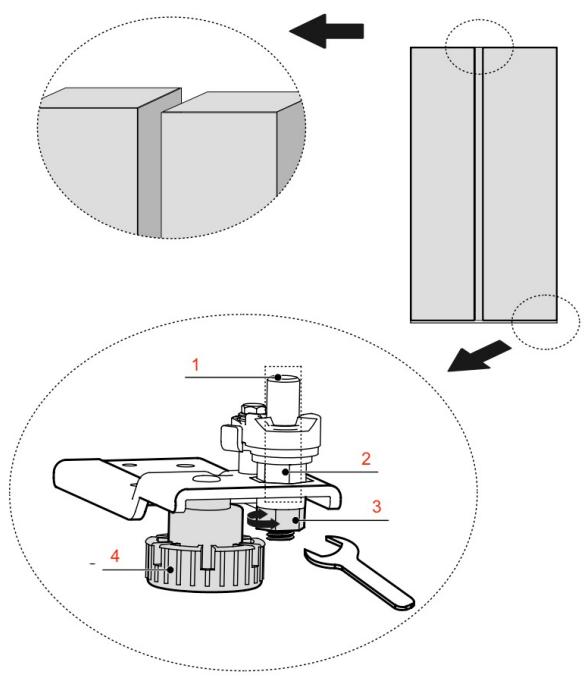
Fig./Img./Abb./Afb./Rys./Obr. 3

Fig./Img./Abb./Afb./Rys./Obr. 4

Fig./Img./Abb./Afb./Rys./Obr. 5
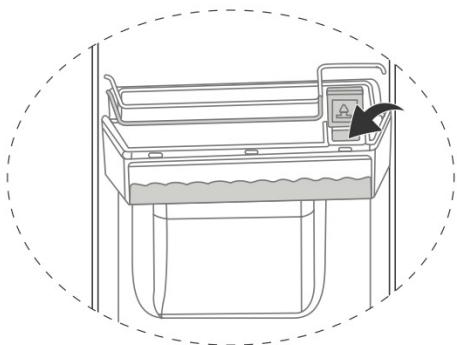
Fig./Img./Abb./Afb./Rys./Obr. 6

Fig./Img./Abb./Afb./ Rys./Obr. 7

Fig./Img./Abb./Afb./ Rys./Obr. 8

Fig./Img./Abb./Afb./Rys./Obr. 9
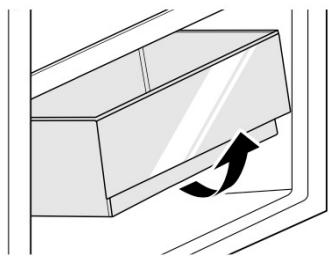
Fig./Img./Abb./Afb./ Rys./Obr. 10

Fig./Img./Abb./Afb./Rys./Obr. 11
www.cecotec.es

- SOMMAIRE
- Temperature range
- Notes:
- Refrigerant
- INSTRUCTIONS DE SÉCURITÉ
- Super Cooling → Super Freezing → Super Cooling / Super Freezing → Vacation → None
- Note:
- BEFORE USE
- ENGLISH
- Box content:
- INSTALLATION
- Installation dimensions
- Device connection
- Levelling feet
- Door levelling
- Replacing the light
- Device movement
- OPERATION
- Control panel
- Fig. 4
- Display
- Icons
- Functions
- Lock/Unlock
- Mode settings
- Temperature settings
- Open door warning
- Open door alarm
- Storage in case of power outage
- How to use the water dispenser
- Drinking water filling
- How to serve water
- How to remove and clean the water dispenser
- Step 1: Withdraw
- Step 2: Clean
- Step 3: Install
- Caution
- ENERGY-SAVING TIPS
- Food storage
- Freezer compartment
- Refrigerator compartment
- Storage time and temperature
- CLEANING AND MAINTENANCE
- !Caution
- Defrosting
- Cleaning the door tray
- Cleaning the crisper drawer
- Fig. 10
- Cleaning of the glass shelf
- Fig. 11
- TROUBLESHOOTING
- Error codes
- RECYCLING OF ELECTRICAL AND ELECTRONIC EQUIPMENT
- COPYRIGHT
- SIMPLIFIED EU DECLARATION OF CONFORMITY
- CE
- PIÈCES ET COMPOSANTS
- Image 1
- PARTI E COMPONENTI
- Figura 1
- ONDERDELEN EN COMPONENTEN
- Figuur 1
- PROBLEEMOPLOSSING
- CZĘŚCI I KOMPONENTY
- Rysunek 1
- SOUČÁSTI A KOMPONENTY
- Obrázek 1
Brand : CECOTEC
Model : Bolero Coolmarket Sbs 551 Wd E
Category : Refrigerator