
WH-UX12HE8 - Air-conditioner PANASONIC - Free user manual and instructions
Find the device manual for free WH-UX12HE8 PANASONIC in PDF.

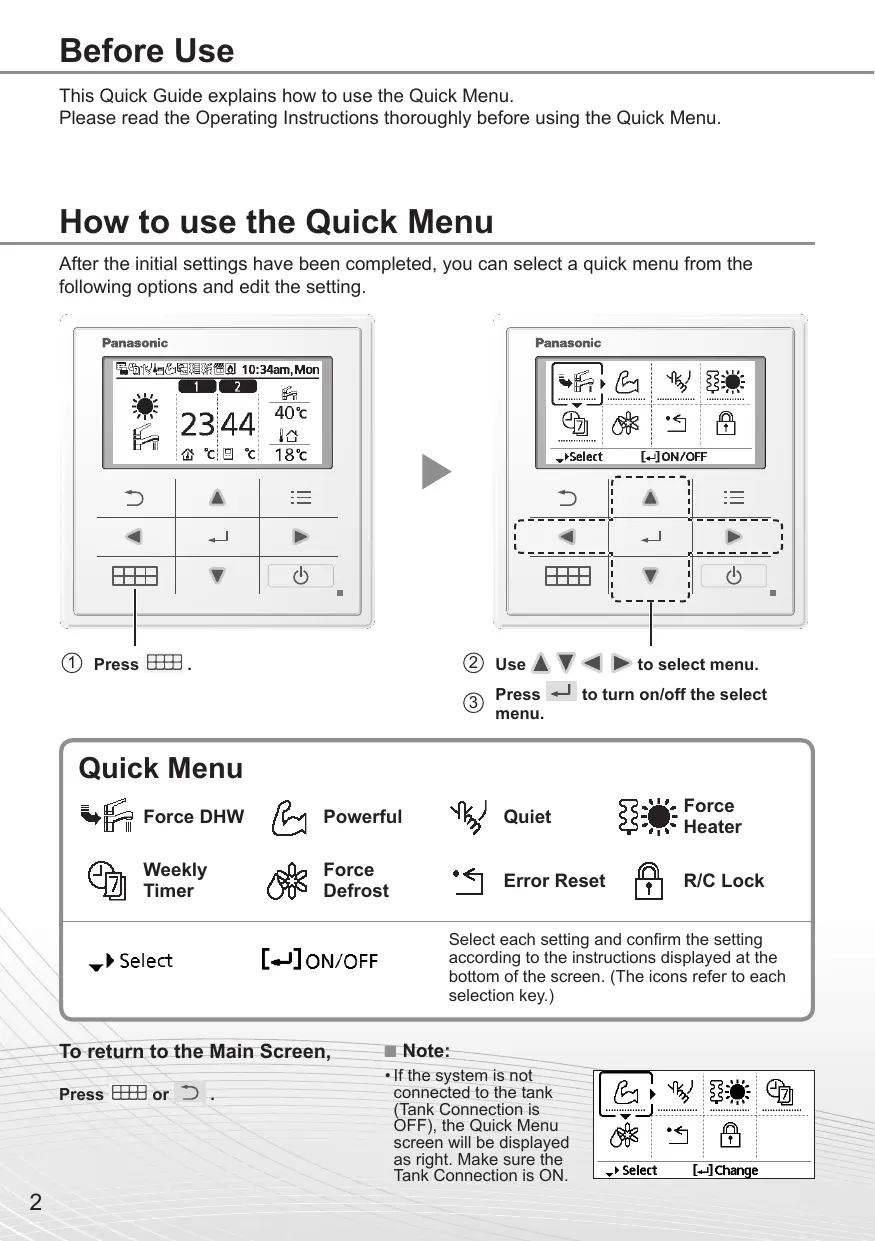


| Product type | Air-to-water heat pump (reversible air conditioner) |
| Brand | Panasonic |
| Model | WH-UX12HE8 |
| Power supply | Single-phase, 220-240 V ~ 50 Hz |
| Nominal heating capacity | 12 kW (estimated) |
| Nominal cooling capacity | 12 kW (estimated) |
| Indoor unit dimensions (W x H x D) | Approx. 900 x 600 x 350 mm (estimated) |
| Indoor unit weight | Approx. 40 kg (estimated) |
| Refrigerant | R32 (estimated) |
| Main functions | Heating, cooling, domestic hot water production, Turbo mode, Silent mode, Forced backup heating, Weekly scheduling, Forced defrosting |
| Maintenance and cleaning | Regularly clean the air filters (every 3 months), check the fins, call a professional for annual maintenance |
| Safety | Remote control lock with PIN code (default 0000), frost protection, automatic stop in case of error |
| Spare parts and repairability | Spare parts available from Panasonic after-sales service; repairs by authorized technician |
| General information | 88-page user manual available in several languages; quick menu for access to advanced functions |
Frequently Asked Questions - WH-UX12HE8 PANASONIC
User questions about WH-UX12HE8 PANASONIC
0 question about this device. Answer the ones you know or ask your own.
Ask a new question about this device
Download the instructions for your Air-conditioner in PDF format for free! Find your manual WH-UX12HE8 - PANASONIC and take your electronic device back in hand. On this page are published all the documents necessary for the use of your device. WH-UX12HE8 by PANASONIC.
USER MANUAL WH-UX12HE8 PANASONIC
Air-to-Water Heatpump
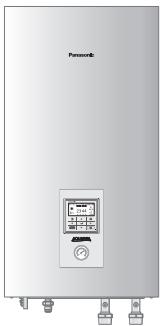
natural_image
Front view of a Panasonic air conditioner unit with control panel and side-mounted buttons (no visible text or symbols)Model No.
Indoor Unit
WH-SDC09H3E8
WH-SDC12H9E8
WH-SDC16H9E8
WH-SXC09H3E8
WH-SXC12H9E8
WH-SXC16H9E8
Outdoor Unit
WH-UD09HE8
WH-UD12HE8
WH-UD16HE8
WH-UX09HE8
WH-UX12HE8
WH-UX16HE8
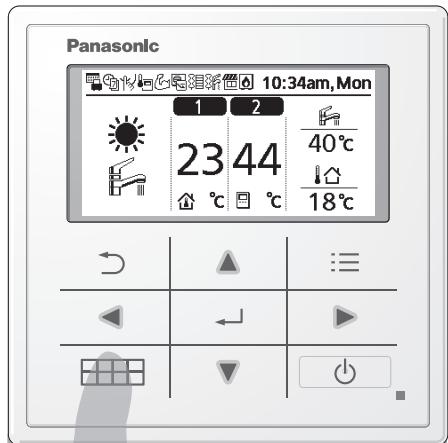

Quick Menu Guide
Air-to-Water Heatpump
Please read the Operating Instructions thoroughly before using the Quick Menu.
How to use the Quick Menu
After the initial settings have been completed, you can select a quick menu from the following options and edit the setting.
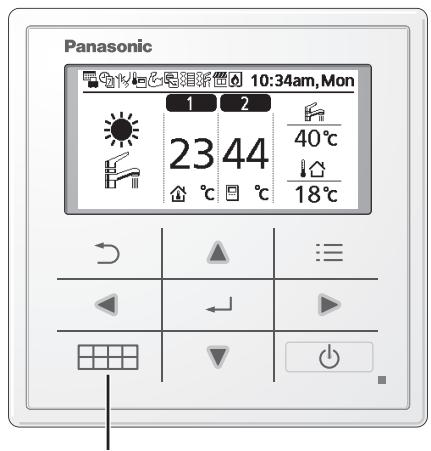
Select each setting and confirm the setting according to the instructions displayed at the bottom of the screen. (The icons refer to each selection key.)
To return to the Main Screen,
Press or ↻.
Note:
- If the system is not connected to the tank (Tank Connection is OFF), the Quick Menu screen will be displayed as right. Make sure the Tank Connection is ON.
![Select [←] Change](/content/2019/10/1505/images/9bec5b1fa1e960af02e2759a72194034e5c7e6cbcb979a088b5270a64b322773.jpg)
Notes on operation icon
Example:

- Operation icon indicate with “............” = OFF

- Operation icon indicate with “——” = ON
natural_image
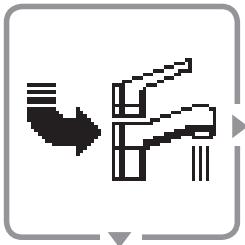
Pure mechanical diagram showing a pipe with a downward arrow and a bracket (no text or symbols)Force DHW
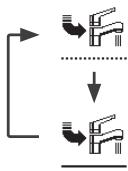
Select this icon to turn the Tank DHW on or off.
Press ← to confirm your selection.
flowchart
graph TD
    A["Water Tap Symbol"] --> B["Downward Arrow"]
    B --> C["Downward Arrow"]
    C --> D["Downward Arrow"]
- Force DHW is turned off.
- Force DHW is turned on.
Note:
- Force DHW is disabled when Force Heater is turned on.
- When Force DHW is turned off, operation & mode should change back to the previous memorized status.

natural_image
Pixelated abstract shape resembling a stylized arm or muscle, enclosed in a rounded square frame (no text or symbols)Powerful
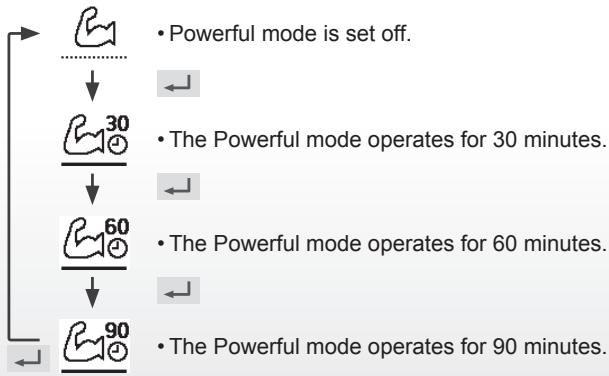
Select this icon to operate the heating/cooling system powerfully.
Press ← to confirm your selection.
(The powerful operation starts approximately 1 minute after ← is pressed.)
flowchart
graph TD
    A["Powerful mode is set off."] --> B["The Powerful mode operates for 30 minutes."]
    B --> C["The Powerful mode operates for 60 minutes."]
    C --> D["The Powerful mode operates for 90 minutes."]
    D --> E["Powerful mode is set off."]
    F["Powerful mode is set off."] --> G["The Powerful mode operates for 30 minutes."]
    G --> H["The Powerful mode operates for 60 minutes."]
    H --> I["The Powerful mode operates for 90 minutes."]
Note:
- Powerful is disabled when operation is turned OFF.
natural_image
Abstract pixelated line drawing with no text or symbolsQuiet
Select this icon to operate quietly.
Press ← to confirm your selection.
(The quiet operation starts approximately 1 minute after ← is pressed.)
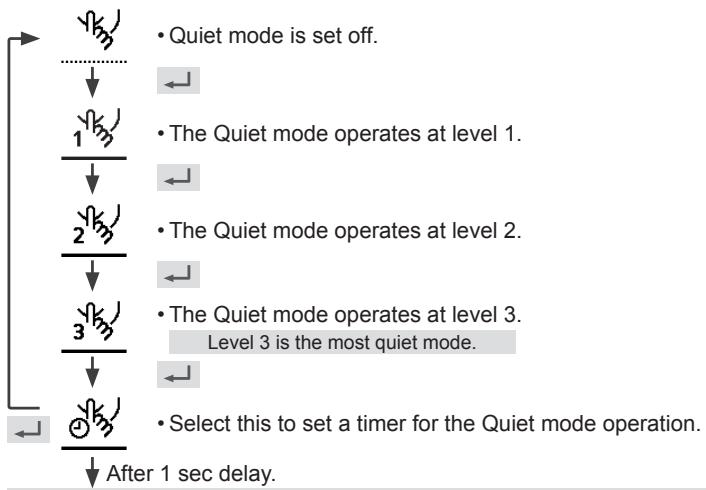
flowchart
graph TD
    A["Start"] --> B{Quiet mode is set off.}
    B --> C["↓"]
    C --> D["1/3"]
    D --> E["↓"]
    E --> F["2/3"]
    F --> G["↓"]
    G --> H["3/3"]
    H --> I["↓"]
    I --> J["End"]
    style A fill:#f9f,stroke:#333
    style J fill:#f9f,stroke:#333
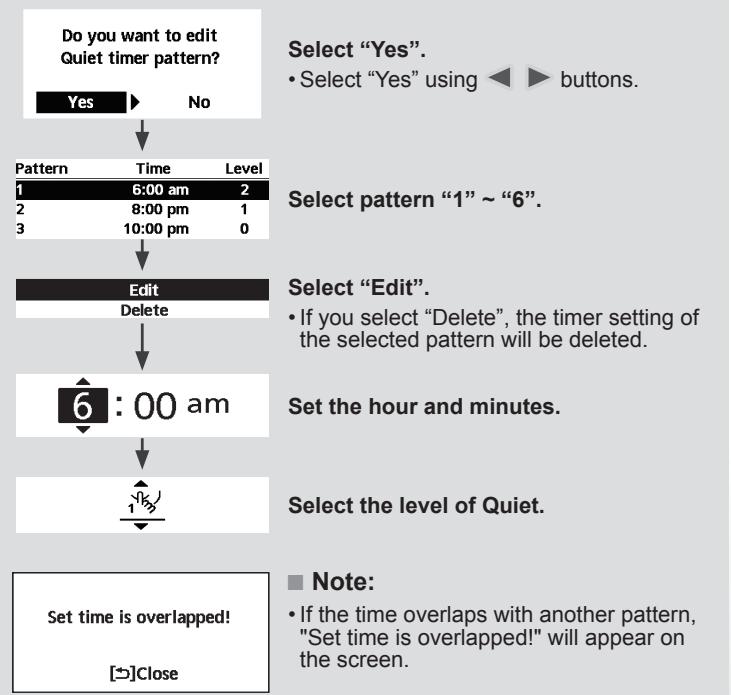
flowchart
graph TD
A["Do you want to edit Quiet timer pattern?"] --> B{Yes}
B -->|No| C["Select "Yes". <br>• Select "Yes" using <► buttons."]
C --> D["1 6:00 am 2"]
D --> E["2 8:00 pm 1"]
E --> F["3 10:00 pm 0"]
F --> G["Edit\nDelete"]
G --> H["6 : 00 am"]
H --> I["Set the hour and minutes."]
I --> J["Select the level of Quiet."]
J --> K["Set time is overlapped! \n[→"]Close]
natural_image
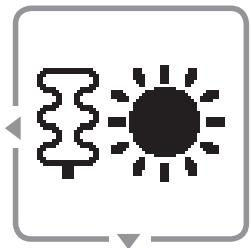
Simple icon showing a tree and sun, no text or symbols presentForce Heater
Select to force the Heater on.
Press ← to confirm your selection.
(The Force Heater mode starts approximately 1 minute after ← is pressed.)
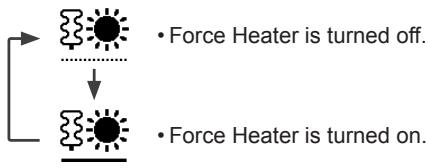
flowchart
graph TD
    A["●"] --> B["●"]
    C["..."] --> D["●"]
    E["• Force Heater is turned off."] --> F["●"]
    G["• Force Heater is turned on."] --> H["●"]
Note:
- Force Heater is disabled whenever operation is already on and ‘Disabled due to operation ON!’ will be displayed.
Disabled due to
operation ON!
[→]Close
natural_image
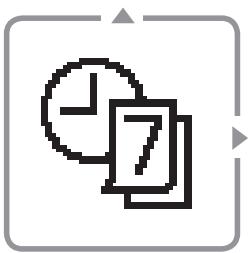
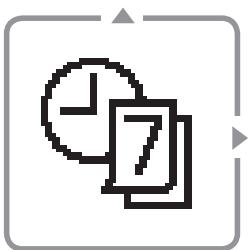
Simple icon showing a clock and two overlapping documents (no text or symbols)Weekly Timer
Select this icon to delete (cancel) or change the pre-set Weekly Timer.
Press ← to confirm your selection.
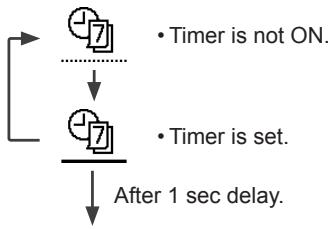
flowchart
graph TD
    A["+"] --> B["Timer is not ON."]
    B --> C["+7"]
    C --> D["After 1 sec delay."]
    E["+"] --> F["Timer is set."]
    F --> D
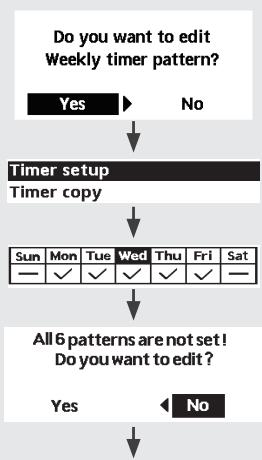
flowchart
graph TD
    A["Do you want to edit Weekly timer pattern?"] --> B{Yes}
    B -->|Yes| C["Timer setup"]
    B -->|No| D["Timer copy"]
    C --> E["Sun Mon Tue Wed Thu Fri Sat"]
    E --> F["All 6 patterns are not set! Do you want to edit?"]
    F --> G{Yes}
    G -->|Yes| H["← No"]
    G -->|No| I["End"]
Select "Yes".
- If you select "No", the screen will return to the Main Screen.
- Timer setup: Select Timer setup to edit the Weekly Timer.
- Timer copy: Select to copy a timer setting.
[Example of a Timer setup]
Select the day(s) which you wish to edit using ▲▼ buttons.
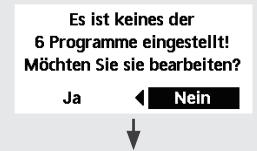
If all 6 patterns are not preset, this screen will be displayed.
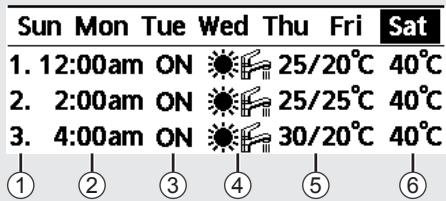
① Select pattern “1” \~ “6”.
② Set the hour and minutes of the Timer.
③ Select ON/OFF of the Timer.
④ Select the operation mode.

⑤ Set the temperature for both Zone 1 and 2 (if your system has the 2-Zone setting).
Saturday: Pattern 1: Set Temp
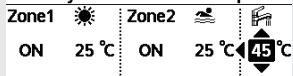
⑥ Set the Tank temperature.
Note:
- Timer is disabled when Force Heater is turned on or Heat-Cool SW is enabled.
- If you have preset the Weekly Timer on 2 zones, you must repeat the same procedure with Zone 2.
natural_image
Pixelated abstract flower-like symbol inside a rounded square frame (no text or symbols)Force Defrost
Select to defrost the frozen pipes.
Press ← to confirm your selection.
(When the mode is accepted, below screen will be displayed.)
Request accepted!
[→] Close

flowchart
graph TD
    A["Start"] --> B{Next Step}
    B --> C["End"]
Error Reset
Select to restore the previous settings when error has occurred.
Press ← to confirm your selection.
(When the mode has been accepted, below screen will be displayed.)
Request accepted!
[→] Close
- Make sure all units are turned off before selecting this mode which restores the whole system to the previous settings.

natural_image
Simple icon of a padlock inside a rounded square frame (no text or symbols)R/C Lock
Select to lock the Remote Controller.
Press ← to confirm your selection.
(When the mode has been accepted, below screen will be displayed.)
Do you want to lock remote control?
Yes
No
Select "Yes".
(The Main Screen will be locked.)
- If "No" is selected, the screen will return to the Main Screen.
To unlock the Remote Controller Press any key.
(When the mode has been accepted, below screen will be displayed.)
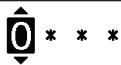
Enter any 4 digits of number (if the number is correct, the screen will be unlocked).
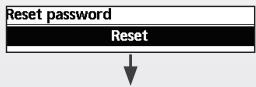
To reset forgotten password (under operation OFF screen) Press ↩, ← and ▶ continuously for 5 seconds.
(When the mode has been accepted, below screen will be displayed.)
flowchart
graph TD
    A["Reset password"] --> B["Reset"]
    B --> C["↓"]
Select "Reset".
- Password is reset to 0000
- Remote control is unlocked
(The screen will be off after 3 seconds.)
natural_image
Pure mechanical diagram showing a pipe with a downward arrow and a bracket (no text or symbols)ACS forzado
flowchart
graph TD
    A["Input"] --> B["Water Inlet"]
    B --> C["Filter"]
    C --> D["Outlet"]
    style A stroke:#000,stroke-width:2px
    style D stroke:#000,stroke-width:2px
natural_image
Pixelated abstract shape resembling a stylized arm or muscle, enclosed in a rounded square frame (no text or symbols)Potente
natural_image
Abstract pixelated line drawing with no text or symbolsSilencioso
natural_image
Simple icon showing a tree and sun, no text or symbols presentResistencia forzada
natural_image
Simple icon showing a clock and two overlapping documents (no text or symbols)Temporiz. semanal
natural_image
Simple line drawing of a flower with petals and stem, enclosed in a rounded square frame (no text or symbols)natural_image
Pixelated icon of a padlock inside a rounded square frame (no text or symbols)Bloquear panel de control
natural_image
Pure mechanical diagram showing a lever and shaft without any text or symbolsACS forzato
natural_image
Pixelated abstract shape resembling a stylized arm or muscle, enclosed in a rounded square frame (no text or symbols)Powerful
natural_image
Abstract pixelated line drawing with no text or symbolsModalità silenziosa
natural_image
Simple icon showing a tree and sun, no text or symbols presentResistenza forzata
flowchart
graph TD
    A["Solar Panel"] --> B["Ground Station"]
    style A fill:#f9f,stroke:#333
    style B fill:#bbf,stroke:#333
natural_image
Simple icon showing a clock and two overlapping documents (no text or symbols)natural_image
Simple line drawing of a flower with petals and stem, enclosed in a rounded square frame (no text or symbols)Sbrinamento forzato
flowchart
graph TD
    A["Ripristino password"] --> B["Reset"]
    B --> C["↓"]
natural_image
Pure mechanical diagram showing a pipe or lever mechanism without any text, numbers, or symbolsForceren warmtapwater
natural_image
Pixelated abstract shape resembling a stylized arm or muscle, enclosed in a rounded square frame (no text or symbols)Extra vermogen
natural_image
Abstract pixelated line drawing with no text or symbolsStil
natural_image
Simple icon showing a tree and sun, no text or symbols presentForceren verwarming
flowchart
graph TD
    A["Solar Panel"] --> B["Ground Station"]
    style A fill:#f9f,stroke:#333
    style B fill:#bbf,stroke:#333
Disabled due to operation ON!
[→]Close
natural_image
Simple icon showing a clock and two overlapping documents (no text or symbols)Week-timer
flowchart
graph TD
    A["Do you want to edit Weekly timer pattern?"] --> B{Yes}
    B -->|Yes| C["Timer setup"]
    B -->|No| D["Timer copy"]
    C --> E["Sun Mon Tue Wed Thu Fri Sat"]
    E --> F["All 6 patterns are not set! Do you want to edit?"]
    F --> G{Yes}
    G -->|Yes| H["← No"]
    G -->|No| I["End"]
Selecteer "Yes".
natural_image
Simple line drawing of a flower with petals and stem, enclosed in a rounded square frame (no text or symbols)Forceren ontdooien
Selecteer "Yes".
flowchart
graph TD
    A["Reset password"] --> B["1. Password is reset to 0000\n2. Remote control is unlocked"]
    B --> C["Reset"]
Selecteer "Reset".
natural_image
Pure mechanical diagram showing a downward arrow and a bracket-like structure without any text or symbolsWymuszenie c.w.u.
flowchart
graph TD
    A["Water Input"] --> B["Refrigeration"]
    B --> C["Filter"]
    C --> D["Outlet"]
    style A stroke:#000,stroke-width:2px
    style D stroke:#000,stroke-width:2px
natural_image
Simple line drawing of a flexed arm inside a rounded square frame (no text or symbols)Tryb intensywny
natural_image
Abstract pixelated line drawing with no text or symbolsPraca cicha
natural_image
Simple icon showing a tree and sun, no text or symbols presentWymuszenie grzałki
flowchart
graph TD
    A["Process 1"] --> B["Process 2"]
    B --> C["Output"]
natural_image
Simple icon showing a clock and two overlapping documents (no text or symbols)natural_image
Simple line drawing of a flower with petals and stem, enclosed in a rounded square frame (no text or symbols)flowchart
graph TD
    A["Reset"] --> B["↓"]
- Reset hasta do 0000
natural_image
Pure mechanical diagram showing a pipe with arrows indicating direction (no text or symbols)flowchart
graph TD
    A["Top pipe"] --> B["Downward arrow"]
    B --> C["Left pipe"]
    C --> D["Right pipe"]
    style A fill:#f9f,stroke:#333
    style D fill:#bbf,stroke:#333
natural_image
Pixelated abstract shape resembling a stylized arm or muscle, enclosed in a rounded square frame (no text or symbols)Ισχυρό
natural_image
Abstract pixelated line drawing with no text or symbolsΑθόρυβο
flowchart
graph TD
    A["Do you want to edit Quiet timer pattern?"] --> B{Yes}
    B -->|No| C["Pattern Time Level"]
    C --> D["6:00 am 2"]
    D --> E["8:00 pm 1"]
    E --> F["10:00 pm 0"]
    F --> G["Edit Delete"]
    G --> H["6:00 am"]
    H --> I["1"]
    I --> J["Set time is overlapped! [→"]Close]
natural_image
Simple icon showing a windmill and a sun, no text or symbols presentDisabled due to operation ON!
[→]Close
natural_image
Simple icon showing a clock and two overlapping documents (no text or symbols)flowchart
graph TD
    A["Do you want to edit Weekly timer pattern?"] --> B{Yes}
    B -->|Yes| C["Timer setup"]
    B -->|No| D["Timer copy"]
    C --> E["Sun Mon Tue Wed Thu Fri Sat"]
    E --> F{All 6 patterns are not set! Do you want to edit?}
    F -->|Yes| G["Yes"]
    F -->|No| H["No"]
Επιλέξτε "Yes".
Saturday: Pattern 1: Set Temp
| Zone1 | ☀️ | Zone2 | ☀️ | ☀️ |
| ON | 25 °C | ON | 25 °C | 45 °C |
Σημείωση:
natural_image
Simple line drawing of a flower with petals and stem, enclosed in a rounded square frame (no text or symbols)natural_image
Simple black arrow pointing left with a dot, enclosed in a gray rounded square frame (no text or symbols)Do you want to lock remote control?

No
Επιλέξτε "Yes".
- Password is reset to 0000
- Remote control is unlocked
natural_image
Pure diagram of a mechanical or architectural component with no text, numbers, or symbolsVynutit TUV
Touto ikonou zapnete/vypnete nádrž TUV.
natural_image
Pixelated abstract shape resembling a stylized arm or muscle, enclosed in a rounded square frame (no text or symbols)Výkonný
natural_image
Abstract pixelated line drawing with no text or symbolsTichý režim
natural_image
Simple icon showing a tree and sun, no text or symbols presentVynutit ohřívač
Týdenní časovač
natural_image
Simple line drawing of a flower with petals and stem, enclosed in a square frame (no text or symbols)Vynutit odmražení
natural_image
Pure mechanical component diagram without any text, numbers, or symbolsnatural_image
Pixelated abstract shape resembling a stylized arm or muscle, enclosed in a rounded square frame (no text or symbols)Chauffage Turbo
natural_image
Abstract pixelated line drawing with no text or symbolsMode silencieux
natural_image
Simple icon showing a windmill and a sun, no text or symbols presentProg. hebdo
Remarque :
natural_image
Simple line drawing of a flower with petals and stem, enclosed in a rounded square frame (no text or symbols)Forcer le dégivrage
natural_image
Simple black arrow pointing left inside a rounded square frame (no text or symbols)natural_image
Pure mechanical diagram showing a pipe bend and lever mechanism without any text or symbolsflowchart
graph TD
    A["Water Flow"] --> B{Water Level}
    B --> C["Flow to Top"]
    B --> D["Flow to Bottom"]
    C --> E["Water Outlet"]
    D --> F["Water Outlet"]
natural_image
Pixelated abstract shape resembling a stylized arm or muscle, enclosed in a rounded square frame (no text or symbols)Leistungsbetrieb
natural_image
Abstract pixelated line drawing with no text or symbolsFlüsterbetrieb
natural_image
Simple icon showing a tree and sun, no text or symbols presentNot- Heizbetrieb
Wochentimer
natural_image
Simple line drawing of a flower with petals and stem, enclosed in a rounded square frame (no text or symbols)natural_image
Pure mechanical diagram showing a pipe with a downward arrow and a bracket (no text or symbols)Zorlu DHW
natural_image
Pixelated abstract shape resembling a stylized arm or muscle, enclosed in a rounded square frame (no text or symbols)Güçlü
natural_image
Abstract pixelated line drawing with no text or symbolsSessiz
Not:
natural_image
Simple icon showing a tree and sun, no text or symbols presentZorlu Isitici
Disabled due to operation ON!
[→]Close
natural_image
Simple icon showing a clock and two overlapping documents (no text or symbols)flowchart
graph TD
    A["Do you want to edit Weekly timer pattern?"] --> B{Yes}
    B -->|Yes| C["Timer setup"]
    B -->|No| D["Timer copy"]
    D --> E["Sun Mon Tue Wed Thu Fri Sat"]
    E --> F["All 6 patterns are not set! Do you want to edit?"]
    F --> G{Yes}
    G -->|Yes| H["← No"]
    G -->|No| I["End"]
"Yes" i seçin.
natural_image
Pixelated abstract flower-like symbol inside a rounded square frame (no text or symbols)Zorlu Buz Çözme
Do you want to lock remote control?

No
"Yes" i seçin.
- Password is reset to 0000
2.Remote control is unlocked
natural_image
Pure diagram of a mechanical or architectural component with no text, numbers, or symbolsTvinga VV
flowchart
graph TD
    A["Top Drain"] --> B["Downward Outlet"]
    B --> C["Bottom Drain"]
natural_image
Pixelated abstract shape resembling a stylized arm or muscle, enclosed in a rounded square frame (no text or symbols)Kraftfull
natural_image
Abstract pixelated line drawing with no text or symbolsTyst läge
natural_image
Simple icon showing a tree and sun, no text or symbols presentTvinga värmare
VeckoTimer
natural_image
Simple line drawing of a flower with petals and stem, enclosed in a square frame (no text or symbols)Tvinga avfrostning
natural_image
Simple diagram with a dot and arrow inside a rectangular frame (no text or symbols)Felåterställning
natural_image
Pure mechanical diagram showing a pipe with a downward arrow and a bracket (no text or symbols)Tvungen DHW
natural_image
Pixelated abstract shape resembling a stylized arm or muscle, enclosed in a rounded square frame (no text or symbols)Kraftig
Velg dette symbolet for å la varme-/kjølesystemet gå ved full effekt.
natural_image
Abstract pixelated line drawing with no text or symbolsStille
Velg dette symbolet for stille drift.
flowchart
graph TD
    A["Source"] --> B["Output Source"]
    C["Source"] --> D["Output Source"]
Uketimer
① Velg mønster "1" \~ "6".
② Still inn time og minutter for Timer.
③ Velg PÅ/AV for Timer.
④ Velg driftsmodus.

• Velg modus med ▲▼ -knappene.
natural_image
Pixelated abstract flower-like symbol inside a rounded square frame (no text or symbols)Tvungen avising
natural_image
Pure mechanical diagram showing a lever and shaft without any text or symbolsPakota DHW
natural_image
Simple line drawing of a flexed arm inside a rounded square frame (no text or symbols)Powerful
natural_image
Abstract pixelated line drawing with no text or symbolsQuiet
Huomautus:
natural_image
Simple icon showing a tree and sun, no text or symbols presentPakota lämmitin
flowchart
graph TD
    A["Source"] --> B["Output Source"]
    style A fill:#f9f,stroke:#333
    style B fill:#bbf,stroke:#333
Disabled due to operation ON!
[→]Close
natural_image
Simple icon showing a clock and two overlapping documents (no text or symbols)Viikkoajastin
flowchart
graph TD
    A["Do you want to edit Weekly timer pattern?"] --> B{Yes}
    B -->|Yes| C["Timer setup"]
    B -->|No| D["Timer copy"]
    D --> E["Sun Mon Tue Wed Thu Fri Sat"]
    E --> F["All 6 patterns are not set! Do you want to edit?"]
    F --> G{Yes}
    G -->|Yes| H["No"]
    G -->|No| I["End"]
natural_image
Simple line drawing of a flower with petals and stem, enclosed in a rounded square frame (no text or symbols)Pakota sulatus
natural_image
Pixelated icon of a padlock inside a rounded square frame (no text or symbols)R/C-lukko
Do you want to lock remote control?

No
- Password is reset to 0000
- Remote control is unlocked
Valitse "Reset".
natural_image
Pure mechanical diagram showing a lever and shaft assembly without any text or symbolsTving DHW
flowchart
graph TD
    A["Water Input"] --> B["Refrigeration"]
    B --> C["Filter"]
    C --> D["Outlet"]
    style A stroke:#000,stroke-width:2px
    style D stroke:#000,stroke-width:2px
natural_image
Pixelated abstract shape resembling a stylized arm or muscle, enclosed in a rounded square frame (no text or symbols)Kraftig
natural_image
Abstract pixelated line drawing with no text or symbolsLydsvag
Vælg dette ikon for at stille drift.
natural_image
Simple icon showing a tree and sun, no text or symbols presentnatural_image
Simple icon showing a clock and two overlapping documents (no text or symbols)Ugentlig timer
natural_image
Pixelated abstract flower-like symbol inside a rounded square frame (no text or symbols)Kraftig optøning
© Panasonic Corporation 2016
Printed in Malaysia
| Country | Hotline Phone Number |
| Hungary | +36 1 382 60 60 |
| Netherlands | +31(0)736402538 |
| Norway | +47 210 339 99 |
| Poland | +48 22 338 11 57 |
| Spain | +34 (0) 902 153 060 |
| Sweden | +46 (0)8 566 426 88 |
| Switzerland | 0800 - 001074 |
| UK/Ireland | +44 (0) 1344 853 393 |
Authorised representative in EU
Panasonic Testing Centre
Panasonic Marketing Europe GmbH
Winsbergring 15, 22525 Hamburg, Germany
AEEE Compliance with Turkey Regulations