
CU-BE20TKD - Air conditioner PANASONIC - Free user manual and instructions
Find the device manual for free CU-BE20TKD PANASONIC in PDF.


| Product Type | Split System Air Conditioner |
| Model (Indoor) | CS-BE20TKD |
| Model (Outdoor) | CU-BE20TKD |
| Cooling Operation Range (Indoor) | 16.0 – 32.0 °C DB / 11 – 23 °C WB |
| Cooling Operation Range (Outdoor) | 5.0 – 43.0 °C DB / – – 26 °C WB |
| Heating Operation Range (Indoor) | 16.0 – 30.0 °C DB / – |
| Heating Operation Range (Outdoor) | -15.0 – 24.0 °C DB / -16 – 18 °C WB |
| Fan Speeds | Auto, 10 steps (1-10) |
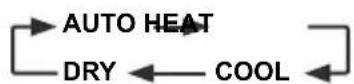
| Operation Modes | Auto, Heat, Cool, Dry |
| Timer | ON/OFF timer with 24-hour clock, repeat daily |
| Sleep Mode | Yes, with adjustable timer (0.5 – 9 hours) |
| Powerful/Quiet Operation | Powerful (20 min) and Quiet modes |
| Auto Restart | Yes (after power failure, except timer settings) |
| Air Flow Direction | Vertical (auto swing) and horizontal (manual) |
| Remote Control Range | Up to 8 meters |
| Power Supply | 220-240 V, 50 Hz (single phase) |
| Recommended Temperature Settings | Cool: 26-28 °C; Heat: 20-24 °C |
| Safety Features | Earth Leakage Circuit Breaker (ELCB) recommended |
| Air Filter Cleaning | Every 2 weeks; wash with water and dry in shade |
| Accessories Included | Remote control, AAA batteries (×2), remote control holder, screws |
Frequently Asked Questions - CU-BE20TKD PANASONIC
User questions about CU-BE20TKD PANASONIC
0 question about this device. Answer the ones you know or ask your own.
Ask a new question about this device
Download the instructions for your Air conditioner in PDF format for free! Find your manual CU-BE20TKD - PANASONIC and take your electronic device back in hand. On this page are published all the documents necessary for the use of your device. CU-BE20TKD by PANASONIC.
USER MANUAL CU-BE20TKD PANASONIC
Operating Instructions
Air Conditioner

natural_image
Exterior view of a modern office building (no signage)Model No.
Indoor Unit Outdoor Unit
CS-BE20TKD CU-BE20TKD
Operating Instructions Air Conditioner
2-14
Before operating the unit, please read these operating instructions thoroughly and keep them for future reference.
The included Installation Instructions should be kept and read by the installer before installation.
Remote control is packaged in the indoor unit and removed by the installer before installation.
Cwhwqnpouwi hnwhwuqutn Onnpwlghz
79-94
Flnp 2whwqnptinig wnwg, wupnnqniujwup lwwnwgtp wju 2whwqnptuwu hnwhwuqutnp u wwhtp nnwup htunwqu untntlywnyniujwu hwuw:
Stwnpnu w hnuhwtuptnn wtng t whtl u lwnnw ntwnpnu w2hwnwnuptngh wnwg:
3tnwlywnwylwnswtu qwhwllwnqqnwlniut tutnuh shwllnpswt uhtg u htnwgylniut tuntwnntpning wnwq:
Provides maximum comfort and clean air with optimal energy saving methods.
Use remote control within 8 m from the remote control receiver of the indoor unit.

Quick Guide
Inserting the batteries
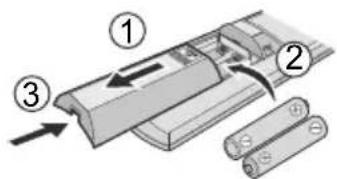
① Pull out the back cover of remote control.
② Insert AAA or R03 batteries.
③ Close the cover.
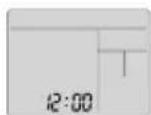
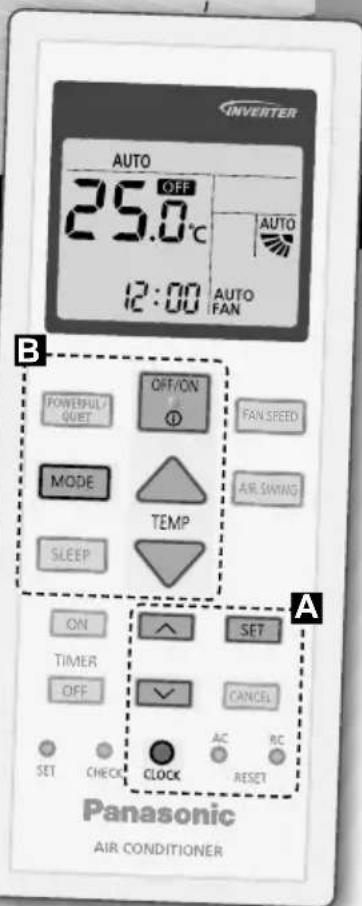
A Clock setting

① Press and set the time
- Press and hold for approximately 5 seconds to show time in 12-hour (am/pm) or 24 hour indication.
② Confi rm SET

natural_image
Interior view of a minimalist living room with a sofa and high ceiling (no text or symbols visible)Thank you for purchasing Panasonic Air Conditioner.
Table of contents
Safety precautions...... 4-6
How to use....7-8
To learn more....9
Cleaning instructions..... 10
Troubleshooting...... 11-13
Information...... 14
Accessories
- Remote control
- AAA or R03 batteries × 2
- Remote control holder
- Screws for remote control holder × 2
The illustrations in this manual are for explanation purposes only and may differ from the actual unit. They are subject to change without notice for future improvement.
B Basic operation
① Press MODE to select the desired mode.

② Press OFF/ON to start/stop the operation.

- Please note that the OFFcation is on display to start the unit.
③ Select the desired temperature.

Selection range: 16.0 °C \~ 30.0 °C / 60 °F \~ 86 °F.
- Press and hold ▼ for approximately 10 seconds to switch the temperature indication in °C or °F.
To prevent personal injury, injury to others or property damage, please comply with the following: Incorrect operation due to failure to follow instructions below may cause harm or damage, the seriousness of which is classified as below: This appliance is not intended for accessibility by the general public.
 WARNING WARNING | This sign warns of death or serious injury. |
 CAUTION CAUTION | This sign warns of injury or damage to property. |
The instructions to be followed are classified by the following symbols:

This symbol denotes an action that is PROHIBITED.


These symbols denote actions COMPULSORY.

flowchart
graph TD
    A["Indoor unit"] --> B["Air outlet"]
    C["Power supply"] --> D["Air inlet"]
    E["Remote control"] --> F["Air outlet"]
    G["Outdoor unit"] --> H["Air inlet"]
    I["Air outlet"] --> J["Air inlet"]
    style A fill:#f9f,stroke:#333
    style C fill:#f9f,stroke:#333
    style E fill:#f9f,stroke:#333
    style G fill:#f9f,stroke:#333
    style I fill:#f9f,stroke:#333
    style B fill:#ccf,stroke:#333
    style D fill:#ccf,stroke:#333
    style H fill:#ccf,stroke:#333
    style J fill:#ccf,stroke:#333
Air outlet

WARNING
Indoor unit and outdoor unit

This appliance can be used by children aged from 8 years and above and persons with reduced physical, sensory or mental capabilities or lack of experience and knowledge if they have been given supervision or instruction concerning use of the appliance in a safe way and understand the hazards involved.
Children shall not play with the appliance. Cleaning and user maintenance shall not be made by children without supervision.
Please consult authorised dealer or specialist to clean the internal parts, repair, install, remove and reinstall the unit. Improper installation and handling will cause leakage, electric shock or fire.
Confir rm with authorised dealer or specialist on usage of any specifi ed refrigerant type. Using refrigerant type other than the specifi ed may cause product damage, burst and injury etc.

Do not install the unit in a potentially explosive or fl ammable atmosphere. Failure to do so could result in fi re.
Do not insert your fingers or other objects into the air conditioner indoor or outdoor unit, rotating parts may cause injury.

Do not touch the outdoor unit during lightning, it may cause electric shock.

Do not expose yourself directly to cold air for a long period to avoid excess cooling.
Do not sit or step on the unit, you may fall down accidentally.

Remote control

Do not allow infants and small children to play with the remote control to prevent them from accidentally swallowing the batteries.
Power supply

Do not use a modifi ed cord, joint cord, extension cord or unspecifi ed cord to prevent overheating and fi re.


To prevent overheating, fire or electric shock:
- Do not share the same power outlet with other equipment.
- Do not operate with wet hands.
- Do not over bend the power supply cord.
- Do not operate or stop the unit by inserting or pulling out the power plug.

If the supply cord is damaged, it must be replaced by the manufacturer, service agent or similarly qualified persons in order to avoid a hazard.
It is strongly recommended to be installed with Earth Leakage Circuit Breaker (ELCB) or Residual Current Device (RCD) to prevent electric shock or fire.
To prevent overheating, fire or electric shock:
- Insert the power plug properly.
- Dust on the power plug should be periodically wiped with a dry cloth.
Stop using the product if any abnormality/failure occurs and disconnect the power plug or turn off the power switch and breaker.
(Risk of smoke/fi re/electric shock)
Examples of abnormality/failure
• The ELCB trips frequently.
- Burning smell is observed.
- Abnormal noise or vibration of the unit is observed.
• Water leaks from the indoor unit.
• Power cord or plug becomes abnormally hot.
- Fan speed cannot be controlled.
- The unit stops running immediately even if it is switched on for operation.
- The fan does not stop even if the operation is stopped. Contact your local dealer immediately for maintenance/repair.

This equipment must be earthed to prevent electrical shock or fire.

Prevent electric shock by switching off the power supply and unplug:

-Before cleaning or servicing, -When extended non-use, or -During abnormally strong lightning activity.

CAUTION
Indoor unit and outdoor unit

Do not wash the indoor unit with water, benzine, thinner or scouring powder to avoid damage or corrosion at the unit.
Do not use for preservation of precise equipment, food, animals, plants, artwork or other objects. This may cause quality deterioration, etc.
Do not use any combustible equipment in front of the airflow outlet to avoid fire propagation.
Do not expose plants or pet directly to airflow to avoid injury, etc.
Do not touch the sharp aluminium fi n, sharp parts may cause injury.

Do not switch ON the indoor unit when waxing the floor. After waxing, aerate the room properly before operating the unit.
Do not install the unit in oily and smoky areas to prevent damage to the unit.
Do not dismantle the unit for cleaning purpose to avoid injury.
Do not step onto an unstable bench when cleaning the unit to avoid injury.
Do not place a vase or water container on the unit. Water may enter the unit and degrade the insulation. This may cause an electric shock.
Do not open window or door for long time during operation, it may lead to ineffi cient power usage and uncomfortable temperature changes.

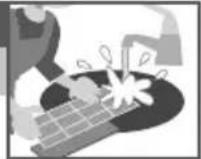
Prevent water leakage by ensuring drainage pipe is: - Connected properly, - Kept clear of gutters and containers, or - Not immersed in water
After a long period of use or use with any combustible equipment, aerate the room regularly.
After a long period of use, make sure the installation rack does not deteriorate to prevent the unit from falling down.
Remote control

Do not use rechargeable (Ni-Cd) batteries. It may damage the remote control.

To prevent malfunction or damage of the remote control:
- Remove the batteries if the unit is not going to be used for a long period of time.
- New batteries of the same type must be inserted following the polarity stated.
Power supply

Do not disconnect the plug by pulling the cord to prevent electric shock.

To adjust airflow direction

flowchart
graph LR
    A["AIR SWING"] --> B["Upper direction"]
    B --> C["→"]
    C --> D["→"]
    D --> E["→"]
    E --> F["→"]
    F --> G["→"]
- Do not adjust the flap by hand.

natural_image
Illustration of a hand pressing down on a curved surface with directional arrows (no text or symbols)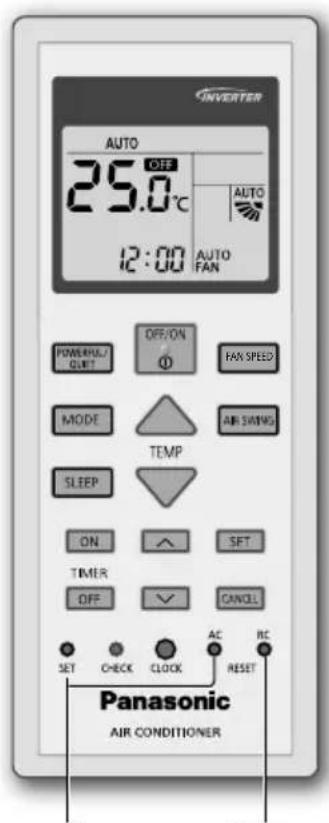
Not used in normal operations.
Press to restore the remote control to default setting.
- For lateral direction, it is manually adjustable as shown.
To adjust fan speed

flowchart
graph LR
    A["FAN SPEED"] --> B["AUTO FAN"]
    B --> C["1"]
    C --> D["2"]
    D --> E["3"]
    E --> F["4"]
    F --> G["5"]
    G --> H["6"]
    H --> I["7"]
    I --> J["8"]
    J --> K["9"]
    K --> L["10"]
- For AUTO, the indoor fan speed is automatically adjusted according to the operation mode.
- To have low noise priority operation, select the lowest fan speed (■).
To switch between powerful/quiet

flowchart
graph TD
    A["POWERFUL/QIET"] --> B["QUIET"]
    B --> C["(NORMAL)"]
    C --> A
POWERFUL:
To reach the preset temperature quickly
• This operation stops automatically after 20 minutes.
QUIET:
To enjoy quiet operation
• This operation reduces airflow noise.
To maximise comfort while sleeping
This operation provides you with a comfortable environment while sleeping. It will automatically adjust the sleep pattern temperature during the activation period. The indoor unit indicator will dim when this operation is activated. This is not applicable if the indicator brightness has been manually dimmed.

This operation is incorporated with the activation timer (0.5, 1, 2, 3, 4, 5, 6, 7, 8 or 9 hours).
- This operation can be set together with timer. Sleep operation has the priority over OFF timer.
- This operation can be cancelled by pressing the respective button when the sleep timer reaches 0.0h.
To set the timer
2 sets of ON and OFF timers are available to turn ON or OFF the unit at different preset times.

① Select ON or OFF timer
• Each time pressed:

Example: OFF at 22:00
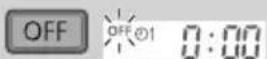
② Set the time
③ Confi rm

- To cancel ON or OFF timer, press ON or to select respective or then press CANCEL.
- If timer is cancelled manually or due to power failure, you can restore the timer again by pressing ON or to select respective or then press. SET
- The nearest timer setting will be displayed and will activate in sequence.
- Timer operation is based on the clock set in the remote control and repeats daily once set. For clock setting, please refer to Quick Guide.
Note
| POWERFUL/QUIET, SLEEPCan be activated in all modes and can be cancelled by pressing the respective button again. | POWERFUL/QUIETCannot be selected at the same time. |
Operating conditions
Use this air conditioner in the temperature range indicated in the table.
| Temperature °C (°F) | Indoor Outdoor | ||||
| DBT WBT D | BT WBT | ||||
| COOL | Max. 32 | (89.6) 23 (73.4) 43 | (109.4) 26 (78.8) | ||
| Min. | 16 (60.8) | 11 (51.8) | 5 (41.0) | - | |
| HEAT | Max. 30 | (86.0) | - 24 | (75.2) 18 (64.4) | |
| Min. | 16 (60.8) | - | -15 (5.0) | -16 (3.2) | |
DBT: Dry bulb temperature, WBT: Wet bulb temperature
Operation mode
AUTO : During operation, the POWER indicator will blinks at initial.
Unit selects operation mode every 10 minutes according to the setting and room temperatures.
HEAT : The POWER indicator blinks at the initial stage of this operation. Unit takes a while to warm up.
COOL : Provides efficient comfort cooling to suit your needs.
DRY : Unit operates at low fan speed to give a gentle cooling operation.
Energy saving temperature setting
Operating the unit within the recommended temperature range may save energy.
HEAT : 20.0 °C \~ 24.0 °C / 68 °F \~ 75 °F.
COOL: 26.0 °C \~ 28.0 °C / 79 °F \~ 82 °F.
Air flow direction
In COOL/DRY mode:
If AUTO is set, the fl ap swings up/down automatically.
Auto restart control
If power is resumed after a power failure, the operation will restart automatically after a period of time with previous operation mode and airflow direction.
- This control is not applicable when TIMER is set.
To ensure optimal performance of the unit, cleaning has to be carried out at regular intervals. Dirty unit may cause malfunction and you may see error code "H 99". Please consult authorised dealer.
- Switch off the power supply and unplug before cleaning.
- Do not touch the aluminium fi n, sharp parts may cause injury.
- Do not use benzine, thinner or scouring powder.
- Use only soap (≈pH 7) or neutral household detergent.
- Do not use water hotter than 40^ / 104^ .
Indoor unit
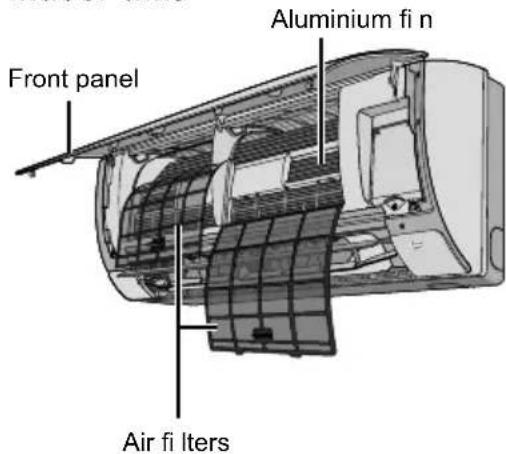
Indoor unit
Wipe the unit gently with a soft, dry cloth.

Outdoor unit
Make sure the air outlet of the outdoor unit is not blocked by fallen leaves or snow.
Clear any blockage from the drain pipe.

Air filters
Once every 2 weeks
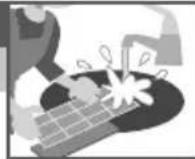
- Wash/rinse the fi Iters gently with water to avoid damage to the fi Iter surface.
- Dry the filters thoroughly under shade, away from fire or direct sunlight.
- Replace any damaged filters.
Remove air filter
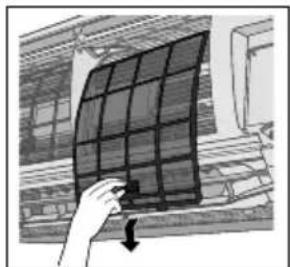
natural_image
Hand holding a solar panel with a downward arrow, against a building facade (no text or symbols visible)Attach air filter

natural_image
Illustration of hands holding a solar panel with a magnified inset showing the structure (no text or symbols)Insert into the unit
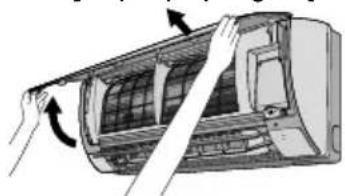
Front panel
Wash gently and dry.
Remove the front panel Close it securely
② Pull out and lift up.

natural_image
Illustration of hands installing or adjusting the air conditioner cover (no text or symbols visible)① Release the hooks at both ends.

③ Close down.
④ Press both ends and center of the front panel.
Troubleshooting
The following symptoms do not indicate malfunction.
| Symptom Cause | |
| Mist emerges from indoor unit. • Condensation effect due to cooling process. | |
| Water flowing sound during operation. | • Refrigerant flow inside the unit. |
| The room has a peculiar odour. • This may be due to damp smell emitted by the wall, carpet, furniture or clothing. | |
| Indoor fan stops occasionally during automatic fan speed setting. | • This helps to remove the surrounding odour. |
| Airflow continues even after operation has stopped. | • Extraction of remaining heat from the indoor unit (maximum 30 seconds). |
| Operation is delayed a few minutes after restarting. | • The delay is a protection to the unit's compressor. |
| Outdoor unit emits water/steam. • Condensation or evaporation occurs on pipes. | |
| TIMER indicator is always on. • The timer setting repeats daily once set. | |
| POWER indicator blinks during HEAT mode with no warm air supply (and fl ap is closed). | • The unit is in defrost mode (and AIR SWING is set to AUTO). |
| Indoor fan stops occasionally during heating operation. | • To avoid unintended cooling effect. |
| POWER indicator blinks before the unit is switched on. | • This is a preliminary step in preparation for the operation when the ON timer has been set. When ON Timer is set, the unit may start earlier (up to 35 minutes) before the actual set time in order to achieve the desired temperature on time. |
| Cracking sound during operation. • Changes of temperature caused the expansion/contraction of the unit. | |
| Dusts accumulated on the wall. • Due to air circulation or static electricity generated by the air conditioner. Some types of wall paper may collect dusts easily (recommended to clean the area around the air conditioner frequently). | |
| Discoloration of some plastic parts. • Discoloration is subject to material types used in plastic parts, accelerated when exposed to heat, sun light, UV light or environmental factor. | |
| Cooling/heating capacity reduced during the lowest fan speed setting. | • The low fan speed is low noise priority operation, so cooling/heating capacity may be reduced (depending on the condition). Increase the Fan Speed to increase the capacity. |
Check the following before calling for servicing.
| Symptom Check | |
| Operation in HEAT/COOL mode is not working effi ciently. | Set the temperature correctly.Close all doors and windows.Clean or replace the fil ters.Clear any obstruction at the air inlet and air outlet vents. |
| Noisy during operation. • Check if the unit has been installed at an incline.Close the front panel properly. | |
| Remote control does not work.(Display is dim or transmission signal is weak.) | Insert the batteries correctly.Replace weak batteries. |
| The unit does not work. • Check if the circuit breaker is tripped.Check if timers have been set. | |
| The unit does not receive the signal from the remote control. | Make sure the receiver is not obstructed.Certain fl uorescent lights may interfere with signal transmitter. Please consult authorised dealer. |
When...
■The remote control is missing or a malfunction has occurred

natural_image
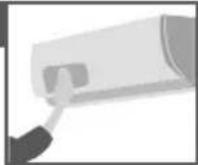
Diagram showing a door handle with an arrow pointing to the button (no text or symbols present)- Raise the front panel.
- Press the button once to use in AUTO mode.
- Press and hold the button until you hear 1 beep, then release to use in forced COOL mode.
- Repeat step 3. Press and hold the button until you hear 2 beeps, then release to use in forced HEAT mode.
- Press the button again to turn off.
■The indicators are too bright
- To dim or restore the unit's indicator brightness, press^ and hold for 5 seconds.
■ Conducting a seasonal inspection after extended non-use
- Check the remote control batteries.
- Check that there is no obstruction around the air inlet and outlet vents.
- Use Auto OFF/ON button to select COOL/HEAT operation. After 15 minutes of operation, it is normal to have the following temperature difference between the air inlet and outlet vents:
COOL: ≥ 8 °C / 14.4 °F HEAT: ≥ 14 °C / 25.2 °F
■ The units are not going to be used for a long period of time
- Activate HEAT mode for 2\~3 hours to remove moisture left in the internal parts thoroughly to prevent mould growth.
- Turn off the power supply and unplug.
- Remove the remote control batteries.
NON SERVICEABLE CRITERIAS
TURN OFF THE POWER SUPPLY AND UNPLUG then please consult an authorised dealer when in following conditions:
- Abnormal noise during operation.
• Water/foreign particles have entered the remote control.
• Water leaks from Indoor unit. - Circuit breaker switches off frequently.
- Power cord becomes unnaturally warm.
- Switches or buttons are not functioning properly.
How to retrieve error codes
If the unit stops and the TIMER indicator blinks, use the remote control to retrieve the error code.

- For certain errors, you may restart the unit for limited operation if there are 4 beeps when operation starts.
| Diagnostic display | Abnormality/Protection control |
| H 00 No memory of failure | |
| H 11 | Indoor/outdoor abnormal communication |
| H 12 Indoor unit capacity unmatched | |
| H 14 | Indoor intake air temperature sensor abnormality |
| H 15 | Outdoor compressor temperature sensor abnormality |
| H 16 | Outdoor current transformer (CT) abnormality |
| H 19 Indoor fan motor mechanism lock | |
| H 21 | Indoor fl oat switch operation abnormality |
| H 23 | Indoor heat exchanger temperature sensor 1 abnormality |
| H 24 | Indoor heat exchanger temperature sensor 2 abnormality |
| H 25 | Indoor ion device abnormality |
| H 27 | Outdoor air temperature sensor abnormality |
| H 28 | Outdoor heat exchanger temperature sensor abnormality |
| H 30 | Outdoor discharge pipe temperature sensor abnormality |
| H 32 | Outdoor heat exchanger temperature sensor 2 abnormality |
| H 33 | Indoor/outdoor misconnection abnormality |
| H 34 | Outdoor heat sink temperature sensor abnormality |
| H 35 | Indoor/outdoor water adverse current abnormality |
| H 36 | Outdoor gas pipe temperature sensor abnormality |
| Diagnostic display | Abnormality/Protection control |
| H 37 | Outdoor liquid pipe temperature sensor abnormality |
| H 38 | Indoor/outdoor mismatch (brand code) |
| H 39 | Abnormal indoor operating unit or standby units |
| H 41 | Abnormal wiring or piping connection |
| H 59 Eco sensor abnormality | |
| H 64 | Outdoor high pressure sensor abnormality |
| H 67 nanoe abnormality | |
| H 70 Light sensor abnormality | |
| H 97 Outdoor fan motor mechanism lock | |
| H 98 Indoor high pressure protection | |
| H 99 Indoor operating unit freeze protection | |
| F 11 4-way valve switching abnormality | |
| F 17 | Indoor standby units freezing abnormality |
| F 90 | Power factor correction (PFC) circuit protection |
| F 91 Refrigeration cycle abnormality | |
| F 93 | Outdoor compressor abnormal revolution |
| F 94 | Compressor discharge pressure overshoot protection |
| F 95 | Outdoor cooling high pressure protection |
| F 96 | Power transistor module overheating protection |
| F 97 Compressor overheating protection | |
| F 98 Total running current protection | |
| F 99 | Outdoor direct current (DC) peak detection |
English
Information for Users on Collection and Disposal of Old Equipment and Used Batteries

These symbols on the products, packaging, and/or accompanying documents mean that used electrical and electronic products and batteries should not be mixed with general household waste.
For proper treatment, recovery and recycling of old products and used batteries, please take them to applicable collection points, in accordance with your national legislation.
By disposing of these products and batteries correctly, you will help to save valuable resources and prevent any potential negative effects on human health and the environment which could otherwise arise from inappropriate waste handling.
For more information about collection and recycling of old products and batteries, please contact your local municipality, your waste disposal service or the point of sale where you purchased the items.
Penalties may be applicable for incorrect disposal of this waste, in accordance with national legislation.

For business users in the European Union
If you wish to discard electrical and electronic equipment, please contact your dealer or supplier for further information.
[Information on Disposal in other Countries outside the European Union]
These symbols are only valid in the European Union. If you wish to discard these items, please contact your local authorities or dealer and ask for the correct method of disposal.
Note for the battery symbol (bottom two symbol examples):
This symbol might be used in combination with a chemical symbol. In this case it complies with the requirement set by the Directive for the chemical involved.
Declaration of Conformity with the requirements of Technical Regulation on the Restriction Of the use of certain Hazardous Substances in Electrical and Electronic Equipment
(adopted by Order №1057 of Cabinet of Ministers of Ukraine)
The Product is in conformity with the requirements of Technical Regulation on the Restriction Of the use of certain Hazardous Substances in electrical and electronic equipment (TR on RoHS).
The content of hazardous substance with the exemption of the applications listed in the Annex №2 of TR on RoHS:
- Lead (Pb) – not over 0,1wt % or 1000wt ppm;
- Cadmium (Cd) – not over 0,01wt % or 100wt ppm;
- Mercury (Hg) – not over 0,1wt % or 1000wt ppm;
- Hexavalent chromium (Cl ^+ ) – not over 0,1wt % or 1000wt ppm;
- Polybrominated biphenyls (PBBs) – not over 0,1wt % or 1000wt ppm;
- Polybrominated diphenyl ethers (PBDEs) – not over 0,1wt % or 1000wt ppm.
< Caution >
Follow the cautions as below, unless otherwise specified in other accompanying documents.
- Install on a hard, flat surface, except for handheld parts or fixed parts.
- Store in a dry place indoors.
- Transport without dropping, excessive vibration or hitting against other objects.
- Dispose of according to national and/or local legislation.
Terms and conditions of sale are not set up by the manufacturer and must comply with national and/or local legislation of the country of sale of goods.
Panasonic®
natural_image
Front view of a white air conditioner unit with horizontal insulation bands (no text or symbols visible)Модель №.
A Установка часов
① Нажмите кнопку

установите время

natural_image
Interior view of a minimalist living room with a sofa and high ceiling (no text or symbols visible)natural_image
Illustration of a hand pressing down on a curved surface with directional arrows (no text or symbols)flowchart
graph TD
    A["POWERFUL/QIET"] --> B["QUIET"]
    B --> C["(NORMAL)"]
    C --> A
POWERFUL:
natural_image
Hand holding a solar panel mounted on a building exterior (no visible text or symbols)natural_image
Illustration of hands holding a flexible solar panel with arrows indicating rotation (no text or symbols)Вставьте в блок
Передняя панель
natural_image
Illustration of hands installing or adjusting a car air conditioner cover (no text or symbols visible)natural_image
Diagram showing a door handle with an arrow pointing to the button (no text or symbols present)natural_image
Front view of a white air conditioner unit with horizontal insulation bands (no text or symbols visible)Модель №.
natural_image
Interior view of a minimalist living room with a sofa and high ceiling (no text or symbols visible)natural_image
Illustration of a hand pressing down on a curved surface with directional arrows (no text or symbols)natural_image
Hand holding a solar panel mounted on a building exterior (no text or symbols visible)natural_image
Illustration of hands holding a flexible solar panel with arrows indicating rotation (no text or symbols)Вставте у блок
Передня панель
natural_image
Illustration of hands installing or adjusting a car air conditioner cover (no text or symbols visible)natural_image
Diagram showing a door handle with an arrow pointing to the button (no text or symbols present)natural_image
Front view of a white air conditioner unit with horizontal insulation bands (no text or symbols visible)Улгі №.
natural_image
Interior view of a minimalist living room with two sofa and ceiling beams (no text or symbols)natural_image
Illustration of a hand pressing down on a curved surface with directional arrows (no text or symbols)flowchart
graph TD
    A["POWERFUL/QUIET"] --> B["QUIET"]
    B --> C["(NORMAL)"]
    C --> A
POWERFUL:
natural_image
Illustration of a hand holding a solar panel with a downward arrow, next to a building facade (no text or symbols)Ауа сүзгісін бекіту

natural_image
Illustration of hands holding a flexible solar panel with control buttons (no text or symbols visible)Курылғыға енгізіңіз
Алдыңғы такта
Шайып, күрғатыңыз.
natural_image
Illustration of hands installing or adjusting a car air conditioner cover (no text or symbols visible)natural_image
Diagram showing a door handle with an arrow pointing to the button (no text or symbols present)natural_image
Front view of a white air conditioner unit with horizontal insulation bands (no text or symbols visible)Улгу нөмүру
Ички блок
Сырткы блок
CS-BE20TKD CU-BE20TKD
natural_image
Interior view of a minimalist living room with two sofa and ceiling beams (no text or symbols)natural_image
Illustration of a hand pressing down on a curved surface with an arrow indicating rotation (no text or symbols)natural_image
Hand holding a grid-mounted solar panel against a brick wall background (no text or symbols visible)Аба фильтрин
коюу

natural_image
Illustration of hands holding a solar panel with visible circuit lines and components (no text or symbols)Блокко киргизициз
Мандайкы панель
natural_image
Illustration of hands installing or adjusting a car air conditioner cover (no text or symbols visible)natural_image
Diagram of a door handle with an arrow pointing to the button (no text or symbols present)natural_image
Front view of a white air conditioner unit with horizontal insulation bands (no text or symbols visible)Unntl No.
Utnphu plny Unmwphu plny
CS-BE20TKD CU-BE20TKD
Unwultwnqniu hwnswnwultnniajniun u swnpin onn wwwhnulniu ti owinhui hutnpwhuwwjnniajwi u shngnu:
Oqunwqnptp htnwlywnwylwnswtu ywhwuwlp utnphu pinlyh unuwgn wwnphg 8 utnphg nz wultl htnwulnnpjuwtu ynw:
Unwq nɪŋtɡnɪg
Uwnungutph utwnnniu

A σωμωτιωμή ψωηρωμηρησί

① Utnutl unawln u wwhuwutl dwuwuwln
• Utnúti l u utnúwó wuhti lynówyn 5 ywnyjwù dwuwùwlyh 12-dwúw ywu 24-dwúw dluwzwnh untuútni hwiwn:
② Rwwwnwntl SET :
natural_image
Interior view of a minimalist living room with a sofa and high ceiling (no text or symbols visible)Cunnhwlywniŋniu Panasonic onnnwlyhzn qutni hwiðwn:
Enluwlnwnlprjni
Luwuqqnizwlywi shngwnniuttn.... 82-84
hùwùu oqunwànpti......85-86
húwùwì wǔtǐhù 87
Uwpnúwú hnwhwúqutn......88
Uuuwnpnipjnii....89-91
Stntlywnunjniŋniù......92-94
Uputuniwnutn
• 362w1wn2w1wn4w1
4whw4w1
• AAA lymph R03 unknownngutn
× 2
• 362w1wn2wn4wn5w1
4whw1ww1h pn1h2
• Πυνιυωμίαρη
hθηωμωνωμωρώω
υμωμωμήρησής Ηωύωη
Uju ǎtnùwnpúnwú ptnúwó wqwnytnútnp pwgwinnpwlywú ùwjuinwú niǔtǔ l lqunnn tǔ unwnptnútl uwnph hnwlwú ntuphg: ʔnwùp lqunnn tǔ yhnuhnuítl wnwùg qqnizwgúwú htnnwqw pwntiwrulówú ùwjuinwylutpnú:
B Rhùwlywù qnpònniŋjniù
① Utnubl MODE
ynawln`gwulwih ndchun pwnntni hwuwn:
② Utnúbì lùnǎwùn 2whwqnpóniúp ulyutīn/wwlwnutīn huúwùn:

• Uyutini hwśwn hwśnqutp, nn OFF úhwguwó 5:
③ Ćùnptī gwǔlǚwǐh qtnúwùnhǎwùn:

Cunnnipjwi nhwwwqnu 16.0 °C \~ 30.0 °C / 60 °F \~ 86 °F:
- Utnúwó whuhtl for únnuwínpwwu 10 lwnpjuwù gtnúwuuuháwùn lwnqwptntǐni puun °C or °F:
Utuhwlywú lyuú wjl ùwnŋlywúg wwuwhnulniəjwù hwiśwn ùwuì qniyph lǚuwutīn lyuúhutīnì ùwwwunwlny htūnuti uinnnu wwjúwùutnhù: Uinnnu ùzylwó hnwhwùqutnhù shtunutīnì n̥twpniú u̥wuì 2whwqnponóniún lyuunn l̥ wjuináwntí lning lǚuwutn, nuin uinnnu p̥tnulwóh: Uju uwnpn wtup l̥ hwuwutih zlhùh 2wn ùwnŋlywúg:
 | ### | ### |
 | ### | ### |
Uju hnwhwuiqutnn, nnnug wtinp t htunutl, nwwuwwnqnqlniu tu nuin htunujwl u2wututnh:

Uju ̇u̇2ẇün ̇u̇2ẇüẇlṅi̇§ U̇ṘEL̇U̇Ḋ qnṅðnṅhɪŋ̇əjni̇:


Uju u2wun u2wuwlnni t NURSUH qnpnnnnupjni:

flowchart
graph TD
    A["Input Input"] --> B["Device 1"]
    B --> C["Device 2"]
    C --> D["Device 3"]
    D --> E["Output Output"]
    style A fill:#f9f,stroke:#333
    style B fill:#ccf,stroke:#333
    style C fill:#cfc,stroke:#333
    style D fill:#fcc,stroke:#333
    style E fill:#cff,stroke:#333

29thcu8nhU
natural_image
Illustration of a hand pressing down on a curved surface with directional arrows (no text or symbols)flowchart
graph TD
    A["POWERFUL/QUIET"] --> B["QUIET"]
    B --> C["(NORMAL)"]
    C --> A
POWERFUL:
Unwq hwutl uwluwnnluwó 2tnuwwunhǎwùhù
3n1nn/3nn n4dhuh dwuwuwly
trat uwhúwùlwið ț AUTO ntchún, www uwhwúhwlywùn țwhylniú ni pwglniú ț húpúwptnwpwn:
húpuwyltnptnúsùwǔ ywnwylwnlǚ
Знушıpωqnyniühg htunn, tnp łaftlnnwwuünigniüh ụtnwlywüquniś ła, υwnpn wülnnúwin ụtnulquniś ła w2hwwinwùpn ὑwwfulhù w2hwwinwùpwjħù οτσθύπιś ła onħ hnuph nιηημαjnίυŋ;
•Uju hywnwylwnniun lyhnwtih 5, tnp dwuwuwqwswh 5 hywnwylnnuud:
Uwpnúwú hnwhwúqún
Uwnph owinhuiw1 w2hwnwnupn wwwhnultini hwuwn wuhnwdt2un 5 hnwlqwuwgutl wwnptnwlywù uwpnniú: 4tnunnu uwnpn hwwnwjnn 5 ptnh wuuwnpnipjwù, l nnip luntuútp "H99"uhuwih lynnp: Thútp ww2nnuwwlywù nhltnhù:
• Uwpnniúhg wniwq wúgwinti ʒitlyunnwuuünigniún u htnwguti ʒitlyunnwuuünigúwù iwnp:
• 2nhwztj unin wyniuhut pheptnhytunhú, unin uwuttn ywnnn tú qiuwutj:
• Ζορωναρηστι ρτύαρή, ἐπιός γωμί hηλην φην₂h:
- Oqunwqnδtι ὑħwμό σάων (≈pH 7) ἡμωύ ξταρος ὑμωρημη ὑħzng:
• 40 °C / 104 °F-hg wultih inwp qnin zoqunwqnndti:
Utnphu plny

Utnphu plny
Uwnpn unnp unptl yhwyni, znn 2nnn:
Ununwphu plny
Змунчукт, nn нрнн уhwуннн онн тірн wnqтишншулюю з untnuütnnu lywiú ájwiú ðwópnu: lugwuüwiú nτωρniú úwpnti wnunwhnuph lunnnulwyn:

Onh \$hlunptn
Uh wùqwù jùnwrpuṭyún 2 2wprwā
• \hùnntnn ǔnnp lǚwǔwì/ wùnwqwqnti gnnu, hùniwwuhtīnú \hùnnh uǎwytntun qǔwutīng:
• Uúpnnqniējwúp snnwgúti \$húnntnn uunltpnniš, ynwlyhg yuwú nihnh wnuh áwnwqwijrəutngh htnni:
• Чุมชนد \$hluntnp ynhut:
Rtnwgutl onh \hlunn Udnwgutl onh \hlunn

natural_image
Hand holding a grid-mounted solar panel against a brick wall background (no text or symbols visible)
natural_image
Illustration of hands holding a solar panel with a grid pattern, no text or symbols visibleStwnntl uwnph út2
Thuugh wutin
Unip lwlwlu snnwgut:
3tnwgutl nhuwgh wwutln 2qn12nptu yhwytl
② Rwutl u pwnānwgutl:
natural_image
Illustration of hands installing or adjusting a car air conditioner cover (no text or symbols visible)① Unāwlytī yīnghyùtnp tṛnyī dōwjntngh:

① tŋyni lʊnɪtɪŋhɡ wʊnɡuːtli:
③ Φωμτι:
④ Utnutl wnguh qwhwuwlyh tnyni dwjntnp u lytuunnnp:
Btunljuw l2wuttng stu u2wuwlni wuuwnpnipni:
| Uzuu Twnundwn | |
| Utnphu plnyhg qnlnnzh t pwnānwūnui: • | Unntuwgniu wntgūwù wngtuḥ wwnāwnnu: |
| Uwnpn w2huwntjning` 2nh hnuph āwjù: | Uwntgūnn tyniḥ hnpn plnyh utpuni: |
| 3ninwhunnliy hnu utújwlniú: | 7nw wwnāwnp lwwnn t jhtī wwntphg, qnnqhg, lwhnyph g ywi hwqniunhg unwnwǒjnn hunwūnjajwù hnuŋ: |
| Utnphu hnuhwnp dwuówuwy wn dwuówuwy lwwquniú t hnuhwph wnwqnijewù wylnnuwl lwwqwlnnuì duwówu: | Uw oquniú t htznwgutl hnuŋ: |
| Onh hnuwupn zwnniuwlyniú t üniúhul uwnpn wügwuntjning htunn: | Uwgnnnwjhu ztniujwù htnwgnwin utnphu pinyh (uwpuhünú 30 lwwlyju): |
| Cwhwqnponiún nwiwnwtgulniú t ðh pwuh nnwt utptnünuühg htunn: | Twnwnntgniún uwnph ynúwntunph wwzwnwùnjewù tuwwwnlnyi t: |
| Unwnphu plnyhg wnǎwylniú t qnlnnzh/qnin: | Iwnnnlwyútph lnu wwnwquniú t lynntuwwgniu lww qnlnn2wgniu: |
| dwuówuwrwswuh gnighsø ðh2un ðhwgulwð t: | DUUUUQUΦC lwnqwulntjning htunn` lwnqwulnniú wútú on lhyújniú t: |
| POWER (RNUUL∅h) gnighsø pwnpaniú t HEAT (SU∅) ntdhúh dwuówuwy wnwug inwp on ðwnwlpwnwntini (huly ħtlnyn ħwuy t): | Uwnpn wwwwwuntgūwù ntdhūniú t (u AIR SWING O?h SUSUTNUL $hpuiwó t wylnnuwn AUTO): |
| Utnphu hnuhwnp dwuówuwy wn dwuówuwy lwwquniú t unwpwgūwù dwuówuwy: | Zuwluwntuqlwó uwntgūnn t§ftlnhg lunwwhjtni hwuwn: |
| RNUUL∅h gnighsø pwnpaniú t ðwufpwù uwnph ðhwgutin: | Uw qnpónnnijeniu lwwwnntini ðwfuwlywù pwjlú t, tnρ dwuówuwrwshn lwwqwlnnjti t ON: grat dwuówuwrwshn ðhwgutí t, uwnpn lwwnn t lwwqwlnnwó dwuówuwyhg 35 nnuyt 2niun ulutj, npwtuqh dwuówuwrh ðwuh gwúwuh ztnuwwunhawuh: |
| Δtnpulwóph āwjù zwhwqnnoúwi duwówuwy: | Ztnuwwunhawuh wúyúwù wwnawnnu untnh t niubgti uwnph pnuwnawlynui/utnuni: |
| Twnhù lnuwnwylwó ʃnzhù: | Onh 2ngwuuwniajwù lww unwnhly htywnwtutnghwjh āluwhnñu wwwnawnnu lwwwnwnh nnn2 ubuwlyutpn htzunnijwúp hwwpniú t ðh2hù (funhninn t unplniú hwàwh ðwpnti unwnwópn onnnwljh 2ning): |
| Nnn2 wllwwunwut ðwutnh qniwwhnfunui: | Qniwwhnfuyniú t ð nnn2 wllwwunwut ðwutn, nnnúp túpawhluniú t ð unwph, wnluh āwnwqwjeutnhù, niynnwuwunizwluqnjù nyuhù lww 2ngwlyw ðhzwulwnj hqnònuh: |
| Onwhnfuhsh wútuwgwón wnwnqniəjwù lwwqwptnúwù ntwpniú uwnztgúwù/unwpwgúwù hqnnnijeniún ðlwqniú t: | Onwhnfuhsh gwón wnwnqnijnún wnwwhnlu ni t wuwunniú w2hwnwnup l uwntgúwù/unwpgwù wqqnnijnún lwwnn t úlwqti (lwwfuwó uwjuwih): Zqnnnijnún utōwgutini hwuwn wtung t pwnpnwgutl onwnhnfuhsh wnwnqnijnún: |
Uwhupwù uwwuwwnlyúwù hwiśwn qwùqwhwntǐn wùhnuòt2ún ห unniqti htunlujwīn:
| Ł2wù Unniqtl | |
| HEAT/COOL rtdhúniú 2whwqnpnóniúp wwnjniúwwultún ɛt: | • ă2qnhun lwwnwulntp gtnúwwunháwùn:• Фwltp pniŋn npútnu ni jnuwúniwútnp:• Uwpntp lww yhnutp $hlunntpn:• Uwpntp útnu únúnn u nninu qüwgn onh yhwlywútnniú gwúlywgwó hugwúniú: |
| Unúniú 2whwqnpnóúwù dwúwúwú: | • Unniqtp, wnynjp uwnpn uttnwnnútl ɛ patpnjewúp jet ns:• Thúwgh wwútin áh2n yhwútl: |
| Rtnwlywnwylwnúwù ywhwúwulp sh w2fuwwnniú: (Twnułtpn wnunn ɛ ywú hwnqnñúwù wqnwú2wúù ɛ pnyi:) | • ăh2n uttnwntpu úwnunlngútpn:• Fnhtp pnyi1 úwnunlngútpn: |
| Uwnpn sh w2fuwwnniú: | • Unniqtp, wnynjp wwwhnlhzn wúgwunlú ɛ:• Unniqtp, wnynjp dwúwúwwyswuhtnp lwwnwulnútl tù: |
| Uwnpn wqnwú2wù sh uwnwùniú htnwlywnwylwnúwù ywhwúwlyhg: | • Rwúnqultp, np pnúhsn sh hugwúlti:• Npn2 gtntlywjhu inyutn lwwnn tǔ huuquntl wqnwúzwiúh hwnqnñúwùn: țhútp wwzunnúwlywù nhltnhù: |
bnp...
■Rtnwlywnwylwndwi uwhwuwyn pwgwlywni# ls ywi# zh w2hwunnid

natural_image
Diagram showing a door with a knob and an arrow pointing to the knob (no text or symbols present)- Fwnānwgutī nhuāwgh ywhwūwyn:
- Utly wùqwú utnúti lynáwlyn` AUTO ntóchún oqnwnqnóbīni hwiúwn:
- Utnúti u utnúwó wuhti ynáwyn wjnpwù, úhúzu luqh úty wqnwúzwi, www jennúti wju, nnwtuqh uwnpn ulquh wzhuwunti COOL ntadhúnui:
- Υημύτι ρωμ 3: Κυτηύτι υ υτηύσω ωμωτι γηάωμη ωμηρωμ, ὑδυξι λυμή τημηι ωαημώμωμ, ωμων ραημύτι ωμ, ηνωμτυμή υωπρη υμμή ω2γωωμη HEAT ηδιδυσιμ:
5.Чпyhù utnúti lynáwln wúgwintǐni hwúwn:
■3nighsutp 2wn qwn tu
• Flnyh gnighsh lnjuŋ pənlwgutini/nidtnwgutini hwúwn utnúwó wuhtp 5 uwnljuwi:
■ tŋlywnwunu ɛzwhwqnɒtɪni ntwɪpnɪð hŋwlqʊwɡʊtʃi utqnʊwjħu uunnɪqnɪd
• UnniqtI htnwlywnwylwnfwtu qwhwuwlyh uwnnyngutnp:
• Unniqti, η ήθην ουπιη ι ηημη φωωρη οης ξωλγωτιβησίξιω μαθωτικό:
• OqunwqnndtI Auto OFF/ON ynáwlyn COOL/HEAT qnnónnniŋnün pünntini huuw: Utnu uununn l u nninu qüwgn onh yhuylwüutnh uhglu htunljuw l gtpnuwjhù unwnptnniŋniün huuwynjniú l tunnúw.
COOL: ≥ 8 °C / 14.4 °F HEAT: ≥ 14 °C / 25.2 °F
■ Uhwlnnutnp 3tu 2whwqnndultni tplwn dwuwiuw
• Uyunhuiwgti HEAT ntchup 2\~3 dwi u pnnutl, nnwtuqh utnphu wutnniw utwgwdo hunuwlnjniun wupnnqnuh u twnuw` uultnh wan ywuhwnqtitni hwuwn:
- Operating Instructions
- Air Conditioner
- Operating Instructions Air Conditioner
- Cwhwqnpouwi hnwhwuqutn Onnpwlghz
- Provides maximum comfort and clean air with optimal energy saving methods.
- Quick Guide
- Inserting the batteries
- A Clock setting
- Table of contents
- Accessories
- B Basic operation
- WARNING
- Indoor unit and outdoor unit
- Remote control
- Power supply
- CAUTION
- POWERFUL:
- To reach the preset temperature quickly
- QUIET:
- To enjoy quiet operation
- To maximise comfort while sleeping
- To set the timer
- Operating conditions
- Operation mode
- Energy saving temperature setting
- Air flow direction
- In COOL/DRY mode:
- Auto restart control
- Indoor unit
- Outdoor unit
- Air filters
- Front panel
- Remove the front panel Close it securely
- Troubleshooting
- When...
- ■The remote control is missing or a malfunction has occurred
- ■The indicators are too bright
- ■ Conducting a seasonal inspection after extended non-use
- ■ The units are not going to be used for a long period of time
- NON SERVICEABLE CRITERIAS
- How to retrieve error codes
- English
- Information for Users on Collection and Disposal of Old Equipment and Used Batteries
- For business users in the European Union
- [Information on Disposal in other Countries outside the European Union]
- Note for the battery symbol (bottom two symbol examples):
- Declaration of Conformity with the requirements of Technical Regulation on the Restriction Of the use of certain Hazardous Substances in Electrical and Electronic Equipment
- Panasonic®
- Передняя панель
- Передня панель
- Алдыңғы такта
- Мандайкы панель
- Unwultwnqniu hwnswnwultnniajniun u swnpin onn wwwhnulniu ti owinhui hutnpwhuwwjnniajwi u shngnu:
- Unwq nɪŋtɡnɪg
- Enluwlnwnlprjni
- Uputuniwnutn
- B Rhùwlywù qnpònniŋjniù
- 29thcu8nhU
- 3n1nn/3nn n4dhuh dwuwuwly
- húpuwyltnptnúsùwǔ ywnwylwnlǚ
- Uwpnúwú hnwhwúqún
- Utnphu plny
- Ununwphu plny
- Onh \$hlunptn
- Thuugh wutin
- 3tnwgutl nhuwgh wwutln 2qn12nptu yhwytl
- bnp...
- ■Rtnwlywnwylwndwi uwhwuwyn pwgwlywni# ls ywi# zh w2hwunnid
- ■3nighsutp 2wn qwn tu
- ■ tŋlywnwunu ɛzwhwqnɒtɪni ntwɪpnɪð hŋwlqʊwɡʊtʃi utqnʊwjħu uunnɪqnɪd
- ■ Uhwlnnutnp 3tu 2whwqnndultni tplwn dwuwiuw
Brand : PANASONIC
Model : CU-BE20TKD
Category : Air conditioner