
WS907 - Weather Station OREGON SCIENTIFIC - Free user manual and instructions
Find the device manual for free WS907 OREGON SCIENTIFIC in PDF.



| Product type | Air purifier |
| Brand | Oregon Scientific |
| Model | WS907 |
| Filtration technology | NCCO (active oxygen + nano filter) |
| Pre-filter | Washable, retains large particles |
| Dimensions (W x D x H) | 150 x 150 x 325 mm |
| Weight | 1800 g |
| Power supply | DC 12V adapter, input 100-240V 50/60Hz |
| Recommended room size | 6 to 20 m² |
| Fan speeds | Auto, High, Low, Silent |
| Air quality sensor | VOCs (volatile organic compounds), scale 1-20 |
| Air quality indicator light | Blue (good), Green (moderate), Amber (bad) |
| Brightness sensor | Adjusts indicator light based on ambient light |
| Display | LCD screen: air quality level, TVOC level, status messages |
| Nano filter lifespan | Up to 3 years under normal household use |
| Filter replacement | Easy, with safety lock |
| Safety | Lock preventing operation without filter and covers |
| Cleaning | Pre-filter washable with water; wipe housing with a soft dry cloth |
| Housing material | Plastic |
| Color | White (estimation) |
Frequently Asked Questions - WS907 OREGON SCIENTIFIC
User questions about WS907 OREGON SCIENTIFIC
0 question about this device. Answer the ones you know or ask your own.
Ask a new question about this device
Download the instructions for your Weather Station in PDF format for free! Find your manual WS907 - OREGON SCIENTIFIC and take your electronic device back in hand. On this page are published all the documents necessary for the use of your device. WS907 by OREGON SCIENTIFIC.
USER MANUAL WS907 OREGON SCIENTIFIC
i.fresh NCCO Air Sanitizing System
Model: WS907
USER MANUAL
i.fresh NCCO Air Sanitizing System
Model: WS907
USER MANUAL
CONTENTS
Important Safety Instructions 1
Introduction 1
HowtheAir PurifierWorks. 1
Precautions 1
Overview
Front View 2
LCD Display 2
Features 2
Getting Started. 2
Air Sanitizing. 3
Air Quality Monitor. 3
Air Quality Indicator Light. 3
Cleaning and Maintenance. 3
Filter Replacement. 4
Specifications 4
Troubleshooting. 4
About Oregon Scientific 5
EU-Declaration Of Conformity 5
IMPORTANT SAFETY INSTRUCTIONS
WHEN USING ELECTRICAL PRODUCTS, ESPECIALLY WHEN CHILDREN ARE PRESENT, BASIC SAFETY PRECAUTIONS SHOULD ALWAYS BE FOLLOWED, INCLUDING THE FOLLOWING:
Read all instructions before using this appliance.
DANGER
- Do not let water or any other liquid or flammable detergent enter the unit to avoid electric shock and / or a fire hazard.
- Do not clean the unit with water or any other liquid or a (flammable) detergent to avoid electric shock and/or a fire hazard.
WARNING
- Please use this unit with bundled power adaptor. Do not use other power adaptor.
- Do not use the unit if the plug, the mains cord or the unit itself is damaged.
- This unit is not intended for use by children or persons with reduced physical, sensory or mental capabilities, or lack of experience and knowledge, unless they have been given supervision or instruction concerning use of the unit by a person responsible for their safety.
- Do not block the air inlet and outlet, e.g. by placing items on the air outlet or in front of the air inlet.
INTRODUCTION
Thank you very much for purchasing "WS907 i.fresh NCCO Air Sanitizing System". This instruction manual contains useful information on the proper use and care of this product. In order to enjoy its features, read through this manual before first use and keep it for future reference. We recommend that you place this unit in a room in which you stay most of your time and where plants or pets are present.
This unit will start air quality monitor function once power is connected. There is no standby mode for this unit; to stop the air quality monitor, please remove the power adaptor from the main socket.
HOW THE AIR SANITIZING SYSTEM WORKS
Polluted air enters the air sanitizing system from the bottom air inlet. As the air is pulled through, the pre-filter helps trapping particles (dust, pollen, hair, etc.). Then the active oxygen sterilises trapped bacteria and viruses. The Nano filter traps a wide range of harmful gases and odours. Next, the active oxygen reacts with the Nano filter to clean out the trapped gases and odours, so that the filter rejuvenates. Finally, the cleaned air
passes back into the room through the top air outlet.
There is a small chance that the air coming out from the unit becomes warm during first use. It is normal as the nano material will have a slight chemical reaction with air. Should this happened it will last for about 20 minutes only.
PRECAUTIONS
Children should be supervised to ensure that they do not play with the unit.
- This unit is not a substitute for proper ventilation, regular vacuum cleaning or use of an extractor hood or fan while cooking.
- If the wall socket used to power the unit has poor connections, the plug of the appliance will become hot. Make sure you plug the unit into a properly connected wall socket.
Always place and use the unit on a dry, stable, level surface.
- Leave at least 10cm free space behind and on both sides of the unit.
- Avoid knocking against the unit (the air inlet and outlet in particular) with hard objects.
- Do not insert your fingers or objects into the air outlet or the air inlet.
- Do not use this unit when you have used indoor smoke-type insect repellents or in places with oily residues, burning incense or chemical fumes lately.
- Do not use the unit near gas appliances, heating devices or fireplaces.
Always unplug the unit after use and before you clean it.
- Do not use the unit in a room with major temperature and humidity changes, as this may cause condensation inside the unit.
- Do not use the unit in a room that is larger or smaller than the recommended size. The recommended room size for WS907 is 6m^2 to 20m^2 .
- To prevent interference, place the unit at least 2m away from electrical appliances that use airborne radio waves such as TV, radio and radio-controlled clock.
- The unit is equipped with a safety device. If you have not placed the Nano filter and the washble dust filter properly, you cannot switch on the unit.
- If the indoor air quality is poor (e.g. due to smoking or cooking or after renovation), we strongly advise you to open the windows when you use the unit to enhance the air circulation.
- The unit is only intended for household use under normal operating conditions.
Do not use the unit in wet surroundings or in surroundings with high ambient temperature, such as bathroom, toilet or kitchen.
The unit does not remove carbon monoxide (CO).
- Save this user manaul.
OVERVIEW
FRONT VIEW
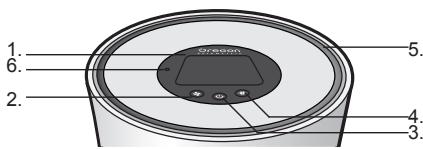
- LCD display
- Fan speed button
- ON/OFF button
- Air quality indicator light button
- Air outlet
- Light sensor
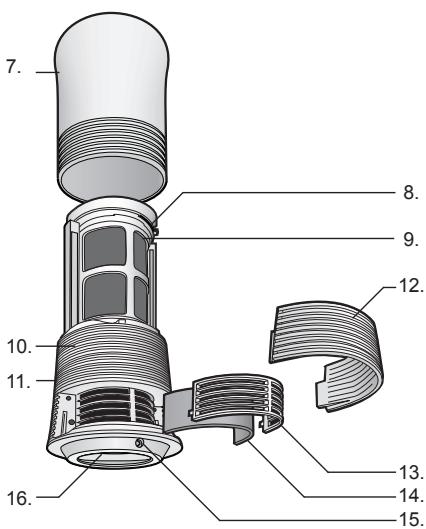
- Air outlet cover
- Nano filter security lock
- Nano filter
- Main body unit
- Air quality sensor
- Air inlet cover
- Dust filter holder
- Dust filter
- DC jack
- Air quality indicator light
LCD DISPLAY
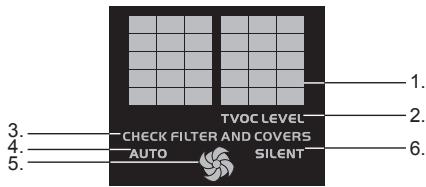
- Air quality level (1-20)
- TVOC level
- Check filter and covers
- Auto Mode
- High / Low Speed
- Silent Mode
FEATURES
NCCO technology sterilizes airborne bacteria and Volatile Organic Compounds (VOC) efficiently.
- Pre-filter captures large airborne particles.
- No harmful emission of chemicals and particles into the air.
- Volatile Organic Compound (VOC) air quality sensor with air quality level display in the scale of 1 (best) to 20 (worst) on the top.
LED air quality detector with light sensing function adjusts the light according to the environment.
Fan with Auto / Hi / Lo intensity draws in airborne particles and accelerates air purification process. Fan speed can be adjusted according to air quality.
- Long-life filter lasts up to 3 years.
- Simple filter replacement and safety lock avoids insecure cover and filter.
GETTING STARTED
Placing the Nano filter
NOTE
- The unit is equipped with a safety device. If the washable dust filter and the Nano filter are not placed properly in the unit, you will not be able to switch on the appliance. The LCD display will show "check filter and cover".
CHECK FILTER AND COVERS
-
You will not be able to switch on the unit if the filter covers are not put in the unit properly.
-
Turn the nano filter cover counterclockwise and gently pull the air outlet cover.
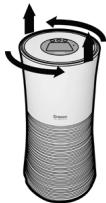
- Slide the nano filter security lock to unlock position.
- Remove the packaging from the nano filter then push it into the filter cartridge lightly with the arrow on the top of the filter facing the unit.
- Slide the nano filter security lock to lock position. You should hear a "click" sound from the lock if the cartridge is properly placed.
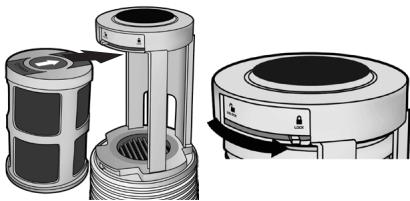
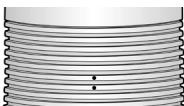
- Reattach the nano filter cover. Turn the cover clockwise until you hear a "click" sound and the dots align vertically.
AIR SANITIZING
- Put the plug to a main socket and connect the DC jack to the product unit.
- The standby light appears on the LCD display and the count down of the air quality sensor warm up timer starts. After approximately 5 minutes, the air quality level (1-20) will be shown. The light indicator at the bottom will glow in different colours according to the air condition: blue for good air quality, green for fair and amber for poor.
- Press the buttons to choose required function and setting.
Fan speed button 5:
To select the desired fan speed.
The LCD display will show the icons accordingly:
AUTO = Auto
=High
= Low
SILENT = Silent
Auto Mode: The built-in air sensor detacts the ambient air quality and automatically selects the most appropriate speed.
High speed mode: the appliance operates at high speed for 30 minutes.
Silent mode: the appliance operates at very low speed with lowest noise level for bedroom use.
ON/OFF button
To turn on / off the air purifying function, press the ON / OFF button
Air quality indicator light button
To turn on / off the air quality indicator light, press the air quality indicator light button
AIR QUALITY MONITOR
Put the plug to a main socket and connect the DC jack to the unit.
The standby light appears on the LCD display and the count down of the air quality sensor warm up timer starts. After 2 minute the fan will automatically turn on.
-
The air quality level will show on the LCD display: from 1 (best air quality) to 20 (worst air quality).
-
To stop air quality level display, unplug the unit.
AIR QUALITY INDICATOR LIGHT
- The air quality indicator light will turn on after 5 minutes warm up of the air quality sensor.
- The air quality indicator light will show a corresponding light colour: blue for good air quality, green for fair air quality and amber for poor air quality.
The air quality indicator light will change the light colour in gradient accord to the existing air quality. - The brightness (high / low) of the air quality indicator light is controlled by the light sensor; the brighter / dimmer the environment, the brighter / dimmer of the air quality indicator light.
CLEANING AND MAINTENANCE
Always unplug the unit before you clean it.
- Do not clean the unit with water or any other liquid or a (flammable) detergent to avoid electric shock and/or a fire hazard.
- Clean the unit regularly to avoid accumulating dust and dirt.
- Wipe away dust with a dry, soft cloth from the unit body.
Clean the air inlet and outlet with a dry soft cloth.
- Remove the pre-filters from the unit before cleaning with water. Allow the filter to dry completely before putting back to the unit.
- Clean the nano filter with a vacuum cleaner or a brush.
- Remove the nano filter before cleaning with a vacuum cleaner.
FILTER REPLACEMENT
Nano Filter
In case of normal household use in a non-smoking environment and in case of proper maintenance (see chapter 'Cleaning and maintenance'), the nano filter lasts up to 3 years.
NOTE You may need to replace the nano filter sooner in case of using in a more extreme environment (smoking environment, just renovated room, non-domestic use etc) and insufficient maintenance.
Removing the filter
- Turn the air outlet cover counterclockwise and lift it up gently.
- Slide the nano filter security lock to unlock position.
- Pull the nano filter out gently.
Inserting the filter
- Turn the air outlet cover counterclockwise and lift it up gently.
- Push the nano filter into the filter cartridge lightly with the arrow on the top of the filter facing the unit.
- Slide the nano filter security lock to lock position. You should hear a "click" sound from the lock if the cartridge is properly placed.
- Reattach the nano filter cover. Turn the cover clockwise until you hear a "click" sound.
Pre-Filter
In case of using in a non-smoking normal household and in case of proper maintenance (see chapter 'Cleaning and maintenance').
Removing the filters
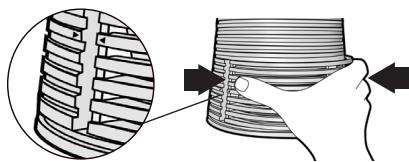
- Pull the air inlet cover out with your thumb and middle finger.
- Take the cartridge out from the unit and remove the pre-filter away from the holder.
Inserting the filters
- Pull the air inlet cover out with your thumb and middle finger.
- Put the pre-filter into the product unit properly.
- Press on the both sides of inlet cover lightly with your thumb and middle finger. Push it to the unit with the markings of main unit and the inlet cover aligned as illustrated below.
SPECIFICATIONS
| TYPE | DESCRIPTION |
| MAIN UNIT | |
| L x W x H | 150mm(L)x150mm(W)x325mm(H) (5.9in x 5.9in x 12.8in) |
| Weight | 1800g (62.79oz) |
| Power | 12V DC power adaptor: INPUT 110-240V 50/60Hz |
TROUBLESHOOTING
This chapter summarizes the most common problems you could encounter when using the unit. If you are unable to solve the problem with the information below, contact the Consumer Care Centre in your country.
| Problem | Solution |
| The unit doesn't work. | ·There may be a connection problem. Check if the plug is inserted to the wall socket properly. ·The filters are not inserted yet or not inserted properly. Insert the filters and reattach the inlet and outlet covers. |
| The clean air doesn't come out smoothly from the air outlet | ·Perhaps you have not removed the plastic wrapper from the new filter. Remove the plastic wrapper and switch on the unit again. |
| The odors are not removed properly. | ·Perhaps the ambient air quality of the room is very poor. In that case, open the windows to improve the air circulation. ·The nano filter may be too dirty or may have reached the end of its life. You should clean the nano filter (see chapter "Cleaning and Maintenance") or replace it (see chapter "Filter Replacement"). ·Perhaps the room size is bigger than the unit is intended for. Use the unit in a smaller room. The recommended room size is 5m2 up to 20m2. |
| The unit produces an unusual noise (e.g. a hissing, sizzling or crackling) during operation. | ·The air inlet or outlet may be blocked by external objects. Remove the object that blocks the air inlet or outlet. |
ABOUT OREGON SCIENTIFIC
Visit our website (www.oregonscientific.com) to learn more about Oregon Scientific products. If you're in the US and would like to contact our Customer Care department directly, please visit:
www2.oregon scientific.com/service/support OR Call 1-800-853-8883.
For international inquiries, please visit: www2.oregonscientific.com/about/international
EU-DECLARATION OF CONFORMITY
Hereby, Oregon Scientific, declares that this i.fresh NCCO Air Sanitizing System (Model: WS907) is in compliance with the essential requirements and other relevant provisions of Directive 1999 / 5 / EC. A copy of the signed and dated Declaration of Conformity is available on request via our Oregon Scientific Customer Service.



CHECK FILTER AND COVERS
CHECK FILTER AND COVERS
EUROPE - DÉCLARATION DE CONFORMITÉ
Uber Oregon Scientific 5
CHECK FILTER AND COVERS
CHECK FILTER AND COVERS
CHECK FILTER AND COVERS
CHECK FILTER AND COVERS
CHECK FILTER AND COVERS
CHECK FILTER AND COVERS
www2.oregonscientific.com/service/support.asp
國際查詢請瀏覽:
www2.oregonscientific.com/about/international.asp
i.fresh 纳米空气净化仪
机型: WS907
用户手册
目录
重要安全说明 1
简介. 1
空气净化运作方法 1
注意事项 1
概要 1
正面图 1
液晶体显示 2
产品特色 2
开始操作 2
净化空气 3
空气质量监测 3
空气质量指示灯 3
清洁和保养. 3
更换过滤网 3
规格 4
疑难排解 4
关于OREGON SCIENTIFIC 4
重要安全说明
CHECK FILTER AND COVERS
www2.oregonscientific.com/service/support.asp
国际查询请浏览:
www2.oregonscientific.com/about/international.asp