50515-1 - Thermostat CARE FITNESS - Free user manual and instructions
Find the device manual for free 50515-1 CARE FITNESS in PDF.


| Product type | Fitness computer with ambient temperature display |
| Brand | CARE FITNESS |
| Model | 50515-1 |
| Power supply | 2 x 1.5V R6/LR6 (AA) batteries |
| Display | LCD with simultaneous reading of functions and SCAN function (alternates every 6 seconds) |
| Main functions | Ambient temperature, month/date/day, time, alarm, RPM, speed, elapsed time, distance, calories, real-time heart rate, recovery |
| RPM/Speed range | Alternating display every 5 seconds |
| Heart rate sensor | Heart rate sensors integrated into the handlebar |
| Training programming | Time (1-minute increments), distance (500 m increments), max heart rate threshold (30-240 in increments of 1), calories (10 kcal increments) |
| Recovery test | Rating F1 (very good) to F6 (poor) |
| Reset | Press and hold the "RESET" button |
| Beep | Beep at the end of each programming |
| Calorie note | Estimation based on average work and average body type, not for medical purposes |
| Heart rate note | Possible variations depending on hand shape and pressure, not for medical purposes |
| Maintenance | Wipe off sweat immediately, do not expose to strong light, do not clean with detergents |
| First start-up | Set time and calendar after installing batteries |
| Alarm | Programmable, activation by SET button, rings daily if activated |
| Batteries | Battery compartment on the back of the computer, replace with two AA batteries |
| After-sales service | Contact customer service at 0820 821 167 (Mon-Fri 9am-12pm, 1pm-5pm) or by email at sav@carefitness.com, provide product reference and serial number |
| Training advice | Consult a doctor before starting, adjust intensity according to age and physical condition |
Frequently Asked Questions - 50515-1 CARE FITNESS
User questions about 50515-1 CARE FITNESS
0 question about this device. Answer the ones you know or ask your own.
Ask a new question about this device
Download the instructions for your Thermostat in PDF format for free! Find your manual 50515-1 - CARE FITNESS and take your electronic device back in hand. On this page are published all the documents necessary for the use of your device. 50515-1 by CARE FITNESS.
USER MANUAL 50515-1 CARE FITNESS
E mail : sav@carefitness.com
PRESENTATION
This computer offers simultaneous read out of various functions. The display of the selected function can be enlarged.
The Heart Rate function is provided by cardiac sensors on the handlebars.
GB
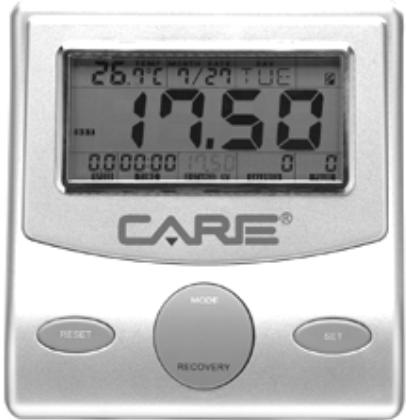
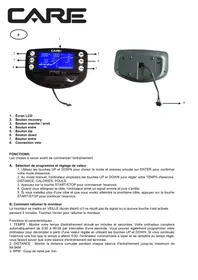
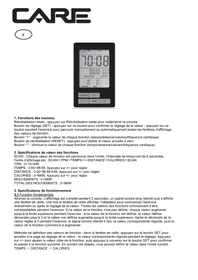
FUNCTIONS AND DISPLAY
TEMPERATURE (TEMP): Displays the ambient temperature.
MONTH / DATE / DAY: Displays the month, the date and the day.
CLOCK: Displays the time for around 4 minutes after the end of the work out.
ALARM (ALM): Can be used to programme a time which will sound every day if the function is activated.
SCAN: Alternating read out mode for the various functions. The functions change automatically every 6 seconds. This type of display can be disconnected using the MODE key.
NUMBER OF REVOLUTIONS PER MINUTE (RPM)*: Displays the number of revolutions of the pedals per minute.
SPEED: Displays the speed in km per hour.
TIME: Displays the time in minutes and seconds up to 99.00.
DISTANCE: Displays the distance covered in intervals of 100 metres up to 99.9km
CALORIES (CAL): Displays the estimated calorific expenditure in Kcal.
PULSE: Displays the pulse in real time.
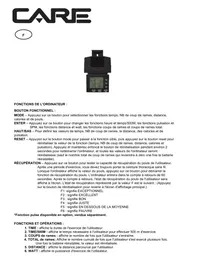
RECOVERY: After a cardiovascular work out, the quicker the heart rate returns to normal, the better your physical fitness. At the end of the work out, press the RECOVERY key (5) whilst maintaining the pulse function. The small STOP symbol to the top left of the display goes out. The computer then measures the heart rate for one minute. After the calculation, it awards a score between F1 and F6 ( F1 = very good, F6 = unsatisfactory) making it possible to assess the user's physical fitness.
- The NUMBER OF REVOLUTIONS PER MINUTE (RPM) and SPEED functions are displayed alternately in the same window every 5 seconds.
*Estimated calories based on an average work rate and a subject of average corpulence and strength. Do not use for therapeutic purposes.
STARTING AND STOPPING
When starting for the first time, the clock and calendar have to be set.
Once the batteries have been installed in their housing on the back of the computer, the CLOCK function flashes.
-
The hour is set using the SET key. Press the MODE key to switch to minutes. Set using the SET key and confirm with MODE.
-
The year flashes. Set using the SET key and confirm with MODE.
-
The figure corresponding to the month (1 to 12) flashes. Set using the SET key and confirm with MODE.
-
The figure corresponding to the day (1 to 7) flashes. Set using the SET key and confirm with MODE.
-
The alarm function appears. To set it, you must first activate it with the SET key (a bell appears) and confirm with MODE. The hour is set using the SET key. Press the MODE key to switch to minutes. Set using the SET key and confirm with MODE.
Subsequently, the computer is started either by pressing one of the keys or by starting to pedal.
RESET
All functions can be reset to zero by pressing and holding in the RESET key.
PROGRAMMING WORK OUT DATA
Before starting the work out, it is possible to programme certain data in the computer such as the work out Time (in intervals of 1 minute), the Distance to be covered (in intervals of 500 metres), the maximum heart rate threshold (in intervals of 1 beat between 30 and 240 beats), as well as the calories (in 10 calorie blocks).
To do this, activate the computer by pressing one of the keys. Select the data to be programmed by pressing the MODE key. The function selected flashes.
Then press the SET key (2) until you reach the value desired.
Counting starts when the pedal is turned.
When each item of data has been programmed, a BEEP sound is emitted.
HEART RATE
To obtain the Pulse function, it is imperative that both hands are placed on the heart rate sensors on the handlebars.
The heart rate values picked up by the sensors on the handlebars may, depending on the subject, suffer more or less noticeable variations due to the morphology of the hands and the pressure they exert on the sensors.
The heart rate values must not be used for therapeutic purposes.
WARNING
Perspiration is corrosive. Wipe it off immediately.
- Do not expose the computer to strong light.
- Do not clean with detergents.
CHANGING THE BATTERIES
Open the compartment on the back of the computer and replace the two 1.5 V R6 - LR6 (AA) batteries.
Cardio - Training:
Before programming your training, it is essential to take account of your age, particularly for people of more than 35 years of age, as well as your physical condition. If you have a sedentary lifestyle without regular physical activity, it is vital that you consult your doctor to determine the level of intensity of your training. Once determined, do not attempt to achieve your maximum during the first training sessions. Be patient; your performance will quickly improve.
This enables you to develop your cardiovascular system (fitness of the heart / blood vessels). During Cardio-Training, the muscles need a supply of oxygen and nutritive substances. They also need to liminate waste. Our heart increases its rhythm and sends a larger amount of oxygen to the body by means of the cardiovascular system.
The more often you exercise regularly and repetitively, the more your heart will develop, just like any other muscle. In daily life, this translates into the ability to bear greater physical effort and improve your intellectual faculties.
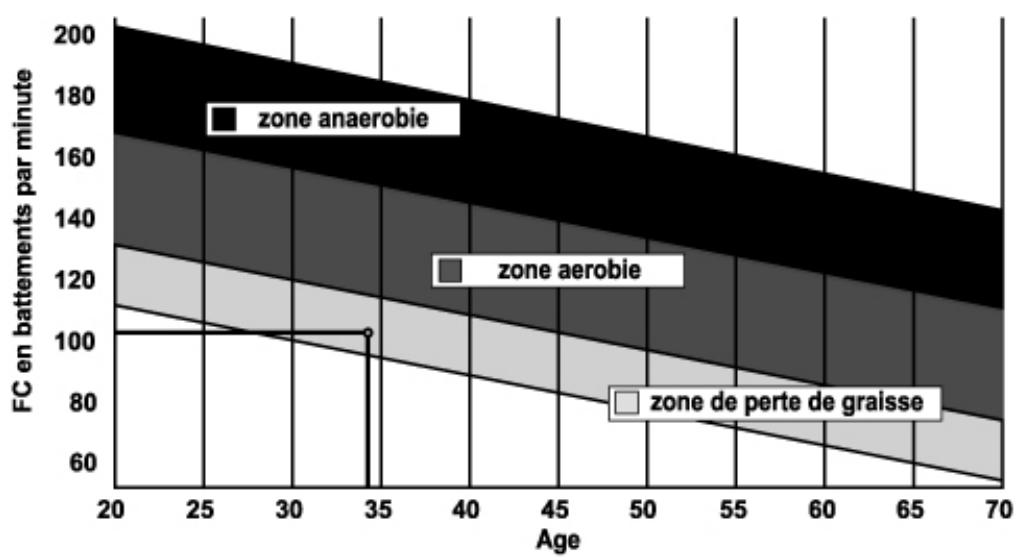
Definition of your work Zone:
The Maximum Heart Rate (MHR) = 220 - age (180 - age for sedentary people).
The Warming Up Zone and Cooling Down Zone are equal to 55% of your MHR.
The Fat Loss Zone is between 55 / 65% of your MHR.
The Aerobic Zone is between 65 / 85% of your MHR.
The Anaerobic Zone is between 85% of your MHR and your MHR.
Make a diagram of the target zones
The progressive training stages:
1) A warming up phase:
Start each training session by warming up progressively (10-20 min, more if you are over 50) which will put your muscles on standby and gently increase your heart rate. Gently increase your pulse to 55% of your MHR (Maximum Heart Rate).
Keep your Heart Rate at this level for the duration of the warming up time. If you
begin your training too quickly, you are in danger of increasing the risk of tendon or muscle injury.
2) A work phase:
This is the main part of the training session. Depending on your specific goals and your initial physical condition, weight loss, improvement of cardiovascular resistance (aerobic work), development of stamina (anaerobic work), it is possible to choose the appropriate target zone.
The Fat Loss Zone, 55 - 65%
The heart rate must be low and the duration of the exercise quite long. This zone is advised for people resuming physical activity after a long period of idleness, who
are trying to eliminate excess weight or are susceptible to cardiac problems. Do not forget that for this type of training the duration of the exercise must be at least 30 minutes and the Heart Rate (HR) between 55 and 65% of the MHR. - Gradually increase from 30 to 60 minutes per session.
Exercise 3 or 4 times a week.
The Aerobic Zone, 65 - 85%
This zone is recommended for those who are in good physical condition who train
regularly. By training in this zone, you will improve your physical condition but avoid overworking.
Duration: 20 to 30 minutes per session.
- Frequency: At least 3 or 4 times a week.
The Anaerobic Zone, 85% - MHR
This zone is exclusively for experienced athletes and is never recommended
without medical approval and supervision. This zone is designed only for very fit people. It is used for interval training (or for short sprints) to help you to improve or measure your level of stamina.
The time spent in this zone must be brief to avoid the risk of accident.
3) A cooling down phase:
This entails a reduction of exertion (10 to 20 min). It enables you to return your cardiovascular system to normal (55% of your MHR) and prevent or reduce muscular pain such as cramp and stiffness. You must follow the training with a session of stretching exercises while your joints
are still warm. This relaxes the muscles and helps to prevent stiffness. Stretch slowly and gently. You must never stretch until you reach the pain threshold. Hold each stretch for 30 to 60 seconds while breathing out.
Check your progress
As it improves, your cardiovascular system will have an HR which will be lower when at rest. You will take longer to reach your target zone and it will be easier for you to maintain it. Sessions will seem easier and easier and you will have more stamina in your daily life.
If, on the other hand, your HR is higher than usual when at rest, you will have to rest or reduce the intensity of your training.
Do not be discouraged by the initial sessions. Motivate yourself by scheduling specific training times. Work hard!
To order spare parts
To guarantee an efficient service, make sure you have the following items before you contact our After Sales Service:
The name or reference of the product.
The manufacturing number shown on the main chassis and on the packing box.
The number of the missing or faulty part shown on the exploded view of the
Product described in this manual.
Contact us from Monday to friday between 9h00 and 12h00 and 17h00 (except for public holidays).
C.A.R.E. After Sales Service
Email: sav@carefitness.com
BESCHREIBUNG
E mail: sav@carefitness.com
PRESENTACION
E-mail: sav@carefitness.com
PRESENTATIE
De harttraining (cardiotraining):
2 tot 3 trainingen per week = circa 30 minutes per keer.
1 tot 2 trainingen per week = circa 50 minutes per keer.
E-mail: sav@carefitness.com