
DISNEY DVD PLAYER MD 8064480815 - DVD player MEDION - Free user manual and instructions
Find the device manual for free DISNEY DVD PLAYER MD 8064480815 MEDION in PDF.


| Product type | Portable DVD player |
| Brand | MEDION |
| Model | MD 8064480815 |
| Power supply | Mains adapter 230 V ~ 50 Hz, output 9 V 1.5 A ; integrated rechargeable battery |
| Battery life | Approximately 2.5 hours |
| Charging time | Approximately 4-5 hours (first charge), 3-4 hours (recharge) |
| Supported formats | DVD, DVD-R/RW, CD audio, CD-R/RW, MP3, JPEG, VCD |
| D/A converter | 24-bit |
| Laser | Class 1 |
| Power consumption | 12 W |
| Main functions | Disc playback, fast forward/rewind, pause, stop, DVD menu, JPEG slideshow, parental control |
| Safety | Do not open the device, class 1 laser, do not expose to moisture |
| Maintenance | Clean with a dry, soft cloth, avoid solvents |
| Supplied accessories | Mains adapter, 1 pair of earphones, instruction manual |
Frequently Asked Questions - DISNEY DVD PLAYER MD 8064480815 MEDION
User questions about DISNEY DVD PLAYER MD 8064480815 MEDION
0 question about this device. Answer the ones you know or ask your own.
Ask a new question about this device
Download the instructions for your DVD player in PDF format for free! Find your manual DISNEY DVD PLAYER MD 8064480815 - MEDION and take your electronic device back in hand. On this page are published all the documents necessary for the use of your device. DISNEY DVD PLAYER MD 8064480815 by MEDION.
USER MANUAL DISNEY DVD PLAYER MD 8064480815 MEDION
- Loudspeaker
- Display
- To switch of the screen when the device is folded
- Set-up: Open setup menu
- Menu: Open DVD menu
- Fast forward
- Rewind
- Up arrow button/Pause
- Playback/Enter:Confirmentry
- Left arrow button/ Skip back
- Down arrow button/ Stop
- Right arrow button / Skip forwards
- Press button to open disk compartment
- (front) pushbutton to unfold the screen
- Headphone connections
- Volume: Volume: to the right - quieter; to the left - louder
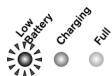
- Low Battery: Indicator for low battery charge
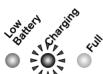
- Charging: Battery charging indicator
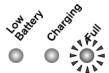
- Full: Charging process complete indicator
- DC IN 9V: Connector for mains adapter supplied
- Power Off On: Main switch (On/Off)

GB-2

CONTENT
Safety instructions 4
Preparation 6
Unpacking 6
Power supply 6
Setting the device up 8
Connecting earphones 8
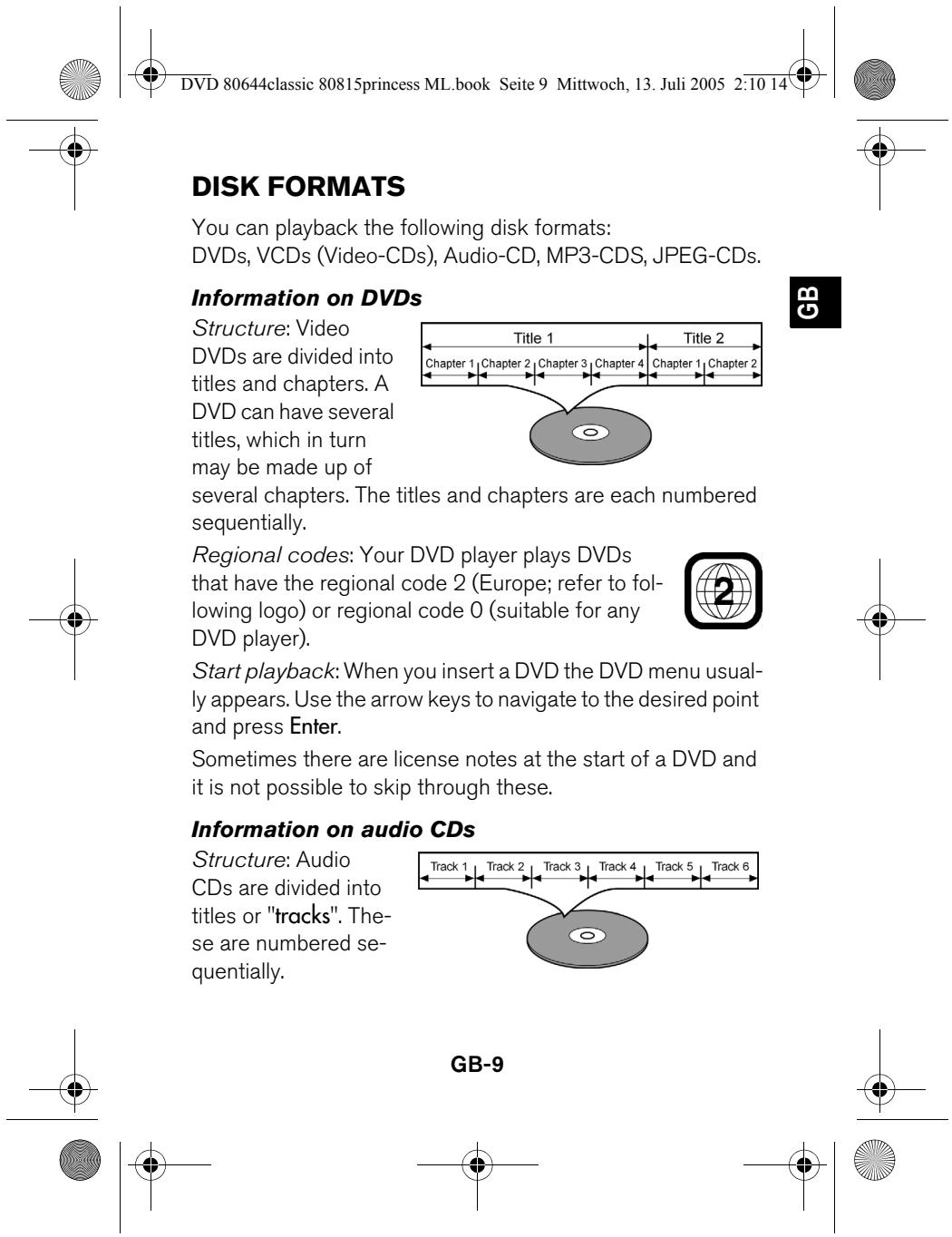
Disk formats 9
Playing disks 11
Inserting/removing a disk 11
Button functions 11
Set-up menu 14
QUICK SETUP 15
FULL SETUP 15
Cleaning and disposal 18
Technical data 19



GB-3



Please read these instructions carefully before using the system. Note the warnings in the operating instructions.
Always keep the operating instructions close to hand. If you sell or give the device away, please ensure that you also pass on these instructions.
Never leave children unsupervised with electrical devices.
Keep plastic packaging out of the reach of children. There is a risk of suffocation.
Setting the device up safely
Place the device on a sturdy, level surface. It is not designed for use in rooms that are very humid (e. g. bathrooms). Always ensure that
- there is adequate ventilation;
- there are no direct heat sources (e.g. heaters) that could affect the device,
- the device is not in direct sunlight;
- you avoid contact with liquids and water (e.g. do not place vases close to the device);
- the device is not placed close to magnetic fields (e.g. televisions or other loudspeakers);
- naked flames such as lit candles are not placed near the device.


GB-4


Ensure that the power device is accessible
Only connect the device to a power point (230 V ~ 50 Hz) that is easy to reach and is close to the place where you have set the device up. The power socket must be freely accessible so that you can unplug the device quickly if necessary.
Pull out the mains plug if you are away for a long period of time or there is a thunder storm.

Do not repair the device yourself
If the plug, cable or device is damaged, detach the plug from the power supply immediately.
Never try to open and/or repair the device yourself. There is a risk of electric shock. If there is a defect contact our Service Centre or other suitable specialist workshop.


CD player
The CD player is a first class laser product. The device has a safety system that prevents dangerous laser rays escaping from the device during normal use. In order to avoid injury to the eyes never manipulate or damage the device's security system.

Use the earphones carefully
Do not expose yourself to a high volume level for a long period of time. Your hearing can be damaged.

GB-5


When unpacking, check the product package:
DVD player
- Mains adapter
1x earphones
- Operating instructions and guarantee documents
The display is protected by transparent film. Remove this film
before using the device for the first time.
Power supply
Your DVD player is equipped with an integrated rechargeable battery. You can operate your DVD player both with this battery and the mains adapter supplied.
Connecting the mains adapter

Only use the mains adapter supplied for the DVD player.
Connect the mains adapter plug to the DC IN 9V socket and the mains plug to an easily accessible plug.
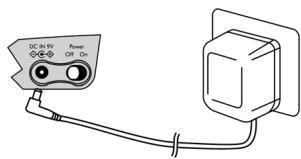
Detach the plug from both
the mains and the device if you are not using the mains adapter.

GB-6



Charging the battery
To charge the integrated battery
- switch the operating switch to Off;
connect the mains adapter.
The red Charging light comes on.
Initial charging takes around 4-5 hours.
When the battery is fully charged the green Fullindicator comes on.
Then you can use the device for around 2.5 hours from the internal battery.
When the battery is low the red Low Batterylight comes on. The device will then work for around a further 5 minutes.
Then recharge the battery (for about 3-4 hours) or use the mains adapter.

Charge the battery fully at least once a year.
5
Connecting earphones
Connect one or both earphones supplied to the earphone connections. The loudspeakers will be deactivated automatically.

Before putting on the earphones, reduce the volume to a minimum.

GB-7



DVD 80644classic 80815princess ML.book Side 10 Mittwoch, 13. Juli 2005 2:10 14

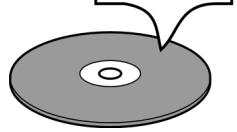
Start playback: The CD starts automatically. Information on playback (number of tracks on the CD, current track, time played and total time) appears for a few seconds. After around 1 minute a screen saver appears, after a further 2 minutes the screen saver disappears in order to save electricity. The screen saver disappears each time a button is pressed.
Information on MP3 and JPEG disks
MP3 is an audio data format; JPEG is an image data format.
Structure: Disks with MP3 titles or JPEG images may be divided into folders, subFolders or individual files as with data CDs.
If you insert an MP3 or JPEG disk the appropriate menu appears on the screen.
Folder 1
File 1a
File 1b
Folder 2
File 2a
File 2b
File 2c



GB-10


Press the button to pause playback.
Continue playback with the same button or with (Enter).
Stop
Press the button to stop playback. The CD is now in stop mode (RESUME ON!).
If you press again a screen saver is displayed after about a minute. If no other button is pressed the device switches itself off automatically after around 50 minutes.
You can continue playback from the same place by pressing Enter
To finally stop the CD press again.
Skip
Press the _ (or) button to skip to the next chapter (DVD) or track (audio CD). The current position of the disk (DVD and audio CD) appears on the screen.
Fast forward
Press the || or || button to rewind or fast forward. The speed increases if you press the button repeatedly: x2 > x4 >x8>x16
The speed returns to normal if you press the button again.


GB-12


You can open the set-up menu when the disk has stopped or when no disk has been inserted. If playback is in process, press stop twice.
Press Set-up twice to open the set-up menu.
- the Quick Setup (most frequently used settings) and
- the Full Setup (complete settings) are displayed.
The selected menu is marked by an oval
(here: Quick Setup).


Navigating in the menus
Use | and | to select a menu in the top line.
Use Enter to open the selected menu. The first menu op
Press or to select another menu option.
Press || to return to the higher level menu.
Press Set-up (Sckp) to close the set-up menu.


GB-14


QUICK SETUP
PLAYER MENU
You open the Player Menu, which is highlighted in blue on the DVD player, by pressing Enter (Enter). Use the or buttons to select the language for the set-up menu and confirm this with Enter (Enter).
TV ASPECT
4:3 PAN&SCAN: A TV in 4:3 format shows a film in 16:9 format at its full height but with cut-off sides:
4:3 LETTER BOX: A TV in 4:3 format shows a film in 16:9 format with a black bar at the top and bottom.
16:9 WIDE: Selection for televisions with 16:9 format.

FULL SETUP

Menu LANGUAGE
You can select the language settings here.
AUDIO LANG: The spoken language on the DVD.
SUBTITLE: The language for the DVD subtitles.
DISK MENU: The language for the DVD menu.
PLAYER MENU: The language for the DVD player's set-up menu.

GB-15





TV ASPECT: Refer to "QUICK SETUP".
BRIGHTNESS, CONTRAST, COLOR: Select on a scale from -
3 to +3

Menu AUDIO
DRC: Default: OFF.
The ON setting reduces the sound range so loud sections are quieter and quiet ones are louder ("night setting").

PARENTAL menu
In this menu you enter the password to set the access control to DVDs that contain blocked scenes.
Confirm the PARENTAL LEVEL - ALL with Enter (Enter). Four fields are displayed for the password. On delivery the default password is: 1-2-3-4.
Use the SEARCH-keys (higher) or (lower) to enter digits for the first position and confirm with Enter. Repeat this for the next three digits.
CHANGE: To change the password confirm the CHANGE option by pressing Enter (Enter). Enter your own password as described above.

Note down the password and make sure you know where to find it. Then confirm by pressing Enter (Enter).

The password is only active after the set-up menu has been closed.


GB-16



DVD 80644classic 80815princess ML.book Side 18 Mittwoch, 13. Juli 2005 2:10 14

CLEANING AND DISPOSAL
Cleaning the device
Before cleaning, pull the plug out of the mains socket. Use a dry, soft cloth to clean the device. Avoid the use of chemical solutions and cleaning products because these may damage the device's surface and/or labels.
Disposing of the device and batteries in an environmentally friendly way

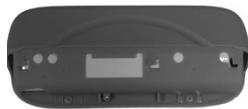
The DVD player's battery is screwed to the rear of the device. At the end of its life, the device should not be disposed of in household rubbish.
Remove the batteries from the device as follows (only do this when you want to dispose of the device):
Loosen the two small screws that fix the battery to the device (see figure) and pull the battery away.
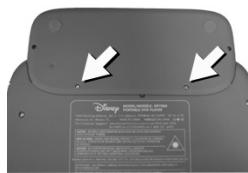

Dispose of the device and batteries (see figure below) separately in line with the regulations in your country.

GB-18


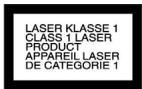
Class 1 laser product
Playable disk formats:
DVD, DVD-R/RW, MP3
Audio CD, CD-R/RW; VCD,
JPEG-CDs
If you play audio CDs
check the following marking:

Digital analogue converter: 24 bit
MP3 coding:
ISO 9660 format
These days there are many non-standard CD recording and copy protection procedures as well as various blank CD-R and CD-RW disks. Therefore in individual cases there may be read errors or delays. This does not mean the device is faulty.
Subject to technical changes.

GB-19



VUE D'ENSEMBLE
QUICK SETUP (configuration radide) 15
FULL SETUP (installation complete) 15
FULL SETUP (installation complete)

Menu LANGUAGE (langue)
FULL SETUP (setup complete)

Menu LANGUAGE (lingua)
Estructura: Los DVDs están divididos en titulos y capítulos. Un DVD pueda tener variedos titutos, que a su vezSEOSEOSEOSEOSEOSEOSEOSEOSEOSEOSEOSEOSEOSEOSEOSEOSEOSEOSEOSEOSEOSEOSEOSEOSEOSEOSEOSEOSEOSEOSEOSEOSEOSEOSEOSEOSEOSEOSEOSEOSEOSEOSEOSEOSEOSEOSEOSEOSEOSEOSEOSEOSEOSEOSEOSEOSEOSEOSEOSEOSEOSEOSEOSEOSEOSEOSEOSEOSEOSEOSEOSEOSEOSEOSEOSEOSEOSEOSEOSEOSEOSEOSEOSEOSEOSEOSEOSEOSEOSEOSEOSEOSEOSEOSEOSEOSEOSEOSEOSEO SEO
QUICK SETUP (hurtig installation) 15
FULL SETUP (fulld installation) 15
Drucken to gange pa Set-up for at abne Setup-menuen. Nu vises
- QUICK SETUP (de mest anvende indstlinger)
FULL SETUP.
QUICK SETUP (hurtig installation)
PLAYER MENU
QUICK SETUP (snabb-setup)
SPELARMENY
FULL SETUP (fullstendig oppsett)

Menyen LANGUAGE (sprak)
Her kan du gjore innstlinger for språket.
AUDIO LANG: Språket som snakkes på DVDen.
SUBTITLE: Språket DVDen tekstes på.
DISC MENU: Språket på DVD-menyene.
PLAYER MENU: Språket på DVD-spillerens oppsettmenyer.



N-15



- CONTENT
- Setting the device up safely
- Ensure that the power device is accessible
- Do not repair the device yourself
- CD player
- Use the earphones carefully
- Power supply
- Connecting the mains adapter
- Charging the battery
- 5
- Connecting earphones
- Information on MP3 and JPEG disks
- Stop
- Skip
- Fast forward
- Navigating in the menus
- QUICK SETUP
- PLAYER MENU
- TV ASPECT
- FULL SETUP
- Menu LANGUAGE
- Menu AUDIO
- PARENTAL menu
- CLEANING AND DISPOSAL
- Cleaning the device
- Disposing of the device and batteries in an environmentally friendly way
- VUE D'ENSEMBLE
- FULL SETUP (installation complete)
- Menu LANGUAGE (langue)
- FULL SETUP (setup complete)
- Menu LANGUAGE (lingua)
- QUICK SETUP (hurtig installation)
- QUICK SETUP (snabb-setup)
- SPELARMENY
- FULL SETUP (fullstendig oppsett)
- Menyen LANGUAGE (sprak)
Brand : MEDION
Model : DISNEY DVD PLAYER MD 8064480815
Category : DVD player