
PROFESSIONAL CARE 9000 - Electric toothbrush BRAUN - Free user manual and instructions
Find the device manual for free PROFESSIONAL CARE 9000 BRAUN in PDF.
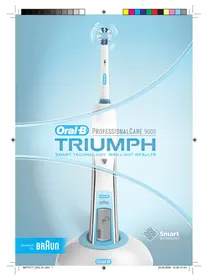



| Product Type | Electric toothbrush |
| Brand | BRAUN |
| Model | PROFESSIONAL CARE 9000 |
| Compatible brush heads | Oral-B FlossAction (included), Oral-B Pro White (optional), Oral-B Ortho |
| Brushing modes | Clean, Sensitive, Polish |
| Power supply | SmartPlug charger, integrated rechargeable battery |
| Full charge time | Approximately 12 hours |
| Battery life | Approximately 2 weeks of normal use (2 two-minute brushings per day) |
| Display | SmartDisplay with battery indicator, brushing mode, smiley, brush head replacement icon |
| Professional timer | Beep signal every 30 seconds to change quadrant, long signal at 2 minutes |
| Pressure control | Yes, pulsations stop if excessive pressure is applied |
| Smart technology | Chip in brush heads for automatic mode switching and replacement reminder |
| Waterproofness | Waterproof handle, can be used in the bathroom |
| Safety | Do not use by children under 3 years; supervision required for people with disabilities |
| Care and cleaning | Rinse head and handle with clear water; station, plate, and cap are dishwasher-safe; charger can be cleaned with a damp cloth |
| Spare parts | Oral-B brush heads (FlossAction, Pro White, Ortho), SmartPlug charger |
| Warranty | 2-year limited, excluding brush heads |
| Compliance | European directives EMC 2004/108/EC and Low Voltage 2006/95/EC |
Frequently Asked Questions - PROFESSIONAL CARE 9000 BRAUN
User questions about PROFESSIONAL CARE 9000 BRAUN
0 question about this device. Answer the ones you know or ask your own.
Ask a new question about this device
Download the instructions for your Electric toothbrush in PDF format for free! Find your manual PROFESSIONAL CARE 9000 - BRAUN and take your electronic device back in hand. On this page are published all the documents necessary for the use of your device. PROFESSIONAL CARE 9000 by BRAUN.
USER MANUAL PROFESSIONAL CARE 9000 BRAUN
HK 852-25249377 (Audio Supplies Company Ltd.)
Internet:
www.oralb.com
www.braun.com
www.service.braun.com
Braun GmbH
Oral-B Triumph has been carefully designed to offer you and your family a new and unique brushing experience that is both safe and effective. However, when using electrical products, basic safety precautions should always be followed.
Please read carefully before use.
Important
- The Oral-B Triumph is provided with a SmartPlug with integrated Safety Extra Low Voltage power supply. Do not exchange or manipulate any part of it. Otherwise there is the risk of electric shock. Periodically check the SmartPlug for damage. A damaged or non-functioning appliance shall no longer be used. Take it to an Oral-B Braun Service Centre.
- This product is not intended for use by children under age three.
- This appliance is not intended for use by children or persons with reduced physical or mental capabilities, unless they are given supervision by a person responsible for their safety. In general, we recommend that you keep the appliance out of reach of children.
- If the product is dropped, the brush head should be replaced before the next use even if no damage is visible.
Description
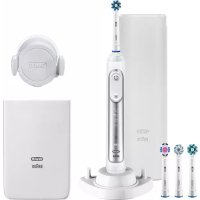
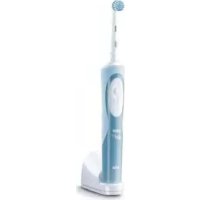
a Oral-B FlossAction brush head b On/off button c Mode button d Handle e SmartDisplay f SmartPlug charger (includes charging ring and SmartPlug) g Base plate h Base station i Protective cover j Oral-B Pro White brush head (not with all models)
Specifications
D24.516.3 Triumph
Type: 3731
Voltage: 100-240 V
Frequency: 50-60 Hz
Power: 2.2 W
Noise level: 63 dB(A)
IP:67
Connecting and charging
Your toothbrush has a waterproof handle, is electrically safe, and is designed for use in the bathroom.
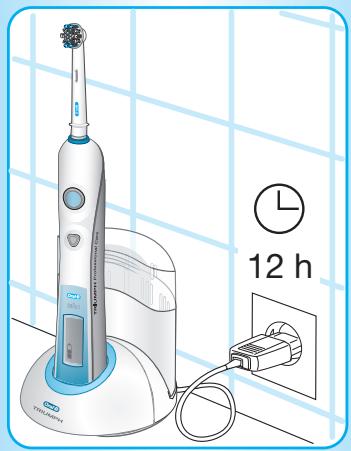
To assemble the base station (h) as a charging unit, detach the base plate (g) first (①, page 3). Place the charging ring into the base station and attach the base plate as shown (② and ③, page 3). Then insert the protective cover (i) on the back of your base station (see diagram ④, page 3).
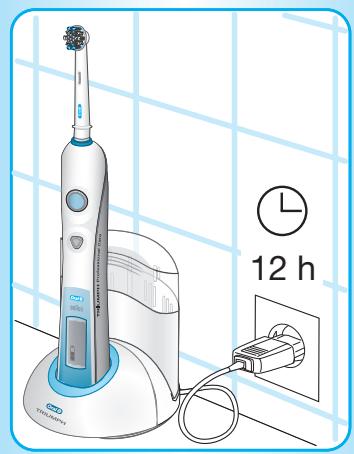
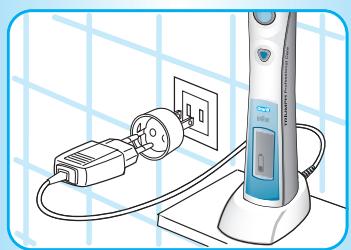
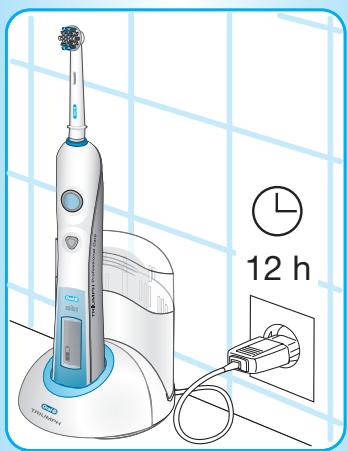
- Plug the SmartPlug into an electrical outlet and place the toothbrush handle (d) on the charging unit. Alternatively, the Oral-B Triumph can be charged by placing the handle directly into the charging ring while the SmartPlug is plugged in.
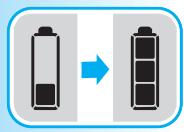
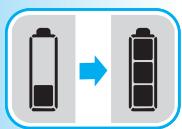
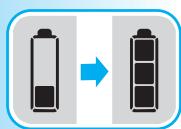
- A battery symbol should appear in the SmartDisplay (e). The battery symbol will fill up while the handle is being charged. Once the handle is fully charged, the battery symbol is completely filled with three bars. A full charge takes at least 12 hours and enables approximately two weeks of regular brushing (twice a day, 2 minutes).
Please note: If the battery symbol is not displayed immediately, continue charging. It will appear in 10-15 minutes.
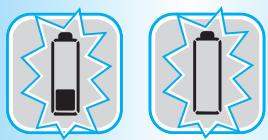
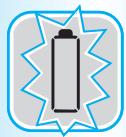
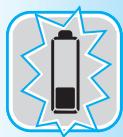
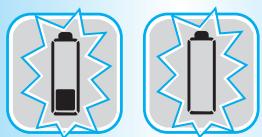
- When the rechargeable battery is low, the battery symbol with one remaining bar starts flashing. Your toothbrush will slow down and then stop. It is time to recharge your toothbrush. When the battery is fully discharged, the empty frame of the battery symbol flashes. It will then need a 15-minute charge before you can use it for a 2-minute brushing.
- For everyday use, the toothbrush handle can be stored on the charging unit to maintain it at full power. There is no risk of overcharging the battery.
- To maintain the maximum capacity of the rechargeable battery, unplug the charging unit and fully discharge the handle by regular use at least every 6 months.
Oral-B Triumph is convenient for travelling because you only need the compact SmartPlug charger and an appropriate travel adapter for recharging in foreign countries. For electric specifications, see printing on the SmartPlug.
Using your toothbrush
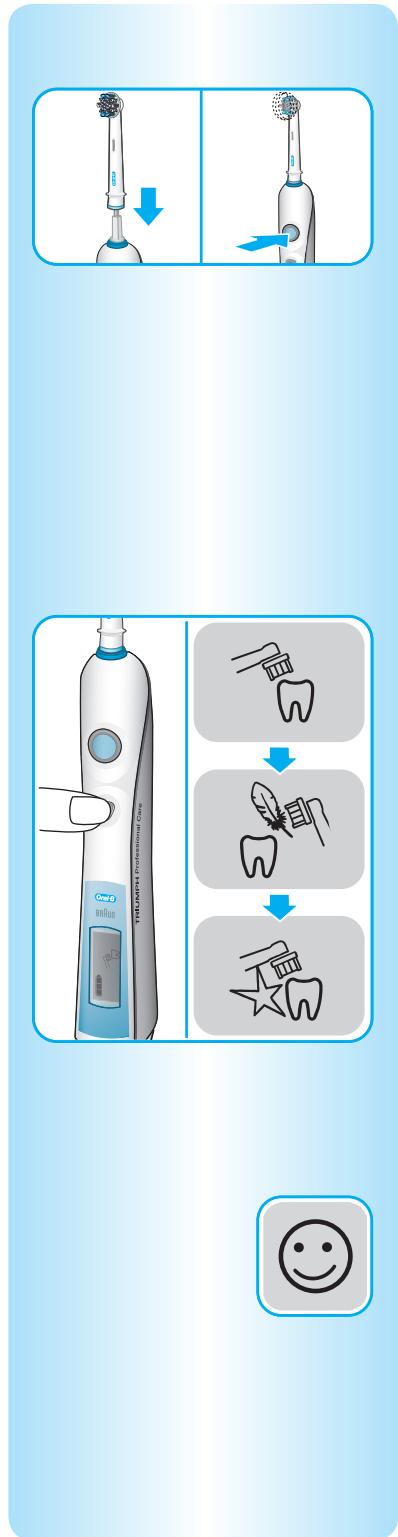
Attach an Oral-B brush head to the handle. You can use any kind of toothpaste. To avoid splashing, guide the brush head to your teeth before switching the appliance on.
Brushing modes
Oral-B Triumph offers different brushing modes for varying oral care needs:
«Clean» - Exceptional mouth cleaning. "Sensitive" - Gentle, yet thorough cleaning for sensitive areas. «Polish» - Exceptional polishing and natural whitening for occasional or everyday use.
How to switch between brushing modes:
- Your toothbrush automatically starts in the «Clean» mode when pressing the on/off button.
- To shift from the «Clean» to the «Sensitive» mode, press the mode button once.
- If you wish to switch to the «Polish» mode, press the mode button again.
- To return from any mode to the «Clean» mode, press and hold the mode button.
- To turn your brush off, press the on/off button.
Please note: the «Polish» mode is best used with an Oral-B Pro White brush head (not with all models). Once the Oral-B Pro White is attached, press the on/off button and your toothbrush automatically starts in the «Polish» mode (please see «Brush heads»).
During brushing, the SmartDisplay shows the brushing mode you have selected, followed by a smiley when you reach the dental professional recommended 2-minute brushing time. The smiley will be displayed for 30 seconds before it disappears automatically. Alternatively, you can directly clear the smiley on the display by pushing the mode button.
Brushing technique
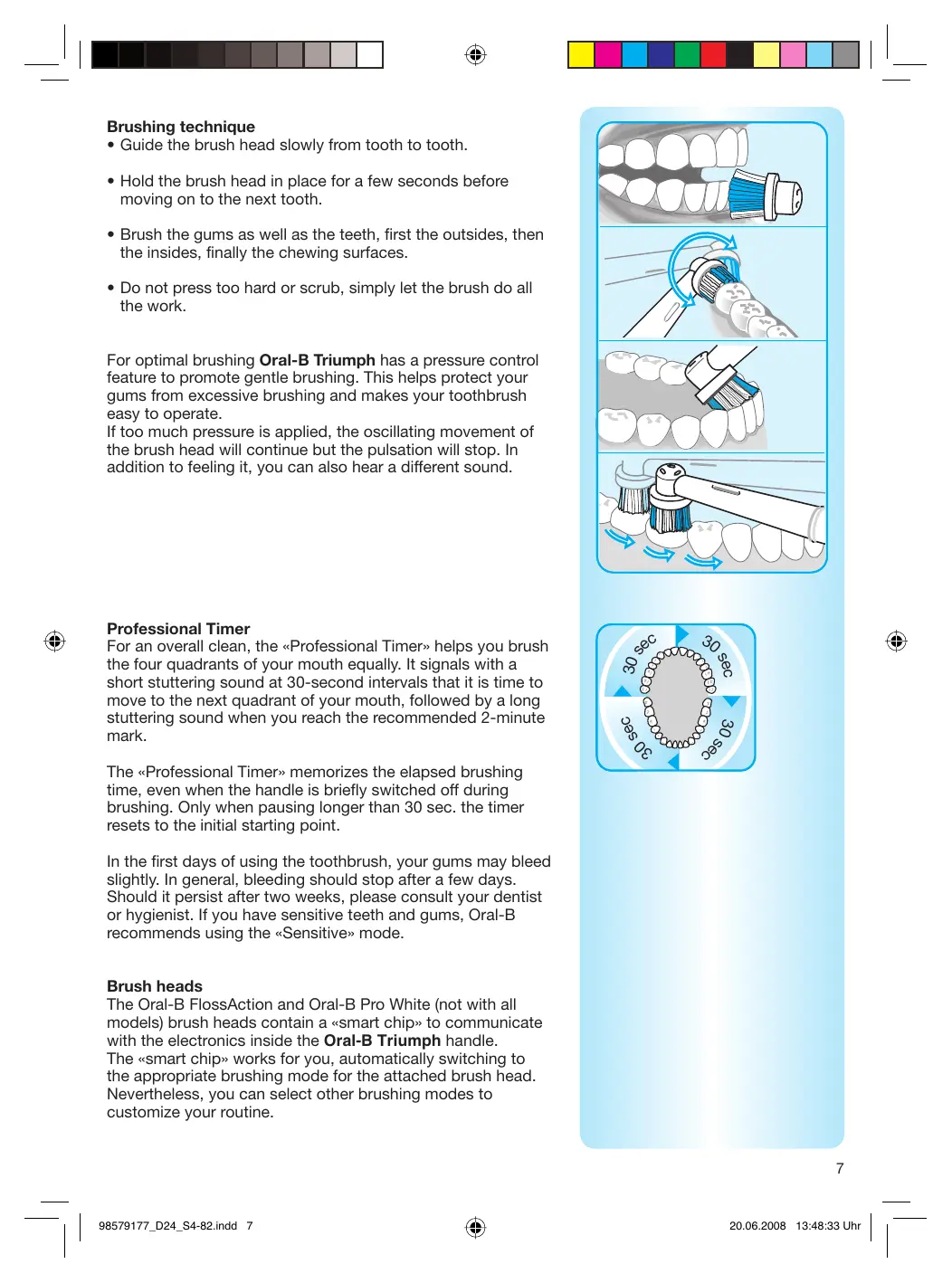
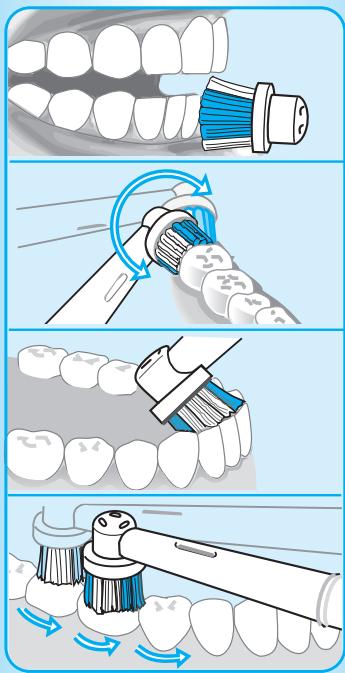
- Guide the brush head slowly from tooth to tooth.
- Hold the brush head in place for a few seconds before moving on to the next tooth.
- Brush the gums as well as the teeth, first the outsides, then the insides, finally the chewing surfaces.
- Do not press too hard or scrub, simply let the brush do all the work.
For optimal brushing, Oral-B Triumph has a pressure control feature to promote gentle brushing. This helps protect your gums from excessive brushing and makes your toothbrush easy to operate.
If too much pressure is applied, the oscillating movement of the brush head will continue but the pulsation will stop. In addition to feeling it, you can also hear a different sound.
Professional Timer
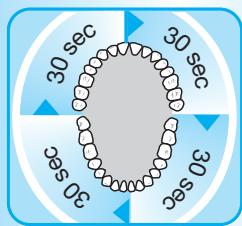
For an overall clean, the Professional Timer helps you brush the four quadrants of your mouth equally. It signals with a short stuttering sound at 30-second intervals that it is time to move to the next quadrant of your mouth, followed by a long stuttering sound when you reach the recommended 2-minute mark.
The Professional Timer memorizes the elapsed brushing time, even when the handle is briefly switched off during brushing. Only when pausing longer than 30 seconds does the timer reset to the initial starting point.
In the first days of using the toothbrush, your gums may bleed slightly. In general, bleeding should stop after a few days. Should it persist after two weeks, please consult your dentist or hygienist. If you have sensitive teeth and gums, Oral-B recommends using the Sensitive mode.
Brush heads
The Oral-B FlossAction and Oral-B Pro White (not with all models) brush heads contain a smart chip to communicate with the electronics inside the Oral-B Triumph handle. The smart chip works for you, automatically switching to the appropriate brushing mode for the attached brush head. Nevertheless, you can select other brushing modes to customize your routine.
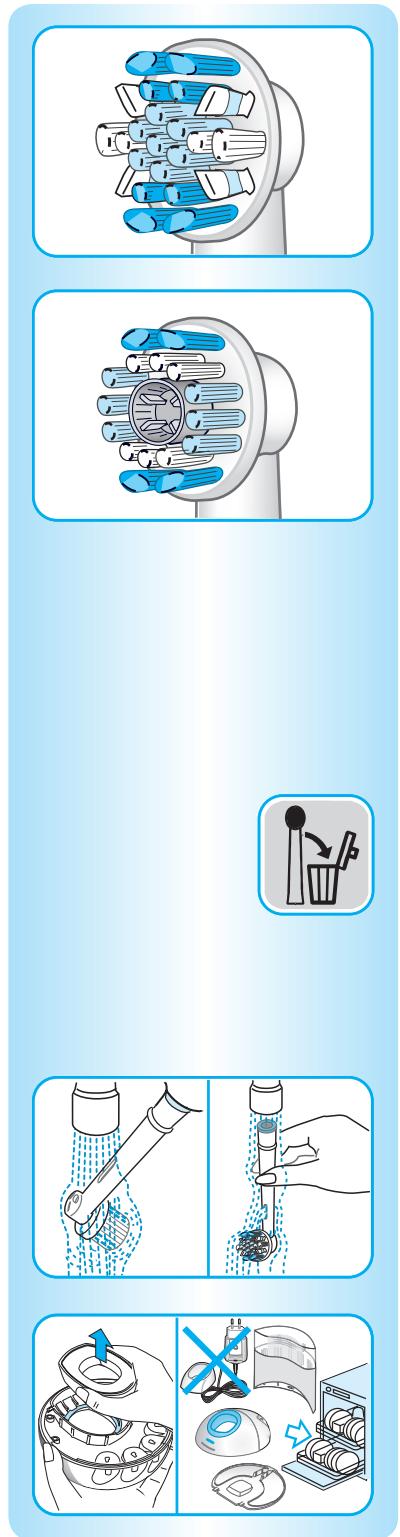
Oral-B FlossAction brush head
The Oral-B FlossAction brush head is recommended for everyday deep cleaning. It features MicroPulse bristles that get deep in hard-to-reach areas between your teeth, gently removing plaque. The brush head's outer bristles surround each tooth, providing thorough overall plaque removal.
Oral-B Pro White brush head (not with all models)
The Oral-B Pro White brush head is for occasional or everyday polishing. It features a dentist-inspired polishing cup to remove stains that can come from coffee, tea and tobacco for effective brightening.
Please note: children under 12 should not use the Oral-B Pro White brush head.
We do not recommend using the Oral-B Pro White or Oral-B FlossAction brush head with braces. Oral-B's Ortho brush head is specifically designed to clean around braces and wires and can be used with the Oral-B Triumph.
Oral-B Triumph has Smart Technology that helps you remember when to replace your brush head for optimal brushing. Dental professionals recommend that you change your brush head every three months. As soon as your Oral-B FlossAction or Oral-B Pro White brush head has surpassed the recommended usage, the SmartDisplay shows the «Replace Brushhead» icon. Replace with a new brush head to get optimal brushing results. If you notice unusual wear before receiving the «Replace Brushhead» icon on the SmartDisplay, replace your brush head immediately.
Cleaning recommendations
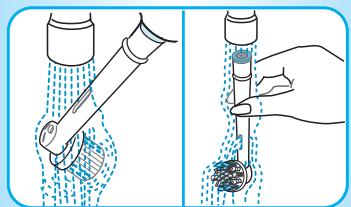
- After brushing, rinse your brush head thoroughly under running water.
- Remove the brush head from the handle and clean both parts separately under running water. Then wipe them dry before you put the handle on the charging unit.
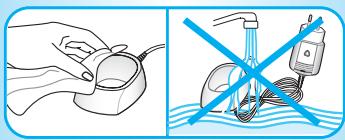
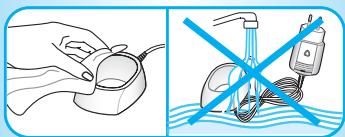
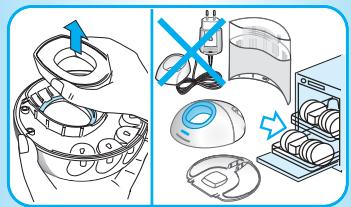
- Before cleaning your charging unit, make sure you disassemble it first. The charging ring and the SmartPlug should never be placed in the dishwasher. However, all other parts (base station, base plate and protective cover) are dishwasher-safe.
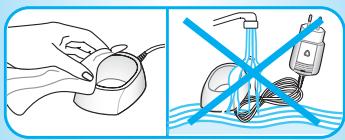
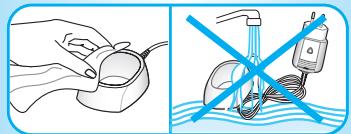
- From time to time, you can also clean the charging ring and the SmartPlug with a damp cloth. The SmartPlug charger should never be placed in water.
Subject to change without notice.
This product conforms to the European Directives EMC 2004/108/EC and Low Voltage 2006/95/EC.

This product contains rechargeable batteries. In the interest of protecting the environment, please do not dispose of the product in the household waste at the end of its useful life. Disposal can take place at an Oral-B Braun Service Centre or at appropriate collection points provided in your country.

Guarantee
We grant 2 years limited guarantee on the product commencing on the date of purchase. Within the guarantee period we will eliminate, free of charge, any defects in the appliance resulting from faults in materials or workmanship, either by repairing or replacing the complete appliance as we may choose.
This guarantee extends to every country where this appliance is supplied by Braun or its appointed distributor.
This guarantee does not cover: damage due to improper use, normal wear or use, especially regarding the brush heads, as well as defects that have a negligible effect on the value or operation of the appliance. The guarantee becomes void if repairs are undertaken by unauthorised persons and if original Braun parts are not used.
To obtain service within the guarantee period, hand in or send the complete appliance with your sales receipt to an authorised Oral-B Braun Service Centre.
Oral-B FlossAction brush head
trconsumers@custhelp.com
MD: Importer: Le Bridge Corporation Limited S.R.L., Str.Varniţa nr. 6, Chisinău 2036
The Oral-B Triumph toothbrush has been specially developed to offer you and your family unique benefits when brushing your teeth, which are both safe and effective. Nevertheless, when using electrical appliances, basic safety precautions should always be followed.
Please read these instructions carefully before use.
Important
The Oral-B Triumph is supplied with a special plug, into which a safe extra-low voltage source is mounted. Never attempt to replace any parts in it, as this may lead to electric shock. Regularly check the plug for damage. Do not use a damaged or non-functioning device; take it to an Oral-B Braun service center. - This product is not intended for use by children under 3 years. - This device is not intended for use by children or persons with limited physical, sensory, or mental capabilities, or lack of experience and knowledge, unless they have been given supervision or instruction concerning use of the appliance in a safe way and understand the hazards involved. - If the toothbrush is dropped, the brush head should be replaced before the next use, even if no visible damage is apparent.
Description
a Replacement brush head Oral-B FlossAction b Power on/off button c Mode selection button d Handle e Display f Charging unit (including charging ring and plug) g Base plate h Base station i Protective cover j Replacement head Oral-B Pro White (not supplied with all models)
The handle of the toothbrush is completely waterproof, electrically safe, and can be used in the bathroom.
To assemble the base station (h), you need to detach the base plate (g) (①, p. 3). Place the charging ring into the base station and connect the base plate (steps ② and ③), as shown on p. 3. Then insert the protective cover (i) into the rear part of the base station (see diagram ④, p. 3).
Insert the plug into the socket and place the handle of the toothbrush (d) on the charging unit. The Oral-B Triumph can also be charged by placing the handle directly on the charging ring when the plug is inserted into the socket.
On the display, an image of a charging battery should appear (e). When the battery is fully charged, the battery icon on the display will be filled with three bars. A full charge takes at least 12 hours, after which the toothbrush can operate for approximately two weeks with regular brushing twice a day for two minutes.
WARRANTY OBLIGATIONS
We provide a two-year warranty on our products, starting from the date of purchase. During the warranty period, we will free of charge repair, replace parts, or replace the entire product for any manufacturing defects caused by poor material quality or assembly.
This warranty is valid in any country where this product is supplied by an authorized distributor or designated distributor.
The warranty does not cover the following cases: damage caused by improper use, normal wear and tear of the product, especially of replaceable brush heads, as well as defects that have a negligible effect on the quality of operation of the device. This warranty becomes void if repairs were carried out by unauthorized personnel or if non-original parts or accessories were used.
For warranty service, during the warranty period, it is necessary to contact a specialized Oral-B Braun service center or send the product in its complete set together with the sales receipt to this service center.
The Oral-B Triumph toothbrush has been specially developed to provide you with a basic, unique brushing experience in a safe and effective way. Despite this, when using electric devices, you should always follow the basic instructions for use.
Please carefully read the instructions before use.
Important
The Oral-B Triumph is supplied with a special plug, which is built in without low voltage. Never attempt to replace any part of it, as this could lead to electric shock. Regularly check the plug for damage. Do not use a damaged appliance or an appliance that is not working properly; take it to the Oral-B Braun service center. - This product is not intended for use by children under 3 years. It is not intended for use by persons with reduced physical or mental capabilities, unless they are supervised by a person responsible for their safety. The appliance must be kept out of reach of children. - If the toothbrush head is dropped, it should be replaced before next use, even if there is no visible damage.
Description
a Removable head Oral-B FlossAction b On/Off button c Mode selection button d Handle e Display
f Charging unit (with charging stand and plug) g Base plate h Base station
i Protective cap
j Oral-B Pro White head (not included with all models)
Charging
The handle of the toothbrush is waterproof, electrically safe and can be used in the bathroom.
To set up the base station (h), first connect the base plate (g) (1, page 3), insert the charging stand into the base station and connect the base plate (steps ② and ③) as shown on page 3. Then insert the protective cap (i) into the rear part of the base station (see diagram ④, page 3).
Insert the plug into the socket and place the handle of the toothbrush (d) on the charging unit. The Oral-B Triumph can also be charged by placing the handle directly on the charging stand with the plug in the socket. The display will show a battery symbol (e) indicating that it is charging. When the battery is fully charged, the battery symbol will be filled with three bars. A full charge takes at least 12 hours, after which the toothbrush can be used for about two weeks with regular brushing twice a day for two minutes. Note: If the battery symbol does not appear on the display when charging, continue charging; the symbol will appear after 10-15 minutes. - When the battery is fully charged, the battery symbol will be displayed continuously. The toothbrush will operate normally. This means that the battery does not need recharging. If the battery is fully discharged, the display will show a flashing outline. Before first use, the toothbrush must be charged for 15 hours, after which it will operate for about 2 hours. - When the toothbrush is not in use, it should always be placed on the charging unit: the battery will be recharged. For maximum battery life, it is recommended to let the toothbrush fully discharge at least once a year by leaving it off the charging unit during brushing.
Oral-B Triumph charging device: It is necessary to take the compact charger with you and follow the instructions for using the charging device in other countries. The electrical characteristics are specified on the charger.
How to use the toothbrush
Place the Oral-B brush head onto the handle. You can use any toothpaste. To prevent splashing, first apply toothpaste to the brush head and only then turn on the brush.
Brushing modes
The Oral-B Triumph can operate in different modes depending on your needs:
Clean mode - for regular brushing.
Sensitive mode - gentle but thorough cleaning of sensitive areas.
Polish mode - for polishing and natural whitening of teeth in special cases or as needed.
How to switch modes:
Country of origin: Germany
Year of manufacture
To determine the year of manufacture, refer to the 3-digit production code located near the type plate. The first digit of the production code refers to the last digit of the year of manufacture. The next two digits refer to the calendar week in the year of manufacture. Example: «819» – The product was manufactured in week 19 of 2008.
Tlumph
SmartPlug
(1) a n = 2a n - 1 + an - 1
∴ S ΔOBC = S ΔCOD + SΔBOC
FlossAction
(SmartPlug and) SmartPlug
2.2.1.11 2
Therefore, the area of triangle OBC equals the area of triangle COD plus the area of triangle BOC minus the area of triangle BOC.
( ) Pro White
- INTERNET
- IMPORTANT
- DESCRIPTION
- SPECIFICATIONS
- CONNECTING AND CHARGING
- USING YOUR TOOTHBRUSH
- BRUSHING MODES
- BRUSHING TECHNIQUE
- PROFESSIONAL TIMER
- BRUSH HEADS
- ORAL-B FLOSSACTION BRUSH HEAD
- ORAL-B PRO WHITE BRUSH HEAD (NOT WITH ALL MODELS)
- CLEANING RECOMMENDATIONS
- GUARANTEE
- WARRANTY OBLIGATIONS
- CHARGING
- HOW TO USE THE TOOTHBRUSH
- COUNTRY OF ORIGIN: GERMANY
- YEAR OF MANUFACTURE
Brand : BRAUN
Model : PROFESSIONAL CARE 9000
Category : Electric toothbrush