
OralB Genius 8600 - Electric toothbrush BRAUN - Free user manual and instructions
Find the device manual for free OralB Genius 8600 BRAUN in PDF.
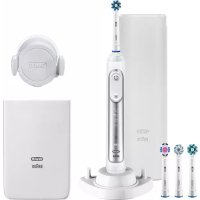



| Product type | Rechargeable electric toothbrush with Bluetooth connection |
| Brand | Braun / Oral-B |
| Model | Genius 8600 |
| Power supply | Built-in rechargeable battery, charger with smart plug (very low safety voltage) |
| Charging time | About 15 hours (full charge) |
| Battery life | Up to 12 days of regular brushing (2 brushings of 2 minutes per day) |
| Brushing modes | Clean, Pro Clean, Soft, 3D White, Gum Care, Tongue Cleaning |
| Timer | Professional timer (every 30 seconds) or 2-minute timer, customizable |
| Pressure sensor | Yes, with red Smart Ring in case of excessive pressure and motion slowdown |
| Smart Ring | Multicolor light ring: white (use), red (pressure), blue (Bluetooth connection) |
| Smartphone connection | Bluetooth 4.0 (or higher) / Bluetooth Smart, Oral-B™ app (iOS and Android) |
| Compatible brush heads | All Oral-B oscillating-rotating brush heads (CrossAction, FlossAction, 3D White, Sensitive, etc.) |
| Replacement indicator | Blue INDICATOR® bristles fading after about 3 months |
| Sound level | 68 dB (A) |
| Waterproof | Waterproof handle, designed for use in the bathroom |
| Included accessories | Brush head holder, smartphone mirror holder, travel charger case (with USB port), smart plug, travel pouch |
| Maintenance | Rinse brush head, wipe handle, clean charger with damp cloth; travel case and brush head holder dishwasher-safe |
| Safety | Do not use if damaged; keep out of reach of children under 3 years; do not immerse charger in water |
| Warranty | 2 years (excluding normal wear and brush heads) |
| Model numbers (radio) | 3765, 3754, 3764, 3762, 3767 |
Frequently Asked Questions - OralB Genius 8600 BRAUN
User questions about OralB Genius 8600 BRAUN
0 question about this device. Answer the ones you know or ask your own.
Ask a new question about this device
Download the instructions for your Electric toothbrush in PDF format for free! Find your manual OralB Genius 8600 - BRAUN and take your electronic device back in hand. On this page are published all the documents necessary for the use of your device. OralB Genius 8600 by BRAUN.
USER MANUAL OralB Genius 8600 BRAUN
(Sharecall charged at local rates)
MA 0800 095 095
Internet:
www.oralb.com
www.braun.com
www.service.braun.com
Braun GmbH
Before operating this toothbrush, please read these instructions and save this manual for future reference.
IMPORTANT
Periodically check the entire product/cords/accessories for damage. A damaged or non-functioning unit should no longer be used. If the product/cords/accessories are damaged, take it to an Oral-B Service Centre. Do not modify or repair the product. This may cause fire, electric shock or injury. Usage by children under age 3 is not recommended. Toothbrushes can be used by children and persons with reduced physical, sensory or mental capabilities or lack of experience and knowledge, if they have been given supervision or instruction concerning use of the appliance in a safe way and understand the hazards involved. Cleaning and maintenance shall not be performed by children. Children shall not play with the appliance. Use this product only for its intended use as described in this manual. Do not use attachments which are not recommended by the manufacturer.
WARNING
- If the product is dropped, the brush head should be replaced before the next use even if no damage is visible.
- Do not place the charger, smart plug or charging travel case in water or liquid or store where it can fall or be pulled into a tub or sink. Do not reach for it when fallen into water. Unplug immediately.
- Do not open and disassemble device. For battery recycling please dispose whole device according to local environmental regulations. Opening the handle will destroy the appliance and invalidate the warranty.
- When unplugging, always hold the power plug instead of the cord. Do not touch the power plug with wet hands. This can cause an electric shock.
- If you are undergoing treatment for any oral care condition, consult your dental professional prior to use.
- This toothbrush is a personal care device and is not intended for use on multiple patients in a dental practice or institution.
- Replace brush head every 3 months or sooner if brush head becomes worn.
- Your charging travel case is provided with a special cord set (smart plug), which has an integrated Safety Extra Low Voltage power supply. Do not exchange or tamper with any part of it, otherwise there is risk of an electric shock. Only use the special cord set provided with your appliance.
Important Information
- Your Oral-B toothbrush can be used with your smartphone (find details under «Connecting your toothbrush to your Smartphone»).
- To avoid electromagnetic interference and/or compatibility conflicts, deactivate the radio transmission of your toothbrush handle (5) before using it in restricted surroundings, such as aircrafts or specially marked areas in hospitals.
- Deactivate radio transmission by simultaneously pressing the on/off (3) and mode button (4) for 2 seconds until the radio transmission display (7) goes off. Follow the same procedure to reactivate transmission again.
- Persons with pacemakers should always keep the toothbrush more than six inches
(15 centimeters) from the pacemaker while turned on. Anytime you suspect interference is taking place, deactivate the radio transmission of your handle.
Description
1 Brush head 2 Smart Ring 3 On/off button 4 Brushing mode button 5 Handle 6 Brushing mode display 7 Radio transmission display (with Bluetooth® wireless technology) 8 Charge level display 9 Charger
Accessories (depending on model):
10a Brush head holder 10b Brush head compartment with protective cover 11 Smartphone holder (for mirror) 11a Holding brackets 11b Lever arm 11c Pull tab 11d Suction cup 12 Charging travel case 12a Charge indicator light 12b USB port 12c Smart plug port 12d Inner lid (with smartphone holder) 12e Removable inlay 13 Smart plug 14 Beauty bag 15 Travel case 16 Smartphone holder (stand)
Note: Content may vary based on the model purchased.
Specifications
For voltage specifications refer to the bottom of the charging unit.
Noise level: 68 dB (A)
Charging and Operating
Your toothbrush has a waterproof handle, is electrically safe and designed for use in the bathroom.
- You may use your toothbrush right away or charge it briefly by placing it on the plugged-in charger (9).
Note: In case the battery is empty (no lights illuminated on charge level display
(8) while charging or no reaction when
pressing the on/off button (3)), charge at least for 30 minutes.
The charge level is indicated on the charge level display (8). Flashing lights indicate that the battery is charging (picture ①); once it is fully charged, the lights turn off. A full charge takes typically 15 hours and enables up to 12 days of regular brushing (twice a day, 2 minutes). Note: At a very low charge level, the lights might not flash immediately; it can take up to 30 minutes. - If the battery is running low, a red light is flashing on the charge level display and the motor is reducing its speed. Once the battery is empty, the motor will stop; it will need at least a 30-minute charge for one usage. - You can always store the handle on the plugged-in charging unit to maintain it at full power; a battery overcharge is prevented by device.
Note: Store handle at room temperature for optimal battery maintenance.
Caution: Do not expose handle to temperatures higher than 50°C.
Using your toothbrush
Brushing technique
Wet brush head and apply any kind of toothpaste. To avoid splashing, guide the brush head to your teeth before switching on the handle (picture ②). When brushing your teeth with one of the Oral-B oscillating-rotating brush heads guide the brush head slowly from tooth to tooth, spending a few seconds on each tooth surface (picture ③). When using the Oral-B «TriZone» brush head place the toothbrush bristles against the teeth at a slight angle towards the gumline. Apply light pressure and start brushing in back and forth motions, just like you would do with a manual toothbrush.
With any brush head, start brushing the outsides, then the insides, and finally the chewing surfaces. Brush all four quadrants of your mouth equally. You may also consult your dentist or dental hygienist about the right technique for you.
In the first days of using any electric toothbrush, your gums may bleed slightly.
In general, bleeding should stop after a few days. Should it persist after 2 weeks, please consult your dentist or dental hygienist.
If you have sensitive teeth and/or gums, Oral-B recommends using the «Sensitive» mode (optional in combination with an Oral-B «Sensitive» brush head).
Smart Ring features
Your toothbrush is equipped with a Smart Ring (2) that has various functionalities indicated via different colors of light:
White (default) = Operating and visual timer light (choose individual color via Oral-B™ App settings)
Red = Pressure sensor light
Blue = Bluetooth® pairing indicator
Timer
You can choose between «Professional» or «2-Minute» timer.
The «2-Minute» timer signals with a long stuttering sound and a flashing light of the Smart Ring (2) that the professionally recommended 2-minute brushing time has been reached.
The «Professional» timer signals with a short stuttering sound and a flashing light of the Smart Ring at 30-second intervals to move to the next quadrant of your mouth (picture ③). A long stuttering sound and a flashing light indicate the end of the professionally recommended 2-minute brushing time.
The timer memorizes the elapsed brushing time, even when the handle is briefly switched off during brushing. The timer resets if pausing longer than 30 seconds, briefly pressing the mode button (4) during pause, or placing the handle on the plugged-in charger.
Note: During the use of special Oral-B™ App features, the visual timer light may be deactivated.
Timer setup:
Your toothbrush comes with the «Professional» timer activated. To change this, press and hold the mode button (4) for 2 seconds. Toggle between timer selection by pressing the on/off button (3). Confirm selection by pressing the mode button.
- 2 LED's illuminated indicate «2-Minute» timer. 4 LED's illuminated indicate «Professional» timer.
Note: You can also set/advance the timer functionality via Oral-B™ App.
Pressure sensor
If too much pressure is applied, the Smart Ring (2) will light up in red, reminding you to reduce pressure. In addition, the pulsation of the brush head will stop and the oscillation movement of the brush head will be reduced (during «Daily Clean», «Pro Clean» and «Sensitive» mode) (picture ③).
Periodically check the operation of the pressure sensor by pressing moderately on the brush head during use.
Brushing modes (depending on model)
Your toothbrush offers different brushing modes indicated on the brushing mode display (6) on your handle («Daily Clean» mode does not illuminate on the brushing mode display):
«Daily Clean» - Standard mode for daily mouth cleaning.
Pro Clean - For an extraordinary clean feeling (operated with a higher frequency).
«Sensitive» - Gentle, yet thorough cleaning for sensitive areas.
3D White - Polishing for occasional or everyday use.
«Gum Care» - Gentle massage of gums.
«Tongue Clean» - Tongue cleaning for occasional or everyday use.
When operating the «Tongue Clean» mode, we recommend using the «Sensitive» brush head. You can brush your tongue either with or without toothpaste. Brush the whole area of your tongue systematically in gentle movements. The recommended brushing time is 20 seconds; indicated with a flashing light of the Smart Ring.
Your toothbrush automatically starts in the mode selected last. To switch to other modes, successively press the mode button during use (picture 4). To return from any mode back to «Daily Clean» mode, press and hold the mode button (4).
Note: You can also set/advance the mode functionality via Oral-B™ App.
Brush heads
Oral-B offers you a variety of different Oral-B brush heads that fit your Oral-B toothbrush handle.
Our oscillating-rotating brush heads can be used for tooth-by-tooth precision cleaning.
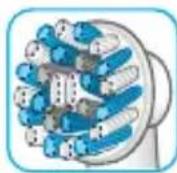
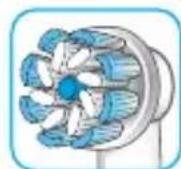
Oral-B CrossAction brush head
Our most advanced brush head. Angled bristles for a precise clean. Lifts and powers away plaque.
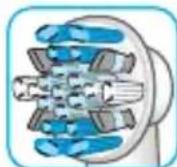
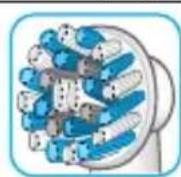
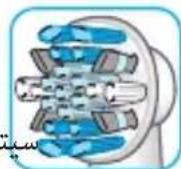
Oral-B FlossAction brush head features micropulse bristles that allow for an outstanding plaque removal in the interdental areas.
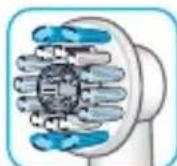
Oral-B 3D White brush head features a special polishing cup to naturally whiten your teeth. Please note that children under 12 years old should not
use the Oral-B «3D White» brush head.
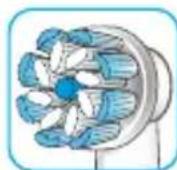
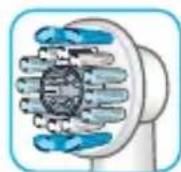
Oral-B Sensi Ultrathin brush head
features a combination of regular bristles to clean teeth surfaces and ultrathin bristles
for a gentle brushing experience on the gumline.
Most Oral-B brush heads feature light blue INDICATOR bristles to help you monitor brush head replacement need. With thorough brushing, twice a day for two minutes, the blue color will fade halfway approximately within 3 months, indicating the need to exchange your brush head. If the bristles splay before the color recedes, you may exert too much pressure on teeth and gums.
We do not recommend using the Oral-B «FlossAction» or Oral-B «3D White» brush head with braces. You may use the Oral-B «Ortho» brush head, specifically designed to clean around braces and wires.
Connecting your toothbrush to your Smartphone
The Oral-B™ App is available for mobile devices running iOS or Android operating systems. It can be downloaded for free from App Store(SM) or Google Play™.
The Oral-B™ App gives you the opportunity to chart your brushing progress and customise your toothbrush settings (for many more benefits see the Oral-B™ App instructions).
- Start the Oral-B™ App. It will guide you through the entire Bluetooth pairing procedure. Note: Oral-B™ App functionality is limited if Bluetooth wireless technology is deactivated on your smartphone (for directions please refer to your smartphone's user manual).
- Any app instructions will be displayed on your smartphone.
- If Bluetooth wireless technology is activated on your handle, the Bluetooth symbol on the radio transmission display (7) illuminates. Once the handle is paired, the Smart Ring (2) flashes briefly.
- Keep your smartphone in close proximity (within 5 m distance) when using it with the handle. Make sure the smartphone is safely positioned in a dry place.
Note: Your smartphone must support Bluetooth 4.0 (or higher)/Bluetooth Smart in order to pair your handle.
Compatible smartphones are listed in App Store(SM) or Google Play™.
Caution: Follow your smartphone's user manual to ensure your phone/charger is designed for use in a bathroom environment.
Check www.oralbappavailability.co.uk for country availability of the Oral-B™ App.
Cleaning recommendations
After brushing, rinse your brush head under running water with the handle switched on. Switch off and remove the brush head. Clean handle and brush head separately;
wipe them dry before reassembling. Unplug the charger before cleaning. Brush head holder (10a), compartment and protective cover (10b), as well as smartphone holder stand (16) are dishwasher-safe. Charger (9) should be cleaned with a damp cloth only (picture 5).
Accessories
(depending on model)
Smartphone Holder
- Before each use, make sure the mirror, suction cup surface (11d), and holding brackets (11a) are always clean and dry (picture B1). Use a fuzz-free cloth to clean the suction cup surface and mirror. In particular, make sure the suction cup surface and mirror are free from any contamination (e.g., hair, dust, oil, fuzz, dirt, etc.).
- Press your smartphone holder (11) with just enough pressure, centered at nose level, onto a sturdy mirror. Then mount the holder by pressing the lever arm (11b) towards the mirror until it snaps in (picture B2).
Note: Only affix on a mirror to ensure safe and correct conditions. For use in bathroom only. Do not use in automobiles.
Always make sure the smartphone holder is securely mounted on the mirror before inserting your smartphone. Place your smartphone (portrait) sideways between the holding brackets (11a) by pressing against one bracket with your phone and sliding the other bracket to the side (picture B2). Follow the same procedure to remove your phone again. Adjust the overall position for the required angle by moving the ball joint of the holder (picture B3). Once done, remove your phone from the holder. Take off the smartphone holder by flipping the lever arm back and pulling the tab carefully (picture B4, steps 1 and 2). Affix the smartphone holder with each use again. The smartphone holder should be cleaned with a damp fuzz-free cloth only (picture ⑤). You may use glass cleaner, alcohol, or similar products (avoid products with silicone oil). Make sure the surface is dry and dust-free after cleaning. Store in a clean and dry place. If not in use, always remove your smartphone from the holder.
Note: Smartphone width required for usage: minimum 58 mm, maximum 83 mm.
Caution: Small parts may come off; keep out of reach of children.
Follow your smartphone's user manual to ensure your phone/charger is designed for use in a bathroom environment.
Charging Travel Case
- To charge your handle (5), place it on the pin in the charging travel case (12) and connect it to an electric outlet using the extra smart plug (13) provided. The flashing light (12a) of the charging travel case indicates that the handle is charging. Once the handle is fully charged, the light turns off. A full charge typically takes 12 hours (picture D1).
Note: You may use the USB port (12b) to charge an electric device while the charging travel case is plugged in. The handle can only be charged with the smart plug (13)/(12c), not via the USB port.
- The inner lid of the travel case has a built-in smartphone holder (12d), which can hold your smartphone while using (picture D2). Before use, make sure your phone fits the stand and remains stable.
- The removable inlay (12e) of the travel case is dishwasher-safe (picture ⑤). The outer case should be cleaned with a damp cloth only. Make sure that travel case parts are completely dry before reassembling, and toothbrush/brush heads are dry before storing in the travel case.
Note: Clean stains on travel case surface immediately. Store travel case in a clean and dry place.
Follow your smartphone's user manual to ensure your phone/charger is designed for use in a bathroom environment.
Beauty Bag
Store your clean and dry toothbrush/brush heads in the travel case (15) and place it inside the beauty bag (14) (picture E1/2). Clean stains on the surface immediately. The beauty bag should be hand washed only with lukewarm water (30°C - 40°C) (picture ⑤). Store in clean and dry place.
Subject to change without notice.
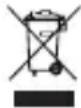
Environmental Notice
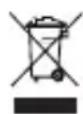
Product contains batteries and/or
recyclable electric waste. For
environment protection do not
dispose in household waste, but
for recycling take to electric waste collection points provided in your country.
U-Ion
Guarantee
We grant 2 years guarantee on the product commencing on the date of purchase. Within the guarantee period we will eliminate, free of charge, any defects in the appliance resulting from faults in materials or workmanship, either by repairing or replacing the complete appliance as we may choose.
This guarantee extends to every country where this appliance is supplied by Braun or its appointed distributor. This guarantee does not cover: damage due to improper use, normal wear or use, especially regarding the brush heads, as well as defects that have a negligible effect on the value or operation of the appliance.
The guarantee becomes void if repairs are undertaken by unauthorized persons and if original Braun parts are not used.
This appliance is equipped with a Bluetooth Smart approved radio module. Failure to establish a Bluetooth Smart connection to specific smartphones is not covered under the device guarantee, unless the Bluetooth radio module of this appliance is damaged. The Bluetooth devices are warranted by their own manufacturers and not by Oral-B. Oral-B does not influence or make any recommendations to device manufacturers, and therefore Oral-B does not assume any responsibility for the number of compatible devices with our Bluetooth systems.
Oral-B reserves the right, without any prior notice, to make any technical modifications or changes to system implementation of device features, interface, and menu structure changes that are deemed necessary to ensure that Oral-B systems function reliably.
To obtain service within the guarantee period, hand in or send the complete appliance with your sales receipt to an authorized Oral-B Braun Customer Service Centre.
Information Bluetooth® radio module
Although all indicated functions on the Bluetooth device are supported, Oral-B does not ensure 100% reliability in connection, and feature operation consistency. Operation performance and connection reliability are direct consequences of each individual Bluetooth device, software version, as well as the operating system of those Bluetooth devices and company security regulations implemented on the device.
Oral-B adheres to and strictly implements the Bluetooth standard by which Bluetooth devices can communicate and function in Oral-B toothbrushes.
However, if device manufacturers fail to implement this standard, Bluetooth compatibility and features will be further compromised and the user may experience functional and feature-related issues. Please note that the software on the Bluetooth device can significantly affect compatibility and operation.
1) Warranty – Exclusions and Limitations
This limited warranty applies only to the new products manufactured by or for The Procter & Gamble Company, its Affiliates or Subsidiaries («P&G») that can be identified by the Braun / Oral-B trademark, trade name, or logo affixed thereto. This limited warranty does not apply to any non-P&G product including hardware and software. P&G is not liable for any damage to or loss of any programs, data, or other information stored on any media contained within the product, or any non-P&G product or part not covered by this limited warranty. Recovery or reinstallation of programs, data or other information is not covered under this limited warranty.
This limited warranty does not apply to (i) damage caused by accident, abuse, misuse, neglect, misapplication, or non-P&G product; (ii) damage caused by service performed by anyone other than Braun or authorized Braun service location; (iii) a product or part that has been modified without the written permission of P&G, and (iv) damage arising out of the use of or inability to use the Oral-B Smartphone stand/puck, Smartphone mirror
holder, or charging travel case (“Accessories”).
2) Using your smartphone holder
The Oral-B Accessories included in the package have been designed to provide you with a convenient way to position your smartphone while you are using the Oral-B app. Try multiple orientations of your smartphone in the Oral-B smartphone holder prior to use to determine the best positioning of your smartphone in the holder. Be sure to try this in a manner which will not harm your smartphone if it falls out of the stand. Do not use in automobiles.
LIMITATION OF LIABILITY
TO THE EXTENT PERMITTED BY APPLICABLE LAW, IN NO EVENT SHALL P&G ITS DISTRIBUTORS OR SUPPLIERS BE LIABLE TO YOU OR ANY THIRD PARTY FOR ANY DIRECT, INDIRECT, INCIDENTAL, CONSEQUENTIAL, SPECIAL, EXEMPLARY OR PUNITIVE DAMAGES, OF ANY NATURE WHATSOEVER, ARISING OUT OF THE USE OF OR INABILITY TO USE THE ORAL-B ACCESSORIES, INCLUDING, WITHOUT LIMITATION, INJURY TO PERSONS, PROPERTY DAMAGE, LOSS OF VALUE OF ANY THIRD PARTY PRODUCTS THAT ARE USED IN OR WITH THE ORAL-B ACCESSORIES, OR LOSS OF USE OF THE ORAL-B ACCESSORIES OR ANY THIRD PARTY PRODUCTS THAT ARE USED IN OR WITH THE ORAL-B ACCESSORIES, EVEN IF P&G HAS BEEN ADVISED OF THE POSSIBILITY OF SUCH DAMAGES. WITHOUT LIMITING THE FOREGOING, YOU UNDERSTAND AND AGREE THAT P&G HAS NO LIABILITY FOR ANY DAMAGE OR DESTRUCTION TO CONSUMER ELECTRONICS DEVICES OR OTHER PERSONAL PROPERTY THAT ARE CONTAINED ON OR EXTERIOR TO THE ORAL-B ACCESSORIES, OR ANY LOSS OF DATA CONTAINED IN THE FOREGOING DEVICES. IN NO EVENT SHALL ANY RECOVERY AGAINST ORAL-B EXCEED THE ACTUAL PRICE PAID FOR THE PURCHASE OF THE PRODUCT.
Warranty replacement brush heads
Oral-B warranty will be voided if electric rechargeable handle damage is found to be attributed to the use of non-Oral-B replacement brush heads.
Oral-B does not recommend the use of non-Oral-B replacement brush heads.
- Oral-B has no control over the quality of non-Oral-B replacement brush heads. Therefore, we cannot ensure the cleaning performance of non-Oral-B replacement brush heads, as communicated with the electric rechargeable handle at time of initial purchase.
- Oral-B cannot ensure a good fit of non-Oral-B replacement brush heads.
- Oral-B cannot predict the long-term effect of non-Oral-B replacement brush heads on handle wear.
All Oral-B replacement brush heads carry the Oral-B logo and meet Oral-B's high quality standards. Oral-B does not sell replacement brush heads or handle parts under any other brand name.
Trouble Shooting
| Problem Possible | reason Remedy | |
| APP | ||
| Handle does not operate (properly) with Oral-BTM App. | 1. Oral-BTM App is turned off. 2. Bluetooth interface is not activated on smartphone. 3. Radio transmission is deactivated on handle; radio transmission display (7) is turned off. 4. Bluetooth connection to smart-phone has been lost. 5. Your smartphone does not support Bluetooth 4.0 (or higher)/Bluetooth Smart. 6. Handle on plugged-in charger. | 1. Turn on Oral-BTM App. 2. Activate Bluetooth interface on smartphone (described in its user manual). 3. Activate radio transmission by simultaneously pressing on/off (3) and mode button (4) for 2 seconds until radio transmission display (7) turns on. 4. Pair handle and smartphone again via app settings. Keep your smartphone in close proximity when using it with handle. 5. Your smartphone must support Bluetooth 4.0 (or higher)/Bluetooth Smart in order to pair handle. Check App Store(SM) or Google PlayTM for compatible smartphones. 6. Radio transmission is deactivated while handle is placed on plugged-in charger. |
| Reset to factory settings. | Original app functionality wanted. Press and hold on/off button (3) for 10 seconds until all indicator lights double blink simultaneously. | |
| TOOTHBRUSH | ||
| Handle is not operating (during first use). | Battery has a very low charge level; no lights illuminate. | Charge at least for 30 min. |
| Handle does not operate with existing SmartGuide in household. | 1. Synchronizing with existing SmartGuide failed. 2. Radio transmission is deactivated; radio transmission display (7) is turned off. 3. SmartGuide is not compatible with handle. 4. Two handles are already assigned to SmartGuide. 5. Function is deactivated via app feature. | 1. Synchronize (existing) handle(s) (again) via SmartGuide settings in SmartGuide's battery compartment: Press «h/min» for 3 seconds. Turn on handle that you want to synchronize. Then turn on second handle you want to synchronize. Press «h/min» or «set» to exit synchronization mode. 2. Activate radio transmission by simultaneously pressing on/off (3) and mode button (4) for 2 seconds until radio transmission display (7) turns on. 3. Handle cannot be used with existing SmartGuide. 4. You can synchronize a total of 2 handles only. Change handles via SmartGuide settings (see 1.) 5. During use of special app features, transmission to Smart-Guide may be deactivated. You can also (de)activate any SmartGuide communication via app. |
| 1. Short stuttering sounds/ flashing light every 30 seconds or after 2 minutes. 2. Handle does not operate any timer. | 1. «Professional timer» or «2-Minute timer» activated. 2. Timer has been modified/deactivated via app. | 1. Set your timer to 2-Minute timer (stuttering sounds/flashing light after 2min); or set your timer to Professional timer (stuttering sounds/flashing light every 30 seconds). Follow steps under «Timer setup」. 2. Use app to change timer settings or perform factory reset (see App Trouble Shootings). |
| Handle does not charge. | 1. Battery is at a very low charger level. 2. Ambient temperature for charging is out of valid range (≤0°C and ≥60°C). | 1. Charging lights might not flash immediately; it can take up to 30 minutes. 2. Recommended ambient temperature for charging is 5 °C to 35°C. |
This rechargeable toothbrush contains a radio module which operates in the 2.4 to 2.48 GHz band with a maximum power of 1 mW.
Hereby, Braun GmbH declares that the radio equipment types 3765, 3754, 3764, 3762 and 3767 are in compliance with Directive 2014/53/EU. The full text of the EU declaration of conformity is available at the following internet address: www.oralb.com/ce.
Characteristic do Smart Ring
Replacement heads under warranty
30 Day Risk Free Trial
30 Day Risk Free Trial
30 Day Risk Free Trial
30 Day Risk Free Trial
.
4
ρd/dt( ωx - 1)
.
150 150
∴ z 1 = - 1/8,z 2 = 1/8
4
Method 1. a 4 = a 1 + 3d∴ a4 = 1/3
30 4
. 2020 Goo
g 1 g w . a y
JgJgJgJgJgJgJgJgJg
j 1g jy0aJ
30 1
Joo
oo jn lilwll ooho hao laol dikos
joo. JokJy ligoo 4Lyy dgoogol joo
.1j j 100
a 100
.
50 1e JJrJyJy:
.
#
a.b.c. a.c.
sul. jliu u gjg no g s g o g oolw rall w j j 1e bai all jdi lilw gao olw al w r g . jlll w ggs ybi diliaw cii ciS 1! (2) 000)
J oscillating-rotating 1
J 1
aLwJdolduwJie. ③gall) Jsw Jb
a aolalh jn JzTrizone 1
b2a. 111 b2 jc o 0 a gj y jn
Ls oLwU uI g uu Ls d 15 1u
. 4dLgduoLgDg
j 1 j 1 1 1 1 1 1 1 1 1 1 1 1 1 1
a. 100
e 15
#
aLwJ 1
2
/3
olly 4
5
aL 6
(sLwJgjgljg)SswJlws
jaiu 8
9
()
oljol0a
10b
() 11
11a
11b
11c
b0j11b2 11d
J 12
jaxu jxg0 12a
BSU Jolc 12b
12c
()12d
12e
13
Jusll 14
jawil abila 15
() 16
j 100000000000000000000000000000000000000000000000
gj
Jolg
Jg j (g) a
.oojog Jai
68dB(A): s
J
gubj 10g.
FlossAction
g a d c 1234567890 gblal no ylll aas gljy jss .11sall no oJgall
- 1
- 1
J 100000000000000000000000000000000000000000000000000000000000000
Sensitive -Jr
y-llg olw g w g 3D w> lwl k. jw Jg Jg 3D w> Ortho w-llg olw g
y
JgoooJg jy gfo 1 Jrj 10 Jolilao oos JsL .Ios pJ . (SM)
J (12a)
lois egaii gbiw .jai l jai j
Jolal joojll gjss J.
.(D1 0g0) 12
jw(12b) USB jia o iu wai ciS:di
J 1
Sill jiaai 10 gao jiaoi jao jao aogao jao
.USB jiaqjg (12c)/(13)
aJawll abol J 1J1 jJl
(12)
J J 15. (D2 890)
Lulj Uzg Jolal yu Lla
(5)(12e)
a aaa aa aaa aaa aaa aaa aaa
Joo Joo
/ jLwI oI wJ J J J 5 W I B P J Ls Ie aoo
afo 1ofofofofofofofofofofofofofofofofofofofofofofofofofofofofofofofofofofofofofofofofofofofofofofofofofofofofofofofofo
.
Joojj
a0g aabj gdlw/
(14)JlaoJIa aoo JolIgOg (15)Jauillabol
.(E1/2o
a a 40-30) jolll gog bgs
.(⑤)
J 1
LiHion
a
1/9 10000000000000000000000000000000000000000
aaii i 1
.
()
S
(11a) cI (11d)
aBb (B1 0g)
a 1
- 5
(LgVglgVg
111 100
S
- 1
1
(13)
∴ 2j = 0( j z)
- 10
- 1
40x10g 1b
i:
- INTERNET
- IMPORTANT
- WARNING
- IMPORTANT INFORMATION
- DESCRIPTION
- ACCESSORIES (DEPENDING ON MODEL)
- SPECIFICATIONS
- CHARGING AND OPERATING
- USING YOUR TOOTHBRUSH
- BRUSHING TECHNIQUE
- SMART RING FEATURES
- TIMER
- TIMER SETUP
- PRESSURE SENSOR
- BRUSHING MODES (DEPENDING ON MODEL)
- BRUSH HEADS
- CONNECTING YOUR TOOTHBRUSH TO YOUR SMARTPHONE
- CLEANING RECOMMENDATIONS
- ACCESSORIES
- (DEPENDING ON MODEL)
- SMARTPHONE HOLDER
- CHARGING TRAVEL CASE
- BEAUTY BAG
- ENVIRONMENTAL NOTICE
- GUARANTEE
- INFORMATION BLUETOOTH® RADIO MODULE
- WARRANTY – EXCLUSIONS AND LIMITATIONS
- USING YOUR SMARTPHONE HOLDER
- LIMITATION OF LIABILITY
- WARRANTY REPLACEMENT BRUSH HEADS
- CHARACTERISTIC DO SMART RING
- REPLACEMENT HEADS UNDER WARRANTY
- DAY RISK FREE TRIAL
- J
- FLOSSACTION
- Y
- A
- I
Brand : BRAUN
Model : OralB Genius 8600
Category : Electric toothbrush