
TRIUMPH PROFESSIONAL CARE - Electric toothbrush BRAUN - Free user manual and instructions
Find the device manual for free TRIUMPH PROFESSIONAL CARE BRAUN in PDF.
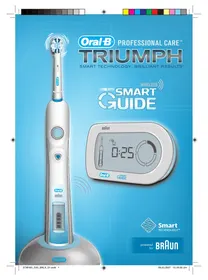



| Brand | BRAUN |
| Model | TRIUMPH PROFESSIONAL CARE |
| Type | Electric toothbrush |
| Handle power supply | Built-in rechargeable battery |
| Charger | SmartPlug™ (mains plug, extra-low voltage) |
| Charging time | 12 hours for full charge |
| Battery life | Approximately 2 weeks (2 brushings of 2 min/day) |
| Display | SmartGuide™ wireless with interactive screen |
| SmartGuide power supply | 2 AA batteries (not included) |
| Brushing modes | Clean, Soft, Massage, Polish (depending on model) |
| Timer | Professional timer (30s quadrants) and 2-minute timer |
| Brushing time display | Progressive timing or countdown |
| Pressure sensor | Yes (excessive pressure icon) |
| Brush head replacement indicator | Yes (alert after 3 months of use) |
| Radio transmission | Yes, can be deactivated (airplane/hospital mode) |
| Waterproof handle | Yes, can be used in the shower |
| Spare parts | FlossAction™, ProBright™ brush heads, SmartPlug, SmartGuide |
| Care | Rinse brush head with water, clean handle and charger with a damp cloth |
| Safety | Not recommended for children under 3 years, keep 15 cm away from pacemakers |
| Warranty | 2 years, covers manufacturing defects |
| 30-day trial | Full refund if not satisfied |
Frequently Asked Questions - TRIUMPH PROFESSIONAL CARE BRAUN
User questions about TRIUMPH PROFESSIONAL CARE BRAUN
0 question about this device. Answer the ones you know or ask your own.
Ask a new question about this device
Download the instructions for your Electric toothbrush in PDF format for free! Find your manual TRIUMPH PROFESSIONAL CARE - BRAUN and take your electronic device back in hand. On this page are published all the documents necessary for the use of your device. TRIUMPH PROFESSIONAL CARE by BRAUN.
USER MANUAL TRIUMPH PROFESSIONAL CARE BRAUN
Audio Supplies Company Ltd.
Internet:
www.oralb.com
www.braun.com
Braun GmbH
Frankfurter Straße 145
61476 Kronberg/Germany
Type 3731
e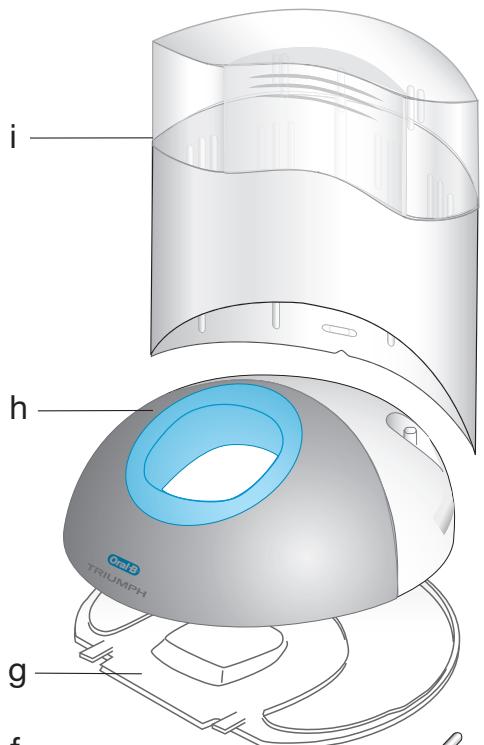
e
English
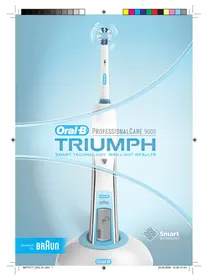
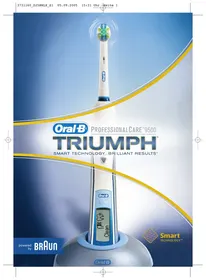
You have chosen the most technologically advanced Oral-B toothbrush. Oral-B®
Triumph™ with SmartGuide™ is the first toothbrush with a wireless display, designed to provide an outstanding clean and to help improve your oral hygiene. With its many state-of-the-art features powered by Braun technology and inspired by the dental experts at Oral-B, you can feel confident that you are brushing brilliantly well.
New Oral-B Triumph now with SmartGuide uses an interactive wireless display to help you optimize your brushing experience. Its state-of-the-art brushing technology delivers outstanding plaque removal and its advanced Oral-B® FlossAction™ brush head features MicroPulse™ bristles to gently penetrate deep between teeth.
Oral-B Triumph with SmartGuide is brought to you by Oral-B, the leader in toothbrushes and the brand more dentists use themselves worldwide.
When using electrical products, basic safety precautions should always be followed. Please read carefully before use.
Important
- To avoid electromagnetic interference and/or compatibility conflicts, deactivate the radio transmission of your toothbrush before carrying or using it in restricted surroundings such as aircrafts or specially marked areas in hospitals (see "Deactivating the radio transmission").
- Persons with pacemakers should always keep the toothbrush more than six inches (15 centimeters) from the pacemaker when turned on. If at any time you suspect interference is taking place, deactivate the radio transmission of your toothbrush before using it (see "Deactivating the radio transmission").
- Your toothbrush is provided with a SmartPlug™ with integrated Safety Extra Low Voltage power supply. Do not exchange or manipulate any part of it. Otherwise there is the risk of electric shock. Periodically check the SmartPlug for damage. A damaged or non-functioning appliance shall no longer be used. Take it to an Oral-B Braun Service Centre.
- This product is not intended for use by children under age three.
- If the product is dropped, the brush head should be replaced before the next use even if no damage is visible.
Description
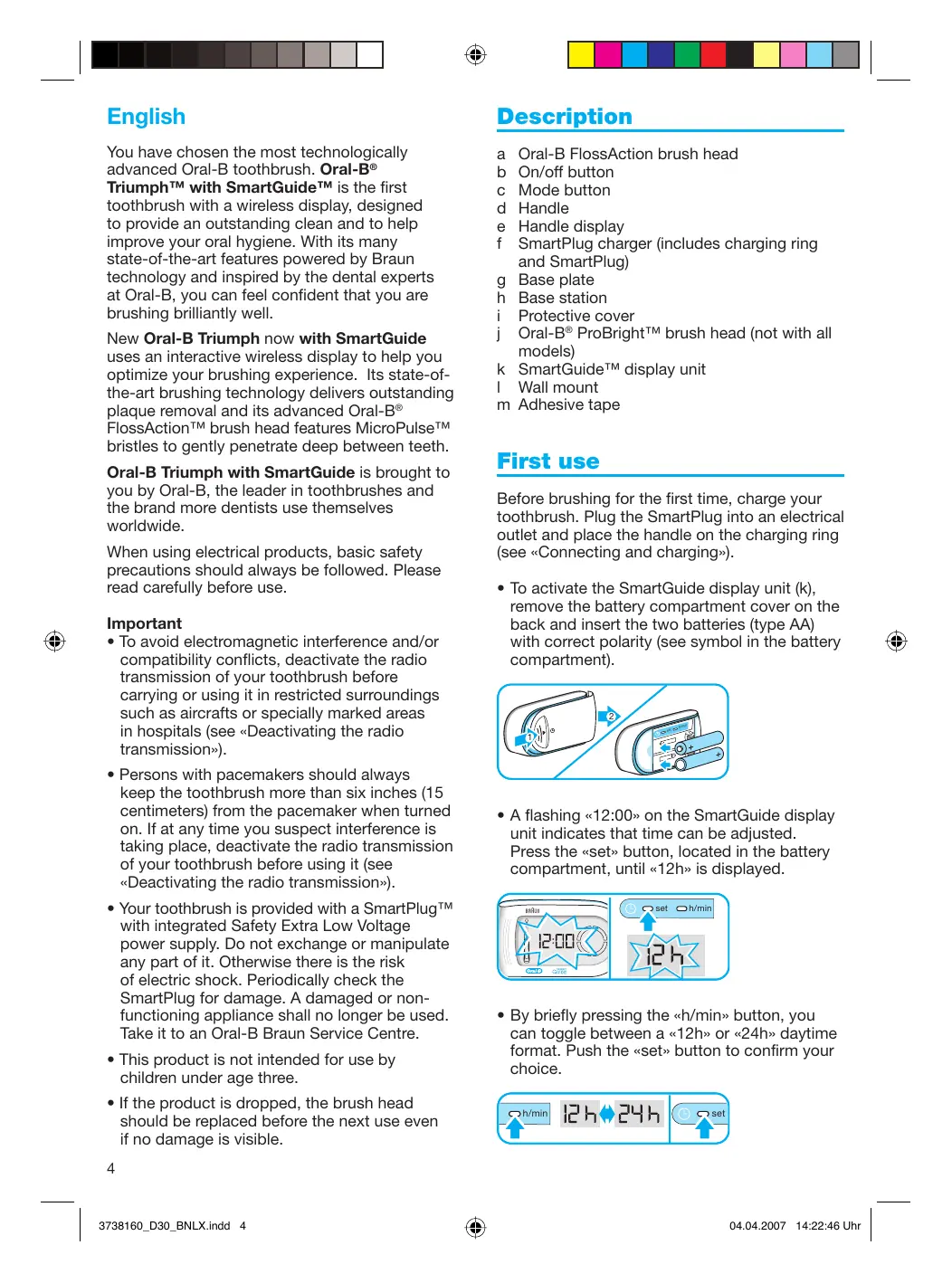
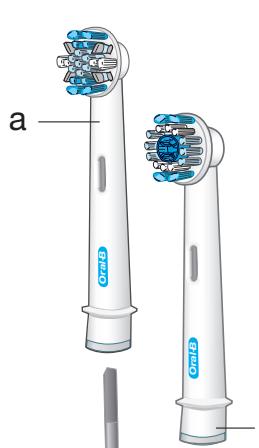
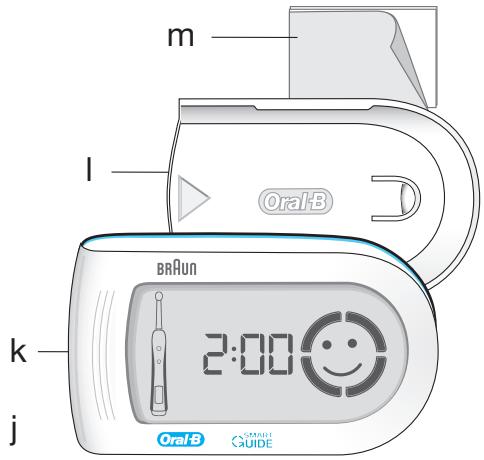
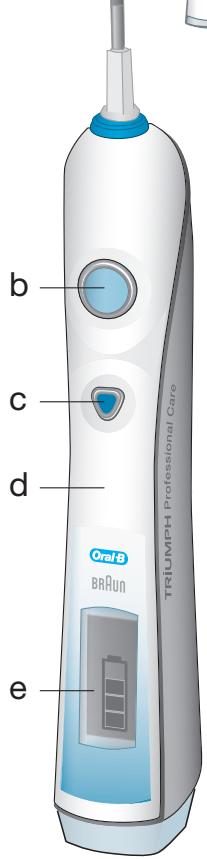
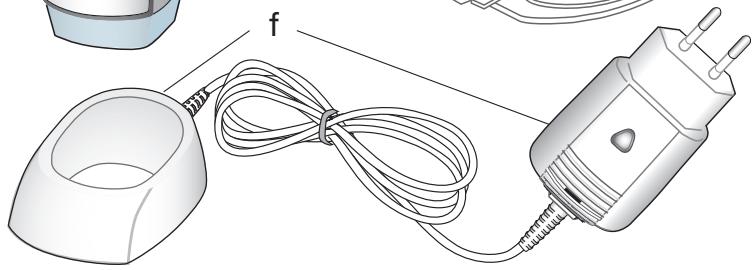
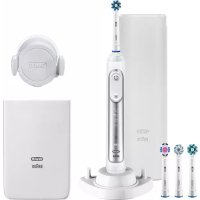
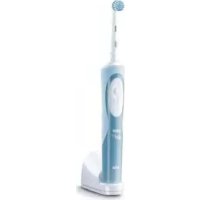
a Oral-B FlossAction brush head b On/off button c Mode button d Handle e Handle display f SmartPlug charger (includes charging ring and SmartPlug) g Base plate h Base station i Protective cover j Oral-B® ProBright™ brush head (not with all models) k SmartGuide™ display unit l Wall mount m Adhesive tape
First use
Before brushing for the first time, charge your toothbrush. Plug the SmartPlug into an electrical outlet and place the handle on the charging ring (see "Connecting and charging").
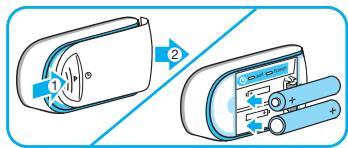
- To activate the SmartGuide display unit (k), remove the battery compartment cover on the back and insert the two batteries (type AA) with correct polarity (see symbol in the battery compartment).
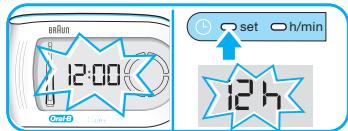
- A flashing "12:00" on the SmartGuide display unit indicates that time can be adjusted. Press the "set" button, located in the battery compartment, until "12h" is displayed.
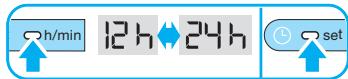
- By briefly pressing the "h/min" button, you can toggle between a "12h" or "24h" daytime format. Push the "set" button to confirm your choice.
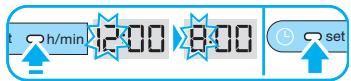
- Then the hour digit starts flashing. Press the "h/min" button until the right hour appears and confirm with the "set" button. Proceed the same way to set both minute digits. If you prefer not using this clock feature, the flashing "12:00" will disappear automatically after 24h.
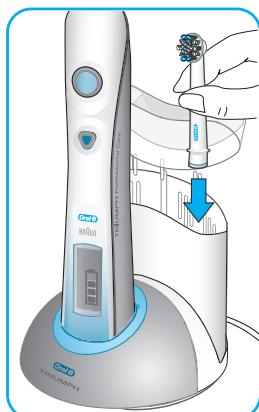
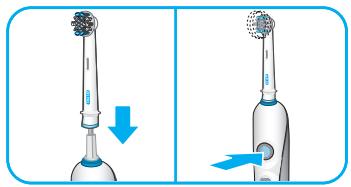
You can start your toothbrush by pressing the on/off button (b). To avoid splashing, guide the brush head to your teeth before switching the appliance on.
Connecting and charging
Your toothbrush has a waterproof handle, is electrically safe and is designed for use in the bathroom.
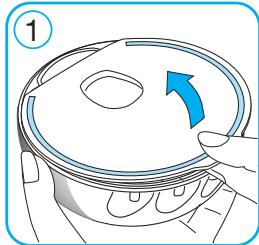
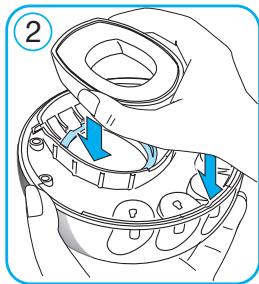
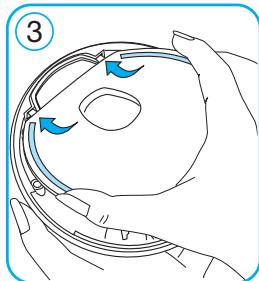
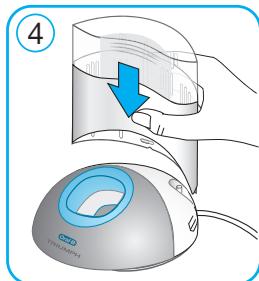
To assemble the base station (h) as a charging unit, detach the base plate (g) first (①, page 3). Place the charging ring into the base station and attach the base plate as shown (② and ③, page 3). Then insert the protective cover (i) on the back of your base station (see diagram ④, page 3).
- Plug the SmartPlug into an electrical outlet and place the toothbrush handle (d) on the charging unit. A battery symbol should appear in the handle display (e). The battery symbol will fill up while the handle is being charged. Once the handle is fully charged, the battery symbol is completely filled with four bars. A full charge takes at least 12 hours to complete and allows for approximately two weeks of regular brushing (twice a day, 2 minutes).
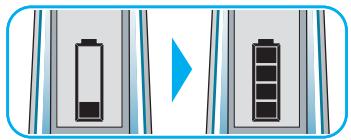
Please note: If the battery symbol is not displayed immediately, continue charging. It will appear in 10 - 15 minutes.
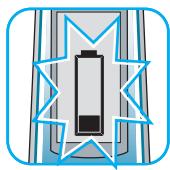
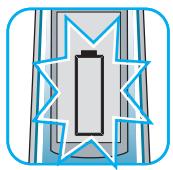
- When the rechargeable battery is low, the battery symbol with one remaining bar starts flashing. Your toothbrush will slow down and then stop. It is time to recharge your toothbrush. When the battery is fully discharged, the empty frame of the battery symbol flashes. It will then need a 15-minute charge before you can use it for a 2-minute brushing.
- For everyday use, the toothbrush handle can be stored on the charging unit to maintain it at full power. There is no risk of overcharging the battery.
- To maintain the maximum capacity of the rechargeable battery, unplug the charging unit and fully discharge the handle by regular use at least every 6 months.
For electric specifications, see printing on the SmartPlug.
Personalizing the timer
You can choose between the «Professional Timer» or «2-Minute Timer» and a «Count Up Timer» or «Count Down Timer» to meet your specific needs.
The «2-Minute Timer» indicates by a long stuttering sound and a «smiley» on the SmartGuide display unit that the dentist recommended 2-minute brushing time has been reached. In addition, the «Professional Timer» helps you brush all four quadrants of your mouth equally. It signals with a short stuttering sound at 30-second intervals and the «quadrant circle» on the SmartGuide display unit that it is time to move to the next quadrant of your mouth.
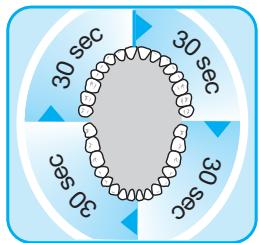
Both timers memorize the elapsed brushing time, even when the handle is briefly switched off during brushing. Only when pausing longer than 30 sec. the timer resets to the initial starting point.
The «Count Up Timer» displays your actual brushing time. The «Count Down Timer» indicates the remaining brushing time. Starting with «2:00» minutes, it goes down to «0:00». When brushing longer than two minutes, it automatically changes to the «Count Up Timer».
Your toothbrush comes with the «Professional Timer» and the «Count Up Timer» activated. If you wish to change these settings, proceed as follows:
- Press and hold the mode button (c) until the SmartGuide display unit (k) shows «:30» and «timer».
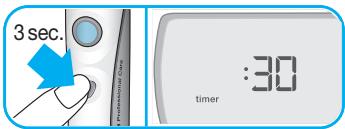
- By briefly pressing the on/off button (b), switch to the «2-Minute Timer», Confirm your choice by pushing the mode button.
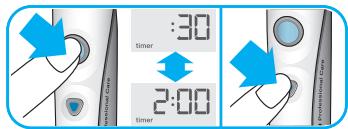
- This will lead you directly to the «Count Up Timer» display («up» and «timer» will be shown). Switch to the «Count Down Timer» by pressing the on/off button and confirm it with the mode button.
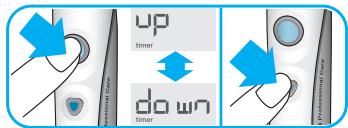
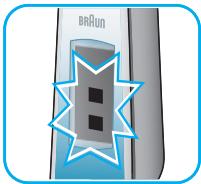
Please note: it is normal that the handle display shows two flashing bars when operating in the timer setting mode.
Brushing
Brushing modes
Your toothbrush offers different brushing modes for varying oral care needs:
«Clean» - Exceptional cleaning of teeth and gums. «Sensitive» - Gentle, yet thorough cleaning for sensitive areas. "Massage" - Gentle stimulation of gums. «Polish» - Exceptional polishing for naturally (deluxe white teeth for occasional or model only) everyday use. - When pressing the on/off button your toothbrush automatically starts in the «clean» mode. - To switch to the other modes, successively press the mode button.
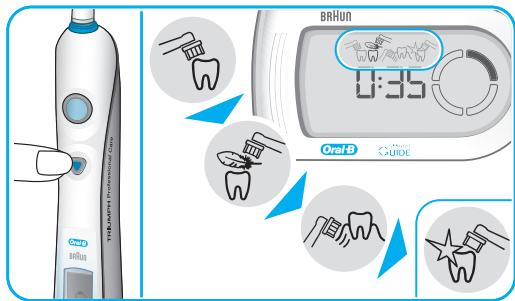
- To return from any mode to the «clean» mode, press and hold the mode button.
- To turn your brush off, press the on/off button.
Please note: the «polish» mode (deluxe model only) is best used with an Oral-B ProBright brush head. Once the Oral-B ProBright is attached, press the on/off button and your toothbrush automatically starts in the «polish» mode (please see «Brush heads»).
Brushing technique
- Guide the brush head slowly from tooth to tooth.
- Hold the brush head in place for a few seconds before moving on to the next tooth.
- Brush the gums as well as the teeth, first the outsides, then the insides, finally the chewing surfaces.
- Do not press too hard or scrub, simply let the brush do all the work.
When you finish brushing, the total brushing time will be displayed for 30 seconds before the display switches back to the time mode. To directly get to the time mode, clear the brushing time display by pushing the mode button.
In the first days of using the toothbrush, your gums may bleed slightly. In general, bleeding should stop after a few days. Should it persist after two weeks, please consult your dentist or hygienist. If you have sensitive teeth and gums, Oral-B recommends using the «sensitive» mode.
Brush heads
The Oral-B FlossAction (a) brush head is recommended for everyday deep cleaning. For occasional or everyday polishing, use the Oral-B ProBright (j) brush head (not with all models). Please note: children under 12 should not use the Oral-B ProBright brush head.
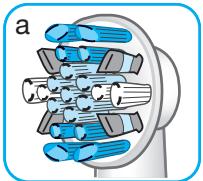
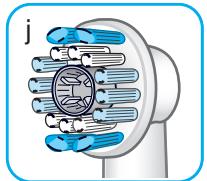
Both brush heads contain a «smart chip» to communicate with the electronics inside the toothbrush handle. Therefore, your toothbrush automatically switches to the appropriate brushing mode for the attached brush head. Nevertheless, you can select other brushing modes to customize your routine.
Do not use these brush heads with braces. We recommend using the Oral-B Ortho brush head, which is specifically designed to clean around braces and wires.
SmartGuide display unit
| Icons | |
| “Clean” mode | |
| “Sensitive” mode | |
| “Massage” mode | |
| “Polish” mode (not with all models) | |
| Too much pressure is applied. Reduce the brushing force. | |
| «Quadrant circle» – currently you are brushing in the first 30-second interval. Move to the next quadrant of your mouth, when the second segment starts flashing. | |
| Dentist recommended 2-minute brushing time has been reached. | |
| «Pre-notice» that your brush head needs to be replaced soon. You can use it for another 10 days (twice a day, 2 minutes) before the recommended replacement time has been reached. | |
| Your brush head has surpassed the dentist recommended usage time of 3 months (twice a day, 2 minutes). Replace it with a new one. | |
| The rechargeable battery of the handle is low. Charge the toothbrush handle. | |
| Batteries of the SmartGuide display unit are low. Change batteries of the SmartGuide display unit. |
- the «brush head replacement» and «pre-notice brush head replacement» features only work when using brush heads enabled with Smart Technology (Oral-B FlossAction and Oral-B ProBright)
Wall mount
If you prefer to mount the SmartGuide display unit on a wall, mirror or other surface, use the adhesive tape (m) to fix the wall mount. Before doing so, make sure the chosen surface is clean and dry (remove grease and dust first).
Position the wall mount so that the Oral-B logo is readable. Then press the wall mount evenly and firmly to the wall. Wait 24h before sliding the SmartGuide display unit into the fixed wall mount.
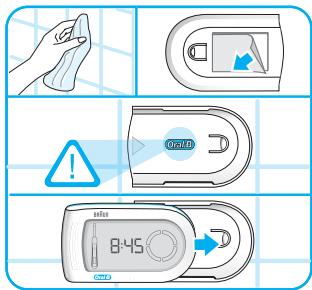
Please note: the adhesive tape will not work on dirt-repellent surfaces.
Cleaning recommendations
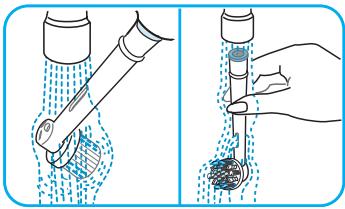
- After brushing, rinse your brush head thoroughly under running water.
- Remove the brush head from the handle and clean both parts separately under running water. Then wipe them dry before you put the handle on the charging unit.
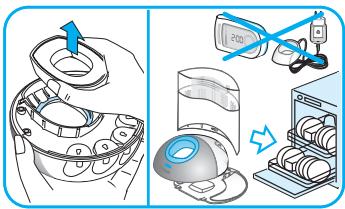
- Before cleaning your charging unit, make sure you disassemble it first. The charging ring and the SmartPlug should never be placed in the dishwasher. However, all other parts (base station, base plate and protective cover) are dishwasher-safe.
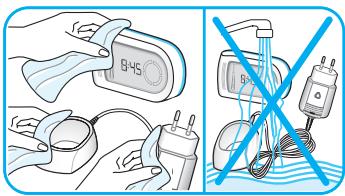
- From time to time, you can also clean the charging ring, the SmartPlug and the SmartGuide display unit with a damp cloth. The SmartPlug charger and the SmartGuide display unit should never be placed in water.
Synchronizing
In order to avoid interference of display messages when using more than one Oral-B Triumph toothbrush with separate SmartGuide display units in the same household, you need to assign the handles to their respective display units. Please follow the steps below:
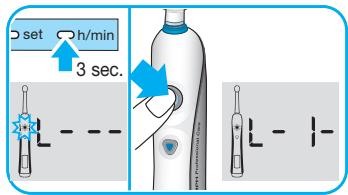
- Push the «h/min» button in the battery compartment for at least 3 seconds. The SmartGuide display unit shows «L----», indicating the «Learn» mode for synchronization is activated.
- Now you are requested by a flashing on/off button in the toothbrush icon on the SmartGuide display unit to turn the handle on. When doing so, the automatic synchronization process starts. It is finished when «L-1» is displayed.
- Then turn off the handle.
If you would like to assign a second handle to the same SmartGuide display unit, repeat the last two steps described above with the other handle. You can exit the «Learn» mode by pressing the «h/min» or «set» button. Otherwise the «Learn» mode will automatically end after 30 seconds.
Please note:
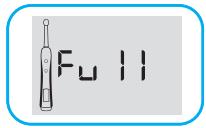
- A maximum of 2 handles can be synchronized with one SmartGuide display unit. After you synchronized the second handle, «Full» will be displayed.
- When changing batteries of the SmartGuide display unit, stored data will be erased. Therefore, please repeat the synchronization process every time you change the batteries.
Deactivating the radio transmission
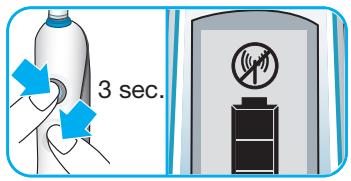
If you want to use or carry your toothbrush in surroundings where radio controlled appliances are not allowed (e.g. hospitals or aircraft), deactivate the radio transmission first. To do so, simultaneously press the on/off and mode
button for 3 seconds. The handle display shows the radio deactivation icon. If you want to reactivate the radio transmission, press both buttons again for 3 seconds and the display icon disappears.
Removing batteries
Remove fully discharged batteries of the SmartGuide display unit immediately and dispose of them according to local environmental regulations. Replace all batteries at the same time. Do not mix alkaline batteries with zinc carbon or rechargeable batteries.
Subject to change without notice.
This product conforms to the European Directives EMC 89/336/EEC and Low Voltage 2006/95/EC.

This appliance complies with the requirements covered by the European Directive 1999/5/EC. Receiver Class 3, Duty Cycle Class 3
This product contains rechargeable batteries. In the interest of protecting the environment, please do not dispose of the product in the household waste at the end of its useful life. Disposal can take place at an Oral-B Braun Service Centre or at appropriate collection points provided in your country.
Guarantee
We grant 2 years guarantee on the product commencing on the date of purchase. Within the guarantee period we will eliminate, free of charge, any defects in the appliance resulting from faults in materials or workmanship, either by repairing or replacing the complete appliance as we may choose. This guarantee extends to every country where this appliance is supplied by Braun or its appointed distributor.
This guarantee does not cover: damage due to improper use, normal wear or use, especially regarding the brush heads, as well as defects that have a negligible effect on the value or operation of the appliance. The guarantee becomes void if repairs are undertaken by unauthorised persons and if original Braun parts are not used.
To obtain service within the guarantee period, hand in or send the complete appliance with your sales receipt to an authorised Oral-B Braun Service Centre.
This guarantee in no way affects your rights under statutory law.
The 30-Day Challenge
Take the challenge! Experience the Oral-B Triumph difference!
Oral-B Triumph with SmartGuide is Oral-B's most technologically advanced rechargeable toothbrush for outstanding cleaning, natural whitening, gentle gum care and freshening of your mouth.
No wonder that Oral-B is the brand more dentists use themselves worldwide. In fact, we are so convinced you'll fall in love with your new toothbrush that we give you this risk-free offer. Try Oral-B Triumph with SmartGuide for 30 days, starting from the day of purchase. If you are not 100% satisfied, receive a full refund. No questions asked. Guaranteed.
For a full refund, please return your handle, refills, and charging unit with your original cash register receipt to the address below.
Great Britain / Ireland
For further details, please contact our customer service 0800 7311 792 to be referred to the authorized Oral-B Braun Service Centre closest to you.
Brand : BRAUN
Model : TRIUMPH PROFESSIONAL CARE
Category : Electric toothbrush