HP8565 Innergize - Solar bench Hapro - Free user manual and instructions
Find the device manual for free HP8565 Innergize Hapro in PDF.


| Product type | Sunbed (wellness solarium) |
| Brand | Hapro |
| Model | HP8565 Innergize |
| UV lamps | 2 UV lamps |
| Infrared lamps | 2 infrared lamps (1100 W each) |
| Main functions | Full-body tanning, partial tanning, infrared relaxation, localized heating, FM radio, sound atmospheres (seaside, forest, oriental garden, sound field), auxiliary MP3 player, natural fragrances, remote control |
| Power supply | Circuit protected by standard 16 A fuse or time-delay automatic circuit breaker |
| Tanning distance | Minimum 70 cm between UV filters and body; 90 cm between filters and lying surface |
| Maximum tanning duration | 19 hours (1140 minutes) per year |
| UV lamp lifespan | 750 hours (recommended replacement) |
| Usage counter | Integrated (displays lamp operating time) |
| Timer | Duration adjustment with rotary ring, digital display, session repeat, snooze function |
| Eye protection | Supplied UV protection goggles, compliant with directive 89/686/EEC class II |
| Overheating protection | Integrated automatic shutdown; restarts after cooling |
| Cleaning | Exterior: damp cloth. UV filters: soft cloth and denatured alcohol. Do not use abrasive products |
| Storage | Foldable in three steps to transport position; compact dimensions (not specified); storage under a bed or in a wardrobe |
| Warranty | 24 months (excluding lamps, starters, and wear parts) |
| Repairability | Replacement of lamps and parts by a Hapro Authorized Service Center only |
| Included accessories | Remote control, protective goggles, AUX cable, tape measure, fragrance cartridge (3 fragrances), Velcro strap, earphones (depending on model) |
| Safety instructions | Do not use in humid environment, respect distances, wear goggles, avoid overexposure, do not use if filters damaged |
Frequently Asked Questions - HP8565 Innergize Hapro
User questions about HP8565 Innergize Hapro
0 question about this device. Answer the ones you know or ask your own.
Ask a new question about this device
Download the instructions for your Solar bench in PDF format for free! Find your manual HP8565 Innergize - Hapro and take your electronic device back in hand. On this page are published all the documents necessary for the use of your device. HP8565 Innergize by Hapro.
USER MANUAL HP8565 Innergize Hapro
HP8550 / HP 8565
ENGLISH 3
DEUTSCH 16
NEDERLANDS 30
FRANÇAIS 44
ITALIANO 58
ESPAÑOL 72
РУССКИЙ 86
NORSK 101

Introduction
Congratulations on your purchase of the Hapro Innergize wellness solarium.
The combination of UV light and infrared warmth produces a natural, even and long-lasting tan. To enjoy relaxing warmth all over your body, the infrared lamps can also be used separately. Sounds of nature or your favourite music from your MP3 player enhance the sun-bathing experience. The HP8550 and HP8565 fold to a compact size in three simple steps to save valuable space. The HP8565 also features a remote control and an FM radio.
* HP8550 does not feature any sound options nor a separate infrared function.
* Just as with natural sunlight, overexposure must be avoided (see chapter 'Tanning and your health').
General description (Fig. 1)
A Handgrip
B Lamp unit
- 2 HPA UV lamps
- 2 Infrared lamps
© Measuring tape
D Storage compartment for protective goggles
E Fragrance cartridge
F Protective goggles
G Control panel (HP8550 only)
1 Time selection wheel
H Control panel (HP8565 only)
1 SNOOZE button
2 Time-selection ring
3 START/STOP button
4 Time display
5 Repeat button (○)
6 Pause button (II)
7 Volume dial
8 Sound selection button
9 Radio display (HP8565 only)
10 Function selection button
11 Radio tuning dial (HP8565 only)
Legs
J Remote control (HP8565 only)
1 SNOOZE button
2 START/STOP button
3 Time display
4 Repeat button (→)
5 Pause button (II)
6 Volume buttons (+/-)
7 Sound selection buttons ( ◀/▶)
K AUX socket
L Pouch for remote control (HP8565 only)
M Velcro cord wrap strip
N Stereo Active speakers
Dual push button
Important
Read this user manual carefully before you use the appliance and save it for future reference.
4 ENGLISH
- Check if the voltage indicated on the appliance corresponds to the mains voltage in your home before you connect the appliance.
- If the wall socket used to power the appliance has poor connections, the plug of the appliance becomes hot. Make sure you plug the appliance into a properly connected wall socket.
- The appliance must be connected to a circuit that is protected with a 16A standard fuse or a slow-blow automatic fuse.
- If the supply cord is damaged, it must be replaced by the manufacturer or service agent or a similarly qualified person in order to avoid a hazard.
- Water and electricity are a dangerous combination! Do not use this appliance in wet surroundings (e.g. in the bathroom or near a shower or swimming pool).
- If you have just been swimming or have just taken a shower, dry yourself thoroughly before using the appliance.
- Make sure children do not play with the appliance.
- Always unplug the appliance after use.
- Let the appliance cool down after use for approx. 15 minutes before you fold it back into transport position and store it.
- Only move the appliance when it is in transport position.
- Make sure the vents in the centre and at both ends of the lamp unit housing remain open during use.
- The UV filters become very hot when you use the appliance. Do not touch them.
- The appliance contains hinging parts, so be careful not to get your fingers stuck between these parts.
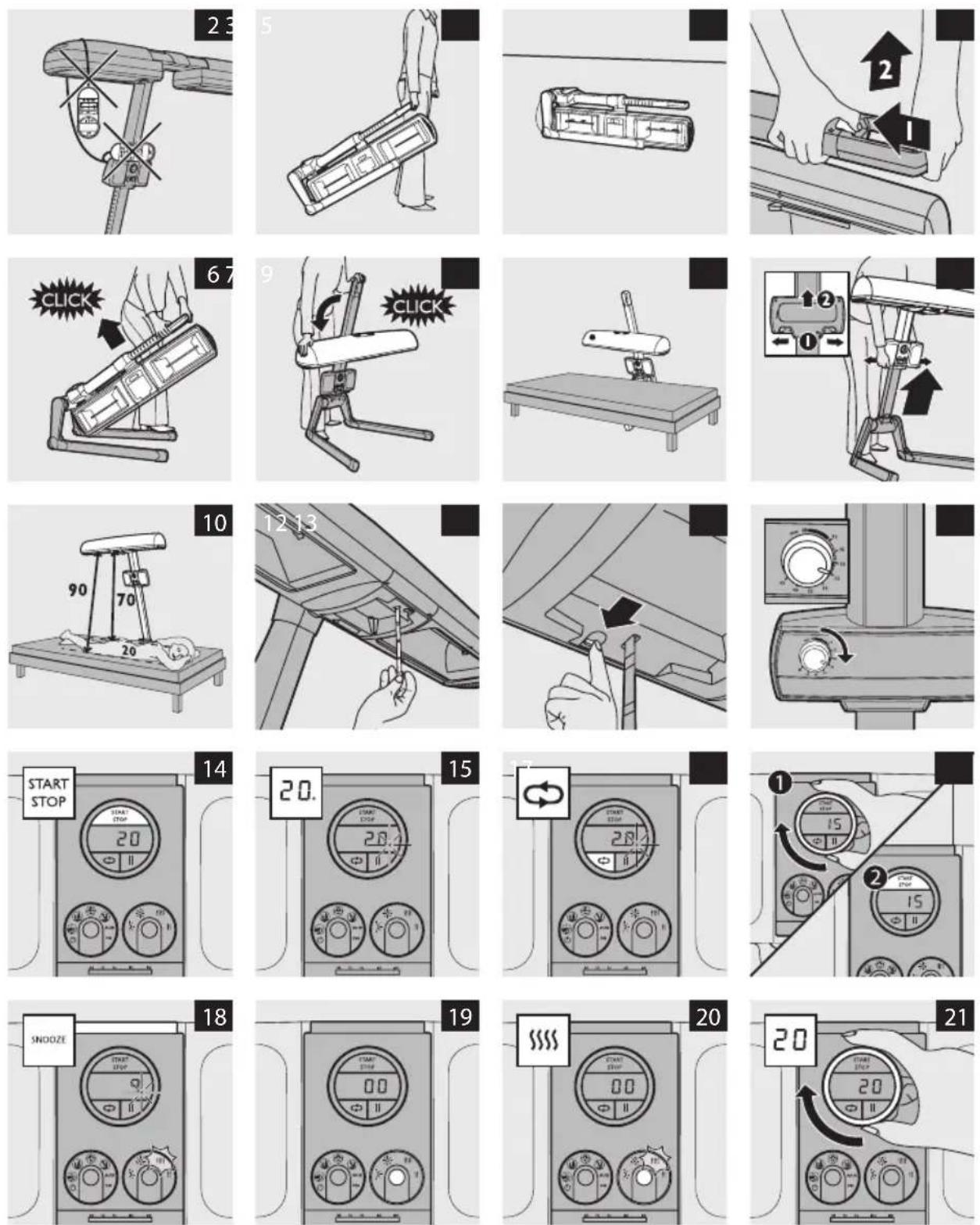
- Never hang the remote control over the lamp unit and never put it on top of the control panel to prevent overheating (Fig. 2).
- Always make sure that the remote control lies on the bed or that it is stored in the pouch together with its cord.
- Never attach the antenna wire to any part of the appliance.
- Do not choose a tanning distance of less than 70cm.
- Do not exceed the recommended tanning times and the maximum number of tanning hours (see section 'Tanning sessions: how often and how long?').
- Do not tan a particular part of your body more than once a day. Avoid excessive exposure to natural sunlight on the same day.
Take the following precautions:
- Protect your eyes during tanning using the UV goggles provided. Contact lenses and sun glasses are not a substitute for the goggles. The unprotected eye may develop surface inflammation. After excessive exposure in some cases damage may occur to the retina. Many repeated exposures to the unprotected eye can lead to cataracts.
- Remove cosmetics well in advance of exposure. Do not use any sunscreens or products that accelerate tanning.
- Do not take a tanning and/or relax session if you have a disease and/or use medication or cosmetics that increase the sensitivity of your skin. Be extra careful if you are hypersensitive to UV light or IR light. Consult your doctor in case of doubt.
- Do not sunbathe and use the appliance on the same day. The skin does not make any distinction between UV-rays from the sun or from a tanning appliance.
- Protect sensitive skin parts such as scars, tattoos and genitals from exposure.
- If persistent lumps or sores appear on the skin or if there are changes in pigmented moles, seek medical advice before resuming tanning.
- Never use the appliance when the control panel or the remote control (HP8565 only) is defective.
- Do not use the tanning appliance if the filter is broken or removed.
ENGLISH 5
- Make sure that non-users, especially children, are not present when the appliance is being operated.
Scent granules:
- Keep the scent granules out of the reach of children.
- Do not use the scent cartridge if you are allergic to scent. Consult your doctor in case of doubt.
- The scent granules are not edible.
- In case of eye contact with the scent granules, flush the eyes immediately with plenty of water.
A tanning appliance is not to be used by:
- Persons with reduced sensory and/or mental capacity.
- Persons lacking knowledge of or experience with tanning appliances, with the exception of individuals who are being supervised or have received instructions regarding the use of the tanning appliance by a person who assumes responsibility for their safety.
- Persons younger than 18.
- Persons who tend to freckle.
- Persons having abnormal discolored patches on skin.
- Persons having more than 16 moles (2 mm or more) on the body.
- Persons having atypical moles (defined as asymmetrical moles larger than 5 mm in diameter with variable pigmentation and irregular borders; in case of doubt, seek medical advice).
- Persons with a natural red hair color.
- Persons whose skin is already sunburned.
- Persons not able to tan at all or not able to tan without burning when exposed to the sun.
- Persons that burn easily when exposed to the sun.
- Persons having a history of frequent severe sunburn during childhood.
- Persons (previously) suffering from skin cancer or predisposed skin cancer.
- Persons having a first-degree relative with a history of melanoma.
- Persons under a doctor's care for diseases that involve photosensitivity and/or receiving photosensitizing medications.
General
- The appliance is fitted with an automatic protection against overheating. If the appliance is insufficiently cooled (e.g. because the vents are covered), the appliance switches off automatically. Once you have removed the cause of overheating and the appliance has cooled down, it switches on automatically again.
- If your skin feels taut after the tanning session, you can apply a moisturising cream.
- To acquire an even tan, lie straight below the lamp unit.
- Colours fade under the influence of the sun. The same effect may occur when you use this appliance.
- Do not expect the appliance to yield better results than the natural sun.
Electromagnetic fields (EMF)
This Hapro appliance complies with all standards regarding electromagnetic fields (EMF). If handled properly and according to the instructions in this user manual, the appliance is safe to use based on scientific evidence available today.
ENGLISH6
Cosmetics and medication
Cosmetics and medication can contain substances that can cause a phototoxic reaction if combined with UV radiation. The phototoxic chemicals occurring most frequently are:
| Demeclocycline | Hydrochinone | Oxytetracycline | Porfimer |
| Rolitetracycline | Etretinate | Tetracycline | Acitretine |
| Nalidixic acid | Isotretinoin | Azapropazone | Lomefloxacin |
| Tretinoin | Doxycycline | Etretinate | |
| Methoxsalen | Amiodarone | Tretinoin | |
| Monobenzone | Chlortetracycline | Hydrochinone |
Contact your dealer for a complete list of substances that can cause a phototoxic reaction.
Tanning and your health
The sun supplies various types of energy. Visible light enables us to see, ultraviolet (UV) light gives us a tan and the infrared (IR) light in sunrays provides the heat in which we like to bask. Just as with natural sunlight, the tanning process takes some time. The first effect only becomes visible after a few sessions (see section 'Tanning sessions: how often and how long?').
Overexposure to ultraviolet light (natural sunlight or artificial light from your tanning appliance) can cause sunburn.
Besides many other factors, such as overexposure to natural sunlight, incorrect and excessive use of a tanning appliance may increase the risk of skin and eye problems. The degree to which these effects occur is determined by the nature, intensity and duration of the exposure on the one hand and the sensitivity of the person involved on the other hand.
The more the skin and the eyes are exposed to UV light, the higher the risk of keratitis, conjunctivitis, damage to the retina, cataracts, premature skin ageing and the development of skin tumours will be. Some medications and cosmetics increase the sensitivity of the skin.
Therefore it is highly important:
- that you follow the instructions in chapter 'Important' and section 'Tanning sessions: how often and how long?'.
- that the tanning distance (distance between the UV filters and the body) is 70cm.
- that you do not exceed the maximum number of tanning hours per year (i.e. 19 hours or 1140 minutes).
- that you always wear the goggles provided while you are tanning.
Tanning sessions: how often and how long?
- Do not take more than one tanning session a day, over a period of 5 to 10 days.
- Take a break of at least 48 hours between the first and the second session.
- After this 5 to 10-day course, we advise you to stop tanning for a while.
- Approximately one month after a course, your skin will have lost much of its tan. You can then start a new course.
- If you want to keep your tan, do not stop tanning after the course, but continue with one or two tanning sessions a week.
- Whether you choose to stop tanning for a while or whether you continue tanning on a lower frequency, always keep in mind that you must not exceed the maximum number of tanning hours.
- For this appliance, the maximum is 19 tanning hours (= 1140 minutes) a year.
- If you have stopped a course and have not continued with it for a long period, do not proceed with the remaining number of sessions of this course but start a new course.
ENGLISH 7
Example
Suppose you take a 10-day tanning course, with a 9-minute session on the first day and a 20-minute session on the nine following days.
The entire course then lasts (1 x 9 minutes) + (9 x 20 minutes) = 189 minutes.
This means you can take 6 of these courses in one year, as 6 x 189 minutes = 1134 minutes.
Of course, the maximum number of tanning hours applies to each separate part or side of the body that is tanned (e.g. the back or front of the body).
Tip: For a beautiful all-over tan, turn your body slightly during the session so that the sides of your body are better exposed to the tanning light.
Tip: If your skin feels slightly taut after tanning, you can apply a moisturising cream.
Tip: If you use function → (HP8565 only), we advise you to extend the tanning sessions by approximately 5 minutes. This does not apply to the first tanning session, which must not last longer than 9 minutes.
Table
As the table shows, the first session of a tanning course must always last 9 minutes, irrespective of the sensitivity of the skin.
If you think that the sessions are too long for you (e.g. because your skin feels taut and tender after the session), we advise you to reduce the length of the sessions by e.g. 5 minutes.
| Duration of the tanning session for each separate part of the body | For persons with very sensitive skin | For persons with normal sensitive skin | For persons with less sensitive skin |
| 1st session 9 minutes 9 minutes 9 minutes | |||
| break of at least 48 hours | break of at least 48 hours | break of at least 48 hours | break of at least 48 hours |
| 2nd session 10-15 minutes 20-25 minutes 30-35 minutes* | |||
| 3rd session 10-15 minutes 20-25 minutes 30-35 minutes* | |||
| 4th session 10-15 minutes 20-25 minutes 30-35 minutes* | |||
| 5th session 10-15 minutes 20-25 minutes 30-35 minutes* | |||
| 6th session 10-15 minutes 20-25 minutes 30-35 minutes* | |||
| 7th session 10-15 minutes 20-25 minutes 30-35 minutes* | |||
| 8th session 10-15 minutes 20-25 minutes 30-35 minutes* | |||
| 9th session 10-15 minutes 20-25 minutes 30-35 minutes* | |||
| 10th session 10-15 minutes 20-25 minutes 30-35 minutes* | |||
*) or longer, depending on your skin sensitivity.
Relaxation and your health (HP8565 only)
Warmth has a relaxing effect. Think of what a hot bath or lazing in the sunshine does to you. You can enjoy the same relaxing effect by selecting the relax function || or ||.
Bear in mind the following when you have a relax session:
- Avoid getting too hot. Increase the distance between yourself and the lamps, if necessary.
ENGLISH8
- If your head gets too hot, cover it or move your body so that less heat is emitted towards your head.
- Close your eyes during a relax session.
- Do not let the relax session last too long (see section 'Relax sessions: how often and how long?').
Relax sessions: how often and how long?
If you want to pamper your muscles or joints or want to enjoy the relaxing warmth of the full-body solarium without getting a tan, only switch on the infrared lamps to get a deep relaxation. If you want to continue enjoying the full-body solarium's warmth after your tanning session, switch on the infrared lamps only for a relax session.
You can take infrared relax sessions several times a day (e.g. 30 minutes in the morning and in the evening).
Preparing for use
Note: You can easily move and store the appliance in transport position (Fig. 3).
1 Put the appliance on the floor as shown in the figure (Fig. 4).
Make sure there is sufficient room on either side of the appliance to allow the legs to move outwards.
2 Press the dual push button in the handgrip (1) and pull the stand slightly up (2). Then release the push button (Fig. 5).
On a smooth floor, the legs of the appliance automatically move outwards. If the floor is not smooth, e.g. a carpeted floor, you may have to put your foot on one of the legs to allow the other leg to move outwards.
3 Pull up the stand by the handgrip as far as it goes. (Fig. 6)
The stand locks into position with a click.
4 Turn the lamp unit in the direction indicated in the figure. (Fig. 7)
This requires some force at first. Push the lamp unit in the direction indicated until it locks into position with a click.
Note: You can only switch on the appliance for a tanning or relax session if the lamp unit is in the correct position.
5 Push the legs of the appliance under the bed or sofa you intend to lie down on. The lamps for functions ✗ and ∥ are on the marked side of the appliance (HP8565 only). (Fig. 8)
6 Press the release buttons in the recesses of the control panel (1) and push the control panel upwards along the stand (2). Let go of the release buttons when the lamp unit is at the required height. (Fig. 9)
- The distance between the UV filters and your body must be 70cm. The distance between the UV filters and the surface on which you lie (e.g. a bed) must be 90cm. (Fig. 10)
- Pull out the measuring tape to determine whether the appliance is at the required height. (Fig. 11)
- The measuring tape automatically rewinds when you operate the red tab. (Fig. 12)
Using the appliance
Tanning or relaxing (HP8550)
1 Fully unwind the mains cord.
2 Put the plug in the wall socket.
ENGLISH 9
3 Consult the chapters 'Tanning and your health' and 'Relaxation and your health' for the correct tanning or relax time.
4 Attach the string to the protective goggles provided.
5 Adjust the string to the length you find most comfortable.
6 Put on the protective goggles.
- Only use these protective goggles when you tan with a Hapro tanning appliance. Do not use them for other purposes.
- The protective goggles comply with protection class II according to directive 89/686/EEC.
7 Lie down straight below the lamp unit of the appliance.
8 Set the timer to the appropriate time for the session. (Fig. 13)
Note: It can take a few seconds for the lamps to go on. This is normal.
- The appliance beeps during the last minute of the session.
- During this minute, you can reset the timer to tan the other side of your body. If you reset the timer during this minute, you avoid the 3-minute waiting time which is necessary to let the tanning lamps cool down after they have switched off.
Tanning or relaxing (HP8565)
1 Fully unwind the mains cord.
2 Put the plug in the wall socket.
3 Select a function by pressing the function selection button (see section 'Adjusting functions').
4 Turn the time-selection ring to set the time (see section 'Setting the time for a tanning or relax session').
5 Attach the string to the protective goggles provided.
6 Adjust the string to the length you find most comfortable.
7 Put on the protective goggles.
- Only use these protective goggles when you tan with a Hapro tanning appliance. Do not use them for other purposes.
- The protective goggles comply with protection class II according to directive 89/686/EEC.
8 Lie down straight below the lamp unit of the appliance.
9 Press the START/STOP button to switch on the tanning lamps or the infrared lamps (Fig. 14).
Note: It can take a few seconds for the lamps to go on. This is normal.
10 A flashing dot appears on the display next to the time. (Fig. 15)
The countdown of the set tanning or relax time starts.
Last minute
The appliance beeps during the last minute of the session.
- During the last minute, you can repeat the set time. Press the repeat button ( ⇌ ). (Fig. 16)
Note: The display shows the set time and starts to count down. The appliance stops beeping.
- During the last minute, you can set a new time. Turn the time-selection ring to the desired time (1) and then press the START/STOP button (2). (Fig. 17)
ENGLISH10
Note: By setting a new time, you can avoid the 3-minute waiting time which is necessary to let the tanning lamps cool down after they have switched off. This 3-minute waiting time does not apply to the infrared lamps.
- During the last minute of the tanning or relax session, you can press the SNOOZE button to enjoy the warmth of the infrared lamps for 9 more minutes. You can press the SNOOZE button as often as you like. (Fig. 18)
Adjusting functions
- The function selection button shows the different functions. (Fig. 19)
1 Press the function selection button to switch from function to function. (Fig. 20)
The symbol that turns yellow shows the function you have selected.
2 Choose:
- symbol ☀ if you want to tan your whole body
- symbol ✦ if you want to tan a specific part of your body*
- symbol if you want to relax
- symbol ∥ if you want to warm up a part of your body*
* One side of the lamp unit goes on.
Setting the time for a tanning or relax session.
1 Consult the chapters 'Tanning and your health' and 'Relaxation and your health' for the correct tanning or relax time.
2 Turn the time-selection ring to set the time of the tanning or relax session (Fig. 21). Turn the ring clockwise to increase the time and turn it anticlockwise to decrease the time.
Interrupting the tanning or relax session
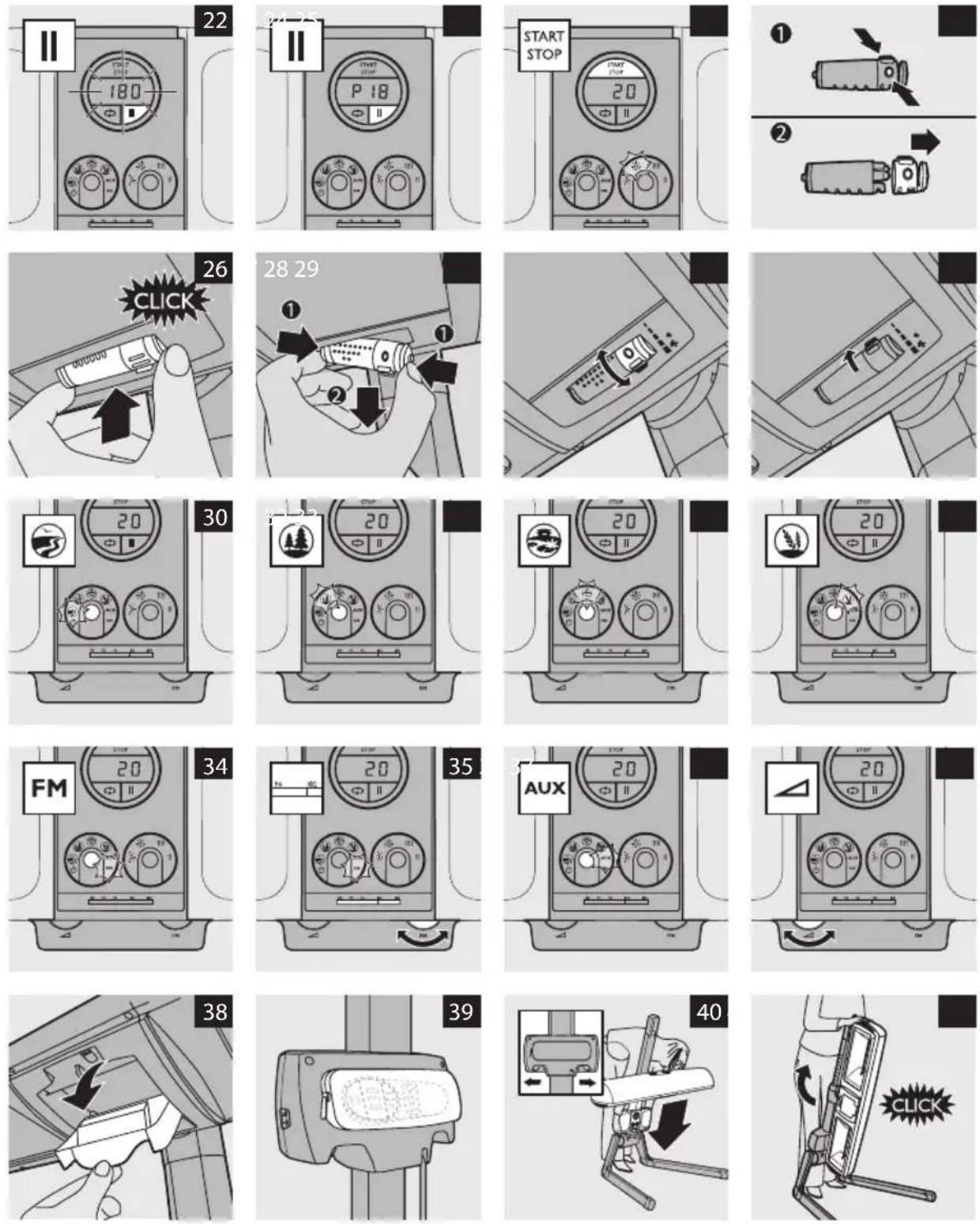
- To interrupt a tanning session, press the pause button (II). (Fig. 22) The lamps go out. The cool-down time of 3 minutes flashes on the display and counts down. During these 3 minutes, the lamps cool down. When the time has counted down to 0 and stops flashing, you can switch the appliance back on. Press the START/STOP button or the pause button (II) to start the countdown of the remaining session time.
- To interrupt a relax session, press the pause button (II). (Fig. 23) The lamps are switched off and the pause symbol and the remaining time appear on the display. The waiting time does not apply to the infrared lamps, so you can switch the appliance back on whenever you want. Press the STOP/START button or the pause button (II) to start the countdown of the remaining time.
Changing the tanning or relax time during a session
- To change the set time during a tanning session, press the START/STOP button (Fig. 24). The lamps are switched off. Set a new time with the time-selection ring. Wait until the set time stops flashing (this takes 3 minutes because the lamps have to cool down first). Then press the START/STOP button to switch the appliance back on.
- To change the set time during a relax session, turn the time-selection ring. The cool-down time of 3 minutes does not apply to the infrared lamps.
Remote control (HP8565 only)
Use the remote control to perform the following actions. See also section 'Tanning or relaxing (HP8565)':
- start/stop the session
- see the remaining session time
- pause the session
- repeat the session
- snooze
You can also use the remote control to select a sound and to set the volume. See also section 'Stereo Active Speakers & ambient sounds (HP8565 only)':
1 Press the ◀ or ▶ button to select a sound.
2 Press the + or - button to set the volume.
Natural fragrances
During the tanning or relax session, you can enjoy your favourite fragrance. You can choose from three different fragrances.
Note: The scent granules have been specially developed for use in this appliance. Do not use other granules.
Filling the cartridge
1 Pull the cap off the cartridge while you apply pressure on the small pressing points. (Fig. 25)
2 Open the sachet at the small opening at the top.
3 Fill the cartridge with the content of one whole sachet of scent granules.
4 Put the cap back onto the cartridge ('click').
Placing or removing the cartridge
1 Place the cartridge in the holder. It only fits in one way and locks in place with a click. (Fig. 26)
2 To remove the cartridge, place your thumb and index finger on the sides of the cartridge. Press on the disc to remove the cartridge from the holder. (Fig. 27)
Setting the fragrance level
1 Turn the cartridge to set the fragrance level. (Fig. 28)
Turn the cartridge in the direction of the large flower symbol to increase the fragrance level. Turn it in the opposite direction to reduce the fragrance level.
2 When you store the appliance or do not want it to emit a fragrance, turn the cartridge away from the large flower symbol as far as it goes. (Fig. 29)
The holes are no longer visible.
3 Replace the granules when the cartridge no longer emits any fragrance. Replacement packages with 3 sachets of scent granules are available under type number HB080.
Please bear in mind that the fragrance level depends on a number of factors, such as the following:
- Habituation may cause fragrances to be perceived less or not at all, but this is normal.
- When you lie on your belly, the fragrance is less noticeable than when you lie on your back.
- Airflows in the room where you use the appliance may also affect the fragrance level.
- Your personal condition may also influence the degree to which you perceive the fragrance.
Stereo Active speakers & ambient sounds (HP8565 only)
During the tanning or relax session, you can choose an ambient sound that appeals to you and that helps you relax optimally. There are four different ambient sounds to choose from. You can also listen to your own favourite music on the built-in radio (HP8565 only). You can also connect your own audio player (e.g. CD/MP3 or radio) to the full-body solarium.
ENGLISH12
Listening to ambient sounds
1 Press the sound selection button one or more times to select the preferred sound. The selected sound symbol turns yellow.
- Seashore sound (Fig. 30)
- Forest sound (Fig. 31)
- Oriental garden sound (Fig. 32)
- Field sound (Fig. 33)
Tip: To listen to the sounds undisturbed by other background noises, you can use headphones (not included).
Note: The ambient sounds are meant to be background sounds. This means that they should not be too dominant. The relaxing effect is optimal when the sounds are just audible. Avoid high sound levels.
Listening to the radio (HP8565 only)
1 Before you select the radio, take the antenna wire from the pouch and unwind it. We advise you to let it hang down from the pouch.
2 To select the radio, press the sound selection button until the FM symbol turns yellow. (Fig. 34)
3 To select your favourite radio station, turn the radio tuning dial (Fig. 35).
Listening to your own favourite music
To connect your own audio player (e.g. CD/MP3 or radio) to the appliance, use the cable with 2 jack plugs supplied with the appliance.
1 Insert one jack plug into the AUX socket on the right side of the control panel.
2 Insert the other jack plug into the headphone socket of your audio player (e.g. CD, MP3 or radio).
3 Press the sound selection button until the AUX symbol lights up. (Fig. 36)
The Stereo Active Speakers amplify the signal according to your preference.
Adjusting the volume
1 Turn the volume dial to adjust the volume. (Fig. 37)
Cleaning
Never use scouring pads, abrasive cleaning agents or aggressive liquids such as petrol or acetone to clean the appliance.
Do not let any water run into the appliance.
1 Unplug the appliance and let it cool down before you clean it.
2 Clean the outside of the appliance with a damp cloth.
3 Clean the outside of the UV filters with a soft cloth sprinkled with some methylated spirits.
4 Clean the protective goggles with a moist cloth.
Storage
1 Let the appliance cool down for 15 minutes before you put it in transport position and store it.
ENGLISH 13
2 Store the protective goggles in the storage compartment between the two lamps. (Fig. 38)
3 Put the remote control and the cord in the pouch on the back of the control panel (HP8565 only). (Fig. 39)
4 Make sure the cord does not get stuck between parts of the appliance when you put the appliance in transport position.
5 Turn the appliance away from the bed or sofa and make sure there is enough space around the appliance to collapse it.
6 Press the two release buttons in the recesses of the control panel and slide the control panel down the stand as far as it goes. (Fig. 40)
7 Turn the lamp unit in the direction of the arrow. (Fig. 41)
You hear a click when the lamp unit locks in vertical position.
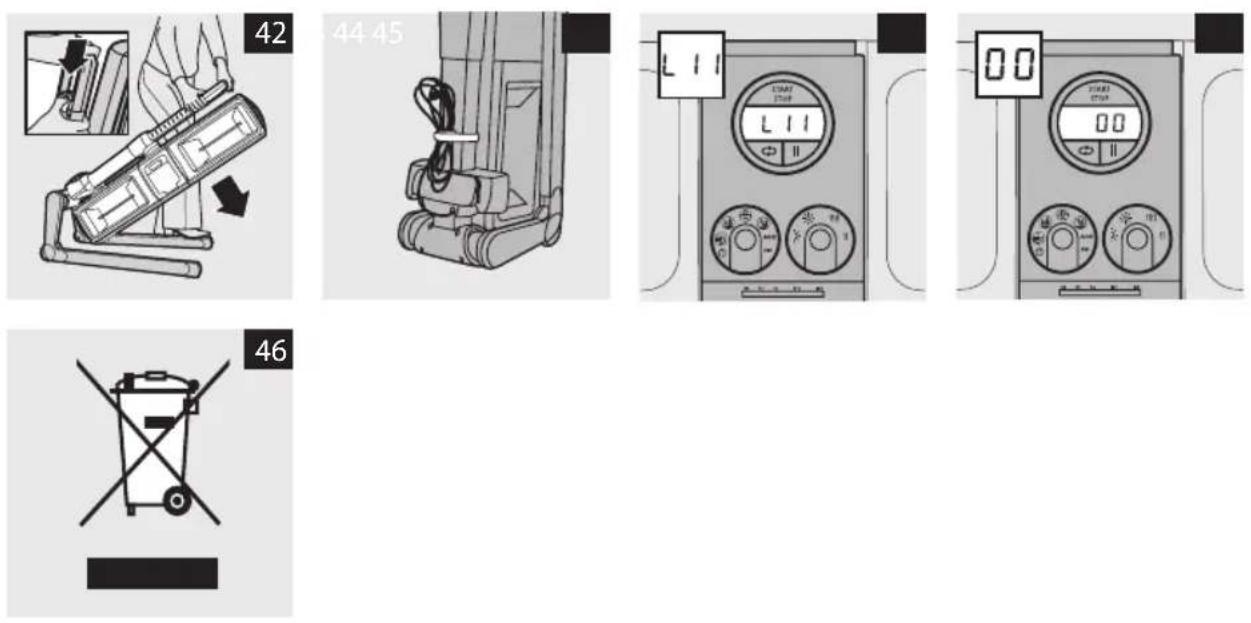
8 Pull the stand slightly backwards and then press the dual push button. Lower the stand slowly until the lamp unit rests on the floor between the legs. (Fig. 42)
9 Wind the cord and fasten it with the Velcro cord wrap strip. (Fig. 43)
You can store the appliance in a wardrobe or under a bed.
Replacement
Tanning lamps
Always have the tanning lamps and starters replaced by a service centre authorised by Hapro. Only they have the knowledge and skills required for this job and the original spare parts for appliance.
The light that the tanning lamps emit becomes less bright in time (i.e. after a few years in case of normal use). When this happens, you notice a decrease in the tanning capacity of the appliance.
- After 750 operating hours, the tanning capacity of the lamps has decreased so much that replacement of the tanning lamps is advisable.
- HP8565: the appliance has a counter that records the operating hours of the tanning lamps. After 750 operating hours, an L appears on the left-hand side of the display to indicate that replacement of the tanning lamps is advisable (Fig. 44).
Note: Of course, you can choose to postpone replacement for a while by setting a longer tanning time.
Viewing the operating hours of the tanning lamps
1 Set the time to 00 and press the repeat button (☐) at least 2 seconds to make the operating hours appear on the display. The maximum number of hours that can be displayed is 999. When this value has been reached, the counter starts to count up from 000 again.
Note: The operating hours disappear from the display as soon as you release the repeat button (⇔).
HP8565: removing the L from display
To remove the L from the display:
1 Make sure time indicated on the display is 00.
2 Press and hold down the START/STOP button.
3 Press and release the repeat button (☐).
ENGLISH14
4 Press and release the pause button (II).
5 Press and release the repeat button ( Ⓤ ).
6 Press and release the repeat button ( Ⓧ ).
7 Release the START/STOP button (Fig. 45).
The L disappears from the display.
Other parts
Have the infrared lamps (1100W) and the UV filters replaced by a service centre authorised by Hapro. Only they have the knowledge and skills required for this job and the original spare parts for the appliance.
- Have the infrared lamps replaced when they stop functioning.
- The UV filters protect against exposure to undesired UV light. It is therefore important to have a damaged or broken filter replaced right away.
- Additional or replacement goggles can be ordered at your local dealer.
Ordering scent granules
You can obtain scent refill packages with 3 sachets of scent granules at your local dealer.
Environment
- The lamps of the appliance contain substances that can be harmful to the environment. When you discard the lamps, do not throw them away with the normal household waste but hand them in at an official collection point.
- Do not throw away the appliance with the normal household waste at the end of its life, but hand it in at an official collection point for recycling. By doing this, you help to preserve the environment (Fig. 46).
Guarantee & service
All defects resulting from material or production faults and which occur within the warranty period, will be repaired free of charge on production of the original sales invoice. The warranty period is 24 months. For warranty queries, please contact your dealer.
Your new tanning appliance is intended for domestic use and not for commercial purposes. Damage as a result of commercial use, as well as tubes, starters, protective supports and acrylic panels, are not covered by the Hapro warranty.
Malfunctioning as a result of assembly and or installation faults, improper use, lightning damage and non-original parts are excluded from the Hapro warranty.
Check carefully if the equipment has been installed properly before claiming under the warranty. In case of an unwarranted claim, you will be charged service costs.
Guarantee restrictions
The terms of the international guarantee do not cover the tanning lamps and the infrared lamps.
Troubleshooting
If problems should arise with this appliance and you are unable to solve them by means of the information below, please contact the nearest Hapro dealer..
| Problem Solution | |
| The appliance does not work. | The plug may not be inserted properly in the wall socket. Put the plug properly in the wall socket. |
| There may be a power failure. Test if the power supply works by connecting another appliance. | |
| The tanning lamps may still be too hot to go on. Let them cool down for 3 minutes first. | |
| The overheat protection may have switched off the appliance automatically because it overheated. Remove the cause of overheating (e.g. a towel that blocks one or more vents). Let the appliance cool down for a while and then switch the appliance back on. | |
| Make sure the lamp unit is in the right position. See chapter ‘Preparing for use’. | |
| The top of the control panel becomes hot during use. | The lamps heat up the top of the control panel. This is normal. |
| The fuse of the circuit to which the appliance is connected cuts off the power when I switch on or use the appliance. | The fuse of the circuit to which the tanning appliance is connected must be a 16A standard fuse or a slow-blow automatic fuse. You may also have connected too many appliances to the same circuit. |
| The tanning results not as good as I expected. | Perhaps you use an extension cord that is too long and/or does not have the correct current rating. Consult your dealer. Our general advice is not to use an extension cord. |
| You may have followed a tanning course that is not appropriate for your skin type. Check the table in chapter ‘Tanning and your health’, section ‘Tanning sessions: how often and how long?’. | |
| The distance between the lamps and the surface you lie on may be larger than prescribed. See chapter ‘Preparing for use’. | |
| When the lamps have been used for a long time, the tanning capacity decreases. This effect only becomes noticeable after several years. To solve this problem, select a slightly longer tanning time or have the lamps replaced. HP8565 only: after 750 operating hours, an L appears on the display which tells you that it is advisable to have the lamps replaced. | |
| The tanning result depends on your skin type and the tanning course you are taking. The first effect only becomes visible after a few sessions. | |
| The appliance does not produce enough fragrance. | Read the last part of section ‘Natural fragrances’ in chapter ‘Using the appliance’. |
| The display shows ‘Err’ (HP8565 only) and/or the appliance beeps. | Stop using the appliance and unplug it. Wait two seconds and put the plug back into the wall socket. Contact your dealer or a Hapro service centre if the problem reoccurs. |
Einführung
Declaration of Confirmity

Manufacturer
Hapro International b.v.
Fleerbosseweg 33
4420 AC Kapelle, The Netherlands
www.hapro.com
Product identification
Hapro Innergize HP8550; Hapro Innergize HP8565
This document is valid for all above mentioned
types produced from 01/02/2011.
Means of conformity
The products are in conformity with Directive 2004/108/EC of the European
Community and the Low-Voltage Directive 2006/95/EC of the European Community.
Testing, Electro-Magnetic Compatibility
Carried out by: Hapro Laboratory
Fleerbosseweg 33
4420 AC Kapelle, The Netherlands
Standards used:
EN 61000-6-3:2007; EN 55022:2006; EN 55014-1:2006;
EN 61000-6-1:2007; EN 61000-4-2:1995+A1:1998,A2:2001
EN 61000-4-3:2006; EN 61000-4-4:2004;
EN 61000-4-5:2006; EN 61000-4-6:1996+A1:2001;
Testing, Low-Voltage Directive
Carried out by: Hapro Laboratory
Fleerbosseweg 33
4420 AC Kapelle, The Netherlands
Standards used:
EN 62233:2008; EN 60335-1:2002;
EN 60335-2-27:2003+A1:2008,A2:2008
EN 62471
Representative
Name: D.C. van de Linde
Function: Managing Director
Date:
Signature:
CE 34053
unción: Director general
Fecha: 04/04/2011
Firma:
CE
34053_016
Производитель
Hapro International b.v.
Fleerbosseweg 33
4420 AC Kapelle, The Netherlands
www.hapro.com
100% recycled paper 100% papier recyclé



- INTRODUCTION
- GENERAL DESCRIPTION (FIG. 1)
- IMPORTANT
- 4 ENGLISH
- TAKE THE FOLLOWING PRECAUTIONS
- ENGLISH 5
- SCENT GRANULES
- A TANNING APPLIANCE IS NOT TO BE USED BY
- GENERAL
- ELECTROMAGNETIC FIELDS (EMF)
- ENGLISH6
- COSMETICS AND MEDICATION
- TANNING AND YOUR HEALTH
- TANNING SESSIONS: HOW OFTEN AND HOW LONG
- ENGLISH 7
- EXAMPLE
- TABLE
- RELAXATION AND YOUR HEALTH (HP8565 ONLY)
- ENGLISH8
- RELAX SESSIONS: HOW OFTEN AND HOW LONG
- PREPARING FOR USE
- USING THE APPLIANCE
- TANNING OR RELAXING (HP8550)
- ENGLISH 9
- TANNING OR RELAXING (HP8565)
- LAST MINUTE
- ENGLISH10
- ADJUSTING FUNCTIONS
- INTERRUPTING THE TANNING OR RELAX SESSION
- CHANGING THE TANNING OR RELAX TIME DURING A SESSION
- REMOTE CONTROL (HP8565 ONLY)
- NATURAL FRAGRANCES
- FILLING THE CARTRIDGE
- PLACING OR REMOVING THE CARTRIDGE
- SETTING THE FRAGRANCE LEVEL
- STEREO ACTIVE SPEAKERS & AMBIENT SOUNDS (HP8565 ONLY)
- ENGLISH12
- LISTENING TO AMBIENT SOUNDS
- LISTENING TO THE RADIO (HP8565 ONLY)
- LISTENING TO YOUR OWN FAVOURITE MUSIC
- ADJUSTING THE VOLUME
- CLEANING
- STORAGE
- ENGLISH 13
- REPLACEMENT
- TANNING LAMPS
- VIEWING THE OPERATING HOURS OF THE TANNING LAMPS
- HP8565: REMOVING THE L FROM DISPLAY
- ENGLISH14
- OTHER PARTS
- ORDERING SCENT GRANULES
- ENVIRONMENT
- GUARANTEE & SERVICE
- GUARANTEE RESTRICTIONS
- TROUBLESHOOTING
- EINFÜHRUNG
- DECLARATION OF CONFIRMITY
- MANUFACTURER
- PRODUCT IDENTIFICATION
- MEANS OF CONFORMITY
- TESTING, ELECTRO-MAGNETIC COMPATIBILITY
- TESTING, LOW-VOLTAGE DIRECTIVE
- REPRESENTATIVE
- ПРОИЗВОДИТЕЛЬ
Brand : Hapro
Model : HP8565 Innergize
Category : Solar bench