USER MANUAL FPT-AG02G TOSHIBA
Leading Innovation >>>
FPT-AG02G
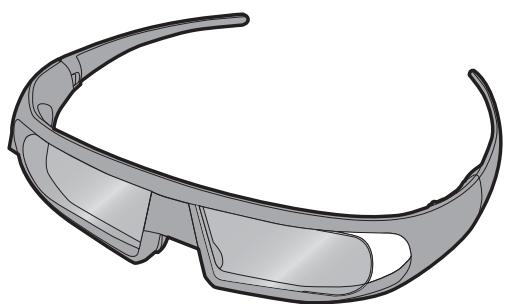
natural_image
Illustration of a modern smart glasses with curved lenses (no text or symbols)
© 2011 TOSHIBA CORPORATION

natural_image
Simple line icon of an open book with a lowercase 'i' in the center, no text or symbols present.
TOSHIBA
Leading Innovation >>>
English
User Manual
3D glasses
(FPT-AG02G)
Contents
Safety Precautions.... 2
Each part's name and function .... 3
Enjoying 3D images....4
Charging the battery....4
Specifications...... 5


English
Safety Precautions
Carefully read "When using the 3D glasses" in "Installation and important information" inscribed in User Manual which came with the TV.
Warning
About handling the 3D glasses
- Do not leave the 3D glasses or the accessories within the reach of small children.
Inhaling or swallowing them may cause suffocation or lesions in the stomach wall. If swallowed, consult a doctor immediately.
- Do not repair, modify, or disassemble the 3D glasses by yourself.
Doing so may cause a fire or cause you to become indisposed while viewing 3D images.
Contact your dealer for repair of your 3D glasses.
- Do not expose the glasses to excessive heat such as sunshine, fire, or the like.
- If the 3D glasses become extremely hot or emit an unusual odor or smoke during charging or use, turn off the power immediately.
Continuing to use them may cause cracking or fire.
Wait until they cool down, and contact the shop where you purchased the product.
Caution
About handling the 3D glasses
- Do not use the 3D glasses if they are not working properly or broken.
Continuing to use them in such a state may cause injury, eye strain, or indisposition.
Do not use the 3D glasses if they are broken or have any cracks.
- Do not stand or walk while wearing 3D glasses.
You may lose your balance which could result in falls or other accidents.
- Do not wear the 3D glasses for any purpose other than viewing 3D programming.
3D glasses do not function as sunglasses.
- Do not scratch the surface of the lenses with sharp objects.
• Do not drop or bend the 3D glasses.
• If your nose or temple turns red, or you feel pain or discomfort, stop using the 3D glasses.
Such symptoms as above may occur if you keep wearing them for a long time, which may also cause indisposition.
- Be careful not to pinch your fingers in the hinge of the 3D glasses.
Each part's name and function
English
Lens (liquid-crystal shutter)
A right and left liquid-crystal shutter opens and closes alternately with the images for the left eye and for the right eye alternately projected on the television screen. In this way, 3D images are reproduced.
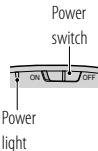
Power switch and
power light
Turns on or off the power of 3D glasses with the switch.
---When working, the power light blinks once every 2 seconds.
---When the power is turned off, the power light goes out.
Infrared
reception part
Receives the infrared signal for the liquid-crystal shutter control sent from the television.
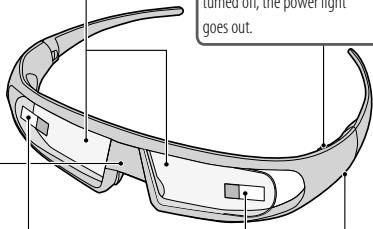
Protective films
Peel these off before beginning use.
USB terminal
When charging the battery, connect to the TV with the battery charge cable.

English
Enjoying 3D images
Note:
Compatible with Toshiba 3D TVs only.
In addition to Compatible Toshiba 3D TV, viewing 3D programming may require the following (Please refer to the Toshiba 3D TV):
• Compatible 3D Playback Device and compatible 3D content or other 3D Source.
• 3D Capable HDMI Cable.
1 Setting television so that 3D images will be shown properly.
• See the television User Manual.
2 Turn the 3D glasses on with the power switch.
3 If 3D images are not displayed correctly, adjust the TV settings.
• See the television User Manual.
Note:
- If the infrared data communication between the television and 3D glasses is lost for 5 minutes, the 3D glasses turn off automatically to preserve battery life.
• The use of 3D glasses could interfere with other IR communication devices.
• Other IR communication devices may cause the 3D glasses not to work correctly.
Charging the battery
If the 3D glasses are turned on while the battery power is low, the power light will blink 5 times. (If the battery is dead, the power light will not blink or light.)
- When the battery is charged, the power light will light up for 2 seconds.
1 Turn the 3D glasses off with the power switch, and connect to the TV with the battery charge cable (supplied).
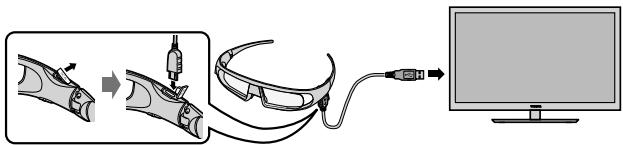
Note:
• If the 3D glasses are turned on, the battery will not charge.
- When the TV is turned off or in standby mode, the battery will be not charged.
- When charging the battery the use of a USB cable other than the battery charge cable supplied is not covered by warranty.
2 The power light will light up.
3 When the light goes out, the charging is completed.
Note:
• It takes approximately two hours to charge the battery.
- If the usage time is extremely short even after the battery has been charged fully, the battery may be worn out. Contact your dealer.
Specifications
3D method Liquid Crystal Shutter
Dimensions Width: 173 mm
Height: 42 mm
Depth: 173 mm
Operating temperature 32°F - 104°F (0°C - 40°C)
Mass (weight) Approx. 35 g
Material Frame: Resin
Lens: Liquid crystal glass
Battery Lithium-ion polymer rechargeable battery
Battery life 23 hours
* The battery operating time may become shorter depending on the usage condition or environment.
• The specification may change without notice.
CAUTION:
Danger of explosion if battery is incorrectly disposed of.
Disposal...
Disposal of products
The crossed out wheeled dust bin symbol indicates that products must be collected and disposed of separately from household waste. Integrated batteries and accumulators can be disposed of with the product. They will be separated at the recycling centres.
The black bar indicates that the product was placed on the market after August 13, 2005.
By participating in separate collection of products and batteries, you will help to assure the proper disposal of products and batteries and thus help to prevent potential negative consequences for the environment and human health.
For more detailed information about the collection and recycling programmes available in your country, please contact your local city office or the shop where you purchased the product.
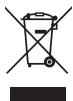
Disposal of batteries and/or accumulators
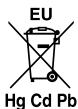
The crossed out wheeled dust bin symbol indicates that batteries and/or accumulators must be collected and disposed of separately from household waste.
If the battery or accumulator contains more than the specified values of lead (Pb), mercury (Hg), and/or cadmium (Cd) defined in the Battery Directive (2006/66/EC), then the chemical symbols for lead (Pb), mercury (Hg) and/or cadmium (Cd) will appear below the crossed out wheeled dust bin symbol.
By participating in separate collection of batteries, you will help to assure the proper disposal of products and batteries and thus help to prevent potential negative consequences for the environment and human health.
For more detailed information about the collection and recycling programmes available in your country, please contact your local city office or the shop where you purchased the product.
© TOSHIBA Television Central Europe Sp. z o.o.
All rights reserved.
Reproduction in whole or part without written permission is strictly prohibited.
TOSHIBA Television Central Europe Sp. z o.o.
ul. Pokoju 1, Biskupice Podgórne, 55-040 Kobierzyce, Poland
TOSHIBA
Leading Innovation >>>
Mode d'emploi
Lunettes 3D
(FPT-AG02G)
Français
Sommaire
4
Remarque:
© TOSHIBA Television Central Europe Sp. z o.o.
TOSHIBA Television Central Europe Sp. z o.o.
ul. Pokoju 1, Biskupice Podgórne, 55-040 Kobierzyce, Poland
TOSHIBA
Leading Innovation >>>
Bedienungsanleitung
3D-Brille
(FPT-AG02G)
Deutsch
Inhalt
4


Hinweis:
© TOSHIBA Television Central Europe Sp. z o.o.
TOSHIBA Television Central Europe Sp. z o.o.
ul. Pokoju 1, Biskupice Podgórne, 55-040 Kobierzyce, Poland
TOSHIBA
Leading Innovation >>>
Manual de usuario
Gafas 3D
(FPT-AG02G)
Contenido
4
Notas:
© TOSHIBA Television Central Europe Sp. z o.o.
TOSHIBA Television Central Europe Sp. z o.o.
ul. Pokoju 1, Biskupice Podgórne, 55-040 Kobierzyce, Poland
TOSHIBA
Leading Innovation >>>
Manuale utente
Occhiali 3D
(FPT-AG02G)
Contenuti
4

Note:
© TOSHIBA Television Central Europe Sp. z o.o.
TOSHIBA Television Central Europe Sp. z o.o.
ul. Pokoju 1, Biskupice Podgórne, 55-040 Kobierzyce, Poland

TOSHIBA
Leading Innovation >>>
Manual do utilizador
Óculos 3D
(FPT-AG02G)
Índice
4
Nota:
© TOSHIBA Television Central Europe Sp. z o.o.
TOSHIBA Television Central Europe Sp. z o.o.
ul. Pokoju 1, Biskupice Podgórne, 55-040 Kobierzyce, Poland
TOSHIBA
Leading Innovation >>>
Polski
4
Uwaga:
© TOSHIB+rope Sp. z o.o.
TOSHIBA Television Central Europe Sp. z o.o.
ul. Pokoju 1, Biskupice Podgórne, 55-040 Kobierzyce, Poland
TOSHIBA
Leading Innovation >>>
4

Opmerking:
© TOSHIBA Television Central Europe Sp. z o.o.
TOSHIBA Television Central Europe Sp. z o.o.
ul. Pokoju 1, Biskupice Podgórne, 55-040 Kobierzyce, Poland
TOSHIBA
Leading Innovation >>>
Εγχειρίδιο χρήστη
Γυαλιά 3D
(FPT-AG02G)
Ελληνικά
Περιεχόμενα
4


Σημείωση:
© TOSHIBA Television Central Europe Sp. z o.o.
TOSHIBA Television Central Europe Sp. z o.o.
ul. Pokoju 1, Biskupice Podgórne, 55-040 Kobierzyce, Poland
TOSHIBA
Leading Innovation >>>
Kullanım Kılavuzu
3 Boyutlu gözlük
(FPT-AG02G)
İçindekiler
4
Not:
© TOSHIBA Television Central Europe Sp. z o.o.
TOSHIBA Television Central Europe Sp. z o.o.
ul. Pokoju 1, Biskupice Podgórne, 55-040 Kobierzyce, Poland


TOSHIBA
Leading Innovation >>>
Használati útmutató
3D szemüveg
(FPT-AG02G)
Tartalomjegyzék
4
Figyelem:
© TOSHIBA Television Central Europe Sp. z o.o.
Minden jog fenntartva.
TOSHIBA Television Central Europe Sp. z o.o.
ul. Pokoju 1, Biskupice Podgórne, 55-040 Kobierzyce, Poland

TOSHIBA
Leading Innovation >>>
© TOSHIBA Television Central Europe Sp. z o.o.
TOSHIBA Television Central Europe Sp. z o.o.
ul. Pokoju 1, Biskupice Podgórne, 55-040 Kobierzyce, Poland

TOSHIBA
Leading Innovation >>>
Русский
4
Примечание:
© TOSHIBA Television Central Europe Sp. z o.o.
TOSHIBA Television Central Europe Sp. z o.o.
ul. Pokoju 1, Biskupice Podgórne, 55-040 Kobierzyce, Poland
TOSHIBA
Leading Innovation >>>
Bruksanvisning
3D-briller
(FPT-AG02G)
Norsk
Innhold
Forholdsregler 2
Hver dels navn og funksjon.... 3
Merknad:
© TOSHIBA Television Central Europe Sp. z o.o.
Med enerett.
TOSHIBA Television Central Europe Sp. z o.o.
ul. Pokoju 1, Biskupice Podgórne, 55-040 Kobierzyce, Poland
TOSHIBA
Leading Innovation >>>
Bruksanvisning
3D-glasögon
(FPT-AG02G)
Svenska
Innehåll
4

Notera:
© TOSHIBA Television Central Europe Sp. z o.o.
Med ensamrätt.
TOSHIBA Television Central Europe Sp. z o.o.
ul. Pokoju 1, Biskupice Podgórne, 55-040 Kobierzyce, Poland
TOSHIBA
Leading Innovation >>>
Käyttöopas
3D-lasit
(FPT-AG02G)
Sisällys
4

Huom:
© TOSHIBA Television Central Europe Sp. z o.o.
TOSHIBA Television Central Europe Sp. z o.o.
ul. Pokoju 1, Biskupice Podgórne, 55-040 Kobierzyce, Poland


TOSHIBA
Leading Innovation >>>
Brugervejledning
3D-briller
(FPT-AG02G)
Indhold
4

Bemærk:
© TOSHIBA Television Central Europe Sp. z o.o.
TOSHIBA Television Central Europe Sp. z o.o.
ul. Pokoju 1, Biskupice Podgórne, 55-040 Kobierzyce, Poland